anotherwindowsuser
Well-Known Member
Member details
- Joined
- Jun 3, 2020
- Messages
- 345
Hi,
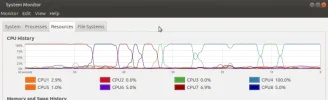
I was using ffmpeg to strip the audio from a video file and it took like 20 minutes and I was not remotely impressed, the audiophile was like 6 hours, I would have thought taking the mp3 from a webm file would be pretty fast, however upon examination of the resources of the cpu it seems it is only using one core? See attached. Despite giving it high priority it still only used up to two cores.
I thought I would try using kdenlive in linux to do it because I presumed that might be faster, however it wanted to spend 6 hours despite me making the ffmepg go to normal usage, what on earth is going on?
Any suggestions on faster processing in future?
I was using ffmpeg to strip the audio from a video file and it took like 20 minutes and I was not remotely impressed, the audiophile was like 6 hours, I would have thought taking the mp3 from a webm file would be pretty fast, however upon examination of the resources of the cpu it seems it is only using one core? See attached. Despite giving it high priority it still only used up to two cores.
I thought I would try using kdenlive in linux to do it because I presumed that might be faster, however it wanted to spend 6 hours despite me making the ffmepg go to normal usage, what on earth is going on?
Any suggestions on faster processing in future?