

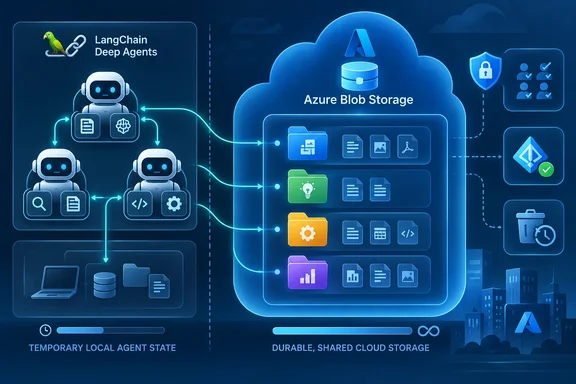
langchain-azure-storage Python package, it connects familiar agent filesystem tools to a blob container. The useful architectural choice is deciding which files deserve that durability—and which agents should have permission to change them.
Microsoft’s Azure SDK Blog describes the integration as a collaboration between LangChain and Azure Storage. LangChain’s reference documentation confirms that AzureBlobBackend implements the Deep Agents filesystem interface, with file content stored in blobs and directories synthesized from blob-name prefixes. This is a concrete storage option for developers building multi-step applications, with consequences for identity, retention, collaboration, and recovery.
The strongest pattern in Microsoft’s walkthrough is more selective than “put the agent’s filesystem in the cloud.” Its multi-agent example keeps thread-scoped working files in agent state, sends evidence and reusable guidance to protected Blob-backed paths, and gives generated output a separate destination. That division is worth understanding before connecting an agent with write access to an existing container.
AzureBlobBackend makes the agent workspace independent of the process
LangChain Deep Agents supplies the harness around a language model: the tools and runtime that let an application plan work, retrieve context, delegate to specialist agents, and request human approval. Its virtual filesystem gives those activities a shared organizing structure. An agent can list files, search for relevant material, read selected content, and save intermediate or final artifacts.
The integration point is BackendProtocol, Deep Agents’ pluggable interface for filesystem operations. LangChain’s repository describes operations including reading, writing, editing, listing, pattern matching, text searching, and batch upload and download. AzureBlobBackend implements that interface using an Azure Blob Storage container, allowing developers to change where the workspace lives without replacing the agent-facing filesystem concept.
That arrangement separates three things that are easy to conflate: the model, an agent’s conversation state, and the files an application retains. Microsoft’s basic demonstration creates a file with one agent, then creates a second agent using the same backend. The second agent can read the file despite having no earlier conversation state. The shared artifact supplies context that the new conversation does not already contain.
Blob names supply the directory structure
The backend stores text as UTF-8 content in blob bodies; binary uploads retain their bytes. Directories are derived from prefixes in blob names, without creating directory-marker blobs. A path is therefore part of the backend’s virtual filesystem view over Blob Storage.
For example, the package documentation shows a backend configured with the prefix session-001/. When the agent writes hello.py, the stored blob name is session-001/hello.py. The prefix establishes where that backend’s workspace begins, while the agent works with the file path presented through its tools.
This mapping explains the scope of the feature. The documented integration exposes storage through Deep Agents’ filesystem tools; it does not provide a procedure for mounting a Windows drive or giving arbitrary desktop applications a filesystem volume. The relevant consumers are agents using the backend and other applications authorized to access the underlying blobs.
Binary upload support also has a narrower meaning than document understanding. Preserving a file’s bytes establishes that the storage backend can retain it. The package separately offers an Azure Blob document loader, whose documentation describes parsing customization for formats such as PDFs and CSVs. Developers should keep storage, parsing, and model interpretation as separate application responsibilities.
Durable files become operational assets
Files in the container remain accessible through the Azure portal, Azure Storage Explorer, and other authorized applications. An operator can inspect an artifact without reconstructing the conversation that produced it, while another application can process the same stored data.
Microsoft positions that persistence as a foundation for reusable instructions, skill libraries, logs, memory, and offloaded context. Its “self-improving workflows” language describes a possible application pattern: agents retain and revise useful material across runs. The announcement provides no measured improvement in model quality. Durable storage preserves what an application writes, including mistakes, so choosing what becomes reusable guidance remains an application-design decision.
The practical benefit is clear without a model-quality claim. A worker process can stop while its stored artifacts remain available, and a later agent can be given access to those artifacts. The storage boundary becomes independent of the lifetime of the process that created them.
A working AzureBlobBackend needs two separate identity setups
The prerequisites are an Azure storage account, a chosen blob container, Python 3.11 or later, the Deep Agents integration, and a configured model provider. LangChain’s reference documentation explicitly places the Python 3.11 requirement on the optional deepagents extra. The base package’s broader Python metadata should not be used to lower that requirement for this backend.
The integration remains Public Preview. The supplied PyPI record lists langchain-azure-storage version 1.2.0, released August 10, 2026, while Microsoft’s September 22 post explains how to use the backend. Those dates support describing September 22 as the publication of the walkthrough, rather than assuming that every component first shipped that day.
Before running a write-capable example, use a dedicated test container. The backend’s documented write and delete behavior can replace or remove existing data, so an agent demonstration should not begin against a container containing unrelated production files.
Create the container and authorize the executing identity
Microsoft’s supported setup sequence is:
- Open the chosen storage account in the Azure portal, select Data storage > Containers, and select + Container if a new container is needed. The walkthrough uses
agent-files. - Copy the storage account’s Blob service endpoint. The backend needs this endpoint and the exact container name as separate constructor arguments.
- Assign the executing identity the
Storage Blob Data Contributorrole at the container scope for the write-and-read demonstration. - For local development, sign in with the Azure CLI using
az login. - For deployment in Azure, assign the appropriate container role to the application’s managed identity or workload identity instead of relying on the developer’s CLI session.
The identity receiving the role is the important boundary. A successful local sign-in does not grant the deployed application access: the developer account and the application identity are separate principals. Conversely, a deployed application using a host-provided identity does not need an interactive Azure CLI sign-in or storage account keys for this configuration.
For a genuinely read-only workflow, Microsoft recommends Storage Blob Data Reader. Contributor is appropriate for the demonstration because the first agent must create a file. It should not become the default role for every application merely because the initial example uses it.
Install the backend separately from the model provider
Install the Deep Agents integration with:
pip install -U "langchain-azure-storage[deepagents]"
The package documentation states that importing the backend without the optional extra raises an ImportError directing the developer to install it. Installing only the base package is therefore insufficient for the Deep Agents backend, even though the base package also supports document-loading scenarios.
The model provider has its own dependency and authentication requirements. Microsoft’s walkthrough uses the OpenAI integration, installed with:
pip install -U langchain-openai
For that provider, the walkthrough sets OPENAI_API_KEY. On PowerShell, the supported form is:
$env:OPENAI_API_KEY = "your-api-key"
In Bash, it is:
export OPENAI_API_KEY="your-api-key"
These credentials have different jobs. OPENAI_API_KEY configures the model provider; Azure identity authorizes Blob Storage access. Setting one does not configure the other. Deep Agents supports multiple providers, so the storage integration does not itself require choosing OpenAI.
Connect one workspace to two agents
The following adaptation uses account_url for the copied Blob service endpoint and model_id for a model identifier supported by the provider configured in the application. Set both before running it; the storage configuration does not select or authorize a model.
from deepagents import create_deep_agent
from langchain_azure_storage.deepagents import AzureBlobBackend

backend = AzureBlobBackend(
    account_url=account_url,
    container_name="agent-files",
)

agent = create_deep_agent(
    model=model_id,
    backend=backend,
)

agent.invoke(
    {
        "messages": [
            {
                "role": "user",
                "content": "Create /hello.py with a Python hello world script.",
            }
        ]
    }
)

another_agent = create_deep_agent(
    model=model_id,
    backend=backend,
)

result = another_agent.invoke(
    {
        "messages": [
            {
                "role": "user",
                "content": "Read /hello.py and explain what the script does.",
            }
        ]
    }
)

print(result["messages"][-1].content)
By default, AzureBlobBackend uses DefaultAzureCredential. In Microsoft’s documented configuration, that can use the local Azure CLI identity during development and an available managed identity or workload identity when deployed.
The expected result is specific: the first agent creates hello.py as a blob, and the second reads it through the shared backend. The file can also be inspected in the container through the Azure portal or Storage Explorer. Those observations distinguish a successfully persisted artifact from a model response that merely says it created one.
Microsoft presents this as an example, not a WindowsForum test result. It demonstrates sharing between two agent instances using the same backend object. More broadly, the documented persistence allows authorized agents and applications connected to the same stored workspace to access its files across process lifetimes.
CompositeBackend keeps temporary work out of durable paths
Connecting the entire workspace to one Blob backend is useful for learning the interface. Microsoft’s mortgage-processing sample shows a more deliberate application design: one coordinator and four specialist agents handle packet intake, document classification, fact extraction, and underwriting, with separate destinations for evidence, guidance, and output.
The sample uses CompositeBackend, which routes selected filesystem paths to particular backends. Its default is StateBackend, while three explicit routes point to Azure Blob Storage. That gives the application one filesystem view with different persistence and access intentions underneath.
| Agent-visible path | Stored material | Blob destination |
|---|---|---|
/source/ | Read-only mortgage packet evidence. | mortgage-packets, under a mortgage-specific prefix. |
/guidance/ | Read-only AGENTS.md instructions and specialist skills. | mortgage-agent-context. |
/output/ | Packet indexes, classification, extracted facts, and underwriting decisions. | mortgage-decisions, under mortgage- and run-specific prefixes. |
| Other paths | Thread-scoped working files, including intermediate plans and offloaded tool results. | The default StateBackend, in agent state. |
The distinction is about intended lifetime and use. Evidence must remain available to the processing stages. Guidance should be reusable without being casually rewritten by the agent following it. Output belongs to a particular processing run. Working files support the current thread and need not automatically become part of the durable application record.
The configuration in Microsoft’s example expresses that separation directly:
source_backend = AzureBlobBackend(
    account_url=account_url,
    container_name="mortgage-packets",
    prefix="MORT-2026-0042/",
)

guidance_backend = AzureBlobBackend(
    account_url=account_url,
    container_name="mortgage-agent-context",
)

output_backend = AzureBlobBackend(
    account_url=account_url,
    container_name="mortgage-decisions",
    prefix=f"MORT-2026-0042/{run_id}/",
)

backend = CompositeBackend(
    default=StateBackend(),
    routes={
        "/source/": source_backend,
        "/guidance/": guidance_backend,
        "/output/": output_backend,
    },
)
This is the routing fragment, with CompositeBackend and StateBackend supplied by the application’s Deep Agents setup and run_id identifying the processing run. It is not the complete mortgage application or its permission configuration.
Run-specific output makes the storage layout meaningful
The source prefix identifies the mortgage packet, while the output prefix adds run_id. The useful implication is organizational: an operator can associate generated artifacts with both the packet and the run that produced them. Repeated processing can have separate output locations instead of treating one path as the only possible destination.
That layout supports inspection, but it should not be described as an automatic audit system. The documented sample organizes files; developers still decide which artifacts to retain, which identities may change them, and how stored decisions are reviewed.
Similarly, retaining source evidence and generated conclusions in different locations preserves their roles in the application. A classification or underwriting output remains a generated artifact, while the packet in /source/ remains the evidence the workflow was given.
Read-only routes need explicit enforcement
A route named /source/ is only a route until permissions make it read-only. Microsoft’s sample passes FilesystemPermission rules to create_deep_agent that deny write operations on /source/** and /guidance/** for the coordinator and its subagents.
Including subagents matters because delegation should preserve the same evidence and guidance boundaries. Protecting only the coordinator’s behavior would leave the application’s stated read-only policy incomplete across the participating agents.
The broader recommendation is to send cross-thread memory, shared policies, skills, source documents, and final artifacts to explicit Blob-backed paths. Keep thread-scoped working files in StateBackend where that matches the workflow. This gives persistence a purpose instead of making every temporary file equally durable.
It also clarifies what resumption means. An agent can recover access to retained files, but the storage backend alone does not specify a complete restart procedure for every aspect of an agent runtime. Durable artifacts and conversational execution state remain separate design concerns.
Azure permissions and tool permissions protect different boundaries
The most consequential backend semantics concern changes to existing data. LangChain’s reference describes write as replacing an existing file in full and delete as removing a path plus everything nested beneath it. The package documentation further specifies that deleting / removes all blobs in the configured prefix namespace—or all blobs in the container when no prefix is configured.
These behaviors make container scope, prefix scope, and tool exposure separate decisions. A prefix narrows the namespace presented by a particular backend. A container-scoped Azure role governs what the executing identity can access at the storage layer. Filesystem permission rules and tool selection govern what operations the agent is allowed to request through its harness.
A prefix is useful organization and a backend boundary, but it should not be treated as interchangeable with a separately authorized container. Microsoft recommends a dedicated container for each agent, tenant, or workload that needs its own access boundary. That is the stronger design when separation must hold independently of one backend object’s configuration.
Removing delete still leaves overwrite risk
The package’s write operation has no create-only mode: writing to an existing path replaces the content instead of failing because the file already exists. Its documentation recommends edit when existing content must be preserved through a targeted change.
This has a direct consequence for tool restrictions. Omitting delete reduces the operations exposed to the agent, but a write-capable agent can still replace a file’s contents. A tool list containing write_file and edit_file remains capable of changing data.
Microsoft recommends omitting the delete tool from FilesystemMiddleware when an agent does not need it, or requiring human approval before deletion runs. That control should accompany a decision about which paths permit writes at all. In the mortgage sample, source evidence and instructions receive write-denial rules, while generated output has a writable destination.
The basic role split follows the same reasoning. A read-only agent should receive Storage Blob Data Reader; an agent that must write or delete can receive Storage Blob Data Contributor at the required container. Granting Contributor to an identity and then hiding a tool from the model serves a different purpose from denying writes at the storage layer.
Recovery belongs in the initial setup
Microsoft recommends enabling blob soft delete and, where appropriate, blob versioning. These controls address recovery after destructive operations, while role assignments and tool restrictions reduce the operations that can occur in the first place.
Enable the relevant recovery protections before using valuable data in a write-capable workflow. The announcement does not supply a universal retention period or a step-by-step restore procedure, so there is no evidence-backed setting that suits every deployment here. The supported recommendation is to make recovery part of the storage configuration, not an assumption attached to the word “durable.”
Durability ensures the storage outlives the agent process. It does not make every later write desirable or every deletion harmless. The backend’s full-replacement writes and recursive deletes are ordinary application operations with potentially broad effects inside the authorized namespace.
ManagedIdentityCredential can make the production identity choice explicit
DefaultAzureCredential supports the walkthrough’s transition from local development to an Azure-hosted application. Microsoft also documents an explicit ManagedIdentityCredential override for deployments whose policy requires managed-identity-only authentication.
For a system-assigned managed identity, the constructor pattern is:
from azure.identity import ManagedIdentityCredential

credential = ManagedIdentityCredential()

backend = AzureBlobBackend(
    account_url=account_url,
    container_name="agent-files",
    credential=credential,
)
For a user-assigned identity, Microsoft shows supplying its client ID:
import os
from azure.identity import ManagedIdentityCredential

credential = ManagedIdentityCredential(
    client_id=os.environ["AZURE_CLIENT_ID"],
)
The chosen identity still needs the appropriate container role. Selecting a credential identifies how the application authenticates; it does not create authorization to the stored data.
Microsoft states that the backend uses the credential without exposing it to the agent or model. That protects the credential material, while the permitted filesystem operations remain available through the agent’s tools. The application therefore still needs carefully scoped storage rights even when the model never receives a secret.
AzureBlobBackend also brings a client lifecycle to manage
The package documentation says AzureBlobBackend creates its underlying Azure SDK client lazily on first use and reuses it across calls. Unless a credential is supplied explicitly, it also creates a DefaultAzureCredential. These are application resources with a lifecycle separate from the files retained in Blob Storage.
For asynchronous methods such as aread and awrite, the documentation requires closing the backend when finished so the underlying aiohttp session is released. Developers can use an asynchronous context manager or call aclose(). Failing to do so can produce Unclosed client session warnings.
The documented context-manager pattern is:
async with AzureBlobBackend(
    account_url=account_url,
    container_name="agent-files",
) as backend:
    agent = create_deep_agent(
        model=model_id,
        backend=backend,
    )
    # Perform the application's work while the backend is open.
Alternatively, the application can call await backend.aclose() when work is complete. The synchronous client releases resources through garbage collection, and the documentation also supports explicit cleanup with a context manager or close().
That lifecycle detail becomes important when turning a short demonstration into a service. The files may be intentionally long-lived, while the clients accessing them should be released when their application lifetime ends. Persistence of data and cleanup of client connections are compatible requirements.
For local emulator work, the package documents AzureBlobBackend.from_connection_string with Azurite. That provides an alternative construction path for local storage testing. It is separate from Microsoft’s deployed-Azure example, which uses an authorized managed identity or workload identity, and it does not remove the need to configure the application’s model provider.
The available evidence supports the backend’s interface, storage mapping, authentication options, and examples. It supplies no benchmark for search speed, concurrent writers, or large-corpus cost. Developers can evaluate this preview for durable workspaces without treating the walkthrough as performance validation for a particular production workload.
What this means for Azure developers and IT administrators
Start with a dedicated preview workspace when the application needs cross-process files, shared agent artifacts, or operator access outside the agent runtime. If the immediate requirement is only thread-scoped scratch work, Microsoft’s own composite example gives a reason to retain StateBackend for that material.
For an application team, the first decision is the persistence map: evidence, guidance, working files, and outputs should each have an intentional destination. For an IT administrator, the corresponding decisions are the executing identity, container-level access, recovery controls, and whether any agent can alter shared instructions or source records.
The two-agent example is a useful initial acceptance exercise because its expected outcome is observable: a blob created through one agent can be inspected in storage and read through another. The next design step is to apply the route and permission separation demonstrated by the mortgage workflow.
- Use Python 3.11 or later and install
langchain-azure-storage[deepagents]; the base package alone does not supply the optional Deep Agents backend. - Configure Blob Storage authorization and model-provider authentication separately, and grant the deployed application’s identity its own container access.
- Route durable evidence, reusable guidance, shared memory, and final artifacts explicitly through
CompositeBackend, while keeping thread-scoped working files inStateBackendwhere appropriate. - Use separate containers when workloads require independent access boundaries, and use prefixes to organize each backend’s namespace within its authorized storage.
- Account for full-file overwrites and recursive deletion before enabling write access, with read-only roles or path rules, restricted destructive tools, and suitable recovery protections.
- Close asynchronous backends when their work is finished, and treat the Public Preview as an integration to evaluate rather than a demonstrated guarantee of model quality or production performance.
AzureBlobBackend gives Deep Agents a concrete way to retain work beyond a process and make it available to other agents, applications, and operators. The productive next step is to choose which artifacts should cross that boundary, then attach the appropriate identity, write policy, and recovery controls to each destination. Microsoft’s selective-routing example provides the useful direction: preserve the work the application needs, while keeping temporary activity and protected evidence in their proper places.