

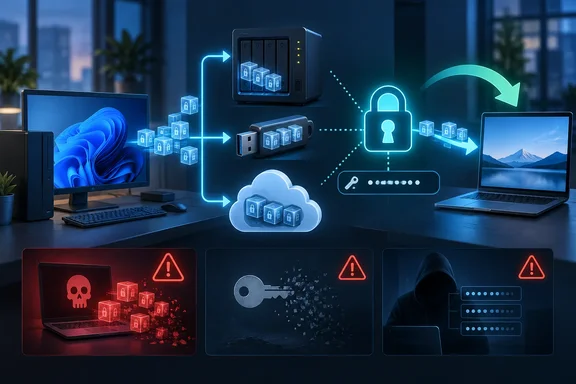
MakeUseOf’s test, in which a backed-up photo reappeared at the destination as unfamiliar backup files and could later be restored on another machine, reflects how Duplicati is designed to work. The storage endpoint holds backup volumes rather than a normal, browsable folder tree. Duplicati’s own documentation says backups are encrypted with AES-256 by default unless encryption is deliberately disabled, and confirms that it can use local disks, network shares, SFTP, WebDAV, S3-compatible object storage, Azure Blob Storage, Backblaze B2, OneDrive, and other services as destinations.
The practical consequence is more precise than “the app stores nothing”: Duplicati separates the backup engine from the company or hardware that stores the encrypted backup volumes. That reduces a storage provider’s ability to casually inspect the contents, but it does not eliminate the need to secure the Windows PC, the storage account, the passphrase, and the backup retention policy.
Duplicati Is a Backup Format, Not a Storage Provider
Traditional consumer backup products often bundle three jobs together: software on the PC, an account with the vendor, and a vendor-operated cloud repository. Duplicati breaks that arrangement apart. It is an open-source backup client that writes its own encrypted backup format to a location selected by the user.
That can be a USB drive connected to a Windows desktop, an SMB share on a NAS, an SFTP server, a Backblaze B2 bucket, Azure Blob Storage, or an S3-compatible service. Backblaze’s own Duplicati integration guide describes the program as an open-source encrypted backup tool with incremental backups and AES-256 encryption, while Duplicati’s documentation lists provider-specific destinations ranging from B2 and Azure to SharePoint and Amazon S3.
This is a meaningful advantage for people who do not want their backup application choice to dictate their storage choice. An IT administrator can keep a local fast-restore copy on a NAS while also sending an encrypted copy to object storage. A home user can move from one storage vendor to another without first converting every document into a provider-specific backup product.
But there is no magic disappearance of the data. The encrypted backup files still reside somewhere, and whoever controls that destination can still see that data exists, measure how much is stored, and potentially remove it. Encryption protects confidentiality; it does not guarantee availability.
The Strange Files Are the Point — With Limits
The unfamiliar files MakeUseOf found on an external drive are expected. Duplicati does not ordinarily send VacationPhoto.jpg to the backup destination under that same name. It divides and organizes source data into backup volumes, applies compression and encryption, and maintains metadata needed for versioned restores and incremental runs.
That design is valuable because a compromised storage account should not yield a convenient directory of readable Word files, PDFs, photos, and browser exports. An intruder who downloads the backup volumes needs the encryption passphrase before Duplicati can turn those volumes back into the original files.
It is also why a Duplicati target should not be treated as a file-sync folder. OneDrive, Dropbox, and a normal network share can expose familiar filenames and allow individual files to be opened in place. Duplicati is designed for backup and restore operations instead. If a user needs live collaboration, direct file access, or a second working copy of a folder, a sync tool is the better fit. If the objective is recoverable, encrypted, versioned data, Duplicati’s less-readable target is an advantage.
The caveat is important: filename obscurity is not the security model. The protection comes from encryption and a strong passphrase, not from the fact that the files look unusual. A weak or reused passphrase can undermine the entire arrangement.
The Passphrase Is the Recovery Key
MakeUseOf correctly identifies the passphrase as the center of trust. If the storage account is compromised but the passphrase remains protected, the attacker should not be able to read the underlying files merely by browsing or downloading the backup volumes.
The reverse is also true. Lose the passphrase and the backup can become permanently useless. Unlike a vendor-managed backup service that may offer account recovery, Duplicati cannot reconstruct an encryption secret it does not have. The storage credentials and the passphrase should therefore be documented separately from the PC being protected.
For a Windows user, the safest operational approach is to preserve at least four items:
- Store the encryption passphrase in a password manager or another secure recovery system that is not dependent on the PC being backed up.
- Keep the destination address and access credentials available for disaster recovery, including the S3 bucket, B2 bucket, network-share path, or SFTP host.
- Record the backup configuration, exclusions, and retention policy so a replacement machine does not silently begin a separate backup set with different rules.
- Perform a test restore to a different folder and, ideally, to another machine before treating the job as a real disaster-recovery plan.
The last step is where backup plans usually fail. A dashboard that says “successful” proves that Duplicati uploaded something. It does not prove the passphrase was saved, the destination credentials will work during an emergency, the restored files are usable, or the desired historical version remains available.
The Local Database Is a Real Security Boundary
The article’s “one asterisk” is more than a minor technical note. Duplicati has to retain local state so it can efficiently run future incremental backups, track backup configuration, and manage the connection to the target. In other words, its servers may not hold the backup repository, but the computer running Duplicati holds information that can be highly sensitive.
Duplicati’s current server documentation explicitly describes its server database as the component responsible for saving backup configurations and starting scheduled backups. It also offers field-level database encryption through a settings-encryption key. The documentation warns administrators when the database is not encrypted and says Duplicati can be configured to refuse to start unless that encryption key is supplied.
That matters on a shared Windows PC, an unattended home server, or a virtual machine where several administrators have access. If Duplicati can automatically connect to an encrypted remote backup and run on schedule, the machine has access to secrets or a means of obtaining them. An attacker who compromises that machine may not need to crack AES-256; they may instead target the account credentials, configuration database, active session, or passphrase storage.
Duplicati reduces one category of trust — trust in the remote storage provider — but it does not remove the need to harden the endpoint. Keep Windows updated, restrict local administrator access, protect the Duplicati data directory, use a separate storage credential with only the permissions required, and enable the program’s database-encryption option where practical.
Administrators should also be careful about exposing Duplicati’s web interface. Its documentation says the server listens on the local machine by default, but accessing it across a network requires an explicit configuration change. A backup console that can restore files, alter retention, or reveal connection settings should not be casually published to a LAN or the internet.
Encryption Cannot Stop Deletion or Ransomware
A remote storage provider cannot conveniently read a well-encrypted Duplicati backup, but it can still delete the encrypted backup volumes. So can an attacker who obtains storage credentials with delete permission. So can Duplicati itself if its retention policy is configured incorrectly.
This is where the “I trust it” framing needs a sharper line. The software is trustworthy for preserving confidentiality from the destination operator; it is not, by itself, ransomware-resistant or deletion-proof. If ransomware compromises a Windows account that has write-and-delete access to the same storage destination used by Duplicati, the backup repository may be within reach as well.
For off-site cloud targets, use provider-side immutability where it is available. Backblaze, for example, documents Object Lock as a way to restrict modification or deletion for a defined period. Comparable retention-lock or immutable-storage controls exist across many object-storage platforms, though the terms, costs, and management rules vary. Such controls require planning: an overly aggressive lock can prevent legitimate cleanup, while no lock can leave prior backup versions exposed to deletion.
A workable Windows strategy is still the old 3-2-1 principle: multiple copies, on more than one kind of storage, with at least one copy off-site. Duplicati can be one component of that plan, particularly as the tool that creates encrypted off-site copies. It should not be the sole copy of irreplaceable data.
Rebuilding After a PC Failure Is Possible, but It Is Not Instant
The MakeUseOf restore test gets another crucial point right: a replacement machine can access an existing repository if the user still knows the destination details and encryption passphrase. Duplicati supports rebuilding missing local database information from the remote backup metadata, and its documentation and support materials describe recovery paths for a lost or crashed PC.
That recovery is not identical to plugging in a drive and opening a photo. Recreating the local database can take time, particularly for a large repository or a high-latency cloud target, because Duplicati must examine backup metadata before it can efficiently browse versions or resume normal incremental operation. Restores also require read access to the backend; a write-only storage credential may be useful for reducing ransomware exposure but will not support routine restore operations unless a separate read-capable recovery credential is retained.
The takeaway is straightforward: Duplicati’s value is not that data “leaves home and comes back a stranger.” Its value is that the data can leave the PC in encrypted form while the owner retains control over both the storage location and the key required to restore it. That is a strong model for Windows users — provided they test restores, secure the local configuration, and protect the remote repository from deletion as seriously as they protect its contents.
References
- My backup app doesn’t store a single byte of my data, and that’s exactly why I trust it MakeUseOf · 2026-09-16T11:00:14+00:00