

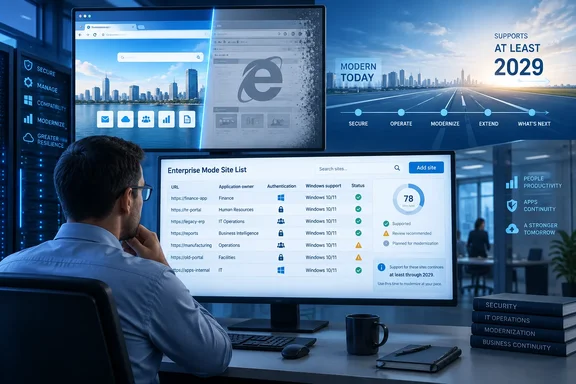
The most important correction is in the wording. Microsoft has not published December 31, 2029 as a hard retirement date for IE mode. Its Lifecycle documentation says support continues through at least 2029 and that customers will receive a minimum of one year’s notice before retirement. It also says IE mode support ends when the underlying Windows version leaves support, if that occurs before 2029.
For an administrator with a Windows 10 estate approaching its own support deadlines, that condition matters more than the headline year. Keeping an IE-dependent internal application alive in Edge does not keep an unsupported Windows release safe or supported. The runway belongs to organizations running supported Windows client, Windows Server, or Windows IoT releases—and it is already shorter than “until 2029” makes it sound.
The 2029 date is a floor, not an end-of-year promise
Microsoft first laid out the “at least 2029” commitment during the Internet Explorer retirement transition, and the company’s current Lifecycle FAQ retains the same language. The company also repeats its promise of at least 12 months’ advance notice, which means an actual retirement announcement could set a later final date.
That is a useful assurance for organizations with legitimate line-of-business dependencies, but it should not be read as a guarantee that every deployment can remain untouched until the end of the decade. Microsoft’s own retirement FAQ adds an important constraint: when a Windows version reaches end of support before 2029, IE mode on that version reaches its end with the operating system.
In other words, an organization that still operates Windows 10 versions without an applicable support arrangement cannot treat Edge’s IE mode commitment as a substitute for an OS migration plan. The same issue applies to legacy server deployments hosting or administering web applications that depend on IE-era technologies. Browser compatibility and operating-system support are related here, but they are not interchangeable.
Neowin’s report says the Message Center notice is informational and requires no immediate configuration change. That is true in the narrow operational sense: Microsoft has not announced a feature removal, policy change, or new tenant deadline. But it is an appropriate trigger for a formal application inventory, particularly where IE mode has gradually become invisible infrastructure.
IE mode still runs the Internet Explorer rendering stack
IE mode is not a cosmetic compatibility setting and does not turn Chromium into Internet Explorer. Microsoft Edge uses Chromium for normal browsing, while designated legacy sites open with the Trident MSHTML engine and IE11-era document modes integrated into Edge.
That distinction explains why some older applications continue working only in IE mode. The feature supports capabilities that modern Chromium rendering deliberately does not reproduce, including legacy document and Enterprise modes, ActiveX controls, Browser Helper Objects, Internet Explorer security-zone settings, and some IE developer-tool workflows. Those dependencies are often found in internally hosted finance, manufacturing, government, health-care, document-management, and identity systems—not merely in old public websites.
It also explains why “it opens in Edge” is not a successful modernization test. A web app may be launched from the current Edge executable while still depending on an outdated rendering engine, compatibility mode, ActiveX component, or intranet authentication flow. If a support team only records the browser name, it can miss the technical dependency that will matter when IE mode is eventually retired.
Microsoft’s Edge documentation makes clear that IE mode is intended to be selective. Administrators can configure sites through an Enterprise Mode Site List, while all other pages stay in the modern engine. The desired end state is therefore not an enormous catch-all list that routes a corporate intranet into IE mode; it is a shrinking, well-understood list of specific exceptions with an owner and retirement plan.
The site list is an inventory, but it is not the whole inventory
The immediate administrative task is to export and review the Enterprise Mode Site List, whether it is maintained through policy, an XML file, or Microsoft 365’s Cloud Site List Management service. Every listed URL should be treated as an application record requiring an accountable business owner, technical owner, authentication dependency, and proposed disposition.
A site list alone, however, can give a false sense of completeness. Microsoft’s current IE mode tooling allows users in permitted configurations to reload unconfigured sites in IE mode and put them on a local list for 30 days. That capability is useful for avoiding a sudden workflow interruption, but it can also conceal application use that never made it into the centrally managed list.
Microsoft’s Cloud Site List Management includes site-feedback features that can show URLs users add locally and report potentially misconfigured neutral sites. Organizations using the Microsoft 365 Admin Center service should examine that feedback rather than limiting their audit to approved entries. It can expose applications that users discovered through trial and error, often the exact systems that lack ownership or documentation.
There is another technical trap: authentication endpoints. Microsoft advises administrators to configure single sign-on and authentication servers as neutral sites in the Enterprise Mode Site List where appropriate. Without that, navigation can switch rendering contexts during a sign-in sequence, producing redirects or failed authentication even when the main legacy app is configured correctly.
A credible IE mode inventory should therefore capture more than URLs:
- It should identify the business process, users, application owner, hosting location, and deadline for every IE-mode entry.
- It should document whether the dependency is on document mode, ActiveX, a plug-in, a downloaded control, intranet-zone behavior, or an authentication flow.
- It should record related identity, payment, upload, reporting, and document-generation domains that the application calls during a normal transaction.
- It should distinguish a temporary user-added exception from a centrally approved site-list entry.
- It should include proof that the application works in modern Edge after remediation, rather than treating a developer statement as a completed migration.
App Assure can help with compatibility, not rebuild the application
The submitted report recommends Microsoft App Assure for eligible customers that need assistance. That is worthwhile advice, with a boundary that organizations should understand before building a plan around it.
Microsoft says App Assure can help customers configure IE mode for legacy Internet Explorer web apps and sites. But Microsoft’s current FastTrack and App Assure documentation also says the benefit does not cover development work to modernize Internet Explorer applications so that they run natively on Chromium. The service can help keep a business process functioning during transition; it is not a free application-rewrite program.
That limitation is material because the costly work is usually not adding a site to Edge’s Enterprise Mode Site List. It is replacing ActiveX controls, rewriting old client-side code, moving integrated Windows authentication to a supported design, updating server-side dependencies, or replacing a vendor product that no longer has a supported upgrade path.
Teams should therefore separate two workstreams. One is continuity: verify that IE mode is centrally configured, supported by the installed Windows version, and restricted to the exact sites that need it. The other is modernization: fund and schedule the replacement, upgrade, rehosting, or rebuild that removes the rendering-engine dependency.
Microsoft’s documentation also notes that the old standalone Enterprise Mode Site List Manager will no longer receive feature updates; current management capabilities are centered on the in-browser Enterprise Site List Manager and the cloud service. That is another reason to avoid treating an old XML file on a network share as a finished strategy. A list with no change control, owners, usage data, or retirement dates is simply a record of unmanaged risk.
What administrators should do before the reminder becomes an outage
The 2029 reminder should lead to a practical deadline inside each organization, not a calendar entry for 2029. The internal target should account for the end-of-support date of every Windows release involved, vendor contracts, procurement lead time, testing cycles, and the fact that business-critical applications are usually harder to replace than initial inventories indicate.
Start by identifying whether IE mode is actually configured through the InternetExplorerIntegrationLevel policy and which Enterprise Mode Site List Edge is consuming. Microsoft documents edge://compat/enterprise as a way to verify that Edge is reading a cloud site list; the same interface can help confirm the list version being applied on a test device. Policy changes involving the IE integration level require a browser restart, so validation should include a fresh Edge session rather than a console-only policy check.
Then stop measuring progress by the number of sites in the list. A smaller list is useful only if each removed site has been tested in supported Chromium-based Edge under the real user’s permissions, network path, authentication method, downloaded-file workflow, and line-of-business transaction. A portal login page rendering correctly does not establish that a month-end report, certificate signing flow, or embedded document control works.
Microsoft’s Message Center reminder does not announce an imminent shutdown, and organizations with supported Windows deployments can continue using IE mode today. But the official record gives admins a more precise conclusion than “IE mode will disappear at the end of 2029”: the feature survives only as long as Microsoft supports the underlying Windows release, and the final retirement date remains unannounced. The useful response is to turn every IE-mode entry into a named modernization project now, while Edge is still providing the fallback.
References
- Microsoft reminds admins of 2029 IE mode deadline Neowin · 2026-09-18T05:38:01+00:00