

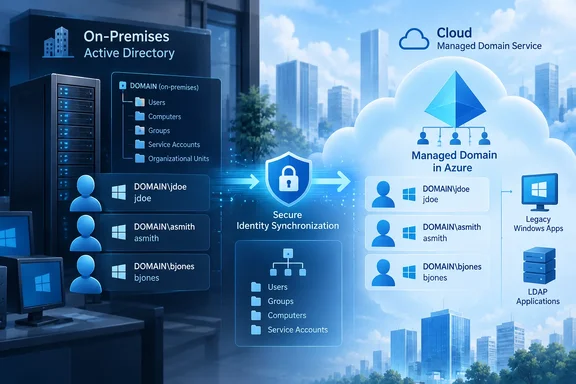
onPremisesSamAccountName attribute already synchronized into Microsoft Entra ID, ending the managed domain’s long-standing habit of generating that legacy logon name from mailNickname or, when necessary, a shortened UPN prefix. For organizations moving Windows-integrated and LDAP-dependent workloads into Azure, the change can preserve familiar DOMAIN\username identities without refactoring applications that still expect an on-premises Active Directory naming convention.Microsoft lists the feature as a public preview in its Entra Domain Services documentation, and its September 2026 Entra update also identifies the capability as newly available in preview. The Microsoft 365 Roadmap entry submitted for Roadmap ID 569446 still labels the item “In development,” with preview availability in August 2026 and general availability targeted for November 2026. Administrators should treat the product documentation, updated August 24, as the operative record for what can be enabled today; the roadmap’s status field has not caught up with the live preview.
The practical warning is in Microsoft’s own implementation note: enabling the setting on an existing managed domain changes the generated sAMAccountName values of existing hybrid users during the next synchronization. This is an identity-compatibility change, not a cosmetic directory cleanup.
The default name was often not the name users knew
Microsoft Entra Domain Services is a managed Active Directory-compatible domain fed by a one-way synchronization path from Entra ID. In a hybrid setup, an on-premises AD DS user synchronizes first to Entra ID, then into the managed domain. Changes made inside Domain Services do not synchronize back to Entra ID, and administrators cannot directly edit synchronized user attributes in the managed domain.
Before this preview, Domain Services generally sourced sAMAccountName from a user’s Entra mailNickname. Where the value was duplicated, too long, or otherwise unsuitable for the older sAMAccountName rules, Domain Services could auto-generate a replacement. Microsoft’s synchronization guidance says sAMAccountName is limited to 20 characters for legacy compatibility, and documentation warns that an auto-generated value may not match the UPN prefix.
That behavior has always created a gap between an organization’s on-premises directory and the managed domain it deploys in Azure. A user known on-premises as CONTOSO\jane.smith could arrive in Domain Services under a shortened or altered logon name, even while retaining the same UPN. Microsoft has long advised users to authenticate with the UPN format because it is more predictable.
For modern applications that exclusively use Entra ID, OAuth, SAML, or UPN-based Kerberos sign-in, that distinction may be irrelevant. For older Windows applications, LDAP integrations, hard-coded scripts, scheduled tasks, SQL Agent jobs, file-transfer appliances, and software configured around DOMAIN\samAccountName, it is often the difference between a straightforward migration and an inventory of exceptions.
Microsoft’s new preview changes the source for hybrid identities: Entra Domain Services will use onPremisesSamAccountName, provided the attribute is populated in Entra ID. That makes the managed-domain logon alias align with the account name organizations already operate on-premises.
Existing domains must opt in, and the change rewrites hybrid user aliases
Microsoft made a sensible deployment distinction. Existing Entra Domain Services managed domains retain the current mailNickname-based or generated behavior until an administrator explicitly enables “sAMAccountName synchronization from on-premises” in the Entra admin center. New managed domains have the enhanced synchronization behavior enabled by default and cannot be switched back to the previous model, according to the current Microsoft Learn guidance.
That means established tenants have a choice, but it is not a harmless toggle. Once enabled, the managed domain synchronizes the on-premises sAMAccountName for existing hybrid users. Any application, task, script, or access-control configuration that refers to the current managed-domain account name as text needs to be tested before the change.
The important technical distinction is between a user name and a security identifier. Microsoft’s general Domain Services documentation says it brings the on-premises SID into sidHistory, which is intended to help lift-and-shift workloads continue accessing resources without re-ACLing them. This new preview does not replace that SID-history mechanism. It changes the account-name attribute that people and older software may use to look up or present the account.
In other words, an NTFS or application permission attached to the appropriate SID should not need to be rebuilt merely because the displayed account name changes. But a batch file calling runas, a service configured with a literal DOMAIN\old-generated-name, an LDAP lookup that searches by sAMAccountName, or an allow-list maintained as account strings can still break. The migration risk lies in those name-based dependencies, not in ordinary SID-based authorization.
Cloud-only accounts retain the old behavior
The feature does not create a universal naming policy for every account in a managed domain. Cloud-only Entra users that have no onPremisesSamAccountName continue to receive a mailNickname-based sAMAccountName. That produces a mixed environment by design: hybrid users can use their on-premises account aliases, while cloud-only users remain under the old generation logic.
This matters for help desks and operations teams that assume a single predictable login format across the domain. An organization might see an established hybrid employee retain jdoe, while a cloud-created contractor receives a generated alias because of a duplicate nickname or a long prefix. Microsoft still recommends UPN sign-in as the reliable path where the actual sAMAccountName is unknown or may have been generated.
The preview therefore solves identity drift for a defined population rather than eliminating it. It is most useful where the workload being moved to Domain Services depends on hybrid identities and existing on-premises account names. It offers little benefit to an organization whose users are cloud-only, whose applications already use UPNs, or whose Domain Services deployment does not host legacy authentication workloads.
The SKU boundary also narrows the audience. Microsoft says the setting is available only with Entra Domain Services Enterprise and Premium SKUs; Standard SKU customers cannot enable it. That limitation is easy to overlook because the Roadmap entry describes the feature broadly as an Entra release, while the implementation documentation places it specifically inside the managed-domain licensing tiers.
The prerequisite is data quality in Entra ID, not merely a portal switch
Microsoft’s instructions require the user’s onPremisesSamAccountName to be present in Entra ID. In a conventional hybrid deployment, that means confirming the source attribute is flowing from on-premises AD DS through Microsoft Entra Connect or the organization’s configured synchronization process before enabling the Domain Services feature.
Administrators should not infer that enabling the preview repairs missing or inconsistent directory data. It does not. If the source value is absent, the documented fallback for cloud-only users remains mailNickname-based generation, and Microsoft directs administrators to verify both the source attribute and the setting when the expected value does not arrive in Domain Services.
There is also an unusually specific role requirement. Microsoft says the administrator changing the setting needs both the Application Administrator and Groups Administrator directory roles. Teams using Privileged Identity Management should plan the activation window accordingly rather than discovering at the end of a maintenance change that their Domain Services administrator lacks one of the two required assignments.
Microsoft’s documentation tells customers to review applications, scripts, scheduled tasks, and access-control configurations before activation. That is the correct starting point, but it leaves several operational questions unanswered: Microsoft does not specify a synchronization completion target, a tenant-visible progress indicator, a rollback procedure for existing domains after user values have changed, or the resolution behavior for problematic source values such as collisions across merged forests. Those gaps are normal caution points for a public preview, and they argue for a staged validation rather than a tenant-wide assumption that every legacy sign-in path will follow the new value cleanly.
A controlled pilot is the safer path
A practical rollout should begin with a representative sample of hybrid users whose on-premises sAMAccountName values are known, unique, and already visible in Entra ID. Capture their current managed-domain names before enabling the setting, then compare the values after synchronization and test each workload that binds, searches, or authenticates by sAMAccountName.
Administrators should specifically include:
- A user whose
mailNicknamematches the on-premises logon name, to confirm the low-risk case. - A user whose existing Domain Services account name was generated, truncated, or altered because of a duplicate.
- A service account or scheduled task that uses the
DOMAIN\usernameformat. - A cloud-only user, to confirm that the expected fallback behavior remains intact.
- A workload that uses LDAP or legacy Windows authentication rather than Entra-native authentication.
The Roadmap’s November 2026 general-availability target signals that Microsoft expects this preview to graduate quickly, but a date on the roadmap is a plan rather than a contractual completion notice. For organizations with managed domains already supporting production line-of-business software, the immediate value is not the toggle itself. It is the chance to remove an account-naming mismatch before another migration cements workarounds around names that were never meant to be authoritative.
References
- Microsoft Entra: Enhanced Security Accounts Manager (sAM) Account Name support for Microsoft Entra Domain Services Microsoft 365 Roadmap · 2026-09-01T22:59:38.0107578Z