

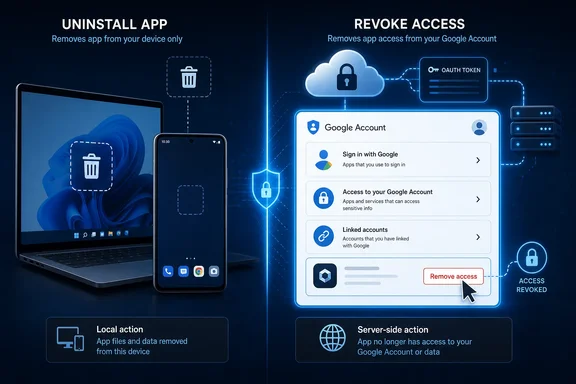
Notebookcheck’s report is right on that central point. Google’s own account help says removing a “Sign in with Google” link stops automatic sign-in, while separately warning that this does not delete data held by the third-party app. Google’s OAuth documentation also lists the events that can invalidate a refresh token—user revocation, prolonged non-use, certain password changes, token limits, expired time-based access, and administrator policy. Local uninstall is not one of them.
For people who use Google as the login broker for desktop utilities, browser-connected services, games, AI tools, calendar clients, and SaaS applications, the practical rule is: remove the connection from your Google Account, not merely from the device.
“Sign in” and “account access” are different grants
The phrase “Sign in with Google” covers two related, but materially different, arrangements. A basic sign-in lets a service verify an identity such as an email address and profile name, then create its own account. That service may retain its own session, account record, purchase history, uploads, or messages even after its Google sign-in link is removed.
A service can also ask for access to Google data—Calendar, Drive, Contacts, Gmail, or other APIs. In the server-side OAuth flow documented by Google, an application that needs to work while the user is absent can receive a refresh token and store it in its backend. That refresh token can later obtain new access tokens without prompting the user again, provided the grant remains valid.
This distinction is the part often lost in advice to “delete unused apps.” A browser-only site using Google solely to authenticate a user may not hold a long-lived Google refresh token at all. Conversely, an installed app may be gone from a PC but its vendor can still possess a valid authorization grant or refresh token on its servers if it was built to sync files, contacts, mail, or calendar events in the background.
In other words, the security question is not whether an icon remains on a device. It is whether the service still has a live authorization and what scopes it was granted.
Google’s six-month expiry is not a cleanup plan
Google says an unused refresh token can stop working after six months. But “unused” is doing the work in that sentence. A service that periodically uses its refresh token to obtain a new access token can keep the authorization alive, which is the intended design for calendar synchronization, backup tools, smart-home connections, and other unattended services.
Google’s developer guidance explicitly describes refresh tokens as a way for an application to obtain fresh access tokens beyond the life of an individual access token. Its Nest documentation goes further, telling developers to refresh within six months for a long-term integration. That is a useful engineering feature, but it means inactivity expiry should never be treated as evidence that an old service has lost access.
There are other expiry cases. Google lists a limit of 100 live refresh tokens per Google Account per OAuth 2.0 client ID, with the oldest invalidated if the limit is exceeded. External apps left in testing can receive refresh tokens that expire after seven days, depending on their scopes. Administrators can also enforce policies that cause access to fail.
None of those cases gives a user a reliable way to infer which old apps are still connected. The only dependable answer is to inspect the account’s connected-app inventory.
A password reset is not a universal OAuth kill switch
Changing a Google Account password is sensible after suspected account compromise, but it is not a blanket cure for third-party authorizations. Google’s OAuth documentation says a password change invalidates refresh tokens when they contain Gmail scopes. It does not say that every Drive, Calendar, Contacts, profile, or basic sign-in grant is revoked.
That limitation has practical consequences. A user who suspects an overbroad calendar or Drive integration should revoke that app specifically rather than assume a password reset removed it. Likewise, changing a password may interrupt a mail client while leaving other authorized services intact.
Google separately says that app passwords—legacy per-app credentials used by some older clients—are revoked when an account password changes. Those credentials should not be confused with OAuth grants. They are different authentication mechanisms with different lifecycle rules, and treating them as interchangeable is how gaps appear in consumer cleanup guides.
The more durable response to a suspicious connection is to change the Google password if there is reason to believe the account itself was compromised, enable or verify multi-factor authentication, and revoke the relevant third-party authorization. Each action solves a different problem.
The Google Account page has three places to inspect
Google’s current linked-apps controls separate connections into three categories:
- “Sign in with Google” identifies services where Google is used to authenticate the account.
- “Access to your Google Account” covers third-party applications authorized to reach Google data or services.
- “Linked accounts” covers cases where Google and another provider’s account have been connected for a shared feature.
A person who checks only “Sign in with Google” can miss the application that has access to Drive or Calendar. A person who checks only data access can miss an old service that still uses Google for automatic login. The categories overlap in purpose but are not duplicates, and Google’s help notes that a single app can appear with more than one connection type.
For a personal account, open the linked-apps area in Google Account settings, review all three groups, open each unfamiliar entry, and read the exact access described before removing it. Use “Stop using Sign in with Google” for a sign-in relationship and “Remove access” for an app that can reach Google Account data.
Expect a service to ask for a new login or permission grant afterward. That is evidence that the old connection was still operational—not a reason to immediately approve the request again without reviewing the scopes.
Removing access also has a boundary users should understand. Google says deleting the connection does not delete information already held by the third party. If the goal is to erase an old account or records stored with a service, users must use that service’s account-deletion process or contact its operator. Revocation prevents future Google-authorized access; it does not compel a vendor to purge data it already collected.
Workspace administrators need an inventory, not a reminder email
For Google Workspace, this is an administrative control problem as much as a user-awareness problem. Google’s Admin console includes App access control, where administrators can review accessed apps, examine OAuth client IDs, see user counts, and inspect requested services and scopes. The console can also mark apps as trusted, limited, allowed for specific Google data, or blocked.
Google states that restricting a service can stop previously installed, untrusted apps and revoke their tokens. The accessed-app inventory can lag token grants or revocations by up to 48 hours, so it is not a real-time incident console. It is still the central place to find the broadest source of unmanaged OAuth exposure across a domain.
Administrators should prioritize apps with high-risk Gmail, Drive, and Chat scopes; apps with unusually broad user adoption; abandoned vendors; and integrations with no named internal owner. Blocking an application by OAuth client ID is more reliable than telling employees to uninstall a desktop client, particularly when the vendor operates a cloud service that retains tokens independently of any endpoint.
The security stakes are no longer theoretical. In August 2025, Google Threat Intelligence reported that attackers used compromised OAuth tokens associated with Salesloft Drift integrations in a data-theft campaign against Salesforce customers; Google later confirmed that tokens for Drift Email were used to access email in a small number of directly integrated Google Workspace accounts. Salesforce said it invalidated Drift access and refresh tokens as part of containment, while SecurityWeek and BleepingComputer independently reported Google’s Workspace impact.
That incident did not arise because users forgot to delete an app. It demonstrated the more consequential failure mode: a valid third-party authorization or token becomes a durable credential after the initial approval screen is long forgotten.
For home users, a short review of Google’s three linked-app categories is enough to remove stale connections. For Workspace teams, it should become a recurring access review tied to vendor ownership, approved OAuth client IDs, high-risk scope controls, and offboarding. An app uninstalled from a device is gone locally; a grant left in an identity provider can remain a live path into the account.