

What Java actually is
Java is both a programming language and a platform. The Java Virtual Machine (JVM) does most of the work once a Java program is running. Developers compile Java source code into bytecode, which usually sits in .class files. Oracle's JVM specification describes that compiled format as independent of hardware and operating system. That is the technical basis for Sun's old "write once, run anywhere" slogan.
Two caveats keep that slogan honest:
- The JVM specification describes an abstract machine, not one product. Details such as the garbage-collection algorithm and the memory layout are left to each implementation.
- Portability still needs a compatible runtime on the destination machine, plus whatever other dependencies the program has.
In practice, a JVM loads classes, manages memory and can turn frequently used bytecode into native instructions while the program runs.
Java is also not JavaScript. The names are similar, but they are separate languages with separate histories and runtimes.
JRE, JDK and apps that bring their own runtime
The classic split was a JRE to run Java programs and a JDK to build them. Oracle's JDK 11 migration notes say it stopped offering separate JRE and Server JRE downloads from that release, and that Auto-Update went with them. That is Oracle's packaging decision. It doesn't mean every Java vendor dropped runtime-only packages.
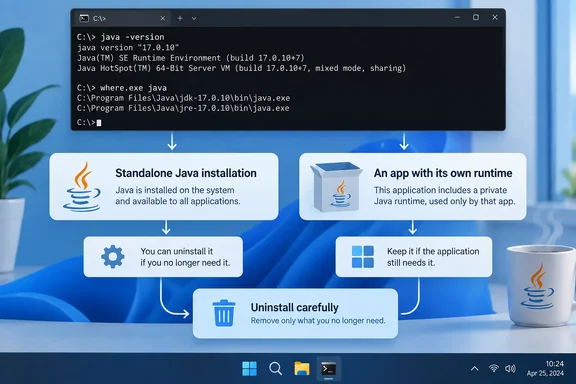
Apps can also carry their own runtime. Oracle's jpackage tool builds self-contained application bundles that users can install and run. Oracle's documentation says it can create a runtime image through jlink tailored to the app. This is why a Java-based program can work without you ever installing Java separately.
IntelliJ IDEA is a documented example. JetBrains says the IDE uses JetBrains Runtime by default. That is a fork of OpenJDK and ships with the IDE. The IDE's own runtime is separate from the JDK you pick for your projects.
Not every Java program is packaged this way. Some still expect a system-wide Java.
Why browser Java disappeared
Java applets ran inside the browser through the NPAPI plugin architecture. That model is gone from mainstream browsers:
- Mozilla's Firefox 52, released in March 2017, stopped supporting NPAPI plugins other than Flash, which stopped Java from loading there.
- Oracle's JDK 11 notes say the Java Plugin, Java Web Start and Java Control Panel are not available in the JDK.
Installing a current Java will not bring back an old applet page in Chrome, Edge or Firefox. But Java did not die with the applet. It carries on in desktop programs, developer tools, business software, backend services, and games such as Minecraft: Java Edition.
Android needs its own note. Android developers can write in Java, but Android's tools convert Java bytecode into DEX bytecode, which runs on the Android Runtime (ART) rather than a desktop JVM. A phone doesn't contain a Windows-style Java installation.
Current Java versions, as of early October 2026
Oracle's download page says JDK 27 is the latest release of the Java SE Platform. It also says JDK 25 is the latest Long-Term Support (LTS) release. JDK 21 is the previous LTS release. Wikipedia's version history records that Java 27 was released on 15 September 2026 and Java 25 LTS was released on 16 September 2025.
The support windows differ a lot:
| Release | Type | Oracle support detail |
|---|---|---|
| JDK 27 | Feature release (non-LTS) | Updates until March 2027, when it is superseded by JDK 28 |
| JDK 25 | LTS | Updates under Oracle's no-fee terms until September 2028; premier support ends 30 Sep 2030, extended support 30 Sep 2033 |
Oracle's roadmap says the next planned LTS release is Java 29 in September 2027.
The newest number is not automatically the right one for your PC. A business application may require Java 8, while another program wants something much newer. For cybersecurity-minded readers, there is a reason people are watching Java 27 anyway. It adds a hybrid post-quantum key exchange to TLS 1.3, according to ADTmag. The same report says whatever server or service the application talks to must also support the hybrid key exchange. That is aimed mainly at enterprise developers. It is not a reason for home users to chase the latest release.
How to check whether Windows can find Java
Open Windows Terminal, PowerShell or Command Prompt and run these two commands:
java -version
where.exe java
java -versionreports the version of the Java executable Windows currently resolves.where.exe javalists matching Java executables in the current directory and in the folders on your PATH.
How to read the results:
- Version info appears. Windows can resolve a Java executable through its normal command search path.
- "Not recognized" and no
where.exeresults. Java isn't reachable through the current directory or PATH. That alone is not a problem, and there is no reason to install Java just to make the commands work. - A caveat on that second case. It doesn't prove there is no Java anywhere on the PC. An app may keep a private runtime in its own folder or launch it directly.
Before you uninstall anything
- Don't delete
java.exefiles by hand, especially ones inside an application's folder. Let that application manage them. - Remove standalone installations through Windows' normal uninstall process, such as Installed apps in Settings.
- Don't treat several installed versions as a fault. Different programs can legitimately need different releases.
- If an app needs Java, follow its developer's guidance on which version to use, and keep that runtime supported.
- If nothing relies on a separate system Java, removing it is a reasonable cleanup.
The security angle
Java's plugin years damaged its reputation, because malicious web content could reach vulnerable plugin code. Modern Java has moved away from that browser model. Even so, an outdated runtime can lack fixes for known vulnerabilities.
Support status depends on the release, the distributor and any support agreement. Check the relevant vendor's lifecycle information rather than assuming an old build is safe or unsafe. As a rule of thumb, an unneeded old runtime is just attack surface you can remove.
Bottom line
Browser applets are gone, and apps increasingly bundle their own Java. Many Windows users can therefore live without a global Java install. Run the two commands, find out what depends on Java, and uninstall only if nothing does.
References
- Java has been on your computer your whole life and here’s what it actually does MakeUseOf · 2026-10-06T17:00:15+00:00
- Change the boot Java runtime of the IDE | IntelliJ IDEA Documentation jetbrains.com
- Java 27 Isn't an LTS Release. Oracle Thinks You May Want It Anyway -- ADTmag adtmag.com