

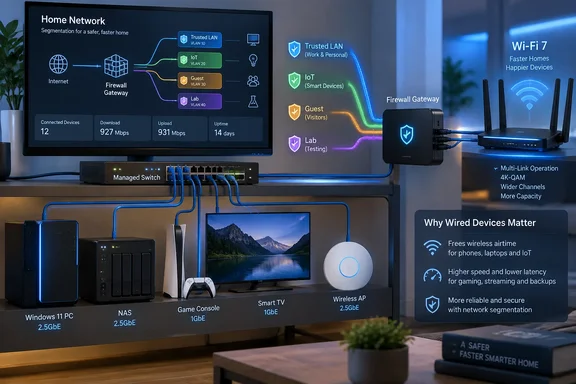
For Windows users and small-office admins, the practical payoff is straightforward: a switch adds ports where consumer routers run out, keeps large local file transfers off the wireless network, and can carry multiple VLANs between capable equipment. But buying a managed switch first is sensible only when the rest of the network can enforce the design. Plugging one into an ISP-supplied gateway with no VLAN support does not turn a flat home LAN into a segmented one.
The useful upgrade is more Ethernet, not a faster box
The most valuable part of XDA Developers’ recommendation is also the least glamorous: cable the equipment that does not move. A desktop PC running Windows 11, a NAS used for backups, a media server, a game console, and a television are all predictable, fixed endpoints. Putting those devices on Ethernet removes their traffic from the same radio airtime used by phones, tablets, and laptops.
That does not improve an internet connection whose bottleneck is an overloaded cable line, fiber ONT, or ISP plan. It can improve local conditions substantially. A PC copying a large Steam library to a NAS, pulling a File History backup, streaming from a local Plex server, or transferring virtual-machine images no longer competes with wireless clients for every frame.
There is another detail frequently obscured by router marketing: a router and a switch do different jobs. The router moves traffic between networks—typically the LAN and internet—and applies NAT, firewall policy, DHCP, and DNS services. The switch moves local Ethernet traffic between attached devices. If a Windows workstation and NAS sit on the same switch and same VLAN, their traffic can stay local instead of making a pointless trip through the router’s CPU.
That is why a switch can remain useful through several router replacements. Wi‑Fi standards, mesh platforms, and router firmware change rapidly. Ethernet port density, structured cabling, and a stable switching core usually have longer lives.
VLANs need a router that understands them
The missing warning in the “buy a managed switch” pitch is that VLANs do not independently create a secure IoT zone. IEEE 802.1Q lets the switch classify and tag Ethernet frames with a VLAN ID. It can keep devices assigned to different VLANs from communicating directly at Layer 2. But a usable network also needs a Layer 3 gateway for each VLAN, separate IP addressing and DHCP service, and firewall policy that decides whether those networks may communicate.
Netgate’s pfSense documentation makes the operational point plainly: new interfaces require firewall rules. The same holds for OPNsense, UniFi gateways, MikroTik routers, OpenWrt-capable hardware, and business-oriented firewalls. A managed switch can carry tagged VLAN traffic to one of those devices through a trunk port; it cannot replace the device that routes between VLANs or blocks that routing.
A practical layout might separate:
- A trusted LAN for Windows PCs, phones, and the NAS.
- An IoT VLAN for cameras, smart plugs, displays, and televisions.
- A guest VLAN with internet access but no access to local devices.
- A lab VLAN for hypervisors, test systems, and services that should not appear on the household LAN.
The switch configuration is only one part of that layout. The router must have an interface or VLAN sub-interface for each network, issue addresses or relay DHCP appropriately, and deny traffic from IoT or guest networks to the trusted LAN by default. If Wi‑Fi clients are part of the plan, the access point must also support multiple SSIDs mapped to VLANs. Many all-in-one consumer routers offer a guest network, but do not expose general-purpose VLAN trunks or granular inter-VLAN firewall policy.
A VLAN without restrictive router rules can still be routed freely from one segment to another. Conversely, a well-configured firewall can separate networks even with relatively simple switching. The managed switch is the transport mechanism that makes a clean wired design possible; it is not the policy engine.
The recommended switches expose a speed mismatch
XDA Developers cites the TP-Link TL-SG108E and Netgear GS308E as low-cost managed-switch examples, then says 2.5 GbE is becoming standard in inexpensive models. Those are two different product categories.
TP-Link’s current TL-SG108E specifications list eight 10/100/1000 Mbps ports, 802.1Q VLAN support, IGMP snooping, static link aggregation, port mirroring, and up to 32 simultaneous VLANs. Netgear’s GS308E is likewise an eight-port Gigabit switch with VLAN features. Neither is a 2.5 GbE switch.
The distinction matters before a buyer starts shopping by price alone. A Gigabit managed switch is still a practical fit for a typical Windows PC, television, console, or internet connection below 1 Gbps. It is also sufficient for many NAS deployments, particularly when the storage itself is hard-drive based. But it will cap a 2.5 GbE desktop-to-NAS transfer well below the speed a 2.5 GbE NIC can sustain.
The Netgear documentation also illustrates why buyers should read the data sheet for the exact hardware revision rather than trust broad comparison copy. Netgear’s current GS308E product page says the unit supports 64 VLANs, while an older 300 Series data sheet lists 32 for the GS308E. For a home deployment, either limit is more than adequate. The discrepancy still matters because it shows how easily a “cheap managed switch” recommendation becomes vague once product revisions, regional variants, and current firmware enter the picture.
Do not assume that a lower-price switch includes Power over Ethernet, either. PoE can be extremely useful for a ceiling-mounted access point, IP camera, or VoIP phone, but it requires a PoE-capable switch with a stated power budget—or individual injectors. It is not a standard feature of the cheapest eight-port managed Gigabit switches.
QoS and link aggregation have narrower benefits than advertised
The management features on entry-level switches are real, but their limits are important.
IGMP snooping can reduce unwanted multicast flooding, which may help networks with IPTV hardware, multicast-heavy discovery protocols, or specific media deployments. Port mirroring can be useful when diagnosing an odd Windows endpoint, NAS service, or suspected device behavior with a packet-capture system. Rate limits can stop a single wired port from consuming all available capacity on that switch.
Quality of Service on an inexpensive Layer 2 switch does not, by itself, cure lag during an overloaded internet upload. The problem commonly called bufferbloat occurs at the constrained WAN link. Effective control there usually requires traffic shaping or Smart Queue Management on the router or firewall that owns the internet connection. Prioritizing frames inside an eight-port switch cannot reclaim upload bandwidth once traffic reaches an ISP bottleneck.
Static link aggregation deserves the same caution. Bonding two Gigabit links may provide more aggregate capacity for several clients accessing a NAS, if the NAS, switch, and network configuration all support the same method. It normally does not make one Windows PC’s single file-copy stream run at 2 Gbps. Traffic is generally distributed through a hash, so an individual flow remains on one member link. Buyers who need consistently faster desktop-to-NAS transfers should look at matched 2.5 GbE or 10 GbE ports instead of treating link aggregation as a substitute.
Budget management planes deserve suspicion
The security caveat in the submitted report is justified, though its wording is too definitive about the current state of TP-Link’s Easy Smart utility. Security researcher Chris D. C. Moore documented a design in which TP-Link’s Easy Smart Configuration Utility used broadcast management traffic protected by a static key, allowing an attacker on the same broadcast domain to capture and decrypt administrative credentials under the documented attack conditions. The TL-SG108E was among the affected switch families identified in related research.
A later patch review by the same research community reached a less tidy conclusion: TP-Link changed elements of the implementation, but static-key material remained a concern in the reviewed utility. Meanwhile, TP-Link continues to publish newer Windows Easy Smart Configuration Utility releases and current firmware for the TL-SG108E hardware line. Its September 2026 firmware notes for hardware version 6.40 mention clickjacking protection for the web management interface, not a change to the management-utility protocol.
That leaves a clear operational recommendation even without declaring every current release vulnerable: do not manage an inexpensive switch casually from an untrusted LAN. Change the default administrator password immediately, update firmware only from the vendor’s regional support site for the exact hardware revision, and back up the configuration before an update. Keep the management interface reachable only from the trusted administration network where possible, and do not expose it through port forwarding or remote administration.
Most importantly, test the segmentation rather than trusting a diagram. A Windows PC on the trusted VLAN should be unable to browse to an IoT camera’s management page if the intended policy is isolation. A guest device should receive an address, reach the internet, and fail to discover SMB shares, Remote Desktop hosts, printers, and NAS interfaces on the main LAN. If those tests fail, the switch has carried the VLAN tags correctly but the network design has not delivered the promised boundary.
A managed switch is a strong $30-to-$100 upgrade when it solves a specific problem: too few ports, too much fixed-device Wi‑Fi traffic, or a router and access-point setup ready for VLANs. It is a poor substitute for a router upgrade when the existing gateway cannot route and firewall those VLANs, or when the actual problem is weak wireless coverage. The concrete win is simple: wire the devices that stay put, then spend the saved Wi‑Fi airtime—and the managed features—where the network can actually enforce them.
References
- Cheap managed switches are the real networking upgrade nobody talks about XDA · 2026-09-18T21:00:17+00:00