

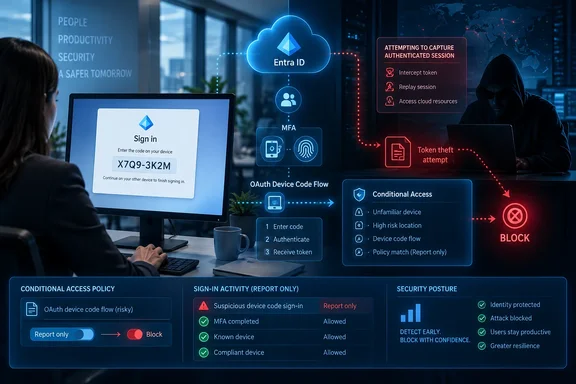
Computerworld’s report is based on analysis published September 15 by eSentire’s Threat Response Unit, which says it identified the active campaign in late August 2026. The researchers tracked the kit as GhostCode and described a chain that starts with a business contact-form message, continues through an apparent NDA exchange, and ends on a real Microsoft sign-in page where the victim completes multifactor authentication for an attacker-controlled session.
This is not a newly disclosed Microsoft OAuth vulnerability in the conventional sense. It is an abuse of a supported authentication method intended for devices such as smart TVs, printers, command-line tools, shared displays, and other systems without a practical browser or keyboard. That distinction matters operationally: patching Windows or rotating passwords alone does not remove the exposure if a tenant continues to permit unnecessary device-code authentication.
A real Microsoft login can still be the trap
In a normal OAuth 2.0 device authorization flow, an application generates a short user code and directs the user to Microsoft’s device-login page on a separate browser-capable device. The user enters the code, authenticates, and—if required—approves MFA. The application that created the code polls Microsoft’s authorization service until the successful sign-in lets it receive tokens.
GhostCode allegedly reverses the trust relationship. According to eSentire, the operator initiates the device-code request, displays that attacker-generated code to the target, and instructs the target to enter it at Microsoft’s authentic sign-in page. The victim may see the correct Microsoft domain, use the organization’s normal MFA method, and receive no obvious indication that the completed authorization belongs to a device under someone else’s control.
That makes common anti-phishing advice incomplete. Telling employees to inspect the browser address bar remains useful for credential-harvesting pages, but it does not solve a campaign that deliberately sends victims to a legitimate identity provider. The safer rule is narrower and more practical: employees should never enter a device code in response to an unsolicited email, contact-form exchange, chat request, or document-sharing prompt.
Microsoft’s own Entra documentation describes device code flow as a higher-risk authentication method that can be used in phishing attacks or to access corporate resources from unmanaged devices. Microsoft recommends allowing it only where it is necessary and blocking it wherever possible.
GhostCode’s delivery method targets business workflow trust
eSentire’s account adds an important detail missing from a generic “device-code phishing” warning: GhostCode is built around ordinary business correspondence rather than an obviously implausible account-alert lure. In the observed case, the attackers posed as a procurement officer for a legitimate company, made an innocuous inquiry through Salesforce, then steered the follow-up conversation toward signing a non-disclosure agreement.
The promised document arrived through a WeTransfer link as a password-protected HTML attachment, eSentire reports. Opening the file redirected the victim through infrastructure that used a Cloudflare Turnstile challenge before presenting a polished document portal and the Microsoft device-code instruction. A decoy NDA document appeared after the authentication sequence, helping the operators conceal the theft by delivering the expected business artifact.
The security consequence is that email filtering alone may not see the whole chain. The initiating message can originate from a web form rather than an external mailbox, while a familiar file-transfer service and a password-protected attachment reduce the visibility available to automated scanners. eSentire also says GhostCode used geo-IP checks, user-agent filtering, and Cloudflare’s anti-bot challenge to limit exposure of the phishing page to security tooling.
Those claims remain based on eSentire’s investigation; no second independent account of this specific GhostCode operation had surfaced at publication time. But the core tactic is well established. Microsoft previously documented device-code phishing used by the threat actor it calls Storm-2372, and its current Conditional Access guidance explicitly treats device code flow as a control that organizations should restrict.
Token theft changes the incident-response order
The uncomfortable part of device-code phishing is that the victim can correctly enter their password and correctly satisfy MFA—yet still hand the attacker a usable authenticated session. In the GhostCode case, eSentire says the attackers used the resulting access to register several devices, obtain longer-lived tokens, and harvest mail.
That means an affected organization should treat a report of “I entered a code at Microsoft’s page” as a possible token compromise, not simply as a failed phishing attempt. Resetting a password without invalidating sessions is an incomplete response. Microsoft’s Entra emergency-access guidance directs administrators to block new sign-ins for the user and revoke sessions, and for broader or repeatable response it also recommends disabling the user and their registered devices where appropriate.
Administrators should begin by preserving evidence: record the user, time window, IP addresses, user agent, application or client ID, resource accessed, Conditional Access result, and any device registration events. Then review Entra sign-in logs for successful device-code authentication. Microsoft’s guidance says the Authentication Protocol filter can be used to locate device code flow, while the sign-in record’s activity details can expose an “original transfer method” value for protocol-tracked sessions.
The response should include a review of the user’s registered devices and authentication methods, particularly unfamiliar entries created near the suspicious sign-in. eSentire’s report describes device registration as part of GhostCode’s persistence chain, so a tenant that finds suspicious device-code activity should not stop after revoking refresh tokens. Check for unexpected devices, newly added MFA methods, mailbox forwarding rules, inbox rules, OAuth application consent, and unusual downloads from Exchange Online, SharePoint Online, or OneDrive.
Microsoft notes that access tokens ordinarily last one hour, while the timing of access loss after revocation varies by application and session type. Continuous Access Evaluation can reduce that exposure for supported Microsoft 365 applications, but it should not be treated as a substitute for containment and investigation.
Conditional Access can close the broad exposure
Microsoft has a direct tenant-level control for this threat: the Authentication Flows condition in Conditional Access. For organizations that do not use device code flow, Microsoft’s published configuration is to scope a policy to users and all resources, select Device code flow under Authentication Flows, set the grant control to block access, and begin in Report-only before enforcing it.
The Report-only step is not bureaucracy. Device code flow remains legitimate for some environments, including conferencing hardware, digital signage, certain shared devices, and older operational tooling. A blanket block without inventory can interrupt those workflows or invalidate sessions that were initially created through device-code authentication.
Microsoft also warns that policies targeting all resources can affect Device Registration Service usage. Since September 2024, authentication-flow policies have been enforced against that service when all resources are in scope. Organizations that rely on device code flow for device registration may need a carefully documented exclusion for Device Registration Service while they redesign or narrow that dependency. That is a reason to test—not a reason to leave device code broadly enabled.
For most Microsoft 365 tenants, the configuration work can be organized into one short change window:
- Review Entra sign-in logs for successful device-code activity and identify every legitimate application, team, or device that depends on it.
- Create a Report-only Conditional Access policy that blocks device code flow for all users and all resources, while excluding only emergency access accounts and verified operational exceptions.
- Validate the policy impact, including conference-room devices, shared displays, registration workflows, and command-line administration tools.
- Enforce the block for the general population and maintain a small, reviewed exception set rather than a tenant-wide allowance.
- Add the instruction “never enter a device code sent by another person” to phishing training and service-desk scripts.
GhostCode is a reminder that MFA protects the act of authentication, not the user’s judgment about what they are authorizing. A Microsoft 365 tenant that has no documented device-code requirement can remove this phishing path now; a tenant that does need it should constrain it to those specific devices and watch every successful use as an identity event worth explaining.