

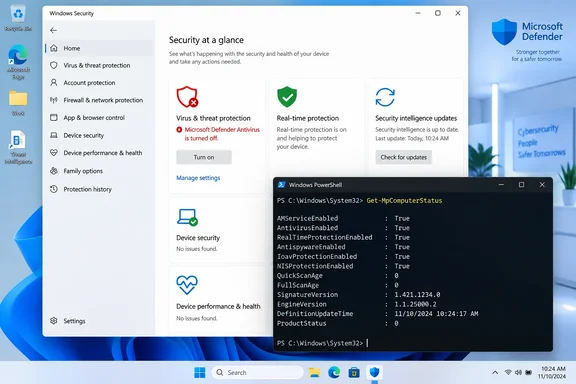
TechPowerUp reported the problem after recent Defender updates, including on systems whose Defender platform was version 4.18.26080.3. Microsoft confirmed the broader issue on August 28, saying affected PCs can display the alert at startup and intermittently afterward even while every Defender setting continues to show protection as active. The company lists the problem as “Confirmed” and, as of September 17, has not published a broadly released platform update that resolves it.
Microsoft says the alert is wrong, not that protection is failing
This is not a Windows 11-only regression. Microsoft’s advisory covers Windows 11 versions 23H2, 24H2, 25H2, and 26H1; Windows 10 versions 21H2 and 22H2; Windows 10 Enterprise LTSC 2016 and 2019; and Windows Server from 2012 through Server 2025.
The message itself is unusually alarming: it tells the user that Microsoft Defender Antivirus is turned off and invites them to turn it on. Microsoft says the antivirus can nevertheless be functioning correctly and showing as active in its settings. The notices may return after startup and can keep appearing even when Windows notification settings are disabled.
That last detail is why the issue is more than cosmetic. Windows Security is supposed to be the authoritative, user-facing signal for endpoint protection. When its notification layer says protection is absent while the protection engine says it is running, administrators have a monitoring problem as well as an annoyance: a genuine future alert can be easier to dismiss after users have been trained by a false one.
BleepingComputer, PCWorld, The Register, and Digital Citizen independently reported the same Microsoft acknowledgement in late August. The record is clear on the present condition: this is a documented notification-status bug, not evidence by itself that Defender has stopped scanning files.
The published version numbers need a correction
The Defender platform build associated with many early reports is 4.18.26080.3, released September 1, 2026, together with engine version 1.1.26080.3. Microsoft’s Defender release notes identify that platform-and-engine pairing as the August 2026 Windows Antivirus release.
But the security-intelligence number in the submitted report—“1.1.159.11.0”—does not match Microsoft’s release record. Microsoft lists the associated security-intelligence version as 1.159.11.0, without the extra “1.” That may look minor, but it illustrates why administrators should not use a single static signature number to diagnose this problem. Security intelligence updates are issued much more frequently than the underlying Defender platform.
On September 17, Microsoft’s Security Intelligence page showed a newer intelligence package, version 1.459.256.0, while retaining platform 4.18.26080.3 and engine 1.1.26080.3. In other words, a machine can be fully current on malware definitions yet still carry the platform build implicated in the false alert. Updating signatures remains essential for protection, but it does not establish that the notification defect has been fixed.
Microsoft’s release-health entry does not name a specific originating KB or platform build; it lists the originating update as “N/A.” TechPowerUp’s 4.18.26080.3 detail is useful for identifying a common configuration among affected systems, but Microsoft has not publicly narrowed the defect to that build alone. The supported scope remains any Windows or Windows Server version running the latest Defender updates.
Verify the engine before ignoring the notification
For an individual PC, the first check is Windows Security. Open Windows Security > Virus & threat protection and confirm that it shows no action required and that real-time protection is enabled. That is preferable to clicking the warning’s “turn on” prompt blindly, especially if the alert repeats after every boot.
For a more reliable local check, open an elevated PowerShell window and run:
Get-MpComputerStatus | Select-Object AMRunningMode,AMServiceEnabled,AntivirusEnabled,RealTimeProtectionEnabled,AntivirusSignatureLastUpdated
Microsoft documents Get-MpComputerStatus as the Defender command for checking antimalware status and protection settings. In the ordinary active-Defender case, AMServiceEnabled, AntivirusEnabled, and RealTimeProtectionEnabled should report True; AMRunningMode should normally read Normal.
Those results matter more than the stray toast notification. AMServiceEnabled indicates that the antimalware service is enabled, AntivirusEnabled reflects antivirus protection status, and RealTimeProtectionEnabled shows whether Defender is actively monitoring files and program activity. Check the displayed signature update time, too. A machine which reports current definitions and positive protection states is in a very different condition from one whose Defender service is stopped or whose real-time protection is actually disabled.
A false warning should not become an excuse to skip a real investigation. Treat the alert as potentially genuine if any of the following applies:
- Windows Security shows a red warning or says real-time protection cannot be enabled.
- The PowerShell status values for antivirus or real-time protection are
False. AMRunningModereports a state other than normal and the device was not deliberately configured for that mode.- A third-party antivirus product was installed, recently removed, or is intended to be the primary provider.
- Security controls, Group Policy, Intune configuration, or an endpoint security product have changed Defender’s expected operating mode.
Third-party antivirus is particularly important. Windows can legitimately turn off Defender Antivirus or place it into a non-primary mode when another security product is registered. That is a separate condition from Microsoft’s current notification bug, and it should not be waved away merely because a false-alert issue exists.
Enterprises should separate telemetry from compliance
The consumer-facing alert is inconvenient; for IT teams, the larger operational concern is an incorrect security state flowing into management and compliance views. Administrators should confirm Defender status through their endpoint tooling and local device evidence before declaring machines noncompliant or changing a baseline.
Microsoft’s own documentation cautions that PowerShell cmdlets are not a substitute for Group Policy, Configuration Manager, Intune, or other policy-management infrastructure. That is the right distinction here. Use the status command to validate the machine reporting the problem, then compare the result with the endpoint-management record. If those disagree, retain the output, relevant Windows Security screenshots, and Defender platform and engine versions before opening a support case.
Avoid the tempting “fixes” circulating around false alerts: removing Defender definitions, resetting security components, changing registry keys, or installing another antivirus just to silence a notification. Those steps alter the security posture and can make a simple reporting bug harder to distinguish from an actual protection failure. Microsoft has offered no workaround beyond waiting for a future Defender Antivirus update.
A fix is promised, but not yet delivered broadly
Microsoft says it is working on a resolution through a future Defender Antivirus update and will provide more information when it is available. The wording is deliberately nonspecific: there is no stated deployment date, KB identifier, affected-platform exclusion, or documented workaround.
There are reports from administrators testing newer 4.18.26080.4 packages in staged or preview channels, but Microsoft’s public Security Intelligence page still listed 4.18.26080.3 as the current platform version on September 17. That means 4.18.26080.4 should not yet be treated as a confirmed broad-release fix. A preview or staged package may be relevant to managed testing, but it is not a reason to manually force unverified Defender builds onto production endpoints.
Keep Defender updates enabled, confirm the actual service and real-time protection state when the warning appears, and document false positives in support workflows. Until Microsoft ships and identifies the corrected platform update, the notification is unreliable—but Defender status still needs to be checked, not assumed.
Update: Defender platform 4.18.26080.4 resolves false “turned off” alerts (September 18, 2026)
Microsoft has now resolved the erroneous “Microsoft Defender Antivirus is turned off” notifications with Defender platform update 4.18.26080.4, according to Neowin. The update was deployed September 17 and applies across the affected Windows 10, Windows 11, and Windows Server releases.
For affected devices, updating Defender to platform version 4.18.26080.4 or later should stop the recurring startup and intermittent false alerts. No registry changes, Defender reinstallation, or antivirus replacement should be necessary.
Administrators should verify that endpoints have received the newer Defender platform package rather than relying only on current security-intelligence definitions, which can update independently.
References
- Microsoft Defender update fixes false antivirus alerts in Windows 10, 11, Server - Neowin Neowin · 2026-09-18T13:22:01+00:00
- PSA: Windows is Reporting Fake "Defender Antivirus Turned Off" Warnings TechPowerUp · 2026-09-17T16:48:16+00:00