

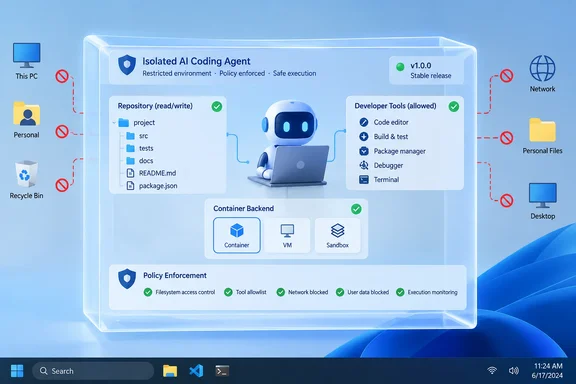
Microsoft says agent users have faced two bad options: give agents unrestricted access and hope nothing breaks, or block them and lose the productivity gains. MXC is its proposed middle path. The basic rule is that an agent can't be its own security authority. The boundary has to be defined by a developer or organization and enforced outside the agent.
From Build preview to general availability
MXC first appeared at Build 2026 in June. At the time, Microsoft introduced an early preview of the Microsoft Execution Containers (MXC) SDK, a cross-platform, policy-driven execution layer for agents on Windows and WSL. The pitch has not changed: developers define what to constrain in their apps and agents, and Windows enforces those constraints consistently at runtime through MXC. MXC provides an abstraction layer across isolation primitives, so developers do not have to manage low-level isolation details.
The maturity level is what changed. Redmondmag's Build coverage noted that the MXC GitHub repository contains early-preview code and says no MXC profiles should currently be treated as security boundaries. The October release is a clear step up from that warning. The GitHub release page lists MXC SDK v1.0.0, dated October 7, as the first stable release of the Rust, .NET and Node.js SDK surfaces. The stable entry points are:
- Rust:
mxc_sdk::v1 - .NET:
Microsoft.Mxc.Sdk.V1 - Node.js:
@microsoft/mxc-sdk/v1
The release notes call V1 the stable compatibility boundary for the 1.x line and say MXC will follow semantic versioning from here. Developers who built against pre-1.0 builds have migration work to do. They need to import from the versioned V1 entry points, replace older sandbox request and lifecycle types with the new ContainerRequest, ProvisionRequest, ExecutionRequest and ContainerId types, and rebuild against the v1.0 packages.
Section summary: MXC went from an early preview at Build in June to a stable v1.0 SDK in October. The earlier "not a security boundary" warning came from the preview period, and anyone who tried MXC back then should re-evaluate it against v1.0.
The core idea: the agent doesn't write its own permission slip
Microsoft's main example is a coding agent asked to update a website. The agent needs read and write access to the repository and to build tools. It may need to read production server configuration to understand the deployment, but it should not be able to change that configuration. Without an enforced boundary, the agent might decide that editing the server config is the quickest way to finish the job. From the agent's point of view that's reasonable. From the on-call engineer's point of view, it's a 2 a.m. outage.
MXC handles this by keeping the policy outside the workload's control. Developers declare what a workload needs, and MXC enforces that boundary with a suitable container. Neither the agent nor the code it generates can grant itself more access. Microsoft says MXC can contain model-generated output, plugins, tools, the agent harness or the whole agent.
An MXC policy covers five areas:
| Policy area | What it controls |
|---|---|
| Containment | The isolation environment, such as a process or session container |
| Process | Command, arguments, working directory, environment and launch settings |
| File system | Writable, read-only and inaccessible locations |
| Network | Inbound and outbound connectivity, including host loopback access |
| User interface | Whether the workload can reach the desktop and related UI resources |
In Microsoft's website example, the policy grants read/write access to the repository and to tools such as Git. It blocks the user's Documents folder, blocks inbound and outbound networking, and denies access to the interactive desktop. This is an example, not a template. A real coding agent that needs to download packages will need a different network configuration.
Choosing a backend: four levels of isolation
MXC is not a single sandbox. It offers several backends, and the right one depends on the risk of the workload:
| Backend | Platforms | Best suited for |
|---|---|---|
| Process container | Windows 11, macOS, Linux | Lightweight, responsive workloads such as generated code and tool calls. Uses AppContainer on Windows, Seatbelt on macOS, Bubblewrap on Linux |
| Session container | Windows 11 only | Long-running agents needing a desktop or stronger separation. Runs under a distinct Windows account and session with separate desktop, clipboard, UI and input |
| WSL container (WSLC) | Windows 11 only | Linux-first toolchains, run through WSL |
| MicroVM | Windows 11 and Linux, experimental | Higher-risk workloads that need a hardware-backed virtualized boundary |
The session container is only available on Windows. Microsoft's Build-era description explains how it works: sessions in Windows run with distinct user accounts, which enables isolation. Windows assigns a local ID or a cloud provisioned identity backed by Entra and attributes all activity from the container to that identity, so you can clearly differentiate human from agent.
The GitHub repository lists more backends than the blog's four-row table, including Windows Sandbox, LXC and Hyperlight. Its README marks Windows Sandbox, MicroVM and Hyperlight as experimental on Windows. Microsoft also notes that each backend has its own security properties, so they are not interchangeable.
Windows 365 is also included. Microsoft says MXC support on Windows 365 is now generally available, so agents can run alongside existing work on Cloud PCs. The announcement does not name a SKU, configuration steps or minimum Cloud PC requirements.
Section summary: Use process containers for fast, low-friction tasks. Use session containers when the agent must be kept away from the user's desktop and input. Treat MicroVM as experimental for now.
The patch prerequisites admins need to check
This is the most useful detail for Windows administrators, and it comes from the MXC release notes rather than the announcement:
- Windows 11 24H2 and 25H2 got Process Isolation for MXC in the August 2026 update, KB5120998.
- The September 2026 update, KB5124010, adds OS support for container-to-host loopback networking and for enumerate-only filesystem access. Enumerate-only access lets a workload list directories without reading file contents. Microsoft says to install KB5124010 or a later cumulative update on 24H2 and 25H2.
- Windows 11 26H1 needs the September update KB5124006 or later.
- IsolationSession, the session-container backend, requires Windows build 26340.9212 or later with the IsolationSession OS feature enabled.
Node.js developers should also note a requirement carried over from v0.9.0: Node.js 24 is the minimum, and on Windows that means 24.21.0 or later within the 24 line, or 26.8.0 or later.
If an MXC-integrated agent fails to start a container on a fleet machine, check whether the machine is behind on cumulative updates before you look anywhere else.
Learning mode, Permissive mode, and avoiding mistakes
Writing a least-privilege policy is difficult when you don't know everything an agent touches. MXC offers three operating modes:
- Enforcement: Anything not granted is blocked, and no activity report is produced. This is the production mode.
- Learning: Anything not granted is still blocked, and each denial is recorded in a JSON activity report. Use it to diagnose failures and confirm the policy grants only what's needed.
- Permissive: Operations the policy would deny are allowed but recorded. This is useful when drafting a policy. Microsoft says it does not bypass other OS or organizational restrictions.
Activity reports are only available for process containers on Windows. A sensible workflow is to draft the policy, run it in Permissive mode against a trusted workload to see what it uses, tighten the policy, check it in Learning mode, and then switch to Enforcement.
There is one caution. The repository documents a separate CLI audit workflow, and its --audit flag turns off sandbox security for the workload being analyzed. Don't confuse it with Learning mode, and never use it on untrusted code. In general, don't run unknown code under relaxed settings, whatever the mode is called.
Microsoft also asks agent developers to handle denials properly. When an organization's policy blocks something, the agent should explain the problem, request user or admin action where that's supported, or choose a safe alternative. It should not fail silently.
What's shipping now and what's still "coming soon"
Read this part of the announcement carefully. MXC containment and the SDK are generally available, along with Windows 365 support. Several other pieces are described only as coming soon, with no dates:
- Intune policy for MXC process containers on Windows 11, covering how Windows evaluates container-creation requests and which resource boundaries are enforced.
- Microsoft Entra separating agent activity from user activity.
- Agent 365 controls for on-device local agents, including attribution, investigation and per-agent policy.
This sits a little awkwardly next to earlier messaging. At Build, Microsoft's security blog said that with MXC as well as Windows 365 for Agents, administrators can use Intune to configure the environments for managed agents running locally and on Cloud PCs. Some trade coverage went further. Petri, for example, reported that MXC integrates with Intune, Entra, Defender, and Purview. The October GA announcement still lists Intune management of process containers as upcoming. Administrators should treat the GA announcement as the current statement and not plan rollouts around integrations that haven't shipped.
The identity feature is the one to watch. Once it ships, a compromised agent could have its access cut off without locking out the employee using it. When several agents are running on one machine, that is the difference between quarantining one bad tool and disabling a whole workstation.
Who's already using it
Microsoft says GitHub Copilot, OpenClaw, OpenAI Codex, Replit, LM Studio and Unsloth AI already support MXC. Support is announced but not yet shipped for Anthropic Claude Code, Box, Egnyte, Heidi Health, Nous Research's Hermes Agent, Manus, Perplexity, Raycast and Simular. NVIDIA has integrated OpenShell, which adds policy controls for file and inference-service access, advanced network controls, credential management and OCSF auditing for enterprises.
VentureBeat reported at Build that the lightweight end of the spectrum was already adopted by GitHub Copilot's command-line interface. That makes Copilot the most mature example of an MXC integration so far.
The bigger picture
Some skepticism is warranted. MXC limits what an agent can reach. It does not stop prompt injection, bad reasoning, or misuse of the access you deliberately grant. If a policy gives an agent write access to a repository, the agent can still damage that repository. Protection is only as good as the policy, and the policy is only as good as the testing behind it. Microsoft also benefits if Windows becomes the default place to run agents, and the session-container and activity-report features are both Windows-only.
Still, the cross-platform process-container layer, the open MIT-licensed repository and a schema that works across Windows, macOS and Linux make this more than a lock-in tactic. Running untrusted code with less than full user authority is an established security practice. MXC applies it to agents through an API developers can actually use.
Bottom line: Developers shipping agents on Windows should test the v1.0 SDK now, starting in Learning mode. Administrators should confirm the August and September cumulative updates are deployed, and should not plan Intune-based governance until Microsoft ships those controls.
References
- Microsoft Execution Containers: Policy-driven containment for AI agents Windows Developer Blog · 2026-10-07T18:00:28+00:00
- Microsoft eXecution Container (MXC) github.com
- How Microsoft Execution Containers Define Boundaries for AI Agents petri.com