

The announcement came first as an Azure update. Its title was "[In preview] Public Preview: Network egress controls for hosted agents in Microsoft Foundry," published Fri, 18 Sep 2026. The blog post, written by Muzz Imam, adds a worked example built around a hypothetical invoice agent. That example is the most useful part, because it shows how to prove the boundary holds. Reading back the configuration is not enough.
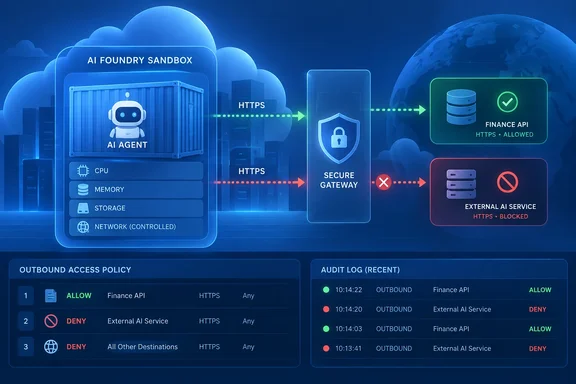
Foundry egress policies move the destination decision out of agent code
The blog frames the problem with the invoice agent. The agent needs two APIs: one to look up a vendor and one to check a payment record. Then a document contains an unfamiliar upload link, or a new helper library follows a URL nobody expected. The blog's point is that a list of tools is not a network boundary. A destination check written into one HTTP wrapper only protects calls that go through that wrapper.
Microsoft's fix is to attach the rule to the hosted-agent definition instead. Microsoft Learn says guardrails are defined in a Responsible AI (RAI) policy that you reference from the agent definition, and the platform applies them at runtime. The same policy object can hold two kinds of guardrail. Content safety controls screen the prompts your agent receives and the responses it returns, while network egress controls (preview) govern the outbound connections your agent makes, so it reaches only the destinations you allow.
The scope is narrow. The controls cover hosted agents only, meaning agents you package as a container and deploy to Foundry. They do not cover prompt-based agents or model deployments. Microsoft's broader guardrails overview says the same thing: hosted agents support network egress controls (preview), which govern the outbound connections an agent makes. Foundry hosted agents as a product are further along than this feature, but the egress controls themselves are still preview.
In practice, the review target changes. Instead of auditing every client library and helper for destination checks, a reviewer reads one named, ordered set of rules. The blog also changes what counts as a passing test. A successful tool response is no longer enough evidence. You test a call that should succeed and a call that should be refused.
How egressPolicy rules evaluate: first match wins, default catches the rest
The rules live in an egressPolicy property inside the RAI policy. Microsoft Learn documents the behavior:
- Rules are evaluated top to bottom, and the first matching rule decides the action.
- If no rule matches, the policy's
defaultActionapplies. Microsoft recommendsDenyfor an allow-list design andAllowfor a deny-list design. - Rules match on the request host. Exact hostnames and wildcards such as
*.contoso.comboth work. - There are four actions.
AllowandDenydo what they say,Transformallows the request but changes its headers, andRewritesends the request to a different destination. - A policy can hold at most 480 rules, counting all action types.
A policy set to deny by default does not block every connection the runtime makes. Microsoft says domains the hosted-agent runtime needs in order to work are allow-listed automatically. The blog repeats this and notes that a deny default "is not a claim that every runtime connection is blocked." Microsoft also says policy evaluation fails closed. If the proxy cannot finish evaluating a request, the request is denied.
The RAI policy has two fields called mode, and they do different things. properties.mode belongs to content safety, and the blog's example sets it to Blocking. properties.egressPolicy.mode controls network behavior and takes Audit or Enforced. Setting the wrong one is an easy mistake.
The blog's invoice policy allows two exact hostnames and denies everything else. It starts in Audit mode:
{
  "properties": {
    "basePolicyName": "Microsoft.DefaultV2",
    "mode": "Blocking",
    "egressPolicy": {
      "mode": "Audit",
      "defaultAction": "Deny",
      "rules": [
        { "name": "allow-finance", "ruleType": "Fqdn",
          "match": { "host": "finance.contoso.example" },
          "action": { "actionType": "Allow" } },
        { "name": "allow-vendors", "ruleType": "Fqdn",
          "match": { "host": "vendors.contoso.example" },
          "action": { "actionType": "Allow" } }
      ]
    }
  }
}
The .example hostnames are placeholders. Replace them with hosts you control. The blog recommends exact hostnames at first so a reviewer can see the intended boundary without working out what a broad wildcard covers.
Creating and attaching the policy with az rest and the Python SDK
You need a test Foundry project, a hosted-agent container image you can deploy, permission to create an account-level RAI policy, and HTTPS endpoints you control. The policy is an ARM resource under the Foundry account, Microsoft.CognitiveServices/accounts/<account>/raiPolicies/<name>. The documented preview API version is 2026-05-15-preview.
The blog's procedure goes like this:
- Save the policy body as
invoice-egress.json. - Sign in with
az loginand select the subscription withaz account set, using an identity that can write RAI policies on the account. - Build the full policy ID,
/subscriptions/<sub>/resourceGroups/<rg>/providers/Microsoft.CognitiveServices/accounts/<account>/raiPolicies/invoice-egress-audit, and export it asRAI_POLICY_ID. - Send
az rest --method puttohttps://management.azure.com${RAI_POLICY_ID}?api-version=2026-05-15-previewwith--body "@invoice-egress.json".az resttakes the ARM token from your signed-in CLI session. - Read the policy back with
az rest --method getand the query{id:id,egressPolicy:properties.egressPolicy}. Check that the ID matches, the network mode isAudit, the default isDeny, and both hostnames are there.
That GET confirms what is stored, not what happens at runtime. The blog also warns against pasting this cut-down example over an existing policy that mixes content safety and network rules. Create a new resource so the other controls on the existing policy stay intact.
To attach the policy, use azure-ai-projects 2.2.0 or later. You reference the guardrail by its RAI policy resource ID on the agent definition, and you can attach it when you deploy by using the Azure Developer CLI (azd), the Python SDK, or the REST API. In Python you pass RaiConfig(rai_policy_name=RAI_POLICY_ID) as the rai_config of a HostedAgentDefinition, and create the client with allow_preview=True. The blog's example uses 1 CPU, 2Gi of memory and a container that speaks the Responses protocol version 2.0.0. Use the full ARM ID, not the short name invoice-egress-audit.
Microsoft Learn gives a warning about content safety that also applies here. On many subscriptions, an agent that points to a policy that doesn't exist still deploys successfully and reports as active, but no filtering is applied. The guardrail fails open, meaning traffic passes as if no policy were attached. So after deploying, read the agent version back and confirm rai_config.rai_policy_name holds the ID you expect. Then check that the policy actually exists on the account.
If you prefer the portal, you can author egress rules in the Foundry portal as a Network control on a guardrail: create or edit a guardrail, expand the Network control, select Egress rules, and set the Outbound requests default action, then assign the guardrail to the hosted agent. Either way, you end up with a policy resource that can be reviewed, rather than a sentence in the agent's prompt.
Proving the boundary: Audit decisions, Enforced 403s and endpoint receipt logs
The blog's strongest recommendation is to test the network boundary and ignore what the agent says it did. You need two probe URLs. One matches the allowed finance host. The other is a host you control that is not allowed and is not a platform host. Configure both to return HTTP 200 and to log every incoming request, and use only synthetic data.
The probe has to run inside the hosted agent. The blog notes that managed hosted-agent containers don't give you an interactive shell for this, so you build a diagnostic function into the test image, register it with the agent's tool or request dispatcher, and call it through the deployed agent's Responses endpoint. Running the same code on your workstation tests nothing. The blog's function uses Python requests with timeout=10 and allow_redirects=False, so each probe hits exactly one destination. It verifies TLS against the certificate bundle in REQUESTS_CA_BUNDLE.
TLS needs care here. According to Microsoft Learn, the runtime injects an egress-proxy certificate authority (CA) into its trust bundle so the proxy can inspect HTTPS requests. That CA can differ by cluster or region and currently rotates about every 30 days. Microsoft treats it as runtime configuration. Don't pin it, copy it into your image or save it anywhere. Python requests reads REQUESTS_CA_BUNDLE, and generic OpenSSL-style clients read SSL_CERT_FILE. Never turn off verification to make a test pass.
In Audit mode, traffic flows normally, and requests that would have been denied are logged instead of blocked. You can inspect those decisions in two places. One is the invocation's trace timeline, where a "Network egress decision" span appears next to the request that caused it. The other is the project's Application Insights. Microsoft's sample query:
traces
| where timestamp > ago(1h)
| where message == "Network egress decision"
The records can include the destination, the decision, the rule that matched, the enforcement mode and the default action. A missing record does not mean a call was allowed. First confirm the diagnostic actually ran.
For the enforcement trial, the blog creates a second policy, invoice-egress-enforced, from the same body with only the network mode changed to Enforced. It attaches that policy to a new agent version. This matches Microsoft's documentation, which says running sandboxes do not reload policy changes. After a policy change you deploy a new version and start or resume a session. The blog expects these results for healthy endpoints:
| Probe | Audit trial | Enforced trial |
|---|---|---|
| Allowed finance endpoint | 200; the request reaches the endpoint | 200; the request reaches the endpoint |
| Unapproved test endpoint | 200; a would-deny decision is logged | 403 from the proxy; nothing arrives at the endpoint |
These are predictions, not recorded output. Microsoft Learn confirms that a denied request under enforcement returns HTTP 403 from the egress proxy. A 403 on its own proves little, because the destination can return 403 too, and a DNS or TLS failure is not a successful denial. The test passes only when the policy decision matches the receipt log on the destination: the finance lookup lands, and the unapproved endpoint receives nothing.
Transform and Rewrite rules still run in Audit mode
Allow and deny cover most cases, but the blog describes two others. A vendor might require a non-secret workload tag on every request, which a Transform rule can add. An approved service might move to another endpoint, which a Rewrite rule can handle by sending matched requests to the new destination. Header transforms support three operations. Use Set to force a header to a specific value regardless of what the agent sent. Use Insert to supply a default only when the agent didn't already set the header. Use Remove to strip a header before the request leaves the runtime.
Two behaviors can catch you out. First, rule order still decides everything. If an Allow rule for a host sits above a Transform rule for the same host, the Allow wins and the header change never happens. Second, Audit mode only stops Deny from blocking. Transform and Rewrite still execute in Audit, so an Audit rollout that includes those rules changes real requests.
Microsoft's documentation is inconsistent on dynamic header values. The September 24 blog, and the version of the Learn guide it cites, say managed-identity value references work when the agent's identity has the required RBAC role on the target resource, and that secret references are not supported during preview. An earlier indexed version of the same Learn page said something weaker: during preview, header transforms support static value only; dynamic value references (valueRef) that inject a managed identity token or a secret aren't enforced yet, and a rule that uses valueRef is accepted but the header isn't injected at runtime. That earlier text means a rule can be accepted without error and still do nothing. So don't assume a managed-identity header arrives. Check the destination's logs. Microsoft advises against putting credentials in static header values in any case.
Where Foundry egress controls sit beside Azure Firewall and managed networking
A destination rule answers one question: is this the right place to send a request? It doesn't say whether the caller is authorized there, or whether the data being sent is appropriate. The blog puts it plainly. An approved vendor can still receive the wrong invoice, and an allowed API can still reject an unauthorized caller. Your agent's own authentication, authorization and data validation stay in place. Microsoft also says customers are responsible for understanding how the endpoints they send data to handle it.
Microsoft lists these preview limits:
- Enforcement happens inside the Foundry-managed sandbox. It complements customer network controls such as Azure Firewall and doesn't replace them.
- Enforcement can't be handed to a customer-managed firewall or applied centrally through Azure Policy.
- Rules match on hostname only. Azure service tags and IP ranges are not available as rule types.
- MCP tool policies, PII and data-loss-prevention inspection, and custom webhook hooks are not available.
- The blog limits its guidance to the hosted-agent HTTP/HTTPS path. It should not be applied to other protocols or other agent types.
That leaves egress policy alongside Foundry's existing networking options. Microsoft's private-networking guide describes a Standard Setup in which foundational infrastructure provides the right authentication and security for your agents and tools with no public egress, and you provide a delegated subnet from your virtual network. Independent writer George Ollis notes that with Foundry's managed virtual network, if you need to restrict outbound traffic from your agent service, you can deploy MVNet with Azure Firewall Basic or Standard. Those are infrastructure controls that a network team owns. The egress policy is a per-agent rule set that a developer can put through code review, and the two are meant to be used together.
What this means for you
For now, this is a feature to evaluate in a test project, not a production control. Teams building containerized hosted agents that call external APIs should try it on one agent. Anyone relying on it to meet a compliance requirement should wait for general availability and keep their firewall rules.
- Build a separate RAI policy for egress in a test Foundry project using API version
2026-05-15-preview, and don't overwrite a policy that already carries content safety settings. - Attach the policy by its full ARM resource ID through
rai_config.rai_policy_name, usingazure-ai-projects2.2.0 or later, then read the agent version back to confirm the reference. - Start with
egressPolicy.modeset toAuditanddefaultActionset toDeny, and find the "Network egress decision" records in the trace timeline or Application Insights. - Deploy a new agent version for each policy change, because running sandboxes don't reload policies.
- Count a denial only when there is a proxy 403, a matching policy decision, and no request in the destination's receipt log.
- Treat Transform and Rewrite rules as live even in Audit, and check at the destination whether any managed-identity header is actually injected.
Microsoft has put the destination decision where both reviewers and the platform can check it, outside the agent's code and prompt. The feature is still preview, with no SLA, no service-tag or IP rules, and documentation that disagrees on dynamic header values. For now it works best as a development test: an allowed finance lookup succeeds, and a test endpoint receives nothing. Teams that set up that two-ended check against a hosted agent now will already have their tests in place when the feature reaches general availability.
References
- Control where your hosted agent connects with network egress in Foundry Agent Service Microsoft Foundry Blog · 2026-09-24T17:55:06+00:00
- Add guardrails to a hosted agent - Microsoft Foundry | Microsoft Learn learn.microsoft.com
- Guardrails and controls overview in Microsoft Foundry - Microsoft Foundry | Microsoft Learn learn.microsoft.com