

What Microsoft has actually announced
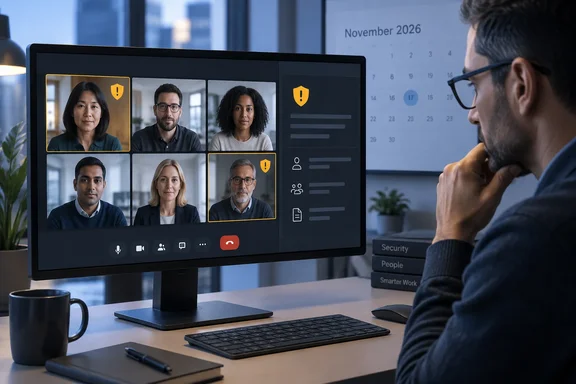
The roadmap entry is short. According to an archived copy, Microsoft says the feature helps users identify potentially deceptive participants and meeting organizers. When Teams detects a potential impersonation attempt, it surfaces warnings and risk indicators to help users recognize suspicious identities and make more informed decisions when joining or participating in a meeting.
The roadmap record gives these details:
| Detail | What the roadmap says |
|---|---|
| Roadmap ID | 573157 |
| Feature | Microsoft Teams: Impersonation Protection for Teams meetings |
| Status | In development |
| Release stage | General Availability |
| Target | November CY2026 |
| Platforms | Teams desktop and Mac |
| Cloud | Worldwide (Standard Multi-Tenant) |
| Published | October 2, 2026 |
Microsoft's own roadmap RSS feed carries the same entry, timestamped October 2, 2026. It shows In development, General Availability, Worldwide (Standard Multi-Tenant), Microsoft Teams, Desktop, Mac, with a GA date of November CY2026.
Bottom line: the feature covers both attendees and organizers, it warns rather than blocks, and its first targets are the desktop and Mac clients in the commercial worldwide cloud.
What the roadmap doesn't tell you
The entry leaves a lot out. It does not say:
- How detection works. Teams might check tenant identity, display names, domains, behaviour, or something else. Microsoft hasn't said.
- What the warning looks like. That could be a banner, a badge on the roster, a prompt in the lobby, or a mix.
- Whether admins get controls. There is no word on policy settings, defaults or opt-outs.
- What licence you need. Nothing on that either.
- Whether users can report or dismiss a warning.
- Whether web and mobile clients are included. Only desktop and Mac are listed.
Fill in those gaps with guesses and you'll be wrong eventually. Note also that the roadmap doesn't promise Teams will confirm anyone's real identity or catch every impostor. Treat a warning as a reason to stop and check, not as proof of fraud. And if no warning appears, that doesn't prove the person is genuine.
Many reports describe this feature as a direct answer to AI voice cloning and deepfake video. That threat is real, and it's reasonable background. But the roadmap text for 573157 doesn't mention AI, deepfakes or media analysis. It talks only about suspicious identities.
The deepfake detection item is a separate entry
Some coverage lumps in a second plan: Teams working with third-party providers that detect synthetic or manipulated audio and video. Microsoft's roadmap feed shows this as its own entry, apparently Roadmap ID 573451, published the same day. The feed lists it for Android, desktop, iOS and Mac. It says third-party detection solutions analyze meeting media for signs of synthetic or manipulated audio and video and send detection signals to Teams, enabling integrated in-meeting experiences and controls. Microsoft adds a caveat: "Synthetic media detection is performed by the third-party provider."
That is a different design from Impersonation Protection:
- Impersonation Protection (573157): Teams itself flags identities that look suspicious, on desktop and Mac.
- Synthetic media detection integration (573451): an outside vendor analyses the meeting audio and video, then sends its findings to Teams, which shows them to users.
These may end up complementing each other, but they are separate roadmap items and shouldn't be treated as one feature. If you're planning budgets, the third-party route probably means a separate vendor relationship, though Microsoft hasn't published commercial details.
Part of a bigger push against social engineering in Teams
This isn't Microsoft's first impersonation warning in Teams. Its 2026 security work has steadily moved toward flagging suspicious identities:
- Brand impersonation in calls. Named "Brand Impersonation Protection," the feature started rolling out to the targeted release ring in mid-February and was enabled by default. BleepingComputer reported that Teams checks incoming VoIP calls from first-time external contacts for signs of brand impersonation and displays high-risk call warnings before suspicious calls are answered. Users can accept, block, or end flagged calls.
- Lookalike domains in chat. An earlier roadmap item, Tenant-Owned Domain Impersonation Protection for Teams Messaging, aimed to identify if an external user comes from a domain that is impersonating the recipient tenant's own domains, during their initial contact with an enterprise user via Teams messages.
- Reporting from inside meetings. A roadmap item targeted for September 2026 lets organizers and attendees report suspicious activity from meetings. Users can submit reports during or after a meeting, helping organizations identify potential threats such as impersonation, phishing, scams, and other suspicious behavior.
Meetings are the obvious next step. Calls and chats already have impersonation warnings. A meeting is arguably the most convincing place to fake an identity, because a familiar name on the roster and a confident voice can carry a scam a long way. Picture the fake CFO joining the "urgent wire transfer" call.
Bottom line: Impersonation Protection for meetings fits a clear 2026 pattern of Teams flagging suspicious identities in calls, chats and now meetings.
Don't confuse this with bot detection
Teams already has a separate control for external meeting bots, and it often gets mixed up with impersonation protection. They solve different problems. The bot policy deals with automated participants, such as transcription and note-taking tools. It isn't designed to catch a human pretending to be your boss.
BleepingComputer described the bot policy like this: "When enabled, Teams automatically detects potential bots, places them in the meeting lobby, clearly identifies them, and prompts organizers to confirm admission. Even in meetings where organizers allow participants to bypass the lobby, bots identified through this policy will continue to require approval before joining."
Microsoft Learn says the setting is in the Teams admin center under Meeting policies > Meeting Join and Lobby, labelled "Manage external bots and their access to meetings." It has two options:
- Do not detect bots (
AllowBots): bots show up like any other external participant. - When detected, require approval before joining (
RequireApprovalWhenDetected): this is the default. Detected bots are marked and held in the lobby until someone admits them.
You can apply the policy org-wide through the default meeting policy or to specific users and groups through targeted policies. The Learn page's PowerShell examples use this form:
Set-CsTeamsEventsPolicy -Identity <policy name> -ExternalBotAccessMode RequireApprovalWhenDetected
The same page refers to Set-CsTeamsMeetingPolicy in its explanation, so test in a non-production policy before you script anything widely.
Microsoft also lists known limitations for bot detection. Some bots aren't caught, and real people are sometimes misclassified as bots. Organizers can fix a misclassification with a "This is not a bot" option. These limitations apply to the bot system only, and there's no evidence yet about how accurate the new impersonation warnings will be.
What admins can do before November
You can't configure Impersonation Protection yet, but you can prepare:
- Check your lobby settings now. Microsoft recommends letting only organizers and co-organizers admit people from the lobby, so presenters can't wave participants past checks.
- Keep bot detection at its default unless a business reason requires otherwise, and watch audit logs for unusual participant activity.
- Brief the helpdesk early. When Brand Impersonation Protection launched, Microsoft told customers to prepare support staff for questions about the new warnings. Expect the same with meeting warnings: the first time a CEO sees a risk indicator next to a vendor's name, someone will call IT.
- Update security awareness training. Teach users that a warning means "verify through another channel" and that no warning doesn't mean "trusted." Callback procedures for payment and credential requests still matter.
- Watch Message Center. Roadmap dates slip often. A Message Center post will normally confirm rollout timing, defaults and any admin controls. Until then, November 2026 is a target, not a promise.
The verdict
Impersonation Protection for Teams meetings fills the gap that brand-impersonation warnings in calls and lookalike-domain checks in chat left open: the meeting itself. The design is cautious. It warns rather than blocks, which reduces disruption from false positives but leaves the final call with users who may be in a hurry.
Whether it works will depend on details Microsoft hasn't published: which signals it uses, how often it raises false alarms, and whether admins can tune it. For now, admins should tighten lobby settings, prepare the helpdesk, and wait for the Message Center post with the real details.
References
- Microsoft Teams Is Getting Impersonation Protection Next Month Windows Report · 2026-10-05T10:33:24+00:00
- Microsoft Teams to add brand impersonation warnings to calls bleepingcomputer.com
- Microsoft adds smarter bot protection to Teams meetings bleepingcomputer.com