

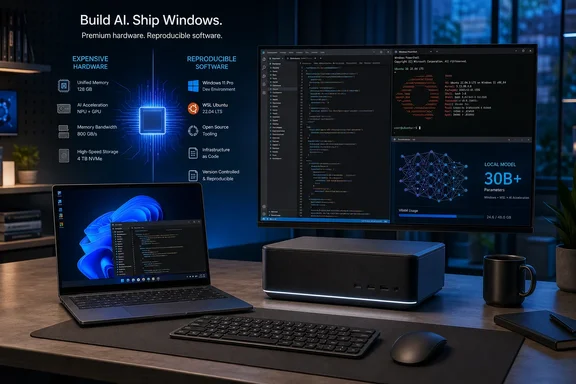
TechRadar framed Zenith as a potential windfall for premium PC vendors, and the concern is reasonable. Microsoft’s September 4 announcement sets a high entry bar: at least 64GB of unified memory and 250GB/s of memory bandwidth, with AMD Ryzen AI Halo devices first in line. Those requirements immediately exclude the vast majority of conventional business laptops and desktop PCs.
But the record also makes the division clearer than the initial announcement did. The out-of-box Windows configuration is not exclusive technology and Zenith is not a distinct Windows 11 edition. Microsoft describes it as a tailored experience on new “developer-class” devices; Windows Central independently reports that the machines will still use ordinary Windows 11 Home or Pro SKUs, depending on the OEM. The feature that cannot be replicated by a setup script is the underlying hardware’s capacity for local inference.
Zenith is a hardware standard wrapped in a Windows configuration
Microsoft says Zenith devices will let developers run models with more than 30 billion parameters locally and without metered cloud-token charges. That is the substantive reason for the 64GB unified-memory and 250GB/s bandwidth requirements. A conventional PC with 16GB or 32GB of separate system RAM and graphics memory may be a perfectly capable development machine, but it is not designed to keep a large local model, its context, the operating system, containers, editor, compiler, and browser workloads resident without serious compromise.
The word unified matters here. Microsoft is identifying machines where CPU and graphics resources can access a large common memory pool, instead of asking a developer to work around a fixed VRAM ceiling. That approach is particularly relevant to local model inference, where fitting the model and moving its weights through memory can be more important than the processor’s headline core count.
Microsoft’s announcement, however, does not publish a benchmark, supported-model list, quantization guidance, tokens-per-second target, or a definition of what it considers a “capable coding model.” It promises that the hardware can run 30B-plus-parameter models locally; it does not promise that every model of that size will deliver interactive performance in every framework or at every context length. Those are materially different claims for a developer considering a purchase.
This is where TechRadar’s skepticism lands closest to the mark. Premium manufacturers gain a clearer message for systems that already cost far more than a mainstream Windows PC: this is hardware for people who want to run substantial AI workloads locally. The badge itself does not make expensive PCs valuable. The memory architecture and performance do.
The Windows changes are useful, but they are not a new SKU
Microsoft’s software side of Zenith is a collection of sensible defaults for a development workstation. File Explorer shows file extensions, hidden files, the full path in the title bar, and the details pane. Long-path support is enabled. Recently used items and sync-provider tips are removed from Explorer, while Start menu tips and account notifications are switched off. Windows Terminal and Visual Studio Code are pinned to the taskbar, and Command Palette is enabled.
For a developer who has spent years reversing consumer-oriented Windows defaults on each new PC, that is a welcome baseline. It also reflects a real enterprise administration problem: a developer laptop often accumulates an inconsistent mix of SDKs, shells, package managers, source-control clients, WSL distributions, editor extensions, and local policy changes. Starting from a known state reduces onboarding friction and makes support less chaotic.
Microsoft’s public GitHub repository, Windows Developer Config, is the important qualification. The company calls it an “opinionated” setup for Windows development boxes and says it can configure a fresh Windows 11 installation with one command through winget configure. It installs PowerShell 7, Git, GitHub CLI, Visual Studio Code, .NET SDK 10, Python 3.14 with uv, Node.js, Coreutils for Windows, Oh My Posh, and PowerToys. It also configures WSL with Ubuntu, including the restart required to enable the necessary Windows feature.
Windows Latest reported that the repository produces a Zenith-like experience on existing PCs. That conclusion is supported by Microsoft’s own descriptions: the repository’s listed terminal, Windows, Explorer, Start/Search, WSL, and toolchain changes closely track the out-of-box configuration Microsoft says Zenith machines will ship with.
So Zenith’s software distinction is convenience and consistency, not exclusivity. A developer does not need a 64GB Ryzen AI Halo computer merely to see file extensions, install WSL, pin Windows Terminal, or remove Start recommendations.
The configuration deserves change-management discipline
The phrase “ready to code” can make the setup sound harmlessly cosmetic. It is more than a taskbar layout. Microsoft’s repository says the configuration is non-interactive, can reboot the machine to enable WSL, and resumes after sign-in using a RunOnce task. It modifies developer-oriented Windows settings, installs multiple language runtimes and command-line tools, changes terminal defaults, and applies policies to parts of the Windows experience.
That may be appropriate for a personal development PC or a dedicated engineering workstation. It is a different proposition for an IT-managed endpoint where the existing build standard, endpoint protection controls, proxy settings, software allowlists, source-code handling rules, and administrator privileges must be preserved.
The repository also identifies a practical snag for unattended or non-elevated setups: winget configure can fail without the Microsoft Visual C++ Redistributable. Microsoft documents separate x64 and Arm64 installation commands for that prerequisite. WSL installation also depends on firmware virtualization being available, or—inside a virtual machine—on nested virtualization being exposed by the host.
For IT teams, the lesson is to treat Windows Developer Config as a transparent reference build rather than an instant deployment recipe. Review the configuration files, decide which runtimes and shell changes fit the organization, validate the reboot behavior in a pilot ring, and distribute an internally approved package through the normal endpoint-management process. The ability to recreate most of Zenith is valuable precisely because administrators can remove choices they do not want.
Who should care about the 64GB requirement
Zenith makes the most sense for developers who already need unusually high memory capacity: people building or evaluating local coding assistants, running container-heavy projects, working with GPU-accelerated AI frameworks, or maintaining development environments that otherwise lean heavily on paid cloud inference. For those users, the preloaded tools are a small bonus on top of a machine purchased for its memory architecture.
It is less compelling as a general “developer PC” category. Web developers, line-of-business developers, many .NET developers, infrastructure engineers, and administrators can build effectively on less exotic Windows hardware. Their biggest gains from Zenith may be available now through the public configuration project or a disciplined internal image, without replacing a functioning computer.
There is also a procurement distinction that Microsoft’s announcement leaves open. The company says more OEM and silicon partners will follow AMD Ryzen AI Halo in the coming months, but it has not identified the full device list, shipping dates, regional availability, pricing, exact Windows build, or whether corporate buyers will receive a management-friendly method to select or decline individual Zenith defaults at order time. Windows Central likewise noted that Microsoft had not named OEM hardware or shipping dates at the time of its report.
That absence matters. A workstation standard becomes useful when buyers can compare supported devices, thermals, sustained performance, memory configurations, warranty terms, and deployment controls—not simply when a platform owner sets a memory threshold.
Premium PC makers get a sharper pitch, not a protected market
The central finding is that Project Zenith separates two things that are often blurred together in AI-PC marketing. Microsoft’s developer setup is broadly portable. Its local-AI performance target is not. The premium opportunity comes from the latter.
For PC makers, that is still meaningful. A company selling a high-memory mini PC, mobile workstation, or desktop can now associate the purchase with a Microsoft-defined development experience instead of relying only on specifications that many customers find difficult to interpret. Microsoft gets a clearer answer to developer complaints about first-day setup, while AMD and future partners get a more direct route to justify costly unified-memory designs.
For buyers, the calculation should run in the opposite direction. First decide whether local models larger than 30 billion parameters are a real and recurring workload, with a measurable reason to avoid cloud inference costs or data transfer. Then evaluate the specific hardware’s memory bandwidth and sustained performance. The Zenith preload should be treated as a useful starting configuration, not as the reason to spend thousands of dollars.
Microsoft has made the developer setup easier to reproduce and the hardware line easier to recognize. The next Zenith devices will matter when manufacturers attach prices, availability dates, and performance evidence to that definition; until then, the practical move for most Windows developers is to test the public configuration on existing hardware before buying a premium machine for defaults they can already deploy.