

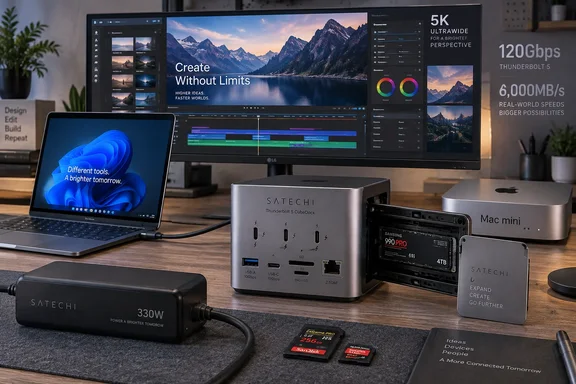
That distinction changes how Windows buyers should read the product. Satechi markets the CubeDock around up to 120Gbps Thunderbolt 5 bandwidth and SSD transfers up to 6,000MB/s, while XDA’s real-world test used a Mac mini connection limited to Thunderbolt 4. The review still found that the dock could run a 5,120-by-1,440 display at 144Hz alongside a webcam, capture card, wireless microphone receiver, mouse, and other peripherals, which is useful evidence that the dock can handle a busy creator setup before Thunderbolt 5 enters the equation.
Satechi’s own documentation confirms the CubeDock works with Windows 10 and Windows 11 systems using Thunderbolt 3, Thunderbolt 4, USB4, or USB-C with DisplayPort Alt Mode. However, the company separately says Thunderbolt 5 is supported only on Windows 11 PCs. That means the dock is usable on older machines, but paying its premium price makes most sense only when the host has Thunderbolt 5—or when the integrated SSD enclosure and compact form factor solve a specific desk problem.
The SSD bay is the reason this dock costs $400
The CubeDock is not merely a port expander. Its main differentiator is an internal M.2 NVMe enclosure supporting 2230, 2242, 2260, and 2280 drives up to 8TB. The SSD is not included, so its real cost starts at $399.99 and rises with the capacity and performance class of the drive installed.
That point is easy to miss in a conventional dock comparison. A buyer who needs both a Thunderbolt 5 dock and a separate high-speed enclosure will usually end up with two powered devices, two enclosures, and another cable on the desk. Macworld reached a similar conclusion in its review: the CubeDock’s price begins to look more reasonable when compared with buying a roughly $300 Thunderbolt 5 dock and a separate Thunderbolt 5 SSD enclosure.
There is a practical trade-off. Internal storage makes the dock a more permanent part of a workstation, rather than an accessory moved between desks or bags. It also means an SSD upgrade requires opening the dock, installing the drive with the supplied screws and thermal pads, and accepting that the dock—and its data—are coupled to the same box. For a desktop replacement setup, that is tidy. For IT teams handing docks among users or troubleshooting a machine remotely, a separate external SSD remains simpler to swap, inventory, and isolate.
Satechi rates the enclosure at up to 6,000MB/s, but that is a ceiling, not a promise for every drive, host, cable, and workload. XDA’s approximately 3,000MB/s read result over Thunderbolt 4 is consistent with the bandwidth constraint of the older interface. It should not be described as evidence that the CubeDock reaches 6,000MB/s, nor should buyers assume that a PCIe 4.0 NVMe drive will automatically deliver its internal-drive benchmark numbers once placed behind a Thunderbolt connection.
XDA’s own specification block understates the dock
The submitted XDA Developers review correctly identifies the core port layout, but its summary table lists only 30W USB Power Delivery and omits support for M.2 2260 SSDs. Satechi’s product page and support documentation list up to 140W of host charging through the upstream Thunderbolt 5 port, while the front USB-C data-and-power port can provide up to 30W to a connected peripheral.
For Mac mini owners, the 140W figure is largely irrelevant because the desktop has its own power supply. For Windows laptop users, it can be decisive. A high-performance mobile workstation can be charged from the dock while using displays, storage, networking, and USB accessories, reducing a desk setup to the laptop’s own power demand and one host cable. Whether a particular laptop actually accepts the full 140W still depends on its USB Power Delivery implementation.
The missing 2260 SSD size is less consequential, but it illustrates why shoppers should check the manufacturer’s compatibility table rather than rely exclusively on a review card. The enclosure officially accepts four common M.2 lengths: 2230, 2242, 2260, and 2280. It supports NVMe storage, not SATA M.2 drives.
Satechi bundles the 180W external power supply, a Thunderbolt 5 cable, a screwdriver, screws, and thermal pads. The inclusion of a cable matters because Satechi says a certified Thunderbolt 5 cable is required to reach the dock’s full performance and function. A random USB-C cable may still provide a connection, but it can reduce data, display, or charging capability enough to make diagnosis unnecessarily difficult.
Windows display support depends on the PC, not the aluminum cube
The CubeDock has no HDMI or DisplayPort sockets. Every display connection is expected to run through downstream Thunderbolt 5 ports, usually with USB-C-to-DisplayPort, USB-C-to-HDMI, or native USB-C display cabling. That is a sensible design for a Thunderbolt dock aimed at advanced workstations, but it makes the CubeDock less convenient for users with several existing HDMI monitors and no suitable adapters.
Satechi advertises one Windows display at up to 8K and 144Hz, two at up to 8K and 120Hz each, or three at up to 8K and 60Hz each. Those figures describe the dock’s transport capability under favorable conditions; they do not override the graphics output, firmware, DisplayPort tunneling, or USB-C capabilities of the host PC. A Windows laptop with only Thunderbolt 4, an integrated GPU with more limited display support, or restrictive OEM firmware may not reproduce those maximum configurations.
XDA’s tested ultrawide result is more immediately useful than the large 8K figures. Keeping a 32:9, 5,120-by-1,440 display at 144Hz while moving capture and input hardware to the dock suggests the CubeDock can serve the kind of streaming, video, and productivity desk where bandwidth contention is a real concern. It does not prove triple-8K reliability on Windows, and no independent testing supplied with the review validates that maximum mode.
The product’s official Windows compatibility list names examples including Microsoft Surface Laptop Studio, Lenovo ThinkPad X13 Gen 2, Lenovo X1 Carbon Gen 1, and Dell XPS 13 9315, while Satechi’s broader support guidance includes Surface Pro models, HP Spectre x360 systems, Envy laptops, and ZBook workstations. That list should be treated as examples, not a complete certification matrix. The company asks buyers to provide a specific Windows PC model for verification, an unusually direct acknowledgement that port labels alone do not settle dock compatibility.
The premium buys integration, not a complete port collection
The CubeDock offers three downstream Thunderbolt 5 ports, one rear 10Gbps USB-C port, one front 10Gbps USB-C port, two 10Gbps USB-A ports, UHS-II SD and microSD readers, a 3.5mm audio jack, and 2.5Gb Ethernet. It is a strong mix for photographers, streamers, developers using fast external storage, and laptop users who need wired networking without adding a separate adapter.
The front-facing SD and microSD slots are especially practical for removable-media workflows. XDA reported that moving its microSD card directly into the dock eliminated the transfer problems it had experienced with a separate microSD-to-SD adapter. That is an observation about that adapter, not proof that every card-reader issue is solved by the CubeDock, but it reinforces the benefit of avoiding another low-cost link in the chain.
There are omissions. At $400, buyers may reasonably expect dedicated video ports or more USB-A capacity, especially when the dock’s 5-by-5-inch chassis is roughly Mac mini-sized. The external 180W power brick also takes away some of the desktop neatness created by integrating the SSD bay. TechRadar independently noted the same arithmetic: the listed price covers the dock alone, with the NVMe drive adding to the final bill.
Satechi uses active cooling to manage the enclosure and controllers. The company specifies a 20–40 dB(A) fan-noise range, and XDA found the dock audible compared with a near-silent Mac mini but quieter than a Wavlink dock it had previously tested. For a workstation with fans, speakers, or normal office noise, that may be immaterial. On a quiet desk recording audio or running overnight transfers, it is a factor worth treating as part of the purchase rather than a footnote.
The Satechi Thunderbolt 5 CubeDock earns its premium chiefly by consolidating a high-bandwidth dock and a serviceable NVMe enclosure into one small device. Windows users should buy it for that consolidation, 2.5Gb Ethernet, and the three downstream Thunderbolt ports—not because an 8K specification or a Thunderbolt 4 storage benchmark promises the same result on every PC. A confirmed Thunderbolt 5 Windows 11 host, a certified cable, and a fast compatible NVMe drive are the conditions that turn the CubeDock from an expensive but capable TB4 dock into the product Satechi is actually selling.
References
- The Satechi Thunderbolt 5 CubeDock gives my Mac Mini all the ports I needed, plus super-fast storage XDA · 2026-09-18T11:00:16+00:00