

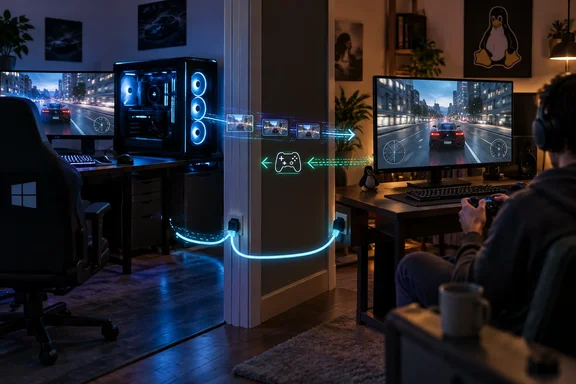
The important distinction is that streaming does not make an incompatible anti-cheat system work on Linux. It moves game execution elsewhere. Valve’s Remote Play documentation explains that the host runs the game and sends video and audio to the client, while the client sends keyboard, mouse, or controller input back. Windows remains responsible for running the game; Linux becomes the seat from which you play.
For someone already maintaining two computers, that can be a useful compromise. Windows has not left the building—it has simply stopped interrupting the working day.
Anti-cheat compatibility is still game-specific
Sherback’s everyday computing happens on Linux, but his preferred games include Escape From Tarkov, Battlefield 6, and EA Sports FC 27. He reports that their anti-cheat requirements kept him returning to a separate Windows installation, sometimes making a quick session feel like more trouble than it was worth.
That experience should not become a blanket claim that competitive games cannot run on Linux.
Valve’s Steamworks documentation confirms that Proton supports both BattlEye and Easy Anti-Cheat, but developers must configure support for their games. BattlEye requires a manual, per-title configuration step; Easy Anti-Cheat also requires developer action. Valve separately says kernel-space anti-cheat solutions are not currently supported by Proton. Middleware support and actual game compatibility are therefore different things.
The practical takeaway is straightforward: check the particular game, not merely the anti-cheat brand. Sherback’s reported obstacles explain his decision, but they do not establish the compatibility status of every game using those systems.
What Pyrowave changes
Valve announced Pyrowave on September 21, 2026. Its central trade-off is bandwidth for responsiveness: Valve says it uses five to ten times the bandwidth of other streaming codecs and recommends wired gigabit Ethernet or better. Encoding and decoding run on the GPU.
The codec’s own project documentation adds useful technical context. Hans-Kristian Arntzen describes Pyrowave as an intra-only codec, processing video as independently compressed images rather than relying on previous frames. It is implemented in Vulkan compute shaders, with simple coefficient encoding designed for highly parallel processing. The project targets local Ethernet game streaming where minimum latency matters more than compression efficiency.
Think of it as choosing a wider delivery lane instead of spending more time squeezing every parcel into a smaller box.
That design does not eliminate the other delays in a gaming session. Valve defines video-stream latency as encoding, network transfer, decoding, and display combined, and explicitly cautions that not every setup will benefit.
A faster codec cannot compensate for an unreliable connection. That is the engineering implication of Valve’s warning, not a promise that Ethernet alone guarantees a flawless result.
The reported results—and their limits
Sherback streams from a Windows gaming PC in his office to a Minisforum MS-03 running Ubuntu in another room. He reports these figures from Steam’s overlay:
| Game | Reported performance | Reported display latency |
|---|---|---|
| Escape From Tarkov | 4K, 120 FPS, no frame loss | 8.38 ms |
| Battlefield 6 | Approximately 97 FPS | 13.64 ms |
| EA Sports FC 27 | Described as similar | No exact figure supplied |
These are one author’s observations, not independently reproduced benchmarks. Sherback also acknowledges that some latency remains.
The display-latency readings should not be presented as measurements of the complete delay between pressing a button and seeing the game respond. Valve’s video-stream definition describes a delivery pipeline, not a complete measurement of every input and game-processing stage.
Sherback contrasts the experience with an earlier Dinkum session streamed to a MacBook Air over Wi-Fi 7, during which he encountered stuttering and visual artifacts. That illustrates why he wanted something better, but it is not a controlled codec comparison: the client, connection, and game differed.
Trying the Windows-to-Linux arrangement
For the beta configuration described here, the essentials are:
- Confirm the game works locally on the Windows host. Valve recommends launching it there first to establish that it is updated and working.
- Sign into the same Steam account on both computers. The client library should offer the host’s installed game for streaming.
- Use the Steam client beta on both machines. On Linux, enable the experimental SteamRT3 client in Steam’s System Settings.
- Enable Pyrowave in Remote Play’s advanced client settings. It is not enabled by default.
- Use the performance graph during testing. Adjust quality or, if needed, disable automatic bitrate and choose a fixed rate between 100 and 500 Mbit/s.
If the stream stutters, lowering quality or frame rate is a sensible first experiment: Valve notes that higher frame rates increase bandwidth demand. If the host is not discovered, Steam Support advises checking that both machines share a subnet and that another program is not occupying UDP port 27036, used for initial discovery.
Success means a stable stream with acceptable image quality and controls that feel comfortable in the actual game—not merely an impressive overlay number.
Less rebooting, not less Windows
Sherback also sees the arrangement as useful for a CachyOS living-room PC. The appeal is consistent across both locations: his Linux environment stays available while the more powerful Windows machine handles games that he cannot use satisfactorily there.
The compromise still requires a separate host and a capable network. For a single-PC household, dual-booting may remain the simpler arrangement. For someone who already has the hardware, however, Remote Play changes the question from “Which operating system must I boot?” to “Where should this game run?”
That is Pyrowave’s most interesting contribution here: not a victory over anti-cheat, but a potentially better way to live with the boundary it creates.
References
- I stopped fighting anti-cheat on Linux and started using Steam Remote Play, and I don't miss dual-booting XDA · 2026-10-07T00:00:21+00:00
- Pyrowave video codec now in beta! :: Steam Remote Play steamcommunity.com
- Pyrowave video codec now in beta! :: Steam Remote Play steamcommunity.com