

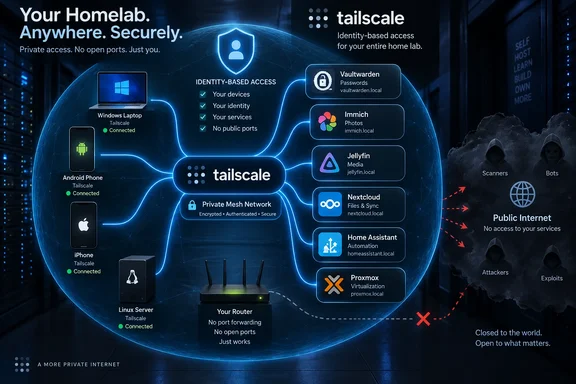
That distinction affects how these services should be deployed. Tailscale can give a Windows laptop, Android phone, iPhone, Linux server, and Proxmox host stable private addresses and names even when they move between networks. It does not patch Vaultwarden, secure a weak administrator password, make an exposed Docker port disappear, or replace backups. The app still needs its own authentication, updates, and least-privilege configuration.
Immich’s own remote-access documentation explicitly presents Tailscale as an alternative for reaching a private photo server when a conventional VPN is impractical, while warning against directly forwarding its default port to the internet without additional protection. Tailscale’s documentation makes the operating model equally clear: it connects devices, but the actual web service, database, SSH daemon, or media server remains the administrator’s responsibility.
For these six services, the result is less “put every homelab service online” than make selected services privately reachable by selected devices.
Vaultwarden turns a home-only vault into a usable password manager
Vaultwarden is arguably the strongest case for a private overlay network because a password manager that works only on a home LAN quickly becomes an inconvenience. The Bitwarden-compatible clients and browser extensions that make Vaultwarden attractive depend on being able to synchronize with the server when credentials are needed, not merely when the user happens to be at home.
A Tailscale-connected Vaultwarden host lets the client point to a private server address reachable from enrolled Windows PCs, phones, and tablets. That removes the need to publish the vault’s login page and API through a public reverse proxy merely to keep password synchronization working outside the house.
The security benefit is real, but it should not be exaggerated. A Vaultwarden instance remains a highly sensitive target inside the tailnet. It needs a unique, strong administrator token; user accounts need strong master passwords and two-factor authentication where supported; backups need to be encrypted and tested; and access should be restricted so that a compromised gaming PC cannot automatically reach the same password service as an administrator’s laptop.
For a household, the clean design is usually to permit only named personal devices to reach Vaultwarden’s HTTPS port. For a small business or shared homelab, do not treat every enrolled machine as equally trusted. Tailscale access policies are the boundary that turns private connectivity into a narrower security control.
Immich and Nextcloud gain utility, but neither becomes a backup plan by itself
Immich and Nextcloud are often grouped together because both solve cloud-storage problems, but their remote-access priorities are different. Immich benefits most from giving its mobile application a reliable path back to the home server for uploads and photo browsing. Nextcloud benefits from making files, calendars, contacts, and collaboration data available across devices.
How-To Geek correctly identifies the immediate use case: a phone that joins the tailnet can upload photos to Immich while the user is away. That reduces the time during which new photos live only on the phone. It does not guarantee an upload will occur on schedule. Mobile operating systems can limit background activity, pause transfers on battery saver settings, and restrict large uploads over cellular data. A Tailscale connection solves reachability, not the operating system’s power-management rules.
Immich’s documentation adds a more consequential point that gets overlooked in self-hosting discussions: the database backup and the original photo library are separate concerns. The application database stores metadata and user information, while the uploaded photos and videos live in the configured asset storage. A working remote upload path is useful, but it is not a tested recovery strategy unless both the library and database are backed up to storage outside the server.
Nextcloud carries a similar operational warning. Remote access makes it easier to use as a private Dropbox replacement, but synchronizing a file to a single server is not the same as preserving it. Accidental deletion, ransomware synced from an endpoint, or storage failure can be replicated just as efficiently as a legitimate edit. Versioning, snapshots, off-host backups, and restore testing matter more once remote access encourages users to depend on the service daily.
For both services, Tailscale is most appropriate when the intended users can install and sign in to the client. If the goal is sharing files or albums with people who cannot join the tailnet, a carefully maintained public-facing reverse proxy or a service-specific sharing feature may still be necessary. Those are different threat models and should not be merged casually.
Jellyfin remote streaming is simple in concept and demanding in practice
Jellyfin has long appealed to users who want a self-hosted media server without Plex’s feature and licensing structure. Tailscale supplies the one capability that makes a private Jellyfin server practical outside the home: a device on cellular or hotel Wi-Fi can connect directly to the server’s private address without an inbound port-forwarding rule.
That is a useful convenience, especially for a single user or a family whose playback devices are all enrolled in the same tailnet. It also avoids making a Jellyfin login screen discoverable to the entire internet.
The limiting factor is not Tailscale; it is upload capacity and transcoding. A home connection with modest upstream bandwidth may handle direct play of a compressed 1080p file but struggle with high-bitrate 4K video, multiple simultaneous streams, or a client that forces the server to transcode. A remote session may also route through a relay when a direct peer-to-peer path cannot be established, which can add latency and make heavy streaming less attractive.
Administrators should therefore test Jellyfin from a real remote connection before assuming that “remote access works” means a library will be pleasant to use while traveling. Direct-play-friendly media formats, hardware transcoding where available, bandwidth limits, and a realistic view of the home ISP’s upload speed matter more than the networking overlay.
Tailscale also changes the sensible sharing model. It is a good fit for devices and people under the server owner’s control. It is a poor substitute for a broadly shared public streaming service. Giving a friend access to a tailnet device may be technically possible, but it adds account management and access-control responsibilities that go beyond sharing a single media library.
Home Assistant needs narrow access, not blanket trust
Home Assistant is one of the more compelling candidates because remote control is part of the product’s daily value. Checking a camera, disarming an alarm, opening a garage door, changing a thermostat, or responding to an automation alert all become less useful if they stop working outside the local network.
The Home Assistant Cloud subscription remains the lower-maintenance option for users who want vendor-managed remote access and its associated integrations. Tailscale is a credible alternative for people who already operate their own server and prefer to keep Home Assistant private to their own devices. The Home Assistant Companion app can reach an instance over its Tailscale address just as it would reach a local address, provided both ends have connectivity.
The practical implication is that an administrator can avoid publishing the Home Assistant interface, webhook endpoints, or add-on dashboards to the public web solely for personal control. But Home Assistant deserves stricter access policy than a media server. It can control physical devices and may provide camera feeds, location-related automations, alarm settings, and household presence data.
A sensible rule is to grant access from a phone and a small number of management PCs, then deny it from general-purpose or guest devices. If Home Assistant is hosted alongside other services in Docker or Proxmox, avoid turning the host into an unrestricted gateway to every container just because one web interface needs remote access.
Proxmox is the exception that can expose the rest of the homelab
Proxmox VE is different from the other five entries because it is not the end-user service; it is often the control plane hosting them. Remote access to its web interface can rescue a failed container, restart a virtual machine, inspect storage, or repair a misbehaving service when no one is home. That makes it valuable, but it also makes it the service that deserves the tightest controls.
Tailscale’s Proxmox documentation supports installing the client on the host and describes using Tailscale-generated certificates or Tailscale Serve to reach the HTTPS interface without browser certificate warnings. It also documents a Proxmox-specific complication: when MagicDNS is enabled on the host, container DNS configuration can be affected. In an LXC that does not run Tailscale itself, that can produce failed DNS lookups rather than convenient private naming.
There is a second design decision: install Tailscale on the Proxmox host, inside each guest, or both. Installing it on the host is appropriate for managing the Proxmox interface. Installing it inside a VM or container gives that workload its own identity and permits application-specific rules. The latter is usually safer for services such as Vaultwarden or Home Assistant because access can be granted to the application without automatically granting access to the hypervisor.
For unprivileged LXC containers, Tailscale’s guidance notes that the container may need access to the TUN device or may need userspace networking. That is an operational detail worth planning for before treating per-container Tailscale installation as a universal one-command answer.
The safer pattern is one service, one identity, one rule
The common thread across all six applications is not simply that remote access is convenient. It is that Tailscale allows administrators to replace broad internet exposure with a private identity-based access path. The useful configuration is usually the least dramatic one: install Tailscale on the server and the specific client devices, use stable private names, and permit only the ports each device actually needs.
For Windows users, that can mean a workhorse laptop receives access to Proxmox and Home Assistant, while a family member’s phone receives access only to Immich, Nextcloud, Jellyfin, and Vaultwarden. A machine used for testing untrusted software should not inherit access to password infrastructure or smart-home administration merely because it belongs to the same household account.
The biggest improvement over the original six-app checklist is therefore architectural rather than promotional: Tailscale is most valuable when it reduces the number of public services and the number of trusted devices at the same time. Vaultwarden, Immich, Jellyfin, Nextcloud, Home Assistant, and Proxmox all benefit from remote reachability, but the safe deployment is to give each one only the audience it actually needs.
References
- 6 self-hosted apps that are better with Tailscale How-To Geek · 2026-09-19T14:30:13+00:00