

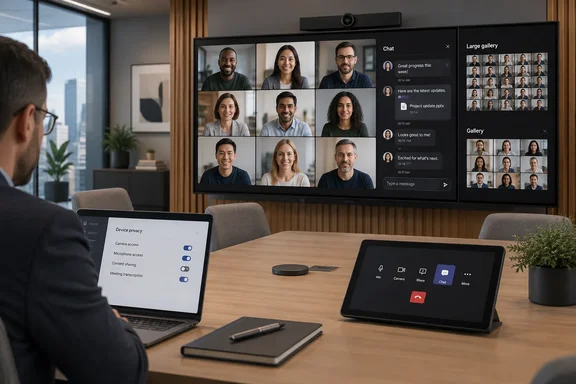
The practical change is simple: people physically in a conference room can see the ongoing Teams chat as soon as the room joins, instead of first navigating into a chat view. But for Teams administrators, it is also a display-default change that deserves review—particularly in rooms where the front display is visible to visitors, where screen real estate is limited, or where meeting chat commonly contains material intended for remote participants rather than everyone in the room.
Microsoft’s June 2026 Teams Rooms on Android release notes provide a more complete description than the roadmap entry. The feature applies to both Gallery and Large Gallery, not only Gallery as the roadmap wording suggests. Microsoft also moved the chat control from the view switcher to the meeting utility bar, so room users can show or dismiss the panel with one touch.
The default has changed, but chat is still separately controlled
This update changes whether the chat panel opens, not whether the room system is allowed to use meeting chat in the first place. Microsoft’s Teams Rooms device-settings documentation lists “Show Meeting Chat” and “Open Chat by Default” as separate controls, both enabled by default.
That distinction matters operationally. Disabling Open Chat by Default keeps the chat capability available but prevents the panel from appearing automatically when the room joins in Gallery view. Disabling Show Meeting Chat goes further: Microsoft says it removes chat functionality, including chat bubbles and the ability to select chat, across all meeting layouts on the Teams Rooms device.
For organizations that simply do not want a discussion pane consuming display space at every meeting start, the narrower setting is the appropriate response. It preserves the option for users to pull chat up when it is useful, rather than turning off a meeting feature globally.
Microsoft’s documentation also confirms that the open-by-default control can be applied to individual devices or in bulk. That makes this more than a one-room preference: a central Teams Rooms administrator can standardize the behavior across a room fleet rather than rely on local console configuration after every device update or replacement.
The June Teams Rooms on Android release is the delivery point
Microsoft lists the feature in Teams Rooms on Android version 1449/1.0.96.2026129709, released in June 2026. The same release included changes to Gallery-stage behavior, including participant placement adjustments, overflow-avatar refinements, and a fix for duplicate video feeds in Large Gallery.
The release-note placement is significant because it ties the new default to a client update rather than merely to a Microsoft 365 service-side policy. Admins troubleshooting inconsistent behavior across rooms should first verify that affected devices have received the June 2026 Teams Rooms on Android release or a later build. A room left on an older application version may retain the prior interaction pattern even if an administrator expects the new default.
Microsoft’s release notes also say that management of settings related to the June release and later releases is available through the Teams Rooms Pro Management portal, provided the device runs Teams Admin Agent version 1.0.0.202606082157 or later. The company does not state in the roadmap entry whether every configuration path reaches every tenant type or device-management arrangement, so administrators should validate policy delivery on a representative room before pushing a fleet-wide change.
The distinction is especially important for organizations that manage rooms through a mix of local settings, configuration profiles, and the Pro Management portal. The feature itself is a display default; the ability to consistently enforce that default depends on the management channel and device agent being current.
Front-of-room visibility changes the meeting’s privacy assumptions
Showing chat by default can be useful in hybrid meetings. A presenter who posts a link, a question, a correction, or a decision in the meeting thread no longer has to assume that people gathered in the room will miss it. That may reduce the familiar split between remote attendees following the chat and in-room attendees focused only on audio and video.
The tradeoff is that chat becomes visible on a shared room display by default. In a controlled internal meeting, that may be exactly what organizers want. In a conference room with guests, external contractors, walk-by visibility, or sensitive discussion among remote participants, the default can reveal messages to a wider audience than participants expect.
Teams meeting chat is already governed by the meeting’s membership and policy settings; this update does not create a new audience in the Teams service. It changes the physical presentation of messages that room occupants could previously choose to open. For security and compliance teams, that is still a meaningful difference. A message that remains inside the meeting tenant can become visible to every person in the room—and potentially to anyone with sight of the front display.
Administrators should therefore treat the setting as part of room-display policy, alongside decisions about whether to show participant names, captions, shared content, or external meeting details. The right setting may vary by room type rather than by tenant: executive boardrooms, reception-adjacent huddle spaces, training rooms, and secure project rooms do not have the same visibility requirements.
Large Gallery is included despite the roadmap’s narrower wording
The roadmap text submitted for item 561604 says the chat panel will open in Gallery view. Microsoft’s Teams Rooms on Android release notes broaden that statement: the panel opens by default in Gallery and Large Gallery.
That is the material implementation detail the roadmap leaves out. Large Gallery rooms are more likely to have a crowded visual stage, and adding a chat panel changes the balance between participant video and meeting text. In a room with a large display, the impact may be modest; on smaller front-of-room displays, it can be more noticeable.
Microsoft has provided the user escape hatch: the chat button is now in the meeting utility bar and the panel can be closed with one touch. But an in-meeting override is not a substitute for choosing a sensible default. Users arriving late, joining from a touch console they rarely use, or focused on starting a meeting may never close the panel even when it is inappropriate for the room.
The roadmap identifies the rollout as general availability for worldwide commercial tenants, GCC, GCC High, and DoD. Microsoft’s product documentation confirms the feature and the configuration controls, but it does not break out behavior or management availability by cloud environment. Government-cloud administrators should verify the setting on their own managed Android room systems rather than infer that all management options appear identically everywhere.
What Teams Rooms administrators should check now
Teams Rooms on Android deployments should review the new default as a deliberate configuration decision rather than leave it to whichever behavior arrived with the June update.
- Confirm that rooms expected to receive the change are running Teams Rooms on Android version 1449/1.0.96.2026129709 or a later release.
- Decide whether meeting chat should remain enabled on the device, independently of whether its panel should appear automatically.
- Disable “Open Chat by Default” where the front-of-room display has heightened privacy, guest-access, or limited-screen-space concerns.
- Test the policy on both Gallery and Large Gallery, because Microsoft’s release notes say both layouts receive the automatic panel.
- Ensure the Teams Admin Agent meets Microsoft’s stated 1.0.0.202606082157 minimum where the Teams Rooms Pro Management portal is used to manage newer release settings.
- Update room-user guidance so people know the chat button has moved to the meeting utility bar and can hide the panel in one tap.
This is a modest interface update, but it changes the default visibility of a live collaboration channel in shared physical spaces. For Teams Rooms on Android administrators, the immediate task is not to deploy a new feature—it is to decide whether the new default belongs on every screen in the building.
References
- Microsoft Teams: Chat panel open by default in the gallery view on Teams Rooms on Android Microsoft 365 Roadmap · 2026-09-02T22:56:59.2759925Z