

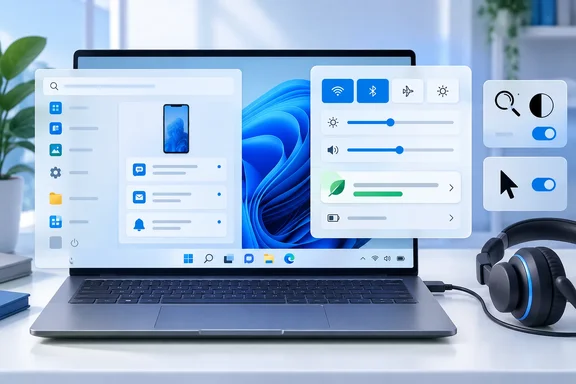
Windows 11 Build 26340.9577 Adds Energy Recommendations to Quick Settings
The Windows Insider blog post, signed by Stephen Lines, lists the builds by channel. The Beta channel gets 26220.9568 and the Experimental channel gets 26340.9577. Two builds are listed "for those on other specific Windows build versions": Beta (26H1) 28020.3112 and Experimental (26H1) 28120.3122. Microsoft says there is no Experimental (Future Platforms) release this week.
The two features the blog highlights both belong to the Experimental channel. Microsoft's release notes say Build 26340.9577 is based on Windows 11, version 26H2 and delivered through an enablement package. An enablement package is a small update that switches on features already staged in the installed build, so the device doesn't need a full reinstall. Community tracking on Eleven Forum identifies KB5122776 as the enablement package for the Insider Experimental Preview Build 26340, which appears in the installed updates list as "Feature Enablement for Windows (Ge) 26H2 Insider Refresh - KB5122776 - 2026.08 A - BuildNumber Update." That identifier comes from the forum, not from this week's Microsoft notes.
With Energy Recommendations in Quick Settings, Microsoft says Insiders can more easily find and act on suggestions that "help reduce energy consumption and improve device sustainability." The recommendations themselves already existed on the Power & battery settings page, which shows the suggested actions. This build adds a shortcut to them in the Quick Settings flyout. The notes don't say which recommendations appear, whether the list changes by device type, or how much energy the suggestions save. Treat this as a change in where the feature lives, not a battery-life improvement.
The Experimental notes also include the usual limits. Changes are "gradually being rolled out," and many features use Controlled Feature Rollout. That means Microsoft turns a feature on for a subset of Insiders first and expands it while watching feedback. Installing 26340.9577 doesn't guarantee you'll see either headline feature right away.
The Start Menu Phone Companion Changes Differently in Each Channel
The Start menu's Phone companion shows recent activity from a linked phone. It changes in both channels this week, but the two changes are different, and it's easy to mix them up.
In Experimental Build 26340.9577, the companion shows more recent activity and adds a scrollable side pane, so you can browse further back without leaving Start. The Beta Build 26220.9568 notes list the Phone companion under Phone Link and describe a different change: hover over a recent message or notification in the Recent section and Start shows a preview of its content. Microsoft pitches this as a way to check whether something needs attention without picking up the phone or opening the item.
The Beta feature has a clear prerequisite. Microsoft says it is rolling out to Beta Insiders with a minimum Phone Link build of 1.26021.3.0, and the related settings are under Phone Link > Settings > Start menu personalization. If you're on Beta and the hover preview doesn't appear, check the Phone Link app version before assuming the Windows build is at fault. The Experimental notes don't give a Phone Link version requirement for the side pane.
Beta Build 26220.9568 Gets Magnifier's Contrast Theme One Week After Experimental
The Beta build carries more user-facing change than the Experimental release this week, and much of it is accessibility work. The clearest example is Magnifier's new contrast theme toggle. On September 18, Microsoft announced the same feature for Experimental, pitched as a new contrast theme toggle for a lower-glare screen. If bright screens are uncomfortable, many people use color inversion to reduce glare. However, inversion changes everything on screen, including photos, charts, and videos. One week later it has reached Beta.
The Beta release notes explain how it works. The toggle sits on the Magnifier toolbar and applies a contrast theme. The dark theme is the default, and you can pick which theme the toggle uses under Settings > Accessibility > Magnifier. Color inversion flips every pixel. The contrast theme recolors the interface and leaves photos, charts and videos in their original colors. Color inversion is still available and works as before, so the new theme is an extra option for people who want a darker interface without inverting colors. Microsoft also notes that zoom per display isn't available in the Beta channel yet.
The second accessibility addition is Pointer Indicator, which Microsoft says helps users with low vision find and use the cursor. To turn it on:
- Open Settings > Accessibility > Mouse pointer and touch, or search Settings for "Pointer indicator."
- Turn on the Pointer indicator setting.
- Once it's enabled, toggle it on or off with Windows logo key + Ctrl + Shift + X.
The September 18 Experimental notes described a sleeker new animation for the Mouse indicator. This can be enabled under accessibility settings. We've also added the option to keep the indicator activated until the user presses the escape key. The naming differs between the two posts, and Microsoft hasn't said whether the Experimental Mouse indicator and the Beta Pointer Indicator are the same feature at different stages. The two builds follow the same pattern as the Magnifier theme, but that link is our inference. Microsoft hasn't confirmed it.
Two smaller Beta changes complete the list. File Explorer's Folder Options dialog now supports dark mode. And the temporary files section under Settings > System > Storage gets small visual refinements, which also appear in the Experimental build.
Narrator Math Reading Expands in Experimental, and a USB Audio Fix Reaches Both Channels
Experimental Build 26340.9577 adds language and browser support to a Narrator feature introduced earlier. Microsoft says math reading and navigation first appeared in Build 26340.9354. Math reading now supports six languages: English (United States), English (United Kingdom), Traditional Chinese, Finnish, German and Spanish. You choose the language under Math reading settings in Narrator settings.
This build also brings math reading to supported web content in two browsers: Microsoft Edge Stable 153.0.4234.32 and later, and Google Chrome Stable 153.0.8010.18 and later. The browser versions are the practical detail. If you're testing this on an Experimental PC, update the browser first, because an older Edge or Chrome won't meet the stated minimum. Microsoft aims the feature at students and professionals reading equations on the web.
Both channels get the same audio fix. It covers certain USB Audio Class 1.0 devices, including some multichannel audio headsets, that could stop working correctly after the latest updates were installed. USB Audio Class 1.0 is an older standard driver class that many plug-and-play USB headsets and audio adapters use. Microsoft doesn't name affected models or say which earlier update caused the problem. If a USB headset stopped working on a recent Beta or Experimental build, this release is the one to install and retest.
The Experimental build has one more fix: Microsoft says it improved how taskbar settings for multiple monitors are saved when monitors are connected and disconnected. This is a reliability change for docked laptops and multi-display desks, where taskbar settings could apparently fail to persist across reconnects. The notes describe the improvement only in general terms.
The 26H1 Builds 28020.3112 and 28120.3122 Carry a Hyper-V Plan9 Fix
The two 26H1 builds are listed separately because they serve Insiders on a different Windows version track from the 25H2-based Beta and 26H2-based Experimental builds. They move steadily week to week. On September 11, Microsoft listed Beta (26H1): Build 28020.2991 · Experimental (26H1): Build 28120.3002 · Experimental (Future Platforms): Build 29667.1000. On September 18, it shipped Experimental (26H1): Build 28120.3032 · Experimental (Future Platforms): Build 29671.1000 and no Beta (26H1) build appeared in that list.
Beta (26H1) Build 28020.3112 has one documented fix that matters to developers and virtualization users. Microsoft says some applications using HCS-managed virtual machines had trouble sharing host folders with Linux VMs over Plan9. The shared folders either didn't appear in the guest or couldn't be accessed. HCS is the Host Compute Service, the Windows component that manages containers and lightweight VMs. Plan9 is the file-sharing protocol used to expose host folders to Linux guests. The notes don't name the affected applications. If a tool that runs Linux VMs through HCS lost access to host folders on this track, 28020.3112 is the build Microsoft says fixes it.
The Experimental (26H1) Build 28120.3122 notes, as captured in the published record, describe only "a small set of general improvements and fixes." Microsoft warns that builds on this track can be unstable and may come with limited documentation, and that features may use Controlled Feature Rollout.
Experimental (Future Platforms) had shipped in each of the previous two weeks, so this week's gap is notable. Microsoft gave no reason for skipping it, and a week without a release doesn't indicate a problem on its own.
What This Means for Windows Insiders and IT Testers
Your channel decides what matters this week. Beta Insiders have the most to look at, particularly anyone relying on Magnifier or needing better cursor visibility. Experimental Insiders get smaller discoverability changes that may not appear right away. None of these builds belong on production machines, and Microsoft says outright that any of these features might change over time, be removed, or replaced and never get released beyond Windows Insiders.
The Beta channel runs on Windows 11 25H2 and is closer to what ships publicly. Experimental runs on 26H2, where Microsoft is still trying features out. Features seem to move from Experimental to Beta: the Magnifier contrast theme went from Experimental on September 18 to Beta on September 25. That makes the Beta notes a reasonable early signal for what IT teams might see in a future cumulative update. Microsoft gives no dates for public release.
- If a USB Audio Class 1.0 headset or adapter stopped working on a recent Beta or Experimental build, install 26220.9568 or 26340.9577 and retest it.
- To use hover previews in the Beta build's Start menu, update Phone Link to at least 1.26021.3.0 and check Phone Link > Settings > Start menu personalization.
- Beta users with low vision can turn on Pointer Indicator under Settings > Accessibility > Mouse pointer and touch and toggle it with Windows logo key + Ctrl + Shift + X.
- To test Narrator math reading on the web in the Experimental build, you need Edge Stable 153.0.4234.32 or Chrome Stable 153.0.8010.18 or later.
- If Linux VMs on the Beta (26H1) track lost access to Plan9-shared host folders, install Build 28020.3112.
- Don't expect measurable battery savings from Energy Recommendations in Quick Settings. Microsoft moved an existing feature somewhere easier to find and didn't quantify any savings.
This week's headline features are the Experimental Quick Settings and Start menu changes, but the release that matters more is Beta Build 26220.9568. It carries accessibility features that have already passed through Experimental and a USB audio fix that some Insiders need. If the one-week handoff from Experimental to Beta holds, the next Beta build may pick up this week's Experimental changes, starting with Energy Recommendations in Quick Settings and the Narrator math expansion.
References
- Windows 11 Insider Beta Preview Build 26220.9568 - Windows Insider Program | Microsoft Learn learn.microsoft.com
- Announcing new builds for 25 September 2026 Microsoft - Windows Insiders Blog · Fri, 25 Sep 2026 17:02:08 +0000
- Announcing new builds for 18 September 2026 | Windows Insider Blog blogs.windows.com