

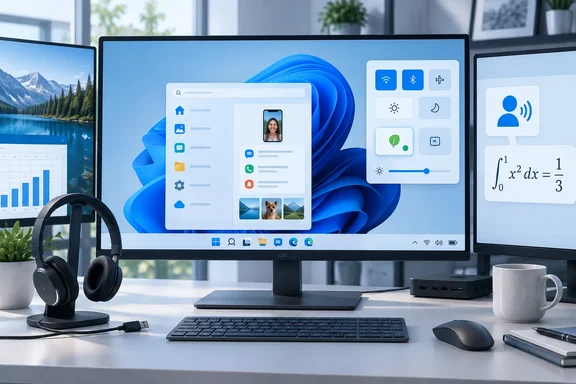
Build 26340.9577 arrives on the Windows 11 26H2 enablement package
The build was part of a larger batch. According to the Windows Insider Blog, Microsoft shipped Beta: Build 26220.9568 ?? Experimental: Build 26340.9577 that day. It also shipped Beta (26H1) Build 28020.3112 and Experimental (26H1) Build 28120.3122, and said there was no release for Experimental (Future Platforms) that week. Windows Report, Neowin and Pureinfotech all covered the Experimental build, and their feature lists match Microsoft's release notes.
The technical basis is the same as in recent Experimental builds. Microsoft's notes say updates are based on Windows 11, version 26H2 via an enablement package (Build 26340.9577). An enablement package is a small update that turns on features already present in the installed build, so the device does not need a full reinstall. Community tracking on Eleven Forum lists KB5122776 as the enablement package for the Experimental 26340 builds. That KB number comes from community tracking, not from this build's release notes.
Installing the build does not guarantee you will see the new features. Many features are rolled out using Controlled Feature Rollout technology, starting with a subset of Insiders and ramping up over time. We monitor feedback to see how they land before pushing them out to everyone in this channel. Two Insiders on the same build number may therefore see different Start menus or Quick Settings panels. Microsoft also gives its usual warning that features might change over time, be removed, or replaced and never get released beyond Windows Insiders.
Energy Recommendations moves from Power & battery into Quick Settings
Windows Report led with this change. Microsoft's release notes say it introduces Energy Recommendations directly in Quick Settings to help discover and act on ways to reduce energy consumption and improve device sustainability.
Energy Recommendations is not new. Microsoft's support documentation describes it as a page that gathers the Windows 11 settings with the biggest effect on power consumption and battery life. Until now it has been several clicks deep, at Start > Settings > System > Power & battery > Energy recommendations. The recommendations Microsoft documents include:
- Setting the power mode to the recommended balance of efficiency and performance.
- Setting screen brightness for energy efficiency, although Microsoft says this is not yet enabled for external displays.
- Putting the device to sleep and turning off the screen after three or ten minutes, depending on the system.
- Content-adaptive brightness and contrast, and brightness that adjusts to ambient light. Microsoft notes limits for devices without batteries and for external monitors.
- Sleeping the device when you walk away and dimming the screen when you look away, which requires a presence sensor.
- Turning off the screen saver and stopping USB devices while the screen is off. The USB option is not available on devices without batteries.
Microsoft's documentation says the list depends on the device type, whether it is plugged in or on battery, and hardware and sensor differences. A desktop tower with no battery or presence sensor will show a much shorter list than a laptop that has both. That will probably also apply to the Quick Settings entry, although this is an inference because the build notes do not describe how the entry behaves on different hardware.
The notes describe a change in where the feature appears, not a change in what it does. Microsoft does not claim new recommendations or new power behavior. The same toggles are now easier to reach from the taskbar flyout. For users who never opened the Power & battery page, that could make a real difference. For people who already tune their power settings, it saves a few clicks. The release notes also do not say exactly what the Quick Settings interaction looks like, for example whether it is a tile, a banner, or a link to the Settings page.
The Start menu phone companion gets a scrollable activity pane
The second headline change is in Start. The notes say the Phone companion for the Start menu now shows more of your recent activity, with a scrollable side pane so you can view even more without leaving the Start menu.
The phone companion is the Phone Link panel attached to the Start menu. Before this build, it showed a limited view of recent phone activity. Now you can scroll through more of it without opening the full Phone Link app. Microsoft's notes do not list which kinds of activity appear in the pane, and they give no minimum Phone Link version or phone OS requirements. Like the other headline features, this one is being rolled out gradually.
Microsoft has been steadily building up Phone Link inside the Start menu, and the Beta build released the same day also includes Phone Link changes, according to Windows Report. This Experimental change is small. It does, however, match the Quick Settings change in keeping information inside a surface the user already has open.
Narrator math reading expands to six languages and Edge and Chrome 153
The accessibility change has the clearest benefit for a specific group of users. Microsoft says it is building on the math reading and navigation support introduced for Narrator in Build 26340.9354. Narrator math reading now supports a total of six languages: English (United States), English (United Kingdom), Traditional Chinese, Finnish, German, and Spanish. You can choose your preferred language under Math reading settings in Narrator settings.
The feature also now works in browsers. Math reading is also now available for supported web content in Microsoft Edge Stable version 153.0.4234.32 and later and Chrome Stable version 153.0.8010.18 and later. These browser versions are the minimums. If you test this on an Experimental build, check each browser's version first, because an older Edge or Chrome can make the feature look broken when the browser is simply too old.
The phrase "supported web content" sets the limit. Microsoft does not say that every equation on every webpage will be readable, and it does not define which markup formats count as supported. Students and educators who use screen readers should treat this as a significant preview improvement and test it against the actual course materials and sites they depend on.
USB Audio Class 1.0 and multi-monitor taskbar fixes
Two fixes deal with problems people run into in everyday use. The first is audio. Microsoft fixed an issue affecting certain USB Audio Class 1.0 devices, including some multichannel audio headsets, that could stop working correctly after installing the latest updates. USB Audio Class 1.0 is the older generic standard many USB headsets and adapters use to work without a vendor driver.
Microsoft limits the fix to "certain" devices. It does not name the update that caused the problem, list affected models, or give a workaround. If your multichannel USB headset stopped working after a recent update, this build may fix it, but it is not a guaranteed fix for every USB audio fault. WindowsForum's coverage of the same day's releases reports that the Beta build 26220.9568 contains the same USB audio fix, so Beta Insiders get it too.
The second fix is for multi-monitor setups. Microsoft improved how Taskbar settings are preserved when you connect or disconnect monitors. The official wording says Microsoft improved the underlying state persistence of those settings. In practice, laptops that dock and undock should keep their multi-monitor taskbar settings more reliably. Microsoft does not say which individual settings are covered, and the fix adds no new visible control.
Microsoft also made what it calls small visual refinements to the Temporary files section under Settings > System > Storage. The notes do not mention any change to how cleanup works. It is a cosmetic change and nothing more.
Build 28120.3122 barely changes the Experimental 26H1 track
Microsoft also released a build for the Experimental (26H1) channel, and it has almost no documentation. Neowin notes that Build 28120.3122 comes without the changelog, with Microsoft only saying: "This update includes a small set of general improvements and fixes that improve the overall experience for Insiders running this build on their PCs."
Build 28120.3122 is a separate branch and should not be confused with 26340.9577. None of the Quick Settings, Start, Narrator, audio or taskbar changes are documented for it. Microsoft also warns that Experimental (26H1) builds can be unstable and may ship with limited documentation. Insiders on that track should expect little beyond general fixes this week.
What this means for Experimental channel Insiders
Most readers do not need to do anything. These are preview changes in a channel designed to try ideas that may never ship. The two groups with a reason to install now are Narrator users who need math reading in one of the six supported languages, and Insiders whose USB Audio Class 1.0 headset or multi-monitor taskbar layout broke after a recent update. Everyone else can wait for the features to show up in the Beta channel or never appear at all.
To check which build you have, run winver. Pureinfotech notes that Experimental features can also be managed under Settings > Windows Update > Windows Insider Program > Feature flags. If you do not see a feature, the most likely reason is the staged rollout, not a failed install.
- Build 26340.9577 is an Experimental channel build on the Windows 11 26H2 enablement package, released September 25, 2026, and it is available only to Windows Insiders.
- Energy Recommendations in Quick Settings is a shortcut to the existing Power & battery page, and which recommendations you see still depends on your hardware, battery and sensors.
- Narrator math reading on the web requires Edge Stable 153.0.4234.32 or Chrome Stable 153.0.8010.18 or later, and it covers only supported web content.
- The USB Audio Class 1.0 fix applies to "certain" devices, including some multichannel headsets, and the Beta build 26220.9568 has the same fix.
- Because of Controlled Feature Rollout, two PCs on the same build can show different features, so a missing feature does not mean the install went wrong.
- Experimental (26H1) Build 28120.3122 only includes unspecified general fixes and does not include the 26340.9577 changes.
This week's release is mostly fixes and small changes that put existing settings in easier-to-reach places. Energy Recommendations in Quick Settings and the Start menu phone pane both move existing features into menus users open every day, and the Narrator and USB audio changes make a practical difference for the users they affect. The shared USB audio fix is already in Beta build 26220.9568. The headline features will reach wider use only if they appear in the Beta channel, which Microsoft has not scheduled.
References
- New Windows 11 Experimental Build Is Out With 'Energy Recommendations' in Quick Settings & More - Windows Report Windows Report · 2026-09-25T19:11:58+00:00
- Build 26340.9577 for Windows 11 26H2 adds useful Start menu and Narrator upgrades – Experimental - Pureinfotech pureinfotech.com
- Windows 11 Insider Experimental Preview Build 26340.9577 - Windows Insider Program | Microsoft Learn learn.microsoft.com