

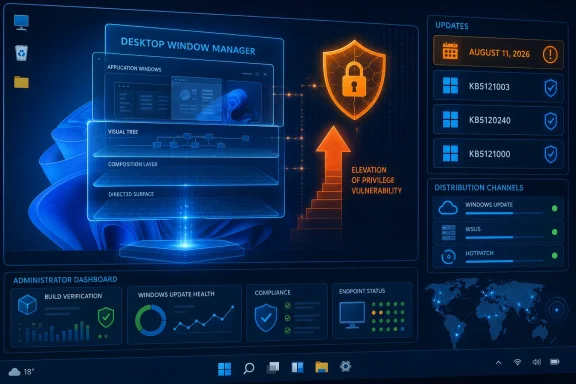
The advisory appeared in Microsoft’s Security Update Guide at 7:00 a.m. Pacific time on August 11. Microsoft identifies the affected component as the Windows DWM Core Library, the code underpinning the Desktop Window Manager’s composition of windows, desktops, visual effects, and screen content. An elevation-of-privilege bug in that layer matters less as an initial intrusion route than as a post-compromise amplifier: an attacker who has already gained code execution or a constrained local foothold may use a local privilege-escalation flaw to turn that access into control at a higher Windows security boundary.
There is an important limit to what is public today. Microsoft’s entry confirms the vulnerability and its impact class, but it does not publicly explain the root cause, publish a proof of concept, or provide an attack narrative in the material currently exposed through the advisory. Searches immediately after release also did not return an independently indexed NVD or CVE Program record for this identifier. That is consistent with a same-day disclosure and indexing lag, but it means organizations should not invent precision that the public record does not yet support.
The Patch Tuesday update is the remedy, not a separate download
For mainstream Windows 11 deployments, Microsoft’s August 11 cumulative releases are the practical remediation vehicle. Windows 11 version 24H2 and version 25H2 received KB5121003, advancing those branches to OS Builds 26100.9168 and 26200.9168 respectively. Windows 11 version 23H2 received KB5120240, moving to Build 22631.7517, while the hardware-scoped Windows 11 version 26H1 release received KB5121000 and Build 28000.2704.
Microsoft’s KB5121003 release notes direct customers to the Security Update Guide for the individual vulnerabilities fixed by the cumulative package. The update is available through Windows Update, Windows Update for Business, WSUS, and the Update Catalog. For organizations already using Microsoft’s hotpatch servicing model on eligible Windows 11 Enterprise devices, Microsoft also lists Hotpatch KB5120994 for version 24H2 and 25H2, advancing those systems to Builds 26100.9106 and 26200.9106 without the conventional monthly restart.
The operational consequence is easy to miss: a hotpatch build and the regular cumulative-update build will not have the same build number, even when both are the August security release for the same Windows feature version. Compliance teams should validate against the servicing channel actually assigned to each device rather than using one universal build-number query.
Microsoft’s Windows 11 release information confirms that the August “B” security release was published on August 11 for 23H2, 24H2, 25H2, and 26H1. That provides a cleaner deployment checkpoint than trying to determine whether a workstation has a particular DWM DLL revision. In ordinary enterprise operations, the cumulative update is the supported unit of remediation.
Why a DWM privilege escalation belongs in the high-priority queue
Desktop Window Manager vulnerabilities can sound like desktop-only defects, inviting the assumption that servers or remote-worker systems are outside the meaningful risk area. That is the wrong operational lens. DWM is a core Windows graphical component on client systems, and an elevation-of-privilege weakness becomes valuable when paired with another attack stage: a malicious installer run by a standard user, browser or document exploitation that lands in a low-privilege process, a compromised user account, or malware operating under ordinary user rights.
The distinction between remote code execution and elevation of privilege remains useful for triage. CVE-2026-61932 is not described by Microsoft as a network wormable flaw, an unauthenticated server compromise, or a vulnerability requiring users to open a booby-trapped file. Those are not claims Microsoft has made. But a locally reachable privilege-escalation path can erase the protection provided by running day-to-day users without administrative rights, turning an initial foothold into broader control over the endpoint.
For security teams, that makes this a patching priority rather than an incident response declaration. There is no public indication in Microsoft’s advisory that CVE-2026-61932 is being exploited in the wild. There is also no published workaround, mitigation, or configuration switch that substitutes for the security update. Treat it as a vulnerability to close promptly in the normal accelerated Patch Tuesday cycle, particularly on systems exposed to users who can install software, use browsers extensively, or handle untrusted files.
The public advisory is unusually thin on technical detail
Microsoft’s guidance includes explanatory text for vulnerability-confidence metrics, but that explanatory material should not be read as a technical description of CVE-2026-61932. It explains what confidence and exploitability-related assessments mean in general: whether a vulnerability’s existence and known technical details have been corroborated, and how much useful knowledge may be available to attackers. It does not reveal the flaw’s trigger, vulnerable function, memory-corruption condition, or privilege target.
That distinction is consequential. A title containing “Windows DWM Core Library Elevation of Privilege Vulnerability” identifies a component and impact category, not a reliable exploitation recipe. Administrators should resist filling the gap with speculation about a use-after-free, a race condition, a window-message issue, or a graphics-driver interaction. Microsoft has published none of that detail for this CVE in the advisory material reviewed at release time.
The same thinness applies to scope. Microsoft’s public KB pages provide the August build and KB identifiers for supported Windows 11 branches, but the concise release notes do not enumerate every CVE-to-product mapping inline. The Security Update Guide remains Microsoft’s primary record for that mapping. NVD’s absence from immediate search results is also not evidence that systems are safe; it is a reminder that vulnerability databases often trail the vendor’s release-day disclosure and analysis.
Deployment teams should validate channel, build, and restart state
Microsoft says KB5121003 has no known issues at publication time. That is useful, but it should not be mistaken for a guarantee that every environment will behave identically. The same package includes servicing-stack changes, Secure Boot certificate-targeting data, and AI-component updates applicable to Copilot+ PCs, alongside its security content. A pilot deployment still makes sense for managed estates with endpoint security agents, unusual display stacks, kiosk configurations, or tightly controlled application baselines.
There is also a practical catalog-readiness wrinkle in Microsoft’s own KB5121003 page. Although the release is marked available through all standard channels, portions of the standalone-installation instructions still display placeholder wording indicating that download links will be available soon. Windows Update, Windows Update for Business, and WSUS are therefore the dependable first routes for broad deployment; organizations relying on manually curated MSU packages should confirm that the correct architecture-specific packages are actually present before scheduling offline or image-servicing work.
Administrators deploying dynamic updates into Windows installation media have a separate requirement. Microsoft warns that the boot.stl file must be included and match the Windows version and architecture of the image being updated; omitting it can prevent booting installation media and produce error 0xc0430001. That is not unique to CVE-2026-61932, but it becomes relevant when teams attempt to bake August security content into new-device or recovery media rather than patching an already running OS.
Windows 11 version 24H2 Home and Pro reaches end of updates on October 13, 2026, according to Microsoft’s release notes. The August update does not change that deadline. Devices staying on 24H2 can receive this month’s DWM fix, but organizations that have not planned their move to 25H2 should not confuse a successful August deployment with a long-term servicing answer.
The concrete next step is to deploy the August 11 security release appropriate to each Windows servicing branch, confirm the resulting build number or hotpatch level, and retain ordinary endpoint telemetry for suspicious local privilege escalation. Microsoft has confirmed the flaw exists and issued the patch; the missing exploit detail is a reason to patch efficiently, not a reason to wait for a more dramatic label.