
The issue is not a remote code execution flaw, a cryptographic break, or an authentication bypass in the usual sense. Instead, it is a weakness in the defenses surrounding password authentication itself. That distinction matters: an attacker still needs a valid username and password, but a router that accepts repeated high-volume guesses gives attackers more opportunity to find them.
For Windows administrators, network teams, managed service providers, and homelab operators using MikroTik devices, the practical conclusion is immediate. An Internet-exposed RouterOS API service should be treated as an unnecessary credential-attack surface unless it is explicitly required and tightly restricted. That applies equally to physical RouterBOARD devices and to MikroTik’s virtualized Cloud Hosted Router (CHR) platform.
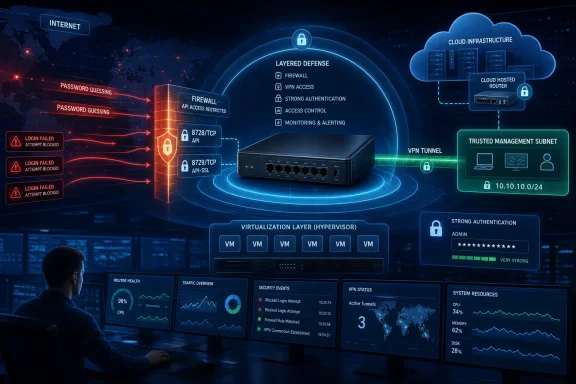 Overview: A Brute-Force Protection Gap in RouterOS API Authentication
According to the CISA advisory, the affected authentication handling does not impose robust controls after repeated invalid API login attempts. In particular, the advisory identifies the absence of meaningful account lockout, per-source restrictions, and effective request-rate controls.
Some RouterOS versions reportedly introduce a fixed delay for each connection attempt. However, that defense can be sidestepped by attempting many logins concurrently. Rather than making the attack impractical, a per-connection pause can merely encourage an attacker to open parallel sessions and distribute the workload across multiple connections.
That is an important distinction for security planning. A delay that slows a single sequential client is not equivalent to rate limiting, which constrains total authentication activity over a defined interval. It is also not equivalent to a source-based lockout, which can temporarily deny further access from an address or network after a configured number of failures.
RouterOS’s API is powerful by design. MikroTik documents it as an interface for custom management software that can gather information, adjust configurations, and administer RouterOS devices. The vendor’s documentation also states that the API service must be enabled before it can accept connections, using TCP port 8728 for API and TCP port 8729 for the secure API service. MikroTik’s API documentation confirms that these services are intended for configuration and management, not passive monitoring alone.
If a valid API account has broad permissions, a successful password guess could be consequential. Depending on the assigned RouterOS user policies, an authenticated session may be capable of reading configuration details, changing firewall rules, creating users, modifying routes, accessing sensitive information, or disrupting connectivity. RouterOS user groups can grant privileges including read, write, policy, sensitive, api, and rest-api, among others. MikroTik’s user-management documentation makes clear that permissions are granular, but its default groups can still be substantially more capable than their names imply.
Why Concurrent Attempts Change the Risk
A simple login delay is often viewed as a basic brute-force defense. In isolation, it can have value. If every invalid login forces an attacker to wait before trying again, the number of guesses possible in a minute or hour falls.
The CISA advisory highlights why that calculation changes when a delay is tied only to an individual connection. An attacker may be able to establish many simultaneous sessions, with each session serving as its own delayed login channel. The aggregate number of attempts can then remain high even though any single connection is slowed.
This is a familiar authentication-security problem. A control must operate at the correct scope:
- A per-connection delay slows one connection.
- A per-account limit restricts repeated guesses against a named account.
- A per-IP or per-prefix limit constrains a single origin.
- A global authentication limit protects the service from aggregate bursts.
- An account lockout or cooldown stops continued guessing against a targeted account.
- An upstream access policy ensures unauthorized sources cannot reach the login service in the first place.
The RouterOS API issue is especially relevant because management services are high-value targets. An attacker who compromises a workstation account may gain limited access to one system. An attacker who gains administrative control of an edge router or a cloud-hosted routing appliance may gain visibility into traffic flows, alter DNS or routing behavior, weaken firewall protections, create persistence, or use the appliance as a pivot point into other network segments.
MikroTik has repeatedly emphasized that management services should not be reachable from untrusted networks. Its security guidance advises customers to maintain RouterOS updates and use a strong firewall to protect administrative services from untrusted traffic. That long-standing recommendation becomes more urgent when the authentication service itself cannot reliably throttle password-guessing activity.
Why RouterOS API Exposure Deserves Immediate Review
API Is an Administrative Interface, Not a General-Purpose Internet Service
The RouterOS API exists to let software interact directly with a router’s configuration and operational state. That is useful for monitoring platforms, provisioning systems, inventory tools, service-provider automation, and custom Windows administration applications. It also means the interface can be extremely sensitive.
MikroTik describes the API as a way for custom software to communicate with RouterOS, collect information, modify configuration, and manage the router. The API reference also explains that requests closely track RouterOS command-line syntax, reinforcing that API access can have operational authority.
An API listener should therefore be exposed only where an automated management workflow genuinely requires it. Enabling API access “just in case,” leaving it open after a deployment task, or publishing it through a broad cloud security-group rule creates risk without a corresponding operational benefit.
Cloud Hosted Router Is Not Immune
MikroTik CHR is RouterOS running as a virtual appliance, often deployed on platforms such as Hyper-V, VMware, Proxmox, Azure, AWS, and other hosting environments. The virtual form factor changes how the router is deployed, but not the importance of securing its management plane.
In fact, CHR instances can be particularly exposed because cloud workloads frequently receive public IP addresses, rely on permissive default security groups, or are rapidly cloned from templates. A management interface that was safely reachable from a private virtualization network may become publicly accessible after a network-interface or firewall-policy change.
The same principle applies to Windows-based network environments. A Hyper-V host may run CHR as a virtual router for lab networks, branch connectivity, site-to-site VPNs, or tenant segmentation. If the VM has a virtual NIC connected to an external switch, API exposure must be assessed at every layer:
- The RouterOS
/ip serviceconfiguration. - The RouterOS input firewall.
- The Hyper-V virtual switch and host network design.
- The upstream router, cloud security group, or perimeter firewall.
- Any VPN, jump-host, or remote-management access path.
Security controls should overlap. A mistake at one layer should not make the API reachable from the public Internet.
What Is Affected—and What Is Not
The advisory specifically concerns authentication safeguards around the RouterOS API. It does not mean every RouterOS service shares precisely the same weakness, and it does not mean every exposed MikroTik device will be compromised.
However, administrators should avoid treating the API in isolation. A weak password, exposed WinBox port, public WebFig interface, insecure SSH configuration, or overly broad user permissions can produce similar real-world outcomes: an attacker gains administrative access to the router.
MikroTik lists multiple management services under /ip service, including Telnet, FTP, SSH, WebFig over HTTP or HTTPS, API, API-SSL, and WinBox. The RouterOS services documentation identifies the API and API-SSL services and their ports, while also documenting the ability to limit the source networks permitted to access a service.
The important operational point is this: disabling API does not solve a broader management-plane exposure problem if other administrative services remain unnecessarily public. A secure remediation project should inventory all remote management paths, not only TCP 8728 and TCP 8729.
No Vendor Fix Yet: Mitigations Become the Primary Defense
CISA states that no MikroTik fix is currently available for this API authentication-handling weakness. The advisory instead directs administrators toward compensating controls, including use of VPN protection, restrictive management access policies, firewall rules, trusted-network setup, and long randomly generated passwords.
That status changes the normal patch-management playbook. Updating RouterOS remains essential because it addresses other vulnerabilities and reliability issues, but a current firmware version alone should not be assumed to eliminate this particular brute-force exposure.
Disable API When It Is Not Needed
The strongest immediate mitigation is to turn off services that are not needed. If no automation platform depends on RouterOS API access, disabling both standard API and API-SSL removes the affected service from the reachable attack surface.
/ip service set api disabled=yes
/ip service set api-ssl disabled=yes
This should be paired with a review of other services such as telnet, ftp, www, www-ssl, ssh, and winbox. The safest configuration is not a management service protected by a password; it is a management service that is not reachable by an attacker at all.
Prefer a VPN or Private Management Network
CISA recommends using a strong VPN or another added protection layer whenever API access must be available from public networks. Its mitigation guidance reflects a sound security architecture: rather than publishing the RouterOS management interface, publish a hardened remote-access gateway and let authenticated administrators reach the router only after entering the trusted management network.
A VPN is not a substitute for strong API credentials or firewall rules. It is an additional gate. Properly implemented, it sharply reduces the population of systems that can even attempt a RouterOS API login.
For an enterprise environment, preferred patterns include:
- A dedicated management VPN with multi-factor authentication.
- A bastion host or privileged access workstation.
- A private management VLAN reachable only from trusted administrator systems.
- Cloud private networking rather than a public interface.
- Site-to-site tunnels for fixed automation platforms.
- Explicitly permitted source IP addresses where static administrative egress addresses are available.
Restrict the Service at /ip service
RouterOS supports a source-address restriction for services. MikroTik documents the address property as a list of IP prefixes from which a service can be accessed, and provides an API restriction example using trusted IPv4 and IPv6 networks. The official services documentation notes that this setting is suitable for trusted-network restrictions, while recommending a firewall for blocking access from external or untrusted networks.
For example, an organization whose automation platform lives on 10.20.30.0/24 can restrict the API service to that private range:
/ip service set api address=10.20.30.0/24
A real deployment should use its own narrowly defined management ranges. Avoid broad entries such as 0.0.0.0/0, large corporate supernets that include unmanaged devices, or an entire VPN address pool if only a few monitoring servers need access.
Enforce the Policy in the Router Firewall
Service restrictions should be reinforced with an explicit RouterOS input-chain firewall policy. MikroTik’s own advanced-firewall guidance describes the core objective as allowing access to the router from the LAN or another trusted source and dropping everything else. The vendor’s firewall documentation stresses the value of a default-deny posture for traffic directed at the router itself.
A conceptual IPv4 pattern might look like this:
/ip firewall address-list
add list=router-management address=10.20.30.0/24 comment="Trusted management subnet"

/ip firewall filter
add chain=input action=accept protocol=tcp dst-port=8729 \
 src-address-list=router-management comment="Allow API-SSL from management subnet"
add chain=input action=drop protocol=tcp dst-port=8728,8729 \
 comment="Block RouterOS API from all other sources"
The order of firewall rules is critical. Existing deployments may already include rules for established traffic, VPN interfaces, administration hosts, monitoring systems, or cloud metadata paths. Administrators should test firewall changes from a trusted local connection or use RouterOS Safe Mode to avoid locking themselves out.
The example also intentionally permits API-SSL on port 8729 rather than the plaintext API service on port 8728. MikroTik documents API-SSL as the secure API service, and notes that a configured certificate permits a TLS session. Its API documentation should be used alongside a proper certificate configuration rather than assuming that merely changing ports provides secure transport.
The Importance of Strong, Random Credentials
CISA specifically advises using long, randomly generated passwords and retaining the device’s randomly generated default password—or replacing it with an equally strong one—because RouterOS does not enforce a minimum password complexity requirement by default. The advisory frames this as an essential mitigation while the service lacks sufficient controls against repeated guessing.
This is more than generic password advice. In the context of a weak brute-force defense, password entropy directly determines the attacker’s chances of eventual success.
A memorable password based on a product name, company name, router model, season, year, or predictable substitution pattern is vulnerable to targeted guessing. Passwords reused from Windows domain accounts, VPN accounts, cloud consoles, or other network devices are even more dangerous because a breach elsewhere can turn into a RouterOS compromise.
RouterOS includes settings for minimum-password-length and minimum-categories, but MikroTik documents these with empty defaults rather than mandatory out-of-the-box enforcement. The RouterOS user documentation also shows that local router users can be assigned source-address restrictions and permission groups.
A hardened account strategy should include:
- Unique passwords for every RouterOS device or managed tenant.
- Passwords generated by an approved password manager.
- No shared
admincredential across a fleet. - Separate accounts for people, automation, and emergency access.
- Custom least-privilege groups for API integrations.
- Source-address constraints on high-value administrative accounts.
- Immediate removal or disabling of obsolete accounts.
- Periodic reviews of users and active sessions.
MikroTik warns that even its default read user group includes significant permissions such as sensitive, reboot, winbox, and API-related access. Its user-group reference recommends custom groups for genuinely limited access. That advice is especially relevant for API clients that need to query interface status or traffic data but do not need the ability to modify routing, firewall, user, or system settings.
Monitoring: Detecting the Attempts the Platform Does Not Stop
The absence of an effective native lockout makes monitoring a key compensating control. Administrators should not assume brute-force activity will be obvious from ordinary operational dashboards.
MikroTik’s security guidance advises customers to review router logs for suspicious login activity. The vendor’s security page also reiterates the need to firewall management services away from untrusted networks. Log review should include failed API logins as well as authentication events involving WinBox, SSH, WebFig, and remote-access services.
At a minimum, teams should establish alerts for:
- Repeated failed logins from a single source address.
- Failed logins against multiple usernames from one address.
- High volumes of failures across many source IP addresses.
- Authentication attempts against disabled, deprecated, or unused accounts.
- A successful login following a burst of failures.
- API logins originating from an unexpected region, ISP, VPN pool, or cloud provider.
- Configuration changes made outside approved maintenance windows.
- New RouterOS users, altered user groups, and changed
/ip servicesettings.
RouterOS can display active sessions with /user/active/print, including the remote address and the access method used, such as API, SSH, WinBox, web, or REST API. MikroTik’s user-management guide also documents the ability to request logout of active sessions. That is useful during incident response, but it should not be confused with a preventative defense.
For larger environments, export RouterOS logs to a central SIEM or log platform. Correlate authentication records with firewall logs, VPN connection events, cloud flow logs, and Windows privileged-access activity. A successful API login from a newly observed source should be treated as a potential administrative security event, not simply as routine router telemetry.
Dynamic Address Lists Help With Exposure Control—But Have Limits
RouterOS supports firewall address lists, including dynamically populated entries that can later be matched by filtering rules. MikroTik’s address-list documentation demonstrates how a source can be added to a list and then dropped by an input rule.
That capability may be useful for narrow network controls, connection-abuse management, or blocking obviously hostile sources. But it is not a complete substitute for authentication-aware rate limiting.
A packet filter typically sees connection attempts and network traffic. It does not necessarily know whether an API login succeeded or failed, which username was used, or whether the failure count has crossed a safe threshold. A crude “block everyone who connects to TCP 8728” rule would also block legitimate management users after their first connection.
That is why allowlisting is more dependable than trying to build a perfect brute-force detector in a generic firewall rule. If only a VPN gateway, a monitoring host, and a provisioning server can reach API-SSL, attackers cannot use the service unless they first compromise one of those trusted paths.
A Practical Hardening Checklist
The following sequence provides a defensible starting point for RouterOS and CHR operators responding to the advisory:
- Inventory every RouterOS device and CHR instance. Include branch routers, lab systems, cloud appliances, backup routers, forgotten test VMs, and tenant deployments.
- Identify whether API or API-SSL is enabled. Use
/ip service printand document which applications, scripts, or management platforms require it. - Disable API and API-SSL wherever no documented dependency exists. Do not preserve remote administrative services simply because they were historically enabled.
- Move remote management behind a VPN, bastion host, or private network. Do not expose TCP 8728 or TCP 8729 directly to the Internet unless there is a documented and exceptional business requirement.
- Restrict
/ip servicesource addresses. Allow only precise management subnets, static automation addresses, or trusted VPN pools. - Apply firewall rules in the RouterOS input chain. Explicitly allow approved sources and deny everyone else, for both IPv4 and IPv6.
- Use API-SSL with an appropriate certificate when API is required. Avoid plaintext management protocols wherever possible.
- Replace weak, reused, default-simple, or human-generated passwords. Use long, unique, randomly generated values stored in a secure password manager or privileged-access system.
- Create least-privilege API accounts. An integration that only reads interface state should not have full administrator permissions.
- Review log forwarding and alerting. Ensure failed and successful management logins reach a system that is monitored and retained.
- Keep RouterOS current. While no fix is currently available for this specific weakness, maintaining supported releases remains necessary for other security fixes and platform stability. MikroTik’s security guidance continues to recommend timely updates alongside firewall protections.
- Document the exception if public API access remains unavoidable. Record the owner, justification, approved source ranges, credential-rotation schedule, monitoring coverage, and planned date for reassessment.
The Larger Lesson: Authentication Must Not Be the Perimeter
The RouterOS API authentication weakness is a reminder that passwords should not be the first or only barrier protecting a router’s management plane. Even a very strong password is a compensating control, not an excuse to leave a sensitive administrative interface exposed to every host on the Internet.
MikroTik’s own documentation supports a layered approach: service-level source restrictions for trusted networks, firewall controls for untrusted networks, narrowly assigned user permissions, and secure API transport. The services reference explicitly distinguishes service source restrictions from firewall-based blocking, while the user-management documentation shows why carefully designed accounts and groups matter.
For RouterOS and Cloud Hosted Router operators, the most effective response is therefore not to wait for a future rate-limit setting. It is to reduce exposure now: disable unused APIs, require a VPN or private management path, enforce explicit firewall allowlists, use strong unique credentials, limit user privileges, and monitor every authentication event that reaches the router.
That approach turns a potentially high-volume password-guessing opportunity into a much narrower and more detectable security event.
