

Code:
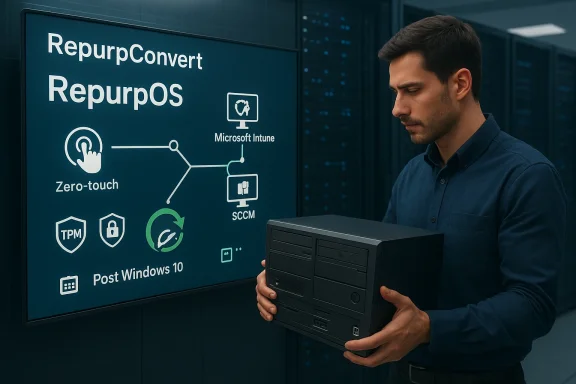
10ZiG’s launch of **RepurpConvert** lands at exactly the moment many IT departments have been dreading and preparing for: the post-**Windows 10** era. The Leicester-based vendor is pitching the tool as a way to convert older PCs, laptops and third-party thin clients into managed endpoints running **RepurpOS**, while reducing the cost and disruption of large-scale refresh projects. That message is likely to resonate because the end of Windows 10 support arrived on **October 14, 2025**, and Microsoft now recommends either moving to Windows 11, buying new hardware, or using Extended Security Updates where appropriate. ([support.microsoft.com](https://support.microsoft.com/en-us/windows/windows-10-supports-ends-on-october-14-2025-2ca8b313-1946-43d3-b55c-2b95b107f281)

What makes the announcement notable is not just the product itself, but the timing and the operational logic behind it. Statcounter’s February 2026 desktop market-share data still showed Windows 10 at **26.27%** of desktop Windows installations worldwide, suggesting that the migration wave is still very real even after end-of-support. In that context, a tool that can be deployed locally or remotely through existing management stacks like **Microsoft Intune** and **Microsoft SCCM** looks like a practical response to a stubborn problem rather than a speculative one. ([gs.statcounter.com](https://gs.statcounter.com/os-version-market-share/windows/desktop/worldwide/2025)

## Background

Windows 10 has been the workhorse platform for an enormous share of enterprise desktops for nearly a decade, and its long tail was always going to complicate the move to Windows 11. Microsoft set the end-of-support date for Windows 10, version 22H2 and related editions at **October 14, 2025**, after which no further security updates or technical support would be provided for the operating system. Microsoft has been equally clear that customers with incompatible hardware should either replace devices or enroll in the appropriate Extended Security Updates path if they need more time. ([support.microsoft.com](https://support.microsoft.com/en-us/windows/windows-10-supports-ends-on-october-14-2025-2ca8b313-1946-43d3-b55c-2b95b107f281)

The reality, however, is that operating-system support deadlines are only one part of the migration equation. Enterprises do not upgrade thousands of endpoints in a single afternoon; they do it in waves, often across distributed offices, managed service agreements, and remote work arrangements. The work can involve imaging, data migration, device collection, transport, validation, user training and help-desk escalation, all of which inflate the cost far beyond the software transition itself.

That is why the Windows 10-to-Windows 11 shift has become a broader endpoint strategy discussion. Microsoft’s minimum requirements, including **TPM 2.0**, **UEFI**, and **Secure Boot**, mean many otherwise serviceable devices fall short on paper even if they remain physically reliable. Microsoft’s own documentation emphasizes that Windows 11 expects TPM 2.0 and associated firmware protections, and its secured-core guidance highlights the security value of that hardware-backed trust chain. ([learn.microsoft.com](https://learn.microsoft.com/en-us/windows/security/hardware-security/tpm/tpm-recommendations)

This is the opening 10ZiG is trying to exploit. Rather than positioning the problem as “How do we install a new version of Windows?” the company is treating it as “How do we preserve usable endpoint hardware while moving into a managed, secure, alternative operating model?” That framing matters because it reframes old PCs not as dead assets, but as candidates for a second life in virtual desktop, DaaS and browser-centric environments.

The company’s pitch also mirrors a larger industry trend toward selective repurposing. IT leaders have increasingly been asked to do more with existing fleets, especially in periods of cost pressure and component volatility. RepurpConvert fits that mood neatly because it promises to reduce hands-on intervention while enabling what 10ZiG describes as a **zero-touch** transition into managed endpoints. ([10zig.com](https://www.10zig.com/wp-content/uploads/2025/05/2025-RepurpOS-Final.pdf)

---

## What RepurpConvert Is Trying to Solve

RepurpConvert is, at its core, a conversion workflow rather than a traditional operating-system installer. According to 10ZiG’s positioning, it takes existing Windows and Linux devices and converts them into endpoints that run **RepurpOS**, a Linux-based thin-client environment designed for remote application and desktop access. That turns a conventional endpoint-refresh story into a repurposing story, which is a materially different proposition for budget-conscious IT teams. ([10zig.com](https://www.10zig.com/wp-content/uploads/2025/05/2025-RepurpOS-Final.pdf)

The tool is meant to reduce the friction associated with migration projects. Instead of bringing every device through a manual reimage process, 10ZiG says customers can deploy the conversion locally or remotely using tools they already have, including **Intune** and **SCCM**. That is important because the biggest failure point in large endpoint transitions is often logistics, not software compatibility.

### Why that matters operationally

A managed conversion path can compress a great deal of work into a more repeatable sequence. If the process is sufficiently scripted, IT teams can standardize the endpoint state, reduce variability, and keep users away from unfamiliar post-upgrade procedures. In practical terms, that is often more valuable than any single feature on a datasheet.

It also changes the user experience. A conversion tool that eliminates or reduces device collection, shipping, and reinstallation windows can make the migration feel less like a project and more like a controlled background task. For branch-heavy organisations, that difference can be decisive.

- **Less device handling**
- **Lower transport overhead**
- **Reduced downtime**
- **Fewer on-site support visits**
- **More predictable rollout windows**

The strategic message is obvious: if hardware still works, why throw it away just because it can no longer run Microsoft’s newest desktop operating system? For many organisations, that is not just a technical question but a finance, sustainability and workforce question all at once.

---

## Windows 10’s Long Tail and the Migration Bottleneck

The persistence of Windows 10 is what gives this product launch its commercial logic. Statcounter’s February 2026 desktop figures still placed Windows 10 at **26.27%** share worldwide, which means roughly one in four desktop Windows installations remains on the older platform. That is a big installed base for any vendor building around post-Windows-10 transitions. ([gs.statcounter.com](https://gs.statcounter.com/os-version-market-share/windows/desktop/worldwide/2025)

A lot of that installed base is not there by choice. Many machines fail Windows 11’s compatibility checks because of TPM, firmware or CPU requirements, while others are perfectly usable but not worth replacing on schedule. Microsoft’s own guidance makes clear that unsupported Windows 10 devices should either move to Windows 11 if eligible, be replaced, or enter ESU where available. In other words, the platform transition is real, but the path is not equally available to every device. ([support.microsoft.com](https://support.microsoft.com/en-us/windows/windows-10-supports-ends-on-october-14-2025-2ca8b313-1946-43d3-b55c-2b95b107f281)

### The hidden costs of “simple” migrations

The IT budget story is often more painful than the software story. Replacing endpoints at scale adds not only hardware procurement costs, but also imaging labor, deployment coordination, user downtime, asset disposal and compliance work. In *distributed* environments, those costs often dominate the project itself.

That is why repurposing has become attractive. It can delay capital expenditure, preserve serviceable assets and reduce the number of endpoints that need to be touched physically. For remote or hybrid workforces, those savings can be especially meaningful because every truck roll or manual intervention creates a delay.

- **Hardware replacement**
- **Data protection and migration**
- **User scheduling**
- **Logistics and shipping**
- **Help-desk load**
- **Secure disposal of retired devices**

The other problem is timing. Organisations are not migrating from a clean slate; they are moving through existing refresh cycles, software dependencies and procurement calendars. That makes a repurposing tool attractive because it offers a bridge rather than demanding an immediate fleet-wide replacement.

---

## How 10ZiG Is Positioning RepurpOS

RepurpConvert is not being marketed as a standalone endpoint-management philosophy. It is part of a broader **10ZiG** ecosystem that spans software and hardware, and that is where the company’s strategy becomes more interesting. Customers can convert older third-party equipment now and potentially move later into 10ZiG’s own thin-client hardware while staying within the same management stack. ([10zig.com](https://www.10zig.com/wp-content/uploads/2025/06/2025-Why-10ZiG-Final.pdf)

That creates a soft landing for customers that may want to defer purchases today but preserve a vendor relationship for tomorrow. It is a smart commercial move because it lowers the entry barrier while keeping the endpoint estate anchored to the 10ZiG platform. In a market crowded with VDI and DaaS vendors, ecosystem retention can be as important as first sale volume.

### The vendor lock-in question

There is a trade-off here, of course. A repurposing system that simplifies conversion can also deepen dependence on the vendor’s tooling, licensing and support model. That is not necessarily a negative outcome, but IT buyers will want to examine whether the operational convenience offsets the long-term flexibility cost.

The product line also reflects a broader convergence between endpoint hardware and endpoint software. Thin-client vendors increasingly have to justify themselves not just on device specs, but on lifecycle management, remote administration and security posture. 10ZiG appears to be leaning hard into that trend by treating the operating system as part of a managed service story.

- **Software-led endpoint transition**
- **Compatibility with third-party hardware**
- **Pathway into 10ZiG hardware later**
- **Unified management story**
- **Focus on VDI and DaaS environments**

That is not a trivial repositioning. It suggests 10ZiG sees the next phase of endpoint competition as being won by companies that can help organisations *avoid* unnecessary hardware replacement while still standardising and securing what they have.

---

## The Role of Intune and SCCM in the Deployment Story

One of the most important details in the launch is the promise of deployment through **Microsoft Intune** and **Microsoft SCCM**. Those platforms are already deeply embedded in enterprise endpoint operations, which means 10ZiG is not asking IT teams to rebuild their management architecture just to use the tool. That lowers the adoption barrier significantly. ([10zig.com](https://www.10zig.com/wp-content/uploads/2025/05/2025-RepurpOS-Final.pdf)

It also matters because the migration process itself becomes easier to govern. If the conversion can be distributed through existing endpoint management channels, IT teams can track rollout, enforce policy and stage changes in a way that aligns with their current device lifecycle processes. The result is less operational sprawl, which is exactly what large estate managers tend to want.

### Why existing tooling matters

Tools that integrate into current workflows are usually more successful than tools that demand a new console. The reason is simple: IT departments are already overloaded, and every new platform adds training, process drift and troubleshooting overhead. By anchoring the deployment to familiar management systems, 10ZiG is trying to make RepurpConvert feel like an extension of existing practice rather than a new project category.

That said, integration alone does not guarantee success. The conversion still has to be reliable across a wide mix of device models, firmware states and user scenarios. If the automation is brittle, the promise of zero-touch deployment can evaporate quickly.

- **Simpler rollout orchestration**
- **Better reporting and compliance**
- **Less need for bespoke tooling**
- **Cleaner operational control**
- **Easier branch-office deployment**

Microsoft’s own endpoint ecosystem helps explain why this approach is plausible. Intune is now central to many modern endpoint-management strategies, while SCCM remains a fixture in mature enterprise environments. A repurposing vendor that can speak both languages is better placed to reach organisations in transition.

---

## Security, Standardisation and the Post-Windows 10 Environment

Security is the other pillar of the RepurpConvert pitch. Microsoft has been blunt that Windows 10 support ended on **October 14, 2025**, and that running unsupported devices increases exposure to malware and other threats. In response, the company has pointed customers toward Windows 11, ESU and new hardware as the supported path forward. ([support.microsoft.com](https://support.microsoft.com/en-us/windows/windows-10-supports-ends-on-october-14-2025-2ca8b313-1946-43d3-b55c-2b95b107f281)

10ZiG is trying to argue that a repurposed endpoint can be more secure than a legacy Windows 10 PC left in place without a supported future. By converting ageing hardware into managed thin-client endpoints, the company can present a more controlled and standardised operating environment. That is especially relevant in VDI and browser-based application models, where the endpoint is mainly a secure access layer rather than a full local workstation.

### Standardisation as a security control

Standardisation is often underrated as a security measure. The fewer endpoint variants an organisation has, the easier it is to enforce patching, control configuration drift and reduce support complexity. A thin-client or repurposed endpoint model narrows the attack surface by design, provided the environment is correctly managed.

This is where the Linux-based aspect of RepurpOS becomes strategically useful. Linux thin-client environments can offer a smaller local software footprint than general-purpose Windows desktops, and that can reduce the maintenance burden on the endpoint itself. The upside is not just lower cost, but a simpler security story.

- **Smaller endpoint footprint**
- **Standardised configuration**
- **Reduced local attack surface**
- **Easier policy enforcement**
- **More predictable user environment**

Of course, security is never a magic trick. It depends on how the platform is deployed, what identity and access controls are in place, and whether the remote workloads themselves are properly hardened. But from a management perspective, moving old hardware into a purpose-built endpoint mode is often preferable to leaving it as a general-purpose machine that no longer receives operating-system support.

---

## Economics: Hardware Spend vs. Repurposing Spend

The commercial case for a tool like RepurpConvert rests on a simple equation: if converting an existing device costs less than replacing it, and if the converted device can reliably serve the intended workload, then repurposing wins. In theory, that sounds obvious. In practice, the trade-off depends on supportability, labor savings and the length of time the asset remains useful.

10ZiG has argued that migration programmes can carry **double- or triple-digit costs per device** once labor, deployment and logistics are included. Even if the exact number varies by environment, the broad point is believable: endpoint migration is expensive because humans are expensive. If automation can remove enough manual work, the savings can be substantial.

### The enterprise budget logic

Budget pressure is one reason this category is interesting right now. Hardware prices have been affected by memory market constraints and supply fluctuations, while many businesses are still balancing post-pandemic refresh cycles against broader IT cost control. A repurposing platform offers finance teams a way to stretch capital budgets without freezing modernization entirely.

This is also why the product may land differently in small and large organisations. Smaller companies may appreciate the straightforward economics of extending hardware life, while larger enterprises may value the consistency of standardised conversion across hundreds or thousands of machines. In both cases, the core appeal is the same: *avoid buying new hardware when the existing device can still do useful work*.

- **Deferred capex**
- **Lower deployment labor**
- **Reduced shipping and handling**
- **Longer asset lifespan**
- **Potential sustainability benefits**

That said, repurposing is not always cheaper over the full lifecycle. If the converted hardware underperforms, causes support issues or becomes incompatible with future remote-work platforms, the organization may simply be delaying the inevitable. The economic case is strongest when the target workload is lightweight and stable.

---

## Sustainability and the End of Endpoint Waste

A secondary but increasingly important selling point is sustainability. Repurposing older machines instead of replacing them can reduce **e-waste**, extend the life of existing equipment and limit the environmental burden associated with manufacturing and shipping new devices. That argument is likely to gain more traction as procurement teams are pushed to consider carbon impact alongside cost. ([10zig.com](https://www.10zig.com/wp-content/uploads/2025/05/2025-RepurpOS-Final.pdf)

This matters because endpoint refresh programmes are notoriously wasteful when poorly managed. Devices that are retired before their useful life has genuinely ended become a disposal problem, not an asset-management success. A conversion-based approach can make the lifecycle more circular by allowing the same hardware to serve a different role.

### Sustainability without sentimentality

Still, environmental benefits should be treated carefully. Not every old device deserves a second life, and not every repurposing project is automatically “green.” If a machine is inefficient, unreliable or already near failure, extending its life may simply preserve waste in slow motion.

The stronger case is for serviceable hardware that is being retired for policy reasons rather than physical ones. In that scenario, conversion can align environmental and financial goals, which is exactly the kind of overlap procurement teams like to see. It is not just about feeling responsible; it is about using assets more intelligently.

- **Reduced device disposal**
- **Longer lifecycle for functioning hardware**
- **Less manufacturing demand**
- **Lower shipping impact**
- **Better alignment with ESG goals**

10ZiG is smart to include this framing, because sustainability language increasingly helps enterprise products get onto the shortlist. But the operational value still has to come first. If the repurposed endpoint does not work well, the environmental argument becomes secondary very quickly.

---

## Competitive Positioning in the VDI and DaaS Market

RepurpConvert also needs to be understood as a competitive move in the **virtual desktop infrastructure** and **desktop as a service** market. These sectors are crowded with vendors promising to simplify access, reduce endpoint complexity and centralise administration. 10ZiG’s angle is to make the endpoint itself cheaper and more flexible before the virtual workspace even enters the picture.

That is a sensible niche. A lot of VDI and DaaS projects fail not because the back end is poor, but because the endpoint estate is too chaotic to manage efficiently. If 10ZiG can standardise the front end, it can make the entire stack easier to consume.

### Where the product fits

RepurpConvert is not trying to replace cloud workspace platforms. It is trying to make them easier to deploy on hardware that the organisation already owns. That makes it a complementary product rather than a direct rival to major workspace vendors, but it still sits in a highly competitive space where simplicity is the real differentiator.

The company’s broader hardware portfolio matters here too. By selling thin clients, zero clients and repurposing software together, 10ZiG can appeal to customers whether they want to preserve old devices or buy new ones later. That flexibility can be persuasive in environments where procurement and technical standards are moving at different speeds.

- **VDI enablement**
- **DaaS readiness**
- **Browser-based working models**
- **Hybrid estate management**
- **Multi-vendor endpoint support**

The competitive implication is that endpoint repurposing may become a more visible subcategory of workplace modernization. If enough organisations conclude they do not need to replace every device to modernize their desktop model, the market for conversion software could widen well beyond its current niche.

---

## Strengths and Opportunities

RepurpConvert’s main strength is that it addresses a problem many IT leaders already understand: the gap between *what Microsoft wants* and *what the hardware estate can realistically support*. It does so with a workflow that tries to fit into existing management processes instead of replacing them, which lowers friction and makes adoption easier. It also speaks to budget, sustainability and standardisation at the same time, which is a rare combination in endpoint software.

- **Lower migration friction**
- **Preservation of usable hardware**
- **Integration with existing management tools**
- **Potentially lower cost than full replacement**
- **Supports remote and branch-office scenarios**
- **Aligned with sustainability goals**
- **Useful for VDI and DaaS transitions**

---

## Risks and Concerns

The biggest risk is that the value proposition may be narrower than it first appears. Organisations that are already committed to a Windows 11 refresh, or that require full local Windows functionality, may not benefit much from a repurposing tool. There is also the usual concern that conversion platforms can deepen vendor dependence while solving only part of the lifecycle problem.

- **Limited fit for Windows-native workloads**
- **Possible vendor lock-in**
- **Dependence on compatible hardware states**
- **Need for careful pilot testing**
- **Potential support complexity across mixed estates**
- **Risk of deferring rather than solving refresh needs**
- **Unclear longevity if endpoint strategy changes**

A second concern is execution quality. Zero-touch is an attractive phrase, but real-world deployments are messy, especially across mixed hardware and remote offices. If the conversion process is not robust, it could create the very support burden it is meant to reduce.

---

## What to Watch Next

The next few months will tell us whether RepurpConvert becomes a useful niche tool or a broader endpoint-management story. Much will depend on whether customers see measurable savings and whether the conversion process remains stable across different device types and deployment environments. If the product delivers, the launch could help normalise repurposing as a legitimate alternative to wholesale replacement.

It will also be worth watching how 10ZiG balances software and hardware messaging. The more effectively the company can show that conversion today can lead to hardware standardisation tomorrow, the stronger its ecosystem play becomes. And if competitors begin packaging similar conversion workflows, the category may gain momentum quickly.

- **Real-world deployment success**
- **Customer uptake in large estates**
- **Integration with Intune and SCCM**
- **How well it works on legacy hardware**
- **Whether other vendors follow with similar tools**

Another key question is whether the product gains traction outside strictly VDI-oriented use cases. If organisations begin using repurposing software as a general endpoint lifecycle tool, the market opportunity could expand well beyond thin-client circles. That would make RepurpConvert less of a tactical migration aid and more of a strategic endpoint platform.

10ZiG’s RepurpConvert is interesting not because it promises a magical solution to the Windows 10 problem, but because it acknowledges a more realistic one: many businesses do not need every old device to become a brand-new Windows 11 PC. They need a reliable way to keep valuable hardware useful, secure and manageable while they modernize on their own terms. In a market still living with the legacy of Windows 10 well after its support deadline, that may be exactly the kind of practicality buyers are looking for.
Source: IT Brief Australia https://itbrief.com.au/story/10zig-launches-repurpconvert-for-windows-10-migrations/
Last edited:
