

1Password has surfaced a community-built Microsoft Security Copilot plugin, now listed through the 1Password Marketplace, that lets security teams query 1Password Enterprise Password Manager audit data in natural language through Microsoft’s AI security platform, according to company and Microsoft documentation published in recent months. The interesting part is not that a password manager has gained another integration. It is that identity telemetry is being pulled closer to the analyst’s workbench, where Microsoft is trying to make Copilot the front door for security operations. For Windows shops already standardizing on Sentinel, Entra ID, Defender, and Security Copilot, this is a small plugin with larger implications.
For years, password managers were treated as defensive plumbing: necessary, slightly thankless, and mostly invisible until something went wrong. In that older model, the password vault was a safer place to store credentials, not a first-class sensor in the security operations center. The new 1Password plugin for Microsoft Security Copilot points to a different role: the vault as an audit-rich system of record for how people, secrets, shared credentials, and privileged workflows actually move through an enterprise.
That shift matters because modern security incidents rarely begin with malware announcing itself. They begin with identity misuse, token theft, suspicious sign-ins, off-hours access, shadow SaaS, and small deviations from normal behavior. A password manager can see some of those deviations earlier than a traditional endpoint tool because it sits close to the act of access itself.
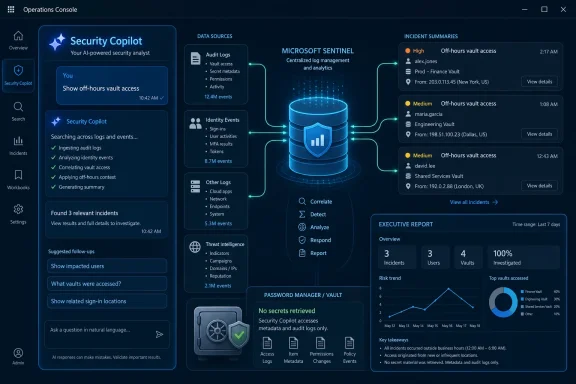
The plugin does not, according to Microsoft’s documentation, retrieve secrets or credentials from 1Password. That distinction is crucial. It analyzes audit logs and events already collected through Microsoft Sentinel, which means the integration is not turning Security Copilot into a master key for the vault. It is turning 1Password’s operational exhaust into material that can be searched, summarized, correlated, and reported through a natural-language security interface.
That is the reasonable version of the AI security pitch. Not “ask the chatbot to secure the company,” but “ask a controlled interface to interpret security telemetry that already exists, with enough context to shorten an investigation.”
That is why plugins matter. Security Copilot is most compelling when it can reason across Defender alerts, Sentinel data, Entra identity events, Purview audit trails, third-party SaaS logs, and the specialized systems that define how a real organization works. A Copilot that can only talk to Microsoft products is powerful in Microsoft-only environments. A Copilot that can pull in signals from the messy edges of enterprise IT is much more useful.
1Password sits at one of those edges. It is not merely another app in the estate. It is where employees, admins, developers, contractors, and sometimes automated workflows touch sensitive credentials, SSH keys, API tokens, and shared access paths. Even when an organization is aggressively adopting passkeys, single sign-on, and conditional access, password and secrets management remains part of the lived reality of enterprise security.
Microsoft’s bet is that analysts will tolerate, and eventually prefer, a natural-language layer over this complexity. That only works if the layer has access to meaningful data and if the answers can be traced back to durable logs. The 1Password plugin fits that model because it appears to ride on Sentinel ingestion rather than inventing a separate side channel.
Sentinel is already where many Microsoft-centric security teams centralize detections, analytics rules, workbooks, incident queues, and long-term log retention. If 1Password audit events are already flowing into Sentinel, Security Copilot becomes a different interface over an existing dataset. The plugin’s job is to make that dataset more usable for analysts who do not want to manually write every Kusto Query Language query from scratch.
That matters for both security and governance. Enterprises have spent years trying to reduce random data sprawl in security tooling, and AI can easily make that problem worse. Every new assistant, connector, agent, and plugin is a potential new place for sensitive data to appear, persist, or be misunderstood.
By leaning on Sentinel, this integration at least starts from an enterprise pattern administrators already understand: collect logs, assign permissions, manage retention, query through controlled systems, and correlate with other signals. The AI layer still deserves scrutiny, but the data path is not a mystery box.
Natural language lowers the cost of asking follow-up questions. That is useful during incident response, where the first query is rarely the final query. A suspicious sign-in may lead to questions about vault access, which may lead to questions about item usage, which may lead to questions about a user’s behavior over the past month compared with a baseline.
But natural language should not be confused with authority. Security Copilot may make queries easier to express, but the quality of the output still depends on what was logged, how the connector was configured, whether the right workspace is linked, whether permissions are sane, and whether the user understands the operational context. A beautifully phrased AI answer based on incomplete ingestion is still incomplete.
That is why the plugin’s prerequisite list is more than administrative boilerplate. Organizations need a 1Password Business or Enterprise subscription with audit logging, Sentinel deployed and configured, the 1Password Events Reporting integration sending logs, the Sentinel data connector ingesting them, administrative access to Security Copilot, and a linked Sentinel workspace. This is not a consumer feature. It is enterprise security plumbing with an AI interface attached.
Community-built enterprise integrations can be awkward. On one hand, they show demand more honestly than a marketing roadmap does. Customers and practitioners tend to build the things they actually need, not the things that fit neatly into a vendor’s launch calendar. On the other hand, community-built security tooling raises questions about support boundaries, code quality, maintenance, documentation, and who gets paged when the thing fails during an incident.
The fact that Microsoft’s documentation treats the 1Password plugin as a third-party plugin is significant. Microsoft helps describe the integration scenario, but troubleshooting responsibility does not magically transfer to Redmond. Administrators should read that as a boundary, not a footnote.
Still, if 1Password can turn community demand into marketplace-grade integrations without losing control of security and support expectations, that is strategically useful. It lets the company expand the surface area of its platform faster than internal product teams could on their own. More importantly, it gives enterprise customers a reason to see 1Password less as an isolated password manager and more as an extensible identity security platform.
Microsoft itself is part of that pressure. Entra ID, Defender for Cloud Apps, Purview, Sentinel, Intune, and Security Copilot increasingly form a broad identity-and-security operating layer for Windows-heavy organizations. Third-party vendors that want to remain relevant in those accounts have to integrate deeply enough that administrators do not see them as parallel consoles creating extra work.
That is why a Security Copilot plugin is a defensive and offensive move for 1Password. Defensively, it reduces the risk that Microsoft-centric customers decide they can standardize away from separate tools. Offensively, it lets 1Password put its telemetry inside the workflows where security leaders are already spending money.
The larger lesson is that enterprise software now competes on where its data shows up. A security tool that produces valuable signals but forces analysts to leave their main investigation environment is at a disadvantage. A tool that feeds high-quality, well-labeled data into Sentinel and Security Copilot has a better chance of being treated as part of the core stack.
Those questions are not new. What changes with Security Copilot-style tooling is the speed with which a team can move from raw log data to a narrative draft. If the plugin can summarize 1Password access activity, anomalous behavior, and compliance-relevant events in a usable format, it could reduce a painful reporting burden.
That does not mean executives should accept AI-generated reports uncritically. In fact, the higher the audience, the more disciplined the review process should be. AI can compress work, but it can also smooth over uncertainty, omit caveats, or overstate confidence in patterns that deserve closer inspection.
The best use case is not automated compliance theater. It is faster preparation for human-owned reporting. Analysts and managers still need to validate the underlying data, understand retention gaps, and explain what the logs can and cannot prove.
1Password’s integration gives those organizations a cleaner way to include password-manager activity in the same operational story. Instead of treating 1Password as a separate administrative island, teams can ask about its audit trail alongside other security events. That is particularly useful when investigating user compromise, insider risk, privileged access anomalies, and access to sensitive shared vaults.
The connection to Sentinel also matters for administrators who already understand KQL but do not want every team member to become a query specialist. A senior analyst may still write and validate the underlying logic. A tier-one analyst, manager, or compliance stakeholder may use natural-language prompts to retrieve repeatable answers.
That is the right division of labor if implemented carefully. AI should broaden access to security insight without weakening the discipline of detection engineering. The risk is that organizations mistake convenience for maturity and let prompt-driven investigation replace the hard work of logging, normalization, access control, and incident process.
But audit logs can still be sensitive. They may reveal usernames, access patterns, vault names, item metadata, administrative actions, business processes, and the shape of an organization’s internal systems. In some environments, knowing which vaults exist and who touches them is itself valuable intelligence.
Administrators should therefore treat this as a security integration, not a productivity add-on. Permissions in Sentinel, Security Copilot, Entra ID, Purview, and 1Password need to line up with least-privilege principles. Prompt and response auditing should be reviewed. Retention and data residency policies should be understood. If Security Copilot output is exported into tickets, reports, chats, or documents, those downstream locations become part of the data governance problem.
The plugin may not touch secrets, but it can still touch the map that leads to them. That is useful for defenders and attractive to attackers. The difference is access control.
That does not absolve buyers from due diligence. Administrators should still ask who maintains the plugin, how updates are delivered, what permissions are required, whether the code or package can be reviewed, what telemetry it produces, and how quickly compatibility issues will be addressed when Microsoft changes Security Copilot, Sentinel schemas, or plugin requirements.
The community-built origin makes those questions more important, not less. Community projects can be excellent, but enterprise security teams need lifecycle clarity. A plugin that works brilliantly during a proof of concept but breaks silently after a schema update is not a feature; it is future incident debt.
The optimistic version is that 1Password is creating an ecosystem where community innovation can be productized responsibly. The cynical version is that vendors benefit from unpaid development while customers inherit unclear support lines. The truth will depend on maintenance, documentation, and how visibly 1Password stands behind the integration over time.
A plugin that helps analysts ask better questions of 1Password audit logs is not science fiction. It is workflow compression. It takes an existing dataset, an existing SIEM, an existing AI interface, and a known administrative pain point, then tries to remove friction.
That is how AI will probably enter most serious IT environments: not as a replacement for the security team, but as a translation layer between specialized data and operational decisions. The wins will be incremental, measurable, and dependent on boring prerequisites.
This is also why the integration is more believable than grander AI claims. If your 1Password logs are in Sentinel, and if Security Copilot can invoke the right plugin capability, then a natural-language query can save time. If the logs are missing, stale, misconfigured, or inaccessible, the AI layer has nothing solid to work with. The magic remains bounded by the plumbing.
In that moment, speed matters. So does accuracy. So does the ability to explain how an answer was produced. If Security Copilot can help an analyst pivot through 1Password audit events faster while preserving a path back to the underlying Sentinel data, the plugin earns its keep.
If it produces vague summaries without enough grounding, teams will fall back to KQL, dashboards, and manual review. That would not make the plugin useless, but it would narrow its role to convenience rather than operational necessity.
The best security integrations become boring over time. They are trusted because they work, because their permissions are predictable, because their failure modes are known, and because they make the common path easier without hiding the details from experts. That is the standard this plugin will need to meet.
 1Password Moves From Vault to Signal Source
For years, password managers were treated as defensive plumbing: necessary, slightly thankless, and mostly invisible until something went wrong. In that older model, the password vault was a safer place to store credentials, not a first-class sensor in the security operations center. The new 1Password plugin for Microsoft Security Copilot points to a different role: the vault as an audit-rich system of record for how people, secrets, shared credentials, and privileged workflows actually move through an enterprise.That shift matters because modern security incidents rarely begin with malware announcing itself. They begin with identity misuse, token theft, suspicious sign-ins, off-hours access, shadow SaaS, and small deviations from normal behavior. A password manager can see some of those deviations earlier than a traditional endpoint tool because it sits close to the act of access itself.
The plugin does not, according to Microsoft’s documentation, retrieve secrets or credentials from 1Password. That distinction is crucial. It analyzes audit logs and events already collected through Microsoft Sentinel, which means the integration is not turning Security Copilot into a master key for the vault. It is turning 1Password’s operational exhaust into material that can be searched, summarized, correlated, and reported through a natural-language security interface.
That is the reasonable version of the AI security pitch. Not “ask the chatbot to secure the company,” but “ask a controlled interface to interpret security telemetry that already exists, with enough context to shorten an investigation.”
Microsoft’s Security Copilot Strategy Needs Partners at the Edge
Microsoft Security Copilot has always depended on a delicate proposition. Microsoft has the platform, the telemetry, the analyst interface, and the enterprise reach. But no single vendor, not even Microsoft, owns every meaningful security signal inside a company.That is why plugins matter. Security Copilot is most compelling when it can reason across Defender alerts, Sentinel data, Entra identity events, Purview audit trails, third-party SaaS logs, and the specialized systems that define how a real organization works. A Copilot that can only talk to Microsoft products is powerful in Microsoft-only environments. A Copilot that can pull in signals from the messy edges of enterprise IT is much more useful.
1Password sits at one of those edges. It is not merely another app in the estate. It is where employees, admins, developers, contractors, and sometimes automated workflows touch sensitive credentials, SSH keys, API tokens, and shared access paths. Even when an organization is aggressively adopting passkeys, single sign-on, and conditional access, password and secrets management remains part of the lived reality of enterprise security.
Microsoft’s bet is that analysts will tolerate, and eventually prefer, a natural-language layer over this complexity. That only works if the layer has access to meaningful data and if the answers can be traced back to durable logs. The 1Password plugin fits that model because it appears to ride on Sentinel ingestion rather than inventing a separate side channel.
The Plugin Is Really a Sentinel Story
The most important technical detail is easy to miss: this is not a direct magic pipe from Security Copilot into a 1Password vault. The integration works through Microsoft Sentinel, where 1Password events are ingested and stored. That architecture makes the plugin less glamorous but more credible.Sentinel is already where many Microsoft-centric security teams centralize detections, analytics rules, workbooks, incident queues, and long-term log retention. If 1Password audit events are already flowing into Sentinel, Security Copilot becomes a different interface over an existing dataset. The plugin’s job is to make that dataset more usable for analysts who do not want to manually write every Kusto Query Language query from scratch.
That matters for both security and governance. Enterprises have spent years trying to reduce random data sprawl in security tooling, and AI can easily make that problem worse. Every new assistant, connector, agent, and plugin is a potential new place for sensitive data to appear, persist, or be misunderstood.
By leaning on Sentinel, this integration at least starts from an enterprise pattern administrators already understand: collect logs, assign permissions, manage retention, query through controlled systems, and correlate with other signals. The AI layer still deserves scrutiny, but the data path is not a mystery box.
Natural Language Is a Convenience Layer, Not a Control Plane
The headline use case is simple: a security analyst can ask plain-English questions about 1Password activity. Show failed login attempts. Identify who accessed sensitive vaults after hours. Summarize newly created shared vaults. Generate an executive report about access to regulated data. These are the kinds of requests that sound obvious until you remember how many teams still rely on dashboards, saved searches, spreadsheets, and overworked analysts to answer them.Natural language lowers the cost of asking follow-up questions. That is useful during incident response, where the first query is rarely the final query. A suspicious sign-in may lead to questions about vault access, which may lead to questions about item usage, which may lead to questions about a user’s behavior over the past month compared with a baseline.
But natural language should not be confused with authority. Security Copilot may make queries easier to express, but the quality of the output still depends on what was logged, how the connector was configured, whether the right workspace is linked, whether permissions are sane, and whether the user understands the operational context. A beautifully phrased AI answer based on incomplete ingestion is still incomplete.
That is why the plugin’s prerequisite list is more than administrative boilerplate. Organizations need a 1Password Business or Enterprise subscription with audit logging, Sentinel deployed and configured, the 1Password Events Reporting integration sending logs, the Sentinel data connector ingesting them, administrative access to Security Copilot, and a linked Sentinel workspace. This is not a consumer feature. It is enterprise security plumbing with an AI interface attached.
The Community-Built Angle Is More Than a Nice Origin Story
TipRanks framed the news partly as an investor signal: 1Password is deepening its Microsoft security ecosystem integration, which could improve retention, upsell, and enterprise positioning. That is a fair read, but the more interesting operational angle is that the plugin reportedly came from the 1Password user community.Community-built enterprise integrations can be awkward. On one hand, they show demand more honestly than a marketing roadmap does. Customers and practitioners tend to build the things they actually need, not the things that fit neatly into a vendor’s launch calendar. On the other hand, community-built security tooling raises questions about support boundaries, code quality, maintenance, documentation, and who gets paged when the thing fails during an incident.
The fact that Microsoft’s documentation treats the 1Password plugin as a third-party plugin is significant. Microsoft helps describe the integration scenario, but troubleshooting responsibility does not magically transfer to Redmond. Administrators should read that as a boundary, not a footnote.
Still, if 1Password can turn community demand into marketplace-grade integrations without losing control of security and support expectations, that is strategically useful. It lets the company expand the surface area of its platform faster than internal product teams could on their own. More importantly, it gives enterprise customers a reason to see 1Password less as an isolated password manager and more as an extensible identity security platform.
The Competitive Pressure Is Coming From Every Direction
1Password is not operating in a quiet market. Password management, secrets management, privileged access, device trust, identity governance, and SaaS security are all converging. Vendors that used to live in separate categories now compete for the same security budget and the same executive attention.Microsoft itself is part of that pressure. Entra ID, Defender for Cloud Apps, Purview, Sentinel, Intune, and Security Copilot increasingly form a broad identity-and-security operating layer for Windows-heavy organizations. Third-party vendors that want to remain relevant in those accounts have to integrate deeply enough that administrators do not see them as parallel consoles creating extra work.
That is why a Security Copilot plugin is a defensive and offensive move for 1Password. Defensively, it reduces the risk that Microsoft-centric customers decide they can standardize away from separate tools. Offensively, it lets 1Password put its telemetry inside the workflows where security leaders are already spending money.
The larger lesson is that enterprise software now competes on where its data shows up. A security tool that produces valuable signals but forces analysts to leave their main investigation environment is at a disadvantage. A tool that feeds high-quality, well-labeled data into Sentinel and Security Copilot has a better chance of being treated as part of the core stack.
AI Reporting Is the Feature Executives Will Notice First
The plugin’s investigation use cases will appeal to analysts, but the executive-reporting angle may be what gets attention upstairs. Security leaders are constantly being asked to translate operational risk into board-readable language. Who accessed sensitive systems? Are we compliant? What changed this quarter? Where did identity controls fail? Which teams are creating avoidable risk?Those questions are not new. What changes with Security Copilot-style tooling is the speed with which a team can move from raw log data to a narrative draft. If the plugin can summarize 1Password access activity, anomalous behavior, and compliance-relevant events in a usable format, it could reduce a painful reporting burden.
That does not mean executives should accept AI-generated reports uncritically. In fact, the higher the audience, the more disciplined the review process should be. AI can compress work, but it can also smooth over uncertainty, omit caveats, or overstate confidence in patterns that deserve closer inspection.
The best use case is not automated compliance theater. It is faster preparation for human-owned reporting. Analysts and managers still need to validate the underlying data, understand retention gaps, and explain what the logs can and cannot prove.
Windows Shops Get a Cleaner Identity Narrative
For WindowsForum readers, the most practical significance is the Microsoft ecosystem fit. Many organizations already use Windows endpoints, Entra ID for identity, Intune for device management, Defender for endpoint and cloud signals, Sentinel for SIEM, and Purview for compliance. Security Copilot is Microsoft’s attempt to put an AI command surface over that stack.1Password’s integration gives those organizations a cleaner way to include password-manager activity in the same operational story. Instead of treating 1Password as a separate administrative island, teams can ask about its audit trail alongside other security events. That is particularly useful when investigating user compromise, insider risk, privileged access anomalies, and access to sensitive shared vaults.
The connection to Sentinel also matters for administrators who already understand KQL but do not want every team member to become a query specialist. A senior analyst may still write and validate the underlying logic. A tier-one analyst, manager, or compliance stakeholder may use natural-language prompts to retrieve repeatable answers.
That is the right division of labor if implemented carefully. AI should broaden access to security insight without weakening the discipline of detection engineering. The risk is that organizations mistake convenience for maturity and let prompt-driven investigation replace the hard work of logging, normalization, access control, and incident process.
The Security Boundary Is the Story Administrators Should Read Twice
Any integration involving a password manager and an AI platform deserves skepticism by default. The reassuring detail here is that the plugin is described as analyzing audit logs rather than retrieving credentials. That should reduce the blast radius of the integration, because Security Copilot is not being positioned as a way to expose vault contents.But audit logs can still be sensitive. They may reveal usernames, access patterns, vault names, item metadata, administrative actions, business processes, and the shape of an organization’s internal systems. In some environments, knowing which vaults exist and who touches them is itself valuable intelligence.
Administrators should therefore treat this as a security integration, not a productivity add-on. Permissions in Sentinel, Security Copilot, Entra ID, Purview, and 1Password need to line up with least-privilege principles. Prompt and response auditing should be reviewed. Retention and data residency policies should be understood. If Security Copilot output is exported into tickets, reports, chats, or documents, those downstream locations become part of the data governance problem.
The plugin may not touch secrets, but it can still touch the map that leads to them. That is useful for defenders and attractive to attackers. The difference is access control.
Marketplace Distribution Raises the Bar for Trust
The 1Password Marketplace angle is not just packaging. Marketplaces are becoming the new trust surface for enterprise integrations. A listing suggests discoverability, documentation, and a more formal route to adoption than a GitHub repository passed around in a Slack channel.That does not absolve buyers from due diligence. Administrators should still ask who maintains the plugin, how updates are delivered, what permissions are required, whether the code or package can be reviewed, what telemetry it produces, and how quickly compatibility issues will be addressed when Microsoft changes Security Copilot, Sentinel schemas, or plugin requirements.
The community-built origin makes those questions more important, not less. Community projects can be excellent, but enterprise security teams need lifecycle clarity. A plugin that works brilliantly during a proof of concept but breaks silently after a schema update is not a feature; it is future incident debt.
The optimistic version is that 1Password is creating an ecosystem where community innovation can be productized responsibly. The cynical version is that vendors benefit from unpaid development while customers inherit unclear support lines. The truth will depend on maintenance, documentation, and how visibly 1Password stands behind the integration over time.
The AI Security Boom Is Becoming Less Theatrical
There is a useful contrast between this plugin and the louder AI security announcements of the past two years. Much of the first wave of enterprise AI marketing promised sweeping transformation: autonomous SOCs, instant investigations, self-healing infrastructure, and a dramatic reduction in human toil. Some of that may eventually arrive, but the near-term value is more prosaic.A plugin that helps analysts ask better questions of 1Password audit logs is not science fiction. It is workflow compression. It takes an existing dataset, an existing SIEM, an existing AI interface, and a known administrative pain point, then tries to remove friction.
That is how AI will probably enter most serious IT environments: not as a replacement for the security team, but as a translation layer between specialized data and operational decisions. The wins will be incremental, measurable, and dependent on boring prerequisites.
This is also why the integration is more believable than grander AI claims. If your 1Password logs are in Sentinel, and if Security Copilot can invoke the right plugin capability, then a natural-language query can save time. If the logs are missing, stale, misconfigured, or inaccessible, the AI layer has nothing solid to work with. The magic remains bounded by the plumbing.
The Real Test Will Be Incident Day
The value of this integration will not be decided in a demo. It will be decided during an incident, when an analyst needs to know whether a compromised user accessed a finance vault, whether an administrator changed sharing settings, whether a new shared vault appeared before data moved, or whether failed sign-ins correlate with suspicious endpoint activity.In that moment, speed matters. So does accuracy. So does the ability to explain how an answer was produced. If Security Copilot can help an analyst pivot through 1Password audit events faster while preserving a path back to the underlying Sentinel data, the plugin earns its keep.
If it produces vague summaries without enough grounding, teams will fall back to KQL, dashboards, and manual review. That would not make the plugin useless, but it would narrow its role to convenience rather than operational necessity.
The best security integrations become boring over time. They are trusted because they work, because their permissions are predictable, because their failure modes are known, and because they make the common path easier without hiding the details from experts. That is the standard this plugin will need to meet.
The Small Plugin That Shows Where Identity Security Is Heading
The concrete lesson is that 1Password’s Microsoft Security Copilot integration should be viewed less as a password-manager feature and more as a sign of where enterprise identity telemetry is going. The vault, the SIEM, the AI assistant, and the compliance report are being pulled into the same workflow.- Security teams can use the plugin to query 1Password audit data through Microsoft Security Copilot, provided the underlying events are already flowing into Microsoft Sentinel.
- The integration is designed to analyze logs and events rather than retrieve secrets or credentials from 1Password.
- Administrators need the right 1Password subscription, Sentinel connector, Security Copilot access, linked workspace, and logging configuration before the feature becomes useful.
- The community-built origin is strategically interesting, but it also makes maintenance, support, and governance questions unavoidable.
- The biggest practical value is likely to come during investigations and compliance reporting, where natural-language access to audit trails can reduce manual query work.
- The biggest practical risk is overtrusting AI summaries without validating ingestion quality, permissions, retention, and the underlying Sentinel data.
References
- Primary source: TipRanks
Published: Fri, 12 Jun 2026 01:03:30 GMT
- Official source: learn.microsoft.com
1Password y Microsoft Security Copilot | Microsoft Learn
Obtenga información sobre las instrucciones para implementar, configurar y usar el complemento 1Password con Microsoft Security Copilot.learn.microsoft.com - Official source: marketplace.microsoft.com
Microsoft Marketplace | cloud solutions, AI apps, and agents
marketplace.microsoft.com
- Related coverage: marketplace.1password.com
1Password Marketplace
The 1Password Marketplace is a centralized platform where users can discover and learn to integrate various tools and services that complement 1Password.marketplace.1password.com - Related coverage: 1password.com
Introducing 1Password Marketplace: Your hub for all 1Password integrations | 1Password
Every supported 1Password integration is now in the new 1Password Marketplace. Discover and deploy integrations – with links to documentation and setup instructions – all in one place.1password.com
- Related coverage: techradar.com
Windows 11 boosts security even further by adding native 1Password passkey support | TechRadar
Windows Hello now supports passkeys stored in 1Passwordwww.techradar.com
- Official source: download.microsoft.com
Security Copilot – Purchase guidance
</rdf:Alt> </dc:description> <dc:creator> <rdf:Seq> <rdf:li>Joey Caparasdownload.microsoft.com
