

AI assistants from Microsoft, Google, and Apple are now embedded across mainstream productivity suites, browsers, operating systems, and mobile platforms, forcing IT teams in 2026 to disable unwanted AI features through layered policy, licensing, network, and device-management controls. The practical problem is not that any one toggle is hard to find. It is that the toggles keep multiplying, moving, and behaving differently depending on product tier, identity state, platform, and update channel. Enterprise AI governance has become less like turning off a feature and more like containing a fast-spreading default.
For years, enterprise software vendors sold AI as an optional upgrade: a premium add-on, a pilot program, a separate app, a budget discussion. That era is ending. The current wave of built-in AI is arriving inside the applications employees already use every day, often as a button in a ribbon, a sidebar in a browser, a summary in an inbox, or an assistant in the operating system.
That changes the security conversation. Shadow AI used to mean employees pasting customer data into an external chatbot. Now the chatbot may be sitting inside the approved productivity suite, authenticated with the same corporate identity, presented in the same interface, and wrapped in a vendor promise that sounds reassuring but still requires policy review.
This is why IT administrators are now racing to disable built-in AI features across Microsoft, Google, and Apple environments. The question is not whether these tools are malicious. The question is whether the organization has explicitly approved how they handle prompts, outputs, context, telemetry, grounding data, third-party integrations, retention settings, and user access.
That distinction matters because vendors tend to frame the issue as enablement. Security teams have to frame it as control.
That naming sprawl is not just a branding nuisance. It creates operational risk. An administrator may believe Copilot has been disabled because one app has been blocked, only to find that users can still reach Copilot Chat through another entry point or see an assistant icon elsewhere in Microsoft 365.
The starting point is visibility. Microsoft 365 administrators should first review Copilot usage reporting in the Microsoft 365 admin center, including usage dashboards that show which users are actively engaging with Copilot Chat and related experiences. That information turns a theoretical governance discussion into an incident-response-style map of actual exposure.
The next layer is access control. Microsoft 365 Copilot itself is a paid add-on, so SKU assignment remains a powerful governance lever. If users are not assigned the licenses that enable the full Microsoft 365 Copilot experience, access to those premium work-grounded features is constrained and the company avoids paying for a tool it has not approved.
But SKU management is not the whole story. Copilot Chat can be available through separate Microsoft 365 entry points, including web and app surfaces, and Microsoft’s own guidance distinguishes between pinning, deploying, and blocking. In other words, hiding an icon is not the same as disabling access.
The difficulty is that Microsoft’s control plane is broad enough to feel like a compliance platform and cluttered enough to feel like a scavenger hunt. The relevant settings may live under integrated apps, cloud policy, administrative templates, Edge policies, Windows policies, or licensing. There is no single universal “make all Copilot disappear everywhere forever” switch.
That is not an accident. Microsoft is building Copilot as a platform layer rather than a feature panel. The assistant is meant to move between Office, Teams, Outlook, Edge, Windows, and the web, carrying the strategic weight once carried by Office integration and Azure identity.
For administrators, the result is a familiar Microsoft compromise: powerful controls exist, but they must be assembled. Enterprises with mature configuration management can do that. Smaller organizations may discover that “turn off Copilot” is not a one-ticket job but a policy project.
Windows Copilot adds another dimension. Group Policy can disable Windows Copilot through the Windows Components administrative template path, and organizations can monitor for traffic associated with Copilot services to detect unwanted use. Where policy enforcement is unreliable or users have local latitude, executable restriction through application control can become the fallback.
That fallback should not be dismissed as crude. In regulated environments, application control is often the line between policy intent and user behavior. If an assistant process should not run on a corporate endpoint, blocking the executable may be cleaner than trusting every UI surface to obey every cloud-side preference.
Disabling the Copilot sidebar in Edge requires browser-specific policies, not merely Microsoft 365 settings. Administrators need to manage sidebar behavior, shopping assistant features, page-context permissions, new-tab Copilot integrations, Microsoft 365 Copilot Chat icon behavior, and local generative AI model settings. These are not philosophical differences; they are separate policy keys that decide what users can actually click.
One policy detail illustrates the broader problem: some settings do not follow the intuitive “0 means off, 1 means on” pattern administrators might expect. In certain cases, disabling a feature requires a specific nonzero value. That kind of configuration nuance is survivable when documented and centrally managed, but dangerous when copied casually from a forum post or half-remembered from another product.
Network blocking can help, but Microsoft explicitly warns that blocking Copilot-related Microsoft cloud domains can break other Microsoft 365 functionality. That warning should be taken seriously. The same hyperscale cloud architecture that makes Microsoft 365 resilient also makes cleanly severing one feature from adjacent services difficult.
The better model is layered enforcement. Use official policy and licensing first. Use network filtering as a compensating control. Use application control where the endpoint itself must refuse execution. Treat domain blocking as a scalpel only if the organization has tested the blast radius.
That separation is the core administrative lesson. Turning off the Gemini app affects Gemini web and mobile access and, depending on policy configuration, Gemini in Chrome. But it does not automatically mean every smart feature or AI-assisted Workspace capability is disabled across Gmail, Docs, Sheets, Meet, or other services.
Workspace smart features need their own review. These controls determine whether Google services can use certain data-driven experiences across apps, and they are tightly connected to the enterprise privacy posture around productivity data. For organizations trying to minimize AI exposure, turning off Gemini while leaving related smart features untouched may produce an incomplete result.
The reporting side is improving. Google provides administrative visibility into Gemini usage and has been moving more Gemini Enterprise controls into the Generative AI area of the Workspace Admin console. That centralization is welcome, but it also signals how quickly Google expects administrators to treat AI as a first-class management category.
Then Chrome complicates the picture. Gemini in Chrome and Chrome’s built-in generative AI features are governed through Chrome Enterprise policies, including settings for Gemini integration, writing assistance, tab organization, theme generation, and AI features in DevTools. A Workspace administrator who ignores browser policy may close the front door and leave the side door open.
That is the new perimeter problem in miniature. The browser is not merely rendering SaaS apps. It is where employees write, inspect, debug, summarize, translate, authenticate, upload, download, and increasingly ask questions of machine-learning systems embedded directly into the work surface.
Chrome Enterprise policies let administrators disable or constrain these features, including Help Me Write, Tab Organizer, Create Themes, DevTools generative AI, and Gemini integrations. In managed environments, those policies should be treated with the same seriousness as password manager settings, extension controls, safe browsing configuration, and certificate trust.
The uncomfortable truth is that browser choice is now an AI governance decision. If users can install unmanaged Chrome or Chromium derivatives outside corporate controls, the organization may lose policy enforcement even if Workspace and managed Chrome are configured correctly.
That is why host-based controls matter. Endpoint protection, EDR, application allowlisting, AppLocker, and similar tools are not glamorous, but they address the gap between approved software and whatever a user can download. AI governance that stops at the SaaS admin console assumes a level of endpoint discipline many organizations do not actually have.
Unlike a single SaaS app, Apple Intelligence consists of many capabilities: writing tools, mail summaries, Genmoji, Image Playground, Image Wand, personalized handwriting results, external intelligence integrations, sign-in controls for those integrations, Notes transcription, and transcription summaries. Each can have different implications for data handling and user behavior.
The administrative answer is mobile device management. Apple provides restriction keys that allow organizations to disable specific Apple Intelligence features through managed profiles. The catch is that there is no single master switch that universally disables every AI capability in one motion.
That makes Apple’s model both precise and tedious. Precise control is useful for organizations that want to allow mail summaries but block image generation, or permit on-device writing assistance but disable external integrations. It is tedious for organizations that simply want no built-in AI anywhere on managed devices until legal, compliance, and security teams finish their review.
The other Apple-specific issue is mobility. Network blocking can help identify or restrict traffic tied to Apple cloud services, but iPhones and iPads do not live permanently behind the corporate firewall. The moment a managed mobile device moves to a home network, café Wi-Fi, or cellular connection, network controls disappear unless the organization routes traffic through managed filtering.
That leaves MDM as the reliable control plane. For Apple devices, AI management is not a nice-to-have profile tweak. It is the enforcement mechanism.
That approach can be useful, but it is rarely clean. Modern productivity suites are built from overlapping services, shared authentication paths, content delivery systems, telemetry endpoints, and cloud APIs. The domain that serves an AI surface may also support unrelated app behavior, and vendors do not always make clean domain separations for every enterprise policy preference.
Microsoft is the most obvious example because Copilot experiences sit near Microsoft 365, Edge, Bing, Windows, and cloud identity. Blocking the wrong endpoint may impair a sanctioned feature, generate confusing user errors, or create support tickets that look unrelated to AI governance.
Google’s ecosystem has similar issues. Blocking Gemini web destinations may prevent obvious access, but Workspace smart features, Chrome policies, mobile apps, and user identity state all need separate consideration. If consumer Google accounts are allowed in unmanaged browsers, domain filtering alone will not express a nuanced corporate policy.
Apple is harder still because device mobility weakens perimeter controls and because Apple services often rely on broad platform infrastructure. A corporate firewall rule cannot be the primary governance model for a managed iPhone that spends most of its life away from the corporate LAN.
Network blocking belongs in the stack, but not at the top. It is best used for detection, defense in depth, and emergency containment. If it becomes the primary control, the organization is admitting that its identity, policy, and device management layers are not doing the job.
Employees are busy. They paste things into tools that promise to summarize, rewrite, classify, translate, debug, or draft. Those things may include customer names, deal terms, incident reports, legal advice, source code, unreleased financials, HR complaints, credentials, or regulated personal information.
The vendor may offer enterprise data protections. The model may not train on customer data. The prompt may remain within a tenant boundary. Those details matter and should be evaluated carefully. But the organization still needs to decide whether the tool is approved for that category of data, for that group of users, under that retention policy, in that jurisdiction, with that auditability.
That is where built-in AI becomes more dangerous than shadow AI in one respect: legitimacy. A random chatbot website looks risky. A Copilot button inside Word or a Gemini feature inside Chrome looks sanctioned, even when the company has not formally approved it.
The user interface can outrun policy. Once the assistant appears in the workflow, employees may infer that someone in IT, security, or legal already said yes. Often, nobody did.
A bank evaluating Copilot or Gemini may need to understand how prompts are logged, how outputs are retained, what administrators can audit, whether customer data leaves approved regions, and whether generated content becomes part of official records. A hospital has to think about protected health information. A law firm has to think about privilege and client confidentiality. A software vendor has to think about source-code exposure and vulnerability data.
That does not mean every AI feature must be banned. It means every AI feature must be governed before it becomes ambient. The difference between an approved pilot and a default assistant can be the difference between controlled adoption and compliance cleanup.
Built-in AI also creates a procurement problem. Traditional software approvals usually happen before deployment. But if AI arrives as part of an update to software already approved years ago, the organization may never trigger the usual review cycle.
That is why IT teams are racing. They are not just turning features off. They are trying to restore the sequencing that enterprise governance depends on: review first, deployment second, user adoption third.
Those benefits are real enough. Anyone who has watched an assistant summarize a long meeting transcript or turn a messy draft into readable prose understands why vendors are pushing hard. The productivity story is not fake.
But enterprise administrators do not buy features in the abstract. They inherit the failure modes. If a user leaks confidential data, if a generated summary is wrong, if an AI-assisted email creates contractual ambiguity, if a developer pastes proprietary code into a tool that was never approved, the vendor’s productivity demo is not the artifact auditors will review.
This tension explains the current scramble. Vendors are trying to normalize AI as a default interface layer. IT teams are trying to keep it inside a permission model. Both sides are acting rationally, but they are optimizing for different outcomes.
The result is an enterprise software landscape where disablement becomes a form of governance. Turning off AI is not necessarily anti-AI. In many organizations, it is the first step toward adopting AI responsibly.
That is not ideal, but it is where the industry has landed. Microsoft exposes controls through Microsoft 365 admin, integrated apps, cloud policy, Group Policy, Edge policies, licensing, and Windows configuration. Google uses Workspace Admin, Gemini settings, smart feature controls, and Chrome Enterprise policies. Apple relies heavily on MDM restriction payloads across individual Apple Intelligence capabilities.
This fragmentation raises the operational bar. Organizations need inventories of AI-capable surfaces, policy baselines, test tenants, change-control processes, and exception handling. They also need communication plans so users understand why an assistant icon disappeared or why a feature available on a personal device is blocked at work.
The worst outcome is silent inconsistency. If one department has Copilot Chat, another has Gemini disabled, developers have Chrome AI enabled, executives have Apple Intelligence summaries, and nobody can explain the policy, the organization has not governed AI. It has accumulated accidents.
That is why the disablement race is really a documentation race. The technical controls matter, but so does the ability to state the rule: which AI tools are allowed, for whom, with what data, under which logging and retention conditions, and who approved the exception.
Then measure usage. Microsoft 365 and Google Workspace both provide administrative reporting surfaces that can help identify active users and adoption patterns. Network logs can reveal traffic to Copilot, Gemini, and Apple service endpoints. Endpoint telemetry can show which applications and browser variants are running outside policy.
After that, decide whether the goal is temporary disablement, permanent prohibition, controlled pilot access, or role-based enablement. Those are different policies. A legal department may need one posture, developers another, executives another, and frontline workers another.
Only then should controls be layered. Licensing and service settings govern access. Product policies remove interface surfaces. Browser and OS policies close local routes. MDM handles mobile and Apple devices. Network filtering catches leakage and gives security teams telemetry. Application control enforces hard boundaries when policy alone is insufficient.
This is slower than blocking a domain, but it is much less likely to break the business.
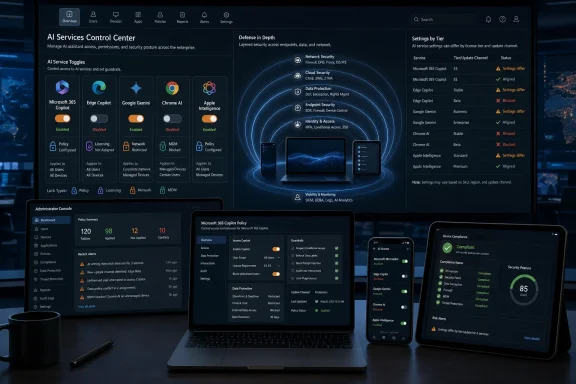 The AI Rollout Has Become an Administrative Ambush
For years, enterprise software vendors sold AI as an optional upgrade: a premium add-on, a pilot program, a separate app, a budget discussion. That era is ending. The current wave of built-in AI is arriving inside the applications employees already use every day, often as a button in a ribbon, a sidebar in a browser, a summary in an inbox, or an assistant in the operating system.That changes the security conversation. Shadow AI used to mean employees pasting customer data into an external chatbot. Now the chatbot may be sitting inside the approved productivity suite, authenticated with the same corporate identity, presented in the same interface, and wrapped in a vendor promise that sounds reassuring but still requires policy review.
This is why IT administrators are now racing to disable built-in AI features across Microsoft, Google, and Apple environments. The question is not whether these tools are malicious. The question is whether the organization has explicitly approved how they handle prompts, outputs, context, telemetry, grounding data, third-party integrations, retention settings, and user access.
That distinction matters because vendors tend to frame the issue as enablement. Security teams have to frame it as control.
Copilot Is Not One Thing, and That Is the First Trap
Microsoft is the most urgent case for many WindowsForum readers because Copilot now spans several layers of the Microsoft stack. There is Microsoft 365 Copilot, Copilot Chat, Windows Copilot, Edge Copilot, Copilot surfaces in Office apps, and related assistant experiences that can appear differently depending on licensing, tenant configuration, and app version.That naming sprawl is not just a branding nuisance. It creates operational risk. An administrator may believe Copilot has been disabled because one app has been blocked, only to find that users can still reach Copilot Chat through another entry point or see an assistant icon elsewhere in Microsoft 365.
The starting point is visibility. Microsoft 365 administrators should first review Copilot usage reporting in the Microsoft 365 admin center, including usage dashboards that show which users are actively engaging with Copilot Chat and related experiences. That information turns a theoretical governance discussion into an incident-response-style map of actual exposure.
The next layer is access control. Microsoft 365 Copilot itself is a paid add-on, so SKU assignment remains a powerful governance lever. If users are not assigned the licenses that enable the full Microsoft 365 Copilot experience, access to those premium work-grounded features is constrained and the company avoids paying for a tool it has not approved.
But SKU management is not the whole story. Copilot Chat can be available through separate Microsoft 365 entry points, including web and app surfaces, and Microsoft’s own guidance distinguishes between pinning, deploying, and blocking. In other words, hiding an icon is not the same as disabling access.
Microsoft’s Control Plane Rewards the Patient and Punishes the Casual
Administrators looking to block Copilot in Microsoft 365 need to work through the Microsoft 365 admin center, especially the Integrated Apps controls and policy management surfaces. Blocking the Copilot app tenant-wide through integrated app controls can remove access across major Microsoft 365 surfaces, including Outlook and the Microsoft 365 Copilot app experience.The difficulty is that Microsoft’s control plane is broad enough to feel like a compliance platform and cluttered enough to feel like a scavenger hunt. The relevant settings may live under integrated apps, cloud policy, administrative templates, Edge policies, Windows policies, or licensing. There is no single universal “make all Copilot disappear everywhere forever” switch.
That is not an accident. Microsoft is building Copilot as a platform layer rather than a feature panel. The assistant is meant to move between Office, Teams, Outlook, Edge, Windows, and the web, carrying the strategic weight once carried by Office integration and Azure identity.
For administrators, the result is a familiar Microsoft compromise: powerful controls exist, but they must be assembled. Enterprises with mature configuration management can do that. Smaller organizations may discover that “turn off Copilot” is not a one-ticket job but a policy project.
Windows Copilot adds another dimension. Group Policy can disable Windows Copilot through the Windows Components administrative template path, and organizations can monitor for traffic associated with Copilot services to detect unwanted use. Where policy enforcement is unreliable or users have local latitude, executable restriction through application control can become the fallback.
That fallback should not be dismissed as crude. In regulated environments, application control is often the line between policy intent and user behavior. If an assistant process should not run on a corporate endpoint, blocking the executable may be cleaner than trusting every UI surface to obey every cloud-side preference.
Edge Is the Browser as AI Delivery Vehicle
Microsoft Edge deserves separate attention because it has become one of the most active delivery vehicles for AI in enterprise Windows environments. Even when an organization has made decisions about Microsoft 365 Copilot, the Edge sidebar and related AI surfaces can remain a parallel route into assistant functionality.Disabling the Copilot sidebar in Edge requires browser-specific policies, not merely Microsoft 365 settings. Administrators need to manage sidebar behavior, shopping assistant features, page-context permissions, new-tab Copilot integrations, Microsoft 365 Copilot Chat icon behavior, and local generative AI model settings. These are not philosophical differences; they are separate policy keys that decide what users can actually click.
One policy detail illustrates the broader problem: some settings do not follow the intuitive “0 means off, 1 means on” pattern administrators might expect. In certain cases, disabling a feature requires a specific nonzero value. That kind of configuration nuance is survivable when documented and centrally managed, but dangerous when copied casually from a forum post or half-remembered from another product.
Network blocking can help, but Microsoft explicitly warns that blocking Copilot-related Microsoft cloud domains can break other Microsoft 365 functionality. That warning should be taken seriously. The same hyperscale cloud architecture that makes Microsoft 365 resilient also makes cleanly severing one feature from adjacent services difficult.
The better model is layered enforcement. Use official policy and licensing first. Use network filtering as a compensating control. Use application control where the endpoint itself must refuse execution. Treat domain blocking as a scalpel only if the organization has tested the blast radius.
Google’s Gemini Controls Are Cleaner, Until Chrome Enters the Room
Google’s enterprise AI story is, in some ways, more legible. Gemini access in Google Workspace can be managed through the Admin console, where administrators can turn the Gemini app on or off for users, organizational units, or groups. Google also separates Gemini app access from other Workspace AI features, which is useful but also means one setting may not cover everything.That separation is the core administrative lesson. Turning off the Gemini app affects Gemini web and mobile access and, depending on policy configuration, Gemini in Chrome. But it does not automatically mean every smart feature or AI-assisted Workspace capability is disabled across Gmail, Docs, Sheets, Meet, or other services.
Workspace smart features need their own review. These controls determine whether Google services can use certain data-driven experiences across apps, and they are tightly connected to the enterprise privacy posture around productivity data. For organizations trying to minimize AI exposure, turning off Gemini while leaving related smart features untouched may produce an incomplete result.
The reporting side is improving. Google provides administrative visibility into Gemini usage and has been moving more Gemini Enterprise controls into the Generative AI area of the Workspace Admin console. That centralization is welcome, but it also signals how quickly Google expects administrators to treat AI as a first-class management category.
Then Chrome complicates the picture. Gemini in Chrome and Chrome’s built-in generative AI features are governed through Chrome Enterprise policies, including settings for Gemini integration, writing assistance, tab organization, theme generation, and AI features in DevTools. A Workspace administrator who ignores browser policy may close the front door and leave the side door open.
Browser AI Turns Developer Tools Into a Governance Surface
Chrome’s AI controls are especially interesting because they reach beyond office productivity into the developer and power-user workflow. Generative AI in DevTools may sound harmless compared with email summarization, but it can become sensitive if prompts include internal code, proprietary application behavior, network traces, stack traces, or customer data.That is the new perimeter problem in miniature. The browser is not merely rendering SaaS apps. It is where employees write, inspect, debug, summarize, translate, authenticate, upload, download, and increasingly ask questions of machine-learning systems embedded directly into the work surface.
Chrome Enterprise policies let administrators disable or constrain these features, including Help Me Write, Tab Organizer, Create Themes, DevTools generative AI, and Gemini integrations. In managed environments, those policies should be treated with the same seriousness as password manager settings, extension controls, safe browsing configuration, and certificate trust.
The uncomfortable truth is that browser choice is now an AI governance decision. If users can install unmanaged Chrome or Chromium derivatives outside corporate controls, the organization may lose policy enforcement even if Workspace and managed Chrome are configured correctly.
That is why host-based controls matter. Endpoint protection, EDR, application allowlisting, AppLocker, and similar tools are not glamorous, but they address the gap between approved software and whatever a user can download. AI governance that stops at the SaaS admin console assumes a level of endpoint discipline many organizations do not actually have.
Apple Intelligence Is Granular by Design and Awkward in Practice
Apple’s approach presents a different challenge. Apple Intelligence is deeply tied to the operating system experience across macOS, iOS, and iPadOS, and Apple’s privacy positioning is central to how the company sells it. But for corporate IT, privacy marketing is not a substitute for enforceable configuration.Unlike a single SaaS app, Apple Intelligence consists of many capabilities: writing tools, mail summaries, Genmoji, Image Playground, Image Wand, personalized handwriting results, external intelligence integrations, sign-in controls for those integrations, Notes transcription, and transcription summaries. Each can have different implications for data handling and user behavior.
The administrative answer is mobile device management. Apple provides restriction keys that allow organizations to disable specific Apple Intelligence features through managed profiles. The catch is that there is no single master switch that universally disables every AI capability in one motion.
That makes Apple’s model both precise and tedious. Precise control is useful for organizations that want to allow mail summaries but block image generation, or permit on-device writing assistance but disable external integrations. It is tedious for organizations that simply want no built-in AI anywhere on managed devices until legal, compliance, and security teams finish their review.
The other Apple-specific issue is mobility. Network blocking can help identify or restrict traffic tied to Apple cloud services, but iPhones and iPads do not live permanently behind the corporate firewall. The moment a managed mobile device moves to a home network, café Wi-Fi, or cellular connection, network controls disappear unless the organization routes traffic through managed filtering.
That leaves MDM as the reliable control plane. For Apple devices, AI management is not a nice-to-have profile tweak. It is the enforcement mechanism.
Domain Blocking Is a Blunt Instrument in a Cloud-Native Office
The temptation to solve this with DNS and web filtering is understandable. Block Copilot domains. Block Gemini domains. Block Apple relay or CloudKit-related endpoints. Watch the traffic disappear and declare victory.That approach can be useful, but it is rarely clean. Modern productivity suites are built from overlapping services, shared authentication paths, content delivery systems, telemetry endpoints, and cloud APIs. The domain that serves an AI surface may also support unrelated app behavior, and vendors do not always make clean domain separations for every enterprise policy preference.
Microsoft is the most obvious example because Copilot experiences sit near Microsoft 365, Edge, Bing, Windows, and cloud identity. Blocking the wrong endpoint may impair a sanctioned feature, generate confusing user errors, or create support tickets that look unrelated to AI governance.
Google’s ecosystem has similar issues. Blocking Gemini web destinations may prevent obvious access, but Workspace smart features, Chrome policies, mobile apps, and user identity state all need separate consideration. If consumer Google accounts are allowed in unmanaged browsers, domain filtering alone will not express a nuanced corporate policy.
Apple is harder still because device mobility weakens perimeter controls and because Apple services often rely on broad platform infrastructure. A corporate firewall rule cannot be the primary governance model for a managed iPhone that spends most of its life away from the corporate LAN.
Network blocking belongs in the stack, but not at the top. It is best used for detection, defense in depth, and emergency containment. If it becomes the primary control, the organization is admitting that its identity, policy, and device management layers are not doing the job.
The Real Risk Is Accidental Disclosure, Not Sentient Software
The most practical reason to disable built-in AI is not fear of science fiction. It is ordinary data exposure.Employees are busy. They paste things into tools that promise to summarize, rewrite, classify, translate, debug, or draft. Those things may include customer names, deal terms, incident reports, legal advice, source code, unreleased financials, HR complaints, credentials, or regulated personal information.
The vendor may offer enterprise data protections. The model may not train on customer data. The prompt may remain within a tenant boundary. Those details matter and should be evaluated carefully. But the organization still needs to decide whether the tool is approved for that category of data, for that group of users, under that retention policy, in that jurisdiction, with that auditability.
That is where built-in AI becomes more dangerous than shadow AI in one respect: legitimacy. A random chatbot website looks risky. A Copilot button inside Word or a Gemini feature inside Chrome looks sanctioned, even when the company has not formally approved it.
The user interface can outrun policy. Once the assistant appears in the workflow, employees may infer that someone in IT, security, or legal already said yes. Often, nobody did.
Regulated Industries Cannot Treat Defaults as Consent
Finance, healthcare, legal services, government contractors, and critical infrastructure operators have a sharper version of the same problem. They cannot merely ask whether an AI feature is useful. They must ask whether it changes data flow, recordkeeping, discovery exposure, audit obligations, contractual commitments, and regulatory posture.A bank evaluating Copilot or Gemini may need to understand how prompts are logged, how outputs are retained, what administrators can audit, whether customer data leaves approved regions, and whether generated content becomes part of official records. A hospital has to think about protected health information. A law firm has to think about privilege and client confidentiality. A software vendor has to think about source-code exposure and vulnerability data.
That does not mean every AI feature must be banned. It means every AI feature must be governed before it becomes ambient. The difference between an approved pilot and a default assistant can be the difference between controlled adoption and compliance cleanup.
Built-in AI also creates a procurement problem. Traditional software approvals usually happen before deployment. But if AI arrives as part of an update to software already approved years ago, the organization may never trigger the usual review cycle.
That is why IT teams are racing. They are not just turning features off. They are trying to restore the sequencing that enterprise governance depends on: review first, deployment second, user adoption third.
Vendors Are Selling Productivity, While Admins Are Buying Liability
Microsoft, Google, and Apple each describe their AI integrations through the language of productivity. Draft faster. Summarize better. Search more naturally. Automate routine work. Make the computer more helpful.Those benefits are real enough. Anyone who has watched an assistant summarize a long meeting transcript or turn a messy draft into readable prose understands why vendors are pushing hard. The productivity story is not fake.
But enterprise administrators do not buy features in the abstract. They inherit the failure modes. If a user leaks confidential data, if a generated summary is wrong, if an AI-assisted email creates contractual ambiguity, if a developer pastes proprietary code into a tool that was never approved, the vendor’s productivity demo is not the artifact auditors will review.
This tension explains the current scramble. Vendors are trying to normalize AI as a default interface layer. IT teams are trying to keep it inside a permission model. Both sides are acting rationally, but they are optimizing for different outcomes.
The result is an enterprise software landscape where disablement becomes a form of governance. Turning off AI is not necessarily anti-AI. In many organizations, it is the first step toward adopting AI responsibly.
The Admin Console Is Becoming the New AI Battleground
The most consequential AI decisions in the enterprise may not be made in a boardroom or a research lab. They may be made in admin consoles by people searching for the right policy key under deadline pressure.That is not ideal, but it is where the industry has landed. Microsoft exposes controls through Microsoft 365 admin, integrated apps, cloud policy, Group Policy, Edge policies, licensing, and Windows configuration. Google uses Workspace Admin, Gemini settings, smart feature controls, and Chrome Enterprise policies. Apple relies heavily on MDM restriction payloads across individual Apple Intelligence capabilities.
This fragmentation raises the operational bar. Organizations need inventories of AI-capable surfaces, policy baselines, test tenants, change-control processes, and exception handling. They also need communication plans so users understand why an assistant icon disappeared or why a feature available on a personal device is blocked at work.
The worst outcome is silent inconsistency. If one department has Copilot Chat, another has Gemini disabled, developers have Chrome AI enabled, executives have Apple Intelligence summaries, and nobody can explain the policy, the organization has not governed AI. It has accumulated accidents.
That is why the disablement race is really a documentation race. The technical controls matter, but so does the ability to state the rule: which AI tools are allowed, for whom, with what data, under which logging and retention conditions, and who approved the exception.
The Practical Playbook Starts With Inventory, Not Panic
Organizations should resist the urge to begin with the harshest possible block. That may be necessary in some environments, but it should follow an inventory of actual exposure. Start by identifying where built-in AI is available today: Microsoft 365 apps, Teams, Outlook, Word, Edge, Windows, Google Workspace, Chrome, macOS, iOS, and iPadOS.Then measure usage. Microsoft 365 and Google Workspace both provide administrative reporting surfaces that can help identify active users and adoption patterns. Network logs can reveal traffic to Copilot, Gemini, and Apple service endpoints. Endpoint telemetry can show which applications and browser variants are running outside policy.
After that, decide whether the goal is temporary disablement, permanent prohibition, controlled pilot access, or role-based enablement. Those are different policies. A legal department may need one posture, developers another, executives another, and frontline workers another.
Only then should controls be layered. Licensing and service settings govern access. Product policies remove interface surfaces. Browser and OS policies close local routes. MDM handles mobile and Apple devices. Network filtering catches leakage and gives security teams telemetry. Application control enforces hard boundaries when policy alone is insufficient.
This is slower than blocking a domain, but it is much less likely to break the business.
The Disappearing AI Button Is Only the Visible Part of the Work
The concrete lesson from the Microsoft, Google, and Apple controls is that AI disablement has become a continuing operations task, not a one-time hardening checklist.- Organizations should treat Microsoft 365 Copilot, Copilot Chat, Windows Copilot, and Edge Copilot as related but separate control surfaces.
- Google administrators should distinguish between turning off the Gemini app, disabling Workspace smart features, and enforcing Chrome Enterprise AI policies.
- Apple administrators should use MDM restriction keys because network blocking cannot reliably follow mobile devices across personal and cellular networks.
- Domain blocking should be treated as a secondary layer because it can disrupt adjacent cloud services and may not express policy cleanly.
- Endpoint application control is increasingly important where unmanaged browsers, local executables, or user-installed tools can bypass SaaS settings.
- Every organization needs a written AI access policy that maps tools, users, data types, approvals, logging, and exceptions.
References
- Primary source: MEXC
Published: 2026-06-05T00:12:12.261824

IT teams race to disable built-in AI features across Microsoft, Google, Apple | MEXC News
AI is no longer knocking before it walks into the office. It is already embedded in word processors, browsers, email clients, and operating systems, often without
www.mexc.com
- Official source: learn.microsoft.com
Manage Microsoft 365 Copilot Chat | Microsoft Learn
Learn how to turn on Microsoft 365 Copilot Chat for your organization.learn.microsoft.com - Official source: support.google.com
- Related coverage: chromeenterprise.google
GeminiSettings: Settings for Gemini integration | Chrome Enterprise
This setting allows Gemini app integrations. 0 = Gemini integration will be available for users. 1 = Gemini integration will not be available for users. If the policy is unset, its behavior is determined by the GenAiDefaultSettings policy. For more information, please check the Help Center...chromeenterprise.google - Official source: workspace.google.com
Enterprise security controls for Gemini in Google Workspace | Google Workspace Blog
Securely deploy Generative AI with Gemini in Google Workspace: data protection, privacy, and granular controls for enterprise adoptionworkspace.google.com
- Related coverage: workspaceupdates.googleblog.com
Google Workspace Updates: Streamlining admin controls for Gemini Enterprise in the Google Workspace Admin console
workspaceupdates.googleblog.com

- Related coverage: msendpoint.com
Microsoft 365 Copilot App Gets a Chat-Centered Redesign — MSEndpoint
Microsoft is rolling out a streamlined, chat-first redesign of the M365 Copilot app starting late May 2026. Here's what admins need to check before it hits your tenant.msendpoint.com - Official source: cdn-dynmedia-1.microsoft.com
- Official source: microsoft.com
</rdf:Alt> </dc:title> <dc:description> <rdf:Alt> <rdf:li xml:lang="x-default"/> </rdf:Alt> </dc:description> <dc:creator> <rdf:Seq> <rdf:li>Lukas V
</rdf:Alt> </dc:description> <dc:creator> <rdf:Seq> <rdf:li>Lukas Velushwww.microsoft.com
- Related coverage: techzone.omnissa.com
Managing Apple Intelligence on macOS and iOS with Workspace ONE UEM
PDF documenttechzone.omnissa.com
- Related coverage: content.govdelivery.com
</rdf:Alt> </dc:title> <dc:description> <rdf:Alt> <rdf:li xml:lang="x-default"/> </rdf:Alt> </dc:description> <dc:creator> <rdf:Seq> <rdf:li>Alyssa.
</rdf:Alt> </dc:description> <dc:creator> <rdf:Seq> <rdf:li>[email protected];[email protected];[email protected];[email protected]content.govdelivery.com
- Official source: techcommunity.microsoft.com
