

A newly reported phishing campaign is abusing legitimate Microsoft 365 Groups, Outlook calendar invitations, shared files, and cloud authentication workflows in 2026 to reach corporate users through trusted collaboration surfaces rather than traditional spoofed email, according to security reporting based on Fortra research and recent FBI warnings. The uncomfortable lesson is that attackers are no longer merely disguising themselves as Microsoft; they are operating inside the grammar of Microsoft 365. That makes the campaign harder to dismiss, harder to filter, and far more dangerous for organizations that still think phishing is mainly an inbox problem.
The old mental model of phishing was built around impersonation. A message arrived from a misspelled domain, a fake bank, a strange HR address, or a vendor whose logo had been copied just badly enough to betray the trick. Security awareness training taught users to hover over links, distrust attachments, and report messages that felt “off.”
That model is not dead, but it is no longer sufficient. The campaign described in recent reporting shows attackers abusing Microsoft 365 Groups and related collaboration features to make the first touch look like a normal tenant event. A user is not necessarily receiving a crude external email; they may be added to a group, receive a calendar invite, see a shared file, or encounter a notification that appears to have passed through legitimate Microsoft infrastructure.
That difference matters because most corporate users have learned to treat email as hostile and collaboration tooling as operational. Outlook, Teams, SharePoint, OneDrive, calendar reminders, group mailboxes, and automated Microsoft 365 notifications form the nervous system of the modern office. If attackers can make malicious activity look like that nervous system simply doing its job, the user’s skepticism arrives late.
This is the strategic shift: attackers are moving from forging trust signals to borrowing them. The campaign does not need to defeat Microsoft 365 at the perimeter if it can persuade Microsoft 365 to deliver the lure through features the organization already permits.
The reported attack begins with a target being invited into or added to an attacker-controlled Microsoft 365 Group. The group’s name, description, welcome message, or subsequent content can be crafted around familiar corporate pressure points: payroll updates, supplier requests, mandatory training, contract renewals, finance approvals, or compliance tasks. None of those themes is exotic. That is precisely why they work.
Once the victim is inside the attacker’s staged collaboration space, the campaign can unfold more slowly than a conventional phishing blast. The attacker can send follow-up messages through the group mailbox, place files in shared locations, or use the calendar to keep the lure visible. Each interaction feels less like a one-off scam and more like a fragment of unfinished office work.
This is what makes the abuse so pernicious. Microsoft 365 Groups are not a fringe feature that administrators can casually disable across the board without breaking workflows. They are part of how many organizations structure teams, projects, committees, vendor relationships, and internal communications. The attacker’s opportunity is born from the same flexibility that makes the product valuable.
A calendar invite has a psychological force that an email does not. It occupies time. It triggers reminders. It appears on mobile devices, lock screens, and daily agenda views. A malicious meeting entry can become ambient pressure: not an urgent message to inspect once, but a recurring prompt that keeps reappearing until the user acts.
That is the logic behind CalPhishing, a term used to describe phishing techniques that abuse calendar invites and calendar file formats to deliver lures. The attacker is not merely asking the user to click now. The attacker is planting a task in the user’s future, where it can sit beside legitimate meetings, HR deadlines, renewals, performance reviews, and vendor calls.
The success of this technique depends on habits that businesses have trained into their own employees. Workers accept last-minute invites from unfamiliar departments. They open rescheduled meetings. They click conferencing links while walking into calls. They skim descriptions because calendars are supposed to be coordination tools, not adversarial documents.
That trust was earned by legitimate productivity software over years. Now it is being monetized by attackers.
That is why this class of attack is difficult for legacy controls. Email filtering may inspect the first message, but the lure can continue through group membership, shared files, calendar metadata, and authentication prompts. A secure email gateway that thinks in terms of “message allowed” or “message blocked” may miss the larger sequence.
The campaign’s strength lies in continuity. The first notification establishes context. The group or calendar entry preserves that context. A shared file or follow-up message provides the call to action. The user’s eventual click may occur hours or days after the original delivery, from a device and interface that no longer feels like email at all.
This is an important defensive distinction. Modern phishing is increasingly a chain of normal-looking events rather than a single obviously malicious artifact. The user may not be tricked by one message; they may be worn down by a workflow that appears to confirm itself over time.
For Windows and Microsoft 365 administrators, that means detection has to move closer to behavior. Unexpected external group membership, unusual calendar invitations, abnormal sharing patterns, risky OAuth consent, and suspicious sign-in flows need to be correlated. The defender’s job is no longer only to find the bad email. It is to notice when the collaboration fabric starts behaving like an attacker’s staging area.
That is not a classic password theft scenario. It is an abuse of a legitimate authentication path designed for devices that lack convenient input, such as shared devices, Teams Rooms, printers, or other constrained hardware. The user enters a code at a legitimate Microsoft page, and the attacker receives the resulting token if the flow succeeds.
This distinction is vital because it exposes a hard truth about MFA. Multifactor authentication is still essential, but it is not magic. If an attacker can manipulate the context in which authentication occurs, the user can approve a legitimate prompt for an illegitimate session.
Kali365 reportedly packages this technique into an accessible criminal service, lowering the skill required to run campaigns. That mirrors the broader direction of phishing: less hand-crafted deception, more industrialized abuse of cloud defaults, identity workflows, and user trust. The tooling is becoming more polished because the cloud environment it targets is standardized.
Microsoft’s own guidance now recommends getting as close as possible to a unilateral block on device code flow unless an organization has a documented need for it. That is a striking recommendation because it effectively acknowledges that some legitimate convenience features have become too risky to leave broadly available.
That assumption is fraying. A message from a legitimate cloud service can still be malicious in intent. A calendar invite delivered through normal channels can still be a lure. A sign-in page hosted by Microsoft can still be part of an attacker-controlled flow. A shared file notification can be real and dangerous at the same time.
This creates an awkward communications problem for IT. For years, users were told to look for obvious signs of fakery. Now administrators must explain that some attacks will look operationally legitimate because they are using legitimate rails. That is a harder lesson to teach without making employees paranoid about every notification.
It also complicates vendor accountability. Microsoft can say, correctly, that many of these features are working as designed. Attackers are abusing allowed invitations, allowed calendar behavior, allowed sharing flows, or allowed authentication mechanisms. But “working as designed” is not the same thing as “safe under current threat conditions.”
The cloud era has made configuration part of security architecture. Tenants that leave every collaboration and authentication path broadly open are not neutral; they are making an implicit risk decision.
Administrators need to reduce the number of dangerous choices users are asked to make. That means tightening external collaboration policies, constraining who can create or invite users into groups, reviewing how external calendar invitations are handled, and limiting high-risk authentication flows. The point is not to turn Microsoft 365 into a locked box. The point is to stop treating every collaboration feature as harmless until proven otherwise.
For device code phishing, Conditional Access becomes especially important. Organizations should audit whether device code flow is actually used, place policies in report-only mode to understand impact, and then block it broadly where possible. Exceptions should be narrow, documented, and monitored, especially for Teams devices or legacy workflows that still require the flow.
For calendar and group abuse, defenders need visibility beyond inbound mail. Security teams should examine group creation patterns, guest invitations, external senders interacting with group mailboxes, suspicious meeting descriptions, and calendar entries that contain links to credential collection or malware delivery. The more the attack spans surfaces, the less useful it is to investigate each surface in isolation.
There is also a governance angle. In many tenants, Microsoft 365 sprawl is real. Groups proliferate. Teams are created for short-lived projects and never retired. Guest access is approved in the moment and forgotten later. Attackers thrive in that clutter because unusual collaboration events become harder to distinguish from the organization’s own mess.
That shift is uncomfortable for traditional administrators because the controls are distributed across identity, Exchange, Teams, SharePoint, Defender, Purview, and Entra. There is no single “stop phishing” toggle that understands the full journey from group invitation to calendar reminder to token capture. The platform is integrated for users, but not always for defenders.
The practical response is to treat collaboration events as security events. An unexpected group addition should not be seen merely as productivity metadata. An external calendar invite with embedded links should not be treated as administrative noise. A device code sign-in by a privileged user should be investigated as a high-risk event unless there is a known business reason.
This does not mean every organization should ban external collaboration. That would be unrealistic and self-defeating. Vendors, contractors, auditors, customers, and partners are part of the modern enterprise. But organizations need a tiered trust model in which external collaboration is expected, logged, constrained, and reviewed.
The old perimeter was crude but visible. The new perimeter is made of defaults.
The company has been moving toward stronger identity controls, mandatory MFA in more places, managed Conditional Access policies, and better visibility into risky authentication flows. Those moves are necessary, but they also reveal the scale of the problem. A platform with hundreds of millions of users cannot rely on customers discovering and hardening every risky edge case on their own.
Defaults are policy. If a feature is broadly enabled, attackers will test whether it can be turned into delivery infrastructure. If a workflow reduces friction for users, attackers will ask whether that friction reduction also reduces suspicion. If a legitimate Microsoft page can be used as part of a phishing flow, criminals will prefer it over a fake page because it defeats the user’s simplest checks.
This is where Microsoft’s responsibility becomes more than documentation. Guidance is useful, but defaults shape reality. Many organizations, especially small and mid-sized businesses without deep identity teams, will run Microsoft 365 close to the way it arrived. If secure operation requires expert-level tuning across multiple admin portals, attackers will find the gaps first.
That does not absolve customers. Enterprise IT must own its tenant. But Microsoft should assume that every convenience feature will be adversarially tested at scale and design the default posture accordingly.
Unexpected group additions deserve scrutiny. Calendar invites that create urgency, ask for credential re-entry, include unfamiliar links, or refer to payroll, contracts, supplier changes, or mandatory action should be treated like phishing candidates. Shared documents that demand a fresh sign-in or redirect through odd intermediate steps should raise alarms even if the first notification looked normal.
For administrators, the work is more concrete. Review guest access and group creation settings. Limit who can create Microsoft 365 Groups if the organization does not need open creation. Monitor external invites and group membership changes. Tune Defender and Exchange policies around calendar and collaboration abuse. Audit sign-in logs for device code flow and build Conditional Access policies that block it wherever business reality allows.
The hard part is cultural. Employees need permission to slow down when a calendar reminder feels wrong. Help desks need procedures for quickly validating group invitations and meeting requests. Security teams need to stop treating “it came from Microsoft” as a reason to close an alert.
The battlefield has widened, and the defensive reflexes must widen with it.
A suspicious calendar invite, by itself, may look minor. An unexpected group addition may look like collaboration noise. A device code flow sign-in may look like an obscure authentication event. But together, these signals can describe a campaign that is using trusted Microsoft surfaces to move a user toward credential theft, token capture, malware delivery, or data exposure.
That is why security operations teams should build detections around sequences, not just artifacts. The question is not simply whether a link is malicious at delivery time. The question is whether a user was placed into an unusual workflow that increases the chance of eventual compromise.
For WindowsForum readers who administer smaller environments, the lesson is equally practical: do not wait for a spectacular breach to review tenant settings. Microsoft 365 security is often won or lost in mundane configuration pages. Group creation, guest access, external sharing, calendar handling, OAuth consent, authentication flows, and alert routing are not glamorous, but they define the attacker’s operating room.
Security is increasingly about denying attackers the ability to look routine.
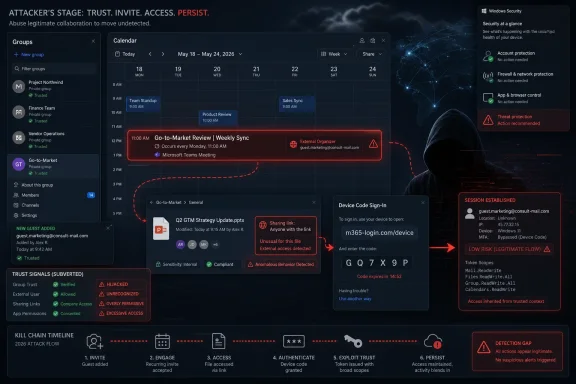 The Phish No Longer Needs to Look Fake
The old mental model of phishing was built around impersonation. A message arrived from a misspelled domain, a fake bank, a strange HR address, or a vendor whose logo had been copied just badly enough to betray the trick. Security awareness training taught users to hover over links, distrust attachments, and report messages that felt “off.”That model is not dead, but it is no longer sufficient. The campaign described in recent reporting shows attackers abusing Microsoft 365 Groups and related collaboration features to make the first touch look like a normal tenant event. A user is not necessarily receiving a crude external email; they may be added to a group, receive a calendar invite, see a shared file, or encounter a notification that appears to have passed through legitimate Microsoft infrastructure.
That difference matters because most corporate users have learned to treat email as hostile and collaboration tooling as operational. Outlook, Teams, SharePoint, OneDrive, calendar reminders, group mailboxes, and automated Microsoft 365 notifications form the nervous system of the modern office. If attackers can make malicious activity look like that nervous system simply doing its job, the user’s skepticism arrives late.
This is the strategic shift: attackers are moving from forging trust signals to borrowing them. The campaign does not need to defeat Microsoft 365 at the perimeter if it can persuade Microsoft 365 to deliver the lure through features the organization already permits.
Microsoft 365 Groups Become the New Delivery Vehicle
Microsoft 365 Groups were designed to make collaboration easier. A group can bind together a shared mailbox, calendar, document library, permissions, and membership model. For legitimate teams, that is useful plumbing; for attackers, it is a ready-made distribution and credibility engine.The reported attack begins with a target being invited into or added to an attacker-controlled Microsoft 365 Group. The group’s name, description, welcome message, or subsequent content can be crafted around familiar corporate pressure points: payroll updates, supplier requests, mandatory training, contract renewals, finance approvals, or compliance tasks. None of those themes is exotic. That is precisely why they work.
Once the victim is inside the attacker’s staged collaboration space, the campaign can unfold more slowly than a conventional phishing blast. The attacker can send follow-up messages through the group mailbox, place files in shared locations, or use the calendar to keep the lure visible. Each interaction feels less like a one-off scam and more like a fragment of unfinished office work.
This is what makes the abuse so pernicious. Microsoft 365 Groups are not a fringe feature that administrators can casually disable across the board without breaking workflows. They are part of how many organizations structure teams, projects, committees, vendor relationships, and internal communications. The attacker’s opportunity is born from the same flexibility that makes the product valuable.
Calendar Trust Is the Weakest Strong Signal
The most unsettling part of the campaign is not the group invitation; it is the calendar. Email is noisy, adversarial, and increasingly filtered. Calendars are different. They are where work turns into obligation.A calendar invite has a psychological force that an email does not. It occupies time. It triggers reminders. It appears on mobile devices, lock screens, and daily agenda views. A malicious meeting entry can become ambient pressure: not an urgent message to inspect once, but a recurring prompt that keeps reappearing until the user acts.
That is the logic behind CalPhishing, a term used to describe phishing techniques that abuse calendar invites and calendar file formats to deliver lures. The attacker is not merely asking the user to click now. The attacker is planting a task in the user’s future, where it can sit beside legitimate meetings, HR deadlines, renewals, performance reviews, and vendor calls.
The success of this technique depends on habits that businesses have trained into their own employees. Workers accept last-minute invites from unfamiliar departments. They open rescheduled meetings. They click conferencing links while walking into calls. They skim descriptions because calendars are supposed to be coordination tools, not adversarial documents.
That trust was earned by legitimate productivity software over years. Now it is being monetized by attackers.
The Attack Surface Is the Workflow
Security teams often describe Microsoft 365 as an identity and collaboration platform. Attackers appear to have reached the same conclusion. They are not treating it as a single mailbox to compromise, but as a workflow environment to manipulate.That is why this class of attack is difficult for legacy controls. Email filtering may inspect the first message, but the lure can continue through group membership, shared files, calendar metadata, and authentication prompts. A secure email gateway that thinks in terms of “message allowed” or “message blocked” may miss the larger sequence.
The campaign’s strength lies in continuity. The first notification establishes context. The group or calendar entry preserves that context. A shared file or follow-up message provides the call to action. The user’s eventual click may occur hours or days after the original delivery, from a device and interface that no longer feels like email at all.
This is an important defensive distinction. Modern phishing is increasingly a chain of normal-looking events rather than a single obviously malicious artifact. The user may not be tricked by one message; they may be worn down by a workflow that appears to confirm itself over time.
For Windows and Microsoft 365 administrators, that means detection has to move closer to behavior. Unexpected external group membership, unusual calendar invitations, abnormal sharing patterns, risky OAuth consent, and suspicious sign-in flows need to be correlated. The defender’s job is no longer only to find the bad email. It is to notice when the collaboration fabric starts behaving like an attacker’s staging area.
Kali365 Shows the Same Pattern in Authentication
The FBI’s recent warning about Kali365 belongs in the same story, even though the mechanics differ. Kali365 is described as a phishing-as-a-service platform that abuses Microsoft’s OAuth device code authentication flow to hijack Microsoft 365 access tokens. The victim may interact with a real Microsoft sign-in page, complete multifactor authentication, and still hand the attacker access because the attacker initiated the flow.That is not a classic password theft scenario. It is an abuse of a legitimate authentication path designed for devices that lack convenient input, such as shared devices, Teams Rooms, printers, or other constrained hardware. The user enters a code at a legitimate Microsoft page, and the attacker receives the resulting token if the flow succeeds.
This distinction is vital because it exposes a hard truth about MFA. Multifactor authentication is still essential, but it is not magic. If an attacker can manipulate the context in which authentication occurs, the user can approve a legitimate prompt for an illegitimate session.
Kali365 reportedly packages this technique into an accessible criminal service, lowering the skill required to run campaigns. That mirrors the broader direction of phishing: less hand-crafted deception, more industrialized abuse of cloud defaults, identity workflows, and user trust. The tooling is becoming more polished because the cloud environment it targets is standardized.
Microsoft’s own guidance now recommends getting as close as possible to a unilateral block on device code flow unless an organization has a documented need for it. That is a striking recommendation because it effectively acknowledges that some legitimate convenience features have become too risky to leave broadly available.
The Common Failure Is Not One Bug
It would be tempting to frame these campaigns as a Microsoft flaw, and there is certainly pressure on Microsoft to harden defaults, reduce risky flows, and make tenant-level controls easier to understand. But the deeper issue is not one bug waiting for a patch. It is a trust model that assumed authenticated infrastructure could make user decisions safer by default.That assumption is fraying. A message from a legitimate cloud service can still be malicious in intent. A calendar invite delivered through normal channels can still be a lure. A sign-in page hosted by Microsoft can still be part of an attacker-controlled flow. A shared file notification can be real and dangerous at the same time.
This creates an awkward communications problem for IT. For years, users were told to look for obvious signs of fakery. Now administrators must explain that some attacks will look operationally legitimate because they are using legitimate rails. That is a harder lesson to teach without making employees paranoid about every notification.
It also complicates vendor accountability. Microsoft can say, correctly, that many of these features are working as designed. Attackers are abusing allowed invitations, allowed calendar behavior, allowed sharing flows, or allowed authentication mechanisms. But “working as designed” is not the same thing as “safe under current threat conditions.”
The cloud era has made configuration part of security architecture. Tenants that leave every collaboration and authentication path broadly open are not neutral; they are making an implicit risk decision.
Enterprise Defaults Now Matter More Than User Instinct
The user remains part of the defense, but this is not a problem that training can solve alone. If a malicious group invitation arrives through expected Microsoft channels, if a calendar invite persists across devices, and if a device code flow sends the user to a real Microsoft page, then the burden cannot rest primarily on human suspicion.Administrators need to reduce the number of dangerous choices users are asked to make. That means tightening external collaboration policies, constraining who can create or invite users into groups, reviewing how external calendar invitations are handled, and limiting high-risk authentication flows. The point is not to turn Microsoft 365 into a locked box. The point is to stop treating every collaboration feature as harmless until proven otherwise.
For device code phishing, Conditional Access becomes especially important. Organizations should audit whether device code flow is actually used, place policies in report-only mode to understand impact, and then block it broadly where possible. Exceptions should be narrow, documented, and monitored, especially for Teams devices or legacy workflows that still require the flow.
For calendar and group abuse, defenders need visibility beyond inbound mail. Security teams should examine group creation patterns, guest invitations, external senders interacting with group mailboxes, suspicious meeting descriptions, and calendar entries that contain links to credential collection or malware delivery. The more the attack spans surfaces, the less useful it is to investigate each surface in isolation.
There is also a governance angle. In many tenants, Microsoft 365 sprawl is real. Groups proliferate. Teams are created for short-lived projects and never retired. Guest access is approved in the moment and forgotten later. Attackers thrive in that clutter because unusual collaboration events become harder to distinguish from the organization’s own mess.
The Calendar Is Now a Security Boundary
Security boundaries used to be described in network terms: firewall, endpoint, VPN, domain, subnet. In Microsoft 365, the boundary is increasingly behavioral. Who can invite whom? Which external users can collaborate? What authentication flows are permitted? Which apps can request consent? Which calendar events can land without scrutiny?That shift is uncomfortable for traditional administrators because the controls are distributed across identity, Exchange, Teams, SharePoint, Defender, Purview, and Entra. There is no single “stop phishing” toggle that understands the full journey from group invitation to calendar reminder to token capture. The platform is integrated for users, but not always for defenders.
The practical response is to treat collaboration events as security events. An unexpected group addition should not be seen merely as productivity metadata. An external calendar invite with embedded links should not be treated as administrative noise. A device code sign-in by a privileged user should be investigated as a high-risk event unless there is a known business reason.
This does not mean every organization should ban external collaboration. That would be unrealistic and self-defeating. Vendors, contractors, auditors, customers, and partners are part of the modern enterprise. But organizations need a tiered trust model in which external collaboration is expected, logged, constrained, and reviewed.
The old perimeter was crude but visible. The new perimeter is made of defaults.
Microsoft Has a Defaults Problem, Not Just a Messaging Problem
Microsoft is in a difficult position because Microsoft 365’s appeal is tied directly to frictionless collaboration. The easier it is to add people, share files, schedule meetings, authenticate devices, and move between apps, the more valuable the platform becomes. But attackers are exploiting that same smoothness.The company has been moving toward stronger identity controls, mandatory MFA in more places, managed Conditional Access policies, and better visibility into risky authentication flows. Those moves are necessary, but they also reveal the scale of the problem. A platform with hundreds of millions of users cannot rely on customers discovering and hardening every risky edge case on their own.
Defaults are policy. If a feature is broadly enabled, attackers will test whether it can be turned into delivery infrastructure. If a workflow reduces friction for users, attackers will ask whether that friction reduction also reduces suspicion. If a legitimate Microsoft page can be used as part of a phishing flow, criminals will prefer it over a fake page because it defeats the user’s simplest checks.
This is where Microsoft’s responsibility becomes more than documentation. Guidance is useful, but defaults shape reality. Many organizations, especially small and mid-sized businesses without deep identity teams, will run Microsoft 365 close to the way it arrived. If secure operation requires expert-level tuning across multiple admin portals, attackers will find the gaps first.
That does not absolve customers. Enterprise IT must own its tenant. But Microsoft should assume that every convenience feature will be adversarially tested at scale and design the default posture accordingly.
The New Defensive Habit Is Suspicion Across Surfaces
For end users, the lesson is not “never trust Microsoft 365.” That would be impossible. The better habit is to separate the channel from the request. A notification can arrive through a legitimate Microsoft surface and still ask for something suspicious.Unexpected group additions deserve scrutiny. Calendar invites that create urgency, ask for credential re-entry, include unfamiliar links, or refer to payroll, contracts, supplier changes, or mandatory action should be treated like phishing candidates. Shared documents that demand a fresh sign-in or redirect through odd intermediate steps should raise alarms even if the first notification looked normal.
For administrators, the work is more concrete. Review guest access and group creation settings. Limit who can create Microsoft 365 Groups if the organization does not need open creation. Monitor external invites and group membership changes. Tune Defender and Exchange policies around calendar and collaboration abuse. Audit sign-in logs for device code flow and build Conditional Access policies that block it wherever business reality allows.
The hard part is cultural. Employees need permission to slow down when a calendar reminder feels wrong. Help desks need procedures for quickly validating group invitations and meeting requests. Security teams need to stop treating “it came from Microsoft” as a reason to close an alert.
The battlefield has widened, and the defensive reflexes must widen with it.
The Warning Signs Are Hiding in Plain Sight
The most useful conclusion from this campaign is not that every Microsoft 365 tenant is doomed. It is that many warning signs already exist inside the telemetry administrators collect but do not always prioritize. The problem is not always a lack of data; it is a lack of narrative stitching.A suspicious calendar invite, by itself, may look minor. An unexpected group addition may look like collaboration noise. A device code flow sign-in may look like an obscure authentication event. But together, these signals can describe a campaign that is using trusted Microsoft surfaces to move a user toward credential theft, token capture, malware delivery, or data exposure.
That is why security operations teams should build detections around sequences, not just artifacts. The question is not simply whether a link is malicious at delivery time. The question is whether a user was placed into an unusual workflow that increases the chance of eventual compromise.
For WindowsForum readers who administer smaller environments, the lesson is equally practical: do not wait for a spectacular breach to review tenant settings. Microsoft 365 security is often won or lost in mundane configuration pages. Group creation, guest access, external sharing, calendar handling, OAuth consent, authentication flows, and alert routing are not glamorous, but they define the attacker’s operating room.
Security is increasingly about denying attackers the ability to look routine.
The Tenant Hygiene That Actually Changes the Odds
The most important fixes are not exotic, and that is both good and bad news. They are available to many organizations today, but they require ownership, testing, and a willingness to trade a little convenience for a much smaller blast radius.- Organizations should audit Microsoft 365 Group creation, membership, and guest invitation policies before attackers use collaboration sprawl as camouflage.
- Administrators should review how external calendar invitations are processed, displayed, and reported, because calendar persistence gives phishing lures a second and third chance.
- Security teams should inventory device code flow usage in Microsoft Entra sign-in logs and block it broadly with Conditional Access unless a documented business case requires an exception.
- Exceptions for Teams devices, legacy tooling, or specialized workflows should be narrow, monitored, and reviewed regularly rather than treated as permanent tenant folklore.
- User training should explicitly cover trusted-channel phishing, including malicious calendar invites, unexpected group additions, shared-file lures, and legitimate Microsoft sign-in pages used in attacker-controlled flows.
- Incident response playbooks should correlate email, calendar, group, sharing, OAuth, and sign-in telemetry instead of investigating each Microsoft 365 surface as a separate universe.
References
- Primary source: the420.in
Published: Tue, 23 Jun 2026 12:48:32 GMT
Microsoft 365's Most Trusted Features Are Being Weaponized Against Corporate Users - The420.in
A new phishing campaign is abusing Microsoft 365 Groups to bypass email security. Learn how to protect your organization from internal group-based attacks.the420.in - Related coverage: livemint.com
What is Kali365? FBI warns Telegram-based phishing service targeting Microsoft 365 users | Mint
The platform, first detected in April 2026, is being actively distributed through Telegram channels and is designed to help even low-skilled attackers conduct sophisticated phishing campaigns. www.livemint.com
- Related coverage: thecybersignal.com
FBI Warns of Kali365 Phishing Kit Stealing Microsoft 365 Tokens
The FBI's IC3 warned of Kali365, a Telegram-sold phishing kit that runs device-code phishing to steal Microsoft 365 OAuth tokens after victims pass MFA. www.thecybersignal.com
- Related coverage: techtimes.com
Microsoft 365 Phishing Kit Kali365 Bypasses MFA: FBI Warns Hundreds of Organizations Targeted
Microsoft 365 phishing attacks now bypass MFA entirely: a criminal subscription service called Kali365 tricks users into granting account access through legitimate Microsoft login pages, lettingwww.techtimes.com - Related coverage: malwarebytes.com
Kali365 phishing kit bypasses MFA and steals Microsoft logins | Malwarebytes
The FBI has warned that attackers are using a new phishing kit to gain long-term access to Microsoft Outlook, Teams, and OneDrive accounts.www.malwarebytes.com - Related coverage: cybersecuritydive.com
FBI warns about PhaaS platform used to access Microsoft 365 environments | Cybersecurity Dive
Device code phishing enabled hackers to bypass multifactor authentication without credentials.www.cybersecuritydive.com
- Related coverage: purpleshieldsecurity.com
FBI Warns of Kali365 Phishing Kit Hijacking Microsoft 365
The FBI warns Kali365, a phishing-as-a-service kit, hijacks Microsoft 365 tokens and bypasses MFA. What it means for your business and how to respond. www.purpleshieldsecurity.com
- Related coverage: cyberscoop.com
FBI warns about fast-growing phishing kit targeting Microsoft 365 users | CyberScoop
Kali365, which was first observed in April, abuses legitimate Microsoft device authorization pages to grant persistent access to cybercriminal-controlled applications. cyberscoop.com
- Related coverage: cside.com
MFA Didn't Fail, the Trust Model Did: Device Code Phishing and OAuth Token Theft (Kali365) - cside Blog
Kali365 abuses the OAuth 2.0 device authorization grant to steal Microsoft 365 tokens after MFA. A technical breakdown of the flow, FOCI, and detection. cside.com
- Related coverage: imtr.net
FBI warns of Kali365 phishing service targeting Microsoft... — IronMonkey Threat Intelligence
The FBI is warning about the Kali365 phishing-as-a-service platform (PhaaS) that is used to hijack Microsoft 365 accounts by abusing OAuth device code a...imtr.net - Related coverage: safebrowz.com
FBI Kali365 Warning 2026: Why OAuth Device-Code Phishing Slips Past MFA | SafeBrowz
The FBI's May 2026 PSA260521 advisory on Kali365 phishing-as-a-service is a watershed moment for Microsoft 365 security. SafeBrowz unpacks the OAuth device-code flow abuse, why MFA does not stop it, and how our 3-layer detection engine catches the landing pages.safebrowz.com - Related coverage: techradar.com
FBI warns of Kali phishing scam hitting Microsoft OAuth tokens — warns 'Kali365 lowers the barrier of entry, providing less-technical attackers access to AI-generated phishing lures' | TechRadar
A new phishing kit is being offered on Telegramwww.techradar.com - Related coverage: fdaytalk.com
Kali365 Phishing-as-a-Service Targets Microsoft 365
Kali365 phishing-as-a-service bypasses Microsoft 365 MFA by stealing OAuth tokens through device code attacks. Learn how it works and how to block it.www.fdaytalk.com - Related coverage: kiplinger.com
New Scam Targets Microsoft Users, FBI Warns. Here's How to Protect Yourself | Kiplinger
This phishing scam doesn't rely on a fake website. Instead, it tricks users into approving access themselves.www.kiplinger.com - Related coverage: itpro.com
Warning issued as surge in OAuth device code phishing leads to M365 account takeovers | IT Pro
Successful attacks enable full M365 account access, opening the door to data theft, lateral movement, and persistent compromisewww.itpro.com - Related coverage: labs.cloudsecurityalliance.org
CSA research note oauth device code phishing evilTokens 20260520 csa styled
PDF documentlabs.cloudsecurityalliance.org
