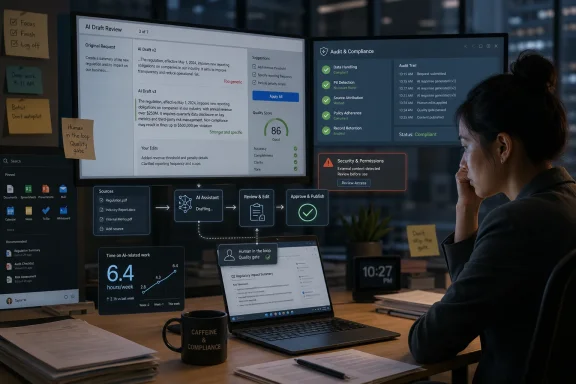
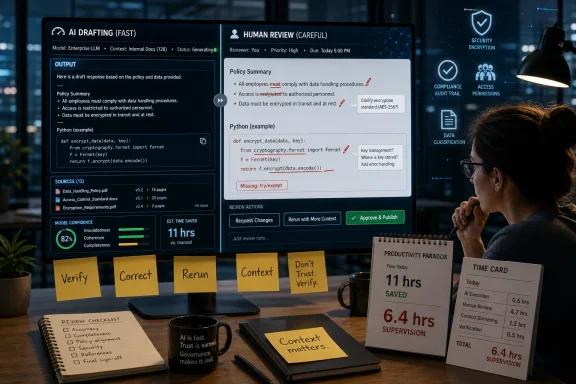
AI tools are saving digital workers about 11 hours a week while also forcing them to spend roughly 6.4 hours supervising, correcting, rerunning, and contextualizing AI output, according to a June 2026 Work AI Institute report based on 6,000 workers in the United States, United Kingdom, and Australia. That is the awkward bargain now sitting underneath the corporate AI boom: the work is faster, but it is not necessarily lighter. The office has not eliminated drudgery so much as promoted it into a new managerial layer, where employees spend their days coaxing, auditing, and laundering machine output into something a colleague can trust. The result is a productivity story that looks impressive at the individual level and far less convincing once it reaches the balance sheet.
The first mistake in reading the new data is to dismiss the productivity gains as hype. Three-quarters of surveyed workers said AI makes them more productive, and the reported 11 hours saved per week is not a rounding error. Anyone who has used modern generative tools to summarize a messy document, draft a first-pass email, translate a spreadsheet into prose, or produce scaffolding code knows the feeling: a task that used to occupy an afternoon can sometimes collapse into minutes.
But the second mistake is the one executives are more likely to make. Saving time on a task is not the same as saving time in a workflow. The report’s central finding is not that AI fails; it is that AI often succeeds only after humans perform a new category of labor around it.
That labor now has a name: botsitting. It includes feeding the model enough context to understand the job, checking whether its answer is plausible, fixing mistakes, rewriting awkward output, rerunning prompts, and deciding when the machine is bluffing. The Work AI Institute found that workers spend 37 percent of their AI time on this invisible support work and 36 percent actually using AI to produce work.
That symmetry should make every CIO pause. If a tool requires nearly as much labor to supervise as it removes from the original task, the organization has not automated a process. It has redistributed the process into a human-machine loop whose costs are easy to miss because they are scattered across calendars, Slack threads, code reviews, and late-night cleanups.
For decades, management meant coordinating people, resolving ambiguity, assigning priorities, and checking quality. Generative AI inserts a tool that can draft, synthesize, and produce, but it does not remove ambiguity. It often increases it, because the machine’s output can look finished before it is sound.
The junior analyst, engineer, marketer, paralegal, or operations worker is therefore asked to become a miniature production manager. They must know what to delegate, how to brief the machine, when to challenge it, how to validate its answer, and how to package the result for others. That is a sophisticated skill set, and many companies are treating it as if it were an instinct.
This is why the botsitting figure matters more than the headline time savings. A worker may save 11 hours on old chores, but if six or more hours are consumed by AI supervision, the net gain becomes smaller, more uneven, and more cognitively taxing. The old task may have been tedious, but at least it was legible. The new task is partly clerical, partly editorial, partly technical, and partly risk management.
That is not a bad trade in every case. In skilled hands, AI supervision can produce better work faster. But it is a different job than the one many employees were hired to do, and it deserves to be measured, trained, and managed as such.
Individuals experience AI at the task level. A worker sees a meeting summary appear instantly, a draft proposal take shape, or a chunk of code emerge from a prompt. The benefit is direct and emotionally persuasive.
Organizations experience AI at the system level. They care whether deals close faster, software ships with fewer defects, support queues shrink, compliance improves, and costs fall without quality collapsing. Those outcomes require more than individual enthusiasm. They require process redesign.
The business world has seen this movie before. The PC, email, cloud software, smartphones, and collaboration apps all promised productivity leaps. Each delivered real gains, but each also created new obligations: more messages, more meetings, more dashboards, more security reviews, more notifications, more “quick” requests because the tools made quick requests cheap.
Generative AI is following the same pattern, only faster. It reduces the cost of producing drafts, summaries, code, analysis, images, and plans. But when the cost of producing something falls, the volume of production rises. The bottleneck moves from creation to evaluation.
That is where the hidden human appears. Someone must decide whether the AI-generated output is accurate, useful, compliant, original, secure, and appropriate. In a healthy organization, that work is designed into the process. In a sloppy one, it lands on whichever employee happens to receive the machine-made artifact.
When a senior engineer has to untangle code that the author cannot explain, the team has not saved time. It has transferred work from the generator to the reviewer. In software, that may show up as broken builds, security flaws, unmaintainable abstractions, or code that passes superficial tests while failing real-world use. In other office contexts, the same pattern appears as plausible but wrong research, bloated slide decks, generic strategy memos, and customer emails that sound polished while saying very little.
This is the phenomenon critics increasingly call workslop: AI-generated material that looks like work, occupies the attention of colleagues, and requires cleanup before it can become useful. It is not simply low-quality output. It is low-quality output that masquerades as finished work and imposes a tax on everyone downstream.
For WindowsForum readers, the analogy to IT operations is obvious. A script that “mostly works” can be more dangerous than no script at all if it runs against production machines. A generated PowerShell command that looks plausible but mishandles permissions, registry keys, or device policies can create a mess that takes longer to diagnose than the original manual task. The same is true of AI-written documentation, incident summaries, or configuration guidance that omits a critical caveat.
The office problem, in other words, is not that AI makes mistakes. Humans make mistakes too. The problem is that AI can make mistakes at industrial speed, in a tone of absolute confidence, and in formats that invite other people to trust it.
That integration is powerful precisely because context is the missing ingredient in so many failed AI sessions. A generic chatbot can draft an answer. A workplace AI system that understands permissions, documents, calendars, and organizational history can theoretically produce something closer to useful output on the first try.
But integration does not abolish verification. It changes what verification means. If Copilot summarizes a Teams meeting, someone still needs to know whether the summary missed a decision made in the last five minutes. If it drafts a customer response, someone still needs to know whether the answer conflicts with policy. If it produces a PowerShell remediation, someone still needs to know whether it is safe for the target environment.
This is where IT administrators should be skeptical of “AI adoption” metrics that celebrate usage alone. More prompts do not automatically mean better work. More generated output can mean more surface area for mistakes, more data exposure risk, and more review burden on senior staff.
The Windows enterprise has spent years learning that automation without governance is just a faster way to make a mistake. Group Policy, Intune, endpoint detection, conditional access, software deployment rings, and change control all exist because scale magnifies error. AI belongs in that same mental category. It is not a magic intern. It is an automation layer that must be permissioned, monitored, tested, and constrained.
Most businesses do not have pristine knowledge bases. They have stale SharePoint folders, overlapping Slack and Teams channels, duplicate policies, tribal knowledge, half-updated CRM records, and documents whose titles made sense to someone three reorganizations ago. When AI is dropped into that environment, it inherits the mess.
That makes enterprise AI less like installing a new app and more like turning on a spotlight in a cluttered garage. The model can retrieve and recombine information, but it cannot always know which version of a policy is authoritative, which spreadsheet is obsolete, which engineer owns a service, or which exception became standard practice last quarter.
Workers then become the missing metadata layer. They tell the AI what matters, correct its assumptions, attach the right files, and explain the organizational context that should have been encoded somewhere else. Botsitting is partly a model problem, but it is also an information architecture problem.
For sysadmins and IT leaders, this is the practical takeaway: the quality of AI output depends heavily on the quality of the digital workplace beneath it. Permissions, labeling, retention, search, document hygiene, and identity management are no longer back-office chores. They are now part of the AI productivity stack.
The common caricature is that workers use AI because they are lazy. Sometimes that is true, as it has always been true with every tool. But the larger danger is subtler: workers are being pushed into higher output expectations without being given enough time, training, or incentives to understand what they are shipping.
If an employee is judged on volume, speed, and AI adoption, they will optimize for those signals. They will produce more drafts, more summaries, more code, more tickets, more slide decks, and more “updates.” If the organization does not also reward understanding, accuracy, and restraint, it will get a flood of plausible output and a shrinking pool of people willing to say, “I don’t know.”
That is especially dangerous in technical environments. An administrator who cannot explain a configuration change should not deploy it. A developer who cannot explain a generated function should not merge it. A security analyst who cannot explain why a model flagged an event should not treat the output as evidence without further investigation.
AI can assist expert judgment, but it cannot replace accountability. The accountable party remains the human or the organization that ships the work. That reality is easy to forget when the machine produces a confident answer in seconds.
An editor does not merely generate text. An editor understands audience, purpose, accuracy, tone, risk, sourcing, and consequence. In a software context, the equivalent is the reviewer who understands architecture and failure modes. In IT operations, it is the admin who knows which automation is safe, which environment is brittle, and which “quick fix” will become next month’s outage.
The best AI users will therefore be people who can decompose work, provide context, verify output, and decide what not to automate. They will be good at saying no to the machine. They will know when a generated answer is good enough, when it needs another pass, and when the fastest route is to do the work themselves.
That is a less glamorous vision than the autonomous-agent demos that dominate vendor conferences. It is also more realistic. Most office work is not a clean sequence of tasks waiting to be automated. It is a web of judgment calls, legacy constraints, interpersonal context, compliance requirements, and half-explicit assumptions.
AI can help navigate that web, but only if humans remain skilled enough to notice when it is pulling the wrong thread.
A better strategy starts by identifying workflows where AI can remove a real bottleneck rather than create a new review queue. That means looking beyond individual anecdotes and measuring cycle time, error rates, rework, customer outcomes, security incidents, and employee load. If the tool saves an analyst two hours but creates three hours of cleanup for a manager, the dashboard should show that.
Training also has to evolve. Many corporate AI training programs still focus on basic prompting and acceptable-use policies. Those are necessary, but insufficient. Workers need domain-specific examples of what good AI-assisted work looks like, what must be verified, what cannot be delegated, and how to document the role AI played.
The hard part is organizational discipline. AI makes it tempting to produce more of everything: more emails, more reports, more tickets, more code, more marketing copy, more meeting notes. But productivity is not the same as output volume. Sometimes the most valuable AI policy will be a norm that says not every generated artifact deserves to be sent.
This is where managers have to earn their salaries. If AI turns every employee into a partial manager of machines, then actual managers must redesign expectations around that reality. They need to account for review time, reward quality, and protect employees from becoming unpaid cleanup crews for poorly deployed automation.
It also shows up in security. AI-generated phishing emails, synthetic documents, automated reconnaissance, and low-effort malware variants increase the amount of machine-made material defenders must inspect. At the same time, defensive AI tools generate alerts, summaries, and suggested actions that analysts must validate. The result is a two-sided automation race in which humans remain the escalation path.
Windows environments are especially exposed because they are broad, heterogeneous, and deeply integrated into business processes. A midsize organization may have Windows 10 and Windows 11 endpoints, Entra ID, legacy Active Directory, Intune, third-party agents, line-of-business apps, local admin exceptions, VPN profiles, printer dependencies, and compliance controls. An AI assistant can help reason across that estate, but it can also flatten important distinctions.
The practical standard should be simple: no AI-generated administrative action should be trusted merely because it is syntactically correct. Commands need test environments. Scripts need review. Policy changes need staged rollout. Documentation needs ownership. The same habits that make good admins good admins are the habits that make AI useful rather than dangerous.
In that sense, botsitting is not an embarrassing side effect. It is the visible form of professional responsibility. The problem is not that humans must supervise automation. The problem is pretending that supervision is free.
The numbers suggest that AI has crossed the adoption threshold but not the organizational redesign threshold. Workers are using it. Workers are getting value from it. Workers are also absorbing a large amount of hidden labor that many companies have not priced, measured, or managed.
That creates a familiar corporate risk. Leadership sees the upside in aggregate: faster drafts, lower friction, more output. Employees experience the operational reality: more checking, more context gathering, more responsibility for tools that do not understand the business as well as the sales deck implied.
The next phase of AI adoption will be less about access and more about accountability. Who owns the output? Who verifies it? Who absorbs the rework? Who decides when AI is inappropriate? Who gets credit for the time saved, and who gets blamed when the machine-made work fails?
If companies cannot answer those questions, the six-hour robot shift will keep expanding. It will become another layer of office work that everyone performs and no one budgets for.
That distinction should shape procurement, training, and management. Buying another AI license is easy. Building the conditions under which AI output can be trusted is harder, slower, and more valuable.
 The Automation Dividend Is Real, but It Arrives With a Handler
The first mistake in reading the new data is to dismiss the productivity gains as hype. Three-quarters of surveyed workers said AI makes them more productive, and the reported 11 hours saved per week is not a rounding error. Anyone who has used modern generative tools to summarize a messy document, draft a first-pass email, translate a spreadsheet into prose, or produce scaffolding code knows the feeling: a task that used to occupy an afternoon can sometimes collapse into minutes.But the second mistake is the one executives are more likely to make. Saving time on a task is not the same as saving time in a workflow. The report’s central finding is not that AI fails; it is that AI often succeeds only after humans perform a new category of labor around it.
That labor now has a name: botsitting. It includes feeding the model enough context to understand the job, checking whether its answer is plausible, fixing mistakes, rewriting awkward output, rerunning prompts, and deciding when the machine is bluffing. The Work AI Institute found that workers spend 37 percent of their AI time on this invisible support work and 36 percent actually using AI to produce work.
That symmetry should make every CIO pause. If a tool requires nearly as much labor to supervise as it removes from the original task, the organization has not automated a process. It has redistributed the process into a human-machine loop whose costs are easy to miss because they are scattered across calendars, Slack threads, code reviews, and late-night cleanups.
The Office Did Not Get Rid of Management; It Pushed Management Downward
Paul Leonardi of UC Santa Barbara, one of the report’s co-authors, frames the problem bluntly: companies are expecting individual contributors to act as managers of AI systems. That is not just a clever line. It describes a structural shift in white-collar work.For decades, management meant coordinating people, resolving ambiguity, assigning priorities, and checking quality. Generative AI inserts a tool that can draft, synthesize, and produce, but it does not remove ambiguity. It often increases it, because the machine’s output can look finished before it is sound.
The junior analyst, engineer, marketer, paralegal, or operations worker is therefore asked to become a miniature production manager. They must know what to delegate, how to brief the machine, when to challenge it, how to validate its answer, and how to package the result for others. That is a sophisticated skill set, and many companies are treating it as if it were an instinct.
This is why the botsitting figure matters more than the headline time savings. A worker may save 11 hours on old chores, but if six or more hours are consumed by AI supervision, the net gain becomes smaller, more uneven, and more cognitively taxing. The old task may have been tedious, but at least it was legible. The new task is partly clerical, partly editorial, partly technical, and partly risk management.
That is not a bad trade in every case. In skilled hands, AI supervision can produce better work faster. But it is a different job than the one many employees were hired to do, and it deserves to be measured, trained, and managed as such.
The Spreadsheet of the Future Has a Human Hidden in Every Cell
The most revealing number in the report may be the gap between personal productivity and organizational performance. While 75 percent of individuals reported a productivity boost, only 13 percent of organizations said they had seen significant business gains from AI adoption. That discrepancy is the whole enterprise AI debate in miniature.Individuals experience AI at the task level. A worker sees a meeting summary appear instantly, a draft proposal take shape, or a chunk of code emerge from a prompt. The benefit is direct and emotionally persuasive.
Organizations experience AI at the system level. They care whether deals close faster, software ships with fewer defects, support queues shrink, compliance improves, and costs fall without quality collapsing. Those outcomes require more than individual enthusiasm. They require process redesign.
The business world has seen this movie before. The PC, email, cloud software, smartphones, and collaboration apps all promised productivity leaps. Each delivered real gains, but each also created new obligations: more messages, more meetings, more dashboards, more security reviews, more notifications, more “quick” requests because the tools made quick requests cheap.
Generative AI is following the same pattern, only faster. It reduces the cost of producing drafts, summaries, code, analysis, images, and plans. But when the cost of producing something falls, the volume of production rises. The bottleneck moves from creation to evaluation.
That is where the hidden human appears. Someone must decide whether the AI-generated output is accurate, useful, compliant, original, secure, and appropriate. In a healthy organization, that work is designed into the process. In a sloppy one, it lands on whichever employee happens to receive the machine-made artifact.
“Workslop” Is Not a Meme; It Is a Quality-Control Failure
The report’s example of a junior software engineer pasting thousands of lines of AI-generated code before bed captures the new office pathology. The immediate problem is not that the worker used AI. Developers have always copied, adapted, scaffolded, and generated boilerplate. The problem is that the output entered a shared workflow without enough understanding attached to it.When a senior engineer has to untangle code that the author cannot explain, the team has not saved time. It has transferred work from the generator to the reviewer. In software, that may show up as broken builds, security flaws, unmaintainable abstractions, or code that passes superficial tests while failing real-world use. In other office contexts, the same pattern appears as plausible but wrong research, bloated slide decks, generic strategy memos, and customer emails that sound polished while saying very little.
This is the phenomenon critics increasingly call workslop: AI-generated material that looks like work, occupies the attention of colleagues, and requires cleanup before it can become useful. It is not simply low-quality output. It is low-quality output that masquerades as finished work and imposes a tax on everyone downstream.
For WindowsForum readers, the analogy to IT operations is obvious. A script that “mostly works” can be more dangerous than no script at all if it runs against production machines. A generated PowerShell command that looks plausible but mishandles permissions, registry keys, or device policies can create a mess that takes longer to diagnose than the original manual task. The same is true of AI-written documentation, incident summaries, or configuration guidance that omits a critical caveat.
The office problem, in other words, is not that AI makes mistakes. Humans make mistakes too. The problem is that AI can make mistakes at industrial speed, in a tone of absolute confidence, and in formats that invite other people to trust it.
Microsoft’s Copilot Era Depends on the Same Unpaid Audit Layer
This debate lands squarely in Microsoft’s world because Windows, Microsoft 365, Teams, Outlook, Edge, GitHub, Azure, and Security Copilot are becoming the places where enterprise AI meets everyday work. Microsoft’s pitch is not merely that Copilot can answer questions. It is that AI can sit inside the flow of work, drawing on email, files, meetings, chats, tickets, repositories, and business data.That integration is powerful precisely because context is the missing ingredient in so many failed AI sessions. A generic chatbot can draft an answer. A workplace AI system that understands permissions, documents, calendars, and organizational history can theoretically produce something closer to useful output on the first try.
But integration does not abolish verification. It changes what verification means. If Copilot summarizes a Teams meeting, someone still needs to know whether the summary missed a decision made in the last five minutes. If it drafts a customer response, someone still needs to know whether the answer conflicts with policy. If it produces a PowerShell remediation, someone still needs to know whether it is safe for the target environment.
This is where IT administrators should be skeptical of “AI adoption” metrics that celebrate usage alone. More prompts do not automatically mean better work. More generated output can mean more surface area for mistakes, more data exposure risk, and more review burden on senior staff.
The Windows enterprise has spent years learning that automation without governance is just a faster way to make a mistake. Group Policy, Intune, endpoint detection, conditional access, software deployment rings, and change control all exist because scale magnifies error. AI belongs in that same mental category. It is not a magic intern. It is an automation layer that must be permissioned, monitored, tested, and constrained.
The Productivity Paradox Is Becoming a Governance Problem
The Work AI Institute report says many workers spend substantial time gathering the right files, documentation, and tacit knowledge required for AI to produce high-quality output. That detail matters because it identifies the organizational failure behind much of the botsitting burden. AI is not struggling only because models are imperfect. It is struggling because companies are messy.Most businesses do not have pristine knowledge bases. They have stale SharePoint folders, overlapping Slack and Teams channels, duplicate policies, tribal knowledge, half-updated CRM records, and documents whose titles made sense to someone three reorganizations ago. When AI is dropped into that environment, it inherits the mess.
That makes enterprise AI less like installing a new app and more like turning on a spotlight in a cluttered garage. The model can retrieve and recombine information, but it cannot always know which version of a policy is authoritative, which spreadsheet is obsolete, which engineer owns a service, or which exception became standard practice last quarter.
Workers then become the missing metadata layer. They tell the AI what matters, correct its assumptions, attach the right files, and explain the organizational context that should have been encoded somewhere else. Botsitting is partly a model problem, but it is also an information architecture problem.
For sysadmins and IT leaders, this is the practical takeaway: the quality of AI output depends heavily on the quality of the digital workplace beneath it. Permissions, labeling, retention, search, document hygiene, and identity management are no longer back-office chores. They are now part of the AI productivity stack.
The Risk Is Not Laziness; It Is Unexplainable Work
One of the more alarming findings in the report is that 41 percent of workers said they sometimes deliver AI-generated work they could not explain if asked. That is a cultural warning light.The common caricature is that workers use AI because they are lazy. Sometimes that is true, as it has always been true with every tool. But the larger danger is subtler: workers are being pushed into higher output expectations without being given enough time, training, or incentives to understand what they are shipping.
If an employee is judged on volume, speed, and AI adoption, they will optimize for those signals. They will produce more drafts, more summaries, more code, more tickets, more slide decks, and more “updates.” If the organization does not also reward understanding, accuracy, and restraint, it will get a flood of plausible output and a shrinking pool of people willing to say, “I don’t know.”
That is especially dangerous in technical environments. An administrator who cannot explain a configuration change should not deploy it. A developer who cannot explain a generated function should not merge it. A security analyst who cannot explain why a model flagged an event should not treat the output as evidence without further investigation.
AI can assist expert judgment, but it cannot replace accountability. The accountable party remains the human or the organization that ships the work. That reality is easy to forget when the machine produces a confident answer in seconds.
The Best AI Users Will Look Less Like Prompt Wizards and More Like Editors
The early corporate AI era celebrated the “prompt engineer,” a figure who could coax better answers from a model through careful wording. That skill still matters, but the botsitting data points toward a more durable role: the editor.An editor does not merely generate text. An editor understands audience, purpose, accuracy, tone, risk, sourcing, and consequence. In a software context, the equivalent is the reviewer who understands architecture and failure modes. In IT operations, it is the admin who knows which automation is safe, which environment is brittle, and which “quick fix” will become next month’s outage.
The best AI users will therefore be people who can decompose work, provide context, verify output, and decide what not to automate. They will be good at saying no to the machine. They will know when a generated answer is good enough, when it needs another pass, and when the fastest route is to do the work themselves.
That is a less glamorous vision than the autonomous-agent demos that dominate vendor conferences. It is also more realistic. Most office work is not a clean sequence of tasks waiting to be automated. It is a web of judgment calls, legacy constraints, interpersonal context, compliance requirements, and half-explicit assumptions.
AI can help navigate that web, but only if humans remain skilled enough to notice when it is pulling the wrong thread.
The Winners Will Redesign Work Instead of Counting Prompts
The companies that benefit most from AI will not be the ones that simply pressure employees to “use AI more.” That strategy risks generating activity without value. It also risks exhausting the very workers whose judgment makes AI useful in the first place.A better strategy starts by identifying workflows where AI can remove a real bottleneck rather than create a new review queue. That means looking beyond individual anecdotes and measuring cycle time, error rates, rework, customer outcomes, security incidents, and employee load. If the tool saves an analyst two hours but creates three hours of cleanup for a manager, the dashboard should show that.
Training also has to evolve. Many corporate AI training programs still focus on basic prompting and acceptable-use policies. Those are necessary, but insufficient. Workers need domain-specific examples of what good AI-assisted work looks like, what must be verified, what cannot be delegated, and how to document the role AI played.
The hard part is organizational discipline. AI makes it tempting to produce more of everything: more emails, more reports, more tickets, more code, more marketing copy, more meeting notes. But productivity is not the same as output volume. Sometimes the most valuable AI policy will be a norm that says not every generated artifact deserves to be sent.
This is where managers have to earn their salaries. If AI turns every employee into a partial manager of machines, then actual managers must redesign expectations around that reality. They need to account for review time, reward quality, and protect employees from becoming unpaid cleanup crews for poorly deployed automation.
The Windows Admin’s Version of Botsitting Is Already Here
For IT pros, the botsitting problem is not theoretical. It shows up when users paste AI-generated fixes into support tickets. It shows up when help desk staff rely on chatbot answers that skip environment-specific constraints. It shows up when executives ask why Copilot cannot instantly produce perfect reports from a decade of inconsistent file storage.It also shows up in security. AI-generated phishing emails, synthetic documents, automated reconnaissance, and low-effort malware variants increase the amount of machine-made material defenders must inspect. At the same time, defensive AI tools generate alerts, summaries, and suggested actions that analysts must validate. The result is a two-sided automation race in which humans remain the escalation path.
Windows environments are especially exposed because they are broad, heterogeneous, and deeply integrated into business processes. A midsize organization may have Windows 10 and Windows 11 endpoints, Entra ID, legacy Active Directory, Intune, third-party agents, line-of-business apps, local admin exceptions, VPN profiles, printer dependencies, and compliance controls. An AI assistant can help reason across that estate, but it can also flatten important distinctions.
The practical standard should be simple: no AI-generated administrative action should be trusted merely because it is syntactically correct. Commands need test environments. Scripts need review. Policy changes need staged rollout. Documentation needs ownership. The same habits that make good admins good admins are the habits that make AI useful rather than dangerous.
In that sense, botsitting is not an embarrassing side effect. It is the visible form of professional responsibility. The problem is not that humans must supervise automation. The problem is pretending that supervision is free.
The Six-Hour Robot Shift Is the Number Executives Should Not Ignore
The Work AI Institute’s report should not be read as an anti-AI manifesto. It is more useful than that. It describes the cost structure of AI work after the novelty wears off and the tool becomes part of the office day.The numbers suggest that AI has crossed the adoption threshold but not the organizational redesign threshold. Workers are using it. Workers are getting value from it. Workers are also absorbing a large amount of hidden labor that many companies have not priced, measured, or managed.
That creates a familiar corporate risk. Leadership sees the upside in aggregate: faster drafts, lower friction, more output. Employees experience the operational reality: more checking, more context gathering, more responsibility for tools that do not understand the business as well as the sales deck implied.
The next phase of AI adoption will be less about access and more about accountability. Who owns the output? Who verifies it? Who absorbs the rework? Who decides when AI is inappropriate? Who gets credit for the time saved, and who gets blamed when the machine-made work fails?
If companies cannot answer those questions, the six-hour robot shift will keep expanding. It will become another layer of office work that everyone performs and no one budgets for.
The New Office Bargain Needs Rules Before It Needs More Demos
The most concrete lesson from the botsitting data is that AI’s value depends on the system around it. A capable model inside a chaotic workflow produces chaos faster. A capable model inside a disciplined workflow can become a real advantage.That distinction should shape procurement, training, and management. Buying another AI license is easy. Building the conditions under which AI output can be trusted is harder, slower, and more valuable.
- Companies should measure AI’s effect on full workflows, not just the time saved on individual tasks.
- Workers should be expected to explain AI-assisted work before they ship it to colleagues, customers, or production systems.
- Managers should treat verification, context gathering, and correction as real labor rather than invisible friction.
- IT teams should connect AI rollouts to identity, permissions, data governance, retention, and endpoint management.
- Organizations should reward employees who reduce low-value output, not just those who generate more material with AI.
- AI tools should be introduced with clear rules for when human review is mandatory and when automation is not appropriate.
References
- Primary source: Los Angeles Times
Published: Fri, 12 Jun 2026 10:00:00 GMT
AI is saving office workers hours — and stealing much of that time back in ‘botsitting’
A new survey of individuals using AI found it made them more productive, saving each roughly 11 hours per week. But at the same time, the workers on average have to spend more than six hours 'botsitting.'www.latimes.com - Related coverage: glean.com
Work AI Index 2026
The Work AI Index 2026 uncovers the hidden human labor of AI at work — botsitting and botshitting — and how leading organizations turn widespread AI use into real performance gains.www.glean.com - Related coverage: ciodive.com
Employees spend more time managing AI than producing work | CIO Dive
Employees saved 11 hours a week by using AI, but some of those hours are taken up by maintenance tasks, a Glean survey found.www.ciodive.com
- Related coverage: ilo.org
The impact of GenAI on jobs, productivity and work organization: a review of the empirical evidence
This research brief reviews emerging empirical evidence on how generative AI is affecting jobs, productivity and work organization. It examines findings from experiments, firm-level data, platform studies and worker surveys to better understand how GenAI is reshaping tasks, employment patterns...www.ilo.org - Related coverage: bcg.com
AI Is Reshaping Jobs Faster Than Companies Are Reshaping Work
BCG’s Fourth Annual Global AI at Work Survey Reveals Nearly Half of Respondents Now Spend More Time Managing and Directing AI than Doing the Work ItselfTwo-Thirds of Regular AI Users Report Higher Job Satisfaction, but 41% Also Report Increased Cognitive Load, Creating a “Joy Paradox” Where AI…www.bcg.com - Related coverage: computerworld.com
The hidden cost of enterprise AI: 6.4 hours a week babysitting bots – Computerworld
AI is automating more than a quarter of digital work, but employees are spending hours managing the technology, creating new bottlenecks. www.computerworld.com
- Related coverage: tiaa.org