

Microsoft Copilot is being pitched as a practical way for Microsoft 365 users to save as much as 10 hours per week by automating meeting preparation, follow-ups, document summaries, Excel analysis, and recurring administrative work across Teams, Word, Excel, PowerPoint, OneNote, and Copilot agents. That claim is plausible in the right job, but it is not magic. Copilot saves time when the work is already trapped inside Microsoft 365 and when organizations are disciplined enough to treat AI output as a draft, not a decision. The real story is not that Copilot can write a meeting recap; it is that Microsoft is trying to turn the workday itself into a programmable surface.
The early version of the Copilot sales pitch was easy to caricature: an AI box inside Word, Excel, Outlook, and Teams that could summarize, draft, and rewrite. Useful, perhaps, but not obviously transformative. The newer pitch is more ambitious because it is less about chatting with an assistant and more about compressing the repetitive loops that define office work.
That is why the “save 10 hours per week” framing has traction. It does not depend on Copilot producing one miraculous spreadsheet or a perfect presentation. It depends on shaving 15 minutes from meeting prep, 20 minutes from a recap, 30 minutes from a document review, and another half-hour from turning scattered notes into something a colleague can actually use.
This is where Microsoft has an advantage that standalone AI tools cannot easily match. Copilot sits where the artifacts of work already live: Teams calls, Outlook threads, Word documents, Excel tables, PowerPoint decks, SharePoint files, and OneNote pages. The assistant’s value increases when it can see the boring connective tissue of a company’s day-to-day operations.
But the same integration that makes Copilot compelling also makes it dangerous to oversell. Productivity does not automatically follow from adding AI to every app. It follows when teams know which tasks to delegate, which outputs to verify, and which workflows should never be automated without human judgment.
Copilot’s ability to summarize previous discussions in Teams, draft agendas, and suggest topics for upcoming meetings addresses a very real tax on professional time. For recurring meetings, scheduled prompts can turn preparation into a repeatable process rather than a weekly scramble through old chats and documents. That is not artificial general intelligence; it is a much better intern with access to the filing cabinet.
The productivity gain comes from reducing the activation energy of being prepared. A manager walking into a weekly operations call does not necessarily need to reread every prior note. They need the unresolved decisions, the open risks, the promises made last time, and the handful of items that require escalation.
Copilot can provide that scaffolding quickly. The human still has to decide what matters, but the machine can assemble the raw briefing. In a workplace drowning in “just checking in” messages and half-remembered action items, that is not a small thing.
Copilot-generated recaps can convert a Teams discussion into a digestible summary with action items, owners, and next steps. Syncing or refining those notes in OneNote gives teams a more durable record than a chat scroll or a hastily written email. In practice, this is where Copilot begins to look less like a writing tool and more like lightweight project infrastructure.
There is a subtle cultural shift here. Traditionally, meeting notes reflected the attention, bias, and stamina of the person assigned to take them. AI recaps are not free of bias or error, but they create a baseline artifact every time. That consistency can be valuable, especially in teams where documentation habits vary wildly.
The risk is that everyone starts treating the recap as canonical simply because it looks polished. Copilot can miss nuance, flatten disagreement, or elevate the wrong point. The correct workflow is not “let Copilot decide what happened.” It is “let Copilot produce the first record, then let accountable humans correct it.”
The promise is straightforward. A sales manager can ask Copilot to identify underperforming regions, highlight revenue trends, or produce a dashboard showing growth and decline. A finance analyst can use it to summarize a table before drilling into the numbers manually. A non-technical executive can get a first-pass view of the data without waiting for someone else to build a report.
That is useful, but it does not abolish the need for data literacy. Copilot can help users ask better questions of a dataset, but it cannot guarantee the dataset is clean, complete, or meaningful. If sales territories changed mid-quarter, if rows are mislabeled, or if the numbers were exported from a system with bad assumptions, the AI-generated dashboard may simply make flawed data look more authoritative.
The danger is not that Copilot will be obviously wrong. The danger is that it will be plausibly wrong. A chart with clean colors and confident labels can travel farther inside an organization than a caveat-filled spreadsheet ever could.
For WindowsForum’s IT pro audience, this is where governance matters. Copilot in Excel should be treated as an accelerator for exploration, not a substitute for controlled reporting. It can help users find patterns faster, but the final numbers used in board packs, audits, compensation plans, or regulatory submissions need old-fashioned validation.
For board meetings and executive briefings, this can be a genuine time-saver. Instead of reading 40 pages to discover the six decisions that matter, a user can ask Copilot for the central argument, the open risks, the financial implications, and the recommended next steps. PowerPoint integration then adds another layer: turning summarized material into presentation-ready content or visual explanations.
This is the part of Copilot that feels most like a direct assault on corporate bloat. If every long document can be summarized instantly, writers may lose some ability to hide weak thinking inside volume. The reader can ask the machine to extract the spine of the argument and expose whether one exists.
Yet summarization also creates a new temptation: pretending to have read something one has merely skimmed through AI. That might be acceptable for triage, but it is reckless for legal, security, financial, or personnel decisions. Copilot can tell you what a document appears to say; it cannot assume responsibility for what you failed to notice.
The best use is layered reading. Let Copilot summarize first, then use that summary to decide where to inspect the source material. That saves time without surrendering judgment.
A weekly sales-report agent, for example, could ingest a recurring file, summarize changes, identify anomalies, and produce a short briefing for a manager. A policy-review agent could help scan documents against internal guidance. A project agent could assemble updates from meetings, files, and messages into a status note.
None of this means the AI becomes a digital employee in the science-fiction sense. The more accurate framing is that Microsoft wants to disassemble office work into repeatable patterns and let users automate the patterns that do not require creativity, authority, or moral judgment. That is a much more practical vision, and probably a more disruptive one.
For administrators, agents also raise the stakes. A bad prompt in a chat wastes one user’s time. A badly designed agent can produce repeated errors at scale. If agents are allowed to access sensitive data, publish outputs, or influence workflows, then permissions, auditability, and lifecycle management become central.
This is where Microsoft’s enterprise posture matters. Copilot’s appeal to organizations rests on the idea that it respects Microsoft 365 identity, permissions, compliance controls, and tenant boundaries. But IT departments should still assume that adoption will create new governance questions faster than policy teams can answer them.
Prompt libraries may sound like a gimmick until you watch a team waste hours reinventing the same request. A good recurring prompt for a project recap, a customer briefing, or a data-quality review can become a reusable business asset. In that sense, prompts are becoming a lightweight form of process documentation.
The deeper issue is consistency. If every employee uses Copilot differently, the organization gets scattered productivity gains but no operational leverage. If teams agree on reusable prompts, review steps, naming conventions, and escalation rules, Copilot becomes part of the workflow rather than a novelty bolted onto it.
That is why the advice to save frequently used prompts, verify AI outputs, and grant editing permissions is more than user training trivia. It is the difference between Copilot as a toy and Copilot as infrastructure. The companies that benefit most will not be the ones that simply buy licenses; they will be the ones that redesign small parts of work around AI-assisted defaults.
This distinction matters because AI vendors have learned to sell time savings as if all work is made of the same material. It is not. Some tasks compress well because they are repetitive, text-heavy, and tolerant of drafts. Others resist compression because they require negotiation, taste, domain expertise, or accountability.
The most credible savings come from administrative friction. Copilot can reduce the time spent finding context, formatting information, producing first drafts, and converting one artifact into another. It is less reliable as a replacement for analysis that requires deep business knowledge or high-stakes interpretation.
There is also a measurement problem. Workers may save time on a recap but spend that time attending another meeting. Organizations may gain faster document production but produce more documents. Productivity software has a long history of turning saved time into higher expectations rather than shorter workweeks.
That does not make the savings meaningless. It means leaders should be honest about where the hours go. If Copilot saves 10 hours and management fills all 10 with more coordination overhead, the tool has improved throughput but not necessarily the work.
Copilot can only be as safe as the environment it operates in. If SharePoint permissions are sloppy, if old files are broadly accessible, or if sensitive information has been stored in the wrong locations, an AI assistant may surface problems that were previously hidden by inconvenience. In many organizations, Copilot adoption begins by revealing that the information architecture was never ready for an assistant that can search and summarize at speed.
This is not a reason to avoid Copilot. It is a reason to prepare for it properly. Before encouraging employees to delegate recurring work to AI, administrators should review access controls, clarify which data sources are appropriate, and define when outputs require human approval.
There is also the issue of user confidence. Employees need to know when Copilot is operating on meeting transcripts, files, chats, or selected data. They need to understand that disabling transcription or limiting access changes what Copilot can produce. A confused user is more likely to blame the tool for weak output or, worse, trust output whose context they do not understand.
The enterprise AI era rewards boring IT fundamentals. Clean permissions, good records management, clear training, and enforceable policies are suddenly productivity features.
That has obvious benefits for customers already committed to Microsoft’s ecosystem. The fewer times workers leave Teams, Outlook, Excel, or Word, the less context switching they endure. A unified AI assistant can reduce the friction of moving from conversation to document to spreadsheet to presentation.
It also deepens lock-in. The more prompts, agents, workflows, and habits organizations build around Microsoft 365 Copilot, the harder it becomes to evaluate alternatives on a simple feature checklist. The value migrates from the app to the accumulated workflow.
For IT leaders, that means Copilot should be evaluated strategically rather than as a clever add-on. The question is not whether it can summarize a meeting. The question is whether the organization wants Microsoft’s AI layer to mediate more of its daily operations.
That may be the right answer for many enterprises. Microsoft has the distribution, security story, admin tooling, and app footprint to make AI useful at scale. But the decision deserves more scrutiny than a productivity demo.
Teams should begin by identifying the weekly tasks that consume time without requiring much original judgment. Then they should create standard prompts, define acceptable outputs, and decide who reviews what. The goal is not to make every employee an AI power user overnight; it is to make the most common workflows less wasteful.
Managers also need to resist the urge to treat Copilot as a surveillance or velocity machine. If AI simply increases the number of updates, reports, decks, and meetings, it will reproduce the same dysfunction at higher speed. The best deployments will use Copilot to remove low-value work, not multiply it.
Employees, meanwhile, should learn to treat Copilot as a capable assistant with a weak sense of consequence. It can produce useful drafts, but it does not know which mistake will embarrass the team, violate policy, or mislead a customer. Human review is not a bureaucratic leftover; it is the control surface.
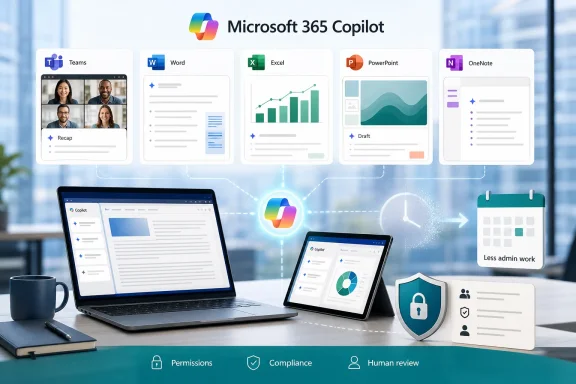 Microsoft’s Productivity Pitch Has Moved From Chatbot to Workflow Engine
The early version of the Copilot sales pitch was easy to caricature: an AI box inside Word, Excel, Outlook, and Teams that could summarize, draft, and rewrite. Useful, perhaps, but not obviously transformative. The newer pitch is more ambitious because it is less about chatting with an assistant and more about compressing the repetitive loops that define office work.That is why the “save 10 hours per week” framing has traction. It does not depend on Copilot producing one miraculous spreadsheet or a perfect presentation. It depends on shaving 15 minutes from meeting prep, 20 minutes from a recap, 30 minutes from a document review, and another half-hour from turning scattered notes into something a colleague can actually use.
This is where Microsoft has an advantage that standalone AI tools cannot easily match. Copilot sits where the artifacts of work already live: Teams calls, Outlook threads, Word documents, Excel tables, PowerPoint decks, SharePoint files, and OneNote pages. The assistant’s value increases when it can see the boring connective tissue of a company’s day-to-day operations.
But the same integration that makes Copilot compelling also makes it dangerous to oversell. Productivity does not automatically follow from adding AI to every app. It follows when teams know which tasks to delegate, which outputs to verify, and which workflows should never be automated without human judgment.
Meeting Prep Is the Killer App Because Meetings Are the Disease
The most persuasive Copilot use case remains the one least likely to impress technologists: meetings. Not because summarizing a meeting is glamorous, but because modern office work has allowed meetings to metastasize into the operating system of the organization. Every project has a standing call, every standing call produces notes, and every note produces a follow-up that someone must chase.Copilot’s ability to summarize previous discussions in Teams, draft agendas, and suggest topics for upcoming meetings addresses a very real tax on professional time. For recurring meetings, scheduled prompts can turn preparation into a repeatable process rather than a weekly scramble through old chats and documents. That is not artificial general intelligence; it is a much better intern with access to the filing cabinet.
The productivity gain comes from reducing the activation energy of being prepared. A manager walking into a weekly operations call does not necessarily need to reread every prior note. They need the unresolved decisions, the open risks, the promises made last time, and the handful of items that require escalation.
Copilot can provide that scaffolding quickly. The human still has to decide what matters, but the machine can assemble the raw briefing. In a workplace drowning in “just checking in” messages and half-remembered action items, that is not a small thing.
The Recap Is Where AI Turns Conversation Into Accountability
Post-meeting work is even more fertile ground because it is both tedious and consequential. Someone must capture what was discussed, identify who agreed to do what, and make sure the record is not trapped in one person’s private notes. When that step fails, the meeting was not merely inefficient; it becomes institutional fog.Copilot-generated recaps can convert a Teams discussion into a digestible summary with action items, owners, and next steps. Syncing or refining those notes in OneNote gives teams a more durable record than a chat scroll or a hastily written email. In practice, this is where Copilot begins to look less like a writing tool and more like lightweight project infrastructure.
There is a subtle cultural shift here. Traditionally, meeting notes reflected the attention, bias, and stamina of the person assigned to take them. AI recaps are not free of bias or error, but they create a baseline artifact every time. That consistency can be valuable, especially in teams where documentation habits vary wildly.
The risk is that everyone starts treating the recap as canonical simply because it looks polished. Copilot can miss nuance, flatten disagreement, or elevate the wrong point. The correct workflow is not “let Copilot decide what happened.” It is “let Copilot produce the first record, then let accountable humans correct it.”
Excel Is Where Copilot Meets the Limits of Business Reality
Excel is the most interesting Copilot battleground because spreadsheets are where business optimism goes to meet messy data. Microsoft can credibly claim that Copilot helps users categorize datasets, apply conditional formatting, identify trends, and build dashboards from natural-language prompts. That is a meaningful shift for workers who know what they want to understand but do not know the formula, pivot table, or visualization path to get there.The promise is straightforward. A sales manager can ask Copilot to identify underperforming regions, highlight revenue trends, or produce a dashboard showing growth and decline. A finance analyst can use it to summarize a table before drilling into the numbers manually. A non-technical executive can get a first-pass view of the data without waiting for someone else to build a report.
That is useful, but it does not abolish the need for data literacy. Copilot can help users ask better questions of a dataset, but it cannot guarantee the dataset is clean, complete, or meaningful. If sales territories changed mid-quarter, if rows are mislabeled, or if the numbers were exported from a system with bad assumptions, the AI-generated dashboard may simply make flawed data look more authoritative.
The danger is not that Copilot will be obviously wrong. The danger is that it will be plausibly wrong. A chart with clean colors and confident labels can travel farther inside an organization than a caveat-filled spreadsheet ever could.
For WindowsForum’s IT pro audience, this is where governance matters. Copilot in Excel should be treated as an accelerator for exploration, not a substitute for controlled reporting. It can help users find patterns faster, but the final numbers used in board packs, audits, compensation plans, or regulatory submissions need old-fashioned validation.
Document Summaries Are a Gift to Busy Readers and a Trap for Lazy Ones
The document-summarization use case is almost too obvious. Professionals spend enormous time reading Word files, PDFs, slide decks, proposals, policy documents, and meeting materials that are too long because nobody had time to make them shorter. Copilot’s ability to compress those materials into executive summaries is one of the most immediately valuable features in the suite.For board meetings and executive briefings, this can be a genuine time-saver. Instead of reading 40 pages to discover the six decisions that matter, a user can ask Copilot for the central argument, the open risks, the financial implications, and the recommended next steps. PowerPoint integration then adds another layer: turning summarized material into presentation-ready content or visual explanations.
This is the part of Copilot that feels most like a direct assault on corporate bloat. If every long document can be summarized instantly, writers may lose some ability to hide weak thinking inside volume. The reader can ask the machine to extract the spine of the argument and expose whether one exists.
Yet summarization also creates a new temptation: pretending to have read something one has merely skimmed through AI. That might be acceptable for triage, but it is reckless for legal, security, financial, or personnel decisions. Copilot can tell you what a document appears to say; it cannot assume responsibility for what you failed to notice.
The best use is layered reading. Let Copilot summarize first, then use that summary to decide where to inspect the source material. That saves time without surrendering judgment.
Agents Are Microsoft’s Bet That Office Work Can Be Delegated in Pieces
The most consequential part of the Copilot story is not the chat pane. It is the rise of agents: task-specific AI helpers that can be configured to perform repeatable work, such as summarizing reports, analyzing PDFs, preparing recurring updates, or monitoring a narrow set of business inputs. This is where Copilot starts to move from assistance to delegation.A weekly sales-report agent, for example, could ingest a recurring file, summarize changes, identify anomalies, and produce a short briefing for a manager. A policy-review agent could help scan documents against internal guidance. A project agent could assemble updates from meetings, files, and messages into a status note.
None of this means the AI becomes a digital employee in the science-fiction sense. The more accurate framing is that Microsoft wants to disassemble office work into repeatable patterns and let users automate the patterns that do not require creativity, authority, or moral judgment. That is a much more practical vision, and probably a more disruptive one.
For administrators, agents also raise the stakes. A bad prompt in a chat wastes one user’s time. A badly designed agent can produce repeated errors at scale. If agents are allowed to access sensitive data, publish outputs, or influence workflows, then permissions, auditability, and lifecycle management become central.
This is where Microsoft’s enterprise posture matters. Copilot’s appeal to organizations rests on the idea that it respects Microsoft 365 identity, permissions, compliance controls, and tenant boundaries. But IT departments should still assume that adoption will create new governance questions faster than policy teams can answer them.
Custom Models and Prompts Shift the Burden From Software to Management
Copilot’s customization features are a reminder that AI productivity is not just a technology problem. Users can refine prompts, select more specialized models in some contexts, and shape outputs for particular tasks. That flexibility is powerful, but it also means organizations must teach employees how to ask for work, evaluate work, and standardize work in new ways.Prompt libraries may sound like a gimmick until you watch a team waste hours reinventing the same request. A good recurring prompt for a project recap, a customer briefing, or a data-quality review can become a reusable business asset. In that sense, prompts are becoming a lightweight form of process documentation.
The deeper issue is consistency. If every employee uses Copilot differently, the organization gets scattered productivity gains but no operational leverage. If teams agree on reusable prompts, review steps, naming conventions, and escalation rules, Copilot becomes part of the workflow rather than a novelty bolted onto it.
That is why the advice to save frequently used prompts, verify AI outputs, and grant editing permissions is more than user training trivia. It is the difference between Copilot as a toy and Copilot as infrastructure. The companies that benefit most will not be the ones that simply buy licenses; they will be the ones that redesign small parts of work around AI-assisted defaults.
The Ten-Hour Claim Is Both Reasonable and Easy to Misread
The claim that Copilot can save 10 hours per week is best understood as an upper-range productivity outcome, not a universal entitlement. A knowledge worker who lives in meetings, writes frequent summaries, prepares slide decks, analyzes routine spreadsheets, and handles repetitive reports may genuinely reclaim that much time. A frontline worker, specialist engineer, or employee outside Microsoft 365-heavy workflows may save far less.This distinction matters because AI vendors have learned to sell time savings as if all work is made of the same material. It is not. Some tasks compress well because they are repetitive, text-heavy, and tolerant of drafts. Others resist compression because they require negotiation, taste, domain expertise, or accountability.
The most credible savings come from administrative friction. Copilot can reduce the time spent finding context, formatting information, producing first drafts, and converting one artifact into another. It is less reliable as a replacement for analysis that requires deep business knowledge or high-stakes interpretation.
There is also a measurement problem. Workers may save time on a recap but spend that time attending another meeting. Organizations may gain faster document production but produce more documents. Productivity software has a long history of turning saved time into higher expectations rather than shorter workweeks.
That does not make the savings meaningless. It means leaders should be honest about where the hours go. If Copilot saves 10 hours and management fills all 10 with more coordination overhead, the tool has improved throughput but not necessarily the work.
Security and Governance Are Not Side Issues
For Windows administrators and Microsoft 365 owners, Copilot is not merely another app deployment. It is an AI layer over organizational memory. That makes identity, permissions, data hygiene, retention policies, sensitivity labels, and user training central to the rollout.Copilot can only be as safe as the environment it operates in. If SharePoint permissions are sloppy, if old files are broadly accessible, or if sensitive information has been stored in the wrong locations, an AI assistant may surface problems that were previously hidden by inconvenience. In many organizations, Copilot adoption begins by revealing that the information architecture was never ready for an assistant that can search and summarize at speed.
This is not a reason to avoid Copilot. It is a reason to prepare for it properly. Before encouraging employees to delegate recurring work to AI, administrators should review access controls, clarify which data sources are appropriate, and define when outputs require human approval.
There is also the issue of user confidence. Employees need to know when Copilot is operating on meeting transcripts, files, chats, or selected data. They need to understand that disabling transcription or limiting access changes what Copilot can produce. A confused user is more likely to blame the tool for weak output or, worse, trust output whose context they do not understand.
The enterprise AI era rewards boring IT fundamentals. Clean permissions, good records management, clear training, and enforceable policies are suddenly productivity features.
Microsoft Is Selling Less Typing, but the Real Product Is Control
The more Copilot expands, the more Microsoft’s strategy comes into focus. The company is not merely adding AI to Office; it is trying to make Microsoft 365 the command layer for work. If users ask Copilot to summarize, draft, analyze, schedule, and delegate, then Microsoft becomes not just the place where work is stored but the place where work is initiated.That has obvious benefits for customers already committed to Microsoft’s ecosystem. The fewer times workers leave Teams, Outlook, Excel, or Word, the less context switching they endure. A unified AI assistant can reduce the friction of moving from conversation to document to spreadsheet to presentation.
It also deepens lock-in. The more prompts, agents, workflows, and habits organizations build around Microsoft 365 Copilot, the harder it becomes to evaluate alternatives on a simple feature checklist. The value migrates from the app to the accumulated workflow.
For IT leaders, that means Copilot should be evaluated strategically rather than as a clever add-on. The question is not whether it can summarize a meeting. The question is whether the organization wants Microsoft’s AI layer to mediate more of its daily operations.
That may be the right answer for many enterprises. Microsoft has the distribution, security story, admin tooling, and app footprint to make AI useful at scale. But the decision deserves more scrutiny than a productivity demo.
The Practical Copilot Playbook Starts Smaller Than the Hype
The smartest way to adopt Copilot is not to unleash every feature at once and hope productivity appears. It is to target the repeatable pain points where AI drafts are useful, errors are manageable, and review is natural. Meeting prep, meeting recaps, document summaries, and first-pass Excel analysis fit that profile.Teams should begin by identifying the weekly tasks that consume time without requiring much original judgment. Then they should create standard prompts, define acceptable outputs, and decide who reviews what. The goal is not to make every employee an AI power user overnight; it is to make the most common workflows less wasteful.
Managers also need to resist the urge to treat Copilot as a surveillance or velocity machine. If AI simply increases the number of updates, reports, decks, and meetings, it will reproduce the same dysfunction at higher speed. The best deployments will use Copilot to remove low-value work, not multiply it.
Employees, meanwhile, should learn to treat Copilot as a capable assistant with a weak sense of consequence. It can produce useful drafts, but it does not know which mistake will embarrass the team, violate policy, or mislead a customer. Human review is not a bureaucratic leftover; it is the control surface.
The Week Copilot Actually Gives Back
The practical value of Copilot is easiest to see when the promise is narrowed from “AI transformation” to “less time lost to office sludge.” That may sound modest, but it is exactly where Microsoft has the strongest case. The following are the clearest lessons for users and administrators weighing whether Copilot can deliver real weekly savings:- Copilot is most useful when it works from existing Microsoft 365 context such as meetings, documents, chats, spreadsheets, and shared files.
- Meeting preparation and post-meeting recaps are likely to produce the fastest visible time savings for many knowledge workers.
- Excel analysis can accelerate exploration, but important business decisions still require clean data and human validation.
- Document summaries are best used as a navigation aid, not as a substitute for reading high-stakes material.
- Agents can reduce recurring administrative work, but they require stronger governance than one-off chat prompts.
- Organizations will get better results when they standardize prompts, review practices, permissions, and acceptable use cases.
References
- Primary source: Geeky Gadgets
Published: Wed, 17 Jun 2026 13:15:23 GMT
Microsoft Copilot Guide: Automate Teams, Excel and OneNote - Geeky Gadgets
Master Microsoft Copilot quickly with this guide to building AI agents, automating workflows, and boosting productivity.www.geeky-gadgets.com - Related coverage: axios.com
Microsoft explores DeepSeek for Copilot Cowork
Microsoft will also shift to usage-based pricing for the enterprise agent.www.axios.com
- Official source: support.microsoft.com
What's the difference between Microsoft Copilot (free) and Copilot in Microsoft 365 | Microsoft Support
Compare Microsoft Copilot options to find the best AI-powered tools for your productivity and collaboration needs.support.microsoft.com - Official source: microsoft.com
Microsoft 365 Copilot Plans and Pricing—AI for Business | Microsoft 365
Explore AI subscription plans for Microsoft 365 Copilot—AI designed to enhance productivity. Discover Copilot pricing options tailored to your business needs.www.microsoft.com
- Official source: learn.microsoft.com
What is Microsoft 365 Copilot? | Microsoft Learn
Learn about what Microsoft 365 Copilot is and common Copilot features in Microsoft 365 apps, like Word, Excel, PowerPoint, and Teams. This article answers common questions about Copilot, including what is Copilot, how Copilot works, and the benefits of using Copilot.learn.microsoft.com - Official source: blogs.microsoft.com
Introducing the First Frontier Suite built on Intelligence + Trust - The Official Microsoft Blog
Today Microsoft is announcing: Wave 3 of Microsoft 365 Copilot Expanded model diversity with Claude and next-gen OpenAI models available today General availability of Agent 365 on May 1 for $15 per user General availability of the new Microsoft 365 E7: The Frontier Suite on May 1 for $99 per...blogs.microsoft.com
- Official source: developer.microsoft.com
Microsoft 365 Copilot | Extend and Customize Copilot
Extend, enrich, and customize Microsoft Microsoft 365 Copilot. Explore Copilot extensibility options such as agents, API plugins, and Copilot connectors to expand AI-powered productivity, skills, and creativity.developer.microsoft.com - Related coverage: atonementlicensing.com
Microsoft 365 Copilot Pricing 2026: True Cost Decoded
Microsoft 365 Copilot lists at $30 per user per month. Realised cost lands at $66 to $87 after the E3 or E5 prerequisite. Get the 2026 pricing math.atonementlicensing.com
- Official source: adoption.microsoft.com
Microsoft Copilot Studio – Microsoft Adoption
Deliver value and employee satisfaction with our tools for Microsoft 365 Copilot Chat, Microsoft 365 Copilot, and agent deployment and adoption.adoption.microsoft.com - Related coverage: windowscentral.com
Only 3.3% of Microsoft 365 users pay for Copilot | Windows Central
A new report suggests that only a fraction of the Microsoft 365 and Office 365 users who interact with Copilot Chat actually pay for it.www.windowscentral.com - Related coverage: techradar.com
'The era of Copilot execution is here': Microsoft's Copilot Cowork is here with Anthropic AI to conquer all your biggest work tasks | TechRadar
Microsoft wants Copilot to 'take action' with your workwww.techradar.com - Related coverage: tomshardware.com
Microsoft offers a one-year free Microsoft 365 subscription to college students — eligible users get 50% off the monthly plan after the first year | Tom's Hardware
This promo will save you $100 for the first year of Microsoft 365.www.tomshardware.com - Related coverage: itpro.com
Satya Nadella says “our multi-model approach goes beyond choice’ as Microsoft adds Claude AI models to 365 Copilot | IT Pro
Users can choose between both OpenAI and Anthropic models in Microsoft 365 Copilotwww.itpro.com - Official source: info.microsoft.com
- Official source: cdn-dynmedia-1.microsoft.com
