

Microsoft Copilot was not showing signs of a widespread outage on Saturday, June 13, 2026, but user-monitoring sites recorded a roughly two-hour disruption on Thursday, June 11, when many users reported errors, inaccessible pages, and failed Copilot Chat sessions. The uncomfortable part for Microsoft is not simply that an AI service hiccupped. It is that Copilot is being sold as infrastructure while it still behaves, at moments, like a fast-moving web app with cloud dependencies users cannot see.
For Windows users, the answer to “is Copilot down?” is now more complicated than a green or red status light. Consumer Copilot, Microsoft 365 Copilot, Copilot Chat, Copilot inside Office apps, Copilot in Edge, and Copilot-related experiences across Windows do not always fail in the same way or show up on the same status page. That fragmentation is becoming the real story.
The June 11 incident appears to have been short-lived by cloud-platform standards. Third-party monitoring data showed a detected Copilot problem beginning around 8:06 p.m. UTC and clearing around 10:05 p.m. UTC, with users continuing to post scattered reports afterward. Some outage trackers described the current service state by June 13 as normal, while still noting the June 11 disruption in recent history.
That timeline matches the kind of outage that can feel chaotic to users but ambiguous to administrators. A user sees “something went wrong,” a frozen chat pane, or an inaccessible web page. An admin checks the tenant health dashboard and may or may not see an incident mapped cleanly to their organization. A public status page may still say everything is operational.
This is why Downdetector-style spikes matter even when they are not authoritative. They are noisy, self-selecting, and vulnerable to duplicate complaints, but they often catch the earliest user-visible pain. In the Copilot era, that early pain matters because the service is no longer a novelty tab off to the side; Microsoft wants it embedded in the workday.
That ambition changes the standard by which outages are judged. If Copilot is a convenience, a two-hour outage is annoying. If Copilot is the front door to email triage, document drafting, meeting summaries, spreadsheet analysis, and enterprise search, a two-hour outage becomes an operational event.
The problem is especially sharp for organizations that have encouraged employees to build habits around AI assistance. Once users stop manually searching SharePoint, stop drafting from scratch, and start relying on chat-based retrieval across Microsoft Graph, an outage does not merely remove a feature. It interrupts a workflow that has been redesigned around the expectation that the assistant will be there.
That is the hidden cost of successful adoption. The more Microsoft wins its argument that Copilot should be everywhere, the less forgiving customers will be when Copilot is unavailable.
Microsoft’s official guidance for Microsoft 365 customers is to use the Service health page in the Microsoft 365 admin center for tenant-specific incidents. That is sensible from an engineering perspective because Microsoft can map incidents to the customers actually affected. It is less satisfying during a fast-moving outage, when non-admin users, help desks, and managers are all asking the same blunt question: is this us, or is this Microsoft?
Public cloud status pages have always had this weakness. They are good at declaring large, well-understood incidents; they are less good at capturing partial failures, regional oddities, authentication loops, capacity problems, and experiences that fail only after a user crosses several service boundaries. Copilot is practically built out of those boundaries.
A single Copilot prompt can involve identity, licensing, browser state, Microsoft Graph, Office context, model routing, content safety filters, enterprise data permissions, and front-end session handling. If one of those layers wobbles, the user may say “Copilot is down,” while Microsoft’s monitoring classifies the problem more narrowly. Both can be true.
But dismissing those reports is equally wrong. For consumer-facing and hybrid enterprise services, user-reporting sites often become the first public evidence that something has broken. They also reveal something official dashboards tend to suppress: the human texture of an outage.
Users were not filing polished incident tickets on June 11. They were saying Copilot would not load, that chat failed, that Office web experiences were misbehaving, and that the usual support path was slower than community confirmation. That is exactly how modern outages are experienced: not as a clean red light, but as a pileup of symptoms across apps that users have been trained to think of as one Microsoft cloud.
For IT teams, the right posture is neither panic nor complacency. A Downdetector spike should trigger verification, not conclusion. Check tenant Service health, test from multiple networks, compare consumer Copilot with Microsoft 365 Copilot, watch Microsoft’s official status channels, and inspect whether authentication or licensing is the real culprit.
That branding may be convenient for marketing, but it is a mess during incident response. A consumer may report that “Copilot is down” because the web page will not answer. A business user may say the same because Outlook cannot summarize a thread. A developer may hear “Copilot outage” and wonder whether GitHub completions are affected. These are not the same failure domains.
The June 11 chatter appears to have centered mainly on Microsoft Copilot web and Microsoft 365 Copilot Chat-style experiences, not every product carrying the Copilot name. That distinction matters. Microsoft’s AI strategy is broad enough that one Copilot can be limping while another keeps running.
Unfortunately, the product surface does not make this distinction easy. Microsoft has spent immense effort making Copilot feel unified. During an outage, that unity becomes a liability because users reasonably expect a single operational answer.
AI outages are stranger because the product often fails at the moment of cognitive handoff. The user has already decided not to do the task manually. They have opened Copilot to summarize, draft, compare, search, reason, or rewrite. When it fails, the user loses not only the tool but also the mental context that was just transferred to it.
This makes Copilot downtime more irritating than its duration might suggest. A two-hour disruption during peak work hours can strand users in half-automated processes. Meeting notes may not be generated. Drafts may not be started. Document analysis may be delayed. The work can continue, but the mode of work changes abruptly.
That matters because Microsoft is not selling Copilot merely as faster typing. It is selling reduced friction, institutional memory, and a new way to interact with corporate data. The outage risk therefore belongs not just to the service desk, but to the operating model of teams that are beginning to depend on AI assistance.
A login loop may point to identity. A blank response may point to model routing or service capacity. Stale answers may point to indexing or Graph access. Missing enterprise context may point to permissions, licensing, or connectors. A generic error can hide any of these.
That diagnostic ambiguity increases support costs. Help desks need scripts that distinguish browser cache issues from tenant-wide incidents. Security teams need assurance that degraded service does not imply data leakage. Compliance teams need to know whether prompts, logs, and generated outputs remain governed during partial failures.
This is where Microsoft needs to improve the administrative experience. If Copilot is going to be a business-critical layer, its health telemetry has to be more granular than “working” or “not working.” Admins need to see which experiences are affected, which regions are involved, which dependencies are implicated, and whether user data access is part of the incident.
That is the right workflow, but it assumes organizations have prepared for it. Many have not. Service health notifications may go to the wrong mailbox, stale distribution lists, or a small group of admins who are not watching during an incident. Front-line support may not have the role permissions needed to view health details. Users may find Reddit or Downdetector before the help desk finds Microsoft’s advisory.
The answer is not to abandon official channels. It is to operationalize them. Service health should be integrated into incident-response tooling, notification rules should be tested, and Copilot-specific failure scenarios should be added to runbooks. If an organization pays for Microsoft 365 Copilot, it should know exactly who is responsible for confirming a Copilot incident within the first fifteen minutes.
That sounds bureaucratic until the next outage lands during an executive meeting, a legal review, a sales deadline, or a security investigation. Then it sounds like basic hygiene.
But Copilot is not a local Windows feature in the old sense. Even when it is surfaced inside Windows or Edge, the meaningful work happens in Microsoft’s cloud. If the back end is degraded, no amount of cache clearing will make the model respond reliably.
The trick is knowing when to stop troubleshooting. If multiple devices fail, multiple networks show the same behavior, and third-party outage trackers are spiking, users should assume a service-side issue until proven otherwise. If only one browser profile fails while mobile works, the problem is more likely local. That distinction saves time.
Microsoft could help by making client-side error messages more explicit. “Something went wrong” is not enough for a product that spans identity, cloud services, enterprise permissions, and AI inference. Users do not need a stack trace, but they do need to know whether to wait, contact IT, or fix their browser.
That is a milestone. The first phase of enterprise AI was about capability: can the assistant summarize, draft, search, and reason usefully enough to justify the license? The next phase is about dependability: can it do those things every workday, under load, across regions, with clear incident communication when it cannot?
Microsoft has the cloud engineering experience to solve much of this. Azure, Microsoft 365, Exchange Online, Teams, and OneDrive have all endured years of scaling pain. But Copilot adds a new layer of complexity because it is not one workload. It is an orchestration fabric stretched across many workloads.
That fabric will be judged by its weakest dependency. A model can be available while enterprise grounding is broken. Office can be available while Copilot in Office is not. Identity can be healthy while token exchange for a specific AI experience fails. The user will not care which layer is responsible. They will say Copilot is down.
As organizations spend real money on Copilot licenses, they will expect not just features but resilience. They will want incident histories, post-incident reviews, uptime commitments, and clarity about which Copilot experiences are covered by which service terms. They will also want a way to measure whether Copilot is delivering value after downtime, degraded answers, or missing context are taken into account.
The sales pitch has been bold: Copilot as the new interface for work. The operational contract needs to become equally mature. If the assistant becomes a dependency, vague assurances will not be enough.
This does not mean Microsoft must promise perfection. No cloud service can. But it does mean Copilot should be treated with the same seriousness as other productivity infrastructure. Availability, transparency, and recovery communication are not optional once a product becomes embedded in daily work.
But the broader lesson is less reassuring. Copilot’s operational picture is still too fragmented for a product Microsoft wants users to experience as unified. Status pages, tenant dashboards, third-party monitors, and community reports all tell part of the truth. During an incident, none of them alone is enough.
For administrators, the June 11 outage should be treated as a rehearsal. Confirm who receives Microsoft 365 Service health alerts. Make sure help-desk staff know how to distinguish consumer Copilot from Microsoft 365 Copilot. Build a short Copilot incident checklist. Decide what users should do when the assistant is unavailable.
For users, the lesson is simpler: do not build a workflow that has no fallback. Copilot can be useful, sometimes remarkably so, but it is still a cloud service. The save button, the manual search box, the local draft, and the old-fashioned browser refresh are not obsolete yet.
Good failure modes are part of good product design. If Copilot cannot answer, it should say whether the problem is authentication, service capacity, enterprise data access, or something unknown. If Microsoft 365 Copilot Chat is degraded, admins should see that quickly and specifically. If only a region or tenant subset is affected, that should be visible without requiring customers to triangulate from social media.
The stakes are rising because Copilot is increasingly positioned as an agent, not just an assistant. Agents that take actions, retrieve business data, operate across apps, and automate workflows will require even higher reliability standards. A chatbot outage is inconvenient. An agentic workflow failure can create missed approvals, stalled processes, or inconsistent business state.
That future makes today’s outage reports more than a passing nuisance. They are early stress tests for a computing model Microsoft is trying to mainstream.
For Windows users, the answer to “is Copilot down?” is now more complicated than a green or red status light. Consumer Copilot, Microsoft 365 Copilot, Copilot Chat, Copilot inside Office apps, Copilot in Edge, and Copilot-related experiences across Windows do not always fail in the same way or show up on the same status page. That fragmentation is becoming the real story.
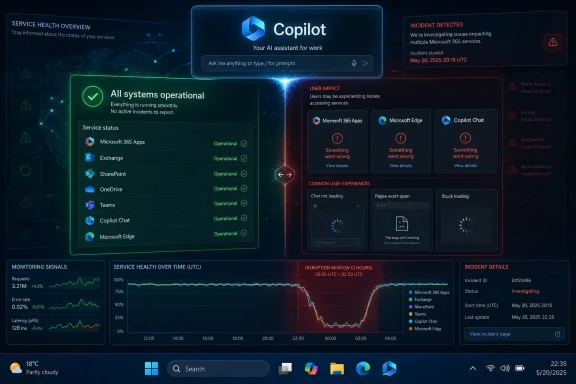 The Outage Was Brief, but the Signal Was Loud
The June 11 incident appears to have been short-lived by cloud-platform standards. Third-party monitoring data showed a detected Copilot problem beginning around 8:06 p.m. UTC and clearing around 10:05 p.m. UTC, with users continuing to post scattered reports afterward. Some outage trackers described the current service state by June 13 as normal, while still noting the June 11 disruption in recent history.That timeline matches the kind of outage that can feel chaotic to users but ambiguous to administrators. A user sees “something went wrong,” a frozen chat pane, or an inaccessible web page. An admin checks the tenant health dashboard and may or may not see an incident mapped cleanly to their organization. A public status page may still say everything is operational.
This is why Downdetector-style spikes matter even when they are not authoritative. They are noisy, self-selecting, and vulnerable to duplicate complaints, but they often catch the earliest user-visible pain. In the Copilot era, that early pain matters because the service is no longer a novelty tab off to the side; Microsoft wants it embedded in the workday.
Microsoft’s AI Assistant Is Becoming Too Important to Fail Quietly
Microsoft has spent the past several years pushing Copilot from a chatbot brand into a platform layer. It sits in Microsoft 365, Windows, Edge, GitHub, security tooling, developer environments, and business workflows. The company’s strategic message is unmistakable: Copilot is not an accessory; it is the new interface.That ambition changes the standard by which outages are judged. If Copilot is a convenience, a two-hour outage is annoying. If Copilot is the front door to email triage, document drafting, meeting summaries, spreadsheet analysis, and enterprise search, a two-hour outage becomes an operational event.
The problem is especially sharp for organizations that have encouraged employees to build habits around AI assistance. Once users stop manually searching SharePoint, stop drafting from scratch, and start relying on chat-based retrieval across Microsoft Graph, an outage does not merely remove a feature. It interrupts a workflow that has been redesigned around the expectation that the assistant will be there.
That is the hidden cost of successful adoption. The more Microsoft wins its argument that Copilot should be everywhere, the less forgiving customers will be when Copilot is unavailable.
The Status Page Gap Is Now a Trust Problem
One of the more revealing details from the June 11 reports is the apparent mismatch between user complaints and public status indicators. Some Copilot-related status surfaces showed no incident for June 11, while independent monitoring sites and user communities recorded a real burst of failures. That does not necessarily mean Microsoft hid anything. It does mean users and administrators were left reconciling different versions of reality.Microsoft’s official guidance for Microsoft 365 customers is to use the Service health page in the Microsoft 365 admin center for tenant-specific incidents. That is sensible from an engineering perspective because Microsoft can map incidents to the customers actually affected. It is less satisfying during a fast-moving outage, when non-admin users, help desks, and managers are all asking the same blunt question: is this us, or is this Microsoft?
Public cloud status pages have always had this weakness. They are good at declaring large, well-understood incidents; they are less good at capturing partial failures, regional oddities, authentication loops, capacity problems, and experiences that fail only after a user crosses several service boundaries. Copilot is practically built out of those boundaries.
A single Copilot prompt can involve identity, licensing, browser state, Microsoft Graph, Office context, model routing, content safety filters, enterprise data permissions, and front-end session handling. If one of those layers wobbles, the user may say “Copilot is down,” while Microsoft’s monitoring classifies the problem more narrowly. Both can be true.
Downdetector Is Not a Source of Truth, but It Is a Smoke Alarm
Downdetector and similar services should not be treated as definitive outage records. They measure reports, not packets. A spike can reflect a real service incident, a regional ISP issue, a bad browser update, a viral social-media post, or user confusion about a login change.But dismissing those reports is equally wrong. For consumer-facing and hybrid enterprise services, user-reporting sites often become the first public evidence that something has broken. They also reveal something official dashboards tend to suppress: the human texture of an outage.
Users were not filing polished incident tickets on June 11. They were saying Copilot would not load, that chat failed, that Office web experiences were misbehaving, and that the usual support path was slower than community confirmation. That is exactly how modern outages are experienced: not as a clean red light, but as a pileup of symptoms across apps that users have been trained to think of as one Microsoft cloud.
For IT teams, the right posture is neither panic nor complacency. A Downdetector spike should trigger verification, not conclusion. Check tenant Service health, test from multiple networks, compare consumer Copilot with Microsoft 365 Copilot, watch Microsoft’s official status channels, and inspect whether authentication or licensing is the real culprit.
The Consumer Copilot and Microsoft 365 Copilot Split Still Confuses Everyone
Microsoft has a naming problem that becomes acute during outages. “Copilot” can mean the public web chatbot at copilot.microsoft.com. It can mean Microsoft 365 Copilot inside Word, Excel, PowerPoint, Outlook, Teams, and the Microsoft 365 app. It can mean Copilot Chat for work and school accounts. It can mean Windows Copilot experiences. It can mean GitHub Copilot, which has its own operational life entirely.That branding may be convenient for marketing, but it is a mess during incident response. A consumer may report that “Copilot is down” because the web page will not answer. A business user may say the same because Outlook cannot summarize a thread. A developer may hear “Copilot outage” and wonder whether GitHub completions are affected. These are not the same failure domains.
The June 11 chatter appears to have centered mainly on Microsoft Copilot web and Microsoft 365 Copilot Chat-style experiences, not every product carrying the Copilot name. That distinction matters. Microsoft’s AI strategy is broad enough that one Copilot can be limping while another keeps running.
Unfortunately, the product surface does not make this distinction easy. Microsoft has spent immense effort making Copilot feel unified. During an outage, that unity becomes a liability because users reasonably expect a single operational answer.
AI Outages Hurt Differently Than Email Outages
Email outages are disruptive, but users and admins understand them. Messages queue, clients retry, mobile apps go stale, and eventually mail flows again. Teams outages have a social rhythm too: meetings fail, chats lag, presence becomes unreliable. The failure mode is familiar.AI outages are stranger because the product often fails at the moment of cognitive handoff. The user has already decided not to do the task manually. They have opened Copilot to summarize, draft, compare, search, reason, or rewrite. When it fails, the user loses not only the tool but also the mental context that was just transferred to it.
This makes Copilot downtime more irritating than its duration might suggest. A two-hour disruption during peak work hours can strand users in half-automated processes. Meeting notes may not be generated. Drafts may not be started. Document analysis may be delayed. The work can continue, but the mode of work changes abruptly.
That matters because Microsoft is not selling Copilot merely as faster typing. It is selling reduced friction, institutional memory, and a new way to interact with corporate data. The outage risk therefore belongs not just to the service desk, but to the operating model of teams that are beginning to depend on AI assistance.
The Enterprise Risk Is Not Just Availability
Availability is the obvious concern, but it is not the only one. Copilot sits at the intersection of uptime, data access, identity, governance, and user trust. When it fails, administrators need to know whether the failure is harmless unavailability or a symptom of something deeper.A login loop may point to identity. A blank response may point to model routing or service capacity. Stale answers may point to indexing or Graph access. Missing enterprise context may point to permissions, licensing, or connectors. A generic error can hide any of these.
That diagnostic ambiguity increases support costs. Help desks need scripts that distinguish browser cache issues from tenant-wide incidents. Security teams need assurance that degraded service does not imply data leakage. Compliance teams need to know whether prompts, logs, and generated outputs remain governed during partial failures.
This is where Microsoft needs to improve the administrative experience. If Copilot is going to be a business-critical layer, its health telemetry has to be more granular than “working” or “not working.” Admins need to see which experiences are affected, which regions are involved, which dependencies are implicated, and whether user data access is part of the incident.
Microsoft’s Own Guidance Still Points Admins Back to the Tenant
For Microsoft 365 customers, the practical answer remains the Microsoft 365 admin center. The Service health dashboard is the place Microsoft expects administrators to verify incidents, review updates, and determine whether a problem is known. If an issue is not listed, admins can report it, allowing Microsoft to correlate signals across organizations.That is the right workflow, but it assumes organizations have prepared for it. Many have not. Service health notifications may go to the wrong mailbox, stale distribution lists, or a small group of admins who are not watching during an incident. Front-line support may not have the role permissions needed to view health details. Users may find Reddit or Downdetector before the help desk finds Microsoft’s advisory.
The answer is not to abandon official channels. It is to operationalize them. Service health should be integrated into incident-response tooling, notification rules should be tested, and Copilot-specific failure scenarios should be added to runbooks. If an organization pays for Microsoft 365 Copilot, it should know exactly who is responsible for confirming a Copilot incident within the first fifteen minutes.
That sounds bureaucratic until the next outage lands during an executive meeting, a legal review, a sales deadline, or a security investigation. Then it sounds like basic hygiene.
Windows Users Are Caught Between Local Troubleshooting and Cloud Reality
For individual Windows users, Copilot failures create a familiar support trap. The first advice is usually local: refresh the page, clear cache, update Edge, disable extensions, sign out and back in, test another browser, check the Microsoft Store app, or restart the PC. Much of that advice is still valid.But Copilot is not a local Windows feature in the old sense. Even when it is surfaced inside Windows or Edge, the meaningful work happens in Microsoft’s cloud. If the back end is degraded, no amount of cache clearing will make the model respond reliably.
The trick is knowing when to stop troubleshooting. If multiple devices fail, multiple networks show the same behavior, and third-party outage trackers are spiking, users should assume a service-side issue until proven otherwise. If only one browser profile fails while mobile works, the problem is more likely local. That distinction saves time.
Microsoft could help by making client-side error messages more explicit. “Something went wrong” is not enough for a product that spans identity, cloud services, enterprise permissions, and AI inference. Users do not need a stack trace, but they do need to know whether to wait, contact IT, or fix their browser.
The June Pattern Makes Reliability Part of the AI Debate
The June 11 outage did not happen in a vacuum. Other AI platforms have also seen notable disruptions as adoption has climbed. Microsoft’s own Copilot ecosystem has had earlier user-reported problems, including a June 1 spike noted by monitoring services. The pattern does not prove systemic fragility, but it does show that AI assistants are entering the same reliability conversation as email, storage, conferencing, and identity.That is a milestone. The first phase of enterprise AI was about capability: can the assistant summarize, draft, search, and reason usefully enough to justify the license? The next phase is about dependability: can it do those things every workday, under load, across regions, with clear incident communication when it cannot?
Microsoft has the cloud engineering experience to solve much of this. Azure, Microsoft 365, Exchange Online, Teams, and OneDrive have all endured years of scaling pain. But Copilot adds a new layer of complexity because it is not one workload. It is an orchestration fabric stretched across many workloads.
That fabric will be judged by its weakest dependency. A model can be available while enterprise grounding is broken. Office can be available while Copilot in Office is not. Identity can be healthy while token exchange for a specific AI experience fails. The user will not care which layer is responsible. They will say Copilot is down.
The SLA Conversation Has Not Caught Up With the Sales Pitch
A harder question sits beneath the outage chatter: what does Microsoft actually owe customers when Copilot fails? Traditional Microsoft 365 services have service commitments and incident processes. Copilot, depending on the plan and context, is layered on top of those services but is also a distinct paid AI capability.As organizations spend real money on Copilot licenses, they will expect not just features but resilience. They will want incident histories, post-incident reviews, uptime commitments, and clarity about which Copilot experiences are covered by which service terms. They will also want a way to measure whether Copilot is delivering value after downtime, degraded answers, or missing context are taken into account.
The sales pitch has been bold: Copilot as the new interface for work. The operational contract needs to become equally mature. If the assistant becomes a dependency, vague assurances will not be enough.
This does not mean Microsoft must promise perfection. No cloud service can. But it does mean Copilot should be treated with the same seriousness as other productivity infrastructure. Availability, transparency, and recovery communication are not optional once a product becomes embedded in daily work.
The Practical Read From the June 11 Failure Is Narrow but Uncomfortable
The most careful interpretation is also the most useful one. As of June 13, broad Copilot availability appeared normal, and the June 11 event looked like a resolved, time-limited disruption rather than an ongoing platform collapse. Users still seeing errors should troubleshoot locally and check tenant-specific service health before assuming Microsoft is down again.But the broader lesson is less reassuring. Copilot’s operational picture is still too fragmented for a product Microsoft wants users to experience as unified. Status pages, tenant dashboards, third-party monitors, and community reports all tell part of the truth. During an incident, none of them alone is enough.
For administrators, the June 11 outage should be treated as a rehearsal. Confirm who receives Microsoft 365 Service health alerts. Make sure help-desk staff know how to distinguish consumer Copilot from Microsoft 365 Copilot. Build a short Copilot incident checklist. Decide what users should do when the assistant is unavailable.
For users, the lesson is simpler: do not build a workflow that has no fallback. Copilot can be useful, sometimes remarkably so, but it is still a cloud service. The save button, the manual search box, the local draft, and the old-fashioned browser refresh are not obsolete yet.
The Copilot Era Needs Better Failure Modes
Copilot does not need to be perfect to be valuable, but it does need to fail better. That means clearer error messages, more precise service health reporting, and less ambiguity between consumer and enterprise incidents. It also means Microsoft should resist the temptation to treat every outage as an edge case in a product that is rapidly becoming central.Good failure modes are part of good product design. If Copilot cannot answer, it should say whether the problem is authentication, service capacity, enterprise data access, or something unknown. If Microsoft 365 Copilot Chat is degraded, admins should see that quickly and specifically. If only a region or tenant subset is affected, that should be visible without requiring customers to triangulate from social media.
The stakes are rising because Copilot is increasingly positioned as an agent, not just an assistant. Agents that take actions, retrieve business data, operate across apps, and automate workflows will require even higher reliability standards. A chatbot outage is inconvenient. An agentic workflow failure can create missed approvals, stalled processes, or inconsistent business state.
That future makes today’s outage reports more than a passing nuisance. They are early stress tests for a computing model Microsoft is trying to mainstream.
The Checklist Windows Shops Should Write Before the Next Spike
The June 11 disruption was not catastrophic, but it was concrete enough to justify preparation. A short Copilot runbook will do more for most organizations than a long debate about whether Downdetector is reliable. The point is not to predict every failure; it is to shorten the time between user complaints and a confident operational answer.- Organizations should verify Microsoft 365 Service health first, but they should also compare it with user reports and independent monitoring when symptoms appear widespread.
- Help desks should ask whether the problem affects consumer Copilot, Microsoft 365 Copilot, Copilot Chat, Office-integrated Copilot, or another Copilot-branded product.
- Users should test another browser, device, and network before spending significant time on local troubleshooting.
- Administrators should confirm that service-health notifications reach an actively monitored mailbox or incident channel.
- Teams that rely on Copilot for recurring workflows should define a manual fallback for meetings, document review, research, and drafting.
- Microsoft should be expected to provide clearer incident boundaries as Copilot becomes more deeply embedded in Windows and Microsoft 365.
References
- Primary source: Dailyhunt
Published: 2026-06-12T21:50:12.030774
Loading…
m.dailyhunt.in - Related coverage: techradar.com
Loading…
www.techradar.com - Related coverage: techtimes.com

Microsoft Copilot Fails Twice in June: Enterprise IT Has No SLA Protection for AI Downtime
Microsoft Copilot outage on June 11 was the second major disruption in 11 days, exposing a critical enterprise reliability gap: Copilot carries no financially backed SLA comparable to Exchangewww.techtimes.com - Related coverage: vaasblock.com

Build 2026's Agentic Copilot Pitch Followed a 14,000-User Outage
At Build 2026 Nadella called Copilot 'the first truly agentic OS.' Seventy-two hours earlier, 14,000 users reported it was down. The pattern is the problem, not the outage.www.vaasblock.com - Related coverage: ad-hoc-news.de
Loading…
www.ad-hoc-news.de - Related coverage: windowscentral.com

Microsoft 365 is paywalling most of Copilot in its Office apps | Windows Central
Commercial customers will soon need a Microsoft 365 Copilot license to use Copilot Chat in Word, Excel, PowerPoint, and OneNote.www.windowscentral.com
- Related coverage: downforeveryoneorjustme.com

Is Copilot down? Live status and problems past 24 hours
Live problems for Copilot. Error received? Down? Slow? Check what is going on. downforeveryoneorjustme.com
- Related coverage: entireweb.com
Loading…
www.entireweb.com - Related coverage: isdown.app

Is Microsoft Copilot Down? Check current status and user reports | IsDown
Check if Microsoft Copilot is down right now. Live Microsoft Copilot status, real-time outage detection, and instant alerts when Microsoft Copilot has issues. Free 14-day trial. isdown.app
- Related coverage: copilot.statuspage.io

Copilot Status
Welcome to Copilot's home for real-time and historical data on system performance.copilot.statuspage.io - Official source: learn.microsoft.com

How to check Microsoft 365 service health - Microsoft 365 Enterprise | Microsoft Learn
View the health status of Microsoft 365 services before you call support to see if there's an active service interruption.learn.microsoft.com - Related coverage: support.nhs.net
- Related coverage: labs.cloudsecurityalliance.org
CSA research note M365 Copilot CVE 2026 24299 20260505 csa styled
PDF documentlabs.cloudsecurityalliance.org
- Related coverage: spscc.edu
