

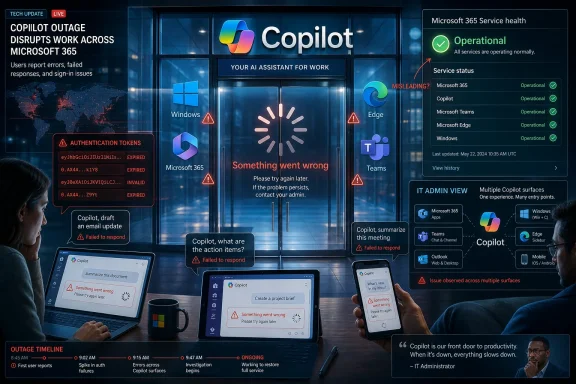
Microsoft Copilot users reported errors, slow loading, failed responses, authentication problems, and unresponsive sessions on Thursday, May 14, 2026, as outage trackers and user reports pointed to a service disruption affecting at least part of Microsoft’s AI assistant stack. The important detail is not that an internet service had a bad hour; that happens. The important detail is that Microsoft has spent three years turning Copilot from an optional chatbot into a front door for Windows, Microsoft 365, Bing, Edge, Teams, and enterprise workflow. When that front door sticks, the whole “AI everywhere” strategy suddenly looks a lot more fragile.
The reported Copilot problems followed a familiar modern outage pattern: users saw vague “Something went wrong” messages, retries produced little clarity, and third-party outage trackers began lighting up before a clean public explanation emerged. Hindustan Times reported nearly 200 Downdetector reports at the time of its story, with users describing slow responses, failed prompts, authentication issues, and total non-responsiveness.
That number does not prove a global meltdown. Downdetector is a complaint thermometer, not a service-level dashboard, and it is especially noisy for products with multiple entry points. Copilot can mean the consumer web chatbot, the Windows app, the Microsoft 365 Copilot experience, Copilot in Edge, Copilot in Teams, or one of several branded business assistants.
But that ambiguity is the point. Microsoft has attached the Copilot name to enough surfaces that “Copilot is down” now means different things to different users. For a consumer, it may mean the web app is spinning. For an enterprise worker, it may mean Microsoft 365 Copilot Chat cannot retrieve work context. For a Windows user, it may mean the bundled AI shortcut has become a very polished error screen.
A decade ago, Microsoft’s cloud outages mostly meant Exchange Online mail delays, Teams meetings going sideways, or Azure regions misbehaving. In 2026, the same reliability question has moved into AI. The difference is that Copilot is not merely another app in the suite; Microsoft has positioned it as the connective tissue between apps.
Status pages are written for precision, not catharsis. They often lag behind user reports because vendors need telemetry, scope, and a mitigation path before they formally acknowledge an incident. But when a user cannot get work done and the dashboard says the service is operational, the dashboard does not feel careful. It feels useless.
For IT administrators, this is not just a communications gripe. A status page that under-describes an outage can send help desks down the wrong path. Staff start clearing browser caches, resetting passwords, changing networks, and reinstalling apps when the real problem sits upstream in Microsoft’s infrastructure.
That does not mean local troubleshooting is pointless. Browser state, authentication tokens, VPN routing, and stale app versions really can produce Copilot failures. But during a live service degradation, those fixes become rituals of uncertainty. They are things users do because the vendor has not yet told them whether the problem is theirs.
The old advice still applies: check the official Microsoft 365 and Azure service health portals, compare them with third-party outage trackers, and look for patterns across devices and networks. If Copilot fails on multiple browsers, multiple networks, and multiple accounts at the same time, the odds tilt sharply away from your local machine.
That means two users can both say “Copilot is broken” and be describing entirely different failure modes. One might be hitting a consumer chatbot capacity issue. Another might be blocked by Microsoft 365 identity. A third might be seeing an app shell load correctly while the model call or grounding data fails behind the scenes.
This is a branding victory when everything works. It lets Microsoft sell a single story: Copilot is the AI layer across your digital life. During an outage, the same brand umbrella becomes fog. The user does not know which service failed, and the admin may not know which dashboard to trust.
The company has spent years trying to make Copilot feel ambient and ever-present. That ambition has a cost. Once a tool is embedded across Windows and Microsoft 365, it inherits the expectations of those platforms. Users do not treat it like a beta chatbot; they treat it like part of the operating environment.
Those steps are not snake oil. Modern web apps are complicated bundles of cached scripts, identity cookies, feature flags, and service calls. A stale token or corrupt cache can absolutely produce a “something went wrong” error that looks like a server outage.
But the practical advice needs a ceiling. If many users are reporting the same symptoms at the same time, troubleshooting should become diagnostic rather than obsessive. Try one clean browser session. Try one alternate network. Try one known-good account if you have access to one. After that, stop burning the afternoon reinstalling software.
The deeper fix is operational: Microsoft needs clearer incident segmentation for Copilot-branded services. If consumer Copilot is degraded but Microsoft 365 Copilot is healthy, say so plainly. If Copilot Chat loads but grounded responses are failing, say that. If authentication is the bottleneck, tell admins before they start chasing endpoint ghosts.
Users can work around an outage. What they cannot work around is uncertainty masquerading as normal operation.
It becomes a productivity dependency.
That does not mean companies should panic or rip Copilot out of their stack. It means they should manage it like any other cloud service. If Copilot is now part of a business process, it needs expectations, fallback paths, and support scripts. Help desks should know how to distinguish local app problems from service degradation. Admins should know which Microsoft portals show tenant-specific health. Managers should know which workflows can proceed without AI assistance.
The uncomfortable truth is that many organizations adopted generative AI faster than they updated their operational playbooks. They bought licenses, enabled integrations, and encouraged usage, but treated reliability as Microsoft’s problem. That is only half true. Microsoft owns the service; the customer owns the business process that depends on it.
This is especially important for security-minded teams. Users under outage pressure tend to improvise. If Copilot is down and a deadline is looming, employees may paste sensitive material into alternative AI tools. A service disruption can quickly become a data-governance incident if organizations have not defined approved fallbacks.
When Copilot stalls, the user does not think in terms of large language model orchestration, inference capacity, or multi-region routing. They think the button Microsoft keeps promoting does not work. That perception matters because Copilot is still fighting for habitual use.
The consumer AI market is unforgiving in a way Office is not. If Word has a temporary cloud feature problem, users still have Word. If Copilot fails, many users can open ChatGPT, Claude, Gemini, Grok, or another assistant in seconds. The switching cost is low unless the user is deeply tied into Microsoft 365 context.
That is why reliability is not merely an infrastructure metric for Copilot. It is a product-adoption metric. Microsoft can bundle Copilot into Windows, but it cannot force users to trust it for real work if it feels intermittent or opaque.
The company’s advantage is distribution. Its weakness is expectation. A chatbot on a website can be flaky and still feel experimental. A chatbot embedded into Windows and Office has to behave like infrastructure.
But outage trackers should be read carefully. A few hundred reports can indicate a real incident, but not necessarily a massive one. Report volume depends on product popularity, geography, time of day, user demographics, and whether the outage hits people who are inclined to report it.
Copilot makes this even more complicated because it is not one neatly bounded service. Reports from consumer Copilot, Microsoft 365 Copilot, and Windows-integrated experiences may pile into the same public perception even if the underlying causes differ.
That nuance matters for journalism and for IT response. “Copilot is down” is a useful first alert, not a final diagnosis. The better question is which Copilot surface is failing, for which users, in which regions, and under which identity model.
Microsoft’s own status language should answer those questions. When it does not, third-party telemetry fills the gap.
Still, the complaint captures a real anxiety. AI services are more resource-intensive than ordinary web apps, and their supply chains are more complex. A simple prompt can involve identity checks, context retrieval, policy enforcement, model inference, content filtering, logging, and response rendering. Each step creates another place for latency or failure.
Microsoft has invested heavily in AI infrastructure, but demand keeps moving too. The more Microsoft inserts Copilot into daily workflows, the more usage shifts from novelty bursts to sustained dependency. That is a different operating challenge.
For WindowsForum readers, the key point is not whether Thursday’s incident was definitely a compute shortage. The key point is that AI reliability cannot be judged by the same mental model as a static web service. These systems depend on expensive, distributed, fast-changing infrastructure. They will fail in ways that look strange from the outside.
The visible symptom may be a bland error message. The invisible cause may sit several layers below the app the user can see.
That makes outage messaging part of the product. If Microsoft wants customers to treat Copilot as a serious productivity layer, the incident response has to be equally serious. A generic service degradation notice is not enough when users cannot tell whether the problem affects consumer accounts, business tenants, Windows integration, or Microsoft 365 grounding.
The company already knows how to communicate cloud incidents to enterprise administrators. Microsoft 365 service health advisories can be detailed, tenant-aware, and operationally useful. The challenge is that Copilot straddles consumer and enterprise worlds, and its public-facing failure modes often look less mature than the rest of Microsoft’s cloud estate.
There is also a cultural mismatch. AI products are marketed with almost magical language: ask anything, do more, work smarter, transform productivity. Outage messages are written in the dead dialect of cloud operations. The bigger the promise, the more jarring the error.
If Copilot is going to be a platform, Microsoft has to talk about it like one when it breaks.
Network changes are also worth a brief test. VPNs, proxies, filtered DNS, and corporate inspection tools can interfere with modern AI web services. If Copilot works on mobile data but not on corporate Wi-Fi, the outage may be local policy or routing rather than Microsoft.
But if the failure follows you across browsers, devices, and networks, it is time to stop treating your PC as the suspect. Check Microsoft’s service portals, watch for administrator advisories if you are in a managed tenant, and compare the timing with third-party outage reports. If you are responsible for users, document the symptoms and avoid shotgun fixes that create more support noise than resolution.
Most importantly, do not let an AI outage push sensitive data into unapproved services. If your organization allows alternate tools, use them within policy. If it does not, fall back to non-AI workflows rather than turning a productivity interruption into a compliance problem.
That changes the reliability standard. Windows users are used to local apps surviving internet weirdness. Microsoft 365 users are used to cloud dependencies, but they also expect mature status reporting and admin visibility. Copilot sits between those worlds, which means it inherits expectations from both.
The outage also reminds us that AI assistants are not self-contained intelligence boxes. They are cloud services with identity systems, data connectors, model endpoints, policy layers, and regional infrastructure. When one piece misbehaves, the user sees a spinner.
That is why Microsoft’s Copilot reliability story must mature quickly. The more the company promotes AI as the interface to everything, the less tolerance users will have for vague errors and ambiguous status pages.
Source: Hindustan Times Microsoft Copilot down? How to fix errors amid massive outage
 Microsoft’s AI Front Door Is Learning the Old Cloud Lesson
The reported Copilot problems followed a familiar modern outage pattern: users saw vague “Something went wrong” messages, retries produced little clarity, and third-party outage trackers began lighting up before a clean public explanation emerged. Hindustan Times reported nearly 200 Downdetector reports at the time of its story, with users describing slow responses, failed prompts, authentication issues, and total non-responsiveness.That number does not prove a global meltdown. Downdetector is a complaint thermometer, not a service-level dashboard, and it is especially noisy for products with multiple entry points. Copilot can mean the consumer web chatbot, the Windows app, the Microsoft 365 Copilot experience, Copilot in Edge, Copilot in Teams, or one of several branded business assistants.
But that ambiguity is the point. Microsoft has attached the Copilot name to enough surfaces that “Copilot is down” now means different things to different users. For a consumer, it may mean the web app is spinning. For an enterprise worker, it may mean Microsoft 365 Copilot Chat cannot retrieve work context. For a Windows user, it may mean the bundled AI shortcut has become a very polished error screen.
A decade ago, Microsoft’s cloud outages mostly meant Exchange Online mail delays, Teams meetings going sideways, or Azure regions misbehaving. In 2026, the same reliability question has moved into AI. The difference is that Copilot is not merely another app in the suite; Microsoft has positioned it as the connective tissue between apps.
The Status Page Problem Is Bigger Than This Outage
One of the more frustrating details in the Hindustan Times report is the tension between user experience and service-status language. The story says Microsoft’s broader consumer status message referenced “service degradation on Microsoft consumer products,” while Copilot itself was shown as operational. That kind of mismatch is not unusual during cloud incidents, but it is uniquely maddening for users because it converts a technical problem into a trust problem.Status pages are written for precision, not catharsis. They often lag behind user reports because vendors need telemetry, scope, and a mitigation path before they formally acknowledge an incident. But when a user cannot get work done and the dashboard says the service is operational, the dashboard does not feel careful. It feels useless.
For IT administrators, this is not just a communications gripe. A status page that under-describes an outage can send help desks down the wrong path. Staff start clearing browser caches, resetting passwords, changing networks, and reinstalling apps when the real problem sits upstream in Microsoft’s infrastructure.
That does not mean local troubleshooting is pointless. Browser state, authentication tokens, VPN routing, and stale app versions really can produce Copilot failures. But during a live service degradation, those fixes become rituals of uncertainty. They are things users do because the vendor has not yet told them whether the problem is theirs.
The old advice still applies: check the official Microsoft 365 and Azure service health portals, compare them with third-party outage trackers, and look for patterns across devices and networks. If Copilot fails on multiple browsers, multiple networks, and multiple accounts at the same time, the odds tilt sharply away from your local machine.
Copilot’s Many Names Make Incidents Harder to Read
Microsoft’s Copilot branding has become a reliability problem of its own. There is consumer Copilot, Microsoft 365 Copilot, Copilot Chat, Copilot in Windows, Copilot in Edge, Copilot for Security, GitHub Copilot, and a growing pile of product-specific assistants. Some share infrastructure; some do not. Some depend on Microsoft account authentication; others depend on Entra ID, Microsoft Graph, Teams, SharePoint, or tenant configuration.That means two users can both say “Copilot is broken” and be describing entirely different failure modes. One might be hitting a consumer chatbot capacity issue. Another might be blocked by Microsoft 365 identity. A third might be seeing an app shell load correctly while the model call or grounding data fails behind the scenes.
This is a branding victory when everything works. It lets Microsoft sell a single story: Copilot is the AI layer across your digital life. During an outage, the same brand umbrella becomes fog. The user does not know which service failed, and the admin may not know which dashboard to trust.
The company has spent years trying to make Copilot feel ambient and ever-present. That ambition has a cost. Once a tool is embedded across Windows and Microsoft 365, it inherits the expectations of those platforms. Users do not treat it like a beta chatbot; they treat it like part of the operating environment.
The Quick Fixes Are Sensible, but They Don’t Fix Microsoft
The quick-fix list circulating with the outage is mostly reasonable. Hard refresh the page. Restart the browser or app. Clear cache and cookies for Copilot and Bing. Try a different network. Disable VPN or proxy routing. Update or reinstall the app. Restart Windows if the failure is inside the Windows Copilot experience.Those steps are not snake oil. Modern web apps are complicated bundles of cached scripts, identity cookies, feature flags, and service calls. A stale token or corrupt cache can absolutely produce a “something went wrong” error that looks like a server outage.
But the practical advice needs a ceiling. If many users are reporting the same symptoms at the same time, troubleshooting should become diagnostic rather than obsessive. Try one clean browser session. Try one alternate network. Try one known-good account if you have access to one. After that, stop burning the afternoon reinstalling software.
The deeper fix is operational: Microsoft needs clearer incident segmentation for Copilot-branded services. If consumer Copilot is degraded but Microsoft 365 Copilot is healthy, say so plainly. If Copilot Chat loads but grounded responses are failing, say that. If authentication is the bottleneck, tell admins before they start chasing endpoint ghosts.
Users can work around an outage. What they cannot work around is uncertainty masquerading as normal operation.
Enterprise IT Should Treat AI as a Dependency, Not a Toy
The most important audience for this outage is not the casual user asking Copilot to summarize a web page. It is the organization that has started building daily workflow around AI assistance. Once employees use Copilot to draft documents, summarize Teams meetings, query internal files, generate Excel analysis, and triage inboxes, an outage becomes more than an inconvenience.It becomes a productivity dependency.
That does not mean companies should panic or rip Copilot out of their stack. It means they should manage it like any other cloud service. If Copilot is now part of a business process, it needs expectations, fallback paths, and support scripts. Help desks should know how to distinguish local app problems from service degradation. Admins should know which Microsoft portals show tenant-specific health. Managers should know which workflows can proceed without AI assistance.
The uncomfortable truth is that many organizations adopted generative AI faster than they updated their operational playbooks. They bought licenses, enabled integrations, and encouraged usage, but treated reliability as Microsoft’s problem. That is only half true. Microsoft owns the service; the customer owns the business process that depends on it.
This is especially important for security-minded teams. Users under outage pressure tend to improvise. If Copilot is down and a deadline is looming, employees may paste sensitive material into alternative AI tools. A service disruption can quickly become a data-governance incident if organizations have not defined approved fallbacks.
Consumer Copilot Has a Different Trust Problem
For consumers, the outage lands differently. Microsoft has put Copilot in front of ordinary Windows users through taskbar prompts, Edge integration, Bing surfaces, and standalone apps. The company wants AI assistance to feel as ordinary as search. But search earned that position through speed and reliability.When Copilot stalls, the user does not think in terms of large language model orchestration, inference capacity, or multi-region routing. They think the button Microsoft keeps promoting does not work. That perception matters because Copilot is still fighting for habitual use.
The consumer AI market is unforgiving in a way Office is not. If Word has a temporary cloud feature problem, users still have Word. If Copilot fails, many users can open ChatGPT, Claude, Gemini, Grok, or another assistant in seconds. The switching cost is low unless the user is deeply tied into Microsoft 365 context.
That is why reliability is not merely an infrastructure metric for Copilot. It is a product-adoption metric. Microsoft can bundle Copilot into Windows, but it cannot force users to trust it for real work if it feels intermittent or opaque.
The company’s advantage is distribution. Its weakness is expectation. A chatbot on a website can be flaky and still feel experimental. A chatbot embedded into Windows and Office has to behave like infrastructure.
Outage Trackers Are Useful, but They Are Not Evidence of Scale
Downdetector and similar services are valuable because they capture user pain early. They often show trouble before official status pages catch up, and they give users the reassurance that the problem is not isolated. In this case, the reported spike helped frame Copilot’s errors as a broader disruption rather than a handful of unrelated client failures.But outage trackers should be read carefully. A few hundred reports can indicate a real incident, but not necessarily a massive one. Report volume depends on product popularity, geography, time of day, user demographics, and whether the outage hits people who are inclined to report it.
Copilot makes this even more complicated because it is not one neatly bounded service. Reports from consumer Copilot, Microsoft 365 Copilot, and Windows-integrated experiences may pile into the same public perception even if the underlying causes differ.
That nuance matters for journalism and for IT response. “Copilot is down” is a useful first alert, not a final diagnosis. The better question is which Copilot surface is failing, for which users, in which regions, and under which identity model.
Microsoft’s own status language should answer those questions. When it does not, third-party telemetry fills the gap.
AI Capacity Is Now Part of the Reliability Conversation
One user quoted in the Hindustan Times report complained that Microsoft “doesn’t have the compute” to serve Copilot consistently. That is an understandable reaction, but it is also a claim outsiders cannot verify from a public outage spike alone. Copilot failures can stem from model capacity, authentication, routing, front-end bugs, backend dependencies, safety systems, regional infrastructure, or data-grounding services.Still, the complaint captures a real anxiety. AI services are more resource-intensive than ordinary web apps, and their supply chains are more complex. A simple prompt can involve identity checks, context retrieval, policy enforcement, model inference, content filtering, logging, and response rendering. Each step creates another place for latency or failure.
Microsoft has invested heavily in AI infrastructure, but demand keeps moving too. The more Microsoft inserts Copilot into daily workflows, the more usage shifts from novelty bursts to sustained dependency. That is a different operating challenge.
For WindowsForum readers, the key point is not whether Thursday’s incident was definitely a compute shortage. The key point is that AI reliability cannot be judged by the same mental model as a static web service. These systems depend on expensive, distributed, fast-changing infrastructure. They will fail in ways that look strange from the outside.
The visible symptom may be a bland error message. The invisible cause may sit several layers below the app the user can see.
Microsoft’s Messaging Needs to Catch Up With Its Strategy
Microsoft’s Copilot strategy is expansive, and the company has not been shy about it. Copilot is not being marketed as a sidecar. It is being marketed as the interface that will increasingly mediate work, search, operating-system interaction, and business data.That makes outage messaging part of the product. If Microsoft wants customers to treat Copilot as a serious productivity layer, the incident response has to be equally serious. A generic service degradation notice is not enough when users cannot tell whether the problem affects consumer accounts, business tenants, Windows integration, or Microsoft 365 grounding.
The company already knows how to communicate cloud incidents to enterprise administrators. Microsoft 365 service health advisories can be detailed, tenant-aware, and operationally useful. The challenge is that Copilot straddles consumer and enterprise worlds, and its public-facing failure modes often look less mature than the rest of Microsoft’s cloud estate.
There is also a cultural mismatch. AI products are marketed with almost magical language: ask anything, do more, work smarter, transform productivity. Outage messages are written in the dead dialect of cloud operations. The bigger the promise, the more jarring the error.
If Copilot is going to be a platform, Microsoft has to talk about it like one when it breaks.
The Practical Playbook for Today’s Copilot Failure
For users dealing with the current disruption, the most useful approach is to separate quick local checks from service-level reality. A hard refresh, app restart, or alternate browser can clear a surprising number of client-side failures. Clearing Copilot and Bing cookies may help if authentication or session state is corrupted.Network changes are also worth a brief test. VPNs, proxies, filtered DNS, and corporate inspection tools can interfere with modern AI web services. If Copilot works on mobile data but not on corporate Wi-Fi, the outage may be local policy or routing rather than Microsoft.
But if the failure follows you across browsers, devices, and networks, it is time to stop treating your PC as the suspect. Check Microsoft’s service portals, watch for administrator advisories if you are in a managed tenant, and compare the timing with third-party outage reports. If you are responsible for users, document the symptoms and avoid shotgun fixes that create more support noise than resolution.
Most importantly, do not let an AI outage push sensitive data into unapproved services. If your organization allows alternate tools, use them within policy. If it does not, fall back to non-AI workflows rather than turning a productivity interruption into a compliance problem.
The Copilot Outage Exposes the New Windows Dependency Chain
This incident is small in the long history of cloud failures, but it is revealing because of where Microsoft has placed Copilot in the Windows and Microsoft 365 story. The assistant is no longer a novelty tab that power users can ignore. It is increasingly treated as an expected layer of interaction.That changes the reliability standard. Windows users are used to local apps surviving internet weirdness. Microsoft 365 users are used to cloud dependencies, but they also expect mature status reporting and admin visibility. Copilot sits between those worlds, which means it inherits expectations from both.
The outage also reminds us that AI assistants are not self-contained intelligence boxes. They are cloud services with identity systems, data connectors, model endpoints, policy layers, and regional infrastructure. When one piece misbehaves, the user sees a spinner.
That is why Microsoft’s Copilot reliability story must mature quickly. The more the company promotes AI as the interface to everything, the less tolerance users will have for vague errors and ambiguous status pages.
The Useful Lessons Are Narrower Than the Hype
The immediate lesson from Thursday’s disruption is not that Copilot is doomed, nor that every AI assistant is unreliable. It is that users and administrators need to treat Copilot like a real dependency with failure modes, fallback plans, and limits. The practical takeaways are refreshingly concrete.- Microsoft Copilot users reported errors and unresponsive sessions on May 14, 2026, while public outage trackers showed a rise in complaints.
- A status page showing “operational” does not always mean every Copilot surface is healthy for every user, tenant, or region.
- A hard refresh, browser restart, cache clear, app update, VPN toggle, or network change is worth trying once, but repeated local troubleshooting is wasteful during a broader incident.
- Businesses using Microsoft 365 Copilot should define approved fallbacks before employees start moving sensitive work into unsanctioned AI tools.
- Microsoft needs clearer incident language for Copilot because the brand now spans consumer, Windows, web, and enterprise experiences.
Source: Hindustan Times Microsoft Copilot down? How to fix errors amid massive outage
