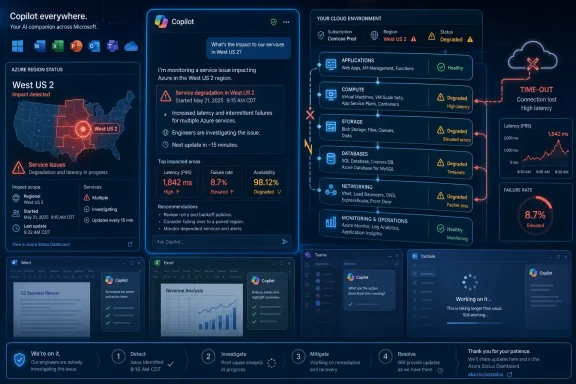
On May 29, 2026, Microsoft investigated a West US 2 Azure service degradation triggered by a datacenter power event, while users reported Microsoft Copilot failures and timeouts across consumer and work-facing entry points, according to Microsoft’s status messaging and outage coverage. The incident was not just another “AI chatbot is down” blip. It was a reminder that Copilot, for all its branding as a personal assistant, is increasingly a front end for a deep stack of cloud dependencies. When that stack coughs, the AI future looks very much like the cloud present: regional, fragile, and operationally messy.
Microsoft has spent the last two years trying to make Copilot feel like a product rather than a plumbing diagram. It appears in Windows, Edge, Bing, Microsoft 365, mobile apps, developer tools, security consoles, and increasingly in the language of Microsoft’s enterprise sales machine. The pitch is seamlessness: one assistant, many contexts, always available.
Outages puncture that illusion. Android Authority reported hundreds of user complaints that Copilot was not working, while Microsoft’s Azure status page described a multi-service degradation in the West US 2 region beginning at 04:27 UTC on May 29. The official impact language pointed to increased latency, intermittent connectivity, and timeouts when connecting to resources.
That wording matters because it is the vocabulary of infrastructure, not of chatbots. A consumer who sees Copilot hang may think “the AI is broken.” An administrator reads the same symptoms and sees failed dependency calls, storage delays, network instability, authentication retries, or compute resources that cannot be reached reliably.
Copilot is not one thing. It is a brand spanning several products that depend on identity, orchestration, model routing, storage, search, enterprise graph access, telemetry, policy enforcement, and regional cloud capacity. The user-facing failure may be a blank pane or a chirpy apology. The operational failure is somewhere underneath.
The affected Azure services list was broad: compute, storage, databases, Kubernetes, monitoring, backup, container registry, managed databases, analytics, and more. That does not prove every Copilot failure came directly from the West US 2 event, but it does show why administrators should be cautious about treating AI assistants as separable from the cloud estate that supports them.
This is the central tension in Microsoft’s Copilot strategy. The company wants customers to experience Copilot as a horizontal layer across work. But horizontal layers become horizontal failure surfaces. If the assistant is embedded in Outlook, Word, Teams, Windows, security workflows, and developer tooling, then degradation in its backing services becomes more than a novelty outage.
Microsoft knows this. Its public status language has become increasingly precise over the years, and Azure customers have access to Service Health views that are more tenant-specific than the public dashboard. But precision after the fact does not eliminate the lived experience of a user clicking Copilot and getting nothing useful back.
For IT departments, the problem is not whether Microsoft can eventually restore service. It usually can. The problem is whether workflows are being redesigned around a tool whose graceful degradation story remains unclear to many organizations adopting it.
Microsoft’s more recent Copilot messaging has pushed beyond assistance and into task execution. Agents, enterprise grounding, security triage, meeting preparation, document generation, spreadsheet analysis, and workflow orchestration all move Copilot from convenience toward dependency. The more useful Copilot becomes, the more painful downtime becomes.
That is the paradox of AI in productivity software. A bad AI assistant is easy to ignore. A good AI assistant becomes part of the workday, then part of the process, then part of the operating model. Reliability expectations rise at each step.
The May 29 incident should therefore be read as a warning shot for organizations that are moving from pilots to production usage. If Copilot is merely a writing helper, an outage is annoying. If it is summarizing customer records before calls, generating first-pass incident reports, triaging security alerts, or helping developers navigate internal codebases, an outage becomes an operational interruption.
This does not mean businesses should avoid Copilot or similar AI systems. It means they should classify them honestly. If a tool is allowed to influence real work, it deserves the same resilience planning, monitoring, fallback design, and support expectations as any other production service.
The West US 2 incident fits that older pattern. A datacenter power event is almost boring compared with the speculative drama that often surrounds AI outages. There is no need to invent a model meltdown or a sinister algorithmic failure when a regional infrastructure event can produce the same user-facing result: slow responses, timeouts, failed sessions, and degraded service.
That mundane explanation is actually more important. AI services are being marketed as transformational, but they are still hosted on physical infrastructure. They need power, cooling, networking, storage, and healthy control planes. They inherit the cloud’s old failure modes even as they introduce new ones.
For WindowsForum readers, this is familiar terrain. We have seen Windows Update failures blamed on the local PC when the problem was upstream. We have seen Microsoft 365 outages appear first as Outlook weirdness before service health pages caught up. We have seen authentication and DNS issues masquerade as application bugs.
Copilot adds a new layer of ambiguity because users are still learning what “normal” failure looks like for AI. A slow answer may be model load. A refusal may be policy. A blank pane may be a browser issue. A failed prompt may be regional cloud degradation. That ambiguity increases support burden.
In this case, the combination of user complaints about Copilot and Microsoft’s official Azure degradation notice created a credible picture: something real was happening, and users were feeling it. The exact path between Azure’s affected services and every failed Copilot request may be complicated, but the broader lesson does not require perfect attribution.
Administrators should treat third-party outage trackers as smoke alarms, not diagnostic tools. They tell you that users outside your tenant may be seeing the same symptoms. They do not tell you whether your conditional access policy, ISP, endpoint protection stack, tenant configuration, or Microsoft’s backend is the final culprit.
The practical workflow is triangulation. Check Microsoft’s public status. Check tenant-specific Service Health. Compare internal telemetry. Look at network egress, identity failures, endpoint logs, and help desk ticket patterns. Then decide whether to wait, reroute, communicate, or escalate.
Copilot complicates that workflow because it straddles product boundaries. A user may say “Copilot is down,” but the affected entry point could be a mobile app, a browser session, Microsoft 365 Chat, Edge, Windows, Teams, or a work account experience governed by different licensing and policy rules. The brand is unified; the troubleshooting surface is not.
It does not always help administrators. A “Copilot problem” can mean a consumer Microsoft account problem, an Entra ID issue, a Microsoft 365 licensing change, a Windows app regression, a browser cache issue, a mobile app fault, a service-side outage, or an Azure regional dependency. The word Copilot hides more than it reveals.
That matters during incidents. Users do not file tickets using Microsoft’s internal taxonomy. They say the thing they clicked is broken. If five products expose Copilot in five ways, the support desk must map a fuzzy complaint to a precise service path.
The same problem appears in governance. Enterprises are already wrestling with which Copilot features are enabled, which data sources are grounded, which users are licensed, and which experiences appear in Office apps or mobile clients. Availability now belongs in that same governance conversation.
An organization that has not inventoried where Copilot appears has not really planned for Copilot failure. It may know who has licenses, but not where users rely on the assistant during the day. It may know how to disable a feature, but not how to communicate a service-side degradation. That gap becomes visible when the assistant stops answering.
The stakes are different for consumer and enterprise users. A consumer who cannot access Copilot may switch to another chatbot for the afternoon. A business user may be constrained by data policy, compliance rules, and the need to keep sensitive material inside approved systems. In that world, “just use another AI” is not a serious fallback.
This creates a subtle competitive problem for Microsoft. Its greatest advantage is integration with the Microsoft 365 and Windows estate. But that integration also means outages feel less isolated. If a standalone chatbot fails, it is one tab. If Copilot is woven into work, failure appears inside the work itself.
Reliability also shapes user psychology. AI tools already require trust because outputs must be checked. Add availability uncertainty and users face a double burden: they must verify the answer if it arrives and maintain a fallback if it does not. That is not a recipe for deep adoption.
The vendors that win enterprise AI will not simply have the most impressive demos. They will have the best operational story: clear status, predictable failover, understandable admin controls, transparent incident histories, and product designs that degrade without derailing the workday.
That bargain is not new. Windows has become more cloud-connected for years, from account sign-in and OneDrive to widgets, search, Store apps, activation, telemetry, and Microsoft 365 integration. Copilot simply makes the bargain more visible because the feature’s value is so obviously dependent on remote intelligence.
When the cloud is healthy, that dependency feels like magic. When it is degraded, the local PC can feel oddly helpless. A powerful workstation with a fast CPU and plenty of RAM cannot make a cloud assistant answer if the backend path is timing out.
This is why Microsoft’s local AI work matters, even when it is overhyped. On-device models, NPUs, local recall-style indexing, and hybrid execution could eventually reduce the blast radius for some tasks. But the most useful enterprise Copilot scenarios still require cloud access to organizational data, policy, and large-scale model infrastructure.
The realistic future is not fully local AI replacing cloud AI. It is tiered AI: local features for resilient low-risk tasks, cloud features for data-rich and compute-heavy work, and clear handoff between the two. Today’s incidents show how much work remains before that feels seamless.
A good Copilot runbook starts by defining which business processes actually depend on it. Not which users have access. Not which departments are excited about AI. Which tasks would slow down, stop, or become riskier if Copilot became unavailable for two hours, eight hours, or a full business day.
The next step is communication. Users need to know whether failures are local, tenant-specific, or broader. Help desks need canned language that does not overpromise. Executives need to understand that AI availability is not guaranteed just because the icon is still visible in an app.
Then comes fallback design. If Copilot is used for meeting summaries, who owns notes when it fails? If it helps draft customer communications, what review process replaces it? If it supports security triage, which dashboards and queries remain authoritative? If developers use it for code assistance, do internal docs and search still work well enough?
This is not anti-AI bureaucracy. It is basic operational hygiene. The more Microsoft succeeds in making Copilot useful, the more customers need to treat it as a production dependency rather than an optional flourish.
Microsoft has improved its cloud incident communications over the years, but Copilot raises the bar. Because the product spans so many surfaces, users need clearer mapping between symptoms and services. “Copilot may be degraded” is less useful than knowing which entry points, account types, regions, and workloads are affected.
Enterprise admins also need better exposure to dependency chains. If Microsoft 365 Copilot relies on a service that is degraded in a particular Azure region, tenant administrators should not have to infer that relationship from public status text and user complaints. The admin experience should make the dependency legible.
There is also a product-design challenge. Copilot experiences should fail with useful information, not just generic apology messages. A user does not need a raw infrastructure dump, but they do need to know whether retrying is sensible, whether the problem is their account, whether work is saved, and whether an administrator has more information.
AI interfaces are often designed to feel conversational, but outage states call for plain engineering honesty. The assistant can be friendly when it works. When it fails, it should be precise.
That should change how organizations evaluate Copilot pilots. Too many pilots focus on prompt quality, user enthusiasm, licensing cost, and security review. Those are important, but they do not answer the operational question: what happens when the AI layer is slow, unavailable, or inconsistent?
A mature pilot should include failure testing. Disable access for a group. Simulate a service degradation. Ask users to complete the same workflow without Copilot. Measure not only productivity gains when it works, but productivity loss when it disappears.
This is especially important because AI tools can quietly reshape work habits. Users may stop learning where source documents live because Copilot finds them. Managers may stop writing detailed briefs because Copilot summarizes meetings. Analysts may rely on generated first drafts that still require verification but save time. Those habits create hidden dependency.
If the organization wants those gains, it should accept the dependency openly. Pretending Copilot is merely optional while encouraging users to rely on it is how outages turn from inconvenience into surprise.
Microsoft’s Copilot strategy still makes sense: users want software that can reason across documents, messages, meetings, code, and business data, and Microsoft owns more of that daily work surface than almost anyone. But the May 29 outage shows the bill that comes due when an assistant becomes infrastructure. The next phase of AI adoption will not be won by the company that merely puts the most buttons in the most apps; it will be won by the company that makes those buttons dependable, explainable, governable, and boring enough for IT to trust on a bad Friday morning.
 Copilot’s Outage Was Really Azure Showing Through the Paint
Microsoft has spent the last two years trying to make Copilot feel like a product rather than a plumbing diagram. It appears in Windows, Edge, Bing, Microsoft 365, mobile apps, developer tools, security consoles, and increasingly in the language of Microsoft’s enterprise sales machine. The pitch is seamlessness: one assistant, many contexts, always available.Outages puncture that illusion. Android Authority reported hundreds of user complaints that Copilot was not working, while Microsoft’s Azure status page described a multi-service degradation in the West US 2 region beginning at 04:27 UTC on May 29. The official impact language pointed to increased latency, intermittent connectivity, and timeouts when connecting to resources.
That wording matters because it is the vocabulary of infrastructure, not of chatbots. A consumer who sees Copilot hang may think “the AI is broken.” An administrator reads the same symptoms and sees failed dependency calls, storage delays, network instability, authentication retries, or compute resources that cannot be reached reliably.
Copilot is not one thing. It is a brand spanning several products that depend on identity, orchestration, model routing, storage, search, enterprise graph access, telemetry, policy enforcement, and regional cloud capacity. The user-facing failure may be a blank pane or a chirpy apology. The operational failure is somewhere underneath.
Microsoft’s AI Ambition Has a Blast-Radius Problem
The most important fact in this incident is not that Copilot had trouble. Consumer AI tools have outages, and so do enterprise SaaS platforms. The important fact is that Microsoft is making Copilot the connective tissue across its product line while the connective tissue still depends on the same regional cloud realities as everything else.The affected Azure services list was broad: compute, storage, databases, Kubernetes, monitoring, backup, container registry, managed databases, analytics, and more. That does not prove every Copilot failure came directly from the West US 2 event, but it does show why administrators should be cautious about treating AI assistants as separable from the cloud estate that supports them.
This is the central tension in Microsoft’s Copilot strategy. The company wants customers to experience Copilot as a horizontal layer across work. But horizontal layers become horizontal failure surfaces. If the assistant is embedded in Outlook, Word, Teams, Windows, security workflows, and developer tooling, then degradation in its backing services becomes more than a novelty outage.
Microsoft knows this. Its public status language has become increasingly precise over the years, and Azure customers have access to Service Health views that are more tenant-specific than the public dashboard. But precision after the fact does not eliminate the lived experience of a user clicking Copilot and getting nothing useful back.
For IT departments, the problem is not whether Microsoft can eventually restore service. It usually can. The problem is whether workflows are being redesigned around a tool whose graceful degradation story remains unclear to many organizations adopting it.
The Assistant Is Becoming a Dependency, Not a Convenience
The first generation of Copilot adoption was easy to dismiss as optional. If the sidebar failed, users could still write their own email, summarize their own document, or search the web manually. That framing is already aging out.Microsoft’s more recent Copilot messaging has pushed beyond assistance and into task execution. Agents, enterprise grounding, security triage, meeting preparation, document generation, spreadsheet analysis, and workflow orchestration all move Copilot from convenience toward dependency. The more useful Copilot becomes, the more painful downtime becomes.
That is the paradox of AI in productivity software. A bad AI assistant is easy to ignore. A good AI assistant becomes part of the workday, then part of the process, then part of the operating model. Reliability expectations rise at each step.
The May 29 incident should therefore be read as a warning shot for organizations that are moving from pilots to production usage. If Copilot is merely a writing helper, an outage is annoying. If it is summarizing customer records before calls, generating first-pass incident reports, triaging security alerts, or helping developers navigate internal codebases, an outage becomes an operational interruption.
This does not mean businesses should avoid Copilot or similar AI systems. It means they should classify them honestly. If a tool is allowed to influence real work, it deserves the same resilience planning, monitoring, fallback design, and support expectations as any other production service.
The Regional Cloud Still Rules the Global AI Story
One of the strangest things about modern cloud computing is how often “global” services become regional stories. Users experience a product as borderless. Engineers experience it as regions, zones, dependencies, replication paths, failover policies, and capacity constraints.The West US 2 incident fits that older pattern. A datacenter power event is almost boring compared with the speculative drama that often surrounds AI outages. There is no need to invent a model meltdown or a sinister algorithmic failure when a regional infrastructure event can produce the same user-facing result: slow responses, timeouts, failed sessions, and degraded service.
That mundane explanation is actually more important. AI services are being marketed as transformational, but they are still hosted on physical infrastructure. They need power, cooling, networking, storage, and healthy control planes. They inherit the cloud’s old failure modes even as they introduce new ones.
For WindowsForum readers, this is familiar terrain. We have seen Windows Update failures blamed on the local PC when the problem was upstream. We have seen Microsoft 365 outages appear first as Outlook weirdness before service health pages caught up. We have seen authentication and DNS issues masquerade as application bugs.
Copilot adds a new layer of ambiguity because users are still learning what “normal” failure looks like for AI. A slow answer may be model load. A refusal may be policy. A blank pane may be a browser issue. A failed prompt may be regional cloud degradation. That ambiguity increases support burden.
Downdetector Is Not a Root Cause, but It Is a Smoke Alarm
User reports are noisy. Downdetector spikes do not establish causality, and social posts can turn isolated failures into apparent catastrophes. But they remain useful because they capture impact before official systems fully explain it.In this case, the combination of user complaints about Copilot and Microsoft’s official Azure degradation notice created a credible picture: something real was happening, and users were feeling it. The exact path between Azure’s affected services and every failed Copilot request may be complicated, but the broader lesson does not require perfect attribution.
Administrators should treat third-party outage trackers as smoke alarms, not diagnostic tools. They tell you that users outside your tenant may be seeing the same symptoms. They do not tell you whether your conditional access policy, ISP, endpoint protection stack, tenant configuration, or Microsoft’s backend is the final culprit.
The practical workflow is triangulation. Check Microsoft’s public status. Check tenant-specific Service Health. Compare internal telemetry. Look at network egress, identity failures, endpoint logs, and help desk ticket patterns. Then decide whether to wait, reroute, communicate, or escalate.
Copilot complicates that workflow because it straddles product boundaries. A user may say “Copilot is down,” but the affected entry point could be a mobile app, a browser session, Microsoft 365 Chat, Edge, Windows, Teams, or a work account experience governed by different licensing and policy rules. The brand is unified; the troubleshooting surface is not.
The Copilot Brand Is Running Ahead of the Admin Model
Microsoft’s branding discipline around Copilot has been relentless. Nearly every major product line has received some variant of the name. That helps Microsoft tell Wall Street and customers a simple story: AI is everywhere in the stack.It does not always help administrators. A “Copilot problem” can mean a consumer Microsoft account problem, an Entra ID issue, a Microsoft 365 licensing change, a Windows app regression, a browser cache issue, a mobile app fault, a service-side outage, or an Azure regional dependency. The word Copilot hides more than it reveals.
That matters during incidents. Users do not file tickets using Microsoft’s internal taxonomy. They say the thing they clicked is broken. If five products expose Copilot in five ways, the support desk must map a fuzzy complaint to a precise service path.
The same problem appears in governance. Enterprises are already wrestling with which Copilot features are enabled, which data sources are grounded, which users are licensed, and which experiences appear in Office apps or mobile clients. Availability now belongs in that same governance conversation.
An organization that has not inventoried where Copilot appears has not really planned for Copilot failure. It may know who has licenses, but not where users rely on the assistant during the day. It may know how to disable a feature, but not how to communicate a service-side degradation. That gap becomes visible when the assistant stops answering.
AI Reliability Is Now a User-Experience Feature
Microsoft often talks about Copilot in terms of capability: better summaries, better drafting, better reasoning, better workflow integration. Reliability deserves equal billing. If users cannot trust the assistant to be there, they will route around it or downgrade it to a toy.The stakes are different for consumer and enterprise users. A consumer who cannot access Copilot may switch to another chatbot for the afternoon. A business user may be constrained by data policy, compliance rules, and the need to keep sensitive material inside approved systems. In that world, “just use another AI” is not a serious fallback.
This creates a subtle competitive problem for Microsoft. Its greatest advantage is integration with the Microsoft 365 and Windows estate. But that integration also means outages feel less isolated. If a standalone chatbot fails, it is one tab. If Copilot is woven into work, failure appears inside the work itself.
Reliability also shapes user psychology. AI tools already require trust because outputs must be checked. Add availability uncertainty and users face a double burden: they must verify the answer if it arrives and maintain a fallback if it does not. That is not a recipe for deep adoption.
The vendors that win enterprise AI will not simply have the most impressive demos. They will have the best operational story: clear status, predictable failover, understandable admin controls, transparent incident histories, and product designs that degrade without derailing the workday.
Windows Users See the Same Old Cloud Bargain
For Windows users, Copilot has always carried a faint tension. Microsoft has promoted AI as a native-feeling part of the Windows experience, yet much of the intelligence lives elsewhere. The local shell may host the button, but the service lives in Microsoft’s cloud.That bargain is not new. Windows has become more cloud-connected for years, from account sign-in and OneDrive to widgets, search, Store apps, activation, telemetry, and Microsoft 365 integration. Copilot simply makes the bargain more visible because the feature’s value is so obviously dependent on remote intelligence.
When the cloud is healthy, that dependency feels like magic. When it is degraded, the local PC can feel oddly helpless. A powerful workstation with a fast CPU and plenty of RAM cannot make a cloud assistant answer if the backend path is timing out.
This is why Microsoft’s local AI work matters, even when it is overhyped. On-device models, NPUs, local recall-style indexing, and hybrid execution could eventually reduce the blast radius for some tasks. But the most useful enterprise Copilot scenarios still require cloud access to organizational data, policy, and large-scale model infrastructure.
The realistic future is not fully local AI replacing cloud AI. It is tiered AI: local features for resilient low-risk tasks, cloud features for data-rich and compute-heavy work, and clear handoff between the two. Today’s incidents show how much work remains before that feels seamless.
Enterprise IT Should Write the Runbook Before the Next Demo
The temptation after an outage is to wait for the post-incident review and move on. That is understandable, but it misses the planning opportunity. Copilot deployments should come with explicit outage assumptions.A good Copilot runbook starts by defining which business processes actually depend on it. Not which users have access. Not which departments are excited about AI. Which tasks would slow down, stop, or become riskier if Copilot became unavailable for two hours, eight hours, or a full business day.
The next step is communication. Users need to know whether failures are local, tenant-specific, or broader. Help desks need canned language that does not overpromise. Executives need to understand that AI availability is not guaranteed just because the icon is still visible in an app.
Then comes fallback design. If Copilot is used for meeting summaries, who owns notes when it fails? If it helps draft customer communications, what review process replaces it? If it supports security triage, which dashboards and queries remain authoritative? If developers use it for code assistance, do internal docs and search still work well enough?
This is not anti-AI bureaucracy. It is basic operational hygiene. The more Microsoft succeeds in making Copilot useful, the more customers need to treat it as a production dependency rather than an optional flourish.
Microsoft Needs More Than a Green Checkmark
Status pages are necessary, but they are not enough. A green checkmark tells users what the provider believes about service health at a point in time. It does not always capture partial degradation, regional user experience, tenant-specific impact, or the weird edge cases that define real-world outages.Microsoft has improved its cloud incident communications over the years, but Copilot raises the bar. Because the product spans so many surfaces, users need clearer mapping between symptoms and services. “Copilot may be degraded” is less useful than knowing which entry points, account types, regions, and workloads are affected.
Enterprise admins also need better exposure to dependency chains. If Microsoft 365 Copilot relies on a service that is degraded in a particular Azure region, tenant administrators should not have to infer that relationship from public status text and user complaints. The admin experience should make the dependency legible.
There is also a product-design challenge. Copilot experiences should fail with useful information, not just generic apology messages. A user does not need a raw infrastructure dump, but they do need to know whether retrying is sensible, whether the problem is their account, whether work is saved, and whether an administrator has more information.
AI interfaces are often designed to feel conversational, but outage states call for plain engineering honesty. The assistant can be friendly when it works. When it fails, it should be precise.
The May 29 Incident Belongs in Every Copilot Pilot Deck
The lesson from May 29 is not that Microsoft is uniquely unreliable. AWS, Google Cloud, Microsoft Azure, and every major SaaS provider have outages. The lesson is that AI adoption is happening inside that imperfect infrastructure reality, not above it.That should change how organizations evaluate Copilot pilots. Too many pilots focus on prompt quality, user enthusiasm, licensing cost, and security review. Those are important, but they do not answer the operational question: what happens when the AI layer is slow, unavailable, or inconsistent?
A mature pilot should include failure testing. Disable access for a group. Simulate a service degradation. Ask users to complete the same workflow without Copilot. Measure not only productivity gains when it works, but productivity loss when it disappears.
This is especially important because AI tools can quietly reshape work habits. Users may stop learning where source documents live because Copilot finds them. Managers may stop writing detailed briefs because Copilot summarizes meetings. Analysts may rely on generated first drafts that still require verification but save time. Those habits create hidden dependency.
If the organization wants those gains, it should accept the dependency openly. Pretending Copilot is merely optional while encouraging users to rely on it is how outages turn from inconvenience into surprise.
The Day’s Practical Lesson for WindowsForum Readers
The immediate response to a Copilot outage should be calm, skeptical, and operational. Do not reinstall half the desktop estate because a cloud assistant is timing out. Do not assume every failure is Microsoft’s fault either. Work the incident like any other layered service problem.- Check Microsoft’s public Azure and Microsoft 365 status pages before making endpoint changes across your environment.
- Review tenant-specific Service Health because public dashboards may not reflect the exact services, regions, or account types affecting your users.
- Separate consumer Copilot, Microsoft 365 Copilot, Windows experiences, Edge integrations, and mobile apps when collecting user reports.
- Preserve non-AI workflows for tasks that affect customer response, incident handling, compliance, security operations, or executive communications.
- Treat repeated Copilot use in a business process as a production dependency that needs ownership, monitoring, and a fallback path.
- Communicate in concrete terms during incidents, using timestamps, affected surfaces, and known workarounds rather than vague statements that “AI is down.”
Microsoft’s Copilot strategy still makes sense: users want software that can reason across documents, messages, meetings, code, and business data, and Microsoft owns more of that daily work surface than almost anyone. But the May 29 outage shows the bill that comes due when an assistant becomes infrastructure. The next phase of AI adoption will not be won by the company that merely puts the most buttons in the most apps; it will be won by the company that makes those buttons dependable, explainable, governable, and boring enough for IT to trust on a bad Friday morning.
References
- Primary source: Android Authority
Published: Fri, 29 May 2026 16:20:40 GMT
Is Microsoft Copilot not working? Here's what's going on (Update: Back up)
If you're having problems with Microsoft Copilot and Azure, you're not alone. Multiple Microsoft services appear to be down.www.androidauthority.com - Independent coverage: Let's Data Science
Published: Fri, 29 May 2026 16:13:30 GMT
Microsoft Copilot and Azure Experience Widespread Outage | Let's Data Science
Multiple Microsoft services, including **Copilot** and **Azure**, experienced service degradation on May 29, 2026. According to Microsoft's Azure status page, the incident was logged as a service degradation affecting Azure and Microsoft consumer products and included the warning that... letsdatascience.com
- Official source: learn.microsoft.com
Не работает copilot на андроид - Microsoft Q&A
При отправке сообщения пишет Возникла внезапная проблема повторите попытку позже. Без аккаунта все работает хорошо. Как это исправить?learn.microsoft.com - Related coverage: windowscentral.com
Microsoft 365 is paywalling most of Copilot in its Office apps | Windows Central
Commercial customers will soon need a Microsoft 365 Copilot license to use Copilot Chat in Word, Excel, PowerPoint, and OneNote.www.windowscentral.com - Related coverage: tomshardware.com
Microsoft suffering from outage — Bing, Copilot, and DuckDuckGo inaccessible for several hours | Tom's Hardware
Microsoft's search services have been offline for at least four hours across the globe.www.tomshardware.com - Related coverage: techradar.com
Microsoft spent billions on Copilot, but only 3.3% of users are actually paying for the AI tools | TechRadar
Microsoft spent $37.5 billion on AI tools, with limited returns so farwww.techradar.com
- Related coverage: bluemonitor.org
Is Microsoft Copilot Down? — Real-Time Status | BlueMonitor
Check if Microsoft Copilot is down right now. Real-time status monitoring, response time, and outage history for Microsoft Copilot.www.bluemonitor.org - Related coverage: techspot.com
Microsoft kills Gaming Copilot for Xbox consoles and mobile | TechSpot
It was only two months ago at GDC 2026 when Sonali Yadav, Xbox's Gaming AI partner group product manager, said Gaming Copilot would be coming to current-gen...www.techspot.com - Related coverage: outage.report

Microsoft Copilot down? Outage map, service status, incidents history
See if Microsoft Copilot is down or it's just you. Check current status and outage map. Post yours and see other's reports and complaints
outage.report
- Related coverage: tomsguide.com
Outlook is down — the latest on the ongoing Microsoft outage | Tom's Guide
What's happening with Microsoft's popular service?www.tomsguide.com - Related coverage: statusgator.com

Microsoft 365 suite Outage History | StatusGator
Complete history of Microsoft 365 suite outages, incidents, and downtime. View past Microsoft 365 suite outages with detailed summaries and timeline information.
statusgator.com
- Official source: techcommunity.microsoft.com
M365 Copilot Android Application Not Working | Microsoft Community Hub
I am using a Samsung S24 FE phone, and the Microsoft Copilot app is not working. When I open the app, I only see a black screen. I cannot open any menus. I... techcommunity.microsoft.com
- Official source: azure.status.microsoft
- Related coverage: support.nhs.net
- Related coverage: labs.cloudsecurityalliance.org
CSA research note M365 Copilot CVE 2026 24299 20260505 csa styled
PDF documentlabs.cloudsecurityalliance.org
- Related coverage: oregon.gov
- Related coverage: isdown.app
Is Microsoft Azure West US 2 Down? Check current status and user reports
Check if Microsoft Azure West US 2 is down right now. Live Microsoft Azure West US 2 status, real-time outage detection, and instant alerts when Microsoft Azure West US 2 has issues. Free 14-day trial. isdown.app
- Related coverage: stocktitan.net
FirstEnergy's Massive Power Restoration: 261K Homes Back Online as Crews Race Against Time
FirstEnergy deploys 330+ emergency crews working round-the-clock to restore power across 4 states. 84% of affected customers back online after devastating thunderstorms.www.stocktitan.net - Related coverage: wkzo.com
Consumers Energy crews working to restore outages, gearing up for next storm | WKZO | Everything Kalamazoo | 590 AM · 106.9 FM
JACKSON, MI, (WKZO AM/FM) - Consumers Energy says it is mobilizing crews across Michigan following severe weat...wkzo.com - Related coverage: disaster.qld.gov.au
Queensland Disaster Management Committee Annual Report 2018-2019
PDF documentwww.disaster.qld.gov.au