

Microsoft Edge 150 still leaves Microsoft’s AI-enhanced History search policy alive in the browser’s administrative catalog on July 1, 2026, even after recent reporting said Microsoft has paused the feature itself for now. That mismatch is not a clerical footnote; it is the kind of product-policy gap that turns into an audit finding six months later. For IT teams, the immediate issue is not whether one controversial Edge feature ships this week. It is whether the controls around browser history, typed searches, Copilot page access, personal accounts, and extensions are actually enforceable on the machines they manage.
The easy reading of the Edge AI history story is that Microsoft tried something, users recoiled, and the company backed away. That is emotionally satisfying and operationally incomplete. In managed environments, a paused feature is not the same thing as a retired policy, and a retired policy is not the same thing as a proven security boundary.
Microsoft’s policy catalog still lists
That distinction matters because browsing history is not harmless exhaust. It can reveal legal strategy, merger activity, internal tooling, unreleased products, customer names, ticketing systems, health research, travel plans, and authentication flows. A browser history feature does not need to leak passwords to create risk; it only needs to make sensitive patterns easier to retrieve, summarize, or correlate.
The unresolved question for administrators is therefore not “did Microsoft kill AI history search?” It is whether the policy surface that governs it remains part of the live browser configuration model, whether it is explicitly set in the organization’s baseline, and whether account type or profile state can bypass the intended control.
But AI features change the weight of the policy catalog. A minor UI toggle used to mean a user annoyance. A minor AI toggle may decide whether page content, typed text, history entries, or search context flows into a cloud-backed experience.
Edge 150 reportedly adds only a small number of new policies and marks
This is especially important after Edge 149, which removed Collections, a feature many users had treated as a lightweight research notebook. The Collections removal showed that Edge features can move from “part of daily workflow” to “gone from the UI” on a release cadence that is quick by enterprise standards. The AI history policy tells the inverse story: a feature may be paused in experience, but its management hooks can remain.
Neither pattern is inherently wrong. Browsers evolve, unused features get removed, and Microsoft has every right to prune Edge. The problem is that enterprises do not manage browsers through vibes; they manage them through documented policies, registry keys, configuration profiles, release notes, and compliance evidence.
That caveat is not unique to this one control. Microsoft has documented that some Edge policies do not apply to profiles signed in with a Microsoft account, a distinction that became more prominent starting with Edge 116. In a clean enterprise model, that may sound manageable. In the real world, browser profiles multiply.
A user can have an Entra-signed work profile, a personal Microsoft account profile, a local profile, a synced profile from a prior machine, and a test profile used for vendor portals or development work. If those profiles sit in the same browser and the same Windows session, the boundary between “managed” and “available to the user” becomes a practical security question rather than a neat identity diagram.
That matters for AI because these features tend to be contextual. They do not simply launch a blank chatbot. They work best when they can see what the user is reading, where the user has been, what the user is typing, or what the user is trying to find.
For administrators, the account caveat turns
In a modern enterprise, browser history is a behavioral map. It shows which internal applications matter, which vendors are in use, which dashboards are visited before incidents, which customer environments are accessed, and which cloud consoles sit behind single sign-on. Even without page contents, the URLs alone can tell a story.
AI-enhanced search makes that story easier to query. The user no longer needs to remember the exact word in a title or the precise URL segment. A natural-language query can make prior browsing activity more discoverable, which is good for productivity and bad for data minimization.
This is the paradox Microsoft keeps running into with browser AI. The same context that makes a feature useful is the context that makes it risky. If Edge can help a user find “that vendor contract portal from last week” or “the Kubernetes error page I saw yesterday,” it can also help expose workflows the organization would rather not make conveniently searchable across user profiles.
The right response is not panic. It is classification. IT teams should decide whether browser history in their environment is low-risk convenience data, regulated operational data, or sensitive metadata that deserves the same scrutiny as mail search, file indexing, and endpoint telemetry.
That sentence should stop administrators in their tracks. It means the policy is not merely cosmetic. It affects whether typed input and URL activity are sent outward as part of suggestion functionality.
If the policy is unset, users can change the setting. That may be acceptable on consumer devices, but it is a weak default for regulated workplaces, law firms, financial institutions, hospitals, defense contractors, public-sector agencies, and any organization where the address bar doubles as a command line for internal life.
Search suggestions also illustrate the broader Microsoft problem. The company operates Edge, Bing, Windows Search, Copilot, Microsoft 365, and the identity layer tying much of it together. A single user action — typing into a box — can land in very different privacy regimes depending on where the box is, which account is active, which policy applies, and which backend service answers.
That does not mean Microsoft is secretly using every keystroke for model training. It does mean administrators need to stop treating “search” as one setting. Browser address-bar suggestions, Windows search box suggestions, Bing-powered results, enterprise Microsoft Search, and Copilot prompts are separate surfaces with separate controls.
The
The default behavior deserves attention. According to Microsoft’s policy description, if the policy is not configured, access is enabled by default outside the European Union and disabled by default in the EU. That is the sort of regional default that makes sense to lawyers and creates work for global endpoint teams.
A multinational company cannot build a privacy baseline around geography alone. Users travel, devices move, tenants span regions, and compliance expectations rarely map perfectly to the default Microsoft chose for a particular market. If Copilot page context is acceptable, it should be explicitly allowed. If it is not acceptable, it should be explicitly blocked.
This is where Microsoft’s enterprise positioning and practical administration diverge. Microsoft 365 Copilot has stronger enterprise assurances than consumer AI experiences, including commitments around service boundaries and foundation-model training. But the browser remains a messy place where consumer identity, enterprise identity, web content, extensions, search engines, and cloud assistants overlap.
Microsoft 365 Copilot is designed around work identity and Microsoft Graph. It operates inside the Microsoft 365 service boundary and is positioned with enterprise data protection promises that differ from consumer search experiences. That does not eliminate risk, but it gives administrators a clearer contractual and technical framework.
Edge AI history search is a browser feature. Search suggestions are a browser and search-service feature. Copilot page context in Edge sits between browser content and enterprise assistant behavior. Extensions may be entirely outside Microsoft’s direct service commitments.
That distinction is not pedantry. It determines which logs exist, which policies apply, which data processing terms govern the interaction, and which administrators own the risk. The Microsoft 365 team, the endpoint team, the security operations center, and the privacy office may all believe someone else has the browser covered.
The result is a governance gap hiding in plain sight. Microsoft has made the browser a front door to AI-assisted work. Enterprises now have to manage it with the seriousness they once reserved for email clients and document repositories.
Recent research into Chrome extensions reportedly linked more than 100,000 installs to hidden data logging and fake traffic. Some AI browser assistant extensions were found collecting full page HTML, form inputs, user queries, telemetry, or inferred demographic information. Because Edge is Chromium-based and supports a broad extension model, this is not someone else’s problem.
Extensions are dangerous precisely because they feel small. A user installs a writing helper, meeting summarizer, coupon finder, PDF assistant, or “productivity” sidebar, and the browser quietly gains a new data processor. If that extension can read page content, it may see CRM records, financial dashboards, admin consoles, HR systems, source code, legal portals, and internal wikis.
AI increases the temptation to grant those permissions. A page summarizer that cannot read the page is useless. A form helper that cannot inspect inputs is crippled. A research assistant that cannot track browsing context is less impressive in the demo.
That is why extension governance belongs in the same conversation as
It is not enough for AI-era Edge. The baseline needs to prove how the organization handles history search, typed suggestions, Copilot page context, extension permissions, profile sign-ins, sync, personalization, and data sharing. More importantly, it needs to prove which settings are mandatory and which are merely recommended.
Recommended policies are useful for preference shaping. They are not controls in the compliance sense if users can override them. Similarly, an unset policy is not neutral when the product default enables a feature or allows user choice.
The practical work is not glamorous. Administrators need to inspect
This is where the Edge 150 moment becomes useful. It gives IT teams a concrete reason to stop arguing abstractly about AI and start enumerating browser data paths. Which browser features can see history? Which features can send typed input to a service? Which assistants can inspect page content? Which extensions can read all sites? Which profiles are outside enterprise policy?
For a single user, AI-enhanced history search is a convenience. For 40,000 managed endpoints, it is a searchable layer over organizational behavior. For a developer, Copilot page context may be a time-saver. For a compliance officer, it is a question about whether regulated page content is being exposed to an assistant flow under the right controls.
Ambiguity scales badly. If one department disables search suggestions, another leaves them user-configurable, a third allows personal profiles, and a fourth installs AI extensions for a pilot, the enterprise no longer has a browser policy. It has browser folklore.
Microsoft could help by making AI-related browser controls easier to discover as a category rather than scattered policy names. Admins should not need to know every feature brand, retired name, replacement name, and regional default to answer a simple question: “Can this browser send user context to an AI or search service?”
Until then, the burden falls on IT. The organizations that handle this well will not be the ones that ban every AI feature by reflex. They will be the ones that make explicit decisions, record them, enforce them, and revisit them as Edge changes.
Teams reviewing their Edge baselines should come away with a handful of concrete findings, not a philosophical position on AI.
Microsoft’s browser strategy is clearly moving toward a future where Edge is less a passive window onto the web and more an active assistant embedded in the workday. That may make users faster, and it may make Microsoft’s ecosystem stickier, but it also makes the browser a higher-value privacy and governance target. Edge 150 did not end the AI history search debate; it clarified the next phase of it, in which IT teams must decide whether browser AI is controlled by policy, by product defaults, or by whatever profile the user happened to open that morning.
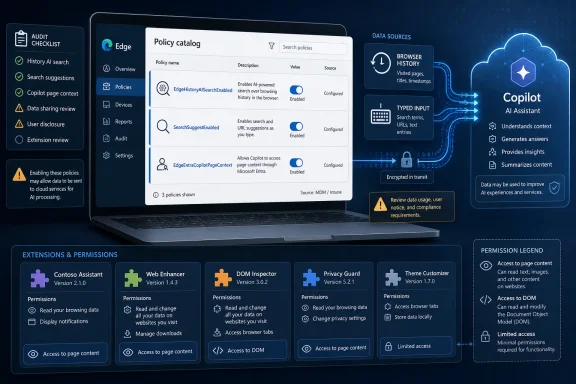 Microsoft Paused the Feature, Not the Governance Problem
The easy reading of the Edge AI history story is that Microsoft tried something, users recoiled, and the company backed away. That is emotionally satisfying and operationally incomplete. In managed environments, a paused feature is not the same thing as a retired policy, and a retired policy is not the same thing as a proven security boundary.Microsoft’s policy catalog still lists
EdgeHistoryAISearchEnabled, a control introduced for Edge 138 on Windows and macOS. Its purpose is straightforward: it governs whether users can search Edge browsing history with AI-assisted matching, including natural-language phrasing, synonyms, and minor spelling mistakes. Disabled, the feature falls back to exact-match history search.That distinction matters because browsing history is not harmless exhaust. It can reveal legal strategy, merger activity, internal tooling, unreleased products, customer names, ticketing systems, health research, travel plans, and authentication flows. A browser history feature does not need to leak passwords to create risk; it only needs to make sensitive patterns easier to retrieve, summarize, or correlate.
The unresolved question for administrators is therefore not “did Microsoft kill AI history search?” It is whether the policy surface that governs it remains part of the live browser configuration model, whether it is explicitly set in the organization’s baseline, and whether account type or profile state can bypass the intended control.
Edge’s Policy Catalog Is Becoming the Real Release Notes
Edge has long been a fast-moving Chromium browser with Microsoft enterprise plumbing wrapped around it. That combination has generally worked in Microsoft’s favor. Enterprises get modern web compatibility, Microsoft gets a browser that fits naturally into Windows, Entra ID, Defender, Intune, and Microsoft 365.But AI features change the weight of the policy catalog. A minor UI toggle used to mean a user annoyance. A minor AI toggle may decide whether page content, typed text, history entries, or search context flows into a cloud-backed experience.
Edge 150 reportedly adds only a small number of new policies and marks
DisabledMiniApps as obsolete, while leaving EdgeHistoryAISearchEnabled in place. That is a signal administrators should treat as meaningful. Microsoft may pause or reshape a feature, but policy availability tells IT that the browser still recognizes the management object and that the deployment model has not simply erased it.This is especially important after Edge 149, which removed Collections, a feature many users had treated as a lightweight research notebook. The Collections removal showed that Edge features can move from “part of daily workflow” to “gone from the UI” on a release cadence that is quick by enterprise standards. The AI history policy tells the inverse story: a feature may be paused in experience, but its management hooks can remain.
Neither pattern is inherently wrong. Browsers evolve, unused features get removed, and Microsoft has every right to prune Edge. The problem is that enterprises do not manage browsers through vibes; they manage them through documented policies, registry keys, configuration profiles, release notes, and compliance evidence.
The Personal Microsoft Account Caveat Is the Part IT Cannot Ignore
The most important line in the policy documentation may not be the description of AI history search at all. It is the applicability note: the policy does not apply to profiles signed in with a personal Microsoft account.That caveat is not unique to this one control. Microsoft has documented that some Edge policies do not apply to profiles signed in with a Microsoft account, a distinction that became more prominent starting with Edge 116. In a clean enterprise model, that may sound manageable. In the real world, browser profiles multiply.
A user can have an Entra-signed work profile, a personal Microsoft account profile, a local profile, a synced profile from a prior machine, and a test profile used for vendor portals or development work. If those profiles sit in the same browser and the same Windows session, the boundary between “managed” and “available to the user” becomes a practical security question rather than a neat identity diagram.
That matters for AI because these features tend to be contextual. They do not simply launch a blank chatbot. They work best when they can see what the user is reading, where the user has been, what the user is typing, or what the user is trying to find.
For administrators, the account caveat turns
EdgeHistoryAISearchEnabled from a single browser setting into a profile governance issue. A policy that works only in the right profile is still useful, but it is not a substitute for knowing which profiles exist, which account types are permitted, and whether users can move sensitive workflows into unmanaged browser contexts.Browser History Is Metadata With a Memory
Security teams have spent years teaching users that message contents, documents, and credentials are sensitive. Browser history often gets treated as a convenience feature, something to clear when troubleshooting or hide when privacy becomes personally awkward. That framing is obsolete.In a modern enterprise, browser history is a behavioral map. It shows which internal applications matter, which vendors are in use, which dashboards are visited before incidents, which customer environments are accessed, and which cloud consoles sit behind single sign-on. Even without page contents, the URLs alone can tell a story.
AI-enhanced search makes that story easier to query. The user no longer needs to remember the exact word in a title or the precise URL segment. A natural-language query can make prior browsing activity more discoverable, which is good for productivity and bad for data minimization.
This is the paradox Microsoft keeps running into with browser AI. The same context that makes a feature useful is the context that makes it risky. If Edge can help a user find “that vendor contract portal from last week” or “the Kubernetes error page I saw yesterday,” it can also help expose workflows the organization would rather not make conveniently searchable across user profiles.
The right response is not panic. It is classification. IT teams should decide whether browser history in their environment is low-risk convenience data, regulated operational data, or sensitive metadata that deserves the same scrutiny as mail search, file indexing, and endpoint telemetry.
Search Suggestions Are the Older Privacy Problem Wearing a Smaller Hat
AI history search is the news hook, but search suggestions are the older and more widely deployed privacy surface. TheSearchSuggestEnabled policy controls whether Edge uses web search suggestions in the address bar and auto-suggest list. When disabled, Microsoft says typed characters and visited URLs are not included in telemetry to Microsoft for that purpose.That sentence should stop administrators in their tracks. It means the policy is not merely cosmetic. It affects whether typed input and URL activity are sent outward as part of suggestion functionality.
If the policy is unset, users can change the setting. That may be acceptable on consumer devices, but it is a weak default for regulated workplaces, law firms, financial institutions, hospitals, defense contractors, public-sector agencies, and any organization where the address bar doubles as a command line for internal life.
Search suggestions also illustrate the broader Microsoft problem. The company operates Edge, Bing, Windows Search, Copilot, Microsoft 365, and the identity layer tying much of it together. A single user action — typing into a box — can land in very different privacy regimes depending on where the box is, which account is active, which policy applies, and which backend service answers.
That does not mean Microsoft is secretly using every keystroke for model training. It does mean administrators need to stop treating “search” as one setting. Browser address-bar suggestions, Windows search box suggestions, Bing-powered results, enterprise Microsoft Search, and Copilot prompts are separate surfaces with separate controls.
Copilot Page Context Moves the Browser From Tool to Witness
The Copilot side pane in Edge is not just another sidebar. It is a contextual assistant living inside the browser, and context is the whole point.The
EdgeEntraCopilotPageContext policy controls whether Copilot in the Edge side pane can access page content and browsing history for profiles signed in with a Microsoft Entra account. Microsoft says the policy applies to Copilot experiences in the side pane, including Microsoft 365 Copilot Business Chat and Microsoft Copilot with enterprise data protection. If enabled, Copilot can use page content and browsing history when users initiate contextual queries; if disabled, it cannot.The default behavior deserves attention. According to Microsoft’s policy description, if the policy is not configured, access is enabled by default outside the European Union and disabled by default in the EU. That is the sort of regional default that makes sense to lawyers and creates work for global endpoint teams.
A multinational company cannot build a privacy baseline around geography alone. Users travel, devices move, tenants span regions, and compliance expectations rarely map perfectly to the default Microsoft chose for a particular market. If Copilot page context is acceptable, it should be explicitly allowed. If it is not acceptable, it should be explicitly blocked.
This is where Microsoft’s enterprise positioning and practical administration diverge. Microsoft 365 Copilot has stronger enterprise assurances than consumer AI experiences, including commitments around service boundaries and foundation-model training. But the browser remains a messy place where consumer identity, enterprise identity, web content, extensions, search engines, and cloud assistants overlap.
Microsoft 365 Copilot Is Not the Same Thing as Browser AI
One of the most common mistakes in AI governance is flattening all Microsoft AI into a single risk category. Microsoft 365 Copilot, Copilot in Edge, Bing-powered search, Windows suggestions, and third-party browser assistants may all look like “AI” to users. They are not governed the same way.Microsoft 365 Copilot is designed around work identity and Microsoft Graph. It operates inside the Microsoft 365 service boundary and is positioned with enterprise data protection promises that differ from consumer search experiences. That does not eliminate risk, but it gives administrators a clearer contractual and technical framework.
Edge AI history search is a browser feature. Search suggestions are a browser and search-service feature. Copilot page context in Edge sits between browser content and enterprise assistant behavior. Extensions may be entirely outside Microsoft’s direct service commitments.
That distinction is not pedantry. It determines which logs exist, which policies apply, which data processing terms govern the interaction, and which administrators own the risk. The Microsoft 365 team, the endpoint team, the security operations center, and the privacy office may all believe someone else has the browser covered.
The result is a governance gap hiding in plain sight. Microsoft has made the browser a front door to AI-assisted work. Enterprises now have to manage it with the seriousness they once reserved for email clients and document repositories.
Extensions Are the Shadow AI Platform Inside the Browser
Microsoft’s own policies are only half the story. The other half is the extension ecosystem, where AI assistants can summarize pages, rewrite text, capture forms, inspect DOM content, and send data to third-party services the organization may never have reviewed.Recent research into Chrome extensions reportedly linked more than 100,000 installs to hidden data logging and fake traffic. Some AI browser assistant extensions were found collecting full page HTML, form inputs, user queries, telemetry, or inferred demographic information. Because Edge is Chromium-based and supports a broad extension model, this is not someone else’s problem.
Extensions are dangerous precisely because they feel small. A user installs a writing helper, meeting summarizer, coupon finder, PDF assistant, or “productivity” sidebar, and the browser quietly gains a new data processor. If that extension can read page content, it may see CRM records, financial dashboards, admin consoles, HR systems, source code, legal portals, and internal wikis.
AI increases the temptation to grant those permissions. A page summarizer that cannot read the page is useless. A form helper that cannot inspect inputs is crippled. A research assistant that cannot track browsing context is less impressive in the demo.
That is why extension governance belongs in the same conversation as
EdgeHistoryAISearchEnabled and EdgeEntraCopilotPageContext. Microsoft’s policy may decide what Edge’s built-in AI can do, but extension policy decides whether a third-party assistant can do something similar with fewer enterprise assurances.The Policy Baseline Has to Become Evidence, Not Intention
Many organizations already believe they manage Edge. They deploy it through Intune or Configuration Manager, set a homepage, define update behavior, configure password manager preferences, and perhaps enforce Microsoft Defender SmartScreen. That was enough when the browser was mostly a renderer, a sync client, and a bookmark container.It is not enough for AI-era Edge. The baseline needs to prove how the organization handles history search, typed suggestions, Copilot page context, extension permissions, profile sign-ins, sync, personalization, and data sharing. More importantly, it needs to prove which settings are mandatory and which are merely recommended.
Recommended policies are useful for preference shaping. They are not controls in the compliance sense if users can override them. Similarly, an unset policy is not neutral when the product default enables a feature or allows user choice.
The practical work is not glamorous. Administrators need to inspect
edge://policy, validate Intune configuration profiles, compare ADMX versions, check registry deployment, review macOS configuration payloads, and test behavior in both Entra and personal Microsoft account profiles. They also need to document exceptions, because auditors and incident responders care less about what the intended baseline said than what the endpoint actually enforced.This is where the Edge 150 moment becomes useful. It gives IT teams a concrete reason to stop arguing abstractly about AI and start enumerating browser data paths. Which browser features can see history? Which features can send typed input to a service? Which assistants can inspect page content? Which extensions can read all sites? Which profiles are outside enterprise policy?
The Real Risk Is Ambiguity at Scale
Microsoft’s challenge is not that every AI browser feature is reckless. Some are genuinely useful, and many can be deployed responsibly. The problem is that usefulness arrives faster than institutional clarity.For a single user, AI-enhanced history search is a convenience. For 40,000 managed endpoints, it is a searchable layer over organizational behavior. For a developer, Copilot page context may be a time-saver. For a compliance officer, it is a question about whether regulated page content is being exposed to an assistant flow under the right controls.
Ambiguity scales badly. If one department disables search suggestions, another leaves them user-configurable, a third allows personal profiles, and a fourth installs AI extensions for a pilot, the enterprise no longer has a browser policy. It has browser folklore.
Microsoft could help by making AI-related browser controls easier to discover as a category rather than scattered policy names. Admins should not need to know every feature brand, retired name, replacement name, and regional default to answer a simple question: “Can this browser send user context to an AI or search service?”
Until then, the burden falls on IT. The organizations that handle this well will not be the ones that ban every AI feature by reflex. They will be the ones that make explicit decisions, record them, enforce them, and revisit them as Edge changes.
Edge 150 Turns a Feature Scare Into a Browser Audit
The practical lesson from the AI history search episode is narrower than the backlash and broader than the feature. Edge 150 is a reminder that browser privacy is now an endpoint management discipline.Teams reviewing their Edge baselines should come away with a handful of concrete findings, not a philosophical position on AI.
EdgeHistoryAISearchEnabledshould be explicitly configured if the organization has any sensitivity around browser history search behavior.SearchSuggestEnabledshould not be left to user choice in environments where typed text or visited URLs may reveal confidential work.EdgeEntraCopilotPageContextshould be treated as a page-content access control, not as a harmless Copilot preference.- Personal Microsoft account profiles should be inventoried or restricted where policy applicability depends on account type.
- AI browser extensions should be reviewed under the same data-access standards as SaaS apps, because many can read the pages users work in.
- Edge policy validation should test real profiles and real endpoints, not just the existence of an Intune profile or Group Policy object.
Microsoft’s browser strategy is clearly moving toward a future where Edge is less a passive window onto the web and more an active assistant embedded in the workday. That may make users faster, and it may make Microsoft’s ecosystem stickier, but it also makes the browser a higher-value privacy and governance target. Edge 150 did not end the AI history search debate; it clarified the next phase of it, in which IT teams must decide whether browser AI is controlled by policy, by product defaults, or by whatever profile the user happened to open that morning.
References
- Primary source: TechRepublic
Published: Wed, 01 Jul 2026 12:01:19 GMT
Microsoft Edge AI History Search Raises New Privacy Questions for IT Teams - TechRepublic
Microsoft Edge 150 keeps AI history search policy active. See what IT teams should audit across Edge AI controls, Copilot access, search suggestions, and extensions.www.techrepublic.com
- Official source: learn.microsoft.com
Microsoft Edge Browser Policy Documentation SearchSuggestEnabled | Microsoft Learn
Windows and Mac documentation for supported Microsoft Edge Browser policy: Enable search suggestionslearn.microsoft.com - Related coverage: windowscentral.com
Edge suddenly feels less bloated — after Microsoft retired its “creepy” AI history search feature to the company's digital graveyard | Windows Central
Microsoft has decided to discontinue its AI search history feature in Edge.www.windowscentral.com - Official source: support.microsoft.com
Microsoft Edge browsing activity for personalized advertising and experiences | Microsoft Support
Learn how Microsoft uses the information from your Microsoft Edge browsing history.support.microsoft.com - Official source: microsoft.com
Protect Your Search History | Microsoft Edge
Learn how to safeguard your online search history with Microsoft Edge. Explore privacy features and stay in control of your online experience.www.microsoft.com
- Related coverage: windowsreport.com
Microsoft Edge could get AI History Search feature
Microsoft has started testing "History Search Assisted with AI" in Edge Canary, claims to show AI recommendations as you do a history search. windowsreport.com
- Official source: cdn-dynmedia-1.microsoft.com
- Related coverage: its.ny.gov
- Related coverage: cms-cd.apmterminals.com
- Related coverage: guidingtech.com
What Happened to Collections in Edge, and How to Get It Back - Guiding Tech
What happened to Collections in Edge? Learn why Microsoft removed the feature and how to restore or recover your saved collections.www.guidingtech.com
- Related coverage: windowslatest.com
Microsoft just killed Edge's Collections and Sidebar for more Copilot, after years of pushing both features
Microsoft told Windows Latest that Collections and Sidebar are no longer available with Edge 149, which began rolling out on June 4, 2026. www.windowslatest.com
- Related coverage: chromestory.com
Edge Collections Is Gone: Here's What to Do With Your Data - Chrome Story
Microsoft Edge removed Collections in Edge 149. Here's exactly what you lost, what the two migration options actually save, and the best alternatives to replace it.chromestory.com - Related coverage: techdemis.com
- Related coverage: pcguia.pt
Microsoft Edge 149 Elimina Colecções e Barra Lateral
A Microsoft lançou a versão 149 do Edge, que remove as Colecções e a Barra Lateral para dar prioridade ao Copilot.www.pcguia.pt - Related coverage: edgeuser.com
The Edge User Guide
The Edge retail jewelry store management system by Abbott Jewelry Systems, Inc.edgeuser.com
