

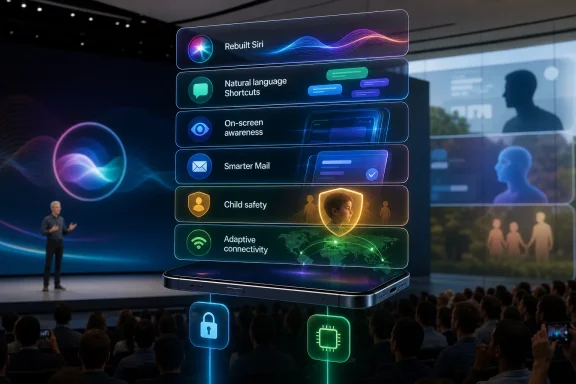
Apple used WWDC 2026 in Cupertino on June 8 to unveil iOS 27, a fall iPhone update that rebuilds Siri and Apple Intelligence with natural-language Shortcuts, personal context, on-screen awareness, smarter Mail, child-safety controls, and more adaptive connectivity. The awkward part is that many of these “new” iPhone ideas have lived for years, in some form, on Android. The more interesting part is that Apple is not merely copying Android’s checklist; it is trying to make those ideas feel safer, more integrated, and less like a collection of experiments. That is both Apple’s advantage and its recurring excuse for arriving late.
The cheap read of iOS 27 is that Apple finally looked across the aisle, saw Gemini, Pixel intelligence features, Gmail ranking, Family Link, Circle to Search, and Nest camera alerts, and decided the iPhone could no longer pretend these were niche conveniences. There is truth in that. Apple has spent much of the AI boom explaining why it was different while Google shipped features that users could actually touch.
But the iOS 27 story is not simply that Apple copied Android. It is that Apple waited until it could route those capabilities through its preferred machinery: device-local processing where possible, system indexes it controls, app APIs developers must opt into, and privacy language that turns restraint into branding. Android often gets there first because Google is willing to iterate in public. Apple often gets there later because it wants the operating system itself to be the product.
That distinction matters for WindowsForum readers because it echoes an old Microsoft problem. Windows has long had features before they were coherent, while Apple has often had coherence before breadth. The PC world knows what happens when capability outpaces trust: users ignore the feature, admins disable it, and the vendor eventually rebrands it as a more polished idea three releases later.
With iOS 27, Apple is trying to skip the messy middle. It wants the agentic phone without the Android feeling that the intelligence layer belongs partly to the cloud, partly to the OEM, partly to Google, and partly to whichever app happens to own the data.
That is why iOS 27’s new Siri architecture matters. Personal context understanding, on-screen awareness, and app actions are not decorative AI features; they are the minimum viable foundation for a modern assistant. Apple is saying Siri will no longer be just a command parser. It will become a system-level interpreter of what the user is doing, what the user owns, and what the user likely wants next.
Android users are right to smirk here. Google has spent years training users to expect Gmail, Photos, Calendar, Assistant, Gemini, Lens, and Android itself to blur into one another. Circle to Search is already a mainstream example of the same direction: the screen becomes a query surface, and the old copy-paste-search loop begins to disappear.
But Apple’s implementation could still be strategically different. By making app developers expose actions and UI data through Apple-sanctioned interfaces, Apple is attempting to build an assistant that is less dependent on screen scraping and more dependent on structured intent. That may be slower to mature, but if it works, it could be more reliable than an assistant guessing its way through pixels.
This is where the comparison to Google’s automation work is fair but incomplete. Google has used natural language and AI suggestions to help users create smart-home routines and interpret patterns, especially in the Home ecosystem. Apple is reaching beyond the home and into a broader operating-system automation layer.
That breadth is important. If a user can say, in plain English, “When I land from a business trip, send my spouse my ETA, turn off airplane mode, save receipts from Mail to a folder, and set my Focus mode back to normal,” the phone begins to behave like a personal operations system. That is the promise Microsoft once chased with Cortana, the promise Google has chased with Assistant and Gemini, and the promise Apple has been unusually slow to operationalize.
The risk is that natural-language automation can become a demo trap. It looks wonderful when the expected apps, permissions, and data are aligned. It becomes maddening when the generated workflow is almost right but not trustworthy enough to run unattended. Apple’s advantage is that Shortcuts already has a concrete action model underneath it. The AI layer is not inventing automation from nothing; it is writing against a system Apple has been refining for years.
Apple Mail, by contrast, has often felt conservative to the point of negligence. It handled mail like mail, not like the messy command center modern users actually inhabit. The iOS 27 ranking and search improvements are therefore less a bold move than a long-overdue concession: the inbox is not a neutral pile of messages. It is a database of obligations, receipts, relationships, and time-sensitive context.
The deeper play is not Mail itself. It is the rebuilt Spotlight infrastructure underneath Mail, Messages, Photos, and other apps. Apple is preparing the ground for Siri to retrieve facts, connect events, and act across personal data without requiring the user to remember where anything lives.
That is exactly the kind of feature that makes privacy both more important and harder to explain. Users want the assistant to know their flight number, hotel booking, child’s school email, and meeting attachment. They do not want that same assistant to feel like a corporate surveillance layer. Apple’s bet is that on-device indexing and privacy-forward processing can make the difference legible.
Android, especially on Pixel devices, has been pursuing this through Adaptive Connectivity and related network intelligence. Google’s approach reflects its broader philosophy: the phone should predict which connection is useful and optimize battery, performance, and reliability in the background. As many Android users will attest, the theory is often better than the lived experience.
Apple’s version will be judged less by its keynote description than by the first week of real travel. If iOS 27 reliably drops bad captive portals and stale aircraft Wi-Fi without user intervention, no one will write love letters to the feature. They will simply stop cursing at their phones.
That is the quiet standard Apple has set for itself. Android can introduce a feature and let users tolerate variance across devices and carriers. Apple sells the expectation that the feature will work the same way across the iPhone line, within the limits of hardware. When it does not, the disappointment is sharper.
Apple’s delay here is harder to defend. Parents did not need a philosophical essay about privacy-preserving design; they needed controls that were clear, enforceable, and hard for children to route around. Screen Time helped, but it never felt like a complete answer to the reality of children carrying always-connected computers.
The iOS 27 approach suggests Apple recognizes that family safety is no longer a niche setting. It is core operating-system policy. The smartphone is where payment, location, messaging, schoolwork, social life, gaming, photos, and identity converge. A parental-control suite that treats all of that as one managed environment is no longer optional.
For administrators, the parallel is obvious. Consumer family controls and enterprise device management are different worlds, but both depend on the same principle: policy must follow the user across apps and contexts. Apple’s consumer-facing polish often previews what users later expect from workplace devices. Once parents get cleaner controls at home, employees become less patient with clumsy policy UX at work.
Google reached this mainstream moment with Circle to Search, which lets Android users identify, query, translate, or investigate what is visible without moving content between apps. Apple’s on-screen awareness aims for a similar user outcome: Siri can understand what the user is looking at and respond accordingly. The old workflow of screenshot, crop, share, paste, search, and interpret begins to look absurd.
The technical distinction matters. Google leans heavily into multimodal understanding: the model looks, interprets, and answers. Apple wants developers to expose structured context so Siri can know not merely what pixels are present, but what those interface elements mean. That could make Apple’s approach more powerful in apps that participate and less useful in apps that do not.
This is where Apple’s platform control becomes both a strength and a choke point. If developers embrace the APIs, Siri may gain clean access to app-specific intent in a way Android cannot uniformly guarantee. If developers drag their feet, Android’s more opportunistic visual approach may keep feeling more universal.
Users do not merely want encrypted video. They want to know whether a package arrived, whether a dog walker entered the yard, whether a child got home, or whether a motion alert was just a tree moving in the wind. The modern smart camera is valuable not because it records everything, but because it filters the important from the banal.
iOS 27’s natural-language security camera search and smarter alerts bring Apple closer to what Nest users already understand. The difference, again, is Apple’s insistence that sensitive processing should happen locally where possible. That is not just marketing. In the home-security category, where footage can reveal children, routines, possessions, visitors, and vulnerabilities, the architecture is the product.
The challenge is performance. Local models must be good enough, fast enough, and available on enough hardware to matter. If Apple limits the best camera intelligence to newer devices or specific Home hubs, the privacy story may remain strong while the user experience fragments inside Apple’s own garden.
Yet Android’s advantage is also its burden. Features can appear first on Pixel, later on Samsung, inconsistently on other OEM devices, and not at all on aging hardware. The same Android ecosystem that gives users choice also makes it harder to create a single shared baseline for the intelligent phone.
Apple’s counterargument remains software support. If iOS 27 brings meaningful core features to devices as old as the iPhone 11, Apple is reinforcing the proposition that an iPhone is not merely a device you buy today but a platform relationship that lasts. That matters enormously as AI features become tied to neural engines, memory ceilings, and local model performance.
The tension is obvious. Apple Intelligence features will still have hardware limits, and Apple cannot make a 2019 iPhone behave like a 2026 flagship. But Apple can make older devices feel included in the direction of travel. Android vendors, even improved ones, still struggle to make that promise feel universal.
Both habits produce real user benefits. Android users often get the future first. iPhone users often get the version of the future that has been sanded down into something supportable. Neither model is morally superior; both are business strategies disguised as product philosophies.
The AI era makes the difference more consequential. A weather widget or lock-screen customization can arrive late without changing the platform’s soul. An assistant that reads personal context, sees the screen, ranks communication, creates automations, and searches home-security footage is different. That is not a feature. That is a layer of mediation between the user and the device.
Microsoft learned this lesson the hard way with Windows Copilot and its broader AI ambitions. The question is not whether an operating system can host an assistant. The question is whether the assistant feels like a trustworthy extension of the system or an ambitious add-on looking for permission to rummage through your life. Apple is now betting that its walled garden gives it the answer.
A few points are worth carrying past the WWDC applause track:
 Apple’s Catch-Up Year Is Really a Control Story
The cheap read of iOS 27 is that Apple finally looked across the aisle, saw Gemini, Pixel intelligence features, Gmail ranking, Family Link, Circle to Search, and Nest camera alerts, and decided the iPhone could no longer pretend these were niche conveniences. There is truth in that. Apple has spent much of the AI boom explaining why it was different while Google shipped features that users could actually touch.But the iOS 27 story is not simply that Apple copied Android. It is that Apple waited until it could route those capabilities through its preferred machinery: device-local processing where possible, system indexes it controls, app APIs developers must opt into, and privacy language that turns restraint into branding. Android often gets there first because Google is willing to iterate in public. Apple often gets there later because it wants the operating system itself to be the product.
That distinction matters for WindowsForum readers because it echoes an old Microsoft problem. Windows has long had features before they were coherent, while Apple has often had coherence before breadth. The PC world knows what happens when capability outpaces trust: users ignore the feature, admins disable it, and the vendor eventually rebrands it as a more polished idea three releases later.
With iOS 27, Apple is trying to skip the messy middle. It wants the agentic phone without the Android feeling that the intelligence layer belongs partly to the cloud, partly to the OEM, partly to Google, and partly to whichever app happens to own the data.
Siri’s Rebuild Is an Admission Wrapped in a Product Demo
Apple’s most important WWDC 2026 announcement was not a single feature. It was the admission that Siri, as previously architected, could not survive the AI era. A voice assistant that launches timers and mishears song titles is not enough when Google, OpenAI, Microsoft, and others are pushing users toward systems that can reason across apps, summarize context, and perform multi-step actions.That is why iOS 27’s new Siri architecture matters. Personal context understanding, on-screen awareness, and app actions are not decorative AI features; they are the minimum viable foundation for a modern assistant. Apple is saying Siri will no longer be just a command parser. It will become a system-level interpreter of what the user is doing, what the user owns, and what the user likely wants next.
Android users are right to smirk here. Google has spent years training users to expect Gmail, Photos, Calendar, Assistant, Gemini, Lens, and Android itself to blur into one another. Circle to Search is already a mainstream example of the same direction: the screen becomes a query surface, and the old copy-paste-search loop begins to disappear.
But Apple’s implementation could still be strategically different. By making app developers expose actions and UI data through Apple-sanctioned interfaces, Apple is attempting to build an assistant that is less dependent on screen scraping and more dependent on structured intent. That may be slower to mature, but if it works, it could be more reliable than an assistant guessing its way through pixels.
Natural-Language Shortcuts Turn Automation Into a Consumer Feature
Shortcuts has always been one of Apple’s strangest power-user gifts. It is enormously capable, deeply Apple-ish, and still obscure enough that many iPhone owners never touch it. The new ability to describe a Shortcut in natural language is Apple’s attempt to turn automation from a hobby into a default behavior.This is where the comparison to Google’s automation work is fair but incomplete. Google has used natural language and AI suggestions to help users create smart-home routines and interpret patterns, especially in the Home ecosystem. Apple is reaching beyond the home and into a broader operating-system automation layer.
That breadth is important. If a user can say, in plain English, “When I land from a business trip, send my spouse my ETA, turn off airplane mode, save receipts from Mail to a folder, and set my Focus mode back to normal,” the phone begins to behave like a personal operations system. That is the promise Microsoft once chased with Cortana, the promise Google has chased with Assistant and Gemini, and the promise Apple has been unusually slow to operationalize.
The risk is that natural-language automation can become a demo trap. It looks wonderful when the expected apps, permissions, and data are aligned. It becomes maddening when the generated workflow is almost right but not trustworthy enough to run unattended. Apple’s advantage is that Shortcuts already has a concrete action model underneath it. The AI layer is not inventing automation from nothing; it is writing against a system Apple has been refining for years.
Apple’s Mail Ranking Is Late Because Google Made Inbox Disposable
The Mail improvements in iOS 27 are another example of Apple arriving after the concept has become mundane. Google’s Inbox app, launched in 2014 and killed in 2019, introduced many users to the idea that email should be bundled, ranked, and interpreted rather than merely listed. Gmail inherited much of that DNA, and the wider industry quietly accepted that inboxes needed machine assistance.Apple Mail, by contrast, has often felt conservative to the point of negligence. It handled mail like mail, not like the messy command center modern users actually inhabit. The iOS 27 ranking and search improvements are therefore less a bold move than a long-overdue concession: the inbox is not a neutral pile of messages. It is a database of obligations, receipts, relationships, and time-sensitive context.
The deeper play is not Mail itself. It is the rebuilt Spotlight infrastructure underneath Mail, Messages, Photos, and other apps. Apple is preparing the ground for Siri to retrieve facts, connect events, and act across personal data without requiring the user to remember where anything lives.
That is exactly the kind of feature that makes privacy both more important and harder to explain. Users want the assistant to know their flight number, hotel booking, child’s school email, and meeting attachment. They do not want that same assistant to feel like a corporate surveillance layer. Apple’s bet is that on-device indexing and privacy-forward processing can make the difference legible.
The Network Handoff Feature Is Small Until It Saves the Day
The smoother Wi-Fi-to-cellular transition feature sounds almost too ordinary for a keynote. The phone should know when hotel Wi-Fi, airline Wi-Fi, coffee-shop Wi-Fi, or a weak home router has become useless. It should move to cellular before the user notices everything has stalled. This is not glamorous AI; it is the kind of invisible plumbing that determines whether a phone feels intelligent.Android, especially on Pixel devices, has been pursuing this through Adaptive Connectivity and related network intelligence. Google’s approach reflects its broader philosophy: the phone should predict which connection is useful and optimize battery, performance, and reliability in the background. As many Android users will attest, the theory is often better than the lived experience.
Apple’s version will be judged less by its keynote description than by the first week of real travel. If iOS 27 reliably drops bad captive portals and stale aircraft Wi-Fi without user intervention, no one will write love letters to the feature. They will simply stop cursing at their phones.
That is the quiet standard Apple has set for itself. Android can introduce a feature and let users tolerate variance across devices and carriers. Apple sells the expectation that the feature will work the same way across the iPhone line, within the limits of hardware. When it does not, the disappointment is sharper.
Child Safety Shows Apple Moving From Settings to Governance
Apple’s expanded child-safety tools are notable because they shift parental control from a scattered set of Screen Time switches toward a more robust family-governance model. Android users familiar with Google Family Link have had a version of this for years: child accounts, device limits, app approvals, screen-time extensions, and the occasional household negotiation over five more minutes.Apple’s delay here is harder to defend. Parents did not need a philosophical essay about privacy-preserving design; they needed controls that were clear, enforceable, and hard for children to route around. Screen Time helped, but it never felt like a complete answer to the reality of children carrying always-connected computers.
The iOS 27 approach suggests Apple recognizes that family safety is no longer a niche setting. It is core operating-system policy. The smartphone is where payment, location, messaging, schoolwork, social life, gaming, photos, and identity converge. A parental-control suite that treats all of that as one managed environment is no longer optional.
For administrators, the parallel is obvious. Consumer family controls and enterprise device management are different worlds, but both depend on the same principle: policy must follow the user across apps and contexts. Apple’s consumer-facing polish often previews what users later expect from workplace devices. Once parents get cleaner controls at home, employees become less patient with clumsy policy UX at work.
On-Screen Awareness Is the New Search Box
The most symbolic iOS 27 feature may be on-screen awareness. For decades, the search box was where users translated intent into keywords. Then mobile operating systems made the app icon the center of action. Now AI assistants are trying to make the current screen itself the interface.Google reached this mainstream moment with Circle to Search, which lets Android users identify, query, translate, or investigate what is visible without moving content between apps. Apple’s on-screen awareness aims for a similar user outcome: Siri can understand what the user is looking at and respond accordingly. The old workflow of screenshot, crop, share, paste, search, and interpret begins to look absurd.
The technical distinction matters. Google leans heavily into multimodal understanding: the model looks, interprets, and answers. Apple wants developers to expose structured context so Siri can know not merely what pixels are present, but what those interface elements mean. That could make Apple’s approach more powerful in apps that participate and less useful in apps that do not.
This is where Apple’s platform control becomes both a strength and a choke point. If developers embrace the APIs, Siri may gain clean access to app-specific intent in a way Android cannot uniformly guarantee. If developers drag their feet, Android’s more opportunistic visual approach may keep feeling more universal.
Security Camera Intelligence Tests Apple’s Privacy Gospel
HomeKit Secure Video was Apple’s privacy-first answer to the smart-camera market. It emphasized encryption, local control, and a refusal to make home footage feel like raw material for somebody else’s machine-learning pipeline. That was admirable, but it also left Apple behind Google Nest in the practical intelligence race.Users do not merely want encrypted video. They want to know whether a package arrived, whether a dog walker entered the yard, whether a child got home, or whether a motion alert was just a tree moving in the wind. The modern smart camera is valuable not because it records everything, but because it filters the important from the banal.
iOS 27’s natural-language security camera search and smarter alerts bring Apple closer to what Nest users already understand. The difference, again, is Apple’s insistence that sensitive processing should happen locally where possible. That is not just marketing. In the home-security category, where footage can reveal children, routines, possessions, visitors, and vulnerabilities, the architecture is the product.
The challenge is performance. Local models must be good enough, fast enough, and available on enough hardware to matter. If Apple limits the best camera intelligence to newer devices or specific Home hubs, the privacy story may remain strong while the user experience fragments inside Apple’s own garden.
Android Still Ships First, But Apple Ships With a Longer Memory
PCMag’s framing lands because Android users have earned the right to ask what took so long. Google has been more aggressive with AI on phones, more willing to blend cloud intelligence into everyday apps, and more comfortable turning experiments into public products. The Pixel line in particular has become Google’s showcase for what an AI-native Android phone might feel like.Yet Android’s advantage is also its burden. Features can appear first on Pixel, later on Samsung, inconsistently on other OEM devices, and not at all on aging hardware. The same Android ecosystem that gives users choice also makes it harder to create a single shared baseline for the intelligent phone.
Apple’s counterargument remains software support. If iOS 27 brings meaningful core features to devices as old as the iPhone 11, Apple is reinforcing the proposition that an iPhone is not merely a device you buy today but a platform relationship that lasts. That matters enormously as AI features become tied to neural engines, memory ceilings, and local model performance.
The tension is obvious. Apple Intelligence features will still have hardware limits, and Apple cannot make a 2019 iPhone behave like a 2026 flagship. But Apple can make older devices feel included in the direction of travel. Android vendors, even improved ones, still struggle to make that promise feel universal.
The Real Rivalry Is Between Integration and Experimentation
The iOS-versus-Android rivalry is often narrated as a feature race, but the more revealing contest is cultural. Google experiments, measures, renames, merges, kills, and resurrects. Apple withholds, integrates, polishes, and then presents the result as if the category has just become ready for normal people.Both habits produce real user benefits. Android users often get the future first. iPhone users often get the version of the future that has been sanded down into something supportable. Neither model is morally superior; both are business strategies disguised as product philosophies.
The AI era makes the difference more consequential. A weather widget or lock-screen customization can arrive late without changing the platform’s soul. An assistant that reads personal context, sees the screen, ranks communication, creates automations, and searches home-security footage is different. That is not a feature. That is a layer of mediation between the user and the device.
Microsoft learned this lesson the hard way with Windows Copilot and its broader AI ambitions. The question is not whether an operating system can host an assistant. The question is whether the assistant feels like a trustworthy extension of the system or an ambitious add-on looking for permission to rummage through your life. Apple is now betting that its walled garden gives it the answer.
The iPhone Learns Android’s Tricks, Then Makes Them Apple’s Problem
The concrete lesson from iOS 27 is not that Apple suddenly discovered AI. It is that Apple has decided the assistant layer must be rebuilt around context, action, and screen awareness rather than voice commands and isolated app features. That pulls the iPhone closer to Android’s recent trajectory, but it also raises the stakes for Apple’s usual claims about privacy, support, and consistency.A few points are worth carrying past the WWDC applause track:
- Apple’s natural-language Shortcuts could make automation mainstream if the generated workflows are reliable enough for non-technical users to trust.
- Siri’s personal context and on-screen awareness are less about convenience than about making the assistant a system-wide broker of user intent.
- Android’s lead in AI phone features remains real, especially on Pixel devices, but ecosystem fragmentation still weakens the promise for many users.
- Apple’s child-safety improvements are overdue, and their importance will be measured in household usability rather than keynote polish.
- Local processing is Apple’s sharpest distinction in sensitive areas such as personal data and home-security footage, but it must still deliver competitive results.
- Long software support remains Apple’s most durable advantage as AI features begin to widen the gap between old and new hardware.
References
- Primary source: PCMag UK
Published: Fri, 12 Jun 2026 16:04:43 GMT

Apple Finally Added These iOS 27 Features. Android Users Wonder What Took So Long
iOS 27 and Siri AI will push the iPhone further into the agentic era, but Android users are already there.uk.pcmag.com - Related coverage: tomshardware.com

Apple demonstrates cross-platform Siri upgrades in macOS 27 Golden Gate at WWDC — update brings Liquid Glass improvements and unifies AI strategy | Tom's Hardware
macOS 27 brings new AI features and, finally, matching corner radii.www.tomshardware.com - Related coverage: androidcentral.com

4 of the best iOS 27 features Android already has | Android Central
Apple rarely does things first, which is one of the reasons we love Android so much.www.androidcentral.com - Related coverage: techradar.com

Apple WWDC 2026 as it happened: Siri AI, iOS 27, macOS Golden Gate, and everything announced at Apple Park | TechRadar
We were on the ground for the WWDC 2026 opening keynotewww.techradar.com - Related coverage: tomsguide.com

WWDC 2026 was Apple's AI renaissance — but there's one very important feature still missing from iOS 27 | Tom's Guide
Siri may be getting a huge AI boost, but what about the rumors that Apple could add other chatbots to join ChatGPT?www.tomsguide.com - Related coverage: livemint.com

Siri AI to iOS 27: Every new feature Apple announced at WWDC 2026 | Mint
Apple unveiled a host of new features at WWDC 2026, including iOS 27, macOS Golden Gate, and a revamped Siri AI www.livemint.com
- Related coverage: techcrunch.com

WWDC 2026: Everything announced on Siri AI, iOS 27, Apple Intelligence, and more | TechCrunch
Apple primarily made the case for an improved experience with its long-standing Siri assistant, which like most other announcements had a hefty helping of AI.techcrunch.com - Related coverage: macrumors.com

What to Expect From WWDC 2026: Gemini-Powered Siri, iOS 27, macOS 27 and More
Apple's 2026 Worldwide Developers Conference is just days away, and it's going to be an interesting event because it will give us a look at Apple's AI plans. We'll see how Apple is going to compete with OpenAI, Anthropic, and Google in the months to come with an AI version of...www.macrumors.com - Related coverage: macobserver.com

Apple Officially Announces iOS 27 with Hundreds of New Features
Apple officially announces iOS 27 with faster performance, smarter search, enhanced Photos, AirDrop improvements, and hundreds of features.www.macobserver.com - Related coverage: macworld.com

iOS 27 Guide: All the new features coming to compatible iPhones, 2026 release date and more | Macworld
iOS 27 will introduce major Apple Intelligence upgrades, changes to Siri, and improvements across core iPhone apps. Here's what you need to know.www.macworld.com - Related coverage: nitromediagroup.com

WWDC 2026 Recap: Tim Cook, Siri AI, Apple Intelligence, iOS 27
Apple's WWDC 2026 recap with official Apple images, Siri AI, iOS 27, macOS Golden Gate, child-safety updates, and the Tim Cook to John Ternus CEO transition.www.nitromediagroup.com - Official source: devimages-cdn.apple.com
