

Apple is expected to preview macOS 27 at WWDC on Monday, June 8, 2026, with the Mac update likely centered on a long-delayed Siri overhaul, deeper Apple Intelligence integration, and refinements to macOS Tahoe’s controversial interface changes. The most interesting thing about that agenda is not whether Apple can add four tidy features to the Mac. It is whether Apple still understands that macOS is not iOS with a menu bar. The next Mac release needs less spectacle than discipline: better navigation, a credible assistant, and a renewed respect for the habits that make desktop computing fast.
The Mac has rarely been in better hardware shape. Apple silicon turned what had become a mature, sometimes sleepy product line into one of the strongest arguments for buying a personal computer in the 2020s: quiet laptops with absurd battery life, desktops with workstation-class performance, and a unified architecture that lets Apple tune the operating system and silicon together.
That success has changed the nature of Apple’s Mac problem. For years, the fear was that the Mac would be neglected while the iPhone consumed the company’s imagination. Today, the concern is subtler: the Mac is receiving plenty of attention, but some of it feels aimed at making macOS fit the rest of Apple’s design system rather than making the Mac itself better.
That is why Macworld’s wishlist for macOS 27 lands harder than the usual pre-WWDC feature shopping. More Siri, visual polish, System Settings repairs, and a better replacement for Launchpad may sound like modest requests. Taken together, they form a critique of Apple’s current desktop strategy.
The Mac does not need a reinvention. It needs Apple to stop treating small frictions as acceptable collateral damage in the march toward platform uniformity.
A desktop operating system knows a lot about a user’s work. It can see files, windows, calendars, email, messages, browser state, installed applications, and system settings. It is the place where context is not a gimmick but the whole environment. If an assistant cannot help meaningfully on a Mac, it is fair to ask whether it can help meaningfully anywhere.
Apple’s challenge is that it is not competing against the old Siri anymore. It is competing against user expectations set by ChatGPT, Microsoft Copilot, Google Gemini, Claude, and a rapidly normalizing assumption that software should be able to understand intent beyond a rigid command phrase. Siri’s legacy weakness has never just been that it lacked features. It was that users learned not to trust it with anything complicated.
That trust gap is brutal on a desktop. A failed weather query is mildly annoying. A failed attempt to find the right document, adjust a system preference, summarize a research folder, or automate a multi-app workflow wastes time and teaches the user to return to manual control. For macOS 27, Apple does not merely need Siri to answer more questions. It needs Siri to become a reliable interface to the user’s own machine.
The trick is that Apple cannot simply bolt a chatbot onto macOS and call the job done. The company’s strongest platform argument has always been that power and privacy can coexist. If the new Siri depends heavily on cloud inference, external model providers, waitlists, or feature gates, Apple will need to explain what runs locally, what leaves the machine, what is retained, and what happens on Macs that do not meet the Apple Intelligence hardware line.
That makes macOS 27 a referendum on execution. Apple has the distribution, the silicon, the APIs, and the first-party apps. What it has not yet shown is that it can turn those ingredients into an assistant that feels native rather than belated.
The old System Preferences was not perfect, and nostalgia has a way of sanding down the rough edges of older software. But it had one enormous advantage: it looked like a place. Users could build a mental map of it. Displays were over here, users and groups were over there, network lived in a recognizable region, and even when you forgot the exact pane, you could scan visually.
System Settings traded much of that spatial memory for an iOS-style sidebar and a long, sometimes opaque hierarchy. The result is not simply that some things moved. It is that macOS now often assumes you know the name of the thing you are trying to change before you can find the thing you are trying to change.
Search helps, but search is not a cure when vocabulary is the disease. A user looking for “stop my Mac from sleeping,” “make the menu bar bigger,” “turn off app startup,” or “change what happens when I close the lid” should not need to guess Apple’s preferred label. The operating system should bridge natural intent and system language.
This is where AI could be useful in a way that is almost embarrassingly practical. Forget the stage demo where Siri rearranges a vacation album while referencing a dinner reservation from Messages. Let a user type, “My external monitor text looks blurry,” and have System Settings surface scaling, resolution, refresh rate, font smoothing, accessibility display options, and relevant help. Let someone ask, “Why is this app opening every time I restart?” and land directly on Login Items.
That would be a more persuasive Apple Intelligence demo than another generated image or writing rewrite. It would show that Apple’s AI layer is not just decorative intelligence pasted on top of apps, but a means of making the operating system more humane.
The danger is that Apple uses AI as a way to avoid fixing the underlying structure. A smarter search box is welcome, but it should not become an excuse for a messy settings architecture. The best version of macOS 27 would do both: reorganize System Settings so humans can browse it, and make it intelligent enough that users do not have to browse it when they already know what they want.
But the Mac has always earned its keep by being more than another pane of glass in the Apple showroom. It is the platform for overlapping windows, dense information, pointer precision, keyboard shortcuts, file manipulation, development tools, creative suites, remote administration, and long sessions of concentrated work. A desktop UI has different obligations than a phone UI.
That is why the criticism of Tahoe’s square or rounded-square app icon direction matters beyond taste. App icons are not just decoration. They are landmarks. On a phone, a grid of similarly shaped icons makes sense because the launcher is a touch-first surface built around uniform hit targets. On a Mac, where the Dock, Finder, Spotlight, application switcher, and file associations all compete as navigational surfaces, overly homogenized icons can make the system feel flatter and less legible.
The same applies to translucency and glass effects. Used carefully, they can create depth and hierarchy. Used too broadly, they create noise, especially for users with busy wallpapers, multiple displays, aging eyes, or accessibility needs. Apple has been here before: the company often debuts a strong design idea, then spends subsequent releases dialing it back toward usability.
macOS 27 should be that dialing-back release. The goal should not be to repudiate Liquid Glass. Apple rarely works that way, and a full retreat would create its own incoherence. The better move is to make macOS feel intentionally Mac-like within the new design system.
That means giving developers more room for distinctive Mac app icons. It means improving contrast where glass effects blur interface boundaries. It means letting widgets and desktop elements behave like Mac objects, not enlarged iPhone furniture. It means remembering that on a 27-inch display, visual personality and information density can coexist.
That may sound minor until it is gone. Desktop operating systems accumulate entry points over time because users differ. Some search. Some browse. Some pin. Some organize into folders. Some remember icons better than names. A mature OS should not force all those users into one blessed path unless the replacement is clearly superior.
Tahoe’s Apps app, as described by critics and users, sounds less like a modernized Launchpad than a halfway house for people being nudged toward Spotlight. If it lacks meaningful customization, flexible sizing, useful organization, and the quick visual affordances that made Launchpad approachable, it becomes a symbol of a familiar platform sin: removing a feature before its successor has earned the right to replace it.
Apple’s argument for Spotlight is understandable. Search is faster for expert users, and a modern Spotlight can blend local apps, files, web results, actions, and assistant features into a single command surface. On paper, that is exactly where desktop interfaces are headed.
But search-first interfaces always have an adoption problem. They reward users who already know what they are looking for. They are weaker for discovery, weaker for recognition, and weaker for users who install something and cannot remember the precise name. Launchpad’s value was not that it was elegant. Its value was that it was obvious.
macOS 27 should either make Apps a first-class launcher or stop pretending it is one. A resizable, customizable app library with folders, sorting, hidden apps, categories, and fast keyboard navigation would fit the Mac. A static window that mostly duplicates Finder’s Applications folder does not.
The best iOS imports have solved real Mac problems. Continuity features made devices cooperate. iCloud Keychain and the Passwords app reduced password friction. Focus modes, when used well, helped tame notification sprawl. Even iPhone Mirroring made sense because it acknowledged that users live across devices and sometimes need one device from another.
The weaker imports are the ones that treat visual similarity as usability. A Mac is not held twelve inches from your face and operated by thumb. It is often connected to multiple displays, used with a keyboard for hours, shared across complex workflows, and customized over years. The interface can afford to be denser because the interaction model is more precise.
This is where macOS 27 has an opportunity to reassert the Mac’s identity without breaking Apple’s ecosystem strategy. Dynamic widgets could be more powerful on the desktop than on the phone. Window management could become smarter without becoming modal. Spotlight could become an action layer for power users while Apps remains a comfortable visual launcher for everyone else. Siri could operate as a contextual assistant that respects the file system rather than hiding it.
The Mac’s future is not isolation. Nobody should want Apple to freeze macOS in amber for the sake of longtime users who think every post-Aqua interface is a betrayal. But convergence should mean shared capabilities, not shared constraints.
That makes the macOS 27 wishlist more operational than it first appears. A confusing Settings app is not just a consumer annoyance; it increases support friction. A changed launcher is not just a UI preference; it affects onboarding documentation and user training. A new AI assistant is not just a keynote feature; it raises questions about data handling, administrative controls, auditability, and feature availability by hardware generation.
The Apple silicon transition sharpened this divide. On the one hand, Apple now controls the Mac platform more tightly than ever, which can make security and performance better. On the other hand, organizations still carrying Intel Macs face a shrinking runway, and Apple Intelligence features already draw a bright line around supported hardware. macOS 27 may make that line feel less like a performance boundary and more like a capability boundary.
That matters because AI features are not like a new wallpaper or a revised icon set. If Siri becomes a practical way to search across local context, summarize documents, execute workflows, or manipulate system settings, then having it or not having it changes the user experience materially. IT departments will need to decide whether to enable it, restrict it, document it, or ignore it until the privacy and management story matures.
Apple’s enterprise pitch has improved enormously over the last decade. Macs are no longer exotic exceptions in many organizations. But Apple still has a habit of presenting platform changes through the lens of individual delight while administrators are left to map the blast radius afterward. WWDC is where Apple can close that gap.
A serious macOS 27 would treat manageability as part of the product story. If AI can change settings, admins need controls. If Siri can understand documents, organizations need data boundaries. If interface changes alter user workflows, Apple needs migration clarity. The Mac may be beloved by individuals, but it is increasingly bought, secured, and supported at fleet scale.
But the more immediate rival is user patience. Mac users will forgive a lot when the fundamentals are strong, and the fundamentals are strong. The machines are fast, quiet, and efficient. The app ecosystem remains deep. The platform still has a rare ability to serve casual users and professionals without splitting into separate editions.
What users forgive less easily is regression disguised as modernization. They notice when a setting becomes harder to find. They notice when an app launcher loses useful behavior. They notice when visual changes make controls less legible. They notice when a promised assistant does not arrive, arrives late, or arrives in a form that feels less capable than what competitors ship every week.
The Mac’s loyal audience is not asking Apple to turn macOS into a Linux desktop, a Windows clone, or a retro computing museum. It is asking Apple to apply its famous taste to workflow, not just surfaces. The company that made the Mac popular did so by making complexity approachable. That mission is not obsolete just because the interface is now translucent.
macOS 27 therefore has to perform a difficult trick. It must show that Apple can move quickly in AI without becoming careless; that it can unify design without flattening platform identity; that it can simplify navigation without deleting useful pathways; and that it can modernize the Mac without treating Mac habits as legacy debt.
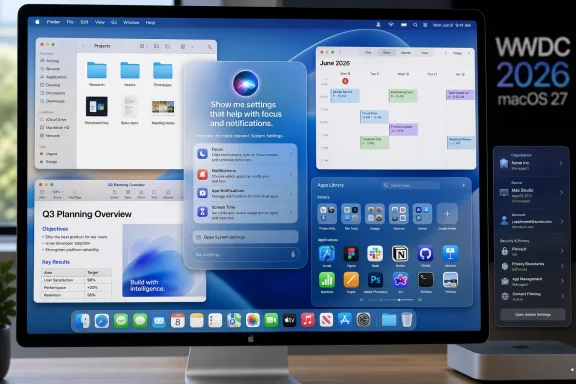 Apple’s Mac Problem Is No Longer Hardware
The Mac has rarely been in better hardware shape. Apple silicon turned what had become a mature, sometimes sleepy product line into one of the strongest arguments for buying a personal computer in the 2020s: quiet laptops with absurd battery life, desktops with workstation-class performance, and a unified architecture that lets Apple tune the operating system and silicon together.That success has changed the nature of Apple’s Mac problem. For years, the fear was that the Mac would be neglected while the iPhone consumed the company’s imagination. Today, the concern is subtler: the Mac is receiving plenty of attention, but some of it feels aimed at making macOS fit the rest of Apple’s design system rather than making the Mac itself better.
That is why Macworld’s wishlist for macOS 27 lands harder than the usual pre-WWDC feature shopping. More Siri, visual polish, System Settings repairs, and a better replacement for Launchpad may sound like modest requests. Taken together, they form a critique of Apple’s current desktop strategy.
The Mac does not need a reinvention. It needs Apple to stop treating small frictions as acceptable collateral damage in the march toward platform uniformity.
Siri Has Become Apple’s Credibility Test
The highest-stakes item on the macOS 27 agenda is Siri, and not because Mac users have been clamoring to dictate every file operation to a floating orb. Siri matters because Apple has spent two years promising that Apple Intelligence would make its platforms more personal, more contextual, and more capable. The Mac is where that promise should be easiest to prove.A desktop operating system knows a lot about a user’s work. It can see files, windows, calendars, email, messages, browser state, installed applications, and system settings. It is the place where context is not a gimmick but the whole environment. If an assistant cannot help meaningfully on a Mac, it is fair to ask whether it can help meaningfully anywhere.
Apple’s challenge is that it is not competing against the old Siri anymore. It is competing against user expectations set by ChatGPT, Microsoft Copilot, Google Gemini, Claude, and a rapidly normalizing assumption that software should be able to understand intent beyond a rigid command phrase. Siri’s legacy weakness has never just been that it lacked features. It was that users learned not to trust it with anything complicated.
That trust gap is brutal on a desktop. A failed weather query is mildly annoying. A failed attempt to find the right document, adjust a system preference, summarize a research folder, or automate a multi-app workflow wastes time and teaches the user to return to manual control. For macOS 27, Apple does not merely need Siri to answer more questions. It needs Siri to become a reliable interface to the user’s own machine.
The trick is that Apple cannot simply bolt a chatbot onto macOS and call the job done. The company’s strongest platform argument has always been that power and privacy can coexist. If the new Siri depends heavily on cloud inference, external model providers, waitlists, or feature gates, Apple will need to explain what runs locally, what leaves the machine, what is retained, and what happens on Macs that do not meet the Apple Intelligence hardware line.
That makes macOS 27 a referendum on execution. Apple has the distribution, the silicon, the APIs, and the first-party apps. What it has not yet shown is that it can turn those ingredients into an assistant that feels native rather than belated.
The Best AI Feature Would Be One That Fixes Apple’s Own UI
If Apple wants a perfect test case for Apple Intelligence on the Mac, it should point the system at System Settings.The old System Preferences was not perfect, and nostalgia has a way of sanding down the rough edges of older software. But it had one enormous advantage: it looked like a place. Users could build a mental map of it. Displays were over here, users and groups were over there, network lived in a recognizable region, and even when you forgot the exact pane, you could scan visually.
System Settings traded much of that spatial memory for an iOS-style sidebar and a long, sometimes opaque hierarchy. The result is not simply that some things moved. It is that macOS now often assumes you know the name of the thing you are trying to change before you can find the thing you are trying to change.
Search helps, but search is not a cure when vocabulary is the disease. A user looking for “stop my Mac from sleeping,” “make the menu bar bigger,” “turn off app startup,” or “change what happens when I close the lid” should not need to guess Apple’s preferred label. The operating system should bridge natural intent and system language.
This is where AI could be useful in a way that is almost embarrassingly practical. Forget the stage demo where Siri rearranges a vacation album while referencing a dinner reservation from Messages. Let a user type, “My external monitor text looks blurry,” and have System Settings surface scaling, resolution, refresh rate, font smoothing, accessibility display options, and relevant help. Let someone ask, “Why is this app opening every time I restart?” and land directly on Login Items.
That would be a more persuasive Apple Intelligence demo than another generated image or writing rewrite. It would show that Apple’s AI layer is not just decorative intelligence pasted on top of apps, but a means of making the operating system more humane.
The danger is that Apple uses AI as a way to avoid fixing the underlying structure. A smarter search box is welcome, but it should not become an excuse for a messy settings architecture. The best version of macOS 27 would do both: reorganize System Settings so humans can browse it, and make it intelligent enough that users do not have to browse it when they already know what they want.
Liquid Glass Made the Mac Feel Less Certain of Itself
macOS Tahoe’s Liquid Glass design language was Apple doing what Apple often does: imposing a visual system across product lines in the name of coherence. There is a logic to that. Apple sells an ecosystem, and visual continuity reduces the sense that users are jumping between unrelated devices.But the Mac has always earned its keep by being more than another pane of glass in the Apple showroom. It is the platform for overlapping windows, dense information, pointer precision, keyboard shortcuts, file manipulation, development tools, creative suites, remote administration, and long sessions of concentrated work. A desktop UI has different obligations than a phone UI.
That is why the criticism of Tahoe’s square or rounded-square app icon direction matters beyond taste. App icons are not just decoration. They are landmarks. On a phone, a grid of similarly shaped icons makes sense because the launcher is a touch-first surface built around uniform hit targets. On a Mac, where the Dock, Finder, Spotlight, application switcher, and file associations all compete as navigational surfaces, overly homogenized icons can make the system feel flatter and less legible.
The same applies to translucency and glass effects. Used carefully, they can create depth and hierarchy. Used too broadly, they create noise, especially for users with busy wallpapers, multiple displays, aging eyes, or accessibility needs. Apple has been here before: the company often debuts a strong design idea, then spends subsequent releases dialing it back toward usability.
macOS 27 should be that dialing-back release. The goal should not be to repudiate Liquid Glass. Apple rarely works that way, and a full retreat would create its own incoherence. The better move is to make macOS feel intentionally Mac-like within the new design system.
That means giving developers more room for distinctive Mac app icons. It means improving contrast where glass effects blur interface boundaries. It means letting widgets and desktop elements behave like Mac objects, not enlarged iPhone furniture. It means remembering that on a 27-inch display, visual personality and information density can coexist.
Launchpad’s Replacement Shows the Cost of Removing “Good Enough” Features
Launchpad was never the soul of macOS. Plenty of Mac power users ignored it, and many longtime users preferred Spotlight, Alfred, Raycast, the Dock, Finder, or muscle-memory keyboard shortcuts. But Launchpad did something useful for a particular kind of user: it provided an obvious, visual, iPad-like inventory of installed apps.That may sound minor until it is gone. Desktop operating systems accumulate entry points over time because users differ. Some search. Some browse. Some pin. Some organize into folders. Some remember icons better than names. A mature OS should not force all those users into one blessed path unless the replacement is clearly superior.
Tahoe’s Apps app, as described by critics and users, sounds less like a modernized Launchpad than a halfway house for people being nudged toward Spotlight. If it lacks meaningful customization, flexible sizing, useful organization, and the quick visual affordances that made Launchpad approachable, it becomes a symbol of a familiar platform sin: removing a feature before its successor has earned the right to replace it.
Apple’s argument for Spotlight is understandable. Search is faster for expert users, and a modern Spotlight can blend local apps, files, web results, actions, and assistant features into a single command surface. On paper, that is exactly where desktop interfaces are headed.
But search-first interfaces always have an adoption problem. They reward users who already know what they are looking for. They are weaker for discovery, weaker for recognition, and weaker for users who install something and cannot remember the precise name. Launchpad’s value was not that it was elegant. Its value was that it was obvious.
macOS 27 should either make Apps a first-class launcher or stop pretending it is one. A resizable, customizable app library with folders, sorting, hidden apps, categories, and fast keyboard navigation would fit the Mac. A static window that mostly duplicates Finder’s Applications folder does not.
The Mac Should Borrow From iOS Without Becoming Its Suburb
Apple’s platform convergence story has always been more complicated than “macOS is turning into iOS.” The Mac still has a real file system, windowing model, menu bar, terminal, scripting tradition, development environment, and decades of professional software behind it. The problem is not that Apple borrows from iOS. The problem is when it borrows without translating.The best iOS imports have solved real Mac problems. Continuity features made devices cooperate. iCloud Keychain and the Passwords app reduced password friction. Focus modes, when used well, helped tame notification sprawl. Even iPhone Mirroring made sense because it acknowledged that users live across devices and sometimes need one device from another.
The weaker imports are the ones that treat visual similarity as usability. A Mac is not held twelve inches from your face and operated by thumb. It is often connected to multiple displays, used with a keyboard for hours, shared across complex workflows, and customized over years. The interface can afford to be denser because the interaction model is more precise.
This is where macOS 27 has an opportunity to reassert the Mac’s identity without breaking Apple’s ecosystem strategy. Dynamic widgets could be more powerful on the desktop than on the phone. Window management could become smarter without becoming modal. Spotlight could become an action layer for power users while Apps remains a comfortable visual launcher for everyone else. Siri could operate as a contextual assistant that respects the file system rather than hiding it.
The Mac’s future is not isolation. Nobody should want Apple to freeze macOS in amber for the sake of longtime users who think every post-Aqua interface is a betrayal. But convergence should mean shared capabilities, not shared constraints.
Enterprise IT Will Judge macOS 27 by Its Predictability
For WindowsForum readers, the Mac is not just a consumer object. It is also a managed endpoint, a developer workstation, a creative platform, a security surface, and in many mixed environments, a machine that has to coexist with Microsoft 365, Entra ID, Intune, Jamf, Google Workspace, VPN clients, endpoint protection, compliance tooling, and remote support workflows.That makes the macOS 27 wishlist more operational than it first appears. A confusing Settings app is not just a consumer annoyance; it increases support friction. A changed launcher is not just a UI preference; it affects onboarding documentation and user training. A new AI assistant is not just a keynote feature; it raises questions about data handling, administrative controls, auditability, and feature availability by hardware generation.
The Apple silicon transition sharpened this divide. On the one hand, Apple now controls the Mac platform more tightly than ever, which can make security and performance better. On the other hand, organizations still carrying Intel Macs face a shrinking runway, and Apple Intelligence features already draw a bright line around supported hardware. macOS 27 may make that line feel less like a performance boundary and more like a capability boundary.
That matters because AI features are not like a new wallpaper or a revised icon set. If Siri becomes a practical way to search across local context, summarize documents, execute workflows, or manipulate system settings, then having it or not having it changes the user experience materially. IT departments will need to decide whether to enable it, restrict it, document it, or ignore it until the privacy and management story matures.
Apple’s enterprise pitch has improved enormously over the last decade. Macs are no longer exotic exceptions in many organizations. But Apple still has a habit of presenting platform changes through the lens of individual delight while administrators are left to map the blast radius afterward. WWDC is where Apple can close that gap.
A serious macOS 27 would treat manageability as part of the product story. If AI can change settings, admins need controls. If Siri can understand documents, organizations need data boundaries. If interface changes alter user workflows, Apple needs migration clarity. The Mac may be beloved by individuals, but it is increasingly bought, secured, and supported at fleet scale.
Apple’s Real Rival Is User Patience
It is tempting to frame macOS 27 as Apple versus Microsoft Copilot or Apple versus Google Gemini. That is partly true, especially in AI. Microsoft is trying to make Windows feel like a front end to a productivity graph, while Google is pushing Gemini deeper into Workspace, Android, and the browser. Apple cannot pretend that assistant intelligence is a side quest.But the more immediate rival is user patience. Mac users will forgive a lot when the fundamentals are strong, and the fundamentals are strong. The machines are fast, quiet, and efficient. The app ecosystem remains deep. The platform still has a rare ability to serve casual users and professionals without splitting into separate editions.
What users forgive less easily is regression disguised as modernization. They notice when a setting becomes harder to find. They notice when an app launcher loses useful behavior. They notice when visual changes make controls less legible. They notice when a promised assistant does not arrive, arrives late, or arrives in a form that feels less capable than what competitors ship every week.
The Mac’s loyal audience is not asking Apple to turn macOS into a Linux desktop, a Windows clone, or a retro computing museum. It is asking Apple to apply its famous taste to workflow, not just surfaces. The company that made the Mac popular did so by making complexity approachable. That mission is not obsolete just because the interface is now translucent.
macOS 27 therefore has to perform a difficult trick. It must show that Apple can move quickly in AI without becoming careless; that it can unify design without flattening platform identity; that it can simplify navigation without deleting useful pathways; and that it can modernize the Mac without treating Mac habits as legacy debt.
The Four Fixes That Would Prove Apple Still Gets the Desktop
The most useful way to read this macOS 27 wishlist is not as a demand for four isolated features. It is a compact test of whether Apple is optimizing for real Mac work or merely continuing a cross-platform design program that began elsewhere.- Apple needs Siri on macOS 27 to be useful inside the user’s actual workspace, not merely better at answering general questions.
- System Settings needs a structural rethink so users can browse by intuition and search by plain-language intent.
- Liquid Glass needs Mac-specific restraint, with stronger legibility, more distinctive app identity, and fewer places where visual unity overrides desktop usability.
- The Apps app needs to become a worthy Launchpad successor with real customization and resizable, discoverable navigation.
- Apple should make AI management, privacy boundaries, and hardware eligibility clear enough for administrators before users start depending on the new features.
- macOS 27 should borrow the best of iOS and iPadOS while preserving the Mac’s role as Apple’s most flexible, user-directed computing environment.
References
- Primary source: Macworld
Published: 2026-06-05T10:50:09.736416
These 4 changes will make macOS 27 massively better | Macworld
WWDC is our chance to see what Apple will do to make our Mac experience better, and here's what I want to see at WWDC26 for macOS.www.macworld.com - Related coverage: techradar.com
iOS 27 and Siri AI compatibility explained — confirmed device requirements for Apple's new software updates | TechRadar
Plus compatibility information for iPadOS 27www.techradar.com - Related coverage: tomsguide.com
I've been covering Apple events for 8 years: Here's what I'm excited for from WWDC 2026 | Tom's Guide
A trio of treats awaits at WWDC - here’s what I’m most excited for.www.tomsguide.com - Related coverage: macrumors.com
macOS 27: All the Rumors So Far
macOS 27 is still months away, but there are already a handful of rumors about the upcoming software update, as outlined below. We expect the first beta of macOS 27 to be seeded to developers during WWDC 2026 in June, and a public beta to follow in July. Following beta testing, the update should...www.macrumors.com - Related coverage: 9to5mac.com
Apple planning standalone Siri app for iOS 27 and macOS 27, per report - 9to5Mac
When Apple unveils iOS 27 on June 8, the company may reveal the first dedicated Siri app as part of...9to5mac.com - Related coverage: appleinsider.com
iOS 27, macOS 27, Siri: What to expect at WWDC 2026
WWDC is just around the corner. Here's what to expect from Apple about the future of iOS 27, macOS 27, AI, and Siri.appleinsider.com
- Related coverage: t3.com
Apple's advanced, AI-powered Siri will finally debut at WWDC, claims expert | T3
Could it finally be Siri's time to shine?www.t3.com
