

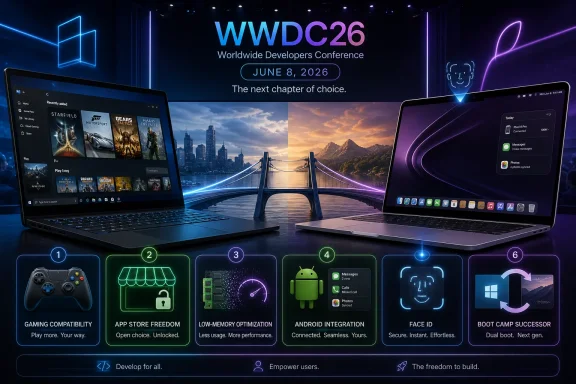
A Windows loyalist’s case for switching to macOS 27 hinges on six changes Apple could preview at WWDC on June 8, 2026: serious gaming compatibility, a less restrictive Mac App Store, better low-memory performance, Android integration, Face ID, and some modern successor to Boot Camp. That is not a normal feature wish list. It is a map of every place where the Mac still behaves less like a general-purpose computer than Windows does. Apple’s problem is not that macOS lacks polish; it is that Windows remains the more permissive, compatible, and hardware-agnostic platform for people who use their computers as tools rather than lifestyle accessories.
The uncomfortable truth for Windows die-hards is that Apple’s laptop hardware has become difficult to dismiss. The MacBook Air is quiet, fast, efficient, and increasingly price-competitive at a moment when Windows laptops are being squeezed by memory costs, storage costs, and the premium attached to AI-branded PCs. Even users who prefer Windows can look at the battery life, display quality, and fanless performance of modern Apple laptops and see the appeal.
But operating systems do not win loyalty on benchmarks alone. Windows users often stick with Windows because it lets them do messy, practical, unglamorous things: run old software, plug into odd hardware, install powerful utilities, play the game they bought in 2009, use an Android phone without apology, or boot into another OS when the job demands it. That is the everyday freedom argument Microsoft rarely markets well but benefits from constantly.
macOS, by contrast, is often the better-designed environment until the user hits a wall. The wall might be an App Store rule, an unsupported game, a missing driver, an iPhone-only ecosystem feature, or a hardware choice Apple has decided users no longer need. Those walls are not bugs in Apple’s strategy. They are the strategy.
That is why the wish list matters. It is not really about six isolated macOS 27 features. It is about whether Apple wants the Mac to compete for Windows users on Windows users’ terms, or whether it is content to sell excellent laptops that still require too many compromises for people who live outside Apple’s preferred ecosystem.
Windows gaming works because it has decades of inertia behind it. Steam libraries are full of old, weird, abandoned, beloved, unsupported, and occasionally barely functional games that still run because Microsoft has treated backward compatibility as a platform obligation. The result is not elegant, but it is powerful. A Windows user can often install a game older than some current college students and expect at least a fighting chance.
Apple has repeatedly chosen cleaner breaks. The end of 32-bit application support in macOS Catalina was defensible from a platform-modernization perspective, but it also wiped out a large swath of older Mac games. Now the Mac is approaching another transition point as Intel support disappears and Rosetta’s general-purpose role begins to sunset. Apple has said it will preserve a subset of Rosetta functionality for older, unmaintained games, which is a telling concession: even Cupertino knows that games are where compatibility decisions become emotionally expensive.
The more ambitious answer would be for Apple to stop thinking of Mac gaming primarily as a porting problem. Valve’s Proton showed the Linux world that compatibility layers can change platform perception when they are integrated well enough that ordinary users stop thinking about them. The Steam Deck is not successful because Linux suddenly became a first-class target for every game studio. It is successful because Valve hid much of the pain.
A Proton-like path on macOS would be technically difficult, politically awkward, and deeply unlike Apple. It would require cooperation, humility, and a willingness to make someone else’s Windows-first ecosystem work acceptably on Apple hardware. But that is exactly why it would matter. If Apple wants Windows users to take Mac gaming seriously, it needs fewer stage demos and more boring reliability in the Steam library.
Sandboxing is the heart of the tension. It is good security policy to limit what apps can touch by default, and Windows has plenty to learn from Apple’s security posture. But desktop utilities often exist precisely because they need to reach into the system, watch folders, automate workflows, customize input devices, intercept events, or glue together pieces of the OS in ways Apple did not anticipate. A Mac that cannot comfortably host those tools in its official store is not safer in every practical sense. It is simply pushing power users elsewhere.
That matters because sideloading on the Mac is not a fringe behavior. It is how a large portion of serious Mac software is distributed. Developers have spent years training users to download apps directly, manage their own licenses, and trust update mechanisms outside Apple’s marketplace. For sophisticated users, that is fine. For ordinary users, it weakens the very security and discoverability arguments Apple likes to make.
The financial side is no less important. Apple’s commission model may be tolerable on iOS because developers have no alternative route to most users. On the Mac, they do. If Microsoft can tolerate a store that is more welcoming to traditional desktop apps and alternative payment models, Apple can hardly claim the Mac requires the same economic rigidity as the iPhone.
The result is a strange inversion. Windows, long caricatured as the messy platform, now has a store strategy that in some respects better acknowledges the reality of desktop software. Apple, which has the better consumer trust story, has a Mac App Store that often feels like it was designed for a narrower and less interesting computer.
But the 8GB question refuses to go away because users do not buy laptops only for ordinary use on day one. They buy them for browser tabs, messaging apps, photo libraries, video calls, background sync tools, AI features, and operating system updates that get heavier over time. Memory pressure is not a philosophical debate when the machine starts swapping aggressively or slowing down under a workload the user thought was normal.
The Windows world has its own problem here. Many budget PCs ship with 16GB of RAM not because Microsoft has solved efficiency, but because the ecosystem has accepted that modern Windows needs headroom. That makes inexpensive Windows laptops harder to build well, especially as component pricing rises and manufacturers chase margins. Apple has an opportunity to attack the issue from the other direction: make the OS and first-party apps so disciplined that low-memory Macs age gracefully.
That is easier said than done. Apple Intelligence and other on-device AI features are likely to increase memory expectations, not reduce them. Visual effects, background indexing, browser workloads, and cross-device features all want their slice. The more Apple markets inexpensive Macs as mainstream machines, the more macOS has to behave as if 8GB is not merely the entry point but a configuration worth protecting.
For Windows users eyeing a MacBook, this is not a minor technical concern. It goes directly to trust. A good-value Mac stops looking like good value if the buyer suspects Apple is using software optimization to justify a memory tier that may feel cramped halfway through the machine’s life.
For an iPhone user, that is a benefit. For an Android user, it is a warning label. Apple does not merely fail to match Windows Phone Link-style integration with Android; it has little strategic incentive to do so. Every missing Android bridge is also a nudge toward buying an iPhone.
That may be good ecosystem economics, but it is bad personal-computer politics. A computer, especially one costing hundreds or thousands of dollars, should not treat the world’s other major mobile platform as a tolerated outsider. Windows has become the more pragmatic system here, not because Microsoft has a purer philosophy, but because it has no successful phone platform to protect. That absence has become a strength.
The most revealing use case is not flashy. It is copying a one-time SMS code, answering a message, checking a notification, or moving a photo without reaching for the phone. These are small conveniences, but small conveniences repeated daily become platform loyalty. If a Mac makes an Android user feel second-class ten times a day, the Mac is doing Microsoft’s retention work for free.
Apple and Google do not need to become friends for this to improve. Standards-based messaging, better notification relay, richer Bluetooth and Wi-Fi handoff, and a more open cross-device framework could make the Mac less hostile to Android without turning it into a Chromebook. But that would require Apple to admit that not every Mac buyer wants an iPhone. So far, Apple has preferred to make the ecosystem gap feel like the user’s problem.
The Mac, oddly, still relies on Touch ID. Touch ID is reliable, secure, and familiar, but it is also less seamless than facial authentication. The user has to reach for the sensor. That sounds trivial until you use a Windows laptop that simply unlocks when you sit down.
Apple’s reluctance is not purely stubbornness. Face ID requires specific sensor hardware, and Apple is careful about security architecture. The MacBook notch is not proof that the required components are already there. Still, users can reasonably look at years of iPhones and iPads with Face ID and wonder why Apple’s premium laptops remain the exception.
The deeper issue is that the Mac sometimes receives Apple’s best ecosystem ideas late, cautiously, or in partial form. The iPhone became the center of Apple’s identity, and the Mac often feels like it inherits selectively from that universe. Face ID is a perfect example: obvious, desirable, technically solvable, and still absent.
If Apple announced Face ID for new Macs alongside macOS 27, it would not convert Windows users by itself. But it would remove one more small daily reason Windows hardware can feel more convenient. Operating system loyalty is often built out of precisely those small frictions.
Apple silicon broke that bargain. The technical reasons are understandable: different architecture, different drivers, different firmware assumptions, and a very different hardware stack. But the user-facing result is simple. A modern Mac no longer offers the same clean dual-boot escape hatch.
Virtualization helps, and tools like Parallels, VMware Fusion, and UTM can be excellent for many productivity tasks. But virtualization is not the same as native boot, especially for gaming, hardware-intensive workloads, low-level tools, or edge-case enterprise software. Running Windows in a window is convenient; turning the Mac into a Windows machine when needed is something else entirely.
A modern Boot Camp for Apple silicon would be extremely hard. Apple would need to support Windows drivers for its chips, GPUs, storage controllers, input devices, cameras, wireless hardware, and power management. Microsoft would need to remain committed to Windows on Arm as a consumer platform, not just an enterprise and OEM initiative. Game compatibility would still be complicated.
Yet the difficulty is part of the point. Bringing back Boot Camp would signal that Apple sees the Mac as a computer first and an ecosystem endpoint second. It would make the Mac less pure, less controlled, and more useful to people who do not want a single-vendor life. That is exactly why Apple probably will not do it.
Apple’s modern platform strategy prizes integration, predictability, and control. The company improves the user experience by narrowing the number of supported paths, not expanding them. That works brilliantly when the user lives inside Apple’s assumptions. It works less well when the user’s life includes Android phones, old games, unsupported utilities, or a desire to dual-boot.
Gaming is the one area where Apple may feel pressure to sound more aggressive. The Mac’s GPU story has improved, Apple’s developer tools have matured, and the company knows gaming is an obvious hole in the Apple silicon pitch. But unless WWDC brings compatibility at scale rather than another curated list of titles, Windows will remain unthreatened where gaming matters most.
Efficiency is the safer bet. If Apple wants to make a lower-cost Mac feel like a long-term buy, macOS 27 needs to be lean, stable, and disciplined. That is less exciting than a new interface or a flashy AI demo, but it may matter more to real buyers deciding between a budget Windows laptop and an entry-level Mac.
The trouble is that polish alone will not win over the Windows faithful. Windows users are not asking Apple to make macOS prettier. They are asking Apple to make the Mac less conditional.
Apple will probably leave WWDC with a stronger macOS than it had before. It may be faster, cleaner, more AI-aware, and better aligned with the rest of the company’s platforms. But if macOS 27 is going to make a die-hard Windows user question their allegiance, Apple must do more than refine the Mac; it must loosen its grip just enough to let the Mac behave like the kind of computer Windows users still recognize as their own.
 Apple Has the Hardware Argument, but Windows Still Has the Computer Argument
The uncomfortable truth for Windows die-hards is that Apple’s laptop hardware has become difficult to dismiss. The MacBook Air is quiet, fast, efficient, and increasingly price-competitive at a moment when Windows laptops are being squeezed by memory costs, storage costs, and the premium attached to AI-branded PCs. Even users who prefer Windows can look at the battery life, display quality, and fanless performance of modern Apple laptops and see the appeal.But operating systems do not win loyalty on benchmarks alone. Windows users often stick with Windows because it lets them do messy, practical, unglamorous things: run old software, plug into odd hardware, install powerful utilities, play the game they bought in 2009, use an Android phone without apology, or boot into another OS when the job demands it. That is the everyday freedom argument Microsoft rarely markets well but benefits from constantly.
macOS, by contrast, is often the better-designed environment until the user hits a wall. The wall might be an App Store rule, an unsupported game, a missing driver, an iPhone-only ecosystem feature, or a hardware choice Apple has decided users no longer need. Those walls are not bugs in Apple’s strategy. They are the strategy.
That is why the wish list matters. It is not really about six isolated macOS 27 features. It is about whether Apple wants the Mac to compete for Windows users on Windows users’ terms, or whether it is content to sell excellent laptops that still require too many compromises for people who live outside Apple’s preferred ecosystem.
Mac Gaming No Longer Needs Pep Talks; It Needs Compatibility
Gaming remains the Mac’s most glaring credibility problem. Apple can bring executives on stage, show a handful of prestige titles, and talk up Metal and game development tools, but the market has already voted: if you care about PC games, Windows is still the default. The reason is not merely raw GPU power. It is the sheer accumulated weight of compatibility.Windows gaming works because it has decades of inertia behind it. Steam libraries are full of old, weird, abandoned, beloved, unsupported, and occasionally barely functional games that still run because Microsoft has treated backward compatibility as a platform obligation. The result is not elegant, but it is powerful. A Windows user can often install a game older than some current college students and expect at least a fighting chance.
Apple has repeatedly chosen cleaner breaks. The end of 32-bit application support in macOS Catalina was defensible from a platform-modernization perspective, but it also wiped out a large swath of older Mac games. Now the Mac is approaching another transition point as Intel support disappears and Rosetta’s general-purpose role begins to sunset. Apple has said it will preserve a subset of Rosetta functionality for older, unmaintained games, which is a telling concession: even Cupertino knows that games are where compatibility decisions become emotionally expensive.
The more ambitious answer would be for Apple to stop thinking of Mac gaming primarily as a porting problem. Valve’s Proton showed the Linux world that compatibility layers can change platform perception when they are integrated well enough that ordinary users stop thinking about them. The Steam Deck is not successful because Linux suddenly became a first-class target for every game studio. It is successful because Valve hid much of the pain.
A Proton-like path on macOS would be technically difficult, politically awkward, and deeply unlike Apple. It would require cooperation, humility, and a willingness to make someone else’s Windows-first ecosystem work acceptably on Apple hardware. But that is exactly why it would matter. If Apple wants Windows users to take Mac gaming seriously, it needs fewer stage demos and more boring reliability in the Steam library.
The Mac App Store Still Feels Like a Storefront for a Smaller Mac
The Mac App Store should be one of Apple’s strongest arguments for macOS. In theory, it offers safer discovery, centralized updates, easy payments, and a familiar installation model. In practice, many of the Mac’s most useful apps live outside it because Apple’s rules are built around a vision of software that is too constrained for the desktop.Sandboxing is the heart of the tension. It is good security policy to limit what apps can touch by default, and Windows has plenty to learn from Apple’s security posture. But desktop utilities often exist precisely because they need to reach into the system, watch folders, automate workflows, customize input devices, intercept events, or glue together pieces of the OS in ways Apple did not anticipate. A Mac that cannot comfortably host those tools in its official store is not safer in every practical sense. It is simply pushing power users elsewhere.
That matters because sideloading on the Mac is not a fringe behavior. It is how a large portion of serious Mac software is distributed. Developers have spent years training users to download apps directly, manage their own licenses, and trust update mechanisms outside Apple’s marketplace. For sophisticated users, that is fine. For ordinary users, it weakens the very security and discoverability arguments Apple likes to make.
The financial side is no less important. Apple’s commission model may be tolerable on iOS because developers have no alternative route to most users. On the Mac, they do. If Microsoft can tolerate a store that is more welcoming to traditional desktop apps and alternative payment models, Apple can hardly claim the Mac requires the same economic rigidity as the iPhone.
The result is a strange inversion. Windows, long caricatured as the messy platform, now has a store strategy that in some respects better acknowledges the reality of desktop software. Apple, which has the better consumer trust story, has a Mac App Store that often feels like it was designed for a narrower and less interesting computer.
Eight Gigabytes of Memory Is Where Apple’s Efficiency Story Meets Reality
Apple’s hardware efficiency is real. Apple silicon changed the laptop market by making performance per watt feel like a mainstream feature rather than a spec-sheet curiosity. A low-cost Mac with 8GB of unified memory can often feel smoother in ordinary use than a Windows laptop with similar paper specifications.But the 8GB question refuses to go away because users do not buy laptops only for ordinary use on day one. They buy them for browser tabs, messaging apps, photo libraries, video calls, background sync tools, AI features, and operating system updates that get heavier over time. Memory pressure is not a philosophical debate when the machine starts swapping aggressively or slowing down under a workload the user thought was normal.
The Windows world has its own problem here. Many budget PCs ship with 16GB of RAM not because Microsoft has solved efficiency, but because the ecosystem has accepted that modern Windows needs headroom. That makes inexpensive Windows laptops harder to build well, especially as component pricing rises and manufacturers chase margins. Apple has an opportunity to attack the issue from the other direction: make the OS and first-party apps so disciplined that low-memory Macs age gracefully.
That is easier said than done. Apple Intelligence and other on-device AI features are likely to increase memory expectations, not reduce them. Visual effects, background indexing, browser workloads, and cross-device features all want their slice. The more Apple markets inexpensive Macs as mainstream machines, the more macOS has to behave as if 8GB is not merely the entry point but a configuration worth protecting.
For Windows users eyeing a MacBook, this is not a minor technical concern. It goes directly to trust. A good-value Mac stops looking like good value if the buyer suspects Apple is using software optimization to justify a memory tier that may feel cramped halfway through the machine’s life.
Android Is the Ecosystem Test Apple Keeps Failing on Purpose
Continuity is one of Apple’s strongest platform achievements. Calls, texts, clipboard sharing, AirDrop, iPhone camera integration, hotspot handoff, and device-to-device workflows make the Mac feel like part of a larger personal computing fabric. The catch is obvious: the fabric is woven around the iPhone.For an iPhone user, that is a benefit. For an Android user, it is a warning label. Apple does not merely fail to match Windows Phone Link-style integration with Android; it has little strategic incentive to do so. Every missing Android bridge is also a nudge toward buying an iPhone.
That may be good ecosystem economics, but it is bad personal-computer politics. A computer, especially one costing hundreds or thousands of dollars, should not treat the world’s other major mobile platform as a tolerated outsider. Windows has become the more pragmatic system here, not because Microsoft has a purer philosophy, but because it has no successful phone platform to protect. That absence has become a strength.
The most revealing use case is not flashy. It is copying a one-time SMS code, answering a message, checking a notification, or moving a photo without reaching for the phone. These are small conveniences, but small conveniences repeated daily become platform loyalty. If a Mac makes an Android user feel second-class ten times a day, the Mac is doing Microsoft’s retention work for free.
Apple and Google do not need to become friends for this to improve. Standards-based messaging, better notification relay, richer Bluetooth and Wi-Fi handoff, and a more open cross-device framework could make the Mac less hostile to Android without turning it into a Chromebook. But that would require Apple to admit that not every Mac buyer wants an iPhone. So far, Apple has preferred to make the ecosystem gap feel like the user’s problem.
Face ID on the Mac Is the Obvious Feature That Somehow Still Hasn’t Arrived
Windows Hello remains one of Windows’ best everyday quality-of-life advantages. On a good laptop, opening the lid and being recognized instantly feels natural. It is not a power-user feature or a corporate checkbox. It is the kind of small interaction that makes a machine feel modern.The Mac, oddly, still relies on Touch ID. Touch ID is reliable, secure, and familiar, but it is also less seamless than facial authentication. The user has to reach for the sensor. That sounds trivial until you use a Windows laptop that simply unlocks when you sit down.
Apple’s reluctance is not purely stubbornness. Face ID requires specific sensor hardware, and Apple is careful about security architecture. The MacBook notch is not proof that the required components are already there. Still, users can reasonably look at years of iPhones and iPads with Face ID and wonder why Apple’s premium laptops remain the exception.
The deeper issue is that the Mac sometimes receives Apple’s best ecosystem ideas late, cautiously, or in partial form. The iPhone became the center of Apple’s identity, and the Mac often feels like it inherits selectively from that universe. Face ID is a perfect example: obvious, desirable, technically solvable, and still absent.
If Apple announced Face ID for new Macs alongside macOS 27, it would not convert Windows users by itself. But it would remove one more small daily reason Windows hardware can feel more convenient. Operating system loyalty is often built out of precisely those small frictions.
Boot Camp Was the Escape Hatch That Made Macs Less Scary
Boot Camp was never just a utility. It was a psychological safety net. It told buyers they could choose a Mac without giving up Windows entirely, and it gave switchers a way to hedge their bets. For a certain generation of users, especially students, developers, and creative professionals, the Intel Mac was compelling because it could be both a Mac and a Windows PC.Apple silicon broke that bargain. The technical reasons are understandable: different architecture, different drivers, different firmware assumptions, and a very different hardware stack. But the user-facing result is simple. A modern Mac no longer offers the same clean dual-boot escape hatch.
Virtualization helps, and tools like Parallels, VMware Fusion, and UTM can be excellent for many productivity tasks. But virtualization is not the same as native boot, especially for gaming, hardware-intensive workloads, low-level tools, or edge-case enterprise software. Running Windows in a window is convenient; turning the Mac into a Windows machine when needed is something else entirely.
A modern Boot Camp for Apple silicon would be extremely hard. Apple would need to support Windows drivers for its chips, GPUs, storage controllers, input devices, cameras, wireless hardware, and power management. Microsoft would need to remain committed to Windows on Arm as a consumer platform, not just an enterprise and OEM initiative. Game compatibility would still be complicated.
Yet the difficulty is part of the point. Bringing back Boot Camp would signal that Apple sees the Mac as a computer first and an ecosystem endpoint second. It would make the Mac less pure, less controlled, and more useful to people who do not want a single-vendor life. That is exactly why Apple probably will not do it.
WWDC Is Likely to Offer Polish Where Switchers Want Permission
The gap between what Windows users want from macOS 27 and what Apple is likely to announce is large. Apple is far more likely to discuss AI advancements, developer tools, refinements to last year’s Liquid Glass design language, and platform-wide polish than to unveil Android integration, Mac App Store liberalization, or a Boot Camp revival. That is not cynicism. It is pattern recognition.Apple’s modern platform strategy prizes integration, predictability, and control. The company improves the user experience by narrowing the number of supported paths, not expanding them. That works brilliantly when the user lives inside Apple’s assumptions. It works less well when the user’s life includes Android phones, old games, unsupported utilities, or a desire to dual-boot.
Gaming is the one area where Apple may feel pressure to sound more aggressive. The Mac’s GPU story has improved, Apple’s developer tools have matured, and the company knows gaming is an obvious hole in the Apple silicon pitch. But unless WWDC brings compatibility at scale rather than another curated list of titles, Windows will remain unthreatened where gaming matters most.
Efficiency is the safer bet. If Apple wants to make a lower-cost Mac feel like a long-term buy, macOS 27 needs to be lean, stable, and disciplined. That is less exciting than a new interface or a flashy AI demo, but it may matter more to real buyers deciding between a budget Windows laptop and an entry-level Mac.
The trouble is that polish alone will not win over the Windows faithful. Windows users are not asking Apple to make macOS prettier. They are asking Apple to make the Mac less conditional.
The Six Fixes Reveal One Bigger Demand
The useful way to read this wish list is not as a prediction but as leverage. These are the places where Apple could make the Mac feel less like a beautiful appliance and more like a general-purpose machine that happens to be beautifully made. That distinction is everything for the Windows crowd.- Apple needs a compatibility-first gaming strategy, not just more high-profile Mac ports announced onstage.
- The Mac App Store needs rules and economics that welcome serious desktop utilities instead of driving them to direct downloads.
- macOS 27 should treat 8GB machines as a design constraint to optimize for, not merely an entry-level configuration to upsell from.
- Android integration would make the Mac more credible as a personal computer for users who refuse to buy their entire digital life from one company.
- Face ID would close a daily convenience gap that many Windows laptops have already solved with Windows Hello.
- A Boot Camp successor remains unlikely, but its absence explains why modern Macs feel riskier to Windows users than Intel Macs once did.
Apple will probably leave WWDC with a stronger macOS than it had before. It may be faster, cleaner, more AI-aware, and better aligned with the rest of the company’s platforms. But if macOS 27 is going to make a die-hard Windows user question their allegiance, Apple must do more than refine the Mac; it must loosen its grip just enough to let the Mac behave like the kind of computer Windows users still recognize as their own.
References
- Primary source: PCMag Australia
Published: 2026-06-05T17:23:15.587461
I'm a Die-Hard Windows User. These 6 macOS 27 Fixes Could Convince Me to Switch
Apple's desktop OS desperately needs to catch up with its top-notch hardware. Here are the upgrades that could make me to ditch my Windows PC for good.au.pcmag.com - Related coverage: macrumors.com
macOS Golden Gate: Everything We Know | MacRumors
macOS 27 Golden Gate is the updated version of macOS that Apple introduced at WWDC in June and will launch in September 2026.www.macrumors.com - Related coverage: tomshardware.com
macOS Tahoe is the last release for Intel Macs — Apple Silicon-exclusivity will mark end of Hackintoshes | Tom's Hardware
Intel got five years of support after the announcement of Apple Siliconwww.tomshardware.com - Related coverage: macos-tahoe.com
macOS 27 Confirms End of Intel Mac Era: Final Compatibility List Before WWDC 2026
macOS 27 will drop all Intel Mac support — Tahoe 26 is the last release. See which Intel Macs are stranded, what security updates remain, and your migration options.macos-tahoe.com
- Related coverage: apple.headliner.nl
macOS Tahoe is de laatste macOS versie voor Intel Macs, ook einde voor Rosetta 2
Apple schakelt definitief een tandje over naar Apple Silicon: Intel‑macs krijgen vanaf macOS 27 geen nieuwe functies meer, alleen nog beveiligingsupdates. Dat maakte het bedrijf vorig jaar tijdens het Platforms State of the Union-evenement bekend; de komende grote macOS‑release is daarmee...apple.headliner.nl - Related coverage: idownloadblog.com
Apple says macOS Tahoe 26 will be the last OS to support Intel Macs, as Rosetta 2 sunsets one year later
Apple says macOS Tahoe 26 will be the last major software update for Intel-equipped Macs, and implicates Rosetta 2 for the following year. www.idownloadblog.com
- Related coverage: cultofmac.com
macOS Tahoe will be the last for Intel Macs | Cult of Mac
The upcoming macOS 26 Tahoe is the last upgrade that will be compatible with Macs running Intel processors, which Apple hasn’t sold in years.www.cultofmac.com - Related coverage: techradar.com
It’s official: your Intel Mac won’t get macOS 27, with macOS Tahoe 26 marking the end of an era | TechRadar
No-go after Tahoe for Macs with Intel CPUswww.techradar.com - Related coverage: thatappleguide.com
macOS 27 Will Drop Support for These Four Intel Macs — That Apple Guide
Apple's next major Mac software release will be the company's first that runs exclusively on Apple siliconthatappleguide.com - Related coverage: tomsguide.com
I've been covering Apple events for 8 years: Here's what I'm excited for from WWDC 2026 | Tom's Guide
A trio of treats awaits at WWDC - here’s what I’m most excited for.www.tomsguide.com
