

Admins should pilot Outlook Mail Merge (Advanced) in June 2026 for low-risk internal or departmental communications, but they should not replace Word-based mail merge and classic Outlook workflows until Microsoft proves the new Outlook and web implementation can handle real production edge cases.
That is the practical answer behind Microsoft 365 Roadmap ID 423047: this is not merely another “coming soon” checkbox for new Outlook. It is a sign that Microsoft is moving a long-standing Office workflow out of the Word-classic Outlook pairing and into Outlook on the web and the new Outlook for Windows. The shift matters because mail merge is one of those unglamorous features that quietly powers HR notices, school communications, customer updates, executive admin work, and departmental outreach across the Windows world.
Microsoft’s roadmap entry for “Outlook: Mail Merge (Advanced) on Outlook on the Web and new Outlook for Windows” puts both preview availability and rollout start in June 2026 for worldwide commercial tenants. The target clients are important: Outlook on the web and the new Outlook for Windows. Classic Outlook is not the beneficiary of this roadmap item.
The feature description is plain enough. Microsoft says advanced mail merge upgrades the current basic capability so each recipient receives a separate email, with only that recipient in the recipient list, and with fields replaced by recipient-specific values such as a name. Microsoft Support also now says new Outlook supports basic mail merge, while advanced mail merge is coming soon with variable fields populated from the list.
That sounds small until you remember what mail merge means in the Microsoft 365 estate. For many organizations, “send a personalized email to a list” still means Word, Excel, Outlook, a local desktop profile, and a workflow that has survived multiple Office branding cycles. Moving that into the web/new Outlook stack is a platform decision, not a cosmetic feature addition.
The verdict for admins is therefore cautious but not dismissive. Treat this as a feature worth piloting as soon as it appears in your tenant, especially if your users have already moved to new Outlook or Outlook on the web. Do not treat it as a full replacement for Word-based mail merge until you have tested source lists, field behavior, drafts, sending limits, compliance handling, delegated scenarios, and rollback paths in your own environment.
That gap matters because mail merge is deceptively simple. Users think in terms of “Dear FirstName,” but administrators think in terms of source data, identity, message trace, transport rules, sensitivity labels, retention, auditability, throttling, and help desk reversibility. The feature that delights an executive assistant with 80 recipients may become a support incident when a department tries to send 5,000 personalized notices through a mailbox with policies the sender does not understand.
The roadmap wording also suggests this is an Outlook-native enhancement, not a promise that the old Word-to-Outlook model is being recreated inside the new Outlook. That distinction should guide every pilot. If your current workflow depends on Word’s document editing model, Excel as a data source, advanced field formatting, conditional text, or years of local process documentation, you should assume you are evaluating a new workflow rather than waiting for the old one to reappear unchanged.
This is where the coverage elsewhere has often been too thin. It is true that the roadmap says rollout dates are estimates, and it is true that classic Outlook remains the workaround for traditional mail merge. But the operational question is sharper: which workflows can move to new Outlook first, and which ones should remain pinned to Word/classic Outlook until Microsoft fills in the blanks?
For those users, advanced mail merge in Outlook on the web and new Outlook could remove friction. They may no longer need to bounce between Word, Excel, and classic Outlook just to send a message that feels personally addressed. The web client also makes the feature more portable across machines, which is useful for organizations trying to reduce dependency on thick-client Outlook profiles.
The timing is also convenient for organizations already nudging users toward new Outlook. WindowsForum readers have been watching the broader Microsoft 365 modernization push for some time, from Teams and OneDrive changes to Outlook’s gradual feature catch-up. Advanced mail merge fits that pattern: Microsoft is not simply adding a missing checkbox; it is trying to make new Outlook good enough that fewer users can justify retreating to classic Outlook for everyday work.
But the pilot should be bounded. Admins should start with users whose current merge process is easy to replicate and easy to validate. If the output can be checked manually, the recipient count is modest, and the business risk of a formatting issue is low, the new feature deserves a controlled trial.
That matters because “advanced” in the roadmap does not automatically mean “equivalent to Word.” The verified description mentions separate recipient emails and personalized fields such as names. It does not establish support for every data source pattern, every Word field behavior, every formatting scenario, or every downstream compliance expectation an organization may have built around the old workflow.
This is not pedantry. A mail merge workflow can contain sensitive data, employment status, customer segmentation, donation history, appointment information, or school records. If the wrong field lands in the wrong message, the fact that the new Outlook interface looked cleaner will be no consolation.
Classic Outlook and Word therefore remain the safer production path for mature workflows until the new implementation is tested against real templates and real data. For many organizations, the best June 2026 posture is dual-track: pilot Outlook-native advanced mail merge for simple use cases while preserving classic workflows for anything business-critical.
For admins, a web-capable mail merge feature could simplify support for shared machines, browser-first users, and workers who move between devices. It could also reduce the number of cases where a user needs classic Outlook installed purely to perform one recurring task. That has real value in environments trying to standardize on lighter endpoint images or reduce legacy Office dependencies.
But web availability also raises governance questions earlier. If the feature appears in the web client, admins will need to understand who can use it, how it interacts with tenant policies, and whether existing mail flow controls catch merged messages the way they expect. Microsoft has not provided enough public detail to answer those questions yet.
That is why the pilot should include Outlook on the web explicitly, not as an afterthought. If your organization supports both new Outlook for Windows and browser-based Outlook, test both. The user experience may feel aligned, but admins should verify the behavior that matters: recipient handling, personalization accuracy, sent item records, message trace visibility, and policy application.
For a certain class of user, the absence of advanced mail merge has been enough to keep classic Outlook alive. Executive assistants, office managers, small business admins, school staff, and departmental coordinators may not care about Microsoft’s architectural direction. They care that a working workflow stopped working, or that a new client cannot do the thing their job requires.
Advanced mail merge gives Microsoft a better argument. If new Outlook can personalize messages, send one email per recipient, and populate fields from a list, one of the most visible productivity gaps narrows. That does not end the classic Outlook debate, but it removes a practical objection for some users.
Still, admins should be wary of letting a roadmap item become a migration mandate. New Outlook adoption should follow workflow readiness, not marketing momentum. If mail merge is the blocker for a group, June 2026 may be the beginning of the evaluation, not the end of the conversation.
Simple personalized outreach can move first. If the message is plain, the fields are limited, the list is clean, and the risk is low, Outlook-native advanced mail merge may be exactly what users need. This is especially true for teams already living in Outlook on the web or new Outlook.
Structured Word templates should wait. If a department has a known-good Word document, a recurring Excel source, and business owners who expect identical output every month, the burden of proof sits with the new feature. Rebuilding the process just because a roadmap entry appeared is not modernization; it is avoidable change risk.
Regulated or sensitive communications should wait longer still. Anything involving personal data, financial information, legal notices, health-related details, or employment decisions should remain in the most proven workflow until admins can validate the new path end to end. The new Outlook feature may eventually be suitable, but the roadmap description alone is not enough evidence.
Third-party bulk mail platforms remain a separate category. If a workflow requires subscription management, campaign analytics, branding controls, bounce handling, or marketing compliance features, Outlook mail merge is probably the wrong tool regardless of client. Microsoft’s feature is about personalized email from Outlook, not turning Outlook into a marketing automation system.
Then define pilot criteria. A good pilot group should include at least one new Outlook for Windows user and one Outlook on the web user, but it should not include the highest-risk mailings first. The point is to learn how the feature behaves, not to stress-test it with the most politically visible communication in the organization.
Admins should also prepare user guidance that explains the difference between basic and advanced mail merge. Microsoft Support now distinguishes the current basic capability from the coming advanced version with variable fields populated from the list. That distinction is likely to matter in help desk tickets, because users may say “mail merge is here” while meaning very different things.
Finally, keep the rollback path boring. If the pilot fails, users should know whether to return to Word/classic Outlook, use an approved third-party tool, or route the communication through another team. A failed pilot is manageable; an improvised workaround with sensitive recipient data is not.
This is especially true in delegated and executive admin scenarios, where mail merge often intersects with authority and ambiguity. A message sent on behalf of a leader can have outsized impact even if the technical workflow is simple. The feature may help admins and delegates, but it also deserves policy attention because the blast radius of a mistake is social as much as technical.
The old Word workflow did not eliminate these risks. In some ways, it hid them behind familiarity. But a new Outlook-native workflow will invite new users to try mail merge precisely because the barrier is lower.
That is the paradox of making a feature easier: adoption rises before governance catches up. Admins should assume that advanced mail merge will be discovered by users who never built Word merge documents before. Training should therefore focus not only on how to send, but on when not to send.
The wording also leaves room for staged capability. “Advanced mail merge” may arrive first with a narrower set of behaviors and then expand. Microsoft’s public description confirms separate emails and variable personalization; it does not confirm every feature an experienced Word mail merge user may expect.
That uncertainty is not a reason to ignore the roadmap. It is a reason to treat June 2026 as the start of field validation. If Microsoft delivers the feature on schedule, admins can begin testing immediately. If it slips, the organization has still gained from mapping its mail merge dependencies.
The worst plan is to do nothing until a VIP complains. Mail merge rarely appears in strategic architecture diagrams, but it often sits inside business processes that people assume will always be available. New Outlook has already taught admins that “basic email works” and “my workflow works” are not the same sentence.
That is why admins should monitor the Microsoft 365 admin center message flow, the roadmap entry, and the actual client experience in test accounts. A feature can be “rolling out” and still not be available to your tenant, your ring, or your user population. Conversely, a preview can appear quietly before internal guidance is ready.
Windows enthusiasts should also understand what this says about Microsoft’s larger Outlook strategy. The company is continuing to close gaps in new Outlook not by preserving every classic integration exactly as it was, but by rebuilding workflows inside the modern Outlook surface. For users, that can feel like progress or regression depending on which details mattered to them.
The deeper story is not that mail merge is “finally arriving.” It is that Microsoft is deciding which Office-era workflows deserve to become cloud-era Outlook features. Advanced mail merge made the cut, but admins still need to verify what survived the translation.
That is the practical answer behind Microsoft 365 Roadmap ID 423047: this is not merely another “coming soon” checkbox for new Outlook. It is a sign that Microsoft is moving a long-standing Office workflow out of the Word-classic Outlook pairing and into Outlook on the web and the new Outlook for Windows. The shift matters because mail merge is one of those unglamorous features that quietly powers HR notices, school communications, customer updates, executive admin work, and departmental outreach across the Windows world.
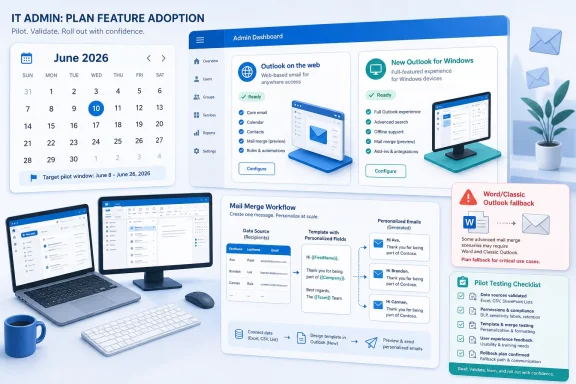 Microsoft Moves the Mail Merge Center of Gravity
Microsoft’s roadmap entry for “Outlook: Mail Merge (Advanced) on Outlook on the Web and new Outlook for Windows” puts both preview availability and rollout start in June 2026 for worldwide commercial tenants. The target clients are important: Outlook on the web and the new Outlook for Windows. Classic Outlook is not the beneficiary of this roadmap item.The feature description is plain enough. Microsoft says advanced mail merge upgrades the current basic capability so each recipient receives a separate email, with only that recipient in the recipient list, and with fields replaced by recipient-specific values such as a name. Microsoft Support also now says new Outlook supports basic mail merge, while advanced mail merge is coming soon with variable fields populated from the list.
That sounds small until you remember what mail merge means in the Microsoft 365 estate. For many organizations, “send a personalized email to a list” still means Word, Excel, Outlook, a local desktop profile, and a workflow that has survived multiple Office branding cycles. Moving that into the web/new Outlook stack is a platform decision, not a cosmetic feature addition.
The verdict for admins is therefore cautious but not dismissive. Treat this as a feature worth piloting as soon as it appears in your tenant, especially if your users have already moved to new Outlook or Outlook on the web. Do not treat it as a full replacement for Word-based mail merge until you have tested source lists, field behavior, drafts, sending limits, compliance handling, delegated scenarios, and rollback paths in your own environment.
The New Feature Is Real, but the Missing Details Are the Story
The most useful thing Microsoft has given admins is the timeframe: June 2026 for both preview and rollout start. The least useful thing Microsoft has given admins is everything else. There are no public build numbers, no exact flighting sequence, no detailed admin controls, and no firm statement of feature parity with Word-driven mail merge.That gap matters because mail merge is deceptively simple. Users think in terms of “Dear FirstName,” but administrators think in terms of source data, identity, message trace, transport rules, sensitivity labels, retention, auditability, throttling, and help desk reversibility. The feature that delights an executive assistant with 80 recipients may become a support incident when a department tries to send 5,000 personalized notices through a mailbox with policies the sender does not understand.
The roadmap wording also suggests this is an Outlook-native enhancement, not a promise that the old Word-to-Outlook model is being recreated inside the new Outlook. That distinction should guide every pilot. If your current workflow depends on Word’s document editing model, Excel as a data source, advanced field formatting, conditional text, or years of local process documentation, you should assume you are evaluating a new workflow rather than waiting for the old one to reappear unchanged.
This is where the coverage elsewhere has often been too thin. It is true that the roadmap says rollout dates are estimates, and it is true that classic Outlook remains the workaround for traditional mail merge. But the operational question is sharper: which workflows can move to new Outlook first, and which ones should remain pinned to Word/classic Outlook until Microsoft fills in the blanks?
The Pilot Case Is Strongest Where the Workflow Is Already Simple
The first candidates for a June 2026 pilot are not the power users with the most elaborate merge documents. They are the teams already doing lightweight personalization in email: departmental announcements, internal event reminders, small customer-success updates, staff notices, and executive admin messages where “one message per recipient” and “insert the recipient’s name” are the core requirements.For those users, advanced mail merge in Outlook on the web and new Outlook could remove friction. They may no longer need to bounce between Word, Excel, and classic Outlook just to send a message that feels personally addressed. The web client also makes the feature more portable across machines, which is useful for organizations trying to reduce dependency on thick-client Outlook profiles.
The timing is also convenient for organizations already nudging users toward new Outlook. WindowsForum readers have been watching the broader Microsoft 365 modernization push for some time, from Teams and OneDrive changes to Outlook’s gradual feature catch-up. Advanced mail merge fits that pattern: Microsoft is not simply adding a missing checkbox; it is trying to make new Outlook good enough that fewer users can justify retreating to classic Outlook for everyday work.
But the pilot should be bounded. Admins should start with users whose current merge process is easy to replicate and easy to validate. If the output can be checked manually, the recipient count is modest, and the business risk of a formatting issue is low, the new feature deserves a controlled trial.
Word-Based Mail Merge Still Owns the Complicated Edge
The case for waiting is strongest wherever the existing workflow is more than “send this message to these people.” Word-based mail merge has decades of institutional muscle memory behind it. Users know where their templates live, admins know which departments rely on them, and support teams know the failure modes even when they dislike them.That matters because “advanced” in the roadmap does not automatically mean “equivalent to Word.” The verified description mentions separate recipient emails and personalized fields such as names. It does not establish support for every data source pattern, every Word field behavior, every formatting scenario, or every downstream compliance expectation an organization may have built around the old workflow.
This is not pedantry. A mail merge workflow can contain sensitive data, employment status, customer segmentation, donation history, appointment information, or school records. If the wrong field lands in the wrong message, the fact that the new Outlook interface looked cleaner will be no consolation.
Classic Outlook and Word therefore remain the safer production path for mature workflows until the new implementation is tested against real templates and real data. For many organizations, the best June 2026 posture is dual-track: pilot Outlook-native advanced mail merge for simple use cases while preserving classic workflows for anything business-critical.
Outlook on the Web Gets the More Interesting Upgrade
The inclusion of Outlook on the web may be more important than the inclusion of new Outlook for Windows. New Outlook is already web-adjacent in its architecture and user experience; Outlook on the web brings the same capability to users who may not rely on a Windows desktop client at all. That changes the operational footprint.For admins, a web-capable mail merge feature could simplify support for shared machines, browser-first users, and workers who move between devices. It could also reduce the number of cases where a user needs classic Outlook installed purely to perform one recurring task. That has real value in environments trying to standardize on lighter endpoint images or reduce legacy Office dependencies.
But web availability also raises governance questions earlier. If the feature appears in the web client, admins will need to understand who can use it, how it interacts with tenant policies, and whether existing mail flow controls catch merged messages the way they expect. Microsoft has not provided enough public detail to answer those questions yet.
That is why the pilot should include Outlook on the web explicitly, not as an afterthought. If your organization supports both new Outlook for Windows and browser-based Outlook, test both. The user experience may feel aligned, but admins should verify the behavior that matters: recipient handling, personalization accuracy, sent item records, message trace visibility, and policy application.
New Outlook Gains Another Argument Against the Classic Holdouts
Microsoft has spent years asking users to accept new Outlook before it could fully replace classic Outlook for every job. That has made each missing feature feel larger than it might otherwise be. Mail merge is one of those features because it is not fashionable, but it is sticky.For a certain class of user, the absence of advanced mail merge has been enough to keep classic Outlook alive. Executive assistants, office managers, small business admins, school staff, and departmental coordinators may not care about Microsoft’s architectural direction. They care that a working workflow stopped working, or that a new client cannot do the thing their job requires.
Advanced mail merge gives Microsoft a better argument. If new Outlook can personalize messages, send one email per recipient, and populate fields from a list, one of the most visible productivity gaps narrows. That does not end the classic Outlook debate, but it removes a practical objection for some users.
Still, admins should be wary of letting a roadmap item become a migration mandate. New Outlook adoption should follow workflow readiness, not marketing momentum. If mail merge is the blocker for a group, June 2026 may be the beginning of the evaluation, not the end of the conversation.
The Workaround Matrix Is Boring, Which Is Why It Matters
The safest operational model is to categorize mail merge workflows before the feature arrives. Do not wait for users to discover the new button and then ask IT whether it is approved. Decide which classes of communication are eligible for pilot use and which must stay on legacy tooling.Simple personalized outreach can move first. If the message is plain, the fields are limited, the list is clean, and the risk is low, Outlook-native advanced mail merge may be exactly what users need. This is especially true for teams already living in Outlook on the web or new Outlook.
Structured Word templates should wait. If a department has a known-good Word document, a recurring Excel source, and business owners who expect identical output every month, the burden of proof sits with the new feature. Rebuilding the process just because a roadmap entry appeared is not modernization; it is avoidable change risk.
Regulated or sensitive communications should wait longer still. Anything involving personal data, financial information, legal notices, health-related details, or employment decisions should remain in the most proven workflow until admins can validate the new path end to end. The new Outlook feature may eventually be suitable, but the roadmap description alone is not enough evidence.
Third-party bulk mail platforms remain a separate category. If a workflow requires subscription management, campaign analytics, branding controls, bounce handling, or marketing compliance features, Outlook mail merge is probably the wrong tool regardless of client. Microsoft’s feature is about personalized email from Outlook, not turning Outlook into a marketing automation system.
The Admin Checklist Starts Before the Button Appears
The smart move now is inventory. Identify who still uses Word-based mail merge, why they use it, what data sources feed it, how often it runs, and what would happen if it failed. Most organizations will find a messy spread of workflows: some trivial, some undocumented, some owned by a single power user, and some far more sensitive than IT realized.Then define pilot criteria. A good pilot group should include at least one new Outlook for Windows user and one Outlook on the web user, but it should not include the highest-risk mailings first. The point is to learn how the feature behaves, not to stress-test it with the most politically visible communication in the organization.
Admins should also prepare user guidance that explains the difference between basic and advanced mail merge. Microsoft Support now distinguishes the current basic capability from the coming advanced version with variable fields populated from the list. That distinction is likely to matter in help desk tickets, because users may say “mail merge is here” while meaning very different things.
Finally, keep the rollback path boring. If the pilot fails, users should know whether to return to Word/classic Outlook, use an approved third-party tool, or route the communication through another team. A failed pilot is manageable; an improvised workaround with sensitive recipient data is not.
The Real Risk Is Treating Personalization as Harmless
Personalized email looks innocuous because the common demo is a greeting line. But variable fields are data fields, and data fields carry risk. The moment a sender can populate content from a list, the organization has to care about list hygiene, field mapping, preview accuracy, and who is authorized to send what.This is especially true in delegated and executive admin scenarios, where mail merge often intersects with authority and ambiguity. A message sent on behalf of a leader can have outsized impact even if the technical workflow is simple. The feature may help admins and delegates, but it also deserves policy attention because the blast radius of a mistake is social as much as technical.
The old Word workflow did not eliminate these risks. In some ways, it hid them behind familiarity. But a new Outlook-native workflow will invite new users to try mail merge precisely because the barrier is lower.
That is the paradox of making a feature easier: adoption rises before governance catches up. Admins should assume that advanced mail merge will be discovered by users who never built Word merge documents before. Training should therefore focus not only on how to send, but on when not to send.
Microsoft’s Roadmap Language Leaves Room for Delay
Roadmap dates are useful, but they are not contracts. Microsoft lists preview availability and rollout start in June 2026, but it has not provided a tenant-by-tenant deployment schedule or the kind of detailed release documentation that would let admins plan a hard cutover. That is normal for Microsoft 365, but it should temper expectations.The wording also leaves room for staged capability. “Advanced mail merge” may arrive first with a narrower set of behaviors and then expand. Microsoft’s public description confirms separate emails and variable personalization; it does not confirm every feature an experienced Word mail merge user may expect.
That uncertainty is not a reason to ignore the roadmap. It is a reason to treat June 2026 as the start of field validation. If Microsoft delivers the feature on schedule, admins can begin testing immediately. If it slips, the organization has still gained from mapping its mail merge dependencies.
The worst plan is to do nothing until a VIP complains. Mail merge rarely appears in strategic architecture diagrams, but it often sits inside business processes that people assume will always be available. New Outlook has already taught admins that “basic email works” and “my workflow works” are not the same sentence.
WindowsForum Readers Should Watch the Tenant, Not the Headlines
The public headline is simple: advanced mail merge is coming to Outlook on the web and new Outlook for Windows. The tenant reality will be more nuanced. Some users may see the capability earlier than others, documentation may lag the interface, and support language may evolve as preview turns into rollout.That is why admins should monitor the Microsoft 365 admin center message flow, the roadmap entry, and the actual client experience in test accounts. A feature can be “rolling out” and still not be available to your tenant, your ring, or your user population. Conversely, a preview can appear quietly before internal guidance is ready.
Windows enthusiasts should also understand what this says about Microsoft’s larger Outlook strategy. The company is continuing to close gaps in new Outlook not by preserving every classic integration exactly as it was, but by rebuilding workflows inside the modern Outlook surface. For users, that can feel like progress or regression depending on which details mattered to them.
The deeper story is not that mail merge is “finally arriving.” It is that Microsoft is deciding which Office-era workflows deserve to become cloud-era Outlook features. Advanced mail merge made the cut, but admins still need to verify what survived the translation.
The June 2026 Playbook for Mail Merge Holdouts
The practical plan is neither blind migration nor indefinite resistance. Advanced mail merge deserves a pilot because it addresses a real gap in new Outlook and Outlook on the web. It does not yet deserve a blanket replacement order because Microsoft has not published enough implementation detail to prove parity with Word-based workflows.- Admins should pilot Outlook Mail Merge (Advanced) first with low-risk communications that use simple personalization and modest recipient lists.
- Organizations should keep Word-based mail merge and classic Outlook available for established, sensitive, or heavily formatted workflows until the new feature proves equivalent in practice.
- Outlook on the web should be tested separately from new Outlook for Windows because browser availability changes the support and governance model.
- Help desk guidance should distinguish today’s basic mail merge from the coming advanced version with variable fields populated from a list.
- Migration decisions should be based on tested business workflows, not merely on the roadmap showing preview and rollout start in June 2026.
References
- Primary source: learn.microsoft.com

Mail Merge Emails not sent - Microsoft Q&A
After I finished the email mail merge in Word, I didn't see any emails in my Outlook Sent folder and I included an email to myself in the mail merge, which I didn't receive. I didn't see an option to include my email address as the "From". The…learn.microsoft.com - Independent coverage: microsoft.com
Microsoft 365 Roadmap | Microsoft 365
The Microsoft 365 Roadmap lists updates that are currently planned for applicable subscribers. Check here for more information on the status of new features and updates.www.microsoft.com
- Independent coverage: techcommunity.microsoft.com

Mail Merge from an Email - New Outlook | Microsoft Community Hub
I am seeing this mail merge feature in New Outlook but struggling to find info about this feature.  Does anyone know about this?  Also not working... techcommunity.microsoft.com
- Independent coverage: support.microsoft.com

New Outlook tips for executive admins and delegates | Microsoft Support
The new Outlook for Windows brings a new, powerful email experience that can help executive administrators and delegates become more productive in everyday work.support.microsoft.com - Independent coverage: marketplace.microsoft.com
Mail Merge Tool for Outlook
Mail Merge for Outlook – Combine Multiple Outlook Emails into One PST Filemarketplace.microsoft.com
- Independent coverage: news.microsoft.com

MSN Announces Beta Availability of New, Innovative Premium Services for Broadband - Source
MSN Premium Services for Broadband Maximize High-Speed Internet Connections, Delivering Broad E-Mail and Communication Capabilities, Rich Digital Information-Sharing, And Extensive Safety and Security Features news.microsoft.com
- Primary source: WindowsForum

Microsoft 365 2025: Major Updates for Teams, Outlook, and OneDrive | Windows Forum
Microsoft 365 is stepping into 2025 with a host of upgrades, delivering a more intuitive and secure experience across Microsoft Teams, Outlook, OneDrive...windowsforum.com
