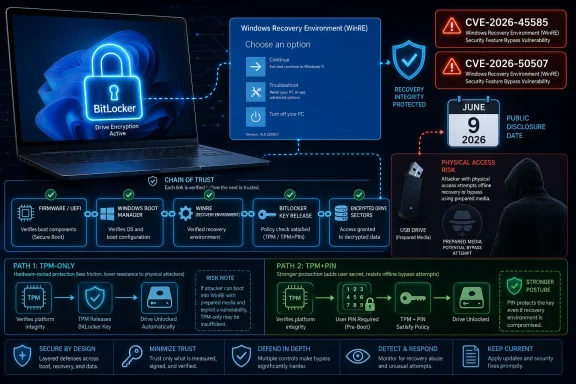
Microsoft’s June 2026 Patch Tuesday updates, released on June 9, fixed three publicly disclosed Windows zero-days tied to researcher Chaotic Eclipse, including YellowKey, a BitLocker bypass that abused Windows Recovery Environment behavior to expose protected drives on affected Windows 11 and Windows Server systems. The patch closes the most alarming chapter in a weeks-long dispute that mixed real security risk, public exploit code, claims of an “intentional” backdoor, and a bruising argument over how vulnerability disclosure should work. For Windows users, the practical answer is simpler than the drama: install the June security updates, verify WinRE and BitLocker posture, and treat unattended physical access as a security boundary you cannot hand-wave away.
BitLocker’s promise has always been easy to state and harder to operationalize: if a laptop is lost, stolen, or seized, the disk should remain unreadable without the right key material. That promise depends on more than the cryptographic strength of AES or the presence of a TPM. It depends on the boot path, the recovery path, the firmware configuration, and the assumptions Windows makes before the user ever sees a sign-in screen.
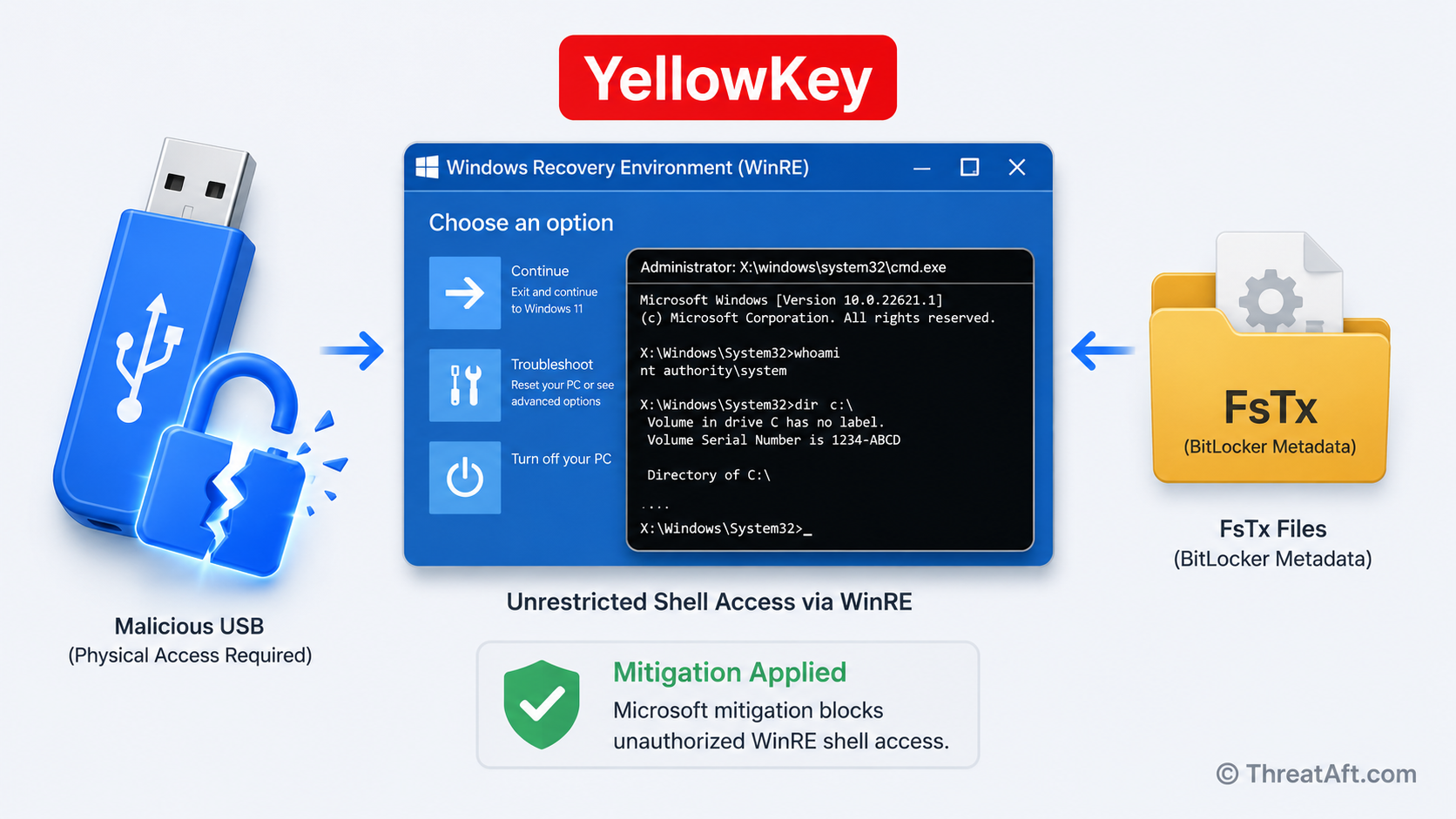
YellowKey was frightening because it lived in that pre-operating-system neighborhood where ordinary users rarely look and administrators often trust defaults. According to public reporting and Microsoft’s own handling of the issue, the flaw was a BitLocker security feature bypass associated with Windows Recovery Environment, or WinRE. An attacker with physical access could use the published technique to reach data that should have remained protected.
That does not mean BitLocker’s encryption algorithm was “broken” in the classic sense. It means a trusted recovery mechanism could be maneuvered into a state where protection failed to deliver the outcome users expected. For defenders, that distinction matters technically, but it is cold comfort operationally. If a stolen laptop yields readable corporate data, the breach report will not hinge on whether the failure was in cryptography, boot policy, or recovery plumbing.
The researcher’s accusation that the behavior looked intentional is the line that made YellowKey travel far beyond normal Patch Tuesday chatter. Microsoft has not endorsed that framing, and readers should be careful with the word backdoor. In security reporting, it carries a heavy implication of deliberate covert access; in engineering reality, many “this cannot possibly be accidental” bugs turn out to be legacy assumptions, recovery shortcuts, compatibility compromises, or insufficiently threat-modeled interactions.
Still, the backdoor language stuck because the exploit hit a nerve. Windows users have been nudged for years toward automatic device encryption, Microsoft-account recovery key escrow, TPM-backed unlock, and a default posture in which security is supposed to happen quietly. YellowKey suggested that one of the quiet parts was not merely imperfect, but dangerously under-scrutinized.
A monthly cumulative update is not magic, but it is a clearer control point. For consumer Windows 11 machines, it means Windows Update can finally do what most users reasonably expect: deliver the fix without asking them to become WinRE engineers. For enterprise fleets, it gives patch teams a more conventional artifact to deploy, measure, and report against.
The catch is that WinRE has historically been a place where updates are less visible than the main Windows image. Security teams should not assume that “the OS is patched” always means every recovery component, boot component, or offline image has been remediated in the way they expect. The YellowKey episode is a reminder that recovery environments are not inert rescue media; they are privileged execution contexts with direct bearing on data-at-rest security.
That is especially important for organizations with custom images, recovery partitions, deployment tooling, or device lifecycle processes that modify WinRE. A cleanly patched reference system is one thing. A fleet of laptops imaged over several years, some upgraded in place, some managed by Intune, some still carrying OEM recovery customizations, is another.
The immediate administrative task is therefore not simply “install KB and move on.” It is to verify that the update path actually covers the machines and configurations in use. BitLocker posture should be checked alongside update compliance, because a device can be technically encrypted and still be configured in a way that weakens the value of that encryption under physical attack.
YellowKey is the kind of vulnerability that collapses the distance between “advanced physical attack” and “practical lost-device risk.” The published descriptions centered on a USB-based method and recovery behavior rather than exotic lab equipment. That is precisely why the story resonated with Windows admins: it sounded like an attack path that could be reproduced, not a conference-stage stunt involving decapped chips and microscopes.
A TPM-only BitLocker configuration is convenient because users do not need to enter a pre-boot PIN. It is also a statement of trust in the integrity of the boot sequence. If that boot sequence can be influenced into giving access to a recovery context that sees the protected volume, convenience becomes exposure.
This is where enterprises will revisit an old trade-off. Requiring a TPM plus PIN improves resistance to certain classes of physical attacks, but it also adds user friction, support tickets, accessibility questions, and recovery headaches. Many organizations avoided pre-boot PINs because the operational cost seemed higher than the plausible risk. YellowKey will not make every company reverse that decision, but it should force the decision to be made consciously rather than inherited from defaults.
The same applies to Secure Boot configuration, firmware passwords, USB boot policy, and recovery key handling. None of these controls is glamorous. All of them become suddenly relevant when the exploit path begins before Windows has fully loaded.
A local privilege escalation flaw is often dismissed by non-specialists because it sounds like the attacker already needs access. That is a misunderstanding of how modern intrusions work. Malware that lands as a low-privilege user wants SYSTEM. A malicious insider wants more than their assigned role. A chained exploit needs the second or third link that turns initial access into durable compromise.
GreenPlasma was reportedly associated with the Collaborative Translation Framework, the long-running Windows subsystem better known through ctfmon.exe. MiniPlasma was connected to the Cloud Files Mini Filter Driver and had the added historical wrinkle of resembling an older issue reported years earlier. The exact mechanics matter to exploit developers and defenders writing detections, but the strategic pattern matters to everyone: mature operating systems accumulate privileged compatibility layers, and attackers keep finding seams between them.
Microsoft’s June patch therefore did more than close one embarrassing BitLocker path. It cleaned up a cluster of bugs that had become public proof points in a researcher’s campaign against the company’s vulnerability-handling process. That context made the fixes feel less like routine maintenance and more like a forced response.
There is a lesson here for Windows defenders. Patch Tuesday is not only about remote code execution ratings and CVSS scores. Privilege escalation and security feature bypass flaws often determine whether a breach fizzles, spreads, or becomes reportable. In real intrusions, the quiet bugs are frequently the ones that let the loud ones matter.
Microsoft’s position was predictable: publishing unpatched vulnerabilities with exploit details puts customers at risk and bypasses coordinated vulnerability disclosure. That argument is not wrong. Coordinated disclosure exists because vendors need time to reproduce bugs, engineer fixes, test regressions, and ship patches across a huge compatibility matrix.
The researcher’s counter-narrative was also familiar in the security world: vendors can be slow, dismissive, underpaying, or adversarial, and researchers who report serious issues can feel trapped in processes that protect the vendor’s calendar more than the public. The claims that accounts were banned or deleted as retaliation added fuel, though Microsoft has disputed at least part of that characterization. Without full evidence from both sides, the responsible posture is to separate the verified technical impact from the contested personal allegations.
What is not in dispute is that the disclosure breakdown became part of the threat model. The moment a working exploit is public, the vulnerability is no longer just a bug in Microsoft’s queue. It is an operational problem for every admin with affected systems and every user who assumes a stolen laptop is just an insurance claim.
This is the uncomfortable reality of vulnerability economics. Researchers want recognition, compensation, and fair treatment. Vendors want control, time, and legal safety. Users want protection without needing to understand the fight. When the relationship collapses, users are the blast radius.
YellowKey did not erase that progress. It did, however, expose the fragility of a security story that relies on users trusting layers they cannot see. If Microsoft says Windows 11 is secure because the boot chain, TPM, recovery environment, and encryption stack cooperate correctly, then a failure in that cooperation is not a niche bug. It is a credibility problem.
This is particularly true because recovery is designed to be helpful. WinRE exists so users and technicians can repair boot failures, restore systems, uninstall problematic updates, reset devices, and recover from disaster. The more powerful the recovery environment, the more carefully it must be constrained when encryption is in play.
Security engineering is often a battle between recoverability and resistance. Make recovery too hard and users lose data, help desks drown, and devices become disposable. Make recovery too permissive and attackers discover that the rescue hatch is also an entryway. YellowKey sits squarely in that tension.
The right answer is not to abolish recovery tools or scare users away from BitLocker. BitLocker remains a core Windows defense, and for most users it is vastly better than an unencrypted disk. The answer is to stop treating recovery behavior as a secondary implementation detail. In a world of ubiquitous laptop encryption, recovery is part of the encryption boundary.
This matters because BitLocker policy, WinRE servicing, firmware configuration, and recovery-key management are not identical across every environment. Some organizations have modern Windows 11 laptops enrolled in cloud management with standardized security baselines. Others have mixed fleets, legacy imaging habits, and devices upgraded across multiple Windows generations.
The YellowKey story should not be reduced to “Windows 11 is unsafe” or “Windows 10 was better.” That is too simplistic. The more useful reading is that Microsoft’s security boundary now spans components that many administrators historically managed inconsistently. If your encryption assurance depends on update state, recovery partition state, firmware policy, boot configuration, and identity-backed key escrow, then asset hygiene becomes security architecture.
For home users, that sounds like inside baseball. For IT pros, it is Tuesday. The challenge is that Windows’ consumer defaults and enterprise controls now overlap in messy ways. A personal Microsoft account may hold a recovery key. A corporate tenant may escrow keys in Entra ID. An OEM may ship recovery customizations. A user may never know any of this exists until a blue recovery screen asks for a 48-digit key.
YellowKey’s biggest contribution may be that it forced these hidden dependencies into the open. It made clear that encryption is not a checkbox; it is an ecosystem.
Administrators should then verify that BitLocker is not merely enabled but configured in line with the organization’s threat model. That may mean reviewing whether TPM-only unlock is acceptable for high-risk devices, whether pre-boot PINs are warranted for executives or travelers, and whether recovery keys are escrowed securely. It also means confirming that users can actually recover devices without resorting to unsafe workarounds.
WinRE deserves a specific audit. Enterprises should know whether it is enabled, whether it has been updated, whether it has been customized, and whether those customizations survive cumulative updates in expected ways. A neglected recovery partition can quietly become the oldest and most privileged code path on the machine.
Security teams should also revisit physical controls. USB boot restrictions, firmware setup passwords, Secure Boot enforcement, device inventory, and lost-device response procedures are all part of the same picture. None of these controls alone is a silver bullet. Together, they reduce the chance that a recovery-path bug becomes a data-exposure incident.
For individual Windows 11 users, the practical stance is less elaborate but still important. Install the June update, do not disable BitLocker out of panic, keep your recovery key somewhere safe, and treat possession of your laptop as meaningful. Encryption is not a substitute for physical custody; it is the thing that buys you safety when custody fails.
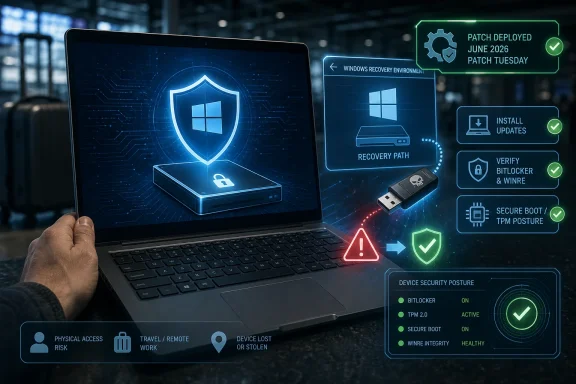 YellowKey Turned Recovery Into the Weak Link
BitLocker’s promise has always been easy to state and harder to operationalize: if a laptop is lost, stolen, or seized, the disk should remain unreadable without the right key material. That promise depends on more than the cryptographic strength of AES or the presence of a TPM. It depends on the boot path, the recovery path, the firmware configuration, and the assumptions Windows makes before the user ever sees a sign-in screen.YellowKey was frightening because it lived in that pre-operating-system neighborhood where ordinary users rarely look and administrators often trust defaults. According to public reporting and Microsoft’s own handling of the issue, the flaw was a BitLocker security feature bypass associated with Windows Recovery Environment, or WinRE. An attacker with physical access could use the published technique to reach data that should have remained protected.
That does not mean BitLocker’s encryption algorithm was “broken” in the classic sense. It means a trusted recovery mechanism could be maneuvered into a state where protection failed to deliver the outcome users expected. For defenders, that distinction matters technically, but it is cold comfort operationally. If a stolen laptop yields readable corporate data, the breach report will not hinge on whether the failure was in cryptography, boot policy, or recovery plumbing.
The researcher’s accusation that the behavior looked intentional is the line that made YellowKey travel far beyond normal Patch Tuesday chatter. Microsoft has not endorsed that framing, and readers should be careful with the word backdoor. In security reporting, it carries a heavy implication of deliberate covert access; in engineering reality, many “this cannot possibly be accidental” bugs turn out to be legacy assumptions, recovery shortcuts, compatibility compromises, or insufficiently threat-modeled interactions.
Still, the backdoor language stuck because the exploit hit a nerve. Windows users have been nudged for years toward automatic device encryption, Microsoft-account recovery key escrow, TPM-backed unlock, and a default posture in which security is supposed to happen quietly. YellowKey suggested that one of the quiet parts was not merely imperfect, but dangerously under-scrutinized.
The Patch Fixes a Bug, Not the Trust Problem
The June update matters because it moves YellowKey from emergency advisory territory into the normal patch-management lane. Microsoft had already published mitigation guidance for the BitLocker bypass before Patch Tuesday, but mitigations are a messy business. They require administrators to interpret guidance, test scripts, validate recovery environments, and avoid breaking the very repair paths users may need when a machine fails to boot.A monthly cumulative update is not magic, but it is a clearer control point. For consumer Windows 11 machines, it means Windows Update can finally do what most users reasonably expect: deliver the fix without asking them to become WinRE engineers. For enterprise fleets, it gives patch teams a more conventional artifact to deploy, measure, and report against.
The catch is that WinRE has historically been a place where updates are less visible than the main Windows image. Security teams should not assume that “the OS is patched” always means every recovery component, boot component, or offline image has been remediated in the way they expect. The YellowKey episode is a reminder that recovery environments are not inert rescue media; they are privileged execution contexts with direct bearing on data-at-rest security.
That is especially important for organizations with custom images, recovery partitions, deployment tooling, or device lifecycle processes that modify WinRE. A cleanly patched reference system is one thing. A fleet of laptops imaged over several years, some upgraded in place, some managed by Intune, some still carrying OEM recovery customizations, is another.
The immediate administrative task is therefore not simply “install KB and move on.” It is to verify that the update path actually covers the machines and configurations in use. BitLocker posture should be checked alongside update compliance, because a device can be technically encrypted and still be configured in a way that weakens the value of that encryption under physical attack.
Physical Access Is Back in the Threat Model
For years, physical access attacks occupied an awkward status in endpoint security. Everyone knew they mattered, but many organizations treated them as edge cases unless they operated in government, defense, finance, or journalism. The post-pandemic device sprawl changed that calculation. Corporate data now rides around in backpacks, sits in hotel rooms, gets repaired through third-party channels, and passes through shipping networks.YellowKey is the kind of vulnerability that collapses the distance between “advanced physical attack” and “practical lost-device risk.” The published descriptions centered on a USB-based method and recovery behavior rather than exotic lab equipment. That is precisely why the story resonated with Windows admins: it sounded like an attack path that could be reproduced, not a conference-stage stunt involving decapped chips and microscopes.
A TPM-only BitLocker configuration is convenient because users do not need to enter a pre-boot PIN. It is also a statement of trust in the integrity of the boot sequence. If that boot sequence can be influenced into giving access to a recovery context that sees the protected volume, convenience becomes exposure.
This is where enterprises will revisit an old trade-off. Requiring a TPM plus PIN improves resistance to certain classes of physical attacks, but it also adds user friction, support tickets, accessibility questions, and recovery headaches. Many organizations avoided pre-boot PINs because the operational cost seemed higher than the plausible risk. YellowKey will not make every company reverse that decision, but it should force the decision to be made consciously rather than inherited from defaults.
The same applies to Secure Boot configuration, firmware passwords, USB boot policy, and recovery key handling. None of these controls is glamorous. All of them become suddenly relevant when the exploit path begins before Windows has fully loaded.
GreenPlasma and MiniPlasma Show the Other Half of the Story
YellowKey dominated the headlines because BitLocker is a familiar brand and “open an encrypted drive with a USB stick” is a terrifying sentence. But Microsoft’s June fixes also addressed GreenPlasma and MiniPlasma, two privilege-escalation issues associated with the same public-disclosure wave. Those bugs point to a different but equally important reality: local privilege escalation remains one of Windows’ most stubborn security problems.A local privilege escalation flaw is often dismissed by non-specialists because it sounds like the attacker already needs access. That is a misunderstanding of how modern intrusions work. Malware that lands as a low-privilege user wants SYSTEM. A malicious insider wants more than their assigned role. A chained exploit needs the second or third link that turns initial access into durable compromise.
GreenPlasma was reportedly associated with the Collaborative Translation Framework, the long-running Windows subsystem better known through ctfmon.exe. MiniPlasma was connected to the Cloud Files Mini Filter Driver and had the added historical wrinkle of resembling an older issue reported years earlier. The exact mechanics matter to exploit developers and defenders writing detections, but the strategic pattern matters to everyone: mature operating systems accumulate privileged compatibility layers, and attackers keep finding seams between them.
Microsoft’s June patch therefore did more than close one embarrassing BitLocker path. It cleaned up a cluster of bugs that had become public proof points in a researcher’s campaign against the company’s vulnerability-handling process. That context made the fixes feel less like routine maintenance and more like a forced response.
There is a lesson here for Windows defenders. Patch Tuesday is not only about remote code execution ratings and CVSS scores. Privilege escalation and security feature bypass flaws often determine whether a breach fizzles, spreads, or becomes reportable. In real intrusions, the quiet bugs are frequently the ones that let the loud ones matter.
The Researcher Drama Became a Security Event of Its Own
The public dispute between Microsoft and Chaotic Eclipse is not incidental gossip. It shaped the risk. When exploit code is published before a vendor patch is available, defenders lose the luxury of quiet preparation. Attackers, researchers, hobbyists, and administrators all get access to the same clues at the same time, and the race begins.Microsoft’s position was predictable: publishing unpatched vulnerabilities with exploit details puts customers at risk and bypasses coordinated vulnerability disclosure. That argument is not wrong. Coordinated disclosure exists because vendors need time to reproduce bugs, engineer fixes, test regressions, and ship patches across a huge compatibility matrix.
The researcher’s counter-narrative was also familiar in the security world: vendors can be slow, dismissive, underpaying, or adversarial, and researchers who report serious issues can feel trapped in processes that protect the vendor’s calendar more than the public. The claims that accounts were banned or deleted as retaliation added fuel, though Microsoft has disputed at least part of that characterization. Without full evidence from both sides, the responsible posture is to separate the verified technical impact from the contested personal allegations.
What is not in dispute is that the disclosure breakdown became part of the threat model. The moment a working exploit is public, the vulnerability is no longer just a bug in Microsoft’s queue. It is an operational problem for every admin with affected systems and every user who assumes a stolen laptop is just an insurance claim.
This is the uncomfortable reality of vulnerability economics. Researchers want recognition, compensation, and fair treatment. Vendors want control, time, and legal safety. Users want protection without needing to understand the fight. When the relationship collapses, users are the blast radius.
Microsoft’s Security Story Depends on the Boring Parts
Microsoft has spent the last several years trying to make Windows security feel default, automatic, and cloud-assisted. Windows 11’s hardware requirements emphasized TPM 2.0, Secure Boot, virtualization-based security, and a stronger baseline. BitLocker and device encryption became part of the broader pitch that modern Windows hardware is safer by design.YellowKey did not erase that progress. It did, however, expose the fragility of a security story that relies on users trusting layers they cannot see. If Microsoft says Windows 11 is secure because the boot chain, TPM, recovery environment, and encryption stack cooperate correctly, then a failure in that cooperation is not a niche bug. It is a credibility problem.
This is particularly true because recovery is designed to be helpful. WinRE exists so users and technicians can repair boot failures, restore systems, uninstall problematic updates, reset devices, and recover from disaster. The more powerful the recovery environment, the more carefully it must be constrained when encryption is in play.
Security engineering is often a battle between recoverability and resistance. Make recovery too hard and users lose data, help desks drown, and devices become disposable. Make recovery too permissive and attackers discover that the rescue hatch is also an entryway. YellowKey sits squarely in that tension.
The right answer is not to abolish recovery tools or scare users away from BitLocker. BitLocker remains a core Windows defense, and for most users it is vastly better than an unencrypted disk. The answer is to stop treating recovery behavior as a secondary implementation detail. In a world of ubiquitous laptop encryption, recovery is part of the encryption boundary.
Windows 10’s Shadow Still Hangs Over the Conversation
Although the most prominent YellowKey reporting focused on Windows 11 and recent Windows Server releases, the broader Patch Tuesday context lands at a strange moment for the Windows ecosystem. Windows 10 is deep into its end-of-support era for mainstream consumers, while many organizations are still in various stages of migration, extension planning, or hardware refresh. That means Windows security conversations are increasingly split between the modern baseline Microsoft wants and the installed base customers actually have.This matters because BitLocker policy, WinRE servicing, firmware configuration, and recovery-key management are not identical across every environment. Some organizations have modern Windows 11 laptops enrolled in cloud management with standardized security baselines. Others have mixed fleets, legacy imaging habits, and devices upgraded across multiple Windows generations.
The YellowKey story should not be reduced to “Windows 11 is unsafe” or “Windows 10 was better.” That is too simplistic. The more useful reading is that Microsoft’s security boundary now spans components that many administrators historically managed inconsistently. If your encryption assurance depends on update state, recovery partition state, firmware policy, boot configuration, and identity-backed key escrow, then asset hygiene becomes security architecture.
For home users, that sounds like inside baseball. For IT pros, it is Tuesday. The challenge is that Windows’ consumer defaults and enterprise controls now overlap in messy ways. A personal Microsoft account may hold a recovery key. A corporate tenant may escrow keys in Entra ID. An OEM may ship recovery customizations. A user may never know any of this exists until a blue recovery screen asks for a 48-digit key.
YellowKey’s biggest contribution may be that it forced these hidden dependencies into the open. It made clear that encryption is not a checkbox; it is an ecosystem.
The Update Is Necessary, but Hardening Is the Real Lesson
For most readers, the immediate advice is uncomplicated: apply the June 2026 Windows security updates as soon as practical. If you delayed because of compatibility caution, test quickly and move. Public exploit availability changes the patching calculus.Administrators should then verify that BitLocker is not merely enabled but configured in line with the organization’s threat model. That may mean reviewing whether TPM-only unlock is acceptable for high-risk devices, whether pre-boot PINs are warranted for executives or travelers, and whether recovery keys are escrowed securely. It also means confirming that users can actually recover devices without resorting to unsafe workarounds.
WinRE deserves a specific audit. Enterprises should know whether it is enabled, whether it has been updated, whether it has been customized, and whether those customizations survive cumulative updates in expected ways. A neglected recovery partition can quietly become the oldest and most privileged code path on the machine.
Security teams should also revisit physical controls. USB boot restrictions, firmware setup passwords, Secure Boot enforcement, device inventory, and lost-device response procedures are all part of the same picture. None of these controls alone is a silver bullet. Together, they reduce the chance that a recovery-path bug becomes a data-exposure incident.
For individual Windows 11 users, the practical stance is less elaborate but still important. Install the June update, do not disable BitLocker out of panic, keep your recovery key somewhere safe, and treat possession of your laptop as meaningful. Encryption is not a substitute for physical custody; it is the thing that buys you safety when custody fails.
The June Patch Draws a Bright Line for Admins
The most useful way to read this Patch Tuesday is not as a scandal resolved, but as a boundary marker. Before June 9, YellowKey was a public exploit with mitigation guidance and a lot of uncertainty. After June 9, unpatched systems are increasingly difficult to defend as a reasonable risk.- Microsoft’s June 2026 security updates patch YellowKey, GreenPlasma, and MiniPlasma, making deployment the first priority for affected Windows fleets.
- YellowKey is best understood as a BitLocker security feature bypass through recovery-path behavior, not as a break of the underlying disk encryption algorithm.
- Systems that rely on TPM-only unlock deserve renewed scrutiny, especially where physical theft, travel, executive devices, or regulated data are part of the risk model.
- WinRE should be treated as a privileged security component that requires servicing, validation, and policy review rather than as a forgotten repair partition.
- The dispute between Microsoft and Chaotic Eclipse does not change the operational facts: public exploit code shortened defender timelines and raised the cost of delayed patching.
- BitLocker remains worth using, but its assurance depends on the surrounding boot, recovery, firmware, and key-management controls.
References
- Primary source: Windows Central
Published: 2026-06-10T19:00:10.856267

Windows 11’s June update shuts down an intentional BitLocker backdoor with full file access — here’s what changed | Windows Central
Microsoft’s June 2026 Patch Tuesday update fixes a controversial BitLocker flaw.www.windowscentral.com - Related coverage: bleepingcomputer.com

Windows BitLocker zero-day gives access to protected drives, PoC released
A cybersecurity researcher has published proof-of-concept (PoC) exploits for two unpatched Microsoft Windows vulnerabilities named YellowKey and GreenPlasma, which are a BitLocker bypass and a privilege-escalation flaw.www.bleepingcomputer.com
- Related coverage: techradar.com

Chaotic Eclipse strikes again with another worrying Windows security flaw
A new Windows 11 bug called MiniPlasma was disclosed on GitHub, together with a PoC.www.techradar.com
- Related coverage: borncity.com

Chaotic Eclipse: Zwei 0-Day-Windows Schwachstellen (YellowKey, GreenPlasma), eine in MS Teams
Der „Zoff“ zwischen einem Sicherheitsexperten, der sich Chaotic Eclipse oder Nightmare-Eclipse nennt, und Microsoft geht weiter. Er hat zum 12. Mai 2026 (pünktlich zum Patchday) wieder zwei 0-Day… borncity.com
- Related coverage: thecybersignal.com

YellowKey: BitLocker Bypass CVE-2026-45585 — TPM+PIN Mitigation
YellowKey (CVE-2026-45585) bypasses BitLocker via a WinRE flaw. Microsoft's only fix is switching TPM-only devices to TPM+PIN — a config change, not a patch. www.thecybersignal.com
- Related coverage: secureinseconds.com

May 2026 Patch Tuesday And The YellowKey BitLocker Bypass
120 fixes, zero exploited zero-days (first since June 2024). Then a researcher dropped YellowKey, an unpatched BitLocker bypass. Here's what to do.www.secureinseconds.com
- Related coverage: cvedaily.io

Windows Zero-Day: 'YellowKey' & 'GreenPlasma' Exploited
Attackers exploited 'YellowKey' and 'GreenPlasma' Windows zero-day vulnerabilities within 24 hours of their public disclosure. Learn about the impact and the tension between researchers and vendors over patching cycles for these critical Windows zero-day flaws. cvedaily.io
- Related coverage: pcgamer.com

Security researcher describes freshly uncovered Windows 11 vulnerability as 'one of the most insane discoveries I ever found.' | PC Gamer
The king in yellow.www.pcgamer.com - Related coverage: tomshardware.com

Microsoft BitLocker-protected drives can now be opened with just some files on a USB stick — YellowKey zero-day exploit demonstrates an apparent backdoor
Also, it's a twofer with the GreenPlasma zero-day local privilege escalation.www.tomshardware.com
- Related coverage: threat-modeling.com

Windows BitLocker Security Feature Bypass — YellowKey (CVE-2026-45585): PoC Publicly Released, Mitigation Available - Threat-Modeling.com
Microsoft has acknowledged a security feature bypass vulnerability in Windows BitLocker, publicly known as “YellowKey” and tracked as CVE-2026-45585. The vulnerability affects Windows 11 (24H2, ... <a title="Windows BitLocker Security Feature Bypass — YellowKey (CVE-2026-45585): PoC Publicly... threat-modeling.com
- Related coverage: threataft.com
CVE-2026-45585 (YellowKey): BitLocker Bypass via USB | ThreatAft
CVE-2026-45585 (YellowKey) — a USB FsTx file unlocks BitLocker-encrypted drives without the password. Microsoft has patches and workarounds. Apply now.threataft.com - Related coverage: techrepublic.com

Microsoft Warns: Windows Zero-Day ‘YellowKey’ Can Bypass BitLocker
Microsoft has released a temporary mitigation for YellowKey, a Windows zero-day that can reportedly bypass BitLocker protections.www.techrepublic.com
- Related coverage: securityarsenal.com
CVE-2026-45585: YellowKey BitLocker Bypass — Mitigation, Detection, and Hardening Guide
Microsoft releases mitigation for CVE-2026-45585 (YellowKey). Defenders must act now to block BitLocker bypass risks on Windows.securityarsenal.com
- Related coverage: gblock.app

YellowKey: A USB Drive Bypasses BitLocker on Windows 11 (CVE-2026-45585)
Plug a USB into a locked Windows 11 laptop, reboot, hold CTRL. That's the entire YellowKey BitLocker bypass. Microsoft has no patch—only mitigations—and the proof of concept is public. www.gblock.app
- Related coverage: techgines.com

CVE-2026-45585 BitLocker Bypass: How the YellowKey Zero-Day Breaks Windows Encryption Before Your OS Even Loads
The CVE-2026-45585 BitLocker bypass, nicknamed YellowKey, is one of those vulnerabilities that makes you stop and re-read the advisory twice. Disclosed on May 19, 2026, this zero-day allows an attacker with physical access to a Windows machine to completely sidestep BitLocker's full-disk...www.techgines.com