

Microsoft’s Workaround Admits the Recovery Environment Became the Attack Surface
YellowKey is not a remote-code-execution panic button, and that matters. It requires physical access to the machine, a reboot path into Windows Recovery Environment, and a target whose BitLocker deployment allows the relevant recovery sequence to complete. That keeps it out of the same category as wormable network bugs or drive-by browser exploits.
But physical-access bugs are precisely where disk encryption is supposed to shine. BitLocker’s promise to most organizations is blunt: if a laptop disappears from a taxi, hotel room, airport checkpoint, or employee car, the data should remain beyond reach. YellowKey cuts at that scenario, not at the server rack guarded by badges and cameras.
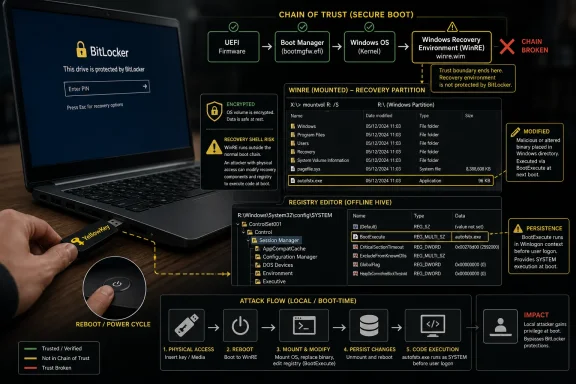
Microsoft’s interim guidance focuses on disabling autofstx.exe, the FsTx Auto Recovery Utility, inside the WinRE image. That is a revealing mitigation. It does not say “install this patch and move on”; it says administrators must surgically modify the recovery image and registry state that Windows depends on before normal Windows has even started.
The technique described in public analyses abuses Transactional NTFS behavior to delete or interfere with winpeshl.ini, causing WinRE to fall into an unrestricted shell rather than the usual recovery interface. Once that shell is available in the right boot context, the attacker is no longer staring at a locked laptop. They are navigating a system whose encrypted volume can be read without the credentials the owner assumed stood between theft and disclosure.
That is why Microsoft’s response feels less like routine hardening and more like a firebreak. The company is trying to remove one piece of recovery-time machinery from the path until a real fix can arrive. It is a reasonable move under pressure, but it is also an admission that the chain of trust around WinRE is now part of the BitLocker threat model in a much more visible way.
The CVSS Score Understates the Operational Shock
CVE-2026-45585 carries a medium-severity CVSS score of 6.8, driven by physical attack vector requirements and the absence of remote reach. On paper, that looks contained. In the real world, physical access is exactly the condition organizations buy full-disk encryption to survive.
The score is not wrong; it is just not a complete risk statement. CVSS is built to compare vulnerabilities across broad technical dimensions. Fleet risk is built from messier inputs: how many mobile devices leave the building, how much regulated data sits locally, how many executives travel internationally, how often laptops are lost, and whether recovery keys and boot policies are already managed consistently.
For a WindowsForum audience, the distinction matters because BitLocker is often treated as a solved checkbox. Enable encryption, escrow the recovery key, verify compliance in Intune or Configuration Manager, and move on to the next control. YellowKey is a reminder that encryption posture is only as strong as the boot and recovery path wrapped around it.
The exploit reportedly needs no network, no malware installation, and no user credentials. That simplicity changes the conversation. A physical attacker does not have to phish the user, defeat EDR, or maintain persistence if the goal is to copy local data from a machine that was presumed safe because its drive was encrypted.
This is also why Microsoft rates exploitation as more likely. A public proof of concept collapses the distance between “possible” and “repeatable,” especially for techniques that require commodity hardware and patience rather than bespoke implants. The attacker still needs access to the device, but the knowledge barrier has already been lowered.
WinRE Is No Longer Just the Place Users Go When Windows Breaks
Windows Recovery Environment has always occupied an awkward security position. It must be powerful enough to repair boot problems, reset systems, recover from failures, and service the operating system when the normal OS cannot run. That same power makes it dangerous when its assumptions are wrong.
In enterprise documentation, WinRE often appears as a support feature. In threat modeling, it should be treated as a privileged alternate operating system with its own image, registry hive, binaries, and boot rules. YellowKey makes that framing unavoidable.
The reported abuse of winpeshl.ini is especially significant because it turns a configuration failure into an interface failure. Instead of entering the constrained recovery workflow the system designer intended, the device can land in a shell with capabilities the defender never meant to expose. In security terms, the recovery environment becomes a control plane.
Microsoft’s mitigation reflects that reality by asking administrators to mount the WinRE image, load the system hive, and remove the autofstx.exe entry from the Session Manager BootExecute value. That is not a consumer-friendly sequence, nor is it a one-click enterprise deployment unless an organization has already invested in image servicing discipline. It is the kind of procedure that separates well-managed fleets from fleets that merely report green in a dashboard.
For home enthusiasts, the lesson is simpler but no less important. If your laptop depends on TPM-only BitLocker and can boot into recovery without another factor, you should assume physical access matters more than you did last week. If your device contains material you would not want a stranger to read after theft, the default configuration deserves another look.
TPM-Only BitLocker Was Always a Convenience Trade
TPM-only BitLocker exists because security products survive by being tolerable. A machine boots normally, the TPM releases the key when the measured boot path looks right, and the user never has to type a PIN before Windows starts. For most office workers, that is the difference between encryption as a deployed control and encryption as an abandoned project.
YellowKey exposes the weak side of that bargain. If the device can be persuaded to take a trusted-enough recovery path while still gaining access to decrypted material, then the absence of a pre-boot secret becomes the attacker’s opening. The TPM has not failed in the cartoon sense; it has done what the surrounding platform convinced it was safe to do.
Microsoft’s recommendation to move high-risk devices to TPM+PIN is therefore unsurprising. A pre-boot PIN forces possession of the device to be paired with knowledge of a secret before the key release path becomes useful. It raises the cost of theft-based attacks, particularly against lost laptops, unattended executive devices, and machines used by administrators with cached secrets or sensitive local files.
But TPM+PIN is not free. It creates help-desk friction, accessibility questions, travel headaches, and lockout scenarios. It also requires organizations to decide which users and devices are sufficiently sensitive to justify a different boot experience.
That is the real policy decision YellowKey forces. Microsoft can patch the specific flaw, but it cannot patch away the tradeoff between seamless boot and pre-boot authentication. Enterprises that have treated TPM-only as the universal answer now have a reason to segment their BitLocker posture by risk.
The Affected-Version Picture Is Narrow, but Not Comforting
Microsoft’s advisory centers on modern Windows releases: Windows 11 24H2, 25H2, and 26H1 on x64 systems, along with Windows Server 2025 and Server Core. Windows 10 is not described as affected in the same way, reportedly because its WinRE configuration differs. That distinction will be welcomed by organizations still carrying Windows 10 in extended or legacy pockets, but it should not become a reason to ignore recovery-environment hygiene.
The mention of Windows Server is what should make administrators pause. BitLocker on servers is less visible in public discussion than BitLocker on laptops, but it is common enough in branch offices, edge deployments, hosted environments, and systems where disks may leave administrative control. A physical-access requirement means something different in a locked data center than it does in a retail back room or remote site with limited staff.
There is also uncertainty around Windows Server 2022. Public technical analyses have suggested it may be vulnerable under particular deployment conditions via the same recovery-path weakness, while Microsoft’s formal affected list has not treated it the same way. That mismatch is not unusual in the early days of a disclosure, but it leaves defenders with an uncomfortable choice: wait for the vendor’s matrix to expand, or test their own images and recovery paths now.
The prudent answer is to test. If an organization has standardized WinRE customization, hardware recovery partitions, deployment tooling, and BitLocker policy, it can validate exposure more quickly than it can wait for every third-party analysis to converge. If it has not standardized those things, YellowKey becomes a useful audit trigger.
The affected-version list also shows how much security now lives outside the visible Windows desktop. Two machines may both be “encrypted with BitLocker,” yet differ materially because of recovery partition state, firmware configuration, Secure Boot settings, TPM policy, and the exact WinRE image deployed. Inventory that stops at “BitLocker enabled” is no longer enough.
Public Disclosure Turned a Design Debate Into an Incident
Microsoft says the proof of concept was made public in violation of coordinated vulnerability disclosure practices. The researcher associated with the release, known publicly as Nightmare-Eclipse or Chaotic Eclipse, had already attracted attention for earlier Windows exploit releases and disputes over disclosure handling. The result is a familiar but corrosive dynamic: a vendor says the process was bypassed, a researcher community debates whether the vendor took reports seriously, and defenders inherit the blast radius.
It is tempting to turn that into a morality play. It is also not especially useful for the administrator with 8,000 laptops and a compliance deadline. Whatever one thinks of the disclosure path, the exploit is public, Microsoft has assigned a CVE, and the mitigation is manual.
Still, the disclosure context matters because it compresses timelines. Coordinated disclosure is not a courtesy ritual; it is meant to give vendors time to build, test, and ship a fix before attackers and defenders receive the same technical roadmap. When that sequencing breaks, mitigations arrive in the form of registry edits, image servicing, and stern warnings rather than cumulative updates.
Microsoft is not blameless simply because a public proof of concept exists. Large vendors have an obligation to handle reports quickly, respectfully, and transparently enough that researchers do not conclude publication is the only route to action. But once exploit code is in the wild, the industry’s argument over process does not reduce the defender’s exposure.
For Windows users, the sharper lesson is that the security of default platform components can hinge on relationships most people never see. Researcher trust, vendor triage, advisory timing, and patch engineering all determine whether a bug becomes a controlled fix or a public scramble. YellowKey landed in the second category.
The Mitigation Is Precise, but Fleet Execution Will Be Messy
Microsoft’s workaround is technically targeted. Disable the problematic FsTx recovery behavior in the WinRE image by removing the autofstx.exe entry from BootExecute, then ensure the system’s recovery configuration and BitLocker trust are left in a valid state. In a lab, that is a finite sequence.
At fleet scale, it is more complicated. Some endpoints will have disabled WinRE. Some will have stale recovery images. Some will have vendor-customized recovery partitions. Some will have broken reagent configuration because of earlier servicing failures, partition resizing, or upgrade history. The mitigation assumes administrators can reliably reach and modify a component that many organizations rarely inspect.
There is also the question of verification. A registry value changed inside a mounted recovery image is not the same as proving every deployed device has a safe boot-and-recovery path. Defenders will need reporting that confirms the image was modified, the modification survived servicing, WinRE remains functional, and BitLocker protection did not get suspended or misconfigured in the process.
The risk of operational overcorrection is real. A rushed script that damages WinRE at scale could create its own outage when users need recovery tools. Conversely, a timid rollout leaves mobile devices exposed during the gap before Microsoft ships a security update. That is the unpleasant middle ground administrators know too well: the workaround is necessary because the patch does not exist, but the workaround touches a part of Windows where mistakes are expensive.
This is where staged deployment matters. High-risk devices should go first: executives, legal teams, finance staff, engineers with source code, administrators with privileged tooling, journalists, field employees, and anyone who travels with sensitive local data. Kiosks in controlled spaces and desktops in secured offices may fall later, depending on the organization’s risk model.
Physical Access Is Not a Comforting Limitation
The phrase “requires physical access” often functions as a sedative. It suggests a smaller attacker pool and a narrower set of scenarios. That is true as far as it goes, but for disk-encryption bypasses it misses the point.
The defining incident for BitLocker is not a remote compromise. It is a lost or stolen device. Every organization with mobile workers already has a physical-access threat model, even if it is buried in asset-management paperwork rather than security architecture diagrams.
A laptop stolen from a car does not need to be exploited immediately. It can be examined in a workshop, rebooted repeatedly, and attacked without the time pressure of an online intrusion. If the exploit path is reliable and public, the economics favor the attacker far more than defenders like to admit.
There are also targeted scenarios. A device left in a hotel room, detained at a border, handled by a repair shop, or briefly accessed in a shared office can be more interesting than a random theft. In those cases, the attacker may know exactly whose machine they have and what data they want.
This is why TPM+PIN belongs back in the conversation for high-value endpoints. It is not a universal cure, and public claims about variants should be treated carefully until validated. But adding a pre-boot secret changes the theft scenario from “possession may be enough” to “possession is not enough by itself,” which is the principle full-disk encryption was supposed to enforce.
Detection Will Be the Weakest Part of the Story
One of YellowKey’s uglier implications is that successful exploitation may leave little obvious evidence for the user. If an attacker’s goal is to read or copy files, the victim may simply recover the laptop, boot normally, and never know that confidentiality was lost. That is the nightmare scenario for incident response because absence of symptoms is not absence of compromise.
Windows event logs may not help if the relevant activity happened in recovery context or if the attacker avoided modifying the installed OS. EDR agents are built to watch the operating system they run inside; they are less useful when the interesting action occurs before Windows has loaded normally. Disk encryption failures often become forensic problems after the fact, not real-time alerts.
Organizations should therefore treat suspicious physical custody events differently until this is patched. A lost-and-recovered laptop, a device left unattended in a hostile environment, or a machine that unexpectedly entered recovery should not be waved through solely because BitLocker reports as enabled. The question becomes whether the device’s recovery path was vulnerable during the period of exposure.
That may sound paranoid. It is also the direction endpoint security has been moving for years. Secure Boot, TPM attestation, measured boot, virtualization-based security, and device health reporting all exist because pre-OS trust matters. YellowKey is another reminder that the boundary between “the machine is off” and “the machine is secure” is thinner than users assume.
The practical response is to combine mitigation with policy. Administrators should update lost-device procedures, educate high-risk users, and decide when a recovered device requires credential rotation or reimaging. Technical fixes matter, but so does the playbook that determines what happens after a laptop has been out of sight.
Microsoft Now Has to Patch Without Breaking Recovery
A permanent fix is harder than simply deleting a binary. WinRE exists because Windows needs a resilient recovery mechanism across countless hardware combinations, OEM images, encrypted volumes, corporate policies, and failure states. A patch that closes YellowKey while breaking recovery would trade a confidentiality problem for a support disaster.
That tension likely explains the interim mitigation. Microsoft can tell administrators how to reduce exposure now while it validates a broader change. But the longer the gap lasts, the more pressure builds on organizations to implement and maintain a workaround in a component that was never designed for frequent manual servicing.
The permanent fix should do more than remove one exploit path. It should clarify the trust boundary between BitLocker, WinRE, Transactional NTFS behavior, and recovery shell invocation. If the fix is narrow, defenders will reasonably worry about neighboring paths that can recreate the same failure mode.
Microsoft also needs to be explicit about affected versions and configurations. If Windows Server 2022 is affected only under certain conditions, say so. If Windows 10’s configuration avoids the issue, explain the meaningful distinction. If TPM+PIN meaningfully reduces the risk for the public exploit but does not address every theoretical variant, administrators need that nuance rather than marketing-grade reassurance.
The company’s challenge is larger than YellowKey. Windows security increasingly depends on a chain of components that users do not see and administrators do not routinely inspect. When one of those components becomes exploitable, the response must include tooling, reporting, and configuration clarity, not merely a security advisory with careful wording.
The Real Test Is Whether Admins Treat BitLocker as a Living Control
YellowKey should change how organizations talk about BitLocker. Encryption is not a static property of a device; it is an operational control with dependencies. Those dependencies include firmware, boot policy, recovery images, key protectors, user behavior, and the vendor’s patch cadence.
For years, the industry has nudged Windows fleets toward default encryption, and that remains the right direction. The answer to a BitLocker bypass is not to abandon BitLocker any more than a browser zero-day is an argument for abandoning browsers. The answer is to stop treating “encrypted” as a binary state.
The most mature organizations already know this. They validate Secure Boot, escrow recovery keys, monitor BitLocker protector types, restrict boot from external media where appropriate, and apply different policies to different risk tiers. YellowKey turns those best practices from nice-to-have hygiene into urgent work.
Smaller shops and enthusiasts can still draw practical lessons. Check whether BitLocker is using TPM-only or TPM+PIN. Understand whether WinRE is enabled. Keep firmware current. Avoid leaving high-value devices unattended. Treat a lost-and-recovered encrypted laptop as a security event, not merely an asset-management inconvenience.
The broader point is that platform security is not magic poured into silicon. TPMs enforce policies. Recovery environments execute code. Boot managers make decisions. If the decisions are wrong, the encryption underneath may still be mathematically sound while the system around it fails.
The YellowKey Response Playbook Is Smaller Than the Panic
The immediate response does not require panic, but it does require prioritization. The public exploit changes the timeline, and the lack of a full patch changes the burden of work. Administrators should resist both extremes: dismissing the bug because it needs physical access, or treating every machine as equally urgent.
- Organizations should identify Windows 11 24H2, 25H2, and 26H1 x64 systems, Windows Server 2025 systems, and any potentially exposed Server 2022 deployments that rely on BitLocker and WinRE.
- Administrators should apply Microsoft’s WinRE mitigation first to devices where theft or brief physical access would create the highest business impact.
- High-risk endpoints should be evaluated for TPM+PIN rather than TPM-only BitLocker, especially for executives, administrators, travelers, and users with sensitive local data.
- Lost-and-recovered device procedures should be updated so that BitLocker status alone is not treated as proof that confidentiality survived physical exposure.
- Teams should verify mitigation success with inventory and compliance reporting instead of assuming that image-servicing commands completed correctly everywhere.
- Organizations should plan to replace the workaround with Microsoft’s eventual security update once it is available, then confirm that WinRE and BitLocker remain healthy after patching.
The right mental model is controlled urgency. YellowKey is not a remote mass-exploitation event, but it is a public bypass for a protection many organizations depend on precisely when the attacker has the hardware. That makes it a board-level problem for some fleets and a weekend lab exercise for others.
Microsoft will almost certainly close this specific hole, but YellowKey’s longer shadow is the loss of simplicity around a comforting checkbox. BitLocker still matters, and for most Windows users it remains one of the most important protections Microsoft ships. The lesson of CVE-2026-45585 is that encryption is only the center of the story, not the whole story; the boot path, the recovery path, and the policies wrapped around them now deserve the same scrutiny as the cipher itself.
References
- Microsoft mitigates YellowKey BitLocker bypass, no patch yet Notebookcheck · 2026-05-21T07:40:07.845472
- learn.microsoft.com learn.microsoft.com