

Google disclosed CVE-2026-12015 on June 11, 2026, as a high-severity Chromium Autofill use-after-free bug fixed in Chrome 149.0.7827.115, allowing a remote attacker with a compromised renderer process to read potentially sensitive process memory through a crafted HTML page. The vulnerability is not the kind of clean, one-click browser takeover that makes for splashy headlines, but it is exactly the sort of memory-safety flaw defenders have learned not to dismiss. Its awkward NVD record, including a version boundary that appears to stop at 149.0.7827.114 while the description says “prior to 149.0.7827.115,” is a reminder that vulnerability metadata often trails operational reality. For Windows administrators, the practical answer is simpler than the database entry: get Chrome and Chromium-based browsers past the fixed build, then verify the fleet actually moved.
CVE-2026-12015 lives in Autofill, one of those browser subsystems users rarely think about until it saves them a few seconds on a form. That convenience layer touches names, addresses, payment-adjacent fields, login flows, and countless fragments of personal context. A memory disclosure bug there is not automatically a password vault breach, but it is uncomfortably close to data users expect the browser to handle carefully.
The important condition in the description is that the attacker must already have compromised the renderer process. Chrome’s multiprocess architecture is designed around the assumption that web content runs in a constrained renderer, separated from more privileged browser components. A bug that requires a compromised renderer is therefore not usually the first step in an attack; it is more plausibly a second-stage primitive inside a chain.
That distinction should lower panic, not priority. Browser exploits often work as choreography: one bug gets code running or corrupts memory in the renderer, another leaks information, another escapes a sandbox, and another turns a foothold into durable access. Information disclosure can be the connective tissue that makes stronger exploitation reliable, especially when modern mitigations depend on keeping memory layout and sensitive process state opaque.
The CISA-ADP CVSS vector rates the attack complexity as high, requires user interaction, and assigns confidentiality impact as high with no integrity or availability impact. That is a useful snapshot, but it can also flatten the risk. A memory disclosure in Chrome is less about the standalone score and more about what else an attacker can pair it with.
That looks like a mismatch, but not necessarily a catastrophic one. Chrome desktop releases often carry slightly different build numbers across operating systems and channels. The vendor advisory for this release used 149.0.7827.114/.115 for Windows and Mac and 149.0.7827.114 for Linux, creating exactly the kind of versioning wrinkle that automated CPE enrichment struggles to express cleanly.
For a Windows-focused audience, the safest interpretation is that 149.0.7827.115 is the clean target where available, while 149.0.7827.114 may be the fixed build for some platforms or release tracks. NVD’s CPE model is trying to describe a cross-platform browser with a single product line and platform-dependent build endings. That is always going to be less precise than the vendor’s own update channel.
This matters because scanners and dashboards tend to turn CPEs into binary compliance flags. If a tool keys strictly on “less than 149.0.7827.114,” it may underreport machines sitting at 149.0.7827.114 where the relevant Windows or Mac fixed build is actually 149.0.7827.115. Conversely, it may produce confusing results on Linux systems where .114 was the published stable fix. The right answer is not to ignore the scanner; it is to validate the scanner logic against Google’s release notes and the installed platform.
The phrase “undergoing reanalysis” is doing real work here. NVD enrichment is not a divine tablet; it is an evolving metadata layer assembled from vendor statements, CPE dictionaries, CVSS inputs, and references that may themselves be partially restricted. In the first days after a browser CVE lands, administrators should treat the vendor advisory as the operational source of truth and the NVD record as useful but provisional.
Autofill is a particularly revealing place for one to appear. It is not a flashy JavaScript engine or a GPU stack, but it has to interpret messy real-world pages, infer user intent, and coordinate browser-side data with renderer-observed form structures. That crossing of trust boundaries is where browser bugs often become interesting.
Google has been pushing memory-safety work across Chromium for years, including hardening allocators, sandboxing, MiraclePtr-style pointer protections, fuzzing, and gradual adoption of safer languages where practical. The persistence of use-after-free CVEs does not mean those efforts are failing. It means the attack surface remains enormous and backwards-compatible web engines are among the hardest pieces of consumer software to make safe.
For Windows users, this is not just a Chrome story. Microsoft Edge, Brave, Vivaldi, Opera, and many embedded browser surfaces depend on Chromium code. A Chromium flaw begins life as a Google Chrome advisory, but it rarely stays confined to Google Chrome in the real world.
That does not mean every Chromium-based browser is vulnerable in precisely the same way or on the same timeline. Vendors may ship different features, patches, release cadences, and hardening choices. But the default assumption for defenders should be that a high-severity Chromium memory bug deserves attention across the Chromium ecosystem, not just in the browser with the multicolor icon.
Modern browsers put untrusted web content in renderer processes because web content is hostile by design. A malicious page can trigger parsing paths, JavaScript engines, media handlers, layout code, form logic, font shaping, and GPU interactions. If any of those paths yields a renderer compromise, the attacker still has to contend with sandbox restrictions. A memory disclosure flaw in another component may help erode those restrictions or expose data that should remain outside the page’s reach.
The CVSS score of 5.3 from CISA-ADP reflects the narrow technical description. It is medium because it requires user interaction, high complexity, and a precondition. But CVSS is not a substitute for threat modeling. A bug can be medium in isolation and still important in the hands of an exploit developer assembling a chain.
This is why browser vendors often restrict issue tracker details until users have updated. The interesting parts are usually not the one-line description, but object lifetimes, trigger conditions, memory layout, and the reliability of exploitation. Those are exactly the details defenders do not need immediately and attackers would love to have.
The absence of a public “exploited in the wild” note for CVE-2026-12015 is meaningful but not exculpatory. It means this is not currently being presented as a known zero-day under active exploitation. It does not mean the bug is uninteresting, unweaponizable, or safe to leave unpatched through the next maintenance window.
Chrome’s auto-update system is strong for unmanaged consumer machines, but enterprise environments introduce policy, packaging, VDI images, golden images, kiosk modes, network controls, application control, and change-management windows. Each of those is defensible on its own. Together, they can quietly turn a browser update into a week-long exposure.
The challenge is especially sharp for organizations that manage Chrome through third-party patch platforms. Those platforms often depend on vendor feeds, detection rules, and version logic that may lag a release by hours or days. When the vulnerability metadata itself contains version ambiguity, the detection story gets more brittle.
Administrators should pay attention to installed version, not merely patch job status. A green deployment dashboard that says “Chrome update deployed” is less useful than an inventory query showing the actual version running on endpoints. The difference matters when Chrome’s own updater, MSI deployments, user-installed copies, and side-by-side channel installations coexist.
The same scrutiny belongs on Edge. Microsoft’s Chromium-based browser usually ships Chromium security fixes on its own schedule, sometimes quickly, sometimes with version numbers that do not map neatly onto Chrome’s. A Chrome CVE is not automatically an Edge incident, but it should trigger an Edge version check and a review of Microsoft’s release notes.
That is a classic weakness in vulnerability automation. CPEs are useful for broad matching, but they struggle with products that ship different fixed versions by operating system, stagger rollout by channel, or publish paired build numbers like 149.0.7827.114/.115. A single “less than” comparison can be technically valid for one platform and misleading for another.
The fix is not to abandon CPEs. Security teams need structured identifiers, and imperfect automation is still better than manual spreadsheet archaeology. But CVE-2026-12015 is a good case study in why high-confidence exposure management requires multiple signals: vendor advisory, installed version, platform, browser channel, and scanner plugin logic.
In practical terms, a Windows scanner should probably treat Chrome below 149.0.7827.115 as suspect unless the vendor or detection plugin has a more nuanced rule. For Linux, 149.0.7827.114 may be the relevant fixed stable build. For macOS, the paired .114/.115 language should be checked against what Google actually shipped to that device.
This is also where asset teams earn their keep. If the inventory cannot distinguish Chrome Stable from Extended Stable, user-installed Chrome from managed Chrome, or Chrome from Chromium-based alternatives, then a CPE mismatch becomes more than a database annoyance. It becomes an operational blind spot.
The phrase “potentially sensitive information from process memory” is deliberately broad. It does not say saved passwords were exposed. It does not say payment data was stolen. It says process memory could contain sensitive material, which is both less dramatic and more realistic.
Browsers are constantly handling session tokens, form contents, page data, extension state, profile metadata, cookies, and transient values. A memory disclosure bug does not need to dump a neat file named secrets.txt to matter. Even small leaks can help attackers defeat address-space layout randomization, steal fragments of user data, or make another exploit more reliable.
Autofill also sits at the intersection of corporate and personal identity. On a managed Windows laptop, the browser may hold work profile data, consumer profile data, password-manager extensions, SSO sessions, and internal application forms. The more the browser becomes the operating shell for work, the more a browser confidentiality bug resembles an endpoint confidentiality bug.
That is the larger shift IT has had to absorb. The browser is no longer an application at the edge of the environment. It is the place where identity, SaaS, documents, email, admin panels, and support consoles converge. A “medium” browser vulnerability can have a higher business temperature than its score suggests.
It also creates a cultural side effect: browser patching feels routine until it fails. Users assume Chrome will update itself. Administrators assume their tools will package the release. Executives assume the browser is handled somewhere inside endpoint management. Attackers assume enough machines will lag to make exploitation worthwhile.
CVE-2026-12015 arrived in a busy Chrome 149 patch period, following another update that addressed a separate actively exploited V8 issue. That cadence matters because update fatigue is real. When Chrome ships multiple security updates in quick succession, some organizations begin treating them as noise. Attackers benefit when routine becomes background.
The better enterprise posture is to separate browser updates from ordinary application maintenance. Browsers deserve something closer to an emergency patch lane, especially for high-severity memory corruption, sandbox-relevant bugs, and anything involving active exploitation. That does not mean every browser patch requires a war room. It means the path from vendor release to fleet verification should be measured in days, not in quarterly cycles.
Windows shops already know this lesson from Patch Tuesday. The difference is that Chrome does not wait for Microsoft’s calendar, and Chromium bugs do not respect the neat boundaries of operating-system servicing. Browser patch operations need their own rhythm.
For administrators, the About page is not enough. Managed environments should query installed versions at scale, confirm process restarts, and look for machines where Chrome remains open for days or weeks. A device can technically have the update staged while users continue running the vulnerable binary.
That restart problem is underrated. Browsers are session containers now, holding dozens of tabs and workflows users are reluctant to close. Enterprises can deploy the patch and still carry risk if they never force or strongly prompt a relaunch. Chrome’s relaunch notifications help, but policy should define how long users can defer.
There is also the question of profiles and channels. Some machines run Chrome Stable, Beta, Dev, or Extended Stable side by side. Developers and power users may have portable Chromium builds or automation-specific browser binaries outside standard paths. Those are easy to miss if inventory only checks the standard installed application.
Security teams should treat CVE-2026-12015 as an opportunity to test browser hygiene rather than as a one-off ticket. Can you identify every Chromium-based browser on managed Windows endpoints? Can you tell which ones are below the fixed build? Can you force a relaunch without breaking critical workflows? If not, the vulnerability has already found a process gap.
That is not a scandal. It is what early vulnerability disclosure often looks like. The security ecosystem is a distributed translation machine, converting vendor advisories into CVEs, CVSS scores, CPEs, scanner plugins, patch catalog entries, SOC tickets, executive dashboards, and compliance evidence. Every translation can lose nuance.
The danger comes when organizations mistake the translation for the event. The event is that Google fixed a high-severity Autofill use-after-free in Chrome and said versions before the fixed release are affected. The translation is the evolving database record that tries to express that fact in standardized fields.
For defenders, the hierarchy should be clear. Vendor release notes tell you what to patch. Installed-version telemetry tells you whether you patched it. Vulnerability databases help prioritize and automate the work, but they should not override obvious version guidance when the record is still under reanalysis.
That is especially true for browsers because their release trains move quickly. By the time a CPE record is polished, a new point release may already be landing. The operational skill is not memorizing the CVE entry; it is building a process that tolerates imperfect metadata and still gets endpoints safe.
Security teams should reduce this to concrete checks that can survive the ambiguity:
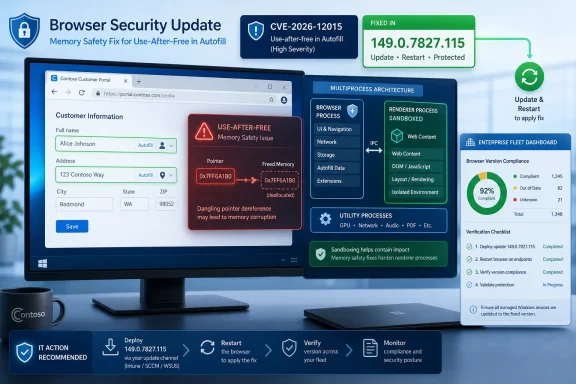 The Autofill Bug Is Small Until It Sits Inside a Browser Chain
CVE-2026-12015 lives in Autofill, one of those browser subsystems users rarely think about until it saves them a few seconds on a form. That convenience layer touches names, addresses, payment-adjacent fields, login flows, and countless fragments of personal context. A memory disclosure bug there is not automatically a password vault breach, but it is uncomfortably close to data users expect the browser to handle carefully.The important condition in the description is that the attacker must already have compromised the renderer process. Chrome’s multiprocess architecture is designed around the assumption that web content runs in a constrained renderer, separated from more privileged browser components. A bug that requires a compromised renderer is therefore not usually the first step in an attack; it is more plausibly a second-stage primitive inside a chain.
That distinction should lower panic, not priority. Browser exploits often work as choreography: one bug gets code running or corrupts memory in the renderer, another leaks information, another escapes a sandbox, and another turns a foothold into durable access. Information disclosure can be the connective tissue that makes stronger exploitation reliable, especially when modern mitigations depend on keeping memory layout and sensitive process state opaque.
The CISA-ADP CVSS vector rates the attack complexity as high, requires user interaction, and assigns confidentiality impact as high with no integrity or availability impact. That is a useful snapshot, but it can also flatten the risk. A memory disclosure in Chrome is less about the standalone score and more about what else an attacker can pair it with.
NVD’s Version Boundary Tells a Messier Story Than the Patch Note
The oddest part of the NVD entry is not the vulnerability description. It is the CPE configuration. The record says Google Chrome versions up to, but excluding, 149.0.7827.114 are vulnerable, while the CVE description says Chrome prior to 149.0.7827.115 is affected.That looks like a mismatch, but not necessarily a catastrophic one. Chrome desktop releases often carry slightly different build numbers across operating systems and channels. The vendor advisory for this release used 149.0.7827.114/.115 for Windows and Mac and 149.0.7827.114 for Linux, creating exactly the kind of versioning wrinkle that automated CPE enrichment struggles to express cleanly.
For a Windows-focused audience, the safest interpretation is that 149.0.7827.115 is the clean target where available, while 149.0.7827.114 may be the fixed build for some platforms or release tracks. NVD’s CPE model is trying to describe a cross-platform browser with a single product line and platform-dependent build endings. That is always going to be less precise than the vendor’s own update channel.
This matters because scanners and dashboards tend to turn CPEs into binary compliance flags. If a tool keys strictly on “less than 149.0.7827.114,” it may underreport machines sitting at 149.0.7827.114 where the relevant Windows or Mac fixed build is actually 149.0.7827.115. Conversely, it may produce confusing results on Linux systems where .114 was the published stable fix. The right answer is not to ignore the scanner; it is to validate the scanner logic against Google’s release notes and the installed platform.
The phrase “undergoing reanalysis” is doing real work here. NVD enrichment is not a divine tablet; it is an evolving metadata layer assembled from vendor statements, CPE dictionaries, CVSS inputs, and references that may themselves be partially restricted. In the first days after a browser CVE lands, administrators should treat the vendor advisory as the operational source of truth and the NVD record as useful but provisional.
Chrome’s Memory-Safety Debt Keeps Showing Up in Familiar Places
Use-after-free bugs are old villains in modern browser security. They happen when software continues using memory after it has been released, opening the door to stale pointers, confused object state, memory disclosure, or code execution depending on surrounding conditions. In a project the size of Chromium, with countless components, asynchronous events, and performance-sensitive C++ code, these bugs are stubborn.Autofill is a particularly revealing place for one to appear. It is not a flashy JavaScript engine or a GPU stack, but it has to interpret messy real-world pages, infer user intent, and coordinate browser-side data with renderer-observed form structures. That crossing of trust boundaries is where browser bugs often become interesting.
Google has been pushing memory-safety work across Chromium for years, including hardening allocators, sandboxing, MiraclePtr-style pointer protections, fuzzing, and gradual adoption of safer languages where practical. The persistence of use-after-free CVEs does not mean those efforts are failing. It means the attack surface remains enormous and backwards-compatible web engines are among the hardest pieces of consumer software to make safe.
For Windows users, this is not just a Chrome story. Microsoft Edge, Brave, Vivaldi, Opera, and many embedded browser surfaces depend on Chromium code. A Chromium flaw begins life as a Google Chrome advisory, but it rarely stays confined to Google Chrome in the real world.
That does not mean every Chromium-based browser is vulnerable in precisely the same way or on the same timeline. Vendors may ship different features, patches, release cadences, and hardening choices. But the default assumption for defenders should be that a high-severity Chromium memory bug deserves attention across the Chromium ecosystem, not just in the browser with the multicolor icon.
The Renderer Requirement Is a Constraint, Not a Comfort Blanket
A casual reading of CVE-2026-12015 might stop at “attacker who had compromised the renderer process” and downgrade the issue mentally. That would be a mistake. Browser sandboxes exist precisely because renderer compromise is a known and recurring class of failure.Modern browsers put untrusted web content in renderer processes because web content is hostile by design. A malicious page can trigger parsing paths, JavaScript engines, media handlers, layout code, form logic, font shaping, and GPU interactions. If any of those paths yields a renderer compromise, the attacker still has to contend with sandbox restrictions. A memory disclosure flaw in another component may help erode those restrictions or expose data that should remain outside the page’s reach.
The CVSS score of 5.3 from CISA-ADP reflects the narrow technical description. It is medium because it requires user interaction, high complexity, and a precondition. But CVSS is not a substitute for threat modeling. A bug can be medium in isolation and still important in the hands of an exploit developer assembling a chain.
This is why browser vendors often restrict issue tracker details until users have updated. The interesting parts are usually not the one-line description, but object lifetimes, trigger conditions, memory layout, and the reliability of exploitation. Those are exactly the details defenders do not need immediately and attackers would love to have.
The absence of a public “exploited in the wild” note for CVE-2026-12015 is meaningful but not exculpatory. It means this is not currently being presented as a known zero-day under active exploitation. It does not mean the bug is uninteresting, unweaponizable, or safe to leave unpatched through the next maintenance window.
The Enterprise Problem Is Not Knowing Chrome Needs Updating
Nobody running a serious Windows environment needs to be told that Chrome updates matter. The hard part is proving that every copy updated, every fork followed, every offline device checked in, and every exception aged out. Browser patching is easy in the abstract and messy in the estate.Chrome’s auto-update system is strong for unmanaged consumer machines, but enterprise environments introduce policy, packaging, VDI images, golden images, kiosk modes, network controls, application control, and change-management windows. Each of those is defensible on its own. Together, they can quietly turn a browser update into a week-long exposure.
The challenge is especially sharp for organizations that manage Chrome through third-party patch platforms. Those platforms often depend on vendor feeds, detection rules, and version logic that may lag a release by hours or days. When the vulnerability metadata itself contains version ambiguity, the detection story gets more brittle.
Administrators should pay attention to installed version, not merely patch job status. A green deployment dashboard that says “Chrome update deployed” is less useful than an inventory query showing the actual version running on endpoints. The difference matters when Chrome’s own updater, MSI deployments, user-installed copies, and side-by-side channel installations coexist.
The same scrutiny belongs on Edge. Microsoft’s Chromium-based browser usually ships Chromium security fixes on its own schedule, sometimes quickly, sometimes with version numbers that do not map neatly onto Chrome’s. A Chrome CVE is not automatically an Edge incident, but it should trigger an Edge version check and a review of Microsoft’s release notes.
The CPE Question Is a Warning About Machine-Readable Security
The user-facing question here is simple: are we missing a CPE? The better answer is that the CPE may be present but insufficiently expressive. NVD’s current configuration attempts to combine the Chrome application with Windows, Linux, and macOS platform CPEs, but the version cutoff appears to compress platform-specific build realities into a single boundary.That is a classic weakness in vulnerability automation. CPEs are useful for broad matching, but they struggle with products that ship different fixed versions by operating system, stagger rollout by channel, or publish paired build numbers like 149.0.7827.114/.115. A single “less than” comparison can be technically valid for one platform and misleading for another.
The fix is not to abandon CPEs. Security teams need structured identifiers, and imperfect automation is still better than manual spreadsheet archaeology. But CVE-2026-12015 is a good case study in why high-confidence exposure management requires multiple signals: vendor advisory, installed version, platform, browser channel, and scanner plugin logic.
In practical terms, a Windows scanner should probably treat Chrome below 149.0.7827.115 as suspect unless the vendor or detection plugin has a more nuanced rule. For Linux, 149.0.7827.114 may be the relevant fixed stable build. For macOS, the paired .114/.115 language should be checked against what Google actually shipped to that device.
This is also where asset teams earn their keep. If the inventory cannot distinguish Chrome Stable from Extended Stable, user-installed Chrome from managed Chrome, or Chrome from Chromium-based alternatives, then a CPE mismatch becomes more than a database annoyance. It becomes an operational blind spot.
Autofill Makes Confidentiality Bugs Feel Personal
Security teams often classify vulnerabilities by exploitability and impact, but users experience browser bugs through trust. Autofill is part of the browser’s promise that personal data can be stored locally and reused safely. A vulnerability that can expose process memory through Autofill undermines that promise even if the technical path is constrained.The phrase “potentially sensitive information from process memory” is deliberately broad. It does not say saved passwords were exposed. It does not say payment data was stolen. It says process memory could contain sensitive material, which is both less dramatic and more realistic.
Browsers are constantly handling session tokens, form contents, page data, extension state, profile metadata, cookies, and transient values. A memory disclosure bug does not need to dump a neat file named secrets.txt to matter. Even small leaks can help attackers defeat address-space layout randomization, steal fragments of user data, or make another exploit more reliable.
Autofill also sits at the intersection of corporate and personal identity. On a managed Windows laptop, the browser may hold work profile data, consumer profile data, password-manager extensions, SSO sessions, and internal application forms. The more the browser becomes the operating shell for work, the more a browser confidentiality bug resembles an endpoint confidentiality bug.
That is the larger shift IT has had to absorb. The browser is no longer an application at the edge of the environment. It is the place where identity, SaaS, documents, email, admin panels, and support consoles converge. A “medium” browser vulnerability can have a higher business temperature than its score suggests.
Patch Velocity Is Now Part of Browser Security Design
Google’s Chrome release machinery is one of the most important security systems on the Internet. The company can push fixes to billions of users, hide bug details while updates roll out, and close high-risk flaws before most people ever learn their CVE numbers. That is an extraordinary defensive advantage.It also creates a cultural side effect: browser patching feels routine until it fails. Users assume Chrome will update itself. Administrators assume their tools will package the release. Executives assume the browser is handled somewhere inside endpoint management. Attackers assume enough machines will lag to make exploitation worthwhile.
CVE-2026-12015 arrived in a busy Chrome 149 patch period, following another update that addressed a separate actively exploited V8 issue. That cadence matters because update fatigue is real. When Chrome ships multiple security updates in quick succession, some organizations begin treating them as noise. Attackers benefit when routine becomes background.
The better enterprise posture is to separate browser updates from ordinary application maintenance. Browsers deserve something closer to an emergency patch lane, especially for high-severity memory corruption, sandbox-relevant bugs, and anything involving active exploitation. That does not mean every browser patch requires a war room. It means the path from vendor release to fleet verification should be measured in days, not in quarterly cycles.
Windows shops already know this lesson from Patch Tuesday. The difference is that Chrome does not wait for Microsoft’s calendar, and Chromium bugs do not respect the neat boundaries of operating-system servicing. Browser patch operations need their own rhythm.
Windows Users Should Check More Than the About Box Once
For individual users, the advice is familiar: open Chrome’s About page, let it check for updates, and restart the browser. The restart is not ceremonial. A downloaded update does not protect the active browser process until the browser relaunches into the fixed version.For administrators, the About page is not enough. Managed environments should query installed versions at scale, confirm process restarts, and look for machines where Chrome remains open for days or weeks. A device can technically have the update staged while users continue running the vulnerable binary.
That restart problem is underrated. Browsers are session containers now, holding dozens of tabs and workflows users are reluctant to close. Enterprises can deploy the patch and still carry risk if they never force or strongly prompt a relaunch. Chrome’s relaunch notifications help, but policy should define how long users can defer.
There is also the question of profiles and channels. Some machines run Chrome Stable, Beta, Dev, or Extended Stable side by side. Developers and power users may have portable Chromium builds or automation-specific browser binaries outside standard paths. Those are easy to miss if inventory only checks the standard installed application.
Security teams should treat CVE-2026-12015 as an opportunity to test browser hygiene rather than as a one-off ticket. Can you identify every Chromium-based browser on managed Windows endpoints? Can you tell which ones are below the fixed build? Can you force a relaunch without breaking critical workflows? If not, the vulnerability has already found a process gap.
The Lesson From CVE-2026-12015 Is in the Metadata
The most interesting thing about this CVE may be its untidiness. The issue tracker is restricted. NVD is still enriching the record. CVSS is present from CISA-ADP but not yet from NVD. The CPE boundary appears to conflict with the plain-English affected-version statement. The vendor release uses paired build numbers that are easy for humans to understand and awkward for machines to encode.That is not a scandal. It is what early vulnerability disclosure often looks like. The security ecosystem is a distributed translation machine, converting vendor advisories into CVEs, CVSS scores, CPEs, scanner plugins, patch catalog entries, SOC tickets, executive dashboards, and compliance evidence. Every translation can lose nuance.
The danger comes when organizations mistake the translation for the event. The event is that Google fixed a high-severity Autofill use-after-free in Chrome and said versions before the fixed release are affected. The translation is the evolving database record that tries to express that fact in standardized fields.
For defenders, the hierarchy should be clear. Vendor release notes tell you what to patch. Installed-version telemetry tells you whether you patched it. Vulnerability databases help prioritize and automate the work, but they should not override obvious version guidance when the record is still under reanalysis.
That is especially true for browsers because their release trains move quickly. By the time a CPE record is polished, a new point release may already be landing. The operational skill is not memorizing the CVE entry; it is building a process that tolerates imperfect metadata and still gets endpoints safe.
The 149.0.7827.115 Fix Draws a Bright Line Through the Fleet
The practical story of CVE-2026-12015 is narrower than the metadata drama but more urgent than the score implies. It is a high-severity confidentiality bug in a browser component that handles personal data, requiring a renderer compromise but potentially useful in exploit chains. The safest response is to update first and argue with the CPE later.Security teams should reduce this to concrete checks that can survive the ambiguity:
- Chrome on Windows and macOS should be verified against the fixed 149.0.7827.115-era release, not merely assumed safe because a scanner says versions below 149.0.7827.114 are affected.
- Linux systems should be checked against the platform-specific Chrome build Google published for the same stable-channel update.
- Any machine with Chrome updated but not relaunched should still be treated as needing remediation until the running process reflects the fixed version.
- Chromium-based browsers other than Chrome should be reviewed through their own vendor advisories and version histories, because shared code does not always mean identical release timing.
- Vulnerability-management teams should inspect detection logic for this CVE and watch for NVD changes as the record moves through reanalysis.
- Autofill risk should be considered in the context of browser-stored personal and enterprise data, not dismissed because the CVSS base score is medium.
References
- Primary source: NVD / Chromium
Published: 2026-06-15T07:00:35-07:00

NVD - CVE-2026-12015
 nvd.nist.gov
- Security advisory: MSRC
Published: 2026-06-15T07:00:35-07:00
Original feed URL

Security Update Guide - Microsoft Security Response Center
 msrc.microsoft.com
- Related coverage: cvefeed.io

CVE-2026-12015 - Google Chrome Use-After-Free in Autofill
Use after free in Autofill in Google Chrome prior to 149.0.7827.115 allowed a remote attacker who had compromised the renderer process to obtain potentially sensitive information from process memory via a crafted HTML page. (Chromium security severity: High)cvefeed.io - Related coverage: govcert.gov.hk

GovCERT.HK - Security Alert (A26-06-27): Multiple Vulnerabilities in Google Chrome
Security Alert (A26-06-27): Multiple Vulnerabilities in Google Chromewww.govcert.gov.hk
