

Google Chrome CVE-2026-12014 was published by NVD on June 11, 2026, describing a high-severity use-after-free flaw in Chrome’s Cast component before version 149.0.7827.115 that could let a local-network attacker potentially escape the browser sandbox with malicious network traffic. The awkward part is not the vulnerability class; Chrome has spent years grinding down memory-safety bugs. The awkward part is the metadata: NVD’s initial CPE configuration appears to exclude versions before 149.0.7827.114, while the CVE description and vendor release line point to 149.0.7827.115 as the safer boundary on at least some desktop platforms. For defenders who automate patch compliance off CPEs, that one-build difference is exactly the kind of clerical-looking discrepancy that can become an operational blind spot.
CVE-2026-12014 is not the usual Chrome story of a user being lured to a malicious web page. The description places the attacker on the same local network segment and routes exploitation through malicious network traffic against Cast, the browser machinery associated with discovering and communicating with casting devices.
That distinction matters. “Adjacent network” is less permissive than “remote over the internet,” but it is not comforting in offices, schools, hotels, conferences, hospitals, shared housing, and flat small-business networks. Plenty of environments still treat the local LAN as a zone of trust long after mobile devices, guest Wi-Fi, printers, TVs, IoT gear, and unmanaged laptops have made that assumption obsolete.
The CISA-ADP CVSS 3.1 vector tells the same story in shorthand: adjacent attack vector, high attack complexity, no privileges, no user interaction, changed scope, and high impact to confidentiality, integrity, and availability. That lands at 8.3, high enough to demand attention but specific enough to resist the lazy “all Chrome bugs are the same” treatment.
The phrase sandbox escape is the red flag. Chrome’s sandbox is designed to contain compromise inside a constrained process; a sandbox escape is how an attacker turns a browser foothold into something more valuable. Even if the path to exploitation is difficult, defenders should read this as a failure at a boundary that modern browsers rely on heavily.
That is why this CVE is more interesting than another heap corruption bug in a rendering component. The attack is not described as requiring a crafted HTML page or extension installation. It is described as malicious network traffic from the local segment, which shifts the defensive conversation from “do users click bad links?” to “what can talk to browsers on this network?”
For home users, the practical risk is most likely a compromised or malicious device on the same Wi-Fi network. For enterprise IT, the more relevant worry is segmentation failure. A guest VLAN that can see corporate endpoints, a conference-room network that bleeds into workstation space, or a poorly isolated lab subnet all become more consequential when browser-adjacent services expose memory corruption paths.
Chrome’s velocity is both a strength and a stressor here. Google can ship patched builds quickly, and most consumer installations will eventually update themselves. But in managed Windows environments, “eventually” is not a policy; it is a gap between disclosure and enforcement.
The CVE description says Google Chrome prior to 149.0.7827.115 is affected. The Chrome release advisory for this update says the stable channel moved to 149.0.7827.114/.115 for Windows and Mac, and 149.0.7827.114 for Linux. NVD’s initial CPE entry, however, reportedly marks Google Chrome versions up to but excluding 149.0.7827.114 as vulnerable, with operating-system CPEs for Windows, Linux, and macOS.
That means a scanner relying strictly on “less than 149.0.7827.114” could decide that 149.0.7827.114 is non-vulnerable everywhere. But the CVE prose says “prior to 149.0.7827.115,” and Google’s platform-specific release numbering implies that Windows and macOS may have both .114 and .115 builds in play while Linux stops at .114. This is exactly the kind of edge case where CPE logic needs to follow the vendor’s platform release mapping, not a flattened version comparison.
The likely correction is not a new vendor or product CPE;
A cleaner model would distinguish the affected Chrome versions per operating system. If 149.0.7827.114 is the fixed Linux build but 149.0.7827.115 is the fixed build for some Windows or macOS users, a single “excluding .114” threshold is too blunt. If .114 and .115 are equivalent fixed builds for different release tracks on Windows and Mac, then the CVE description’s “prior to .115” is itself imprecise. Either way, the metadata needs reconciliation.
Chrome’s multi-platform release pattern makes this harder than it looks. A Windows machine and a Linux machine can both be fully patched while reporting different final build numbers. A Mac fleet can lag by hours or days behind Windows, or vice versa, depending on staged rollout timing, enterprise controls, and update channel behavior.
That is why NVD’s “undergoing reanalysis” label matters. It is not bureaucratic filler. It is a warning that the enrichment process — CVSS, CWE, CPE, applicability statements — is still moving, and that downstream scanners may be consuming provisional data.
The safest operational stance is to avoid treating a single NVD CPE range as gospel during the first few days after publication. Use the vendor advisory, the browser’s own reported version, and your management platform’s update status together. If those disagree, assume the more conservative interpretation until the data settles.
Local-network bugs exploit organizational messiness. They do not need an attacker to cross the internet if the attacker can compromise one weak device already inside the building, join guest Wi-Fi, abuse a misconfigured VLAN, or sit near a target in a public network. The browser becomes another reachable surface inside a trust zone that was never designed for hostile traffic.
This is where Cast is symbolically perfect. Enterprises adopted consumer-style collaboration hardware because it made meetings easier. The cost is more discovery protocols, more broadcast domains, more semi-trusted devices, and more code paths built for convenience rather than zero-trust assumptions.
The fix is not to panic-disable every media feature overnight. The fix is to recognize that browsers are not just web-page renderers anymore. They are network clients, identity agents, file handlers, password managers, PDF readers, conferencing endpoints, and device-discovery participants. Every one of those roles widens what “browser security” means.
That does not mean administrators should blindly copy Chrome version numbers onto Edge. Edge uses its own versioning and release notes, and Microsoft’s packaging can lag or differ from Google’s. But it does mean Windows admins should treat significant Chromium CVEs as an Edge-watch item, not merely a Chrome item.
The same applies to other Chromium-based browsers. Brave, Vivaldi, Opera, and Electron-based applications may inherit affected code paths depending on how they use Chromium components and how quickly they rebase. The public CVE may say Google Chrome, but the security lesson is broader: Chromium is an ecosystem, not a single executable.
On managed Windows fleets, the practical audit should include Chrome, Edge, and any approved third-party Chromium browsers. It should also include developer tools and embedded browser runtimes where feasible, though mapping those to a specific Chromium patch level can be less straightforward.
But absence of public exploitation is not the same thing as low risk. The bug class is serious, the component is network-facing, and the impact includes a potential sandbox escape. The attack complexity is high, but no user interaction and no privileges are required in the CVSS vector, which keeps the risk profile uncomfortable.
Chrome’s security team often restricts bug details until most users have updated. That is sensible disclosure practice, but it also means defenders are making decisions with incomplete technical visibility. When the issue-tracker entry requires permission, the public cannot inspect the exploitability assumptions or the exact affected paths.
That puts more weight on patch discipline. If the vendor says update and the CVSS impact is high, the right move is not to wait for exploit code to appear. The right move is to close the window before curiosity turns into weaponization.
A good scanner should preserve ambiguity when upstream data is ambiguous. If the description says one fixed version and the CPE says another, the product should flag the conflict rather than quietly choose whichever value is easier to parse. Security teams need visibility into uncertainty, not false precision.
This is particularly true for Chrome because patch state can change quickly. A machine may update in the background but not apply the new build until restart. A browser may report a patched version while running old processes. A managed endpoint may have update policy correctly configured but still be waiting for a maintenance window or user reboot.
The operational test should be concrete: launch-state version, installed version, pending restart state, and platform-specific fixed build. Anything less risks turning vulnerability management into spreadsheet theater.
For administrators, assurance takes more work. Managed Chrome environments should verify update policy, force relaunch where appropriate, and confirm that endpoints actually report a fixed build. The version target should be checked against Google’s platform-specific release line and updated again if NVD revises its CPE range.
Network controls also deserve attention. If Cast functionality is unnecessary in a managed environment, policy restrictions may reduce exposure. If casting is required, then segmentation and device trust become the more important controls.
The point is not that this one CVE should trigger a redesign of every LAN. The point is that adjacent-network browser vulnerabilities expose the debt of flat networks. Patching closes the known bug; segmentation reduces the damage when the next one arrives.
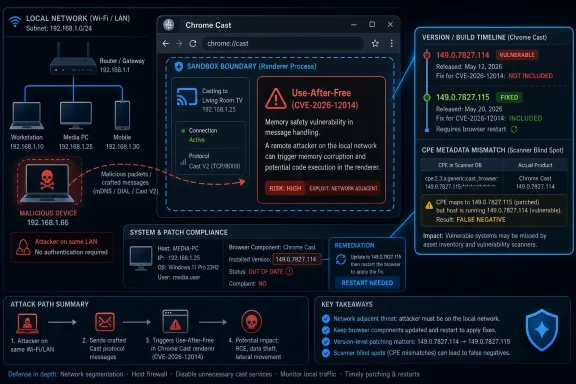 The Bug Is Local, but the Blast Radius Is Not
CVE-2026-12014 is not the usual Chrome story of a user being lured to a malicious web page. The description places the attacker on the same local network segment and routes exploitation through malicious network traffic against Cast, the browser machinery associated with discovering and communicating with casting devices.That distinction matters. “Adjacent network” is less permissive than “remote over the internet,” but it is not comforting in offices, schools, hotels, conferences, hospitals, shared housing, and flat small-business networks. Plenty of environments still treat the local LAN as a zone of trust long after mobile devices, guest Wi-Fi, printers, TVs, IoT gear, and unmanaged laptops have made that assumption obsolete.
The CISA-ADP CVSS 3.1 vector tells the same story in shorthand: adjacent attack vector, high attack complexity, no privileges, no user interaction, changed scope, and high impact to confidentiality, integrity, and availability. That lands at 8.3, high enough to demand attention but specific enough to resist the lazy “all Chrome bugs are the same” treatment.
The phrase sandbox escape is the red flag. Chrome’s sandbox is designed to contain compromise inside a constrained process; a sandbox escape is how an attacker turns a browser foothold into something more valuable. Even if the path to exploitation is difficult, defenders should read this as a failure at a boundary that modern browsers rely on heavily.
Cast Turns the Living-Room Feature Into Enterprise Attack Surface
Cast is easy to overlook because users experience it as a convenience feature: click an icon, send a tab or stream to a TV, move on. Under the hood, that convenience requires discovery, messaging, device negotiation, and network-facing behavior. Anything that listens, parses, or reacts to untrusted network input becomes part of the attack surface.That is why this CVE is more interesting than another heap corruption bug in a rendering component. The attack is not described as requiring a crafted HTML page or extension installation. It is described as malicious network traffic from the local segment, which shifts the defensive conversation from “do users click bad links?” to “what can talk to browsers on this network?”
For home users, the practical risk is most likely a compromised or malicious device on the same Wi-Fi network. For enterprise IT, the more relevant worry is segmentation failure. A guest VLAN that can see corporate endpoints, a conference-room network that bleeds into workstation space, or a poorly isolated lab subnet all become more consequential when browser-adjacent services expose memory corruption paths.
Chrome’s velocity is both a strength and a stressor here. Google can ship patched builds quickly, and most consumer installations will eventually update themselves. But in managed Windows environments, “eventually” is not a policy; it is a gap between disclosure and enforcement.
The CPE Mismatch Is the Part Automation Will Trip Over
The user’s central question — are we missing a CPE here? — deserves a direct answer: probably not in the sense of an entirely absent product family, but there is a meaningful version-boundary inconsistency that should be treated as a metadata problem until NVD finishes reanalysis.The CVE description says Google Chrome prior to 149.0.7827.115 is affected. The Chrome release advisory for this update says the stable channel moved to 149.0.7827.114/.115 for Windows and Mac, and 149.0.7827.114 for Linux. NVD’s initial CPE entry, however, reportedly marks Google Chrome versions up to but excluding 149.0.7827.114 as vulnerable, with operating-system CPEs for Windows, Linux, and macOS.
That means a scanner relying strictly on “less than 149.0.7827.114” could decide that 149.0.7827.114 is non-vulnerable everywhere. But the CVE prose says “prior to 149.0.7827.115,” and Google’s platform-specific release numbering implies that Windows and macOS may have both .114 and .115 builds in play while Linux stops at .114. This is exactly the kind of edge case where CPE logic needs to follow the vendor’s platform release mapping, not a flattened version comparison.
The likely correction is not a new vendor or product CPE;
cpe:2.3:a:google:chrome is the expected application CPE. The missing nuance is version applicability across platform-specific builds. If NVD keeps the operating-system CPEs in an AND configuration, the version range should still reflect the vulnerable Chrome build boundaries accurately for each platform.A cleaner model would distinguish the affected Chrome versions per operating system. If 149.0.7827.114 is the fixed Linux build but 149.0.7827.115 is the fixed build for some Windows or macOS users, a single “excluding .114” threshold is too blunt. If .114 and .115 are equivalent fixed builds for different release tracks on Windows and Mac, then the CVE description’s “prior to .115” is itself imprecise. Either way, the metadata needs reconciliation.
Version Numbers Are Policy, Not Trivia
Security teams often treat browser version numbers as a nuisance detail because Chrome updates so frequently. That works until a version boundary becomes the thing deciding whether a machine is quarantined, patched, ticketed, or ignored. In vulnerability management, version strings are not trivia; they are policy encoded into tooling.Chrome’s multi-platform release pattern makes this harder than it looks. A Windows machine and a Linux machine can both be fully patched while reporting different final build numbers. A Mac fleet can lag by hours or days behind Windows, or vice versa, depending on staged rollout timing, enterprise controls, and update channel behavior.
That is why NVD’s “undergoing reanalysis” label matters. It is not bureaucratic filler. It is a warning that the enrichment process — CVSS, CWE, CPE, applicability statements — is still moving, and that downstream scanners may be consuming provisional data.
The safest operational stance is to avoid treating a single NVD CPE range as gospel during the first few days after publication. Use the vendor advisory, the browser’s own reported version, and your management platform’s update status together. If those disagree, assume the more conservative interpretation until the data settles.
Local Network Exploits Punish Flat Networks
The adjacent-network requirement may tempt some admins to downgrade urgency. That is a mistake, especially in Windows-heavy environments where user endpoints often share space with printers, conferencing systems, smart displays, development devices, and unmanaged BYOD hardware.Local-network bugs exploit organizational messiness. They do not need an attacker to cross the internet if the attacker can compromise one weak device already inside the building, join guest Wi-Fi, abuse a misconfigured VLAN, or sit near a target in a public network. The browser becomes another reachable surface inside a trust zone that was never designed for hostile traffic.
This is where Cast is symbolically perfect. Enterprises adopted consumer-style collaboration hardware because it made meetings easier. The cost is more discovery protocols, more broadcast domains, more semi-trusted devices, and more code paths built for convenience rather than zero-trust assumptions.
The fix is not to panic-disable every media feature overnight. The fix is to recognize that browsers are not just web-page renderers anymore. They are network clients, identity agents, file handlers, password managers, PDF readers, conferencing endpoints, and device-discovery participants. Every one of those roles widens what “browser security” means.
Microsoft Shops Inherit Chromium’s Calendar
For WindowsForum readers, the Chrome patch is only half the story. Microsoft Edge is Chromium-based, and Chromium security work routinely flows into Edge on Microsoft’s own release cadence. A Cast vulnerability in Chromium naturally raises the question of when Edge incorporates the relevant fix, how quickly managed Edge installations receive it, and whether policy controls expose or suppress affected features.That does not mean administrators should blindly copy Chrome version numbers onto Edge. Edge uses its own versioning and release notes, and Microsoft’s packaging can lag or differ from Google’s. But it does mean Windows admins should treat significant Chromium CVEs as an Edge-watch item, not merely a Chrome item.
The same applies to other Chromium-based browsers. Brave, Vivaldi, Opera, and Electron-based applications may inherit affected code paths depending on how they use Chromium components and how quickly they rebase. The public CVE may say Google Chrome, but the security lesson is broader: Chromium is an ecosystem, not a single executable.
On managed Windows fleets, the practical audit should include Chrome, Edge, and any approved third-party Chromium browsers. It should also include developer tools and embedded browser runtimes where feasible, though mapping those to a specific Chromium patch level can be less straightforward.
The Absence of Known Exploitation Is Not a Permission Slip
Nothing in the supplied CVE text says CVE-2026-12014 is being exploited in the wild. That is important because Chrome did patch an actively exploited zero-day earlier in June 2026, and it would be easy to blur the two stories together. CVE-2026-12014 should not be described as a confirmed zero-day unless Google or another authoritative source says so.But absence of public exploitation is not the same thing as low risk. The bug class is serious, the component is network-facing, and the impact includes a potential sandbox escape. The attack complexity is high, but no user interaction and no privileges are required in the CVSS vector, which keeps the risk profile uncomfortable.
Chrome’s security team often restricts bug details until most users have updated. That is sensible disclosure practice, but it also means defenders are making decisions with incomplete technical visibility. When the issue-tracker entry requires permission, the public cannot inspect the exploitability assumptions or the exact affected paths.
That puts more weight on patch discipline. If the vendor says update and the CVSS impact is high, the right move is not to wait for exploit code to appear. The right move is to close the window before curiosity turns into weaponization.
Scanner Vendors Need to Resist the Easy Green Check
The CPE discrepancy is not just an NVD concern. Vulnerability scanners, asset platforms, SIEM enrichers, and ticketing automations often ingest NVD data rapidly and present the result as certainty. A green checkmark produced from unsettled metadata can be more dangerous than no checkmark at all.A good scanner should preserve ambiguity when upstream data is ambiguous. If the description says one fixed version and the CPE says another, the product should flag the conflict rather than quietly choose whichever value is easier to parse. Security teams need visibility into uncertainty, not false precision.
This is particularly true for Chrome because patch state can change quickly. A machine may update in the background but not apply the new build until restart. A browser may report a patched version while running old processes. A managed endpoint may have update policy correctly configured but still be waiting for a maintenance window or user reboot.
The operational test should be concrete: launch-state version, installed version, pending restart state, and platform-specific fixed build. Anything less risks turning vulnerability management into spreadsheet theater.
The Patch Is Simple; The Assurance Is Not
For ordinary users, the advice is boring and correct: update Chrome and restart it. Chrome’s built-in updater is usually good enough for personal machines, provided the browser is allowed to relaunch. The most common failure mode is not that the patch is unavailable; it is that the browser remains open for days with the update staged but not active.For administrators, assurance takes more work. Managed Chrome environments should verify update policy, force relaunch where appropriate, and confirm that endpoints actually report a fixed build. The version target should be checked against Google’s platform-specific release line and updated again if NVD revises its CPE range.
Network controls also deserve attention. If Cast functionality is unnecessary in a managed environment, policy restrictions may reduce exposure. If casting is required, then segmentation and device trust become the more important controls.
The point is not that this one CVE should trigger a redesign of every LAN. The point is that adjacent-network browser vulnerabilities expose the debt of flat networks. Patching closes the known bug; segmentation reduces the damage when the next one arrives.
The Real Answer Hides in the Build Boundary
The most useful reading of CVE-2026-12014 is neither “panic” nor “ignore.” It is a precise patch-management problem wrapped around a serious memory-safety flaw. The defender’s job is to make sure the precision survives the trip from Google’s advisory to NVD, from NVD to scanners, and from scanners to endpoint action.- Chrome installations should be updated to the vendor-advised fixed build for their platform, with special attention to the 149.0.7827.114 versus 149.0.7827.115 boundary.
- NVD’s CPE entry should be treated as provisional while the CVE remains under reanalysis, especially if automated tools mark 149.0.7827.114 as universally safe.
- The expected application CPE for Google Chrome is present, so the likely issue is not a missing Chrome CPE but an imprecise version applicability statement.
- Windows administrators should track Chromium-based Edge and other Chromium browsers separately rather than assuming a Chrome CVE has no relevance outside Google’s package.
- Adjacent-network exploitability makes segmentation, guest Wi-Fi isolation, and unmanaged device control part of the practical mitigation story.
- A patched browser that has not restarted should not be counted as remediated in any environment where exploitation risk matters.
References
- Primary source: NVD / Chromium
Published: 2026-06-15T07:00:33-07:00
NVD - CVE-2026-12014
 nvd.nist.gov
- Security advisory: MSRC
Published: 2026-06-15T07:00:33-07:00
Original feed URL
Security Update Guide - Microsoft Security Response Center
 msrc.microsoft.com
- Related coverage: cvefeed.io
CVE-2026-12014 - Chrome Use-after-free Sandbox Escape
Use after free in Cast in Google Chrome prior to 149.0.7827.115 allowed an attacker on the local network segment to potentially perform a sandbox escape via malicious network traffic. (Chromium security severity: High)cvefeed.io - Related coverage: govcert.gov.hk
GovCERT.HK - Security Alert (A26-06-27): Multiple Vulnerabilities in Google Chrome
Security Alert (A26-06-27): Multiple Vulnerabilities in Google Chromewww.govcert.gov.hk
