

Google Chrome CVE-2026-11695 was published by NVD on June 8, 2026, after Google disclosed a high-severity Passwords-component flaw fixed before Chrome 149.0.7827.103 that could let a remote attacker leak cross-origin data through a crafted HTML page. The important story is not just another Chrome patch; it is the awkward collision between browser release mechanics, vulnerability metadata, and enterprise asset matching. For Windows administrators, the question “are we missing a CPE?” is less clerical than it sounds, because a single version boundary can decide whether scanners flag thousands of endpoints or let them pass.
CVE-2026-11695 sits in one of the most sensitive corners of the browser: the password-management surface. Google’s public wording is terse, as usual for newly disclosed Chromium bugs, but the phrase “inappropriate implementation in Passwords” matters because password features routinely straddle the browser’s security boundary, the credential store, autofill logic, saved-site metadata, and the web page currently asking for secrets.
The reported impact is a leak of cross-origin data through a crafted HTML page. That is a very browser-specific kind of failure: not necessarily code execution, not necessarily a full sandbox escape, but a violation of the same-origin assumptions that keep one website from reading another website’s data. In modern Chrome, those assumptions are the whole game.
This is why the severity labels look odd at first glance. Chromium calls the issue High, while CISA’s ADP enrichment gives it a CVSS 3.1 score of 4.3, or Medium, with user interaction required and only low confidentiality impact. Both can be true. Chromium severity often reflects browser-context risk and exploit class, while CVSS compresses the bug into a generic scoring model that can understate how valuable a browser data leak may be in a targeted attack.
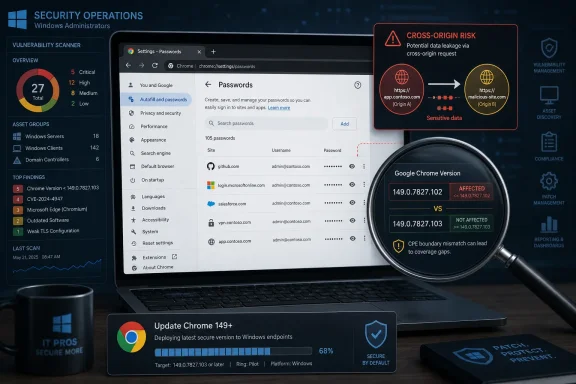
The fixed-version boundary is where administrators should slow down. The CVE description says Chrome prior to 149.0.7827.103 is affected. The NVD change record, however, shows a CPE configuration excluding 149.0.7827.102. That creates an obvious tension: if the vulnerable range stops before .102, then .102 is treated as fixed; if the description is authoritative at .103, then .102 may still be vulnerable on at least some platforms or channels.
The CPE line in the change history appears to model Google Chrome as a single application package across operating systems, then combines it with Windows, Linux kernel, and macOS platform CPEs. That is a common NVD pattern for cross-platform desktop software, but it becomes brittle when the vendor’s patched builds vary by platform or when a release blog uses “.102/.103” style notation.
For this CVE, the safest reading is that the CPE range should align with the fixed version named in the CVE description unless a vendor advisory clearly establishes platform-specific exceptions. If the description says “prior to 149.0.7827.103,” then scanners that stop the vulnerable range at “excluding 149.0.7827.102” may under-report exposure for builds between .102 and .103.
That does not prove NVD is “missing” a separate product CPE. The more likely issue is a version-boundary mismatch in the existing Chrome CPE configuration. The CPE product entry for Google Chrome is present; the questionable part is whether the affected-version condition should exclude .102 or .103.
A cross-origin data leak in that context is not just an information-disclosure bug in the abstract. It potentially means a malicious page can learn something it should not know about another origin, a saved credential flow, or browser-held state associated with a different site. Google has not publicly released the exploit mechanics, and it is right not to do so before users are broadly updated, but the class of vulnerability is enough to justify urgency.
Browsers have spent years making the renderer less trusted. Site isolation, process separation, sandboxing, and increasingly strict storage partitioning all reflect the same design principle: web content is hostile until proven otherwise. A Passwords-component bug that leaks cross-origin data cuts across that design, because password features necessarily mediate between user intent, stored data, and web-origin boundaries.
That is why a Medium CVSS score should not lull administrators into a relaxed patch cycle. CVSS says the attacker needs a crafted page and user interaction. In the browser world, that is not a high bar. Users click links, preview documents, open intranet portals, visit compromised sites, and follow support instructions all day long.
Chrome’s update cadence is not designed around the tidy monthly rhythm that Windows administrators still use as their mental model. Stable-channel fixes arrive when Google ships them, often with partial rollout language and sometimes with slightly different build numbers across Windows, macOS, and Linux. That is good for security, but awkward for compliance evidence.
On Windows, this matters because Chrome may be installed per-machine or per-user, managed by Google Update, deployed through Intune, wrapped into third-party patch tools, or left to its own updater. Edge adds another Chromium-based variable, though this CVE is specifically recorded against Google Chrome unless Microsoft separately ships and documents equivalent Edge exposure. Chromium lineage is not the same thing as identical vendor vulnerability status.
A scanner that relies on NVD CPE data may produce different results from an endpoint-management platform that keys off installed build numbers, and both may differ from what Chrome reports at
The CVE text says “prior to 149.0.7827.103.” The change record says the configuration was added for Chrome versions up to, but excluding, 149.0.7827.102. Those two statements do not match cleanly. In vulnerability-management terms, that is the difference between treating 149.0.7827.102 as safe and treating it as still below the fixed threshold.
The conservative enterprise policy is straightforward: require Chrome 149.0.7827.103 or later for CVE-2026-11695 until the vendor or NVD clarifies the platform-specific version boundary. If later Chrome builds are available, prefer those, because Chrome security releases often stack fixes rapidly and a “fixed for this CVE” build can still be behind the current stable security baseline.
This is also the kind of discrepancy worth reporting through NVD’s “Are we missing a CPE?” feedback path, but the report should be precise. The issue is not simply “missing CPE.” It is that the CPE version range appears to exclude 149.0.7827.102 even though the CVE description states that versions prior to 149.0.7827.103 are affected.
That lack of specificity is normal for browser CVEs while bug details remain restricted. It is also frustrating for defenders who want to decide whether compensating controls help. If this were a classic memory-corruption flaw, exploit mitigations and sandboxing would frame the risk. For a cross-origin leak involving Passwords, the relevant controls are murkier.
Disabling password saving is not a clean universal mitigation, because enterprise credential policy is rarely that simple. Some organizations prefer managed browser password storage with sync disabled; others mandate third-party password managers; others rely on passkeys, federation, or hardware-backed authentication. The CVE does not provide enough detail to say which of those choices materially reduces exposure.
The one reliable mitigation is patching. Browser bugs that require user interaction are still highly reachable, and cross-origin data leaks often depend on subtle browser state that security teams cannot confidently inspect after the fact. If a fleet is below the fixed version, the responsible answer is update first and debate architectural lessons later.
That creates a strange information asymmetry. Defenders are asked to act quickly without the technical detail they would normally use to rank risk. Vendors, meanwhile, are trying not to hand exploit developers a blueprint before auto-update reaches the long tail of unmanaged and intermittently connected machines.
CVE-2026-11695 is not reported as exploited in the wild in the public data reviewed for this article. That distinguishes it from other Chrome issues in the same general release window that received active-exploitation attention. But absence of public exploitation is not a reason to wait when the bug class involves browser-side data leakage and the fix is already available.
The right posture is boring and effective: treat this as a high-priority browser update, not as an emergency incident unless telemetry suggests users were driven to suspicious pages or exposed to targeted lures. Security teams should reserve their all-hands panic for active exploitation, but they should not let “not a zero-day” become a synonym for “next month.”
Auto-update makes home users dramatically safer than they would be under a manual patch model. But in managed environments, auto-update can create a false sense of completion. A policy may be correct, a deployment ring may be healthy, and a dashboard may still hide machines that have not restarted the browser, have stale per-user installs, or are pinned by an application-control exception.
The difference between “the update was released” and “the vulnerable browser process is gone” is operationally important. Chrome can download an update and still leave the old version running until the browser restarts. Users who keep sessions open for days can remain exposed after the patch technically lands on disk.
That is why mature Windows shops increasingly treat browser updates like endpoint hygiene rather than software distribution. They verify running versions, not just installed versions. They monitor update lag by organizational unit. They enforce browser relaunch deadlines. They pay attention to machines where Chrome’s updater is broken, disabled, or blocked by network controls.
The first step is to identify the version floor your organization will accept. For this CVE, that should be 149.0.7827.103 or later unless you have authoritative platform-specific guidance saying otherwise. The second step is to compare that floor against actual endpoint data, including both system-level and user-level Chrome installations.
The third step is to document the exception logic. If a scanner reports 149.0.7827.102 as clean because its CPE feed excludes that version, but your internal standard requires .103, the scanner result should not override policy. Conversely, if a scanner flags a later build because its feed has not caught up, that should be treated as a false positive only after confirming the installed build is genuinely newer than the fixed threshold.
This is tedious work, but it is exactly where vulnerability management becomes real. The industry likes to talk about exploit chains, threat intelligence, and AI-assisted defense. A surprising amount of risk reduction still comes down to reading a version comparator carefully.
Password features complicate the contract. They are supposed to recognize legitimate login contexts, fill secrets only where appropriate, and avoid being tricked by lookalike pages or embedded frames. They also need to be convenient enough that users do not abandon them for worse practices. That makes them a rich target for subtle implementation bugs.
A crafted HTML page is not an exotic delivery vehicle. It is the native language of the browser. If a vulnerability can be reached by convincing a user to load attacker-controlled web content, then phishing, malvertising, compromised sites, and poisoned internal links all become plausible delivery paths.
That does not mean every Chrome information leak is equally catastrophic. It does mean organizations should resist downgrading browser confidentiality bugs simply because they are not remote code execution. Data theft is often the objective, not a consolation prize.
For consumers, the guidance is simple: open Chrome’s About page, let it update, and relaunch. For administrators, the guidance is more exacting. Inventory Chrome versions, require at least the fixed build, validate relaunch, and do not assume that a medium CVSS score reflects the business value of browser-held data.
The CPE inconsistency is worth escalating because automated vulnerability management depends on these details. A wrong version boundary can suppress alerts on machines that still need an update. It can also create confusion for compliance teams trying to reconcile vendor advisories with scanner output.
But the CPE issue should not become a distraction from remediation. If the vulnerable range is ambiguous between .102 and .103, the answer is not to debate semantics while endpoints sit below both. The answer is to move to a later stable release and then clean up the metadata trail.
 The Version Number Is Doing More Work Than the Advisory Admits
CVE-2026-11695 sits in one of the most sensitive corners of the browser: the password-management surface. Google’s public wording is terse, as usual for newly disclosed Chromium bugs, but the phrase “inappropriate implementation in Passwords” matters because password features routinely straddle the browser’s security boundary, the credential store, autofill logic, saved-site metadata, and the web page currently asking for secrets.The reported impact is a leak of cross-origin data through a crafted HTML page. That is a very browser-specific kind of failure: not necessarily code execution, not necessarily a full sandbox escape, but a violation of the same-origin assumptions that keep one website from reading another website’s data. In modern Chrome, those assumptions are the whole game.
This is why the severity labels look odd at first glance. Chromium calls the issue High, while CISA’s ADP enrichment gives it a CVSS 3.1 score of 4.3, or Medium, with user interaction required and only low confidentiality impact. Both can be true. Chromium severity often reflects browser-context risk and exploit class, while CVSS compresses the bug into a generic scoring model that can understate how valuable a browser data leak may be in a targeted attack.
The fixed-version boundary is where administrators should slow down. The CVE description says Chrome prior to 149.0.7827.103 is affected. The NVD change record, however, shows a CPE configuration excluding 149.0.7827.102. That creates an obvious tension: if the vulnerable range stops before .102, then .102 is treated as fixed; if the description is authoritative at .103, then .102 may still be vulnerable on at least some platforms or channels.
NVD Metadata Is a Map, Not the Territory
NVD records are often treated as machine-readable truth, but they are assembled from upstream CVE data, vendor advisories, enrichment work, and later corrections. In this case, the record itself shows the machinery in motion: Chrome submitted the CVE on June 8, CISA added CVSS and CWE enrichment later that day, and NIST added initial CPE configuration on June 9. That is fast, but fast is not the same as final.The CPE line in the change history appears to model Google Chrome as a single application package across operating systems, then combines it with Windows, Linux kernel, and macOS platform CPEs. That is a common NVD pattern for cross-platform desktop software, but it becomes brittle when the vendor’s patched builds vary by platform or when a release blog uses “.102/.103” style notation.
For this CVE, the safest reading is that the CPE range should align with the fixed version named in the CVE description unless a vendor advisory clearly establishes platform-specific exceptions. If the description says “prior to 149.0.7827.103,” then scanners that stop the vulnerable range at “excluding 149.0.7827.102” may under-report exposure for builds between .102 and .103.
That does not prove NVD is “missing” a separate product CPE. The more likely issue is a version-boundary mismatch in the existing Chrome CPE configuration. The CPE product entry for Google Chrome is present; the questionable part is whether the affected-version condition should exclude .102 or .103.
Chrome’s Password Surface Is Too Important to Treat as Autofill Plumbing
It is tempting to hear “Passwords” and think of a convenience feature, something adjacent to autofill rather than central to browser security. That is outdated. Chrome’s password manager is now bound up with phishing defenses, credential reuse warnings, account synchronization, passkeys, site identity, and the browser’s understanding of which origin is allowed to receive which secret.A cross-origin data leak in that context is not just an information-disclosure bug in the abstract. It potentially means a malicious page can learn something it should not know about another origin, a saved credential flow, or browser-held state associated with a different site. Google has not publicly released the exploit mechanics, and it is right not to do so before users are broadly updated, but the class of vulnerability is enough to justify urgency.
Browsers have spent years making the renderer less trusted. Site isolation, process separation, sandboxing, and increasingly strict storage partitioning all reflect the same design principle: web content is hostile until proven otherwise. A Passwords-component bug that leaks cross-origin data cuts across that design, because password features necessarily mediate between user intent, stored data, and web-origin boundaries.
That is why a Medium CVSS score should not lull administrators into a relaxed patch cycle. CVSS says the attacker needs a crafted page and user interaction. In the browser world, that is not a high bar. Users click links, preview documents, open intranet portals, visit compromised sites, and follow support instructions all day long.
The Enterprise Problem Is Not Knowing Chrome Needs Patching
Most enterprise Windows shops already know Chrome needs frequent patching. The operational problem is proving which build is actually installed, which channel it came from, whether auto-update succeeded, and whether the scanner’s vulnerability logic agrees with Google’s version logic. CVE-2026-11695 is a small but useful example of how those layers can diverge.Chrome’s update cadence is not designed around the tidy monthly rhythm that Windows administrators still use as their mental model. Stable-channel fixes arrive when Google ships them, often with partial rollout language and sometimes with slightly different build numbers across Windows, macOS, and Linux. That is good for security, but awkward for compliance evidence.
On Windows, this matters because Chrome may be installed per-machine or per-user, managed by Google Update, deployed through Intune, wrapped into third-party patch tools, or left to its own updater. Edge adds another Chromium-based variable, though this CVE is specifically recorded against Google Chrome unless Microsoft separately ships and documents equivalent Edge exposure. Chromium lineage is not the same thing as identical vendor vulnerability status.
A scanner that relies on NVD CPE data may produce different results from an endpoint-management platform that keys off installed build numbers, and both may differ from what Chrome reports at
chrome://settings/help. When the CPE boundary itself appears inconsistent, administrators should prioritize vendor-fixed versions and local inventory over a single vulnerability-feed interpretation.The CPE Question Has a Practical Answer
So, are we missing a CPE here? Probably not in the sense of a missing Google Chrome product identifier. The record already includes the Chrome application CPE and platform CPEs for Windows, Linux, and macOS. The sharper question is whether NVD’s affected-version range is off by one patch build.The CVE text says “prior to 149.0.7827.103.” The change record says the configuration was added for Chrome versions up to, but excluding, 149.0.7827.102. Those two statements do not match cleanly. In vulnerability-management terms, that is the difference between treating 149.0.7827.102 as safe and treating it as still below the fixed threshold.
The conservative enterprise policy is straightforward: require Chrome 149.0.7827.103 or later for CVE-2026-11695 until the vendor or NVD clarifies the platform-specific version boundary. If later Chrome builds are available, prefer those, because Chrome security releases often stack fixes rapidly and a “fixed for this CVE” build can still be behind the current stable security baseline.
This is also the kind of discrepancy worth reporting through NVD’s “Are we missing a CPE?” feedback path, but the report should be precise. The issue is not simply “missing CPE.” It is that the CPE version range appears to exclude 149.0.7827.102 even though the CVE description states that versions prior to 149.0.7827.103 are affected.
The CWE Label Says Less Than Administrators Want
CISA mapped the issue to CWE-693, Protection Mechanism Failure. That is an expansive bucket, and in this case it tells us more about the violated security expectation than the actual programming mistake. It says a defense mechanism failed; it does not say whether the root cause was origin validation, state confusion, UI handling, password-form classification, autofill behavior, or a renderer/browser-process boundary error.That lack of specificity is normal for browser CVEs while bug details remain restricted. It is also frustrating for defenders who want to decide whether compensating controls help. If this were a classic memory-corruption flaw, exploit mitigations and sandboxing would frame the risk. For a cross-origin leak involving Passwords, the relevant controls are murkier.
Disabling password saving is not a clean universal mitigation, because enterprise credential policy is rarely that simple. Some organizations prefer managed browser password storage with sync disabled; others mandate third-party password managers; others rely on passkeys, federation, or hardware-backed authentication. The CVE does not provide enough detail to say which of those choices materially reduces exposure.
The one reliable mitigation is patching. Browser bugs that require user interaction are still highly reachable, and cross-origin data leaks often depend on subtle browser state that security teams cannot confidently inspect after the fact. If a fleet is below the fixed version, the responsible answer is update first and debate architectural lessons later.
Chrome’s Quiet Restrictions Are Part of the Security Model
Google’s practice of restricting access to bug details until most users are updated is sometimes irritating, but it is defensible. Browser vulnerabilities are unusually easy to weaponize once the patch reveals the vulnerable code path. Attackers can diff Chromium source, inspect tests, and build a proof of concept faster than many organizations can complete a patch cycle.That creates a strange information asymmetry. Defenders are asked to act quickly without the technical detail they would normally use to rank risk. Vendors, meanwhile, are trying not to hand exploit developers a blueprint before auto-update reaches the long tail of unmanaged and intermittently connected machines.
CVE-2026-11695 is not reported as exploited in the wild in the public data reviewed for this article. That distinguishes it from other Chrome issues in the same general release window that received active-exploitation attention. But absence of public exploitation is not a reason to wait when the bug class involves browser-side data leakage and the fix is already available.
The right posture is boring and effective: treat this as a high-priority browser update, not as an emergency incident unless telemetry suggests users were driven to suspicious pages or exposed to targeted lures. Security teams should reserve their all-hands panic for active exploitation, but they should not let “not a zero-day” become a synonym for “next month.”
Windows Fleets Need Browser Patch Evidence, Not Browser Patch Hope
For WindowsForum readers, the practical endpoint story is familiar. Chrome is often the most exposed application on the machine after the operating system itself, and in many environments it updates outside the same governance path as Windows cumulative updates. That is both a strength and a liability.Auto-update makes home users dramatically safer than they would be under a manual patch model. But in managed environments, auto-update can create a false sense of completion. A policy may be correct, a deployment ring may be healthy, and a dashboard may still hide machines that have not restarted the browser, have stale per-user installs, or are pinned by an application-control exception.
The difference between “the update was released” and “the vulnerable browser process is gone” is operationally important. Chrome can download an update and still leave the old version running until the browser restarts. Users who keep sessions open for days can remain exposed after the patch technically lands on disk.
That is why mature Windows shops increasingly treat browser updates like endpoint hygiene rather than software distribution. They verify running versions, not just installed versions. They monitor update lag by organizational unit. They enforce browser relaunch deadlines. They pay attention to machines where Chrome’s updater is broken, disabled, or blocked by network controls.
Scanner Disagreements Should Trigger Triage, Not Theology
Vulnerability scanners are indispensable, but they are not oracles. CVE-2026-11695 shows why: one feed may parse the NVD CPE range literally, another may use vendor release notes, a third may wait for its own plugin logic, and an endpoint tool may only know the installed executable version. When those disagree, the answer is not to pick a favorite vendor and stop thinking.The first step is to identify the version floor your organization will accept. For this CVE, that should be 149.0.7827.103 or later unless you have authoritative platform-specific guidance saying otherwise. The second step is to compare that floor against actual endpoint data, including both system-level and user-level Chrome installations.
The third step is to document the exception logic. If a scanner reports 149.0.7827.102 as clean because its CPE feed excludes that version, but your internal standard requires .103, the scanner result should not override policy. Conversely, if a scanner flags a later build because its feed has not caught up, that should be treated as a false positive only after confirming the installed build is genuinely newer than the fixed threshold.
This is tedious work, but it is exactly where vulnerability management becomes real. The industry likes to talk about exploit chains, threat intelligence, and AI-assisted defense. A surprising amount of risk reduction still comes down to reading a version comparator carefully.
The Same-Origin Policy Remains the Browser’s Fragile Social Contract
The web works because browsers enforce a social contract between mutually distrustful sites. Your bank, your webmail, your company’s identity provider, and a random page opened from a chat message can coexist in one application because the browser promises that each origin is fenced from the others. Cross-origin leaks are dangerous because they poke holes in that promise without necessarily doing anything as dramatic as launching calc.exe.Password features complicate the contract. They are supposed to recognize legitimate login contexts, fill secrets only where appropriate, and avoid being tricked by lookalike pages or embedded frames. They also need to be convenient enough that users do not abandon them for worse practices. That makes them a rich target for subtle implementation bugs.
A crafted HTML page is not an exotic delivery vehicle. It is the native language of the browser. If a vulnerability can be reached by convincing a user to load attacker-controlled web content, then phishing, malvertising, compromised sites, and poisoned internal links all become plausible delivery paths.
That does not mean every Chrome information leak is equally catastrophic. It does mean organizations should resist downgrading browser confidentiality bugs simply because they are not remote code execution. Data theft is often the objective, not a consolation prize.
The Patch Is Small; the Lesson Is Bigger
The immediate fix for CVE-2026-11695 is to update Chrome. The broader lesson is to treat browser vulnerability metadata as a living record that may lag, contradict itself, or fail to express platform nuance. That is especially true in the first days after publication, when NVD, CISA, vendor advisories, and third-party scanners are still converging.For consumers, the guidance is simple: open Chrome’s About page, let it update, and relaunch. For administrators, the guidance is more exacting. Inventory Chrome versions, require at least the fixed build, validate relaunch, and do not assume that a medium CVSS score reflects the business value of browser-held data.
The CPE inconsistency is worth escalating because automated vulnerability management depends on these details. A wrong version boundary can suppress alerts on machines that still need an update. It can also create confusion for compliance teams trying to reconcile vendor advisories with scanner output.
But the CPE issue should not become a distraction from remediation. If the vulnerable range is ambiguous between .102 and .103, the answer is not to debate semantics while endpoints sit below both. The answer is to move to a later stable release and then clean up the metadata trail.
The Passwords Bug Leaves Administrators With a Narrow, Concrete Checklist
CVE-2026-11695 is not the kind of vulnerability that rewards elaborate speculation. The public details are limited, the affected component is sensitive, and the version metadata contains just enough friction to trip automated programs. The useful response is disciplined and concrete.- Chrome installations should be brought to 149.0.7827.103 or later, with newer stable builds preferred where available.
- Vulnerability teams should treat the NVD CPE range as potentially inconsistent if it marks 149.0.7827.102 as outside the affected range while the CVE description says versions prior to 149.0.7827.103 are affected.
- Windows administrators should verify running Chrome versions after relaunch, not merely confirm that an update package was staged.
- Security teams should prioritize this as a browser data-leak risk even though CISA’s CVSS enrichment rates it Medium.
- Organizations using scanner exceptions should document whether they are following vendor fixed-version language or NVD CPE logic.
References
- Primary source: NVD / Chromium
Published: 2026-06-15T19:15:01-07:00
NVD - CVE-2026-11695
 nvd.nist.gov
- Security advisory: MSRC
Published: 2026-06-15T19:15:01-07:00
Original feed URL
Security Update Guide - Microsoft Security Response Center
 msrc.microsoft.com
- Related coverage: vulnerability.circl.lu
Vulnerability-Lookup
Vulnerability-Lookup - Fast vulnerability lookup correlation from different sources.vulnerability.circl.lu
