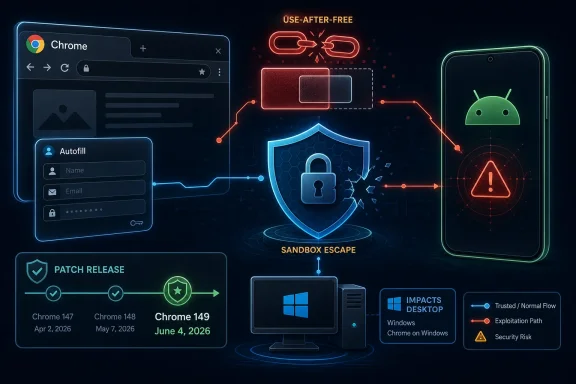
Google published CVE-2026-10934 on June 4, 2026, describing a high-severity use-after-free flaw in Chrome Autofill on Android before version 149.0.7827.53 that could let an attacker with renderer compromise attempt a sandbox escape through crafted HTML. That is a narrow sentence with a very large blast radius. It says the bug is Android-specific, but the fix arrived inside a much broader Chrome 149 security release that also matters to Windows users because Chromium is no longer merely a browser engine — it is shared infrastructure. The real story is not one Autofill bug; it is the growing difficulty of understanding browser risk when the affected component, affected platform, CVE metadata, and enterprise scanner output do not line up cleanly.
CVE-2026-10934 is easy to misread because its public record pulls in several layers of the Chromium ecosystem at once. The vulnerability description says “Google Chrome on Android,” the affected version threshold is Chrome 149.0.7827.53, and the weakness class is CWE-416, the familiar use after free memory-safety category that has haunted C and C++ software for decades.
The attack preconditions matter. This is not described as a one-click, direct remote code execution bug from a cold start. The attacker must already have compromised the renderer process, and the user interaction requirement in the CVSS vector suggests that a victim has to be drawn into the malicious content path. But the prize is serious: a potential sandbox escape.
That phrase should make administrators sit up. Browser sandboxes exist because modern web content is hostile by default. If the renderer is the front line, the sandbox is the wall behind it; a renderer bug chained to a sandbox escape is how a malicious web page begins to look less like a browser crash and more like a device compromise.
Google’s Chrome 149 stable update was unusually large, with hundreds of security fixes and a long roster of high and critical issues. CVE-2026-10934 appears in that flood as one high-severity Autofill flaw among many, which is precisely why it deserves attention. The danger in a giant security release is not that every CVE is equally urgent; it is that the one CVE relevant to your fleet can disappear into the patch noise.
That makes Autofill an attractive place for subtle bugs. It has to interpret web forms, react to page structure, mediate between stored personal data and hostile markup, and behave consistently across device classes. On Android, the feature also lives in a mobile environment where browser UI, operating-system services, saved credentials, keyboards, overlays, and touch-driven workflows create a different threat surface than desktop Chrome.
A use-after-free bug means software continued to reference memory after the object that owned it had been released. In exploit development, that can become a route to memory corruption, type confusion, object substitution, or control-flow manipulation. Not every use-after-free is exploitable in practice, and modern Chrome has multiple mitigations, but the pattern remains one of the browser world’s durable red flags.
The Autofill angle also complicates user advice. Telling people “do not visit suspicious sites” is not a meaningful mitigation for a browser flaw in 2026. The web is a supply chain: ads, embedded frames, redirects, compromised legitimate sites, and third-party scripts can all turn a normal browsing session into an exposure path.
Chrome’s multi-process design assumes renderer compromise is possible. The renderer handles risky content, and the sandbox is supposed to limit the damage. A vulnerability that helps cross that boundary has a different strategic value than a bug that merely crashes a tab or leaks a bit of state.
This is how browser exploitation is commonly assembled: one flaw gets code running inside the renderer, another escapes the sandbox, and sometimes a third escalates privilege or reaches deeper into the operating system. CVE-2026-10934 is publicly described as the second kind of link. It is not necessarily a complete chain by itself, but it is the sort of component an attacker wants in a chain.
The CVSS 3.1 vector assigned by CISA’s ADP gives it an 8.3 high rating, with network attack vector, high attack complexity, no privileges required, user interaction required, changed scope, and high impacts to confidentiality, integrity, and availability. The “high complexity” part is meaningful; this is not being presented as a trivial commodity bug. But “high complexity” is a weaker defense than many organizations think, especially against targeted actors who can reuse exploit primitives once they are developed.
The absence of a NIST NVD base score at first publication is also not unusual. NVD enrichment often lags vendor disclosure, and the initial record can be sparse. That does not make the bug less real; it means defenders should treat vendor advisories and browser version thresholds as the operational source of truth while metadata catches up.
But CPEs are blunt instruments. They work best when a product maps neatly to a platform and a version range. Chromium vulnerabilities routinely defy that neatness because the same codebase feeds Chrome, Chromium packages in Linux distributions, Android builds, ChromeOS builds, Edge, Brave, Vivaldi, Electron applications, embedded WebViews, and vendor-maintained forks with their own versioning and patch cadence.
For this CVE, the conservative reading is that the Android Chrome product CPE is the primary affected configuration. The NVD entry’s platform condition is not a clerical detail; it is the difference between “all Chrome installs before 149.0.7827.53” and “Chrome before that version when running on Android.” That distinction matters for scanners because a Windows endpoint running Chrome 149 may ingest the CVE through the desktop release notes even if the public vulnerability description names Android.
Still, administrators should not assume that absence of a CPE means absence of risk in adjacent Chromium products. It means the public vulnerability record has not mapped that product as affected. If a downstream browser vendor consumed the vulnerable Autofill code and later patched it, that vendor should publish its own advisory or release note. Until then, vulnerability management tools may either under-report the exposure or over-report it against unrelated systems.
This is why CPE hygiene has become a practical security problem. A vulnerability record is not just a database row; it drives dashboards, tickets, compliance reports, patch SLAs, and board-level risk summaries. When the CPE says Android and the release blog says desktop, the human in the loop has to understand that the release vehicle and the affected product may not be identical.
That breadth changes how organizations should think about patching. In the old desktop-software model, a browser update was an application update. In the modern endpoint model, the browser is a privileged interpreter for untrusted code, an identity surface, a password manager, a document viewer, a video stack, a GPU client, a protocol handler, and sometimes a thin application platform for the business itself.
Chrome’s release cadence reflects that reality. The stable channel moves quickly, and security updates arrive as part of a rolling maintenance stream rather than a monthly ceremony. That is healthy for consumers with automatic updates enabled, but it complicates enterprise change control, especially in environments that pin versions, stage deployments, or run compatibility testing against internal web apps.
Extended Stable channels and managed update policies can reduce feature churn, but they do not eliminate the need for urgent security movement. A sandbox escape candidate is the sort of bug that punishes slow patch pipelines. If a fleet’s browser update policy was designed around UI regression fear rather than exploit-chain risk, Chrome 149 is another argument for revisiting that bargain.
First, many Windows environments also manage Android devices. Corporate phones, tablets, shared frontline devices, kiosks, and BYOD profiles often sit under the same security governance umbrella as Windows endpoints. A Chrome Android sandbox escape is therefore not “mobile-only” in any practical enterprise sense; it is part of endpoint risk.
Second, the Chrome 149 release that contains this fix also contains many desktop-relevant fixes. If your patch process is reading the release as a single Chrome milestone, you should not let one Android-specific CVE distract from the broader point: Chrome before the fixed desktop versions carried a large set of vulnerabilities. Windows and macOS builds were updated to 149.0.7827.53/54, while Linux moved to 149.0.7827.53.
Third, Microsoft Edge and other Chromium-based browsers inherit large parts of Chromium’s security story but not always on Google’s exact schedule or with Google’s exact CVE mapping. A Windows shop that standardizes on Edge still needs to watch Chromium advisories because the underlying engine is shared. Microsoft’s release notes remain the authoritative source for Edge-specific remediation, but Chrome disclosures often foreshadow what Edge administrators need to verify.
Finally, vulnerability scanners often flatten nuance. They may flag a CVE against the browser family, the Chromium version, the package name, or the operating system context, and those mappings are not always graceful. Admins need to validate whether a scanner finding is a real affected configuration, a downstream package concern, or a metadata artifact.
That is why sandbox escapes attract so much attention. They challenge the containment model. If a renderer compromise is a fire in one room, a sandbox escape is a door left open into the rest of the building.
CVE-2026-10934’s precondition — a compromised renderer — does not make it harmless. It defines its role in a chain. In targeted attacks, exploit chains are built precisely by combining bugs whose individual descriptions sound conditional.
This is also why browser hardening is layered. Site isolation, process boundaries, memory allocators, control-flow protections, platform sandboxing, permission prompts, safe browsing systems, exploit mitigations, and automatic updates all exist because no single layer is expected to win every time. A use-after-free in Autofill is a bug in one component, but a potential sandbox escape is a test of the whole stack.
This frustrates researchers and defenders who want technical detail immediately. It also protects users during the most dangerous window, when a patch exists, attackers can diff code, and large populations have not yet updated. Publishing exploit-friendly detail too early would serve curiosity at the expense of patch adoption.
For administrators, the restricted bug means the right response is not to wait for proof-of-concept code. The right response is to verify version state. If Chrome on Android is below 149.0.7827.53, it is in the vulnerable range described by the CVE. If desktop Chrome is below the fixed Chrome 149 builds, the broader release should already be in scope for remediation.
The lack of exploit detail also means nobody should overstate the threat. There is no public evidence in the supplied record that CVE-2026-10934 is being actively exploited in the wild. It is high severity, plausible as part of a chain, and fixed in a major security release. That is enough to patch promptly without pretending every high CVE is a burning zero-day.
The correct answer is not to dismiss the scanner or blindly accept it. The correct answer is to map the finding to four facts: product, platform, version, and vendor advisory. If all four line up, remediate. If the version is patched, close with evidence. If the platform does not match but the package is Chromium-derived, check the downstream vendor’s advisory before declaring a false positive.
This is especially important in environments with compliance-driven patch SLAs. A high CVSS score can trigger a clock, but a bad CPE match can waste time. Conversely, assuming the CPE is wrong can leave real mobile exposure untouched.
The practical discipline is boring but effective. Inventory Chrome versions across Android, Windows, macOS, and Linux. Confirm whether managed mobile devices are receiving Play Store updates or enterprise-controlled app updates. Verify Edge and other Chromium browsers through their own release channels. Document exceptions by platform rather than by wishful reading of the CVE title.
That instinct is wrong. Component names are not impact labels. A flaw in Autofill can matter because Autofill handles structured web content and personal-data workflows inside the browser’s trust boundary. A flaw in a media codec can be a code execution problem. A flaw in a PDF viewer can be a browser compromise. The modern browser is too interconnected for surface labels to carry much comfort.
For Android users, the update path is straightforward in concept: update Chrome through the platform’s app-update mechanism and confirm the version is at or beyond the fixed build. In practice, device age, regional rollout timing, enterprise controls, managed Play configurations, and OEM policies can delay that outcome.
For Windows users, the lesson is broader. Keep Chrome and Chromium-based browsers moving. If you use Edge, check Edge’s version and release notes rather than assuming Chrome’s number applies. If you run both browsers, both need attention. If you manage browsers with a third-party patching tool, confirm that the tool has actually published and deployed the relevant package.
That sequencing is normal, but it creates a visibility gap. A user may think Chrome is “up to date” because the update is rolling out gradually. An enterprise may think it is covered because the package exists in the vendor channel. A scanner may still report vulnerable versions because endpoints have not restarted the browser.
Browsers are particularly prone to this last-mile problem. Chrome can download an update and still require a relaunch. Mobile apps may wait for charging, Wi-Fi, policy windows, or user behavior. Kiosk and shared devices may run browser processes for days. Remote workers may sit outside the neat assumptions of the office network.
For security teams, the meaningful metric is not whether Google shipped the fix. It is how many active browser instances in the fleet are actually running a fixed build. That requires telemetry, not optimism.
Memory-safe rewrites, stronger sandboxing, and exploit mitigations will reduce classes of bugs over time, but Chromium still contains vast amounts of performance-sensitive native code. Graphics, media, device integration, input handling, identity, payments, and web compatibility all create pressure to keep old surfaces alive while adding new ones. That is fertile ground for the occasional use-after-free.
The industry’s answer has been speed: faster release cycles, faster patch publication, faster auto-update, faster scanner ingestion. Speed helps, but speed also increases the burden on IT teams to separate signal from noise. Not every CVE deserves a war room, but every browser update deserves a path to completion.
CVE-2026-10934 illustrates that tension neatly. It is not the biggest-sounding bug in Chrome 149. It is not publicly known to be exploited. It is not even described as a Windows flaw. Yet it touches sandbox escape risk, sensitive browser functionality, mobile fleet management, and the ambiguity of vulnerability metadata. That is exactly the kind of issue that tests whether an organization’s patch process understands Chromium as an ecosystem rather than a single executable.
 A Mobile Autofill Bug Lands in a Desktop-Sized Patch
CVE-2026-10934 is easy to misread because its public record pulls in several layers of the Chromium ecosystem at once. The vulnerability description says “Google Chrome on Android,” the affected version threshold is Chrome 149.0.7827.53, and the weakness class is CWE-416, the familiar use after free memory-safety category that has haunted C and C++ software for decades.The attack preconditions matter. This is not described as a one-click, direct remote code execution bug from a cold start. The attacker must already have compromised the renderer process, and the user interaction requirement in the CVSS vector suggests that a victim has to be drawn into the malicious content path. But the prize is serious: a potential sandbox escape.
That phrase should make administrators sit up. Browser sandboxes exist because modern web content is hostile by default. If the renderer is the front line, the sandbox is the wall behind it; a renderer bug chained to a sandbox escape is how a malicious web page begins to look less like a browser crash and more like a device compromise.
Google’s Chrome 149 stable update was unusually large, with hundreds of security fixes and a long roster of high and critical issues. CVE-2026-10934 appears in that flood as one high-severity Autofill flaw among many, which is precisely why it deserves attention. The danger in a giant security release is not that every CVE is equally urgent; it is that the one CVE relevant to your fleet can disappear into the patch noise.
Autofill Is No Longer a Convenience Feature Sitting at the Edge
Autofill sounds benign, almost domestic: names, addresses, forms, payment fields, and the small usability shortcuts that keep people from typing the same data into the web forever. In security terms, though, Autofill sits close to sensitive user data, complex parsing, cross-origin web behavior, and UI assumptions about what the user sees versus what the page controls.That makes Autofill an attractive place for subtle bugs. It has to interpret web forms, react to page structure, mediate between stored personal data and hostile markup, and behave consistently across device classes. On Android, the feature also lives in a mobile environment where browser UI, operating-system services, saved credentials, keyboards, overlays, and touch-driven workflows create a different threat surface than desktop Chrome.
A use-after-free bug means software continued to reference memory after the object that owned it had been released. In exploit development, that can become a route to memory corruption, type confusion, object substitution, or control-flow manipulation. Not every use-after-free is exploitable in practice, and modern Chrome has multiple mitigations, but the pattern remains one of the browser world’s durable red flags.
The Autofill angle also complicates user advice. Telling people “do not visit suspicious sites” is not a meaningful mitigation for a browser flaw in 2026. The web is a supply chain: ads, embedded frames, redirects, compromised legitimate sites, and third-party scripts can all turn a normal browsing session into an exposure path.
The Sandbox Escape Is the Sentence That Matters
The public CVE text says the attacker must have compromised the renderer process first. Some readers will treat that as comfort. It is not comfort; it is architecture.Chrome’s multi-process design assumes renderer compromise is possible. The renderer handles risky content, and the sandbox is supposed to limit the damage. A vulnerability that helps cross that boundary has a different strategic value than a bug that merely crashes a tab or leaks a bit of state.
This is how browser exploitation is commonly assembled: one flaw gets code running inside the renderer, another escapes the sandbox, and sometimes a third escalates privilege or reaches deeper into the operating system. CVE-2026-10934 is publicly described as the second kind of link. It is not necessarily a complete chain by itself, but it is the sort of component an attacker wants in a chain.
The CVSS 3.1 vector assigned by CISA’s ADP gives it an 8.3 high rating, with network attack vector, high attack complexity, no privileges required, user interaction required, changed scope, and high impacts to confidentiality, integrity, and availability. The “high complexity” part is meaningful; this is not being presented as a trivial commodity bug. But “high complexity” is a weaker defense than many organizations think, especially against targeted actors who can reuse exploit primitives once they are developed.
The absence of a NIST NVD base score at first publication is also not unusual. NVD enrichment often lags vendor disclosure, and the initial record can be sparse. That does not make the bug less real; it means defenders should treat vendor advisories and browser version thresholds as the operational source of truth while metadata catches up.
The CPE Entry Is Awkward Because the Vulnerability Is Awkward
The user-facing question here — are we missing a CPE? — is exactly the right one. The NVD configuration shown for CVE-2026-10934 uses Google Chrome up to, but excluding, 149.0.7827.53, running on or with Android. That captures the vendor’s wording: Chrome on Android prior to the fixed version.But CPEs are blunt instruments. They work best when a product maps neatly to a platform and a version range. Chromium vulnerabilities routinely defy that neatness because the same codebase feeds Chrome, Chromium packages in Linux distributions, Android builds, ChromeOS builds, Edge, Brave, Vivaldi, Electron applications, embedded WebViews, and vendor-maintained forks with their own versioning and patch cadence.
For this CVE, the conservative reading is that the Android Chrome product CPE is the primary affected configuration. The NVD entry’s platform condition is not a clerical detail; it is the difference between “all Chrome installs before 149.0.7827.53” and “Chrome before that version when running on Android.” That distinction matters for scanners because a Windows endpoint running Chrome 149 may ingest the CVE through the desktop release notes even if the public vulnerability description names Android.
Still, administrators should not assume that absence of a CPE means absence of risk in adjacent Chromium products. It means the public vulnerability record has not mapped that product as affected. If a downstream browser vendor consumed the vulnerable Autofill code and later patched it, that vendor should publish its own advisory or release note. Until then, vulnerability management tools may either under-report the exposure or over-report it against unrelated systems.
This is why CPE hygiene has become a practical security problem. A vulnerability record is not just a database row; it drives dashboards, tickets, compliance reports, patch SLAs, and board-level risk summaries. When the CPE says Android and the release blog says desktop, the human in the loop has to understand that the release vehicle and the affected product may not be identical.
Chrome 149 Shows the Scale Problem in Browser Security
Chrome 149’s security release is a reminder that the browser is now one of the largest and most aggressively attacked pieces of software on any endpoint. The release included hundreds of security fixes, including many critical and high-severity issues across rendering, graphics, media, networking, V8, WebRTC, passwords, Autofill, and other components.That breadth changes how organizations should think about patching. In the old desktop-software model, a browser update was an application update. In the modern endpoint model, the browser is a privileged interpreter for untrusted code, an identity surface, a password manager, a document viewer, a video stack, a GPU client, a protocol handler, and sometimes a thin application platform for the business itself.
Chrome’s release cadence reflects that reality. The stable channel moves quickly, and security updates arrive as part of a rolling maintenance stream rather than a monthly ceremony. That is healthy for consumers with automatic updates enabled, but it complicates enterprise change control, especially in environments that pin versions, stage deployments, or run compatibility testing against internal web apps.
Extended Stable channels and managed update policies can reduce feature churn, but they do not eliminate the need for urgent security movement. A sandbox escape candidate is the sort of bug that punishes slow patch pipelines. If a fleet’s browser update policy was designed around UI regression fear rather than exploit-chain risk, Chrome 149 is another argument for revisiting that bargain.
Windows Admins Should Care Even When the CVE Says Android
For WindowsForum readers, the obvious objection is that CVE-2026-10934 is described as Chrome on Android. Why should a Windows admin care? Because the operational response to Chromium security is rarely confined to the exact affected platform string.First, many Windows environments also manage Android devices. Corporate phones, tablets, shared frontline devices, kiosks, and BYOD profiles often sit under the same security governance umbrella as Windows endpoints. A Chrome Android sandbox escape is therefore not “mobile-only” in any practical enterprise sense; it is part of endpoint risk.
Second, the Chrome 149 release that contains this fix also contains many desktop-relevant fixes. If your patch process is reading the release as a single Chrome milestone, you should not let one Android-specific CVE distract from the broader point: Chrome before the fixed desktop versions carried a large set of vulnerabilities. Windows and macOS builds were updated to 149.0.7827.53/54, while Linux moved to 149.0.7827.53.
Third, Microsoft Edge and other Chromium-based browsers inherit large parts of Chromium’s security story but not always on Google’s exact schedule or with Google’s exact CVE mapping. A Windows shop that standardizes on Edge still needs to watch Chromium advisories because the underlying engine is shared. Microsoft’s release notes remain the authoritative source for Edge-specific remediation, but Chrome disclosures often foreshadow what Edge administrators need to verify.
Finally, vulnerability scanners often flatten nuance. They may flag a CVE against the browser family, the Chromium version, the package name, or the operating system context, and those mappings are not always graceful. Admins need to validate whether a scanner finding is a real affected configuration, a downstream package concern, or a metadata artifact.
Renderer Compromise Is the Baseline Assumption Now
The most important shift in browser security over the past decade is psychological. We no longer assume that the renderer can be made perfectly safe. We assume it will be attacked, occasionally compromised, and then contained.That is why sandbox escapes attract so much attention. They challenge the containment model. If a renderer compromise is a fire in one room, a sandbox escape is a door left open into the rest of the building.
CVE-2026-10934’s precondition — a compromised renderer — does not make it harmless. It defines its role in a chain. In targeted attacks, exploit chains are built precisely by combining bugs whose individual descriptions sound conditional.
This is also why browser hardening is layered. Site isolation, process boundaries, memory allocators, control-flow protections, platform sandboxing, permission prompts, safe browsing systems, exploit mitigations, and automatic updates all exist because no single layer is expected to win every time. A use-after-free in Autofill is a bug in one component, but a potential sandbox escape is a test of the whole stack.
The Public Bug Is Restricted, and That Is a Feature
The Chromium issue linked to CVE-2026-10934 is restricted, which is typical for fresh security bugs. Google’s release notes routinely say bug details may remain limited until most users are updated, and that restriction can continue when third-party libraries or downstream projects are also affected.This frustrates researchers and defenders who want technical detail immediately. It also protects users during the most dangerous window, when a patch exists, attackers can diff code, and large populations have not yet updated. Publishing exploit-friendly detail too early would serve curiosity at the expense of patch adoption.
For administrators, the restricted bug means the right response is not to wait for proof-of-concept code. The right response is to verify version state. If Chrome on Android is below 149.0.7827.53, it is in the vulnerable range described by the CVE. If desktop Chrome is below the fixed Chrome 149 builds, the broader release should already be in scope for remediation.
The lack of exploit detail also means nobody should overstate the threat. There is no public evidence in the supplied record that CVE-2026-10934 is being actively exploited in the wild. It is high severity, plausible as part of a chain, and fixed in a major security release. That is enough to patch promptly without pretending every high CVE is a burning zero-day.
The Scanner Ticket Needs a Human, Not Just a SLA
CVE-2026-10934 is the kind of vulnerability that produces messy tickets. One tool may show the Android CPE and classify only mobile Chrome as affected. Another may ingest the Chrome 149 release and associate the CVE with desktop Chrome. A Linux scanner may surface it against a distro Chromium package even when the upstream wording says Android. An asset team may then ask why a Windows workstation appears to have a mobile browser CVE.The correct answer is not to dismiss the scanner or blindly accept it. The correct answer is to map the finding to four facts: product, platform, version, and vendor advisory. If all four line up, remediate. If the version is patched, close with evidence. If the platform does not match but the package is Chromium-derived, check the downstream vendor’s advisory before declaring a false positive.
This is especially important in environments with compliance-driven patch SLAs. A high CVSS score can trigger a clock, but a bad CPE match can waste time. Conversely, assuming the CPE is wrong can leave real mobile exposure untouched.
The practical discipline is boring but effective. Inventory Chrome versions across Android, Windows, macOS, and Linux. Confirm whether managed mobile devices are receiving Play Store updates or enterprise-controlled app updates. Verify Edge and other Chromium browsers through their own release channels. Document exceptions by platform rather than by wishful reading of the CVE title.
The Autofill Name Should Not Lull Users Into Waiting
Users often rank browser vulnerabilities by component name. V8 sounds dangerous. GPU sounds dangerous. Autofill sounds like a settings-panel annoyance.That instinct is wrong. Component names are not impact labels. A flaw in Autofill can matter because Autofill handles structured web content and personal-data workflows inside the browser’s trust boundary. A flaw in a media codec can be a code execution problem. A flaw in a PDF viewer can be a browser compromise. The modern browser is too interconnected for surface labels to carry much comfort.
For Android users, the update path is straightforward in concept: update Chrome through the platform’s app-update mechanism and confirm the version is at or beyond the fixed build. In practice, device age, regional rollout timing, enterprise controls, managed Play configurations, and OEM policies can delay that outcome.
For Windows users, the lesson is broader. Keep Chrome and Chromium-based browsers moving. If you use Edge, check Edge’s version and release notes rather than assuming Chrome’s number applies. If you run both browsers, both need attention. If you manage browsers with a third-party patching tool, confirm that the tool has actually published and deployed the relevant package.
The Patch Window Is Where This CVE Becomes Operational
The most dangerous period for many browser vulnerabilities is not the day before disclosure. It is the week after disclosure, when defenders are reading advisories, attackers are studying patches, and users are waiting for automatic updates to finish. CVE-2026-10934 entered that window on June 4, 2026, after Chrome 149 had already begun rolling out on June 2.That sequencing is normal, but it creates a visibility gap. A user may think Chrome is “up to date” because the update is rolling out gradually. An enterprise may think it is covered because the package exists in the vendor channel. A scanner may still report vulnerable versions because endpoints have not restarted the browser.
Browsers are particularly prone to this last-mile problem. Chrome can download an update and still require a relaunch. Mobile apps may wait for charging, Wi-Fi, policy windows, or user behavior. Kiosk and shared devices may run browser processes for days. Remote workers may sit outside the neat assumptions of the office network.
For security teams, the meaningful metric is not whether Google shipped the fix. It is how many active browser instances in the fleet are actually running a fixed build. That requires telemetry, not optimism.
What Chrome 149 Tells Us About the Next Browser Fire Drill
Chrome 149 is not an isolated event. It is part of a trend in which browser releases carry huge bundles of security fixes, many of them memory-safety issues, some of them critical, and several touching features users barely think about. The browser is becoming both more hardened and more complex, and those two facts are not in conflict.Memory-safe rewrites, stronger sandboxing, and exploit mitigations will reduce classes of bugs over time, but Chromium still contains vast amounts of performance-sensitive native code. Graphics, media, device integration, input handling, identity, payments, and web compatibility all create pressure to keep old surfaces alive while adding new ones. That is fertile ground for the occasional use-after-free.
The industry’s answer has been speed: faster release cycles, faster patch publication, faster auto-update, faster scanner ingestion. Speed helps, but speed also increases the burden on IT teams to separate signal from noise. Not every CVE deserves a war room, but every browser update deserves a path to completion.
CVE-2026-10934 illustrates that tension neatly. It is not the biggest-sounding bug in Chrome 149. It is not publicly known to be exploited. It is not even described as a Windows flaw. Yet it touches sandbox escape risk, sensitive browser functionality, mobile fleet management, and the ambiguity of vulnerability metadata. That is exactly the kind of issue that tests whether an organization’s patch process understands Chromium as an ecosystem rather than a single executable.
The Autofill Bug Leaves a Short Checklist Behind
CVE-2026-10934 should be treated as a prompt to verify browser hygiene rather than as a reason to panic. The fixed version threshold is clear for Chrome on Android, and the broader Chrome 149 release makes the desktop patching case obvious even where this specific CVE’s platform language is narrower.- Chrome on Android should be updated to version 149.0.7827.53 or later wherever the device is in scope for corporate or personal security management.
- Desktop Chrome should be kept at the fixed Chrome 149 builds or later because the same release carried a large set of other security fixes beyond this Android Autofill CVE.
- Vulnerability scanner findings should be checked against product, platform, version, and vendor advisory before being closed as false positives or escalated as real exposure.
- Edge and other Chromium-based browsers should be verified through their own release notes and version numbers, not assumed safe merely because Chrome has shipped a fix.
- A patched browser that has not been relaunched should not be counted as remediated in operational reporting.
- The lack of public exploit detail should lower the rhetoric, not the urgency of routine browser patching.
References
- Primary source: NVD / Chromium
Published: 2026-06-09T07:00:59-07:00

NVD - CVE-2026-10934
nvd.nist.gov
- Security advisory: MSRC
Published: 2026-06-09T07:00:59-07:00
Original feed URL

Security Update Guide - Microsoft Security Response Center
msrc.microsoft.com
- Related coverage: security.snyk.io
- Related coverage: stack.watch