

CVE-2026-12007 is a critical Google Chrome for Windows vulnerability fixed on June 11, 2026, in Chrome 149.0.7827.115, where a crafted HTML page could trigger a use-after-free bug in Chrome’s Core component and allow remote code execution. The short answer for scanners is that the NVD entry does include a CPE configuration, but it is easy to miss because the page’s JavaScript-backed CPE display can lag or fail while the change history shows the real enrichment. The longer answer is more interesting: this CVE is another reminder that browser patching is now Windows patching by another route, and asset inventories that treat Chrome as “just an app” are increasingly out of step with the risk.
The description of CVE-2026-12007 is terse in the way Chrome security notes often are: “use after free,” “Core,” “Windows,” “crafted HTML page,” “arbitrary code.” That is enough to tell defenders almost everything they need operationally and almost nothing they want intellectually. The bug was patched in the Stable Channel update that moved Windows and Mac builds to 149.0.7827.114/.115 and Linux to 149.0.7827.114, with Google saying the release would roll out over the coming days and weeks.
For Windows administrators, the platform qualifier matters. The NVD record describes the affected software as Google Chrome on Windows prior to 149.0.7827.115, not Chrome everywhere and not Windows itself. That distinction can get muddy in vulnerability-management dashboards because the CPE configuration combines the application CPE for Google Chrome with the operating-system CPE for Microsoft Windows.
That does not mean Microsoft shipped the bug. It means the vulnerable configuration is Chrome running on Windows. In practice, however, the risk lands on the Windows estate: help desks, endpoint managers, SOC dashboards, compliance reports, and user machines that may or may not have restarted Chrome since the last update.
This is where modern browser security collides with the old taxonomy of “OS patches” and “third-party patches.” A remote code execution issue reachable through a crafted web page is operationally closer to a Patch Tuesday emergency than to a routine application refresh. The browser is the interpreter for the public internet, the PDF reader for half the enterprise, the front end for SaaS, and the place where identity tokens live.
That structure is not a random duplication. It is an AND configuration: Chrome is the vulnerable application, Windows is the relevant platform condition. The important bit for vulnerability scanners is the Chrome application CPE and the upper version bound excluding 149.0.7827.115.
Still, the NVD presentation leaves room for confusion. If the visible CPE panel stalls while the change history contains the actual configuration, a human analyst sees two different states of truth on the same page. For a vulnerability database that feeds automation, ticketing, dashboards, and audit evidence, that is not merely cosmetic.
The more subtle issue is naming. Many products have vendor-specific CPE naming inconsistencies, and Chrome has historically appeared across databases in ways that can trip up matching logic. Here, the application CPE shown in the change record uses
A use-after-free flaw occurs when software continues to use memory after it has been released. In exploit terms, that can become a way to confuse the program about what object it is operating on, redirect control flow, or corrupt memory in a controlled enough way to gain execution. The exact details of Chrome bugs are commonly restricted until enough users have updated, precisely because a proof-of-concept can become a weapon.
The CVSS vector supplied by CISA’s ADP enrichment captures why defenders should not wave this off: network attack vector, low attack complexity, no privileges required, user interaction required, and high impact across confidentiality, integrity, and availability. In plain English, the user may need to visit or be lured to a malicious page, but the attacker does not need an account on the target system.
That “user interaction required” field often causes a dangerous shrug. On paper, it is not a worm. In the real world, web browsing is user interaction at industrial scale. Phishing links, malvertising, compromised websites, poisoned search results, and malicious redirects are all delivery mechanisms for a bug whose trigger is a crafted HTML page.
That restriction is frustrating but rational. A browser vendor has to publish enough to tell administrators to patch while not publishing a recipe for exploit developers. The result is a security communication style that feels like a weather warning issued through a keyhole: enough to know the storm is coming, not enough to model every gust.
For defenders, the absence of public exploitation details is not evidence of low risk. The NVD record does not say this was exploited in the wild, and the Chrome advisory for this specific CVE does not appear to make that claim. That distinction matters, especially because another Chrome issue patched days earlier, CVE-2026-11645, was reported as having an exploit in the wild. Conflating the two would inflate the story and mislead patch prioritization.
The right posture is narrower and firmer: CVE-2026-12007 is a critical, remotely reachable Chrome-on-Windows bug fixed in 149.0.7827.115, with details restricted and a high CVSS 3.1 score from CISA ADP. That is more than enough to justify accelerated deployment on managed Windows endpoints, even without a public “exploited” tag.
That sounds simple until it meets enterprise reality. Chrome auto-update is good, but it is not magic. Browsers can remain open for days, virtual desktops can suspend and resume, update services can be disabled by image drift or overzealous hardening, and application control policies can interfere with installation flows.
The Chrome release also uses split build notation: 149.0.7827.114/.115 for Windows and Mac. That is normal for Chrome’s release machinery, but vulnerability-management teams should avoid treating the lower number as sufficient when the NVD range explicitly says Windows prior to 149.0.7827.115. If your scanner, report, or endpoint query is making a pass/fail decision for this CVE, the safe threshold for Windows is 149.0.7827.115.
This is especially important in mixed fleets where macOS, Linux, Windows, and Extended Stable channels may report adjacent but not identical build numbers. Administrators should resist the urge to normalize those into a single “Chrome 149 is fine” rule. The CVE’s boundary is a specific build, and the platform condition is part of the definition.
The practical lesson is that Chromium lineage creates correlated patch pressure across browsers, but CVE applicability still depends on vendor advisories and product-specific integration. Edge uses Chromium, but Microsoft ships it on Microsoft’s schedule and may carry fixes through separate version numbers, release notes, and CVE mappings. A Chrome CPE does not become an Edge CPE merely because the word Chromium appears in the ecosystem.
For WindowsForum readers, that means two parallel checks. First, update Chrome where Chrome is installed. Second, check Edge through Microsoft’s normal update channels and security advisories rather than assuming Chrome’s build number tells the whole story. On many Windows machines, both browsers are present; patching one does not patch the other.
The same logic applies to embedded Chromium runtimes, Electron applications, WebView2-dependent software, and third-party browsers that track Chromium. A CVE scoped to Chrome should not be blindly sprayed across all of them, but neither should defenders pretend a critical memory safety fix in Chromium-land is somebody else’s problem.
Chrome has invested heavily in sandboxing, fuzzing, sanitizers, site isolation, exploit mitigations, and memory-safety initiatives. Those investments matter. They turn many bugs into crashes, many crashes into contained renderer failures, and many renderer compromises into problems that still require a second vulnerability to escape the sandbox.
But the browser remains a giant parser of hostile input. HTML, JavaScript, CSS, media codecs, fonts, graphics APIs, USB-adjacent features, identity mechanisms, accessibility layers, translation, printing, extensions, password flows, and enterprise policy all meet inside the same user-facing application. “Core” is not a narrow blast chamber; it is part of the machinery that makes the browser feel like an operating system in miniature.
That is why use-after-free vulnerabilities still carry weight in 2026. Even when a single bug does not guarantee full system compromise, it can be one link in a chain. Attackers do not need one perfect vulnerability if they can combine renderer execution, sandbox escape, credential theft, session hijacking, or social engineering into a campaign that gets the same result.
Chrome’s rapid release model changes the shape of risk. Delaying browser updates to preserve stability can create a wider exposure window than many organizations realize, especially because Chrome security advisories often disclose enough detail for exploit developers to start diffing patches. Once a fix is public, the race is no longer theoretical.
Windows shops should know how quickly Chrome moves from “available” to “installed and relaunched.” That means measuring not just package deployment but active process replacement. A browser that has downloaded an update but has not restarted is still a browser running old code.
For managed environments, this is where policy matters. Chrome’s enterprise update controls can be used well or badly. Deferrals, target channels, restart prompts, and auto-update enforcement should be tuned with the assumption that critical browser fixes are time-sensitive. A governance model built around monthly desktop patch cycles will be too slow for some browser CVEs.
The “Are we missing a CPE?” prompt is a generic NVD mechanism, not proof that the record is incomplete. In this case, the change history indicates that NIST added an affected configuration on June 12, one day after Chrome submitted the CVE. The browser display may be the weak link, not the vulnerability metadata.
That said, security teams should not blindly trust that every tool ingests the same fields at the same speed. NVD enrichment, vendor advisories, CISA ADP scoring, scanner plugins, endpoint inventory, and SIEM correlation often update on different clocks. A CVE can be “known” in one system, “not applicable” in another, and “pending analysis” in a third.
The operational answer is to make the version check authoritative. Query installed Chrome versions directly, compare them against the fixed build, and use CVE metadata to drive prioritization rather than to substitute for inventory. If a dashboard says “no vulnerable CPE” but your endpoint reports Chrome 149.0.7827.102 on Windows, believe the endpoint and update the browser.
A vulnerability reachable through page content can sit behind a phishing lure, but it can also ride on compromised legitimate infrastructure. Attackers targeting enterprises often care less about mass exploitation than about dependable delivery to a small number of users with valuable access. A browser RCE is especially attractive because the browser is where the work happens.
The Windows angle sharpens that risk. Windows remains the default endpoint platform across large parts of business, government, education, and healthcare. A Chrome-on-Windows critical bug is not a niche desktop concern; it is a mainstream endpoint concern.
The most valuable targets may not be administrators in the classic sense. They may be finance users with access to payment systems, developers with cloud credentials, HR staff with sensitive documents, or executives whose browser sessions are worth more than local admin. Browser compromise has become identity compromise by another route.
The CVSS 3.1 score of 8.8 is high rather than the maximum critical band used by some scoring schemes, while Chromium’s own security severity marks the issue critical. That mismatch is not unusual. Vendor severity often reflects exploitability and browser-specific context in ways that generic scoring systems flatten.
Administrators should read both signals together. The CVSS vector says remote, low complexity, no privileges, user interaction, and high impact. Chrome’s critical label says the vendor considers this one of the more serious classes of browser vulnerability. The absence of a public NVD score from NIST at publication time does not reduce the urgency.
The better question is how quickly an organization can close a browser CVE without heroic effort. If the answer is “we need a special project,” the problem is not CVE-2026-12007. The problem is that the browser has become critical infrastructure while the patch process still treats it as desktop furniture.
Security teams are often tempted to chase the single named vulnerability with the scariest description. That is understandable, but browser updates are cumulative risk reduction. The same build that fixes CVE-2026-12007 also closes other paths through GPU, DigitalCredentials, WebMIDI, Network, Media, Extensions, Mojo, DevTools, Safe Browsing, Views, Passwords, Video, and other components.
This matters because attackers do not read advisories the way compliance teams do. They look for chains, adjacent primitives, and newly patched code paths. A high-severity bug that seems less dramatic in isolation may become valuable when paired with another vulnerability.
That is another reason version-based remediation is the right mental model. Do not build a bespoke mitigation plan for every Chrome CVE in the advisory unless you have a research reason to do so. Get the browser to the fixed build and verify that the old process is gone.
For IT pros, the more useful exercise is to ask how many Chrome instances are below 149.0.7827.115 right now. Not in last week’s software inventory. Not in a monthly compliance snapshot. Now. Browser exposure ages quickly.
Endpoint management tools should be able to report Chrome version across the fleet, but the quality varies. Some inventories report the installed package version, others report the running executable, and some lag until the next check-in. For a critical browser bug, the running version is the one that matters most.
Security teams should also watch for unmanaged Chrome installs. User-installed copies, stale portable builds, developer workstations, VDI base images, and lab machines often escape the clean lines of enterprise software deployment. Those are exactly the systems that turn a straightforward patch into a lingering exception.
Windows hardening still matters. Application control, exploit protection, least privilege, endpoint isolation, browser site isolation, DNS filtering, attack surface reduction rules, EDR, and phishing-resistant authentication all help determine how far an attacker can go after a browser exploit. But those controls should be layers around a fast patch process, not excuses to tolerate stale browser builds.
This is especially true because arbitrary code execution in a browser context can be useful even without immediate local administrator privileges. Stealing session cookies, manipulating web sessions, reading accessible files, staging payloads, or pivoting through user trust can be enough. The browser has become a privileged social and identity environment even when the Windows token is not elevated.
Defenders should therefore treat Chrome patching as part of endpoint hardening. The line between “browser security” and “Windows security” is more organizational than technical. Attackers do not care which team owns the update ring.
That should settle the immediate triage. If you are below the fixed build on Windows, update. If your scanner says the CPE is missing, inspect the feed details and do not let a UI artifact override the version boundary. If you manage endpoints, verify relaunch.
The uncomfortable part is that the next Chrome issue will look much the same: a short advisory, restricted bug details, a version threshold, and a scramble to establish fleet reality. That is the browser security treadmill. The organizations that do well are not the ones that write the longest exception memos; they are the ones that can answer the version question quickly and act on it.
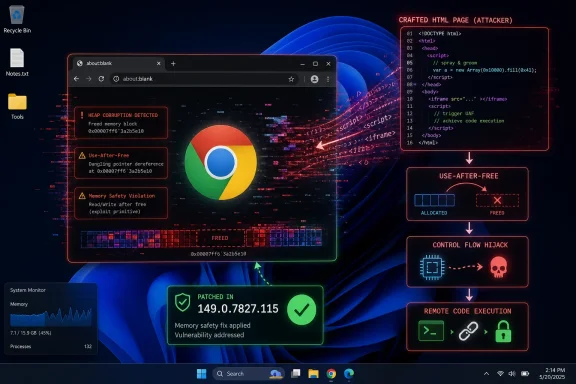 The Browser Bug That Looks Like an Operating-System Problem
The description of CVE-2026-12007 is terse in the way Chrome security notes often are: “use after free,” “Core,” “Windows,” “crafted HTML page,” “arbitrary code.” That is enough to tell defenders almost everything they need operationally and almost nothing they want intellectually. The bug was patched in the Stable Channel update that moved Windows and Mac builds to 149.0.7827.114/.115 and Linux to 149.0.7827.114, with Google saying the release would roll out over the coming days and weeks.For Windows administrators, the platform qualifier matters. The NVD record describes the affected software as Google Chrome on Windows prior to 149.0.7827.115, not Chrome everywhere and not Windows itself. That distinction can get muddy in vulnerability-management dashboards because the CPE configuration combines the application CPE for Google Chrome with the operating-system CPE for Microsoft Windows.
That does not mean Microsoft shipped the bug. It means the vulnerable configuration is Chrome running on Windows. In practice, however, the risk lands on the Windows estate: help desks, endpoint managers, SOC dashboards, compliance reports, and user machines that may or may not have restarted Chrome since the last update.
This is where modern browser security collides with the old taxonomy of “OS patches” and “third-party patches.” A remote code execution issue reachable through a crafted web page is operationally closer to a Patch Tuesday emergency than to a routine application refresh. The browser is the interpreter for the public internet, the PDF reader for half the enterprise, the front end for SaaS, and the place where identity tokens live.
The CPE Is There, but the Presentation Is Doing No One Any Favors
The user-facing NVD page may show “CPEs loading, please wait,” which naturally prompts the question: are we missing a CPE here? Based on the change history, no. NIST’s initial analysis added a configuration that pairscpe:2.3:a:google:chrome:*:*:*:*:*:*:*:* with versions up to, but excluding, 149.0.7827.115, and cpe:2.3:o:microsoft:windows:-:*:*:*:*:*:*:*.That structure is not a random duplication. It is an AND configuration: Chrome is the vulnerable application, Windows is the relevant platform condition. The important bit for vulnerability scanners is the Chrome application CPE and the upper version bound excluding 149.0.7827.115.
Still, the NVD presentation leaves room for confusion. If the visible CPE panel stalls while the change history contains the actual configuration, a human analyst sees two different states of truth on the same page. For a vulnerability database that feeds automation, ticketing, dashboards, and audit evidence, that is not merely cosmetic.
The more subtle issue is naming. Many products have vendor-specific CPE naming inconsistencies, and Chrome has historically appeared across databases in ways that can trip up matching logic. Here, the application CPE shown in the change record uses
google:chrome, which is the right anchor for this entry’s affected software. If a scanner is looking only for a different Chrome naming pattern, it may fail to map the CVE cleanly even when the NVD enrichment exists.“Core” Is a Small Word for a Large Attack Surface
Google’s advisory labels CVE-2026-12007 as a critical use-after-free vulnerability in Core, reported by Google on May 26, 2026. “Core” is not a user-facing feature, and that is partly why this kind of issue is uncomfortable. Users know extensions, profiles, password managers, tabs, and downloads; attackers care about object lifetimes, renderer behavior, memory safety, and the path from a webpage to code execution.A use-after-free flaw occurs when software continues to use memory after it has been released. In exploit terms, that can become a way to confuse the program about what object it is operating on, redirect control flow, or corrupt memory in a controlled enough way to gain execution. The exact details of Chrome bugs are commonly restricted until enough users have updated, precisely because a proof-of-concept can become a weapon.
The CVSS vector supplied by CISA’s ADP enrichment captures why defenders should not wave this off: network attack vector, low attack complexity, no privileges required, user interaction required, and high impact across confidentiality, integrity, and availability. In plain English, the user may need to visit or be lured to a malicious page, but the attacker does not need an account on the target system.
That “user interaction required” field often causes a dangerous shrug. On paper, it is not a worm. In the real world, web browsing is user interaction at industrial scale. Phishing links, malvertising, compromised websites, poisoned search results, and malicious redirects are all delivery mechanisms for a bug whose trigger is a crafted HTML page.
Google’s Patch Notes Say Less Than Defenders Need, by Design
The Chrome release note for June 11 lists 28 security fixes and highlights externally contributed or otherwise notable issues. CVE-2026-12007 sits at the top of the list, marked critical, followed by several other critical bugs in areas such as DigitalCredentials, Accessibility, GPU, and WebMIDI. The advisory also repeats Google’s standard warning that bug details and links may remain restricted until most users are updated.That restriction is frustrating but rational. A browser vendor has to publish enough to tell administrators to patch while not publishing a recipe for exploit developers. The result is a security communication style that feels like a weather warning issued through a keyhole: enough to know the storm is coming, not enough to model every gust.
For defenders, the absence of public exploitation details is not evidence of low risk. The NVD record does not say this was exploited in the wild, and the Chrome advisory for this specific CVE does not appear to make that claim. That distinction matters, especially because another Chrome issue patched days earlier, CVE-2026-11645, was reported as having an exploit in the wild. Conflating the two would inflate the story and mislead patch prioritization.
The right posture is narrower and firmer: CVE-2026-12007 is a critical, remotely reachable Chrome-on-Windows bug fixed in 149.0.7827.115, with details restricted and a high CVSS 3.1 score from CISA ADP. That is more than enough to justify accelerated deployment on managed Windows endpoints, even without a public “exploited” tag.
Chrome’s Version Number Is the Control, Not the Advisory Text
The most practical control for CVE-2026-12007 is not a registry key, a firewall rule, or a detection regex. It is the Chrome version. Windows systems running Chrome before 149.0.7827.115 are the exposed population described by the CVE; systems at 149.0.7827.115 or later are outside the stated vulnerable range.That sounds simple until it meets enterprise reality. Chrome auto-update is good, but it is not magic. Browsers can remain open for days, virtual desktops can suspend and resume, update services can be disabled by image drift or overzealous hardening, and application control policies can interfere with installation flows.
The Chrome release also uses split build notation: 149.0.7827.114/.115 for Windows and Mac. That is normal for Chrome’s release machinery, but vulnerability-management teams should avoid treating the lower number as sufficient when the NVD range explicitly says Windows prior to 149.0.7827.115. If your scanner, report, or endpoint query is making a pass/fail decision for this CVE, the safe threshold for Windows is 149.0.7827.115.
This is especially important in mixed fleets where macOS, Linux, Windows, and Extended Stable channels may report adjacent but not identical build numbers. Administrators should resist the urge to normalize those into a single “Chrome 149 is fine” rule. The CVE’s boundary is a specific build, and the platform condition is part of the definition.
The Edge Question Is Unavoidable, Even When the CVE Says Chrome
Any Chrome critical memory bug raises the Microsoft Edge question because Edge is Chromium-based. But CVE-2026-12007, as published, is a Google Chrome CVE affecting Chrome on Windows prior to 149.0.7827.115. That does not automatically prove Edge is affected, unaffected, patched, or irrelevant.The practical lesson is that Chromium lineage creates correlated patch pressure across browsers, but CVE applicability still depends on vendor advisories and product-specific integration. Edge uses Chromium, but Microsoft ships it on Microsoft’s schedule and may carry fixes through separate version numbers, release notes, and CVE mappings. A Chrome CPE does not become an Edge CPE merely because the word Chromium appears in the ecosystem.
For WindowsForum readers, that means two parallel checks. First, update Chrome where Chrome is installed. Second, check Edge through Microsoft’s normal update channels and security advisories rather than assuming Chrome’s build number tells the whole story. On many Windows machines, both browsers are present; patching one does not patch the other.
The same logic applies to embedded Chromium runtimes, Electron applications, WebView2-dependent software, and third-party browsers that track Chromium. A CVE scoped to Chrome should not be blindly sprayed across all of them, but neither should defenders pretend a critical memory safety fix in Chromium-land is somebody else’s problem.
Memory Safety Keeps Collecting Its Tax
The uncomfortable pattern in the June 11 Chrome advisory is not merely one critical vulnerability. It is the clustering of memory corruption and validation bugs across browser subsystems: use-after-free, heap buffer overflow, out-of-bounds access, insufficient validation, inappropriate implementation, and race conditions. That is the familiar grammar of browser exploitation.Chrome has invested heavily in sandboxing, fuzzing, sanitizers, site isolation, exploit mitigations, and memory-safety initiatives. Those investments matter. They turn many bugs into crashes, many crashes into contained renderer failures, and many renderer compromises into problems that still require a second vulnerability to escape the sandbox.
But the browser remains a giant parser of hostile input. HTML, JavaScript, CSS, media codecs, fonts, graphics APIs, USB-adjacent features, identity mechanisms, accessibility layers, translation, printing, extensions, password flows, and enterprise policy all meet inside the same user-facing application. “Core” is not a narrow blast chamber; it is part of the machinery that makes the browser feel like an operating system in miniature.
That is why use-after-free vulnerabilities still carry weight in 2026. Even when a single bug does not guarantee full system compromise, it can be one link in a chain. Attackers do not need one perfect vulnerability if they can combine renderer execution, sandbox escape, credential theft, session hijacking, or social engineering into a campaign that gets the same result.
Windows Administrators Should Treat Browser Currency as a Security Baseline
The old enterprise instinct was to certify a browser version and hold it steady. That instinct made sense when browser updates broke intranet apps and when the browser was one application among many. It makes less sense when a browser is a continuously attacked runtime carrying credentials into every SaaS platform the company owns.Chrome’s rapid release model changes the shape of risk. Delaying browser updates to preserve stability can create a wider exposure window than many organizations realize, especially because Chrome security advisories often disclose enough detail for exploit developers to start diffing patches. Once a fix is public, the race is no longer theoretical.
Windows shops should know how quickly Chrome moves from “available” to “installed and relaunched.” That means measuring not just package deployment but active process replacement. A browser that has downloaded an update but has not restarted is still a browser running old code.
For managed environments, this is where policy matters. Chrome’s enterprise update controls can be used well or badly. Deferrals, target channels, restart prompts, and auto-update enforcement should be tuned with the assumption that critical browser fixes are time-sensitive. A governance model built around monthly desktop patch cycles will be too slow for some browser CVEs.
Scanner Output Needs Human Skepticism, Not Human Guesswork
The CPE confusion around this entry is a good case study in vulnerability-management hygiene. If an NVD page’s main CPE panel appears empty or stuck, but the change history shows a CPE configuration, the right move is not to assume the CVE lacks affected product data. It is to inspect the record’s enrichment, compare vendor advisory text, and validate how your scanner maps the product.The “Are we missing a CPE?” prompt is a generic NVD mechanism, not proof that the record is incomplete. In this case, the change history indicates that NIST added an affected configuration on June 12, one day after Chrome submitted the CVE. The browser display may be the weak link, not the vulnerability metadata.
That said, security teams should not blindly trust that every tool ingests the same fields at the same speed. NVD enrichment, vendor advisories, CISA ADP scoring, scanner plugins, endpoint inventory, and SIEM correlation often update on different clocks. A CVE can be “known” in one system, “not applicable” in another, and “pending analysis” in a third.
The operational answer is to make the version check authoritative. Query installed Chrome versions directly, compare them against the fixed build, and use CVE metadata to drive prioritization rather than to substitute for inventory. If a dashboard says “no vulnerable CPE” but your endpoint reports Chrome 149.0.7827.102 on Windows, believe the endpoint and update the browser.
The Risk Is Bigger Than One Crafted Page
A crafted HTML page sounds almost quaint, as if the attacker must persuade a user to visit a strange website with neon skulls and broken English. The modern web does not work that way. Users pass through dozens of third-party scripts, ad networks, redirectors, content delivery paths, federated login flows, and embedded webviews in a normal day.A vulnerability reachable through page content can sit behind a phishing lure, but it can also ride on compromised legitimate infrastructure. Attackers targeting enterprises often care less about mass exploitation than about dependable delivery to a small number of users with valuable access. A browser RCE is especially attractive because the browser is where the work happens.
The Windows angle sharpens that risk. Windows remains the default endpoint platform across large parts of business, government, education, and healthcare. A Chrome-on-Windows critical bug is not a niche desktop concern; it is a mainstream endpoint concern.
The most valuable targets may not be administrators in the classic sense. They may be finance users with access to payment systems, developers with cloud credentials, HR staff with sensitive documents, or executives whose browser sessions are worth more than local admin. Browser compromise has become identity compromise by another route.
“Critical” Does Not Mean Panic, but It Does Mean a Short Clock
There is a difference between panic and urgency. Panic is rewriting firewall rules at midnight based on a half-read CVE. Urgency is knowing exactly which Windows endpoints have Chrome below 149.0.7827.115 and pushing them through update and relaunch before the exposure window becomes comfortable for attackers.The CVSS 3.1 score of 8.8 is high rather than the maximum critical band used by some scoring schemes, while Chromium’s own security severity marks the issue critical. That mismatch is not unusual. Vendor severity often reflects exploitability and browser-specific context in ways that generic scoring systems flatten.
Administrators should read both signals together. The CVSS vector says remote, low complexity, no privileges, user interaction, and high impact. Chrome’s critical label says the vendor considers this one of the more serious classes of browser vulnerability. The absence of a public NVD score from NIST at publication time does not reduce the urgency.
The better question is how quickly an organization can close a browser CVE without heroic effort. If the answer is “we need a special project,” the problem is not CVE-2026-12007. The problem is that the browser has become critical infrastructure while the patch process still treats it as desktop furniture.
The June 11 Update Was a Cluster, Not a One-Off
CVE-2026-12007 arrived in an update that fixed 28 security issues. Several were marked critical, and many more were high severity. Even if this particular CVE is the one that catches the eye because of its Core component and Windows-specific description, the surrounding advisory tells the larger story.Security teams are often tempted to chase the single named vulnerability with the scariest description. That is understandable, but browser updates are cumulative risk reduction. The same build that fixes CVE-2026-12007 also closes other paths through GPU, DigitalCredentials, WebMIDI, Network, Media, Extensions, Mojo, DevTools, Safe Browsing, Views, Passwords, Video, and other components.
This matters because attackers do not read advisories the way compliance teams do. They look for chains, adjacent primitives, and newly patched code paths. A high-severity bug that seems less dramatic in isolation may become valuable when paired with another vulnerability.
That is another reason version-based remediation is the right mental model. Do not build a bespoke mitigation plan for every Chrome CVE in the advisory unless you have a research reason to do so. Get the browser to the fixed build and verify that the old process is gone.
The Practical Window for WindowsForum Readers Is Narrow and Measurable
For home users, the advice is almost boring: open Chrome’s About page, let it update, and restart the browser. The risk is not that Google forgot how to ship updates; it is that people often leave browsers open indefinitely and assume “automatic” means “already running the patched code.”For IT pros, the more useful exercise is to ask how many Chrome instances are below 149.0.7827.115 right now. Not in last week’s software inventory. Not in a monthly compliance snapshot. Now. Browser exposure ages quickly.
Endpoint management tools should be able to report Chrome version across the fleet, but the quality varies. Some inventories report the installed package version, others report the running executable, and some lag until the next check-in. For a critical browser bug, the running version is the one that matters most.
Security teams should also watch for unmanaged Chrome installs. User-installed copies, stale portable builds, developer workstations, VDI base images, and lab machines often escape the clean lines of enterprise software deployment. Those are exactly the systems that turn a straightforward patch into a lingering exception.
The Chrome Fix Belongs in the Same Conversation as Windows Hardening
It is tempting to view Chrome CVEs as outside the Windows security model because Google ships the browser. That is a mistake. On Windows endpoints, Chrome interacts with the file system, credential stores, identity providers, document workflows, endpoint detection tools, clipboard, downloads, local apps, and sometimes privileged enterprise extensions.Windows hardening still matters. Application control, exploit protection, least privilege, endpoint isolation, browser site isolation, DNS filtering, attack surface reduction rules, EDR, and phishing-resistant authentication all help determine how far an attacker can go after a browser exploit. But those controls should be layers around a fast patch process, not excuses to tolerate stale browser builds.
This is especially true because arbitrary code execution in a browser context can be useful even without immediate local administrator privileges. Stealing session cookies, manipulating web sessions, reading accessible files, staging payloads, or pivoting through user trust can be enough. The browser has become a privileged social and identity environment even when the Windows token is not elevated.
Defenders should therefore treat Chrome patching as part of endpoint hardening. The line between “browser security” and “Windows security” is more organizational than technical. Attackers do not care which team owns the update ring.
The 149.0.7827.115 Line in the Sand
The actionable story is compact, even if the surrounding ecosystem is not. CVE-2026-12007 affects Google Chrome on Windows before 149.0.7827.115. Google fixed it in the June 11 Stable Channel update. NVD’s visible CPE panel may appear unhelpful, but the change history shows an affected configuration for Chrome on Windows.That should settle the immediate triage. If you are below the fixed build on Windows, update. If your scanner says the CPE is missing, inspect the feed details and do not let a UI artifact override the version boundary. If you manage endpoints, verify relaunch.
The uncomfortable part is that the next Chrome issue will look much the same: a short advisory, restricted bug details, a version threshold, and a scramble to establish fleet reality. That is the browser security treadmill. The organizations that do well are not the ones that write the longest exception memos; they are the ones that can answer the version question quickly and act on it.
The Patch Note Leaves a Few Hard Facts Behind
This is one of those security items where the uncertainty is mostly about exploit mechanics, not about what defenders should do. The concrete facts are enough to drive action.- CVE-2026-12007 is a use-after-free vulnerability in Google Chrome’s Core component on Windows.
- The affected range is Chrome for Windows before version 149.0.7827.115.
- Google released the relevant Stable Channel update on June 11, 2026, with Windows and Mac moving to 149.0.7827.114/.115 and Linux to 149.0.7827.114.
- CISA ADP supplied a CVSS 3.1 vector of AV:N/AC:L/PR:N/UI:R/S:U/C:H/I:H/A:H, producing an 8.8 high score.
- NVD’s change history shows an affected CPE configuration pairing Google Chrome with Microsoft Windows, even if the main CPE display appears to stall.
- The practical remediation is to update Chrome on Windows to 149.0.7827.115 or later and confirm the browser has restarted into the patched build.
References
- Primary source: NVD / Chromium
Published: 2026-06-15T07:00:24-07:00

NVD - CVE-2026-12007
 nvd.nist.gov
- Security advisory: MSRC
Published: 2026-06-15T07:00:24-07:00
Original feed URL

Security Update Guide - Microsoft Security Response Center
 msrc.microsoft.com
