

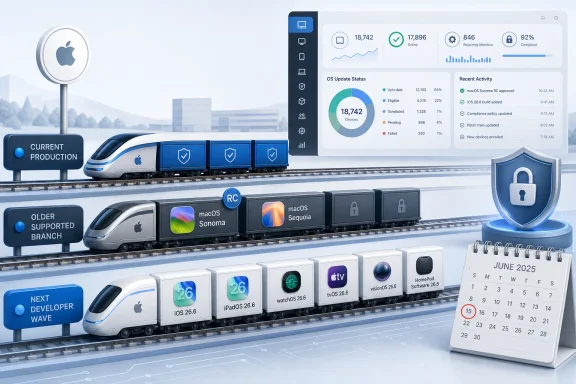
Apple on June 15, 2026 seeded second developer betas for iOS 26.6, iPadOS 26.6, macOS Tahoe 26.6, watchOS 26.6, tvOS 26.6, visionOS 26.6, and HomePod Software 26.6, while also issuing second release candidates for macOS Sequoia 15.7.8 and macOS Sonoma 14.8.8. The split matters more than the build numbers suggest. Apple is now maintaining three practical Mac lanes at once: the current production generation, two older supported macOS branches, and the next wave already moving through the post-WWDC developer pipeline. For Windows administrators who also manage Macs, this is less an Apple enthusiast footnote than a reminder that endpoint patching has become a multi-track operating system business.
The headline-grabbing Apple story each June is usually the next operating system: the redesigned interface, the new continuity trick, the AI promise, the developer APIs that may or may not become essential six months later. But the more consequential story for many users is the dull one: release candidates for old macOS versions, terse security language, and build numbers that signal an update is nearly ready for broad deployment.
That is what Apple appears to be doing with macOS Sonoma 14.8.8 and macOS Sequoia 15.7.8. Both have now reached a second release candidate, with reported builds 23J607 for Sonoma and 24G809 for Sequoia. Apple’s release-note language is characteristically spare, describing the updates as providing important security fixes and recommending them for all users.
That kind of phrasing is easy to skim past, but it is the language of operational reality. Not every Mac can move to the newest macOS. Not every organization wants to move immediately. Not every creative department, school lab, medical office, or developer workstation can treat a major OS upgrade as a casual afternoon errand.
Apple’s older macOS branches have therefore become a kind of quiet infrastructure layer. They are not where Apple sells the future, but they are where Apple keeps the present from falling apart.
The timing is also notable. The first RC builds for macOS Sonoma 14.8.8 and macOS Sequoia 15.7.8 reportedly appeared on May 26, followed by public beta availability on May 28. Now, on June 15, Apple has issued another RC wave. That is a long enough gap to suggest these were not merely ceremonial rebuilds.
For individual Mac users, the practical message is simple: if you are still on Sonoma or Sequoia, a security-focused update may be close. For administrators, the message is more layered. A second RC gives managed environments a better preview window, but it also raises the possibility that the earlier candidate contained something Apple did not want to ship unchanged.
Apple’s sparse release notes do not tell us whether the fixes address actively exploited vulnerabilities, routine hardening, or compatibility fallout from adjacent updates. That ambiguity is normal in Apple’s patch culture. It is also exactly why enterprises tend to care less about Apple’s marketing cadence than about repeatable deployment behavior.
This is the familiar late-cycle pattern: the current operating systems keep getting tuned while the next generation absorbs the ambitious feature work. After WWDC, Apple’s developer ecosystem usually has two rhythms running at once. One is the exciting, unstable, future-facing beta stream. The other is the less glamorous maintenance stream that must carry millions of production devices until the fall.
That division is not unique to Apple. Microsoft does the same thing through Windows Insider channels, cumulative updates, enablement packages, and long-tail servicing branches. The difference is cultural. Microsoft tends to make servicing mechanics visible, sometimes painfully so. Apple hides much of the machinery and asks users to trust the outcome.
For Mac users in mixed environments, the result is familiar but awkward. The beta that developers want to test may not be the update that administrators want to validate. The release candidate that security teams care about may not be the update that appears in consumer tech headlines. The operational center of gravity is no longer the keynote; it is the patch calendar.
That era is over. Apple Silicon accelerated the Mac’s modernization, but it also widened the gap between old and new machines. Some users remain on older Intel Macs. Some Macs can run Sonoma but not newer releases. Others can run Sequoia but are not yet good candidates for Tahoe in a managed environment. Meanwhile, applications, kernel extensions, security agents, VPN clients, device management profiles, and compliance tools all have their own support timelines.
This is where Apple increasingly resembles the Windows world it once defined itself against. Windows administrators have long lived with the reality that “supported” is not a single state. A device can be supported for security updates but not feature updates, compatible with one management policy but not another, eligible for one servicing path but blocked from a different one.
Apple’s release candidates for Sonoma and Sequoia sit squarely in that world. They are not nostalgia releases. They are part of a practical support ladder for users and organizations that cannot move in lockstep with Cupertino’s annual cycle.
The WindowsForum audience should recognize the pattern immediately. The OS vendor wants everyone on the latest branch. The endpoint estate says otherwise.
The security stakes around Apple platforms have changed dramatically over the last decade. Macs are no longer treated as exotic endpoints in enterprise networks. iPhones and iPads are not merely personal devices; they are authentication devices, executive communication devices, field workstations, payment terminals, and privileged access points. A WebKit flaw, an image parsing bug, or a kernel issue can have consequences well beyond a single user’s desktop.
That is why older macOS support matters. The risk is not simply that a user misses out on a new feature. The risk is that a machine stuck on an older branch becomes the exception that weakens the fleet. Attackers do not care whether a user avoided Tahoe because of app compatibility, hardware age, or simple preference.
Security updates are also the cleanest form of vendor pressure. Apple does not need to shame users into upgrading when vulnerability management does the job. Over time, the branch receiving fuller, faster, and more predictable fixes becomes the branch IT wants to standardize on. The old branch remains supported, but support itself becomes a narrowing corridor.
For developers, the 26.6 beta stream is useful. It can expose compatibility issues, API regressions, battery behavior, performance changes, and subtle security policy adjustments before they land publicly. For everyone else, especially users managing only one Mac or one iPhone, the risk-reward calculation is poor.
The current 26.6 betas also appear to be maintenance-focused rather than feature-heavy. The first iOS 26.6 beta reportedly included a Contacts-related notification for users who reach the maximum of 20,000 blocked listings, along with a security fix involving Apple Maps. That is useful, but it is not the sort of feature payload that should tempt cautious users onto pre-release software.
The real lesson is that public excitement and operational caution now point in opposite directions. Apple’s most interesting future-facing work is likely in the next major OS generation. Apple’s most important near-term work may be in small security updates that most users will never read about.
The second RC builds for Sonoma and Sequoia should prompt inventory questions before they prompt excitement. Which Macs are still on Sonoma? Which are on Sequoia? Which are eligible for Tahoe but intentionally held back? Which devices are blocked by application dependencies? Which users have local admin rights, deferred updates, or third-party security tools that historically lag after macOS point releases?
This is where Apple’s consumer simplicity becomes an enterprise abstraction. The update button hides a deployment chain: MDM policy, user deferrals, bootstrap tokens, FileVault state, recovery partition health, network caching, compliance reporting, and the human habit of clicking “later” for three weeks.
The Windows analogy is obvious. Patch Tuesday is not a day; it is a process. Apple’s equivalent is less formally branded, but the operational burden is increasingly similar. The only mistake is pretending otherwise.
But this should not be mistaken for indefinite comfort. Apple typically supports recent macOS generations for a period after newer versions arrive, but the quality and scope of support inevitably narrow as systems age. Eventually, the branch that feels safely conservative becomes the branch that creates risk.
That transition is rarely dramatic. There is no single moment when a Mac becomes irresponsible to use. Instead, the warning signs accumulate: fewer compatibility updates, more applications requiring newer APIs, security tools dropping older versions, browser support tightening, and vendors quietly moving their test matrix forward.
This is why release candidates for older macOS versions are both reassuring and transitional. They say Apple has not abandoned these systems. They also remind everyone that older branches now exist primarily to buy time.
That is the cost of Apple’s ecosystem strategy. The more Apple binds its products together, the more updates become interdependent. A change in iOS can affect watchOS behavior. A macOS security change can influence Safari, iCloud, device pairing, enterprise identity tools, or continuity features. A HomePod update can matter because the home is now a networked computing environment, not just a place with speakers.
For consumers, the ecosystem pitch remains convenience. For IT, it looks like platform sprawl with excellent industrial design. Every device category creates another patch state, another compliance question, and another edge case when something breaks.
Apple’s advantage is that it controls more of the stack than Microsoft does. Apple’s disadvantage is that user expectations are correspondingly higher. When Apple patches quietly, people expect quiet success.
Microsoft, for its part, has spent years trying to make Windows servicing more predictable. The company has consolidated update channels, refined deployment rings, and pushed businesses toward cloud-based management. Yet Windows remains a wider hardware and software universe, which makes every comparison with Apple both useful and unfair.
The more interesting point is that both companies are converging on the same truth. Operating systems are no longer products that ship once a year and then settle down. They are moving security platforms, app platforms, identity platforms, AI platforms, and hardware abstraction layers. Their maintenance is continuous because their risk is continuous.
Apple’s June 15 releases are a small case study in that reality. The betas keep the future moving. The release candidates keep the past patched. Users live somewhere in between.
For WindowsForum readers managing Apple devices alongside Windows endpoints, the concrete moves are familiar:
 Apple’s Quiet June Patch Train Says More Than Its Keynotes
The headline-grabbing Apple story each June is usually the next operating system: the redesigned interface, the new continuity trick, the AI promise, the developer APIs that may or may not become essential six months later. But the more consequential story for many users is the dull one: release candidates for old macOS versions, terse security language, and build numbers that signal an update is nearly ready for broad deployment.That is what Apple appears to be doing with macOS Sonoma 14.8.8 and macOS Sequoia 15.7.8. Both have now reached a second release candidate, with reported builds 23J607 for Sonoma and 24G809 for Sequoia. Apple’s release-note language is characteristically spare, describing the updates as providing important security fixes and recommending them for all users.
That kind of phrasing is easy to skim past, but it is the language of operational reality. Not every Mac can move to the newest macOS. Not every organization wants to move immediately. Not every creative department, school lab, medical office, or developer workstation can treat a major OS upgrade as a casual afternoon errand.
Apple’s older macOS branches have therefore become a kind of quiet infrastructure layer. They are not where Apple sells the future, but they are where Apple keeps the present from falling apart.
The Second Release Candidate Is a Signal, Not a Spectacle
A release candidate is not a final release, but it is Apple’s closest public hint that the company thinks a build may be ready. A second release candidate usually means something changed after the first one — perhaps a regression, a last-minute security adjustment, or a compatibility issue found late in testing. Apple rarely narrates that process in detail, and that silence is part of the frustration for IT teams trying to plan around it.The timing is also notable. The first RC builds for macOS Sonoma 14.8.8 and macOS Sequoia 15.7.8 reportedly appeared on May 26, followed by public beta availability on May 28. Now, on June 15, Apple has issued another RC wave. That is a long enough gap to suggest these were not merely ceremonial rebuilds.
For individual Mac users, the practical message is simple: if you are still on Sonoma or Sequoia, a security-focused update may be close. For administrators, the message is more layered. A second RC gives managed environments a better preview window, but it also raises the possibility that the earlier candidate contained something Apple did not want to ship unchanged.
Apple’s sparse release notes do not tell us whether the fixes address actively exploited vulnerabilities, routine hardening, or compatibility fallout from adjacent updates. That ambiguity is normal in Apple’s patch culture. It is also exactly why enterprises tend to care less about Apple’s marketing cadence than about repeatable deployment behavior.
The New Betas Are Where Apple Parks the Future
Alongside the older macOS release candidates, Apple seeded second developer betas for the 26.6 generation across its active platforms. The reported builds include iOS and iPadOS 26.6 build 23G5043d, macOS Tahoe 26.6 build 25G5043d, watchOS 26.6 build 23U5040d, tvOS 26.6 build 23L5744d, visionOS 26.6 build 23O5743c, and HomePod Software 26.6 build 23L5744d.This is the familiar late-cycle pattern: the current operating systems keep getting tuned while the next generation absorbs the ambitious feature work. After WWDC, Apple’s developer ecosystem usually has two rhythms running at once. One is the exciting, unstable, future-facing beta stream. The other is the less glamorous maintenance stream that must carry millions of production devices until the fall.
That division is not unique to Apple. Microsoft does the same thing through Windows Insider channels, cumulative updates, enablement packages, and long-tail servicing branches. The difference is cultural. Microsoft tends to make servicing mechanics visible, sometimes painfully so. Apple hides much of the machinery and asks users to trust the outcome.
For Mac users in mixed environments, the result is familiar but awkward. The beta that developers want to test may not be the update that administrators want to validate. The release candidate that security teams care about may not be the update that appears in consumer tech headlines. The operational center of gravity is no longer the keynote; it is the patch calendar.
Apple’s Multi-Track macOS Reality Looks More Like Windows Every Year
There was a time when Apple’s operating system story was simpler than Microsoft’s. Macs had fewer hardware permutations, fewer enterprise deployment models, and a smaller attack surface by market share. Apple could afford to present macOS as a relatively unified experience, even when the underlying compatibility matrix was more complicated than advertised.That era is over. Apple Silicon accelerated the Mac’s modernization, but it also widened the gap between old and new machines. Some users remain on older Intel Macs. Some Macs can run Sonoma but not newer releases. Others can run Sequoia but are not yet good candidates for Tahoe in a managed environment. Meanwhile, applications, kernel extensions, security agents, VPN clients, device management profiles, and compliance tools all have their own support timelines.
This is where Apple increasingly resembles the Windows world it once defined itself against. Windows administrators have long lived with the reality that “supported” is not a single state. A device can be supported for security updates but not feature updates, compatible with one management policy but not another, eligible for one servicing path but blocked from a different one.
Apple’s release candidates for Sonoma and Sequoia sit squarely in that world. They are not nostalgia releases. They are part of a practical support ladder for users and organizations that cannot move in lockstep with Cupertino’s annual cycle.
The WindowsForum audience should recognize the pattern immediately. The OS vendor wants everyone on the latest branch. The endpoint estate says otherwise.
Security Updates Have Become the Real Upgrade Pressure
Apple’s wording — “important security fixes” — does a lot of work. It tells users to install the update, but it does not tell them much about why. That is not unusual for Apple, which often withholds detailed vulnerability information until updates are publicly available and sometimes remains restrained even then.The security stakes around Apple platforms have changed dramatically over the last decade. Macs are no longer treated as exotic endpoints in enterprise networks. iPhones and iPads are not merely personal devices; they are authentication devices, executive communication devices, field workstations, payment terminals, and privileged access points. A WebKit flaw, an image parsing bug, or a kernel issue can have consequences well beyond a single user’s desktop.
That is why older macOS support matters. The risk is not simply that a user misses out on a new feature. The risk is that a machine stuck on an older branch becomes the exception that weakens the fleet. Attackers do not care whether a user avoided Tahoe because of app compatibility, hardware age, or simple preference.
Security updates are also the cleanest form of vendor pressure. Apple does not need to shame users into upgrading when vulnerability management does the job. Over time, the branch receiving fuller, faster, and more predictable fixes becomes the branch IT wants to standardize on. The old branch remains supported, but support itself becomes a narrowing corridor.
The Beta Warning Still Deserves to Be Taken Literally
AppleInsider’s standard warning about not installing developer betas on mission-critical or primary-use hardware is boilerplate, but it is good boilerplate. Developer betas exist to find problems, not to prove that a device is safe for daily production. That distinction gets blurred every year because Apple has made beta enrollment easier and because enthusiasts treat early access as a feature.For developers, the 26.6 beta stream is useful. It can expose compatibility issues, API regressions, battery behavior, performance changes, and subtle security policy adjustments before they land publicly. For everyone else, especially users managing only one Mac or one iPhone, the risk-reward calculation is poor.
The current 26.6 betas also appear to be maintenance-focused rather than feature-heavy. The first iOS 26.6 beta reportedly included a Contacts-related notification for users who reach the maximum of 20,000 blocked listings, along with a security fix involving Apple Maps. That is useful, but it is not the sort of feature payload that should tempt cautious users onto pre-release software.
The real lesson is that public excitement and operational caution now point in opposite directions. Apple’s most interesting future-facing work is likely in the next major OS generation. Apple’s most important near-term work may be in small security updates that most users will never read about.
For Mixed Windows-and-Mac Shops, This Is a Deployment Problem
Windows administrators who inherited a small Mac fleet often discover that Apple patching is easy until it is not. A handful of unmanaged MacBooks can update themselves. A few dozen executive laptops can be nudged with polite reminders. A few hundred Macs across engineering, design, security, and remote work roles become a different animal.The second RC builds for Sonoma and Sequoia should prompt inventory questions before they prompt excitement. Which Macs are still on Sonoma? Which are on Sequoia? Which are eligible for Tahoe but intentionally held back? Which devices are blocked by application dependencies? Which users have local admin rights, deferred updates, or third-party security tools that historically lag after macOS point releases?
This is where Apple’s consumer simplicity becomes an enterprise abstraction. The update button hides a deployment chain: MDM policy, user deferrals, bootstrap tokens, FileVault state, recovery partition health, network caching, compliance reporting, and the human habit of clicking “later” for three weeks.
The Windows analogy is obvious. Patch Tuesday is not a day; it is a process. Apple’s equivalent is less formally branded, but the operational burden is increasingly similar. The only mistake is pretending otherwise.
Old macOS Branches Are a Promise With an Expiration Date
Apple’s continued security work for Sonoma and Sequoia is good news for users who cannot or will not move immediately. It gives organizations breathing room. It gives older hardware more useful life. It gives developers and vendors time to certify their software against newer macOS versions.But this should not be mistaken for indefinite comfort. Apple typically supports recent macOS generations for a period after newer versions arrive, but the quality and scope of support inevitably narrow as systems age. Eventually, the branch that feels safely conservative becomes the branch that creates risk.
That transition is rarely dramatic. There is no single moment when a Mac becomes irresponsible to use. Instead, the warning signs accumulate: fewer compatibility updates, more applications requiring newer APIs, security tools dropping older versions, browser support tightening, and vendors quietly moving their test matrix forward.
This is why release candidates for older macOS versions are both reassuring and transitional. They say Apple has not abandoned these systems. They also remind everyone that older branches now exist primarily to buy time.
The Build Numbers Tell a Story of Platform Sprawl
Build numbers are catnip for enthusiasts and necessary metadata for administrators, but they also tell a larger story. Apple’s June 15 batch spans phones, tablets, Macs, watches, TVs, headsets, and smart speakers. Each platform has its own build line, its own testing risk, and its own user behavior.That is the cost of Apple’s ecosystem strategy. The more Apple binds its products together, the more updates become interdependent. A change in iOS can affect watchOS behavior. A macOS security change can influence Safari, iCloud, device pairing, enterprise identity tools, or continuity features. A HomePod update can matter because the home is now a networked computing environment, not just a place with speakers.
For consumers, the ecosystem pitch remains convenience. For IT, it looks like platform sprawl with excellent industrial design. Every device category creates another patch state, another compliance question, and another edge case when something breaks.
Apple’s advantage is that it controls more of the stack than Microsoft does. Apple’s disadvantage is that user expectations are correspondingly higher. When Apple patches quietly, people expect quiet success.
Windows Users Should Watch Apple’s Servicing Model, Not Just Its Features
It is tempting for Windows users to treat Apple beta news as someone else’s weather. But Apple’s servicing choices have a way of influencing expectations across the industry. When Apple pushes rapid security responses, long-tail OS updates, and cross-device release trains, users start expecting similar smoothness everywhere.Microsoft, for its part, has spent years trying to make Windows servicing more predictable. The company has consolidated update channels, refined deployment rings, and pushed businesses toward cloud-based management. Yet Windows remains a wider hardware and software universe, which makes every comparison with Apple both useful and unfair.
The more interesting point is that both companies are converging on the same truth. Operating systems are no longer products that ship once a year and then settle down. They are moving security platforms, app platforms, identity platforms, AI platforms, and hardware abstraction layers. Their maintenance is continuous because their risk is continuous.
Apple’s June 15 releases are a small case study in that reality. The betas keep the future moving. The release candidates keep the past patched. Users live somewhere in between.
Apple’s June Betas Leave Administrators With a Short Checklist
The practical response is not to panic, and it is not to install everything immediately because a build number appeared on a website. The right response is to treat Apple’s RC and beta activity as early warning for deployment planning. A security-labeled release candidate for older macOS branches is exactly the sort of signal that should trigger validation, not improvisation.For WindowsForum readers managing Apple devices alongside Windows endpoints, the concrete moves are familiar:
- Organizations should identify every Mac still running macOS Sonoma or macOS Sequoia before the 14.8.8 and 15.7.8 updates reach general release.
- Administrators should test the release candidates or final builds against VPN clients, endpoint detection agents, backup tools, and line-of-business applications before broad rollout.
- Users should avoid installing the 26.6 developer betas on primary devices unless they have a real testing need and a current backup.
- Security teams should treat Apple’s vague “important security fixes” language as a reason to prepare deployment, not as a reason to wait for dramatic vulnerability details.
- Hardware that cannot move beyond older macOS branches should be tracked as a lifecycle risk, even if it remains patched today.
References
- Primary source: 9to5Mac
Published: 2026-06-15T19:50:09.875350

Apple rolls out RC builds for upcoming macOS Sonoma and macOS Sequoia updates - 9to5Mac
In addition to releasing macOS Tahoe 26.6 developer beta 2 today, Apple also seeded Release Candidates for two older versions of macOS.9to5mac.com - Independent coverage: AppleInsider
Published: 2026-06-15T17:50:09.874145

Second developer betas for iOS 26.6, macOS 26.6 surface
Apple's beta testing routine for the current-gen operating systems continues, with the second developer builds of iOS 26.6, iPadOS 26.6, watchOS 26.6, tvOS 26.6, visionOS 26.6, and macOS Tahoe 26.6 out now.appleinsider.com - Related coverage: macrumors.com

Second macOS Tahoe 26.6 Beta Now Available for Developers
Apple today provided the second beta of an upcoming macOS Tahoe 26.6 update to developers for testing purposes, with the update coming almost three weeks after Apple seeded the first beta. Developers can download the macOS Tahoe 26.6 update by opening up the System Settings app, selecting the...www.macrumors.com - Related coverage: macdailynews.com

Apple releases second macOS 26.6, iOS 26.6, iPadOS 26.6, watchOS 26.6, tvOS 26.6, and visionOS 26.6 betas
Apple has just seeded the second developer betas for its current-generation operating systems, focusing primarily on stability…macdailynews.com - Official source: developer.apple.com
macOS Tahoe 26.6 Beta 2 Release Notes | Apple Developer Documentation
Update your apps to use new features, and test your apps against API changes.developer.apple.com
- Official source: support.apple.com
Apple security releases - Apple Support
This document lists security updates for Apple software.support.apple.com
- Related coverage: macgadget.de
Apple startet Betatest von macOS Tahoe 26.6 und iOS/iPadOS 26.6 (2. Update) | MacGadget
MacGadget liefert Nachrichten, Tipps und Hintergründe zu Apple, Mac, macOS, iPhone, iOS und iPadwww.macgadget.de
- Related coverage: appleosophy.com

Apple rolls out the first developer betas of iOS 26.6, iPadOS 26.6, watchOS 26.6, and more
Apple has started rolling out the first betas of iOS 26.6, iPadOS 26.6, macOS Tahoe 26.6, watchOS 26.6, tvOS 26.6, and visionOS 26.6 to developers. appleosophy.com
- Related coverage: macworld.com

Security updates released in iOS 18.7, macOS Sequoia 15.7, and Sonoma 14.8 | Macworld
Security update coincides with the release of iOS 26 and macOS Tahoe.www.macworld.com - Related coverage: techradar.com

Update Apple devices now - new security patch fixes potentially serious zero-day flaw | TechRadar
Apple fixes zero-day flaw used in highly sophisticated attackswww.techradar.com - Related coverage: cincodias.elpais.com

Apple se pone el mono de trabajo: soluciona muchos problemas en iOS y macOS | Lifestyle | SmartLife | Cinco Días
La firma de Cupertino ha trabajado duro para solucionar más de 100 fallos detectados en sus diferentes sistemas operativos.cincodias.elpais.com
