

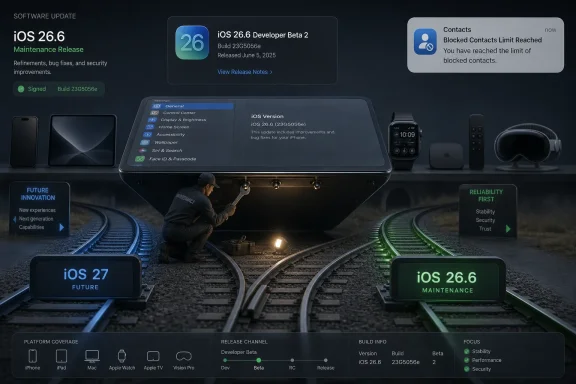
Apple released second developer betas of iOS 26.6, iPadOS 26.6, macOS Tahoe 26.6, watchOS 26.6, tvOS 26.6, and visionOS 26.6 on June 15, 2026, three weeks after the first 26.6 test builds and one week after Apple opened the iOS 27 developer cycle. The timing matters more than the feature list, because 26.6 is not where Apple is spending its imagination. It is where Apple is spending its maintenance budget.
That makes this beta round easy to dismiss and surprisingly useful to study. Apple’s late-cycle updates are often the software equivalent of tightening bolts before the next machine rolls onto the factory floor. For Windows users and administrators watching from the other side of the platform fence, iOS 26.6 is a reminder that the most consequential updates are not always the ones with the keynote slides.
The second developer beta wave covers the whole current Apple platform stack: iPhone, iPad, Mac, Apple Watch, Apple TV, HomePod-adjacent tvOS builds, and Vision Pro. Reports from Apple-focused outlets indicate that the new beta builds arrived broadly across Apple’s operating systems, with iOS 26.6 and iPadOS 26.6 beta 2 carrying build 23G5043d and macOS Tahoe 26.6 beta 2 carrying build 25G5043d.
The visible change list is thin. The most concrete user-facing item tied to iOS 26.6 so far is revised wording around blocked contact limits, warning users when they exceed the maximum number of blocked contacts. MacRumors has also reported that the beta may include an anti-snatching lock behavior, but Apple has not turned this release into a public campaign around that feature.
That is usually the point of a .6 update this late in the cycle. Apple’s marketing engine has already moved to the next train, while engineering still has to ship a stable current branch for hundreds of millions of devices. In that sense, 26.6 is less a preview of Apple’s future than a public snapshot of Apple’s discipline.
The beta label should not be ignored. These are developer builds, not production software, and Apple’s usual warning applies even when the release looks uneventful. A quiet beta can still break enterprise apps, battery behavior, VPN clients, device management policies, or the one obscure Bluetooth accessory an executive insists on using.
That leaves iOS 26.6 in an awkward but important role. It is the release that must serve people who are not ready, not eligible, or not willing to jump into the next major version. In the Apple ecosystem, that includes cautious users, IT-managed fleets, regulated environments, and anyone who has learned that installing the first developer beta of a major release is a hobby rather than a support strategy.
This is where Apple’s platform model differs sharply from Microsoft’s Windows servicing reality, even if both companies are solving the same problem. Apple can usually move users rapidly from one annual OS to the next because it controls the hardware, the software stack, and the update channel. Microsoft, by contrast, has to carry a sprawling universe of OEM designs, drivers, business applications, peripherals, and long-lived deployment assumptions.
But Apple’s late-cycle beta still speaks the same language administrators know from Windows: stabilization, compatibility, and risk reduction. The headline features may be elsewhere, yet the practical value sits in the boring release. A beta like 26.6 is not glamorous because its job is to make sure the floor does not creak while everyone is staring at the new staircase.
Build suffix tea-reading is a long-running Apple watcher habit because it often correlates with stability. A build ending in “a” is usually closer to release than one ending in “e,” and a late-cycle branch that starts in the middle of the alphabet often has several turns left. Still, Apple can compress or extend beta cycles depending on bugs, security fixes, carrier testing, regulatory concerns, or synchronized releases across platforms.
The more reliable signal is the calendar. A second developer beta arriving on June 15 places iOS 26.6 in the summer maintenance window, after Apple’s next-generation software has been introduced but before the autumn platform transition. That is precisely when Apple needs to clean up the outgoing generation enough that mainstream users can stay on it without feeling abandoned.
For administrators, the correct response is not to predict the release date down to the Monday. It is to assume that 26.6 is becoming real enough to test against, especially if your organization has iPhones, iPads, Macs, or Apple Watches enrolled in management. Waiting until the public release is safe for consumers; it is not a plan for an IT department that owns the fallout.
Blocked contact limits sit at the intersection of consumer safety and operating system plumbing. Most people never think about the maximum size of a block list until spam, harassment, or abuse forces the issue. When that boundary appears, the operating system has a responsibility to explain it plainly.
Apple’s strength has always been making complex security and privacy behaviors feel simple. Its weakness is that simplicity can sometimes hide the edge cases until the user hits them. A more explicit warning is not a revolution, but it is a small example of Apple repairing the contract between interface and reality.
The rumored anti-snatching behavior, if it ships, would fit the same pattern. Theft mitigation has become a visible battleground for phone makers because modern phones are wallets, identity tokens, authenticator devices, and location beacons. A device that reacts differently when physically grabbed would not be a gimmick if it meaningfully reduces the window between theft and lockout.
That duality is familiar to Windows insiders. Microsoft has its own channels, rings, enablement packages, cumulative updates, feature drops, and long-tail servicing obligations. Apple’s labels are cleaner, but the underlying reality is similar: modern operating systems are never really finished, only serviced at different speeds.
Where Apple has an advantage is narrative control. A maintenance release can be quiet without seeming chaotic because the company’s main story is elsewhere. Microsoft’s cumulative updates, by contrast, often become news only when something breaks, even though the work is equally necessary.
The risk for Apple is that the quiet branch becomes too quiet. Users who do not follow beta notes closely may assume that no visible features means no meaningful change. That is bad security culture. The unglamorous updates are often where trust is either preserved or lost.
The same applies across iPadOS, watchOS, tvOS, visionOS, and macOS Tahoe. Cross-platform Apple developers have learned that “minor” OS updates can still expose assumptions in shared code. A Watch companion app, a Catalyst build, an iPad workflow, and a Mac helper component can all fail in different ways even when the release notes look empty.
That is especially true for enterprise software. Authentication brokers, MDM agents, VPN clients, endpoint security tools, secure browsers, and line-of-business apps live close to system boundaries. A maintenance beta is the right time to discover whether Apple’s latest fix has changed the behavior your app quietly depended on.
The developer temptation is to spend all energy on iOS 27 because that is where the platform story is headed. The professional obligation is to test 26.6 because that is where customers still are. Shipping for the future while ignoring the present is how apps earn one-star reviews in the gap between WWDC excitement and fall reality.
An Apple beta like 26.6 should trigger a limited pilot in organizations that manage Apple devices. That does not mean pushing developer betas to production users. It means maintaining a test pool of representative hardware and workflows so the IT team is not learning about problems from executives, field staff, or help-desk tickets after release day.
The same logic applies to mixed environments. Many Windows shops now manage iPhones, iPads, and Macs through Microsoft Intune, Jamf, Kandji, Mosyle, or another MDM platform. The operating system vendor may be Apple, but the operational burden still lands on the same administrators responsible for identity, compliance, conditional access, and endpoint posture.
There is also a security reason to care. Late-cycle operating system updates often bundle hardening that never becomes a keynote feature. Even when Apple does not advertise the details during beta, administrators should assume that platform behavior may shift in ways that affect authentication, app permissions, device enrollment, or recovery workflows.
The appeal is understandable. Apple’s beta access has become easier over the years, and the Software Update screen makes joining a beta channel feel like flipping a normal settings toggle. That convenience can blur the distinction between a public update and a developer seed.
There is also an emotional trap in late-cycle betas. Users may think, “It is only 26.6, not 27, so it must be safe.” That is not how risk works. A smaller update can still contain system-level changes, and a beta build can still ship with bugs Apple expects developers to find before the general public receives it.
If a user wants to experiment, the safer route is a secondary device with a current backup and no irreplaceable data. If the device is used for work, travel, banking, medical apps, two-factor authentication, or family logistics, the beta can wait. Curiosity is not a disaster recovery plan.
That is the mature operating system business in 2026. The old rhythm of big annual releases has been overlaid with continuous servicing, regulatory adjustments, security hardening, AI feature gating, regional availability, and device-specific capabilities. Every platform vendor now runs multiple timelines at once.
Apple is better than most at making that complexity invisible. The Settings app offers a simple path: General, Software Update, Beta Updates, Developer Beta. Behind that plain sequence is a release process spanning chip families, carriers, app frameworks, cloud services, regional law, and hardware generations.
For Windows observers, this should feel familiar rather than alien. Microsoft’s update model gets more scrutiny because Windows is more heterogeneous and more exposed to enterprise complexity. Apple’s model is cleaner at the surface, but the 26.6 beta shows the same truth: operating systems are now living infrastructure.
AI has sharpened that divide. Apple’s iOS 27 pitch reportedly leans into smarter Siri behavior, personal context, image tools, and password automation. Those are features that demand user trust. But that trust is earned partly through the mundane work of updates like 26.6, where limits, warnings, lock behaviors, and stability fixes make the platform feel dependable.
The industry often talks about AI as if it floats above the operating system. It does not. It sits on permissions, identity, local data, cloud sync, device security, and user expectations. If those foundations are brittle, the AI layer becomes a liability.
That is why an update with few visible features can still be strategically important. Apple cannot credibly ask users to let Siri understand more personal context if the basic privacy and safety surfaces feel sloppy. The small warning dialogs and anti-theft behaviors are part of the same trust architecture as the headline AI demos.
That makes this beta round easy to dismiss and surprisingly useful to study. Apple’s late-cycle updates are often the software equivalent of tightening bolts before the next machine rolls onto the factory floor. For Windows users and administrators watching from the other side of the platform fence, iOS 26.6 is a reminder that the most consequential updates are not always the ones with the keynote slides.
 Apple’s Second Beta Is a Maintenance Release Wearing a Version Number
The second developer beta wave covers the whole current Apple platform stack: iPhone, iPad, Mac, Apple Watch, Apple TV, HomePod-adjacent tvOS builds, and Vision Pro. Reports from Apple-focused outlets indicate that the new beta builds arrived broadly across Apple’s operating systems, with iOS 26.6 and iPadOS 26.6 beta 2 carrying build 23G5043d and macOS Tahoe 26.6 beta 2 carrying build 25G5043d.The visible change list is thin. The most concrete user-facing item tied to iOS 26.6 so far is revised wording around blocked contact limits, warning users when they exceed the maximum number of blocked contacts. MacRumors has also reported that the beta may include an anti-snatching lock behavior, but Apple has not turned this release into a public campaign around that feature.
That is usually the point of a .6 update this late in the cycle. Apple’s marketing engine has already moved to the next train, while engineering still has to ship a stable current branch for hundreds of millions of devices. In that sense, 26.6 is less a preview of Apple’s future than a public snapshot of Apple’s discipline.
The beta label should not be ignored. These are developer builds, not production software, and Apple’s usual warning applies even when the release looks uneventful. A quiet beta can still break enterprise apps, battery behavior, VPN clients, device management policies, or the one obscure Bluetooth accessory an executive insists on using.
iOS 27 Has the Spotlight, Which Is Exactly Why 26.6 Matters
Apple’s major narrative has already shifted to iOS 27 and the next annual OS family. According to the Appleosophy report, iOS 27 beta 1 arrived a week before this 26.6 beta 2 wave, complete with the higher-profile features users expect from a new platform generation: a smarter Siri with personal context, new photo editing options, agentic password updating, and improvements to Image Playground on Apple Intelligence-capable devices.That leaves iOS 26.6 in an awkward but important role. It is the release that must serve people who are not ready, not eligible, or not willing to jump into the next major version. In the Apple ecosystem, that includes cautious users, IT-managed fleets, regulated environments, and anyone who has learned that installing the first developer beta of a major release is a hobby rather than a support strategy.
This is where Apple’s platform model differs sharply from Microsoft’s Windows servicing reality, even if both companies are solving the same problem. Apple can usually move users rapidly from one annual OS to the next because it controls the hardware, the software stack, and the update channel. Microsoft, by contrast, has to carry a sprawling universe of OEM designs, drivers, business applications, peripherals, and long-lived deployment assumptions.
But Apple’s late-cycle beta still speaks the same language administrators know from Windows: stabilization, compatibility, and risk reduction. The headline features may be elsewhere, yet the practical value sits in the boring release. A beta like 26.6 is not glamorous because its job is to make sure the floor does not creak while everyone is staring at the new staircase.
The Build Numbers Tell a Familiar Beta Story, But Not a Release Date
Appleosophy notes that the trailing letters in Apple beta build numbers tend to descend as the release approaches a Release Candidate. The first 26.6 builds included suffixes such as “c” and “d,” and the second round continues to suggest that Apple is not at the finish line yet. That observation fits Apple’s usual cadence, but it should not be mistaken for a schedule.Build suffix tea-reading is a long-running Apple watcher habit because it often correlates with stability. A build ending in “a” is usually closer to release than one ending in “e,” and a late-cycle branch that starts in the middle of the alphabet often has several turns left. Still, Apple can compress or extend beta cycles depending on bugs, security fixes, carrier testing, regulatory concerns, or synchronized releases across platforms.
The more reliable signal is the calendar. A second developer beta arriving on June 15 places iOS 26.6 in the summer maintenance window, after Apple’s next-generation software has been introduced but before the autumn platform transition. That is precisely when Apple needs to clean up the outgoing generation enough that mainstream users can stay on it without feeling abandoned.
For administrators, the correct response is not to predict the release date down to the Monday. It is to assume that 26.6 is becoming real enough to test against, especially if your organization has iPhones, iPads, Macs, or Apple Watches enrolled in management. Waiting until the public release is safe for consumers; it is not a plan for an IT department that owns the fallout.
The Blocked Contacts Warning Is Small, But It Reveals Apple’s Defensive Posture
The blocked contacts warning sounds almost comically minor beside Apple Intelligence, Siri, and agentic password management. Yet it is the kind of change that often matters more in lived experience than a demo-stage feature. A clearer warning when a user exceeds a blocked contact limit is about expectation management, abuse mitigation, and preventing a privacy setting from silently becoming less effective than the user assumes.Blocked contact limits sit at the intersection of consumer safety and operating system plumbing. Most people never think about the maximum size of a block list until spam, harassment, or abuse forces the issue. When that boundary appears, the operating system has a responsibility to explain it plainly.
Apple’s strength has always been making complex security and privacy behaviors feel simple. Its weakness is that simplicity can sometimes hide the edge cases until the user hits them. A more explicit warning is not a revolution, but it is a small example of Apple repairing the contract between interface and reality.
The rumored anti-snatching behavior, if it ships, would fit the same pattern. Theft mitigation has become a visible battleground for phone makers because modern phones are wallets, identity tokens, authenticator devices, and location beacons. A device that reacts differently when physically grabbed would not be a gimmick if it meaningfully reduces the window between theft and lockout.
Apple’s Beta Program Is Now a Two-Track Machine
The coexistence of iOS 26.6 beta 2 and iOS 27 beta 1 is not unusual, but it is increasingly central to how Apple ships software. One track is the future-facing branch, full of new APIs, design shifts, and the features Apple wants developers to adopt before autumn. The other track is the incumbent branch, where Apple continues to harden the version ordinary users are running today.That duality is familiar to Windows insiders. Microsoft has its own channels, rings, enablement packages, cumulative updates, feature drops, and long-tail servicing obligations. Apple’s labels are cleaner, but the underlying reality is similar: modern operating systems are never really finished, only serviced at different speeds.
Where Apple has an advantage is narrative control. A maintenance release can be quiet without seeming chaotic because the company’s main story is elsewhere. Microsoft’s cumulative updates, by contrast, often become news only when something breaks, even though the work is equally necessary.
The risk for Apple is that the quiet branch becomes too quiet. Users who do not follow beta notes closely may assume that no visible features means no meaningful change. That is bad security culture. The unglamorous updates are often where trust is either preserved or lost.
Developers Should Treat 26.6 as a Compatibility Checkpoint, Not a Playground
For developers, iOS 26.6 beta 2 is unlikely to be the branch where new product strategy is born. The more important work is regression testing. Apps should be checked for launch behavior, authentication flows, notification handling, networking, storage access, background tasks, accessibility, and any entitlement-sensitive function that can break when Apple adjusts system behavior.The same applies across iPadOS, watchOS, tvOS, visionOS, and macOS Tahoe. Cross-platform Apple developers have learned that “minor” OS updates can still expose assumptions in shared code. A Watch companion app, a Catalyst build, an iPad workflow, and a Mac helper component can all fail in different ways even when the release notes look empty.
That is especially true for enterprise software. Authentication brokers, MDM agents, VPN clients, endpoint security tools, secure browsers, and line-of-business apps live close to system boundaries. A maintenance beta is the right time to discover whether Apple’s latest fix has changed the behavior your app quietly depended on.
The developer temptation is to spend all energy on iOS 27 because that is where the platform story is headed. The professional obligation is to test 26.6 because that is where customers still are. Shipping for the future while ignoring the present is how apps earn one-star reviews in the gap between WWDC excitement and fall reality.
For IT, the Quiet Apple Update Is the One Worth Piloting
WindowsForum readers know the pattern from Patch Tuesday: the update that looks routine can still be the update that breaks printing, VPN connectivity, BitLocker recovery assumptions, or a driver stack nobody remembered was business-critical. Apple estates are not immune to that problem. They are simply smaller, more vertically integrated, and often less publicly noisy when they fail.An Apple beta like 26.6 should trigger a limited pilot in organizations that manage Apple devices. That does not mean pushing developer betas to production users. It means maintaining a test pool of representative hardware and workflows so the IT team is not learning about problems from executives, field staff, or help-desk tickets after release day.
The same logic applies to mixed environments. Many Windows shops now manage iPhones, iPads, and Macs through Microsoft Intune, Jamf, Kandji, Mosyle, or another MDM platform. The operating system vendor may be Apple, but the operational burden still lands on the same administrators responsible for identity, compliance, conditional access, and endpoint posture.
There is also a security reason to care. Late-cycle operating system updates often bundle hardening that never becomes a keynote feature. Even when Apple does not advertise the details during beta, administrators should assume that platform behavior may shift in ways that affect authentication, app permissions, device enrollment, or recovery workflows.
The Consumer Advice Has Not Changed: Do Not Beta Your Daily Life
For ordinary users, the practical advice is simple: do not install developer betas on your primary phone unless you are prepared for inconvenience. The fact that iOS 26.6 appears light on major changes does not make it stable. A beta can be uneventful for one user and miserable for another depending on carrier, apps, accessories, battery health, storage, and account configuration.The appeal is understandable. Apple’s beta access has become easier over the years, and the Software Update screen makes joining a beta channel feel like flipping a normal settings toggle. That convenience can blur the distinction between a public update and a developer seed.
There is also an emotional trap in late-cycle betas. Users may think, “It is only 26.6, not 27, so it must be safe.” That is not how risk works. A smaller update can still contain system-level changes, and a beta build can still ship with bugs Apple expects developers to find before the general public receives it.
If a user wants to experiment, the safer route is a secondary device with a current backup and no irreplaceable data. If the device is used for work, travel, banking, medical apps, two-factor authentication, or family logistics, the beta can wait. Curiosity is not a disaster recovery plan.
Apple’s Real Message Is That the Platform Never Sleeps
What makes this release cycle interesting is not the number of new features. It is the evidence of Apple’s always-on platform machinery. While the company sells the future with iOS 27, it still has to service iOS 26, align companion platforms, support developers, and prepare a release that most users will experience as “just another update.”That is the mature operating system business in 2026. The old rhythm of big annual releases has been overlaid with continuous servicing, regulatory adjustments, security hardening, AI feature gating, regional availability, and device-specific capabilities. Every platform vendor now runs multiple timelines at once.
Apple is better than most at making that complexity invisible. The Settings app offers a simple path: General, Software Update, Beta Updates, Developer Beta. Behind that plain sequence is a release process spanning chip families, carriers, app frameworks, cloud services, regional law, and hardware generations.
For Windows observers, this should feel familiar rather than alien. Microsoft’s update model gets more scrutiny because Windows is more heterogeneous and more exposed to enterprise complexity. Apple’s model is cleaner at the surface, but the 26.6 beta shows the same truth: operating systems are now living infrastructure.
The Apple Release Train Leaves Clues for the Rest of the Industry
This beta also hints at a broader industry shift. Platform vendors increasingly split their software into attention-grabbing features and background trust work. The features generate upgrade desire; the trust work prevents churn, lawsuits, support spikes, and reputational damage.AI has sharpened that divide. Apple’s iOS 27 pitch reportedly leans into smarter Siri behavior, personal context, image tools, and password automation. Those are features that demand user trust. But that trust is earned partly through the mundane work of updates like 26.6, where limits, warnings, lock behaviors, and stability fixes make the platform feel dependable.
The industry often talks about AI as if it floats above the operating system. It does not. It sits on permissions, identity, local data, cloud sync, device security, and user expectations. If those foundations are brittle, the AI layer becomes a liability.
That is why an update with few visible features can still be strategically important. Apple cannot credibly ask users to let Siri understand more personal context if the basic privacy and safety surfaces feel sloppy. The small warning dialogs and anti-theft behaviors are part of the same trust architecture as the headline AI demos.
The Late-Cycle Checklist Apple Users Should Actually Care About
By this point in the 26.x line, the useful question is not whether iOS 26.6 is exciting. It is whether it reduces risk before Apple’s next major platform transition. That makes the release more operational than theatrical, and that is exactly how users, developers, and administrators should read it.- Apple’s June 15 beta wave is a current-generation maintenance push across iPhone, iPad, Mac, Watch, TV, and Vision platforms rather than a major feature debut.
- iOS 26.6 beta 2 appears focused on refinement, including clearer handling of blocked contact limits and possibly additional anti-theft behavior.
- The arrival of iOS 27 beta 1 does not make iOS 26.6 irrelevant, because most real-world devices still need a stable current branch before the fall transition.
- Developers should test production apps against 26.6 now instead of assuming that a quiet beta cannot expose regressions.
- IT teams managing Apple devices should treat 26.6 as a pilot candidate, not because it is flashy, but because quiet updates can still affect compliance, identity, networking, and support workflows.
- Consumers should avoid installing developer betas on primary devices unless they are comfortable troubleshooting instability and restoring from backups.
References
- Primary source: Appleosophy
Published: 2026-06-15T17:50:09.878701
Apple rolls out iOS 26.6 Beta 2, iPadOS 26.6 Beta 2,and more
Apple has started rolling out the second betas of iOS 26.6, iPadOS 26.6, macOS Tahoe 26.6, watchOS 26.6, tvOS 26.6, and visionOS 26.6 to developers. appleosophy.com
- Independent coverage: 9to5Mac
Published: Mon, 15 Jun 2026 17:06:00 GMT
Apple releases iOS 26.6 beta 2 for iPhone, here’s what to expect - 9to5Mac
While iOS 27 is the new focus for pre-release software, Apple is still preparing iOS 26.6 as the next iPhone...9to5mac.com - Related coverage: macrumors.com
Apple Seeds Second iOS 26.6 and iPadOS 26.6 Betas to Developers
Apple today seeded the second betas of upcoming iOS 26.6 and iPadOS 26.6 updates to developers for testing purposes, with the software coming three weeks after Apple seeded the first betas. Registered developers can download the betas from the Settings app on the iPhone or iPad by going to the...www.macrumors.com - Related coverage: macdailynews.com
Apple releases second macOS 26.6, iOS 26.6, iPadOS 26.6, watchOS 26.6, tvOS 26.6, and visionOS 26.6 betas
Apple has just seeded the second developer betas for its current-generation operating systems, focusing primarily on stability…macdailynews.com - Official source: developer.apple.com
iOS & iPadOS 26.6 Beta 2 Release Notes | Apple Developer Documentation
Update your apps to use new features, and test your apps against API changes.developer.apple.com
- Related coverage: appleinsider.com
Second developer betas for iOS 26.6, macOS 26.6 surface
Apple's beta testing routine for the current-gen operating systems continues, with the second developer builds of iOS 26.6, iPadOS 26.6, watchOS 26.6, tvOS 26.6, visionOS 26.6, and macOS Tahoe 26.6 out now.appleinsider.com
- Related coverage: macworld.com
iOS 26.6 beta 2 is here, but you won't see much that is new | Macworld
This update is likely to focus on bug fixes and security rather than new features.www.macworld.com - Related coverage: iclarified.com
Apple Seeds Second Betas of watchOS 26.6, tvOS 26.6, and visionOS 26.6 [Download] - iClarified
Apple has seeded the second developer betas of tvOS 26.6, HomePod Software 26.6, visionOS 26.6, and watchOS 26.6, focusing on bug fixes and system stability.www.iclarified.com - Related coverage: iphoneincanada.ca
iOS 26.6 Beta 2 Is Here. Don’t Expect Any New Features Though | iPhone in Canada
Apple has released the second betas of iOS 26.6 and more. Here's what available for developers right now to download and test: iOS 26.6 beta 2 (Build: 23G5043d) iPadOS 26.6 beta 2 (Build: 23G5043d) macOS 26.6 beta 2 (Build: 25G5043d) tvOS 26.6 beta 2 (Build: 23L5744d) visionOS 26.6 beta 2...www.iphoneincanada.ca - Related coverage: ashgabattimes.com
