

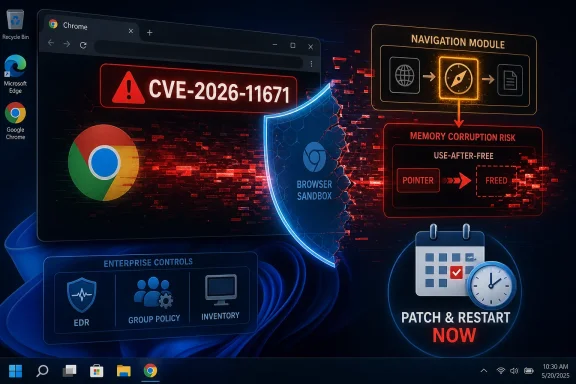
Google disclosed CVE-2026-11671 on June 8, 2026, as a high-severity use-after-free flaw in Chrome’s Navigation component affecting desktop Chrome versions before 149.0.7827.103, with exploitation possible through a crafted HTML page and potential sandbox escape. That is the kind of browser bug that turns “just don’t download suspicious files” into outdated advice. The browser is the file parser now, the application runtime, the identity surface, and often the first hop into corporate data. For Windows users and administrators, this CVE is less a one-off Chrome advisory than another reminder that browser patching has become endpoint security’s fastest-moving frontline.
CVE-2026-11671 sits in an uncomfortable category: a memory-safety issue in a browser subsystem that handles navigation, paired with the possibility of escaping the sandbox. The words are dry, but the implication is not. If an attacker can persuade a user to open a malicious page, the browser’s own machinery may become the route out of its intended containment.
Chrome’s sandbox is designed to make exploitation harder by isolating renderer processes and limiting what compromised web content can do. A sandbox escape does not automatically mean full system compromise, but it means the attacker may be able to cross one of the most important boundaries in the browser security model. That is why the CISA-ADP CVSS 3.1 vector lands at 9.6, even though user interaction is still required.
The tension here is familiar. Google’s own Chromium severity marks the issue as High, while the scoring supplied through CISA-ADP treats the practical risk as Critical. That difference is not necessarily a contradiction; it is a difference in lens. Chrome’s internal severity reflects Chromium’s bug taxonomy, while CVSS tries to model exploitability and impact in a broader operational context.
For defenders, the broader context matters more. A bug that can be triggered remotely through web content, needs no privileges, has low attack complexity, and may break containment is not something to park in next month’s maintenance window. In 2026, a web browser is not a convenience app. It is a privileged conduit into mail, documents, SaaS consoles, password managers, admin dashboards, and identity tokens.
A use-after-free vulnerability occurs when software continues to use memory after it has already been released. In complex C++ applications like Chromium, those mistakes can become exploitable when an attacker can influence what occupies the freed memory next. The browser thinks it is handling one object; the attacker tries to make it interact with something else.
Navigation code is especially interesting because it is full of edge cases. Redirects, frames, back-forward cache behavior, prerendering, cross-origin transitions, downloads, permissions prompts, and process swaps all touch the lifecycle of browser objects. Every performance optimization and compatibility concession adds state, and state is where memory-lifetime bugs like this tend to hide.
That does not mean CVE-2026-11671 is trivially exploitable. Google has not published full bug details, and the Chromium issue is access-restricted, which is normal while fixes are still rolling out. But the public description is enough to establish the shape of the risk: crafted HTML, remote attacker, user interaction, and possible sandbox escape.
This is why browser security advisories often feel both sparse and urgent. Vendors intentionally withhold details to avoid handing exploit developers a roadmap before users have patched. Administrators, however, still have to act on the absence of detail. In this case, the absence should not be read as reassurance.
For home users, that is usually enough. Chrome’s automatic update machinery is one of the better consumer patch systems in the industry, but it still has one stubborn dependency: the browser has to restart. A machine that has downloaded the patch but kept a vulnerable browser process alive is not as safe as its version inventory may suggest.
For enterprise IT, version numbers become messier. Chrome may be managed by Group Policy, Microsoft Intune, third-party patching platforms, golden images, VDI pools, application control baselines, or browser isolation products. A successful response is not “Google shipped a fix.” A successful response is proving that the fixed build is actually running across the fleet.
That distinction matters because Chrome is not always the only Chromium-derived browser in the environment. Microsoft Edge, Brave, Vivaldi, Opera, Electron-based desktop apps, embedded webviews, and other Chromium consumers may carry related code paths or depend on the same upstream fixes on different schedules. CVE-2026-11671 is a Chrome CVE, but Chromium’s gravitational pull means administrators should think in families, not brands.
Windows shops should be especially careful not to assume that Microsoft’s OS patch cadence covers the browser risk. Edge has its own update channel. Chrome has its own update service. WebView2 has its own runtime considerations. Electron apps bundle their own Chromium versions unless the vendor has done the work to update and ship them. The browser monoculture is not one product; it is one engine replicated across dozens of delivery mechanisms.
The June 8 list includes a long run of use-after-free flaws, integer overflows, out-of-bounds reads and writes, validation failures, and component-specific bugs affecting areas such as Ozone, Views, Bluetooth, Autofill, Printing, Compositing, V8, Network, Extensions, Skia, WebRTC, PDF, GPU, Guest View, and more. CVE-2026-11671 is one item in that storm, but it is a notable one because of the sandbox-escape language.
There is an easy but wrong conclusion to draw from a crowded advisory: if there are dozens of bugs, no single one can be that important. The opposite is often true. A crowded advisory tells defenders that the browser attack surface is broad and that attackers have many candidate primitives to study, chain, and adapt.
Modern browser exploitation is often about chaining. One bug may gain code execution in a constrained renderer. Another may disclose memory or bypass a mitigation. A third may escape the sandbox or deepen privileges. Even when a CVE description appears limited, its value changes when paired with other flaws in the same codebase or adjacent release window.
That is why CVE-2026-11671 should not be handled as a boutique vulnerability for security researchers alone. It belongs in the same operational bucket as the rest of the Chrome 149 security update: patch quickly, verify thoroughly, and assume attackers are reading the advisory with more imagination than procurement spreadsheets allow.
A crafted HTML page can arrive through phishing, malvertising, compromised legitimate websites, poisoned search results, chat messages, QR codes, or internal collaboration platforms. In many organizations, the browser is open all day, and users move between trusted and untrusted content without a meaningful sense that the boundary has changed. The attacker does not need a user to behave recklessly; they need a user to behave normally.
This is where the sandbox-escape possibility raises the stakes. Browser sandboxing exists because web content is hostile by default. When a bug threatens that assumption, endpoint controls outside the browser have to matter: EDR telemetry, application control, credential isolation, least privilege, exploit mitigations, and network segmentation.
Still, patching is the cleanest fix. Mitigations buy time and reduce blast radius, but they do not make the vulnerable code path disappear. For an exposed browser flaw, especially one involving memory corruption and navigation, the most reliable control is getting to a fixed build and restarting the process.
Security teams should also resist the urge to overfit their response to whether exploitation has been publicly confirmed. Google’s advisory for this specific CVE does not say it is being exploited in the wild. Another Chrome vulnerability in the same release cycle, CVE-2026-11645 in V8, has been separately reported as having an exploit in the wild. The presence or absence of that phrase for CVE-2026-11671 is useful intelligence, but it is not a reason to wait.
That distinction matters for scanners and dashboards. A careless reading could make it look as though the operating system itself is vulnerable. A better reading is that the Chrome application CPE is constrained by the OS platforms on which the vulnerable desktop builds run. This is a common source of noise in vulnerability management, especially when CPE logic is represented as nested AND/OR conditions.
The user’s question — whether a CPE is missing — is the right instinct, but the better criticism is that the CPE expression is awkward rather than obviously incomplete. The Chrome application CPE is present. The OS CPEs are present as non-vulnerable platform qualifiers. What is not represented by that NVD snippet is the larger Chromium ecosystem: Edge, Electron apps, Chromium forks, WebView runtimes, and vendor-specific rebuilds.
That gap is not always a flaw in the CVE record. CVE entries usually describe the product reported by the CNA, in this case Chrome. Downstream projects may receive their own advisories, version mappings, or CVEs depending on exposure and disclosure practice. The absence of those downstream CPEs from this entry does not prove they are unaffected.
For administrators, the practical answer is to inventory by engine as well as by package name. Chrome before the fixed version is directly in scope. Other Chromium-based products should be monitored through their own vendor advisories and update channels. If a vulnerability scanner only raises the Google Chrome CPE, it may still be missing risk from embedded Chromium code elsewhere.
This is not an argument for panic; it is an argument for inventory maturity. If the only browser metric in a dashboard is “Chrome installed: yes/no,” the organization is already behind the shape of the risk. The relevant question is which Chromium runtimes exist, who updates them, how fast they consume upstream fixes, and whether stale copies remain on disk after application upgrades.
Microsoft’s own ecosystem complicates and improves the picture at the same time. Edge and WebView2 benefit from centralized update mechanisms and enterprise controls, but they still require policy decisions, network reachability, and restart behavior. Chrome benefits from its own update service, but organizations often disable or delay automatic updates to preserve change control. Every one of those decisions trades operational stability against exposure time.
The worst pattern is the frozen browser. Some organizations still pin browser versions because an internal application depends on an old behavior. That was risky a decade ago; today it is indefensible unless paired with strong isolation. A business-critical web app that requires a vulnerable browser is not a compatibility issue. It is a security debt instrument with interest compounding daily.
CVE-2026-11671 is therefore a useful audit trigger. If patching Chrome requires heroic coordination, the process is broken. If the fleet cannot tell which browser processes have restarted, the process is incomplete. If unmanaged Chromium forks are everywhere, the browser estate has escaped governance.
Public details change attacker economics. Once a patch ships, adversaries can diff the source, inspect commits, study tests, and infer the vulnerable path. Detailed bug reports accelerate that process. Delaying disclosure is not secrecy for its own sake; it is an attempt to give the update mechanism a head start.
The trade-off is that defenders must make decisions with imperfect information. They cannot always know whether a particular hardening setting blocks the exploit, whether a specific site pattern is risky, or whether the flaw is easy to weaponize. In that fog, version-based remediation becomes the only clean line.
This also explains why Chrome’s security page often reads like a strange compromise: enough information to identify the issue and prioritize the patch, not enough to reproduce it. The public gets a CVE, a severity, a component, a class of bug, a fixed version, and sometimes a reward amount or reporter. The exploit developers get the same clues, but without the full map until the window has narrowed.
For WindowsForum readers, the important point is that withheld details are not a reason to downgrade the issue. In browser security, sparse advisories are often the norm for serious bugs. The absence of a public proof of concept today does not mean there will not be one after patch diffing catches up.
A sensible enterprise target is rapid deployment to high-risk users first: executives, finance staff, administrators, developers, help desk personnel, and anyone with privileged SaaS access. But that should be a matter of hours within a broader rollout, not an excuse to let the rest of the fleet drift. Browser vulnerabilities do not respect org charts; phishing kits often start with whoever clicks.
Verification should include both installed version and running version. Chrome’s auto-update can stage a fixed build while old processes persist. Browser relaunch campaigns, user prompts, forced restarts after grace periods, and session-aware controls may be necessary in environments where users keep browsers open for days.
Administrators should also check policy settings that delay updates. Chrome Enterprise policies can be useful when they prevent chaos, but they can also create artificial exposure if set too conservatively. Update suppression that made sense for a feature release does not necessarily make sense for a security release with sandbox-escape potential.
The help desk script should be simple. Open Chrome’s About page, confirm the fixed version or later, and relaunch when prompted. For managed fleets, rely on telemetry rather than screenshots. If a browser is internet-facing enough to receive malicious HTML, it is important enough to report its patch state centrally.
This is where vulnerability management tooling often underperforms. It can tell you Chrome’s version. It may tell you Edge’s version. It may not tell you that an Electron app in a user profile bundles an old Chromium runtime, or that a vendor’s desktop client has not been rebuilt against a fixed branch. The practical attack surface is bigger than the browser icons pinned to the taskbar.
The industry has spent years turning the web platform into the universal application runtime. That strategy produced cross-platform convenience, faster development, and richer apps. It also created a world where a browser-engine vulnerability can echo through software that users do not think of as browsers at all.
For Windows administrators, this argues for a wider browser-component inventory. Software asset management should identify applications built on Electron, CEF, WebView2, and other embedded web technologies. Procurement should ask vendors how quickly they consume Chromium security updates. Security teams should treat stale embedded browsers as first-class vulnerabilities, not cosmetic technical debt.
CVE-2026-11671 may or may not be reachable in every Chromium consumer. The point is not to assume universal exploitability. The point is to stop assuming that Chrome is the whole Chromium story.
This is the difference between compliance data and security knowledge. A CPE match is a useful starting point, not a complete model of exposure. It tells a vulnerability platform where to begin; it does not absolve administrators from understanding software lineage and runtime behavior.
There is also a political dimension to vulnerability scoring. Chrome calls the bug High. CISA-ADP scores it Critical. NVD had not yet supplied its own base score at the time reflected in the entry. A dashboard that simply sorts by one severity label may understate or overstate depending on which authority it privileges.
The better approach is to read the vector. Network-reachable. Low complexity. No privileges. User interaction required. Scope changed. High impact. That profile deserves urgency regardless of whether the label says High or Critical.
Security programs that chase only the highest numeric scores often miss the exploit path that matters. Browser bugs with user interaction are a perfect example. They may look less pristine than unauthenticated server-side RCEs, but they target the people and sessions that actually hold the keys.
The operational response should be boring, fast, and verified.
For Windows users, the advice is simple enough to feel anticlimactic: update Chrome and restart it. For administrators, the lesson is broader. Browser patching must be treated like identity protection, because the browser is where identity is exercised all day. The next Chrome memory-safety advisory will arrive with a different component name and a different CVE number, but the winning response will look the same: know what Chromium code you run, update it quickly, verify that it is actually running, and stop pretending the browser is just another desktop application.
 The Browser Patch Is Now the Perimeter
CVE-2026-11671 sits in an uncomfortable category: a memory-safety issue in a browser subsystem that handles navigation, paired with the possibility of escaping the sandbox. The words are dry, but the implication is not. If an attacker can persuade a user to open a malicious page, the browser’s own machinery may become the route out of its intended containment.Chrome’s sandbox is designed to make exploitation harder by isolating renderer processes and limiting what compromised web content can do. A sandbox escape does not automatically mean full system compromise, but it means the attacker may be able to cross one of the most important boundaries in the browser security model. That is why the CISA-ADP CVSS 3.1 vector lands at 9.6, even though user interaction is still required.
The tension here is familiar. Google’s own Chromium severity marks the issue as High, while the scoring supplied through CISA-ADP treats the practical risk as Critical. That difference is not necessarily a contradiction; it is a difference in lens. Chrome’s internal severity reflects Chromium’s bug taxonomy, while CVSS tries to model exploitability and impact in a broader operational context.
For defenders, the broader context matters more. A bug that can be triggered remotely through web content, needs no privileges, has low attack complexity, and may break containment is not something to park in next month’s maintenance window. In 2026, a web browser is not a convenience app. It is a privileged conduit into mail, documents, SaaS consoles, password managers, admin dashboards, and identity tokens.
Navigation Is a Boring Name for a Dangerous Boundary
The phrase “use after free in Navigation” sounds like the sort of bug only a browser engineer could love. In practice, navigation is where the browser decides what page you are going to, what process may host it, what permissions apply, what history entry gets created, and how old content gives way to new content. It is a traffic controller for trust transitions.A use-after-free vulnerability occurs when software continues to use memory after it has already been released. In complex C++ applications like Chromium, those mistakes can become exploitable when an attacker can influence what occupies the freed memory next. The browser thinks it is handling one object; the attacker tries to make it interact with something else.
Navigation code is especially interesting because it is full of edge cases. Redirects, frames, back-forward cache behavior, prerendering, cross-origin transitions, downloads, permissions prompts, and process swaps all touch the lifecycle of browser objects. Every performance optimization and compatibility concession adds state, and state is where memory-lifetime bugs like this tend to hide.
That does not mean CVE-2026-11671 is trivially exploitable. Google has not published full bug details, and the Chromium issue is access-restricted, which is normal while fixes are still rolling out. But the public description is enough to establish the shape of the risk: crafted HTML, remote attacker, user interaction, and possible sandbox escape.
This is why browser security advisories often feel both sparse and urgent. Vendors intentionally withhold details to avoid handing exploit developers a roadmap before users have patched. Administrators, however, still have to act on the absence of detail. In this case, the absence should not be read as reassurance.
The Version Number Is the Operational Fact That Matters
The fixed Chrome desktop line is 149.0.7827.102/.103 depending on platform, with 149.0.7827.103 named in the CVE entry as the threshold before which Chrome is vulnerable. Google’s June 8 Stable Channel update says the release applies to Windows and Mac at 149.0.7827.102/.103 and Linux at 149.0.7827.102, rolling out over the following days and weeks. The article users see in Help > About Google Chrome should be boring: the browser checks, updates, and prompts for a relaunch.For home users, that is usually enough. Chrome’s automatic update machinery is one of the better consumer patch systems in the industry, but it still has one stubborn dependency: the browser has to restart. A machine that has downloaded the patch but kept a vulnerable browser process alive is not as safe as its version inventory may suggest.
For enterprise IT, version numbers become messier. Chrome may be managed by Group Policy, Microsoft Intune, third-party patching platforms, golden images, VDI pools, application control baselines, or browser isolation products. A successful response is not “Google shipped a fix.” A successful response is proving that the fixed build is actually running across the fleet.
That distinction matters because Chrome is not always the only Chromium-derived browser in the environment. Microsoft Edge, Brave, Vivaldi, Opera, Electron-based desktop apps, embedded webviews, and other Chromium consumers may carry related code paths or depend on the same upstream fixes on different schedules. CVE-2026-11671 is a Chrome CVE, but Chromium’s gravitational pull means administrators should think in families, not brands.
Windows shops should be especially careful not to assume that Microsoft’s OS patch cadence covers the browser risk. Edge has its own update channel. Chrome has its own update service. WebView2 has its own runtime considerations. Electron apps bundle their own Chromium versions unless the vendor has done the work to update and ship them. The browser monoculture is not one product; it is one engine replicated across dozens of delivery mechanisms.
The 74-Fix Release Makes One CVE Look Smaller Than It Is
CVE-2026-11671 arrived as part of a Chrome Stable Channel update containing 74 security fixes. That number matters because it changes the interpretation of the advisory. This was not a tiny emergency patch with one isolated bug; it was a broad security release with numerous memory-safety issues across browser components.The June 8 list includes a long run of use-after-free flaws, integer overflows, out-of-bounds reads and writes, validation failures, and component-specific bugs affecting areas such as Ozone, Views, Bluetooth, Autofill, Printing, Compositing, V8, Network, Extensions, Skia, WebRTC, PDF, GPU, Guest View, and more. CVE-2026-11671 is one item in that storm, but it is a notable one because of the sandbox-escape language.
There is an easy but wrong conclusion to draw from a crowded advisory: if there are dozens of bugs, no single one can be that important. The opposite is often true. A crowded advisory tells defenders that the browser attack surface is broad and that attackers have many candidate primitives to study, chain, and adapt.
Modern browser exploitation is often about chaining. One bug may gain code execution in a constrained renderer. Another may disclose memory or bypass a mitigation. A third may escape the sandbox or deepen privileges. Even when a CVE description appears limited, its value changes when paired with other flaws in the same codebase or adjacent release window.
That is why CVE-2026-11671 should not be handled as a boutique vulnerability for security researchers alone. It belongs in the same operational bucket as the rest of the Chrome 149 security update: patch quickly, verify thoroughly, and assume attackers are reading the advisory with more imagination than procurement spreadsheets allow.
“User Interaction Required” Is Not Much Comfort in 2026
The CVSS vector includes user interaction, and that can tempt organizations into downgrading urgency. After all, the attacker needs the user to visit or load something. But requiring a click is not a strong barrier in a world built on links, previews, redirects, collaboration tools, and single sign-on prompts.A crafted HTML page can arrive through phishing, malvertising, compromised legitimate websites, poisoned search results, chat messages, QR codes, or internal collaboration platforms. In many organizations, the browser is open all day, and users move between trusted and untrusted content without a meaningful sense that the boundary has changed. The attacker does not need a user to behave recklessly; they need a user to behave normally.
This is where the sandbox-escape possibility raises the stakes. Browser sandboxing exists because web content is hostile by default. When a bug threatens that assumption, endpoint controls outside the browser have to matter: EDR telemetry, application control, credential isolation, least privilege, exploit mitigations, and network segmentation.
Still, patching is the cleanest fix. Mitigations buy time and reduce blast radius, but they do not make the vulnerable code path disappear. For an exposed browser flaw, especially one involving memory corruption and navigation, the most reliable control is getting to a fixed build and restarting the process.
Security teams should also resist the urge to overfit their response to whether exploitation has been publicly confirmed. Google’s advisory for this specific CVE does not say it is being exploited in the wild. Another Chrome vulnerability in the same release cycle, CVE-2026-11645 in V8, has been separately reported as having an exploit in the wild. The presence or absence of that phrase for CVE-2026-11671 is useful intelligence, but it is not a reason to wait.
NVD’s CPE Entry Is Clumsy, but the Message Is Clear
The NVD entry’s affected configuration is worth a closer look because it can confuse automated workflows. It describes vulnerable Google Chrome versions up to, but excluding, 149.0.7827.103 and combines that with operating-system CPEs for Windows, Linux, and macOS. In plain English, the affected software is Chrome on those desktop platforms, not Windows, Linux, or macOS as standalone vulnerable operating systems.That distinction matters for scanners and dashboards. A careless reading could make it look as though the operating system itself is vulnerable. A better reading is that the Chrome application CPE is constrained by the OS platforms on which the vulnerable desktop builds run. This is a common source of noise in vulnerability management, especially when CPE logic is represented as nested AND/OR conditions.
The user’s question — whether a CPE is missing — is the right instinct, but the better criticism is that the CPE expression is awkward rather than obviously incomplete. The Chrome application CPE is present. The OS CPEs are present as non-vulnerable platform qualifiers. What is not represented by that NVD snippet is the larger Chromium ecosystem: Edge, Electron apps, Chromium forks, WebView runtimes, and vendor-specific rebuilds.
That gap is not always a flaw in the CVE record. CVE entries usually describe the product reported by the CNA, in this case Chrome. Downstream projects may receive their own advisories, version mappings, or CVEs depending on exposure and disclosure practice. The absence of those downstream CPEs from this entry does not prove they are unaffected.
For administrators, the practical answer is to inventory by engine as well as by package name. Chrome before the fixed version is directly in scope. Other Chromium-based products should be monitored through their own vendor advisories and update channels. If a vulnerability scanner only raises the Google Chrome CPE, it may still be missing risk from embedded Chromium code elsewhere.
Windows Administrators Have a Browser Supply Chain Problem
Windows environments tend to treat browsers as visible applications, but Chromium often arrives through less visible supply chains. A user-installed Chrome is obvious. A WebView2 runtime inside a line-of-business app is less obvious. An Electron shell embedded in a chat client, VPN client, note-taking app, or developer tool may be invisible to standard browser reporting.This is not an argument for panic; it is an argument for inventory maturity. If the only browser metric in a dashboard is “Chrome installed: yes/no,” the organization is already behind the shape of the risk. The relevant question is which Chromium runtimes exist, who updates them, how fast they consume upstream fixes, and whether stale copies remain on disk after application upgrades.
Microsoft’s own ecosystem complicates and improves the picture at the same time. Edge and WebView2 benefit from centralized update mechanisms and enterprise controls, but they still require policy decisions, network reachability, and restart behavior. Chrome benefits from its own update service, but organizations often disable or delay automatic updates to preserve change control. Every one of those decisions trades operational stability against exposure time.
The worst pattern is the frozen browser. Some organizations still pin browser versions because an internal application depends on an old behavior. That was risky a decade ago; today it is indefensible unless paired with strong isolation. A business-critical web app that requires a vulnerable browser is not a compatibility issue. It is a security debt instrument with interest compounding daily.
CVE-2026-11671 is therefore a useful audit trigger. If patching Chrome requires heroic coordination, the process is broken. If the fleet cannot tell which browser processes have restarted, the process is incomplete. If unmanaged Chromium forks are everywhere, the browser estate has escaped governance.
Google’s Silence Is Part of the Security Model
The Chromium issue linked to CVE-2026-11671 is access-restricted, and Google’s release note repeats the standard warning that bug details may remain restricted until most users have updated. This irritates researchers and administrators who want to understand the exact exploit path. It is also one of the few responsible ways to handle a high-impact browser bug at internet scale.Public details change attacker economics. Once a patch ships, adversaries can diff the source, inspect commits, study tests, and infer the vulnerable path. Detailed bug reports accelerate that process. Delaying disclosure is not secrecy for its own sake; it is an attempt to give the update mechanism a head start.
The trade-off is that defenders must make decisions with imperfect information. They cannot always know whether a particular hardening setting blocks the exploit, whether a specific site pattern is risky, or whether the flaw is easy to weaponize. In that fog, version-based remediation becomes the only clean line.
This also explains why Chrome’s security page often reads like a strange compromise: enough information to identify the issue and prioritize the patch, not enough to reproduce it. The public gets a CVE, a severity, a component, a class of bug, a fixed version, and sometimes a reward amount or reporter. The exploit developers get the same clues, but without the full map until the window has narrowed.
For WindowsForum readers, the important point is that withheld details are not a reason to downgrade the issue. In browser security, sparse advisories are often the norm for serious bugs. The absence of a public proof of concept today does not mean there will not be one after patch diffing catches up.
The Enterprise Response Should Be Measured in Hours, Not Intentions
The first response is obvious: update Chrome. The harder part is deciding how quickly, how broadly, and how to verify. For a vulnerability with network attack vector, low complexity, no required privileges, user interaction, changed scope, and high impact across confidentiality, integrity, and availability, a multi-week rollout is hard to defend.A sensible enterprise target is rapid deployment to high-risk users first: executives, finance staff, administrators, developers, help desk personnel, and anyone with privileged SaaS access. But that should be a matter of hours within a broader rollout, not an excuse to let the rest of the fleet drift. Browser vulnerabilities do not respect org charts; phishing kits often start with whoever clicks.
Verification should include both installed version and running version. Chrome’s auto-update can stage a fixed build while old processes persist. Browser relaunch campaigns, user prompts, forced restarts after grace periods, and session-aware controls may be necessary in environments where users keep browsers open for days.
Administrators should also check policy settings that delay updates. Chrome Enterprise policies can be useful when they prevent chaos, but they can also create artificial exposure if set too conservatively. Update suppression that made sense for a feature release does not necessarily make sense for a security release with sandbox-escape potential.
The help desk script should be simple. Open Chrome’s About page, confirm the fixed version or later, and relaunch when prompted. For managed fleets, rely on telemetry rather than screenshots. If a browser is internet-facing enough to receive malicious HTML, it is important enough to report its patch state centrally.
The Real Risk Is the Patch Gap Between Chrome and Everything Else
Chrome itself will update quickly for many users. The harder risk lives in the lag between upstream Chromium fixes and downstream adoption. Every fork, embedded runtime, and Chromium-based app has to move from “upstream fixed” to “user actually running the fixed code.” Some do this well. Others lag for weeks.This is where vulnerability management tooling often underperforms. It can tell you Chrome’s version. It may tell you Edge’s version. It may not tell you that an Electron app in a user profile bundles an old Chromium runtime, or that a vendor’s desktop client has not been rebuilt against a fixed branch. The practical attack surface is bigger than the browser icons pinned to the taskbar.
The industry has spent years turning the web platform into the universal application runtime. That strategy produced cross-platform convenience, faster development, and richer apps. It also created a world where a browser-engine vulnerability can echo through software that users do not think of as browsers at all.
For Windows administrators, this argues for a wider browser-component inventory. Software asset management should identify applications built on Electron, CEF, WebView2, and other embedded web technologies. Procurement should ask vendors how quickly they consume Chromium security updates. Security teams should treat stale embedded browsers as first-class vulnerabilities, not cosmetic technical debt.
CVE-2026-11671 may or may not be reachable in every Chromium consumer. The point is not to assume universal exploitability. The point is to stop assuming that Chrome is the whole Chromium story.
The CPE Question Exposes the Limits of Checkbox Security
The NVD CPE entry gives scanners something to match, but it cannot express all the operational nuance. It can say Chrome before a fixed version is vulnerable on Windows, Linux, and macOS. It cannot tell you whether a managed device has relaunched, whether a portable browser copy exists in a user directory, whether a Chromium fork has absorbed the patch, or whether an Electron app is carrying related code.This is the difference between compliance data and security knowledge. A CPE match is a useful starting point, not a complete model of exposure. It tells a vulnerability platform where to begin; it does not absolve administrators from understanding software lineage and runtime behavior.
There is also a political dimension to vulnerability scoring. Chrome calls the bug High. CISA-ADP scores it Critical. NVD had not yet supplied its own base score at the time reflected in the entry. A dashboard that simply sorts by one severity label may understate or overstate depending on which authority it privileges.
The better approach is to read the vector. Network-reachable. Low complexity. No privileges. User interaction required. Scope changed. High impact. That profile deserves urgency regardless of whether the label says High or Critical.
Security programs that chase only the highest numeric scores often miss the exploit path that matters. Browser bugs with user interaction are a perfect example. They may look less pristine than unauthenticated server-side RCEs, but they target the people and sessions that actually hold the keys.
The Chrome 149 Patch Window Leaves Little Room for Complacency
Here is the practical shape of CVE-2026-11671 for WindowsForum readers: it is a Chrome desktop vulnerability fixed in the 149.0.7827.102/.103 update train, described publicly as a Navigation use-after-free that could allow a sandbox escape through crafted HTML. The advisory was published June 8, 2026, and the NVD record was last modified June 9. The exact bug details remain restricted, as expected.The operational response should be boring, fast, and verified.
- Chrome installations older than 149.0.7827.103 should be treated as exposed and updated without waiting for a fuller NVD assessment.
- Administrators should confirm that browsers have relaunched after updating, because staged updates do not protect old running processes.
- The NVD CPE entry appears to include the Chrome application CPE and platform qualifiers for Windows, Linux, and macOS, but it does not cover every Chromium-based downstream product.
- Edge, WebView2, Electron applications, and Chromium forks should be reviewed through their own vendor update channels rather than assumed safe because Chrome is patched.
- The CISA-ADP 9.6 Critical score is operationally meaningful because the vector combines remote delivery, low complexity, no privileges, changed scope, and high impact.
- The lack of public exploit details should be read as normal coordinated-disclosure practice, not as evidence that the bug is harmless.
Browser Security Has Become a Restart Discipline
The uncomfortable truth is that many organizations are no longer defeated by the absence of patches. They are defeated by the last mile: deferred restarts, unmanaged apps, stale embedded runtimes, and policies that confuse update control with risk control. CVE-2026-11671 fits that pattern perfectly because the fix exists, the affected version line is clear, and the remaining uncertainty mostly concerns how completely organizations can deploy what is already available.For Windows users, the advice is simple enough to feel anticlimactic: update Chrome and restart it. For administrators, the lesson is broader. Browser patching must be treated like identity protection, because the browser is where identity is exercised all day. The next Chrome memory-safety advisory will arrive with a different component name and a different CVE number, but the winning response will look the same: know what Chromium code you run, update it quickly, verify that it is actually running, and stop pretending the browser is just another desktop application.
References
- Primary source: NVD / Chromium
Published: 2026-06-15T19:14:30-07:00

NVD - CVE-2026-11671
 nvd.nist.gov
- Security advisory: MSRC
Published: 2026-06-15T19:14:30-07:00
Original feed URL

Security Update Guide - Microsoft Security Response Center
 msrc.microsoft.com
- Related coverage: vulnerability.circl.lu
Vulnerability-Lookup
Vulnerability-Lookup - Fast vulnerability lookup correlation from different sources.vulnerability.circl.lu - Related coverage: radar.offseq.com
CVE-2026-11671: Use after free in Google Chrome - Live Threat Intelligence - Threat Radar | OffSeq.com
Detailed information about CVE-2026-11671: Use after free in Google Chrome affecting Google Chrome. Get real-time updates, technical details, and mitigation strradar.offseq.com
