

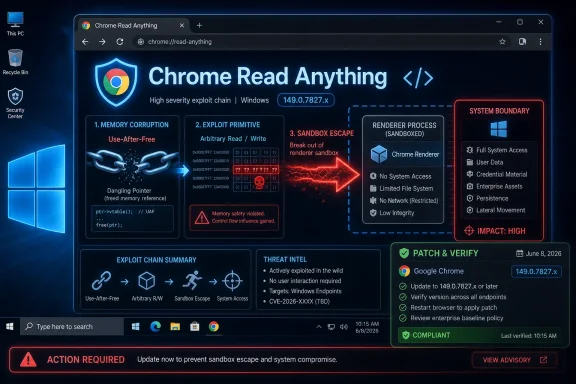
Google disclosed CVE-2026-11692 on June 8, 2026, as a high-severity use-after-free flaw in Chrome’s Read Anything feature before version 149.0.7827.103, where a crafted HTML page could help an attacker who had already compromised the renderer process attempt a sandbox escape. That phrasing is easy to glide past because it sounds conditional, almost bureaucratic. It should not be. In modern browser security, “renderer compromise plus sandbox escape” is the line between a bad tab and a bad machine.
Read Anything is not the first Chrome component most administrators think about when they hear “sandbox escape.” It is a user-facing accessibility and reading feature, the kind of subsystem that feels closer to convenience than to attack surface. That is precisely why CVE-2026-11692 is worth more attention than another entry in a long Chrome security rollup.
The vulnerability is a classic memory-safety failure: use after free. In plain English, Chrome could continue using a piece of memory after it had already been released, opening the door to carefully shaped corruption. In browser exploitation, that class of bug has a long and ugly résumé because the attacker does not need a feature to be glamorous; they need it to be reachable, stateful, and complex enough to mishandle object lifetimes.
Google’s advisory placed CVE-2026-11692 among 74 security fixes in the June 8 Stable Channel update for desktop Chrome. The fixed versions were listed as 149.0.7827.102/.103 for Windows and Mac and 149.0.7827.102 for Linux, with rollout over the usual “coming days/weeks” window. NVD’s entry describes affected Chrome versions as prior to 149.0.7827.103, which is the conservative number defenders should treat as the line unless their platform-specific channel information says otherwise.
The uncomfortable part is not that Read Anything had a bug. The uncomfortable part is that Chrome is now so large, and so deeply integrated into daily work, that even auxiliary features sit inside a threat model normally reserved for the browser’s highest-risk machinery.
CVE-2026-11692 is explicitly described as useful to a remote attacker who had already compromised the renderer process. That wording matters. This is not, based on the public description, a simple one-shot “visit page, own host” bug by itself. It is the second or later move in an attack sequence: first escape the logic and memory safety of the renderer, then try to break out of the browser’s containment.
For enterprise defenders, that distinction should shape urgency but not reduce it. A vulnerability that requires renderer compromise is still dangerous because renderer compromise is exactly what attackers pursue with JavaScript engine bugs, DOM bugs, media bugs, GPU bugs, and parser bugs. Google’s same June 8 release also noted an actively exploited V8 vulnerability, CVE-2026-11645, which is the kind of companion weakness that makes sandbox-related bugs feel less theoretical.
That is the modern browser bargain. Google, Microsoft, Mozilla, and Apple have built browsers on layers of isolation, fuzzing, process separation, exploit mitigations, and rapid patching. Attackers have responded by specializing in chains that turn one “limited” bug into a larger compromise. In that world, a high-severity sandbox-escape candidate is not background noise.
The “user interaction required” part will tempt some people to downgrade the concern. They should resist that instinct. In web security, user interaction often means the victim opens or is redirected to a crafted page, which is not a meaningful barrier in phishing, malvertising, watering-hole attacks, compromised legitimate sites, or messaging-platform lures.
The “attack complexity high” part is more meaningful. It suggests exploitation is not automatic and may require specific heap state, renderer control, or a carefully staged chain. But high complexity rarely stops sophisticated actors when the target population is broad and the browser is Chrome. It mostly determines who can weaponize the flaw first, not whether defenders should patch.
The “changed scope” part is the phrase administrators should underline. A renderer process is supposed to be a containment zone. A sandbox escape is, by definition, an attempt to cross that boundary. When a bug’s worst-case impact crosses from web content into a more privileged browser or operating-system context, endpoint exposure changes dramatically.
That mismatch is not just pedantry. Vulnerability scanners, SBOM platforms, EDR dashboards, and compliance reports all depend on version boundaries being precise. If one feed says the fixed line is .102 and another says .103, administrators can end up with false positives, false negatives, or a week of arguing with dashboards that disagree with the software actually installed.
The sensible operational answer is simple: do not build your patch decision around the most forgiving interpretation of a CPE entry. Check Chrome’s own update channel and ensure systems are at the vendor-published fixed build for their platform. Where the metadata disagrees, the vendor advisory and the installed browser’s update state should carry more weight than an early enrichment record.
This is also a reminder that CPEs are an awkward fit for fast-moving, multi-platform applications. Chrome does not behave like a static server package with one universal build number across every operating system and channel. Security teams that treat public vulnerability metadata as gospel rather than input will keep tripping over these edge cases.
That reality changes the patching standard. Chrome updates should not wait for the monthly Windows rhythm, even in environments that otherwise organize around Patch Tuesday. Google ships Chrome security releases when they are ready because the browser threat model demands it. Administrators who fold Chrome into a slower desktop maintenance cycle are accepting exposure that attackers know how to exploit.
On managed Windows fleets, this means verifying Google Update policy, checking update holdbacks, watching Extended Stable channel decisions, and making sure application-control rules do not accidentally freeze Chrome in place. It also means auditing clones and Chromium-based alternatives, because a fleet can contain Chrome, Edge, Brave, Vivaldi, Electron apps, embedded WebViews, and vendor-bundled runtimes that do not all update at the same pace.
Microsoft Edge is not automatically covered by a Chrome advisory simply because both browsers share Chromium foundations. Edge has its own release pipeline, versioning, and security advisories. But the strategic lesson carries over: Chromium memory-safety fixes should trigger a wider look at every Chromium-based surface in the Windows estate, especially where privileged users browse the web from admin workstations.
Read Anything is a useful feature. It helps present page content in a simplified reading view and supports accessibility-oriented workflows. But every feature that interprets, transforms, extracts, or re-renders web content must handle hostile inputs, unusual document structures, dynamic updates, and object lifetimes under pressure.
That is why memory-safety flaws in “non-core” browser components matter. The web page remains the attacker-controlled input. The component may not be glamorous, but it may still touch complex trees, accessibility objects, layout state, or renderer-adjacent structures. If those lifetimes are mishandled, the exploit primitive does not care that the original feature was built to improve readability.
This is the trade-off browser vendors rarely foreground. Users want browsers to do more, enterprises want browsers to integrate more deeply with identity and management, and platform vendors want browsers to become universal application shells. Security teams then inherit the accumulated risk of that expansion.
That breadth matters because attackers rarely read advisories the way compliance teams do. A defender sees a list of CVEs to close. An attacker sees a map of bug classes, components, and potential chain ingredients. A renderer bug, a browser-process bug, a GPU bug, and a sandbox escape are not isolated trivia when they land in the same release window.
Google also stated that an exploit for CVE-2026-11645, the V8 out-of-bounds memory access flaw in the same update, existed in the wild. That does not mean CVE-2026-11692 was known to be exploited. Publicly, the in-the-wild language was attached to CVE-2026-11645. Still, defenders should be wary of treating the rest of the update as routine housekeeping when at least one vulnerability in the batch was already operationally relevant.
The Chrome security team’s routine restriction of bug details until most users are updated is another signal worth understanding. That is not secrecy for its own sake. It is an acknowledgment that the delta between a patch and a working exploit can narrow quickly once technical details are public. In browser security, the patch itself can become a roadmap.
Some systems are pinned for compatibility. Some VDI images are refreshed on a schedule that trails upstream releases. Some kiosks and shared workstations are rebuilt from stale gold images. Some networks restrict background update services. Some users keep browsers open for weeks, which can leave an update downloaded but not activated until restart.
That last point is easy to underestimate. A browser that has staged an update but not relaunched is still running old code. For a vulnerability class involving memory corruption and sandbox boundaries, “pending relaunch” is not a comforting status. It is an unclosed exposure with a polite notification bubble.
Administrators should therefore measure not only package deployment but actual running version. Endpoint tools that report installed version are useful; process inventory and browser management telemetry are better. The question is not whether the update was offered. The question is whether vulnerable Chrome processes are still alive on endpoints that browse the internet.
The real controls are boring and administrative. Keep Chrome updating. Enforce relaunch deadlines. Reduce local administrative rights. Separate privileged administration from general browsing. Use site isolation and enterprise browser policies where appropriate. Monitor for abnormal child processes, suspicious downloads, token theft, and post-browser behavior rather than assuming the browser will always contain the first stage.
Security teams should also think about identity. A successful browser exploit does not need to drop a traditional malware payload to cause damage. Session cookies, OAuth tokens, password manager contents, internal web app access, and single sign-on sessions are all attractive targets. The browser is where the modern enterprise keeps its keys, often temporarily, sometimes persistently, and always at scale.
That is why a sandbox escape vulnerability has consequences beyond classic endpoint compromise. If an attacker can move from web content into a more privileged browser context, the path to credential theft, persistence, lateral movement, or surveillance becomes easier. The operating system matters, but the browser session may matter more.
That does not mean Chrome is uniquely careless. It means the browser is one of the most complex pieces of software most people run, written largely in languages where memory lifetime bugs remain possible. Chromium’s scale, performance requirements, and hardware integration make an overnight migration to memory-safe implementation unrealistic.
The direction of travel is still clear. Browser vendors are gradually adopting safer languages, stronger allocators, MiraclePtr-style mitigations, partitioning, CFI, site isolation improvements, and additional hardening around dangerous interfaces. Those investments reduce exploitability, but they do not erase the need for rapid patching. Defense in depth is not a substitute for closing the bug.
The Read Anything flaw is particularly symbolic because it sits at the intersection of feature velocity and memory-safety debt. The browser keeps gaining user-visible capabilities, and every new capability has to coexist with a hostile web. The long-term answer is not to stop building useful features; it is to build them under the assumption that every parser, transformer, and renderer-adjacent path will be attacked.
For unmanaged users, the path is familiar: open Chrome’s About page, let it check for updates, and relaunch. For managed fleets, the task is broader: confirm update policy, verify installed and running versions, and investigate endpoints that remain below the fixed build. Where Chrome is business-critical, relaunch enforcement should be policy, not a suggestion.
The more strategic response is to stop treating browser patches as small desktop hygiene events. Chrome vulnerabilities now sit on the same operational plane as VPN bugs, identity-provider flaws, and endpoint privilege-escalation chains. That may sound inflated until one remembers how much work now happens inside authenticated browser sessions.
 Chrome’s Quiet Accessibility Feature Just Entered the Exploit-Chain Conversation
Read Anything is not the first Chrome component most administrators think about when they hear “sandbox escape.” It is a user-facing accessibility and reading feature, the kind of subsystem that feels closer to convenience than to attack surface. That is precisely why CVE-2026-11692 is worth more attention than another entry in a long Chrome security rollup.The vulnerability is a classic memory-safety failure: use after free. In plain English, Chrome could continue using a piece of memory after it had already been released, opening the door to carefully shaped corruption. In browser exploitation, that class of bug has a long and ugly résumé because the attacker does not need a feature to be glamorous; they need it to be reachable, stateful, and complex enough to mishandle object lifetimes.
Google’s advisory placed CVE-2026-11692 among 74 security fixes in the June 8 Stable Channel update for desktop Chrome. The fixed versions were listed as 149.0.7827.102/.103 for Windows and Mac and 149.0.7827.102 for Linux, with rollout over the usual “coming days/weeks” window. NVD’s entry describes affected Chrome versions as prior to 149.0.7827.103, which is the conservative number defenders should treat as the line unless their platform-specific channel information says otherwise.
The uncomfortable part is not that Read Anything had a bug. The uncomfortable part is that Chrome is now so large, and so deeply integrated into daily work, that even auxiliary features sit inside a threat model normally reserved for the browser’s highest-risk machinery.
The Sandbox Is Strongest When Attackers Cannot Chain Their Way Around It
Chrome’s sandbox remains one of the most important security barriers on a Windows PC. The browser assumes web content is hostile, confines renderer processes, and forces attackers to do more than merely trick a user into loading a page. That model has worked well enough that modern Chrome exploitation often depends on chaining multiple vulnerabilities together.CVE-2026-11692 is explicitly described as useful to a remote attacker who had already compromised the renderer process. That wording matters. This is not, based on the public description, a simple one-shot “visit page, own host” bug by itself. It is the second or later move in an attack sequence: first escape the logic and memory safety of the renderer, then try to break out of the browser’s containment.
For enterprise defenders, that distinction should shape urgency but not reduce it. A vulnerability that requires renderer compromise is still dangerous because renderer compromise is exactly what attackers pursue with JavaScript engine bugs, DOM bugs, media bugs, GPU bugs, and parser bugs. Google’s same June 8 release also noted an actively exploited V8 vulnerability, CVE-2026-11645, which is the kind of companion weakness that makes sandbox-related bugs feel less theoretical.
That is the modern browser bargain. Google, Microsoft, Mozilla, and Apple have built browsers on layers of isolation, fuzzing, process separation, exploit mitigations, and rapid patching. Attackers have responded by specializing in chains that turn one “limited” bug into a larger compromise. In that world, a high-severity sandbox-escape candidate is not background noise.
“High” Is Doing a Lot of Work Here
CISA’s ADP scoring gives CVE-2026-11692 a CVSS 3.1 base score of 8.3, rated high, with network attack vector, no privileges required, user interaction required, high attack complexity, changed scope, and high confidentiality, integrity, and availability impact. That is a dense way of saying the bug is not trivial to weaponize, but the payoff could be severe if it is successfully chained.The “user interaction required” part will tempt some people to downgrade the concern. They should resist that instinct. In web security, user interaction often means the victim opens or is redirected to a crafted page, which is not a meaningful barrier in phishing, malvertising, watering-hole attacks, compromised legitimate sites, or messaging-platform lures.
The “attack complexity high” part is more meaningful. It suggests exploitation is not automatic and may require specific heap state, renderer control, or a carefully staged chain. But high complexity rarely stops sophisticated actors when the target population is broad and the browser is Chrome. It mostly determines who can weaponize the flaw first, not whether defenders should patch.
The “changed scope” part is the phrase administrators should underline. A renderer process is supposed to be a containment zone. A sandbox escape is, by definition, an attempt to cross that boundary. When a bug’s worst-case impact crosses from web content into a more privileged browser or operating-system context, endpoint exposure changes dramatically.
NVD’s CPE Confusion Is a Symptom of a Bigger Inventory Problem
The NVD change history for CVE-2026-11692 is messy in a way that will look familiar to anyone who has tried to automate vulnerability management from public feeds. NIST initially added a CPE configuration that included Google Chrome versions up to, but excluding, 149.0.7827.102, combined with operating-system CPEs for Windows, Linux, and macOS. The CVE text, however, says Chrome prior to 149.0.7827.103.That mismatch is not just pedantry. Vulnerability scanners, SBOM platforms, EDR dashboards, and compliance reports all depend on version boundaries being precise. If one feed says the fixed line is .102 and another says .103, administrators can end up with false positives, false negatives, or a week of arguing with dashboards that disagree with the software actually installed.
The sensible operational answer is simple: do not build your patch decision around the most forgiving interpretation of a CPE entry. Check Chrome’s own update channel and ensure systems are at the vendor-published fixed build for their platform. Where the metadata disagrees, the vendor advisory and the installed browser’s update state should carry more weight than an early enrichment record.
This is also a reminder that CPEs are an awkward fit for fast-moving, multi-platform applications. Chrome does not behave like a static server package with one universal build number across every operating system and channel. Security teams that treat public vulnerability metadata as gospel rather than input will keep tripping over these edge cases.
Windows Shops Should Treat Chrome Like Infrastructure, Not an App
For Windows administrators, Chrome is often managed as “third-party software,” a phrase that undersells its importance. In many organizations, Chrome is the primary interface to identity providers, SaaS dashboards, password managers, finance systems, ticketing queues, admin consoles, and internal apps. A browser compromise is no longer adjacent to the enterprise; it is inside the front door.That reality changes the patching standard. Chrome updates should not wait for the monthly Windows rhythm, even in environments that otherwise organize around Patch Tuesday. Google ships Chrome security releases when they are ready because the browser threat model demands it. Administrators who fold Chrome into a slower desktop maintenance cycle are accepting exposure that attackers know how to exploit.
On managed Windows fleets, this means verifying Google Update policy, checking update holdbacks, watching Extended Stable channel decisions, and making sure application-control rules do not accidentally freeze Chrome in place. It also means auditing clones and Chromium-based alternatives, because a fleet can contain Chrome, Edge, Brave, Vivaldi, Electron apps, embedded WebViews, and vendor-bundled runtimes that do not all update at the same pace.
Microsoft Edge is not automatically covered by a Chrome advisory simply because both browsers share Chromium foundations. Edge has its own release pipeline, versioning, and security advisories. But the strategic lesson carries over: Chromium memory-safety fixes should trigger a wider look at every Chromium-based surface in the Windows estate, especially where privileged users browse the web from admin workstations.
Read Anything Shows How Feature Growth Expands the Browser’s Blast Radius
The browser used to be a document viewer with scripting. It is now an operating environment with accessibility services, translation, password management, payment flows, GPU acceleration, media stacks, AI-adjacent reading tools, sync layers, extension systems, and enterprise policy hooks. Each subsystem exists for a reason. Each subsystem also brings code, state, permissions, and assumptions.Read Anything is a useful feature. It helps present page content in a simplified reading view and supports accessibility-oriented workflows. But every feature that interprets, transforms, extracts, or re-renders web content must handle hostile inputs, unusual document structures, dynamic updates, and object lifetimes under pressure.
That is why memory-safety flaws in “non-core” browser components matter. The web page remains the attacker-controlled input. The component may not be glamorous, but it may still touch complex trees, accessibility objects, layout state, or renderer-adjacent structures. If those lifetimes are mishandled, the exploit primitive does not care that the original feature was built to improve readability.
This is the trade-off browser vendors rarely foreground. Users want browsers to do more, enterprises want browsers to integrate more deeply with identity and management, and platform vendors want browsers to become universal application shells. Security teams then inherit the accumulated risk of that expansion.
The June 8 Chrome Update Was Bigger Than One CVE
CVE-2026-11692 arrived as part of a large Chrome desktop security update, not as a standalone emergency note. Google listed 74 security fixes, including a long run of critical and high-severity memory-safety issues across components such as Ozone, Aura, Bluetooth, Autofill, Views, Printing, Compositing, V8, Network, Extensions, Skia, WebRTC, Media, GPU, ServiceWorker, and more.That breadth matters because attackers rarely read advisories the way compliance teams do. A defender sees a list of CVEs to close. An attacker sees a map of bug classes, components, and potential chain ingredients. A renderer bug, a browser-process bug, a GPU bug, and a sandbox escape are not isolated trivia when they land in the same release window.
Google also stated that an exploit for CVE-2026-11645, the V8 out-of-bounds memory access flaw in the same update, existed in the wild. That does not mean CVE-2026-11692 was known to be exploited. Publicly, the in-the-wild language was attached to CVE-2026-11645. Still, defenders should be wary of treating the rest of the update as routine housekeeping when at least one vulnerability in the batch was already operationally relevant.
The Chrome security team’s routine restriction of bug details until most users are updated is another signal worth understanding. That is not secrecy for its own sake. It is an acknowledgment that the delta between a patch and a working exploit can narrow quickly once technical details are public. In browser security, the patch itself can become a roadmap.
The Patch Window Is Where Theory Becomes Exposure
Chrome’s auto-update machinery is one of the reasons the web is not even more dangerous than it already is. Most consumers will receive the fix without knowing CVE-2026-11692 exists. The problem is that enterprise reality is full of machines that do not behave like clean consumer installs.Some systems are pinned for compatibility. Some VDI images are refreshed on a schedule that trails upstream releases. Some kiosks and shared workstations are rebuilt from stale gold images. Some networks restrict background update services. Some users keep browsers open for weeks, which can leave an update downloaded but not activated until restart.
That last point is easy to underestimate. A browser that has staged an update but not relaunched is still running old code. For a vulnerability class involving memory corruption and sandbox boundaries, “pending relaunch” is not a comforting status. It is an unclosed exposure with a polite notification bubble.
Administrators should therefore measure not only package deployment but actual running version. Endpoint tools that report installed version are useful; process inventory and browser management telemetry are better. The question is not whether the update was offered. The question is whether vulnerable Chrome processes are still alive on endpoints that browse the internet.
The User Cannot Be the Control Plane
The advisory’s attack model includes user interaction, but that should not turn into user blame. Browser exploitation succeeds because users use browsers. Telling people not to click unknown links is not a serious control strategy when legitimate websites can be compromised, ads can be malicious, and business workflows require constant navigation across external domains.The real controls are boring and administrative. Keep Chrome updating. Enforce relaunch deadlines. Reduce local administrative rights. Separate privileged administration from general browsing. Use site isolation and enterprise browser policies where appropriate. Monitor for abnormal child processes, suspicious downloads, token theft, and post-browser behavior rather than assuming the browser will always contain the first stage.
Security teams should also think about identity. A successful browser exploit does not need to drop a traditional malware payload to cause damage. Session cookies, OAuth tokens, password manager contents, internal web app access, and single sign-on sessions are all attractive targets. The browser is where the modern enterprise keeps its keys, often temporarily, sometimes persistently, and always at scale.
That is why a sandbox escape vulnerability has consequences beyond classic endpoint compromise. If an attacker can move from web content into a more privileged browser context, the path to credential theft, persistence, lateral movement, or surveillance becomes easier. The operating system matters, but the browser session may matter more.
Memory Safety Remains Chromium’s Long-Term Debt
CVE-2026-11692 is another entry in a pattern Chromium watchers know well: use-after-free, out-of-bounds access, type confusion, object lifecycle errors, and validation failures keep appearing across a vast C++ codebase. Google’s fuzzing and sanitizer work catches enormous numbers of bugs before they ship, and Chrome’s exploit mitigations raise the cost of exploitation. Yet the stream of high-severity memory-safety CVEs continues.That does not mean Chrome is uniquely careless. It means the browser is one of the most complex pieces of software most people run, written largely in languages where memory lifetime bugs remain possible. Chromium’s scale, performance requirements, and hardware integration make an overnight migration to memory-safe implementation unrealistic.
The direction of travel is still clear. Browser vendors are gradually adopting safer languages, stronger allocators, MiraclePtr-style mitigations, partitioning, CFI, site isolation improvements, and additional hardening around dangerous interfaces. Those investments reduce exploitability, but they do not erase the need for rapid patching. Defense in depth is not a substitute for closing the bug.
The Read Anything flaw is particularly symbolic because it sits at the intersection of feature velocity and memory-safety debt. The browser keeps gaining user-visible capabilities, and every new capability has to coexist with a hostile web. The long-term answer is not to stop building useful features; it is to build them under the assumption that every parser, transformer, and renderer-adjacent path will be attacked.
The Practical Answer Is Less Dramatic Than the Risk
The immediate response to CVE-2026-11692 is straightforward, even if the underlying threat model is not. Users and administrators should ensure Chrome is updated to the June 8 fixed Stable build or later, and they should relaunch the browser so the new code is actually running. On Windows, the version line to verify is the 149.0.7827.102/.103 Stable release family, with 149.0.7827.103 being the conservative threshold named in the CVE description.For unmanaged users, the path is familiar: open Chrome’s About page, let it check for updates, and relaunch. For managed fleets, the task is broader: confirm update policy, verify installed and running versions, and investigate endpoints that remain below the fixed build. Where Chrome is business-critical, relaunch enforcement should be policy, not a suggestion.
The more strategic response is to stop treating browser patches as small desktop hygiene events. Chrome vulnerabilities now sit on the same operational plane as VPN bugs, identity-provider flaws, and endpoint privilege-escalation chains. That may sound inflated until one remembers how much work now happens inside authenticated browser sessions.
The Read Anything Bug Leaves Administrators With a Short Checklist and a Long Memory
CVE-2026-11692 is not the loudest Chrome vulnerability of June 2026, but it is one of the clearest reminders that the browser’s less celebrated features still belong inside the enterprise threat model. The useful response is concrete, not theatrical.- Chrome installations should be updated to the June 8, 2026 Stable Channel fixed build or later, with version 149.0.7827.103 treated as the conservative safe line where platform-specific guidance is unclear.
- Administrators should verify running browser versions, not merely deployed packages, because pending relaunches can leave vulnerable Chrome processes active.
- The vulnerability should be understood as a sandbox-escape ingredient rather than a standalone drive-by compromise, which makes exploit chaining the central concern.
- NVD CPE metadata should be checked against Google’s advisory and local inventory before being used for compliance decisions.
- Windows fleets should include Chrome and other Chromium-based surfaces in rapid patch workflows rather than waiting for monthly operating-system maintenance cycles.
- User training cannot compensate for delayed browser updates, because crafted pages can arrive through ordinary browsing paths, compromised sites, and business-required workflows.
References
- Primary source: NVD / Chromium
Published: 2026-06-15T19:14:57-07:00
NVD - CVE-2026-11692
 nvd.nist.gov
- Security advisory: MSRC
Published: 2026-06-15T19:14:57-07:00
Original feed URL
Security Update Guide - Microsoft Security Response Center
 msrc.microsoft.com
