

Google patched CVE-2026-11638 on June 8, 2026, in Chrome 149.0.7827.102/.103 for desktop platforms after documenting a critical use-after-free flaw in Chrome’s Printing component that could let a remote attacker potentially escape the browser sandbox through a crafted HTML page. The bug is not just another line in a swollen Chromium security changelog; it is a reminder that browser attack surface now lives in places users barely think about. Printing sounds quaint until it becomes a bridge out of Chrome’s containment model. For Windows users and administrators, the practical lesson is blunt: browser patch latency is now endpoint exposure.
The most interesting thing about CVE-2026-11638 is not that it affects Chrome. Chrome ships security fixes constantly, and Chromium’s bug pipeline is large enough that any single CVE can look like weather. What matters here is the component: Printing, a feature many users treat as a boring relic and many administrators treat as a policy headache rather than a browser exploitation surface.
A use-after-free vulnerability is a memory-lifetime bug. Software frees a chunk of memory, then later tries to use it again, creating the opportunity for an attacker to influence what sits in that memory space when the program returns to it. In a browser, where untrusted web content is intentionally shoved into a complicated engine and asked to render, script, compose, preview, print, and communicate with operating-system facilities, that class of bug has long been a favorite ingredient in exploit chains.
Chrome’s description says the issue existed in Google Chrome prior to 149.0.7827.103 and could allow a remote attacker to potentially perform a sandbox escape via a crafted HTML page. That wording is doing a lot of work. A sandbox escape is not merely “the browser crashes” or “the tab misbehaves.” It means the attack may move beyond the renderer’s intended cage and toward the host system’s broader privileges, depending on the rest of the chain and target environment.
That distinction matters for WindowsForum readers because the modern browser is no longer an application sitting politely on top of Windows. It is an operating environment with identity tokens, synced passwords, enterprise certificates, web apps, file-system access prompts, print subsystems, PDF workflows, GPU acceleration, and policy hooks. When a component like Printing has a critical memory-safety flaw, the old mental model of “don’t download strange executables” is inadequate.
CVE-2026-11638 sits in the middle of that list, reported by Google on May 27 and assigned Chromium’s critical severity. It was not the only Printing-related flaw in the same advisory; Google also listed CVE-2026-11647 as a high-severity use-after-free in Printing. That does not automatically mean the two bugs are related in exploitability or code path, but it does suggest that Printing received more than casual attention in this release cycle.
The advisory also disclosed that Google was aware of active exploitation for a different vulnerability in the same update, CVE-2026-11645, an out-of-bounds memory access flaw in V8. That detail has understandably attracted the headlines because “zero-day exploited in the wild” is a louder phrase than “critical sandbox escape potential.” But defenders should resist the temptation to patch only for the bug with the known exploit note. Attackers read advisories too, and high-impact bugs in the same build quickly become part of the reverse-engineering race.
Google’s standard restriction on bug details is also relevant. Access to bug reports and links may remain limited until most users have updated, particularly when related code exists in third-party libraries or downstream projects. That is not secrecy for secrecy’s sake; it is a recognition that exploit developers can move faster than enterprise patch governance when given precise technical breadcrumbs.
The “user interaction required” portion should not comfort anyone. In browser vulnerability language, that often means the victim must visit or be routed to a crafted page. That can happen through a malicious link, compromised site, ad network, phishing email, poisoned search result, chat message, or any other path that gets a browser to parse hostile content.
The more important phrase is “scope changed.” In CVSS terms, changed scope indicates that successful exploitation can affect a security authority beyond the vulnerable component’s original boundary. In plain English, that is why “sandbox escape” gets security teams moving. The browser sandbox is supposed to absorb the blast; a sandbox escape is the blast finding a seam.
Still, a CVSS score is not a guarantee of exploitation in the wild. It is a severity model, not a telemetry feed. As of the public details available around this advisory, Google explicitly called out known exploitation for CVE-2026-11645, not CVE-2026-11638. The right conclusion is not panic; it is prioritization. Critical sandbox-escape potential in a browser deserves fast patching even before public exploitation is confirmed.
This distinction matters because CPE trees can be misread during vulnerability management triage. A scanner may surface the OS CPE alongside the application CPE, and a hurried report can turn that into “Windows is vulnerable to CVE-2026-11638.” The more accurate statement is that Chrome versions before the fixed build are vulnerable when running on the listed desktop operating systems.
For Windows environments, the operational target is therefore Chrome inventory, not a Windows cumulative update. Administrators should confirm Chrome’s installed version across managed endpoints, including systems where users may have installed Chrome outside the standard image, and should account for both per-machine and per-user installs. The latter is still a perennial blind spot in organizations that inherited years of relaxed browser-install policy.
There is also an Edge-adjacent implication, even though this specific CVE record names Chrome. Microsoft Edge is Chromium-based, and many Chromium fixes eventually appear across the Chromium ecosystem, but version numbers, release timing, and advisory language differ by vendor. The correct enterprise move is to track each deployed Chromium-based browser through its own update channel rather than assuming Chrome’s fixed version number maps cleanly to Edge, Brave, Vivaldi, Opera, or embedded WebView runtimes.
The web also made printing programmable in subtle ways. CSS print stylesheets, page-break rules, SVGs, fonts, canvases, iframes, PDFs, and dynamic document generation all feed into the same broad experience of turning web content into a printable or saved representation. A crafted HTML page does not need to look like an obvious “print this” trap to exercise complicated rendering and preview paths.
That is why dismissing a Printing bug as niche misunderstands browser design. Attackers do not care whether a feature is fashionable. They care whether it is reachable, complex, memory-unsafe, and connected to privilege boundaries. Printing checks enough of those boxes to deserve attention when a critical CVE lands.
The history of Windows security should make this especially intuitive. Print-related components have repeatedly punched above their apparent weight because they connect user-facing workflows to deeper system services. CVE-2026-11638 is not PrintNightmare redux, and it should not be described as such. But it belongs to the same uncomfortable family of lessons: unglamorous plumbing becomes strategic when it crosses trust boundaries.
But every sandbox has seams. The browser must talk to the GPU, file pickers, clipboard, cameras, microphones, identity providers, native messaging hosts, print subsystems, enterprise policies, extension APIs, and the operating system’s own security model. Each seam is a negotiation between usability and containment.
A sandbox escape vulnerability is dangerous because it targets that negotiation. It may not be enough by itself to own a machine, and public descriptions often leave out the practical exploit prerequisites. But as part of a chain, a sandbox escape is the second act attackers need after gaining code execution in a renderer or otherwise steering the browser into a corrupted state.
That is why Chrome advisories can feel repetitive and still be urgent. Memory corruption in the renderer is bad; memory corruption that can help cross process or privilege boundaries is worse. The former may steal data available inside the browser context; the latter can potentially widen the attack into the endpoint.
Chrome can download an update and still leave the old vulnerable binary running until users close and relaunch the browser. In organizations where browsers stay open for days, where virtual desktops are suspended rather than restarted, or where kiosks run long-lived sessions, update availability does not equal update completion. The delta between the two is now part of the attack surface.
Reverse engineering adds pressure. Once a patched build is public, attackers can diff old and new code, inspect changed functions, and infer the shape of the fixed vulnerability. Even when bug details remain restricted, the patch itself is a map for skilled adversaries. The longer vulnerable builds remain deployed, the more valuable that map becomes.
This is why browser patch SLAs should be more aggressive than many traditional desktop software SLAs. A monthly cadence may be acceptable for some low-exposure applications. It is increasingly hard to defend for browsers, especially when a release bundles dozens of security fixes and at least one actively exploited zero-day elsewhere in the same update.
The modern Windows user lives in the browser. Email clients open links into it, collaboration tools unfurl content around it, identity workflows depend on it, line-of-business apps are increasingly web apps, and help desks often guide users through browser-based admin portals. A malicious page is not an edge case; it is the ambient condition of internet use.
This is why administrators should treat browser isolation, web filtering, and exploit mitigation as layers rather than substitutes for patching. Network controls may block known bad infrastructure. Endpoint detection may catch post-exploitation behavior. Application control may reduce what a payload can execute. None of those controls should be asked to compensate for leaving a critical browser sandbox bug unpatched.
For consumers, the advice is simpler but no less serious: restart Chrome. The browser’s update mechanism is effective only when allowed to finish the job. If the menu is nagging for a relaunch, that is not cosmetic; it is a security boundary waiting to be rebuilt.
Chrome’s enterprise policy machinery gives IT teams the ability to control update behavior, but it also gives them enough rope to preserve vulnerable versions longer than intended. Version pinning, extended stable channels, maintenance windows, and compatibility exceptions all have legitimate uses. They also create pockets of exposure when a critical advisory lands.
The difficult cases are not the obvious unmanaged laptops. They are the business-critical web app that “only works” against a frozen browser version, the call-center image nobody wants to reboot during peak hours, the lab machine exempted from updates for a vendor portal, and the executive endpoint that has accumulated local exceptions. Security teams know these exceptions exist; vulnerability management systems often discover them only after the fact.
The better operating model is to treat browser emergency updates like identity infrastructure updates: fast, visible, and measured. If the browser is the front door to SaaS, SSO, financial systems, customer records, and internal admin consoles, then browser vulnerability response is not desktop hygiene. It is business risk management.
The answer is often product-specific. Some vendors integrate Chromium updates quickly. Others lag because they carry custom patches, ship on different release trains, or maintain separate enterprise channels. Embedded browsers and application runtimes can be harder still because the vulnerable component may sit inside software that users do not think of as a browser at all.
For Windows administrators, this means Chrome patching is necessary but not always sufficient. Edge, Electron-based applications, Chromium-based third-party browsers, WebView2 runtimes, and specialized kiosk software may each have their own update story. CVE naming does not always make that story obvious on day one.
This is not an argument against Chromium. A shared codebase also means that fixes can propagate rapidly and that many eyes are focused on hardening the same components. But shared code concentrates risk as well as engineering effort. When a memory-safety bug appears in a widely reused browser subsystem, the blast radius is measured in ecosystems, not brands.
Chrome has invested heavily in fuzzing, sanitizers, control-flow integrity, site isolation, sandboxing, and memory-safety mitigations. Those investments matter. They find bugs earlier, raise exploitation cost, and reduce the number of straightforward paths from malformed web content to reliable compromise. Yet the advisory still reads like an inventory of C++ risk spread across a massive browser codebase.
The industry’s shift toward memory-safe languages is the long-term answer, but browsers cannot rewrite themselves overnight. Chromium is a huge, performance-sensitive, compatibility-bound project with decades of inherited assumptions and platform integration. The practical present is a hybrid world: better tooling, tighter sandboxes, more compartmentalization, and relentless patching.
That is why users see so many updates. It is not evidence that Chrome security is uniquely broken; it is evidence that the browser is one of the most attacked and most scrutinized pieces of software on the planet. The uncomfortable truth is that patch frequency is a feature of living software at internet scale.
This matters because many organizations do not patch from advisories; they patch from dashboards. A vulnerability becomes real to them when it appears in a scanner, ticket queue, risk register, or executive metric. The metadata pipeline is therefore part of the incident response pipeline.
But metadata can also mislead when read without context. NVD’s inclusion of operating-system CPEs does not mean Windows, Linux, and macOS each contain the same flaw. The CISA score does not prove exploitation. Google’s critical severity does not provide exploit code. Each data point is useful, but none replaces technical interpretation.
The job for defenders is to turn the record into action without overclaiming. The action is update Chrome to the fixed version or later, verify that the browser relaunched, and review other Chromium-based software. The restraint is not to invent exploitation claims for CVE-2026-11638 beyond what the public advisory says.
The relaunch prompt is the weak hinge. Users defer it because they have tabs open, forms half-filled, meetings in progress, dashboards running, or simply because the browser has trained them to treat prompts as background noise. In a world where the browser is the workspace, restarting it feels like interrupting the workday.
That creates a design problem for vendors and administrators alike. If a critical update is available but dormant until restart, the interface must communicate urgency without becoming another alert users learn to ignore. Enterprises can force restarts, but doing so clumsily creates resentment and work loss. Doing nothing creates exposure.
A better pattern is staged urgency: notify, preserve session state, offer a short grace period, then enforce relaunch for high-severity security updates. The principle is simple. Users should have enough control to avoid losing work, but not enough control to leave a known critical browser flaw active indefinitely.
The discipline is harder because browser updates sit at the intersection of security, productivity, compatibility, and user autonomy. Nobody wants to break a revenue-generating web app because a browser jumped builds. Nobody wants to reboot a kiosk in the middle of operations. Nobody wants to tell a department that its tab-hoarding culture is now a security finding.
But critical browser vulnerabilities force that conversation. A browser that can reach sensitive internal applications and identity sessions cannot be treated like a casual utility. Its update state belongs in the same operational conversation as endpoint detection, device compliance, and privileged access.
For Windows enthusiasts at home, the lesson is less bureaucratic but equally concrete. If Chrome shows an update pending, apply it. If you run multiple browsers, check them all. If you rely on portable builds or niche Chromium forks, understand that you may have opted out of the fastest security supply chain.
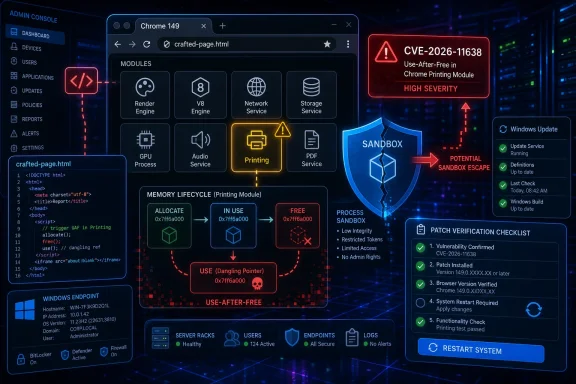 The Print Dialog Has Become Part of the Threat Model
The most interesting thing about CVE-2026-11638 is not that it affects Chrome. Chrome ships security fixes constantly, and Chromium’s bug pipeline is large enough that any single CVE can look like weather. What matters here is the component: Printing, a feature many users treat as a boring relic and many administrators treat as a policy headache rather than a browser exploitation surface.A use-after-free vulnerability is a memory-lifetime bug. Software frees a chunk of memory, then later tries to use it again, creating the opportunity for an attacker to influence what sits in that memory space when the program returns to it. In a browser, where untrusted web content is intentionally shoved into a complicated engine and asked to render, script, compose, preview, print, and communicate with operating-system facilities, that class of bug has long been a favorite ingredient in exploit chains.
Chrome’s description says the issue existed in Google Chrome prior to 149.0.7827.103 and could allow a remote attacker to potentially perform a sandbox escape via a crafted HTML page. That wording is doing a lot of work. A sandbox escape is not merely “the browser crashes” or “the tab misbehaves.” It means the attack may move beyond the renderer’s intended cage and toward the host system’s broader privileges, depending on the rest of the chain and target environment.
That distinction matters for WindowsForum readers because the modern browser is no longer an application sitting politely on top of Windows. It is an operating environment with identity tokens, synced passwords, enterprise certificates, web apps, file-system access prompts, print subsystems, PDF workflows, GPU acceleration, and policy hooks. When a component like Printing has a critical memory-safety flaw, the old mental model of “don’t download strange executables” is inadequate.
Google Fixed One Bug Inside a Much Larger Patch Wave
The June 8 stable-channel update moved desktop Chrome to 149.0.7827.102/.103 on Windows and Mac and 149.0.7827.102 on Linux, with the update rolling out over the following days and weeks. Google listed 74 security fixes in the release, including a striking run of critical use-after-free issues across Ozone, File Input, Aura, TabStrip, Bluetooth, Gamepad, Autofill, Views, Printing, Compositing, Web Apps, Proxy, and other browser subsystems.CVE-2026-11638 sits in the middle of that list, reported by Google on May 27 and assigned Chromium’s critical severity. It was not the only Printing-related flaw in the same advisory; Google also listed CVE-2026-11647 as a high-severity use-after-free in Printing. That does not automatically mean the two bugs are related in exploitability or code path, but it does suggest that Printing received more than casual attention in this release cycle.
The advisory also disclosed that Google was aware of active exploitation for a different vulnerability in the same update, CVE-2026-11645, an out-of-bounds memory access flaw in V8. That detail has understandably attracted the headlines because “zero-day exploited in the wild” is a louder phrase than “critical sandbox escape potential.” But defenders should resist the temptation to patch only for the bug with the known exploit note. Attackers read advisories too, and high-impact bugs in the same build quickly become part of the reverse-engineering race.
Google’s standard restriction on bug details is also relevant. Access to bug reports and links may remain limited until most users have updated, particularly when related code exists in third-party libraries or downstream projects. That is not secrecy for secrecy’s sake; it is a recognition that exploit developers can move faster than enterprise patch governance when given precise technical breadcrumbs.
A Critical CVSS Score Is a Warning, Not a Forecast
CISA’s ADP scoring gave CVE-2026-11638 a CVSS 3.1 base score of 9.6, with network attack vector, low attack complexity, no privileges required, user interaction required, changed scope, and high impact across confidentiality, integrity, and availability. NVD had not yet supplied its own CVSS assessment at the time reflected in the record, but the CISA vector captures why the bug is being treated as serious: a remote web-delivered attack, no prior account needed, and possible consequences outside the original browser security boundary.The “user interaction required” portion should not comfort anyone. In browser vulnerability language, that often means the victim must visit or be routed to a crafted page. That can happen through a malicious link, compromised site, ad network, phishing email, poisoned search result, chat message, or any other path that gets a browser to parse hostile content.
The more important phrase is “scope changed.” In CVSS terms, changed scope indicates that successful exploitation can affect a security authority beyond the vulnerable component’s original boundary. In plain English, that is why “sandbox escape” gets security teams moving. The browser sandbox is supposed to absorb the blast; a sandbox escape is the blast finding a seam.
Still, a CVSS score is not a guarantee of exploitation in the wild. It is a severity model, not a telemetry feed. As of the public details available around this advisory, Google explicitly called out known exploitation for CVE-2026-11645, not CVE-2026-11638. The right conclusion is not panic; it is prioritization. Critical sandbox-escape potential in a browser deserves fast patching even before public exploitation is confirmed.
Windows Administrators Should Read the CPE Entry Carefully
NVD’s affected-configuration entry ties vulnerable Google Chrome versions below 149.0.7827.103 to Windows, Linux, and macOS platform CPEs. That is a conventional way to express that desktop Chrome on those operating systems is in scope. It should not be read as Windows itself having a Printing vulnerability under this CVE.This distinction matters because CPE trees can be misread during vulnerability management triage. A scanner may surface the OS CPE alongside the application CPE, and a hurried report can turn that into “Windows is vulnerable to CVE-2026-11638.” The more accurate statement is that Chrome versions before the fixed build are vulnerable when running on the listed desktop operating systems.
For Windows environments, the operational target is therefore Chrome inventory, not a Windows cumulative update. Administrators should confirm Chrome’s installed version across managed endpoints, including systems where users may have installed Chrome outside the standard image, and should account for both per-machine and per-user installs. The latter is still a perennial blind spot in organizations that inherited years of relaxed browser-install policy.
There is also an Edge-adjacent implication, even though this specific CVE record names Chrome. Microsoft Edge is Chromium-based, and many Chromium fixes eventually appear across the Chromium ecosystem, but version numbers, release timing, and advisory language differ by vendor. The correct enterprise move is to track each deployed Chromium-based browser through its own update channel rather than assuming Chrome’s fixed version number maps cleanly to Edge, Brave, Vivaldi, Opera, or embedded WebView runtimes.
Printing Is Not a Peripheral Feature in Modern Browsers
Printing used to mean paper. In 2026, browser printing means print preview, PDF generation, system dialog mediation, device enumeration, page layout transformation, font handling, graphics compositing, and the handoff between web content and operating-system services. That is a lot of code for a feature many users activate with Ctrl+P and then forget.The web also made printing programmable in subtle ways. CSS print stylesheets, page-break rules, SVGs, fonts, canvases, iframes, PDFs, and dynamic document generation all feed into the same broad experience of turning web content into a printable or saved representation. A crafted HTML page does not need to look like an obvious “print this” trap to exercise complicated rendering and preview paths.
That is why dismissing a Printing bug as niche misunderstands browser design. Attackers do not care whether a feature is fashionable. They care whether it is reachable, complex, memory-unsafe, and connected to privilege boundaries. Printing checks enough of those boxes to deserve attention when a critical CVE lands.
The history of Windows security should make this especially intuitive. Print-related components have repeatedly punched above their apparent weight because they connect user-facing workflows to deeper system services. CVE-2026-11638 is not PrintNightmare redux, and it should not be described as such. But it belongs to the same uncomfortable family of lessons: unglamorous plumbing becomes strategic when it crosses trust boundaries.
The Browser Sandbox Is Still Strong, but It Is Not Magic
Chrome’s sandbox remains one of the major security achievements of modern consumer computing. It is designed around the assumption that parsing the web is dangerous and that compromised renderer processes should be contained. That assumption has prevented countless browser bugs from becoming immediate full-system compromises.But every sandbox has seams. The browser must talk to the GPU, file pickers, clipboard, cameras, microphones, identity providers, native messaging hosts, print subsystems, enterprise policies, extension APIs, and the operating system’s own security model. Each seam is a negotiation between usability and containment.
A sandbox escape vulnerability is dangerous because it targets that negotiation. It may not be enough by itself to own a machine, and public descriptions often leave out the practical exploit prerequisites. But as part of a chain, a sandbox escape is the second act attackers need after gaining code execution in a renderer or otherwise steering the browser into a corrupted state.
That is why Chrome advisories can feel repetitive and still be urgent. Memory corruption in the renderer is bad; memory corruption that can help cross process or privilege boundaries is worse. The former may steal data available inside the browser context; the latter can potentially widen the attack into the endpoint.
Patch Rollouts Are Now a Race Against Reverse Engineering
Google’s advisory said the update would roll out over the coming days and weeks, which is normal language for Chrome stable releases. For home users with automatic updates functioning, that usually means the browser quietly pulls the fix and applies it after restart. For enterprises, the “after restart” clause is where risk accumulates.Chrome can download an update and still leave the old vulnerable binary running until users close and relaunch the browser. In organizations where browsers stay open for days, where virtual desktops are suspended rather than restarted, or where kiosks run long-lived sessions, update availability does not equal update completion. The delta between the two is now part of the attack surface.
Reverse engineering adds pressure. Once a patched build is public, attackers can diff old and new code, inspect changed functions, and infer the shape of the fixed vulnerability. Even when bug details remain restricted, the patch itself is a map for skilled adversaries. The longer vulnerable builds remain deployed, the more valuable that map becomes.
This is why browser patch SLAs should be more aggressive than many traditional desktop software SLAs. A monthly cadence may be acceptable for some low-exposure applications. It is increasingly hard to defend for browsers, especially when a release bundles dozens of security fixes and at least one actively exploited zero-day elsewhere in the same update.
The “Crafted HTML Page” Phrase Hides the Real Distribution Problem
Security advisories often flatten attacks into tidy phrases. “Via a crafted HTML page” sounds almost quaint, as if the victim must deliberately open a suspicious local file named something obvious. In reality, crafted web content can arrive through any compromised or attacker-controlled delivery surface that a browser trusts enough to render.The modern Windows user lives in the browser. Email clients open links into it, collaboration tools unfurl content around it, identity workflows depend on it, line-of-business apps are increasingly web apps, and help desks often guide users through browser-based admin portals. A malicious page is not an edge case; it is the ambient condition of internet use.
This is why administrators should treat browser isolation, web filtering, and exploit mitigation as layers rather than substitutes for patching. Network controls may block known bad infrastructure. Endpoint detection may catch post-exploitation behavior. Application control may reduce what a payload can execute. None of those controls should be asked to compensate for leaving a critical browser sandbox bug unpatched.
For consumers, the advice is simpler but no less serious: restart Chrome. The browser’s update mechanism is effective only when allowed to finish the job. If the menu is nagging for a relaunch, that is not cosmetic; it is a security boundary waiting to be rebuilt.
Enterprise Chrome Management Needs Proof, Not Hope
In managed Windows fleets, the response to CVE-2026-11638 should start with inventory. Administrators need to know which endpoints are running Chrome below the fixed version, which update channels they are on, and whether any policies are delaying updates. “Chrome auto-updates” is a useful default, not an audit result.Chrome’s enterprise policy machinery gives IT teams the ability to control update behavior, but it also gives them enough rope to preserve vulnerable versions longer than intended. Version pinning, extended stable channels, maintenance windows, and compatibility exceptions all have legitimate uses. They also create pockets of exposure when a critical advisory lands.
The difficult cases are not the obvious unmanaged laptops. They are the business-critical web app that “only works” against a frozen browser version, the call-center image nobody wants to reboot during peak hours, the lab machine exempted from updates for a vendor portal, and the executive endpoint that has accumulated local exceptions. Security teams know these exceptions exist; vulnerability management systems often discover them only after the fact.
The better operating model is to treat browser emergency updates like identity infrastructure updates: fast, visible, and measured. If the browser is the front door to SaaS, SSO, financial systems, customer records, and internal admin consoles, then browser vulnerability response is not desktop hygiene. It is business risk management.
Chromium’s Shared Codebase Spreads Both Fixes and Uncertainty
Chrome is the named product in CVE-2026-11638, but Chromium is the substrate beneath a large share of the browser market. That creates a familiar downstream question after every serious Chrome advisory: which other Chromium-based products inherit the vulnerable code, and when do their patches land?The answer is often product-specific. Some vendors integrate Chromium updates quickly. Others lag because they carry custom patches, ship on different release trains, or maintain separate enterprise channels. Embedded browsers and application runtimes can be harder still because the vulnerable component may sit inside software that users do not think of as a browser at all.
For Windows administrators, this means Chrome patching is necessary but not always sufficient. Edge, Electron-based applications, Chromium-based third-party browsers, WebView2 runtimes, and specialized kiosk software may each have their own update story. CVE naming does not always make that story obvious on day one.
This is not an argument against Chromium. A shared codebase also means that fixes can propagate rapidly and that many eyes are focused on hardening the same components. But shared code concentrates risk as well as engineering effort. When a memory-safety bug appears in a widely reused browser subsystem, the blast radius is measured in ecosystems, not brands.
The Security Changelog Is Becoming a Memory-Safety Ledger
One striking aspect of the June 8 Chrome advisory is the number of use-after-free flaws. CVE-2026-11638 is one entry in a long sequence of memory-lifetime vulnerabilities across interface, rendering, device, and service components. That pattern is not new, but its persistence is the story.Chrome has invested heavily in fuzzing, sanitizers, control-flow integrity, site isolation, sandboxing, and memory-safety mitigations. Those investments matter. They find bugs earlier, raise exploitation cost, and reduce the number of straightforward paths from malformed web content to reliable compromise. Yet the advisory still reads like an inventory of C++ risk spread across a massive browser codebase.
The industry’s shift toward memory-safe languages is the long-term answer, but browsers cannot rewrite themselves overnight. Chromium is a huge, performance-sensitive, compatibility-bound project with decades of inherited assumptions and platform integration. The practical present is a hybrid world: better tooling, tighter sandboxes, more compartmentalization, and relentless patching.
That is why users see so many updates. It is not evidence that Chrome security is uniquely broken; it is evidence that the browser is one of the most attacked and most scrutinized pieces of software on the planet. The uncomfortable truth is that patch frequency is a feature of living software at internet scale.
NVD’s Timeline Shows How Fast the Metadata Machine Moves
The CVE record was received from Chrome on June 8, modified by CISA-ADP later that day with a CVSS vector, and then updated by NIST on June 9 with initial analysis and affected-configuration data. That sequence is typical of the modern vulnerability pipeline: vendor disclosure first, enrichment by public-sector and ecosystem databases shortly after, scanner ingestion almost immediately.This matters because many organizations do not patch from advisories; they patch from dashboards. A vulnerability becomes real to them when it appears in a scanner, ticket queue, risk register, or executive metric. The metadata pipeline is therefore part of the incident response pipeline.
But metadata can also mislead when read without context. NVD’s inclusion of operating-system CPEs does not mean Windows, Linux, and macOS each contain the same flaw. The CISA score does not prove exploitation. Google’s critical severity does not provide exploit code. Each data point is useful, but none replaces technical interpretation.
The job for defenders is to turn the record into action without overclaiming. The action is update Chrome to the fixed version or later, verify that the browser relaunched, and review other Chromium-based software. The restraint is not to invent exploitation claims for CVE-2026-11638 beyond what the public advisory says.
The User Experience Still Undermines the Security Model
Chrome’s automatic update system is one of the reasons browser security is better than it was in the plug-in era. Most consumers no longer download browser installers by hand, and enterprises have mature controls for update cadence. Yet the final mile still depends heavily on user behavior.The relaunch prompt is the weak hinge. Users defer it because they have tabs open, forms half-filled, meetings in progress, dashboards running, or simply because the browser has trained them to treat prompts as background noise. In a world where the browser is the workspace, restarting it feels like interrupting the workday.
That creates a design problem for vendors and administrators alike. If a critical update is available but dormant until restart, the interface must communicate urgency without becoming another alert users learn to ignore. Enterprises can force restarts, but doing so clumsily creates resentment and work loss. Doing nothing creates exposure.
A better pattern is staged urgency: notify, preserve session state, offer a short grace period, then enforce relaunch for high-severity security updates. The principle is simple. Users should have enough control to avoid losing work, but not enough control to leave a known critical browser flaw active indefinitely.
The Fix Is Simple; The Discipline Is Not
The immediate remediation for CVE-2026-11638 is straightforward: run Chrome 149.0.7827.103 or later, with awareness that Google’s Windows stable-channel notation for the update also includes 149.0.7827.102/.103 during rollout. On individual PCs, the familiar route is Chrome’s About page, which checks for updates and prompts for relaunch. In managed environments, the route is whatever update system enforces Chrome currency across the fleet.The discipline is harder because browser updates sit at the intersection of security, productivity, compatibility, and user autonomy. Nobody wants to break a revenue-generating web app because a browser jumped builds. Nobody wants to reboot a kiosk in the middle of operations. Nobody wants to tell a department that its tab-hoarding culture is now a security finding.
But critical browser vulnerabilities force that conversation. A browser that can reach sensitive internal applications and identity sessions cannot be treated like a casual utility. Its update state belongs in the same operational conversation as endpoint detection, device compliance, and privileged access.
For Windows enthusiasts at home, the lesson is less bureaucratic but equally concrete. If Chrome shows an update pending, apply it. If you run multiple browsers, check them all. If you rely on portable builds or niche Chromium forks, understand that you may have opted out of the fastest security supply chain.
This Printing Bug Leaves a Clear Checklist for Windows Fleets
CVE-2026-11638 is narrow enough to patch quickly and broad enough to expose weak habits. The organizations that handle it well will not be the ones with the longest vulnerability policy documents. They will be the ones that can prove, quickly, which browser builds are running and whether the fixed code is actually active.- Chrome installations below the fixed desktop build should be treated as urgent remediation targets, especially on systems that routinely access email, SaaS apps, admin portals, or sensitive data.
- A downloaded Chrome update should not be counted as remediated until the browser has relaunched and the running version reflects the patched build.
- Vulnerability reports should distinguish between Chrome as the affected application and Windows as a supported platform CPE, rather than describing this CVE as a Windows operating-system flaw.
- Managed environments should review update deferrals, version pins, extended-stable policies, and exception groups that could keep vulnerable browser builds alive after the advisory.
- Security teams should separately track Edge, other Chromium-based browsers, WebView2-dependent applications, and Electron apps instead of assuming Chrome’s patch automatically closes every Chromium-derived exposure.
- Public evidence points to active exploitation of a different Chrome vulnerability in the same update, CVE-2026-11645, while CVE-2026-11638 remains serious because of its critical severity and sandbox-escape potential.
References
- Primary source: NVD / Chromium
Published: 2026-06-15T19:13:44-07:00
NVD - CVE-2026-11638
 nvd.nist.gov
- Security advisory: MSRC
Published: 2026-06-15T19:13:44-07:00
Original feed URL
Security Update Guide - Microsoft Security Response Center
 msrc.microsoft.com
