

UniGetUI 2026.2.1 is a new maintenance release of Devolutions’ open-source Windows package-manager front end, published in mid-June 2026, that improves update reliability, adds safer diagnostic logging, and refines how the app handles package operations across Windows 10 and Windows 11. The release is not glamorous, and that is precisely why it matters. Windows software management still lives in the uneasy space between consumer convenience and administrator discipline, and UniGetUI’s latest build is aimed squarely at making that middle ground less brittle.
The headline feature is not a new package source or a redesigned dashboard. It is a collection of small changes that acknowledge a basic truth: the hardest part of desktop package management is not finding software, but trusting the machinery that installs, updates, removes, logs, retries, and explains it. UniGetUI 2026.2.1 reads like a release built by people who have spent time watching real users file real bug reports after an update stalls halfway through.
For years, Windows users lived with a software model that was both familiar and chaotic. You searched the web, downloaded an installer, clicked through a wizard, hoped you had not landed on an adware clone, and repeated the process whenever a vendor remembered to ship an updater. That model worked because Windows had scale, not because it had elegance.
The arrival and maturation of package managers changed the conversation without fully solving the problem. WinGet gave Microsoft’s ecosystem an official command-line installer and updater. Chocolatey brought long-running infrastructure and enterprise familiarity. Scoop appealed to developers who wanted portable, user-space tooling. Pip, npm, and .NET tools covered language-specific ecosystems that increasingly matter on developer workstations.
UniGetUI’s pitch is that Windows does not need another package manager so much as it needs a control surface for the ones people already use. That distinction is important. The app is not trying to replace WinGet, Scoop, Chocolatey, pip, npm, or .NET Tool; it is trying to make them feel like parts of one coherent system.
That makes UniGetUI a particularly Windows-shaped project. Linux distributions tend to define the package universe from the top down. Windows, by contrast, has accumulated software channels like sediment: Microsoft Store apps, traditional EXE installers, MSIX packages, developer tools, portable utilities, enterprise deployment systems, and vendor-specific updaters. UniGetUI is a pragmatic response to that mess, not a philosophical cure for it.
That language can sound bland until you consider the job UniGetUI is doing. A graphical shell around several command-line package managers is only as good as its ability to translate state. If WinGet reports one kind of failure, Chocolatey another, and Scoop something stranger still, the user does not want a philosophical lecture on backend differences. They want to know whether the app installed, whether it needs attention, and whether pressing “update” again will make things better or worse.
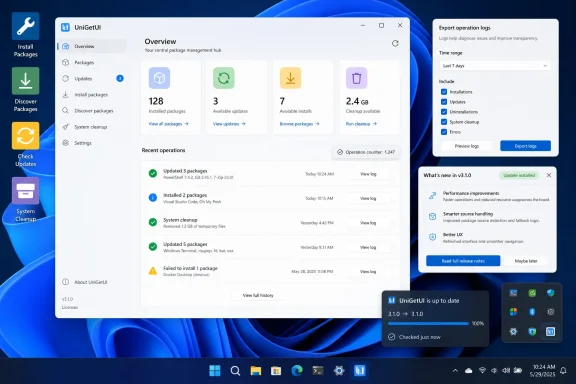
The new operation counter is a good example of a small change with larger implications. Package operations can take time, especially when multiple apps are queued, installers spawn their own processes, or network downloads behave inconsistently. A visible counter does not make those operations faster, but it makes them more legible. In software management, legibility is a feature.
The same is true of the expanded troubleshooting capabilities. Package managers fail in ways that are often hard to reproduce: a bad manifest, a locked file, a permissions mismatch, a flaky CDN, a stale cache, a process still running in the background. Better diagnostics do not eliminate those failures, but they shorten the distance between “it broke” and “here is what happened.”
On Windows, usernames often appear in file paths, profile directories, environment variables, cache locations, and package-manager output. A support log that looks harmless to a developer may reveal a person’s real name, workplace convention, machine naming scheme, or directory structure. For home users, that is uncomfortable. For administrators, it can be a policy problem.
By adding automatic username redaction, UniGetUI lowers the social cost of bug reporting. Users can share diagnostics with less manual scrubbing, and maintainers can ask for logs with less risk of exposing personal information. This is not privacy theater; it is a direct improvement to the feedback loop that keeps a tool like this usable.
It also reflects a broader shift in Windows utilities. The old freeware culture treated diagnostic output as something power users would inspect manually. Modern open-source utilities are expected to behave more like products: safer defaults, clearer support paths, fewer accidental leaks. UniGetUI is moving in that direction.
But in this case, the default has a defensible purpose. UniGetUI sits between users and the tooling that changes their installed software. If the app’s own update modifies package handling, logging behavior, or self-update mechanics, users benefit from knowing what changed. The release notes are not merely marketing copy; they are part of the trust model.
The key is that the behavior can be disabled. That matters because the Windows enthusiast audience is particularly sensitive to forced surfaces. A toggle converts a potentially irritating default into a reasonable onboarding mechanism. It says: we think this information matters, but we are not going to trap you in it.
There is also a support angle. When users skip release notes, they often miss fixes for issues they have already experienced. Opening the notes by default may reduce duplicate reports and give users a better sense of whether a frustrating behavior was addressed. It is a small nudge toward informed updating.
Version 2026.2.1 specifically calls out enhanced installer behavior when updating running UniGetUI instances. That is not a flashy feature, but it is exactly the kind of improvement that separates a pleasant utility from a risky one. Users should not need to understand process handles or background services just to keep their package-management front end current.
The stakes are higher because UniGetUI encourages bulk operations. If a user trusts the app to update many installed packages at once, they also need to trust that UniGetUI will not leave itself in an inconsistent state. A broken self-update is more than an inconvenience; it undermines confidence in the whole software-maintenance workflow.
That is why the release’s emphasis on reducing update interruptions and inconsistent update states matters. The app is not only managing software; it is making a claim about reliability. Every failed self-update weakens that claim.
A bad GUI would paper over those differences so aggressively that users lose sight of what is actually happening. A bad power-user tool would expose every backend quirk until the interface becomes a decorated terminal. UniGetUI’s value depends on living between those extremes.
The 2026.2.1 improvements to package manager integrations and metadata processing suggest continued work on that translation layer. Metadata is not decoration. Publisher names, download sizes, direct download URLs, screenshots, icons, package identifiers, and version information are all part of how users decide whether an installation is trustworthy.
This is especially important on Windows because many packages ultimately wrap traditional installers. Unlike a tightly controlled distribution repository, the Windows package world often delegates final installation behavior to vendor-provided setup programs. A GUI can make that feel smoother, but it cannot magically eliminate the underlying diversity of installer behavior.
But bulk operations magnify both success and failure. Updating one app and discovering a broken installer is annoying. Updating twenty apps and discovering that three installers require interaction, two fail because of running processes, and one changes its channel unexpectedly is a workflow problem. The more UniGetUI encourages one-click maintenance, the more important its operation tracking and failure reporting become.
That is why an operation counter belongs in the same conversation as stability fixes. Users need to know not just that something is happening, but how much is happening. When a queue stalls, that context matters. When an operation completes, the user needs confidence that the count reflects reality rather than wishful UI state.
For IT pros, the export and import features are equally attractive and equally deserving of caution. A package list can speed up workstation setup, but it is not a complete configuration-management system. Install parameters, architecture choices, older versions, and package-specific switches help, yet administrators still need to validate whether the resulting machine meets policy and security expectations.
That makes integrations like the system tray icon, Widgets pane, and Dev Home pane more significant than they first appear. These are not merely convenience surfaces. They move software maintenance from an occasional chore into the ambient operating environment. Updates become something the user can notice and act on without opening a terminal or visiting vendor sites.
There is a risk here. Too many update surfaces can become noise, and Windows users already live with notifications from the OS, browsers, drivers, stores, game launchers, and vendor agents. UniGetUI has to be careful not to become another nagging icon in the corner. Its value depends on consolidating update awareness, not adding to notification fatigue.
The per-package ability to skip versions or ignore updates is therefore important. A serious update tool must acknowledge that “latest” is not always “best.” Users may hold back an app because of a regression, licensing change, compatibility issue, or workflow dependency. Automation that cannot be selectively restrained is not administration; it is gambling.
But UniGetUI should not be confused with Microsoft Intune, Configuration Manager, winget-based enterprise deployment, or a full endpoint-management platform. It does not solve approval workflows, software inventory compliance, vulnerability prioritization, rollback governance, or organization-wide reporting by itself. It can support disciplined maintenance, but it is not discipline in a box.
That distinction matters because package updates are increasingly tied to security posture. Browsers, compression tools, developer utilities, remote-access clients, media apps, and productivity software all carry risk when left stale. A consumer-friendly GUI can help close some of that gap, especially on unmanaged systems. Still, IT departments need policy, testing, and auditability around any tool that changes installed software at scale.
UniGetUI’s best enterprise-adjacent role may be as a bridge. It gives technicians a usable front end for package-manager ecosystems they may already trust. It also gives advanced users a safer way to keep machines current without demanding that everyone memorize command-line syntax.
Open source, however, is not a magic shield. A package-management front end touches sensitive workflows, launches installers, invokes command-line tools, and surfaces software from repositories with their own trust models. Transparency helps, but responsible defaults matter just as much.
The log-redaction feature is a good sign because it treats user safety as part of the product, not merely part of the license. The same is true of better error reporting. Open-source projects often ask users to meet maintainers halfway; good tooling makes that halfway point easier to reach.
Devolutions’ involvement also changes the project’s posture. UniGetUI is no longer merely a clever enthusiast utility floating around the Windows software ecosystem. It is now attached to a company known for remote-connection and password-management products, which raises expectations around polish, supportability, and security-minded design. That does not guarantee perfection, but it does make the direction of travel more interesting.
Package managers answer part of that problem by standardizing discovery and installation. A GUI answers another part by making the workflow approachable. But trust is cumulative. It depends on metadata, logs, predictable updates, sensible defaults, and the absence of unpleasant surprises.
That is why 2026.2.1’s small fixes are more strategically meaningful than they appear. Improved handling of package manager responses and failure scenarios is not cosmetic. Fixed package discovery and metadata retrieval issues are not merely housekeeping. Stability during package operations is not optional. These are the bones of user trust.
For Windows enthusiasts, UniGetUI also represents a cultural shift. The command line remains powerful, but not every useful administrative workflow needs to look like a terminal session. A good GUI does not make a power user weaker. It makes repeated, error-prone work easier to review and execute.
The practical lessons are straightforward:
The headline feature is not a new package source or a redesigned dashboard. It is a collection of small changes that acknowledge a basic truth: the hardest part of desktop package management is not finding software, but trusting the machinery that installs, updates, removes, logs, retries, and explains it. UniGetUI 2026.2.1 reads like a release built by people who have spent time watching real users file real bug reports after an update stalls halfway through.
 Windows Finally Has Package Managers, But Not One Package Culture
For years, Windows users lived with a software model that was both familiar and chaotic. You searched the web, downloaded an installer, clicked through a wizard, hoped you had not landed on an adware clone, and repeated the process whenever a vendor remembered to ship an updater. That model worked because Windows had scale, not because it had elegance.The arrival and maturation of package managers changed the conversation without fully solving the problem. WinGet gave Microsoft’s ecosystem an official command-line installer and updater. Chocolatey brought long-running infrastructure and enterprise familiarity. Scoop appealed to developers who wanted portable, user-space tooling. Pip, npm, and .NET tools covered language-specific ecosystems that increasingly matter on developer workstations.
UniGetUI’s pitch is that Windows does not need another package manager so much as it needs a control surface for the ones people already use. That distinction is important. The app is not trying to replace WinGet, Scoop, Chocolatey, pip, npm, or .NET Tool; it is trying to make them feel like parts of one coherent system.
That makes UniGetUI a particularly Windows-shaped project. Linux distributions tend to define the package universe from the top down. Windows, by contrast, has accumulated software channels like sediment: Microsoft Store apps, traditional EXE installers, MSIX packages, developer tools, portable utilities, enterprise deployment systems, and vendor-specific updaters. UniGetUI is a pragmatic response to that mess, not a philosophical cure for it.
The Maintenance Release Is the Message
Version 2026.2.1 does not pretend to be a revolution. Its changelog is full of phrases that software vendors often bury under the heading of “quality-of-life improvements”: better update handling, expanded diagnostics, improved package metadata processing, cleaner installer behavior, more consistent UI elements, updated icons and resources, and stability fixes.That language can sound bland until you consider the job UniGetUI is doing. A graphical shell around several command-line package managers is only as good as its ability to translate state. If WinGet reports one kind of failure, Chocolatey another, and Scoop something stranger still, the user does not want a philosophical lecture on backend differences. They want to know whether the app installed, whether it needs attention, and whether pressing “update” again will make things better or worse.
The new operation counter is a good example of a small change with larger implications. Package operations can take time, especially when multiple apps are queued, installers spawn their own processes, or network downloads behave inconsistently. A visible counter does not make those operations faster, but it makes them more legible. In software management, legibility is a feature.
The same is true of the expanded troubleshooting capabilities. Package managers fail in ways that are often hard to reproduce: a bad manifest, a locked file, a permissions mismatch, a flaky CDN, a stale cache, a process still running in the background. Better diagnostics do not eliminate those failures, but they shorten the distance between “it broke” and “here is what happened.”
The Log-Redaction Toggle Understands the Real Support Problem
The most interesting privacy change in UniGetUI 2026.2.1 is a setting that automatically redacts usernames from exported logs. That may sound minor, but it reflects a mature understanding of open-source support. Users are constantly asked to share logs, and logs are constantly full of little bits of identity.On Windows, usernames often appear in file paths, profile directories, environment variables, cache locations, and package-manager output. A support log that looks harmless to a developer may reveal a person’s real name, workplace convention, machine naming scheme, or directory structure. For home users, that is uncomfortable. For administrators, it can be a policy problem.
By adding automatic username redaction, UniGetUI lowers the social cost of bug reporting. Users can share diagnostics with less manual scrubbing, and maintainers can ask for logs with less risk of exposing personal information. This is not privacy theater; it is a direct improvement to the feedback loop that keeps a tool like this usable.
It also reflects a broader shift in Windows utilities. The old freeware culture treated diagnostic output as something power users would inspect manually. Modern open-source utilities are expected to behave more like products: safer defaults, clearer support paths, fewer accidental leaks. UniGetUI is moving in that direction.
Opening Release Notes After Updates Is Annoying Until It Is Useful
UniGetUI now opens the release notes page after updating by default, with an option to disable the behavior in Settings. Some users will immediately turn it off, and that is fine. Nobody wants every utility on a Windows desktop acting like a product manager desperate for attention.But in this case, the default has a defensible purpose. UniGetUI sits between users and the tooling that changes their installed software. If the app’s own update modifies package handling, logging behavior, or self-update mechanics, users benefit from knowing what changed. The release notes are not merely marketing copy; they are part of the trust model.
The key is that the behavior can be disabled. That matters because the Windows enthusiast audience is particularly sensitive to forced surfaces. A toggle converts a potentially irritating default into a reasonable onboarding mechanism. It says: we think this information matters, but we are not going to trap you in it.
There is also a support angle. When users skip release notes, they often miss fixes for issues they have already experienced. Opening the notes by default may reduce duplicate reports and give users a better sense of whether a frustrating behavior was addressed. It is a small nudge toward informed updating.
Self-Updating Is Where Utilities Prove Their Discipline
The changelog’s repeated references to update reliability and self-update workflows are worth pausing on. Updating a tool that itself manages updates is a deceptively tricky act. The app may be running in the tray, monitoring available packages, holding state about operations, or launching installers while its own files need replacement.Version 2026.2.1 specifically calls out enhanced installer behavior when updating running UniGetUI instances. That is not a flashy feature, but it is exactly the kind of improvement that separates a pleasant utility from a risky one. Users should not need to understand process handles or background services just to keep their package-management front end current.
The stakes are higher because UniGetUI encourages bulk operations. If a user trusts the app to update many installed packages at once, they also need to trust that UniGetUI will not leave itself in an inconsistent state. A broken self-update is more than an inconvenience; it undermines confidence in the whole software-maintenance workflow.
That is why the release’s emphasis on reducing update interruptions and inconsistent update states matters. The app is not only managing software; it is making a claim about reliability. Every failed self-update weakens that claim.
A GUI for Package Managers Has to Hide Complexity Without Lying
UniGetUI’s core challenge is balancing simplicity against honesty. The user interface promises one place to discover, install, update, and remove software. Underneath, however, the package managers do not behave identically. They have different repositories, package formats, permission models, installer conventions, update semantics, and failure modes.A bad GUI would paper over those differences so aggressively that users lose sight of what is actually happening. A bad power-user tool would expose every backend quirk until the interface becomes a decorated terminal. UniGetUI’s value depends on living between those extremes.
The 2026.2.1 improvements to package manager integrations and metadata processing suggest continued work on that translation layer. Metadata is not decoration. Publisher names, download sizes, direct download URLs, screenshots, icons, package identifiers, and version information are all part of how users decide whether an installation is trustworthy.
This is especially important on Windows because many packages ultimately wrap traditional installers. Unlike a tightly controlled distribution repository, the Windows package world often delegates final installation behavior to vendor-provided setup programs. A GUI can make that feel smoother, but it cannot magically eliminate the underlying diversity of installer behavior.
Bulk Operations Are Convenient Because They Are Dangerous
One of UniGetUI’s strongest appeals is bulk management. Select multiple packages, install them together, update them together, remove them together, export a setup, import it elsewhere, and rebuild a working machine faster than the old manual download ritual ever allowed. That is a powerful idea for enthusiasts and a practical one for technicians who frequently rebuild Windows systems.But bulk operations magnify both success and failure. Updating one app and discovering a broken installer is annoying. Updating twenty apps and discovering that three installers require interaction, two fail because of running processes, and one changes its channel unexpectedly is a workflow problem. The more UniGetUI encourages one-click maintenance, the more important its operation tracking and failure reporting become.
That is why an operation counter belongs in the same conversation as stability fixes. Users need to know not just that something is happening, but how much is happening. When a queue stalls, that context matters. When an operation completes, the user needs confidence that the count reflects reality rather than wishful UI state.
For IT pros, the export and import features are equally attractive and equally deserving of caution. A package list can speed up workstation setup, but it is not a complete configuration-management system. Install parameters, architecture choices, older versions, and package-specific switches help, yet administrators still need to validate whether the resulting machine meets policy and security expectations.
The Package Manager Manager Is Becoming a Desktop Control Plane
The phrase “package manager manager” sounds like a joke, but it captures what UniGetUI is becoming. The application is less about any single repository and more about control: visibility into installed software, visibility into available updates, and enough automation to reduce the repetitive work of keeping a Windows machine current.That makes integrations like the system tray icon, Widgets pane, and Dev Home pane more significant than they first appear. These are not merely convenience surfaces. They move software maintenance from an occasional chore into the ambient operating environment. Updates become something the user can notice and act on without opening a terminal or visiting vendor sites.
There is a risk here. Too many update surfaces can become noise, and Windows users already live with notifications from the OS, browsers, drivers, stores, game launchers, and vendor agents. UniGetUI has to be careful not to become another nagging icon in the corner. Its value depends on consolidating update awareness, not adding to notification fatigue.
The per-package ability to skip versions or ignore updates is therefore important. A serious update tool must acknowledge that “latest” is not always “best.” Users may hold back an app because of a regression, licensing change, compatibility issue, or workflow dependency. Automation that cannot be selectively restrained is not administration; it is gambling.
The Enterprise Story Is Tempting, But Still Bounded
It is easy to imagine UniGetUI appealing to small IT shops, consultants, lab administrators, and power users managing family machines. A single GUI that can update software from multiple sources is exactly the kind of thing Windows has historically lacked. The export-and-import workflow also fits the real world of rebuilding PCs, setting up development environments, and keeping non-domain machines from drifting too far out of date.But UniGetUI should not be confused with Microsoft Intune, Configuration Manager, winget-based enterprise deployment, or a full endpoint-management platform. It does not solve approval workflows, software inventory compliance, vulnerability prioritization, rollback governance, or organization-wide reporting by itself. It can support disciplined maintenance, but it is not discipline in a box.
That distinction matters because package updates are increasingly tied to security posture. Browsers, compression tools, developer utilities, remote-access clients, media apps, and productivity software all carry risk when left stale. A consumer-friendly GUI can help close some of that gap, especially on unmanaged systems. Still, IT departments need policy, testing, and auditability around any tool that changes installed software at scale.
UniGetUI’s best enterprise-adjacent role may be as a bridge. It gives technicians a usable front end for package-manager ecosystems they may already trust. It also gives advanced users a safer way to keep machines current without demanding that everyone memorize command-line syntax.
The Open-Source Advantage Is Also an Obligation
UniGetUI is open source, which gives it credibility with the kind of audience that cares how system utilities behave. Users can inspect the project, follow issues, and see the pace of development. Community reports are clearly part of the 2026.2.1 story, given the changelog’s references to stability issues reported by users and fixes across package discovery, metadata retrieval, and failure scenarios.Open source, however, is not a magic shield. A package-management front end touches sensitive workflows, launches installers, invokes command-line tools, and surfaces software from repositories with their own trust models. Transparency helps, but responsible defaults matter just as much.
The log-redaction feature is a good sign because it treats user safety as part of the product, not merely part of the license. The same is true of better error reporting. Open-source projects often ask users to meet maintainers halfway; good tooling makes that halfway point easier to reach.
Devolutions’ involvement also changes the project’s posture. UniGetUI is no longer merely a clever enthusiast utility floating around the Windows software ecosystem. It is now attached to a company known for remote-connection and password-management products, which raises expectations around polish, supportability, and security-minded design. That does not guarantee perfection, but it does make the direction of travel more interesting.
Windows Software Management Is Still a Trust Problem
The deeper issue exposed by UniGetUI’s popularity is that Windows users do not merely want faster installs. They want less anxiety. They want to know whether an app came from the expected publisher, whether the update is legitimate, whether the installer will behave, and whether they can reverse course if something goes wrong.Package managers answer part of that problem by standardizing discovery and installation. A GUI answers another part by making the workflow approachable. But trust is cumulative. It depends on metadata, logs, predictable updates, sensible defaults, and the absence of unpleasant surprises.
That is why 2026.2.1’s small fixes are more strategically meaningful than they appear. Improved handling of package manager responses and failure scenarios is not cosmetic. Fixed package discovery and metadata retrieval issues are not merely housekeeping. Stability during package operations is not optional. These are the bones of user trust.
For Windows enthusiasts, UniGetUI also represents a cultural shift. The command line remains powerful, but not every useful administrative workflow needs to look like a terminal session. A good GUI does not make a power user weaker. It makes repeated, error-prone work easier to review and execute.
This Release Rewards Users Who Treat Updates as a Workflow
UniGetUI 2026.2.1 is best understood as a workflow release. It improves the experience around operations, diagnostics, privacy, update reliability, and interface consistency rather than trying to redefine the application. For users already relying on UniGetUI, that makes it a sensible update; for new users, it makes the app feel a little more like infrastructure and a little less like an experiment.The practical lessons are straightforward:
- UniGetUI 2026.2.1 focuses on reliability, diagnostics, and privacy rather than adding a major new package source.
- The new operation counter should make long-running or bulk package tasks easier to understand while they are in progress.
- Automatic username redaction in exported logs makes it safer for users to share troubleshooting data with maintainers or support communities.
- The app now opens release notes after updating by default, but users can disable that behavior in Settings.
- The update includes fixes for self-update workflows, package installation edge cases, metadata retrieval, and stability issues reported by the community.
- UniGetUI remains a front end for underlying package managers, so its reliability still depends partly on WinGet, Scoop, Chocolatey, pip, npm, .NET Tool, and the packages they expose.
References
- Primary source: Neowin
Published: Tue, 16 Jun 2026 04:06:00 GMT
UniGetUI 2026.2.1 - Neowin
User-friendly graphical interface for the Windows Package Manager (winget). It simplifies app installation on Windows 10/11 and enables users to browse and install apps from a visual interface. www.neowin.net
- Related coverage: unigetui.com
UniGetUI – Free Windows Package Manager GUI
Use UniGetUI to control all your Windows package managers in one place. Install, update, and manage software with a simple graphical interface. #UniGetUI unigetui.com
- Related coverage: unigetui.org
UniGetUI — Free Download for Windows PC
Download UniGetUI free for Windows 10/11. One GUI to manage WinGet, Scoop, Chocolatey, and more package managers.unigetui.org - Official source: github.com
GitHub - Devolutions/UniGetUI: UniGetUI: The Graphical Interface for your package managers. Could be terribly described as a package manager manager to manage your package managers · GitHub
UniGetUI: The Graphical Interface for your package managers. Could be terribly described as a package manager manager to manage your package managers - Devolutions/UniGetUI github.com
- Related coverage: devolutions.net
UniGetUI: one user interface for all package managers
UniGetUI is one user interface for all package managers. Install, update, and uninstall software via Winget, Chocolatey, Scoop, Snap, Pip, Npm, and more — no CLI required. Free, open source, MIT licensed.devolutions.net - Related coverage: firethering.com
UniGetUI: The Ultimate Open-Source GUI for Windows Package Managers - Firethering
UniGetUI (formerly known as WingetUI) is a free and open-source graphical user interface (GUI) designed to simplify how you manage software packages on Windows 10 and 11. Instead of using command-line tools, UniGetUI provides a sleek, intuitive desktop interface for popular Windows package... firethering.com
- Related coverage: newreleases.io
Devolutions/UniGetUI v2026.2.1 on GitHub
New release Devolutions/UniGetUI version v2026.2.1 UniGetUI v2026.2.1 on GitHub. newreleases.io
- Related coverage: sourceforge.net
UniGetUI
Download UniGetUI for free. The Graphical Interface for your package managers. The main goal of this project is to create an intuitive GUI for the most common CLI package managers for Windows 10 and 11, such as WinGet, Scoop, Chocolatey, Pip, Npm, .NET Tool, and PowerShell Gallery. With this...sourceforge.net - Related coverage: alternativeto.net
UniGetUI: Graphical interface for managing multiple Windows package managers | AlternativeTo
Intuitive interface for managing software via multiple Windows package managers. Supports install, update, bulk actions, backups, metadata review, and notifications.alternativeto.net
- Related coverage: memstechtips.com
How To Use UniGetUI To Install And Update Apps On Windows
UniGetUI is a free GUI for WinGet, Scoop, and Chocolatey. Install, update, and manage all your Windows apps from one interface. Download, setup, and usage guide.memstechtips.com
