

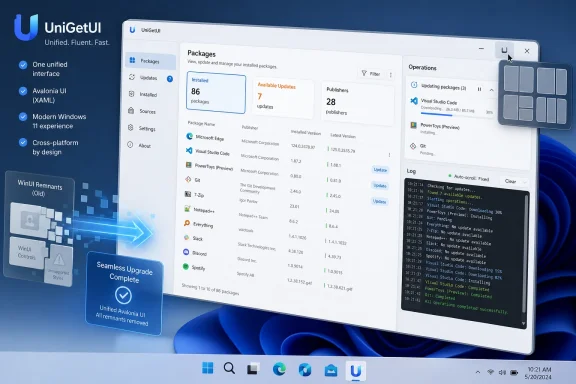
Devolutions released UniGetUI 2026.2.2 on June 25, 2026, completing the app’s migration from WinUI to Avalonia while adding Windows 11 Snap Layouts support, smaller release packages, improved logging behavior, and another round of visual refinements. The headline sounds cosmetic, but it is really architectural. UniGetUI is trying to make the messy reality of Windows package management feel native, stable, and approachable without pretending Winget, Chocolatey, Scoop, pip, npm, and .NET tools are all the same thing. That is a harder job than drawing a nicer package list.
Windows users have never lacked ways to install software. They have lacked a consistent way to manage software once it arrives from a dozen different channels, each with its own assumptions about scope, elevation, manifests, update rules, and silent installers. Microsoft’s Winget helped normalize the idea that Windows could have a package-manager workflow, but it did not erase the existing ecosystem of Chocolatey, Scoop, language-specific tools, and developer-local installers.
That is the gap UniGetUI has been filling. It is not a package manager in the classic Linux sense. It is a graphical control plane for other package managers, wrapping their catalogs, installed-package detection, upgrade flows, and uninstall commands into a single Windows application.
That distinction matters because UniGetUI’s value is not merely “click instead of type.” Power users can already script
Version 2026.2.2 advances that pitch by removing the last WinUI remnants and settling fully on Avalonia. For a normal app, a UI framework migration might be inside baseball. For UniGetUI, the interface is the product surface where trust is earned or lost.
WinUI carries an obvious appeal for a Windows-first application. It is Microsoft’s modern native UI stack, it fits the design language, and it gives developers a route to controls that behave like Windows controls because they are built for that world. But WinUI has also been a moving target for many desktop developers, especially those trying to ship outside the narrow path of Microsoft Store-style applications.
Avalonia, by contrast, gives UniGetUI a cross-platform-capable XAML-style UI framework with a more self-contained deployment story. Even if UniGetUI remains primarily a Windows utility, the maintenance argument is clear: fewer framework-specific dependencies, fewer split implementations, fewer awkward edge cases where part of the application behaves one way and another part behaves differently.
The risk is that users notice the seams. A package manager GUI has to feel predictable because it is driving privileged operations: installs, removals, updates, background checks, and potentially silent modifications to a machine. If the new framework makes list selection odd, focus handling inconsistent, or dialogs feel foreign, users will assume the underlying operation layer is just as brittle.
That is why so much of the 2026.2.2 changelog is about refinement rather than dramatic feature work. Package list styling, column headers, backgrounds, hover states, selection indicators, sidebar navigation, segmented controls, badges, labels, and placeholders all received attention. None of those items wins a release-note popularity contest by itself. Together, they are the difference between “this is an open-source wrapper” and “this is a Windows application I can leave in the tray.”
UniGetUI adding Snap Layouts support is therefore more than a convenience. It is a signal that the Avalonia rewrite is not an excuse to ship a generic cross-platform shell that only happens to run on Windows. The maintainers are still chasing the behaviors Windows users expect from first-class desktop apps.
This is the broader challenge for frameworks like Avalonia. Cross-platform technology can be a gift to maintainers and a curse to users if it abstracts away too much of the host operating system. A Windows utility that manages Windows software cannot afford to feel like a Linux app in a Windows costume.
The 2026.2.2 update seems to understand that tradeoff. It removes WinUI dependencies while spending engineering time to re-create Windows-native behaviors where users will actually notice them. That is the right hierarchy: reduce technical baggage underneath, then pay back the difference at the interaction points that matter.
A package manager front-end is often installed early in a machine’s life. It may be part of a fresh Windows setup, a developer workstation bootstrap, a family PC cleanup, or a small-business admin’s preferred recovery kit. The less friction involved in getting the tool onto a system, the more plausible it becomes as part of a repeatable workflow.
This is especially relevant because UniGetUI itself exists to reduce repetitive setup work. It can export custom package lists, import them elsewhere, preserve installation parameters, and back up package selections for migration. If the tool that helps bootstrap machines becomes bloated, slow to fetch, or dependency-heavy, it undercuts its own argument.
The smaller-package work also reinforces why the Avalonia migration matters. Removing old UI dependencies is not only about developer neatness. It affects the delivered artifact. It affects download time, installer behavior, update bandwidth, and the number of things that can break when a user tries to run the app on a real Windows 10 or Windows 11 machine with real-world cruft.
For enterprise administrators, UniGetUI is still not the same thing as a managed software deployment platform. It does not replace Intune, Configuration Manager, winget configuration files, Chocolatey for Business, or a mature endpoint management stack. But smaller and simpler deployment bits make it easier to justify using UniGetUI as a technician-facing tool, a lab utility, or a bridge for environments that are not ready to standardize fully on one package ecosystem.
A GUI can simplify discovery and selection, but when a silent installer fails, a package source times out, a manifest points to a bad download, or elevation behaves unexpectedly, the user is back in the world of command output. At that point, the app needs to expose enough information to diagnose the problem without fighting the person reading it.
Auto-scrolling logs are a classic example of a feature that is correct until it is wrong. During a live operation, users often want the newest line. During a failure investigation, they want to scroll back and stay there. If the UI yanks the view downward every time another entry arrives, it turns troubleshooting into a wrestling match.
The fix is small, but it is deeply aligned with UniGetUI’s role. This is not a consumer app that can hide all complexity behind a cheerful error message. It is a tool for managing tools, and the underlying tools will sometimes fail in ways UniGetUI cannot control. The best front-end does not pretend otherwise; it gives users a readable window into what happened.
Winget is Microsoft’s official answer, and it has matured substantially since its early days. But it is not the only answer, and for many users it is not a complete answer. Chocolatey remains entrenched, especially among admins and automation-minded users. Scoop remains beloved by developers who like user-space installs and portable command-line tools. pip, npm, Bun, PowerShell Gallery, and .NET tools all serve language or platform ecosystems that Windows users need because Windows is often the workstation where everything meets.
UniGetUI succeeds because it does not try to settle the argument. It accepts the federation. Instead of telling users to pick one package manager and abandon the others, it presents the practical question: what software do you want to install, update, remove, export, or ignore today?
That pragmatism is valuable, but it also means UniGetUI inherits the weakest parts of every system it fronts. If a Winget package has incomplete metadata, UniGetUI cannot magically invent it. If a Chocolatey package uses an installer with odd silent switches, the GUI still has to live with that. If Scoop’s model is better suited to portable developer tools than traditional Windows applications, UniGetUI can make it visible but not transform the model.
The app’s job, then, is not to create a perfect package universe. It is to make an imperfect one legible. Version 2026.2.2 is part of that legibility campaign: cleaner package lists, clearer labels, better tags, better empty states, and a more consistent interface around operations that are inherently inconsistent underneath.
The project remains free, open source, and MIT-licensed. That matters for credibility. But institutional backing brings a different kind of promise: longer-term maintenance, more structured governance, better security processes, and a roadmap that can plausibly serve both enthusiasts and organizations.
Version 2026.2.2 looks like the kind of release a project ships when it is trying to grow up. It is not overloaded with flashy new integrations. It is mostly about completing a migration, reducing dependencies, polishing behavior, improving logs, adding native windowing affordances, and cleaning up the build pipeline.
That can disappoint users who scan release notes looking for new package sources or headline automation features. But for software that manages other software, boring is often the correct direction. The people who rely on UniGetUI do not need the application to become more surprising. They need it to become more predictable.
The project itself is explicit about the fact that UniGetUI is not affiliated with the package managers it integrates with and that packages are provided by third parties. That is not a legal nicety; it is the core security model. UniGetUI can show metadata, expose publishers, present download information, and make operations easier to review, but it cannot guarantee that every package in every upstream ecosystem is safe, current, or maintained to the same standard.
For home users, the practical advice is familiar: prefer known publishers, be wary of lookalike package names, and understand that package managers are not magic antivirus engines. For administrators, the stakes are higher. UniGetUI’s convenience can be useful, but unmanaged package installation from public repositories may conflict with software approval processes, compliance requirements, or endpoint hardening policies.
This is where the GUI cuts both ways. It lowers the barrier to doing the right thing: updating installed software, reviewing available upgrades, removing unwanted packages, and exporting a repeatable setup. It also lowers the barrier to doing risky things quickly, such as bulk-installing packages from mixed sources without understanding their trust chain.
The correct enterprise posture is not to ban tools like UniGetUI out of reflex. It is to define where they fit. On a technician bench, in a lab, on personal developer machines, or in small environments with limited management tooling, UniGetUI can be a net improvement. On locked-down fleets, it needs policy, source control, and audit expectations around it.
UniGetUI’s existence is a reminder that the Windows desktop is not a single marketplace. It is a bazaar with official stalls, old vendors, side entrances, corporate loading docks, and developer pop-ups. Users do not experience that as architectural richness. They experience it as update fatigue.
That is why automatic update notifications, per-package ignores, skipped versions, tray indicators, and bulk operations are more than convenience features. They are attempts to impose rhythm on software that otherwise updates according to the whims of each vendor and each package source.
The danger is false confidence. A single interface can make all updates look equivalent when they are not. A Winget update, a Scoop update, a pip package update, and an npm global package update may carry very different implications for system state, user profile contents, developer environments, and rollback expectations.
UniGetUI’s best version is not the one that hides those differences. It is the one that makes them visible without overwhelming users. The refinements in 2026.2.2 point in that direction: better presentation, clearer package metadata, improved visual states, and a UI that more closely matches Windows conventions so the user can focus on the package decision rather than the app mechanics.
But the more interesting use case is what happens after setup day. UniGetUI becomes a maintenance dashboard. It surfaces installed packages, available updates, ignored versions, and package-manager status in one place. It gives the system tray a practical job. It turns the “I should update that later” problem into a repeatable habit.
This is where GUI matters more than command-line purists often admit. A command is efficient when you already know what you want to do. A dashboard is efficient when you need to inspect state, compare options, and decide. Updating all packages blindly is not always the right answer; sometimes a user wants to defer a major app version, avoid a broken release, or inspect the publisher and download metadata before installing.
UniGetUI’s per-package choices, saved install options, architecture overrides, older-version installs where supported, and custom parameters acknowledge that reality. Windows software management is not just “latest equals best.” It is a negotiation among compatibility, trust, convenience, and time.
Version 2026.2.2 does not reinvent that workflow, but it makes it more pleasant and more coherent. Empty and loading illustrations may sound decorative, but even those states matter in an app that spends time querying multiple package managers and sources. A blank pane can look broken. A well-designed loading state tells the user the tool is doing work.
But UniGetUI should not be mistaken for centralized management. It does not inherently provide the enforcement, reporting, approval workflows, rollback guarantees, or compliance evidence that enterprise tooling is expected to provide. Its role is closer to an operator console for local package-manager ecosystems than a fleet command system.
That does not make it unprofessional. Many useful IT tools occupy exactly that middle ground. Remote Desktop Manager, Sysinternals utilities, package scripts, imaging helpers, and technician USB toolkits all live somewhere between formal management platforms and ad hoc user behavior.
The Devolutions stewardship angle may make organizations more comfortable evaluating UniGetUI, but governance around package sources remains essential. Admins need to decide which package managers are allowed, which sources are trusted, whether users can install packages without approval, and how UniGetUI fits with existing endpoint management.
The best policy may be selective adoption. Use UniGetUI where visibility and repeatability are currently poor. Avoid using it as a shadow software portal in environments that already have strong app governance. Treat it as a practical tool, not a replacement architecture.
The most important change is the completed removal of WinUI-era components. That gives the maintainers a cleaner base for future work. The most visible change is Windows 11 Snap Layouts support. That gives users confidence that the Avalonia version still respects the host operating system. The most practical fix is the log scrolling behavior. That helps users when something goes wrong.
Together, they suggest a maturing application. UniGetUI is no longer just proving that a GUI for Winget, Chocolatey, Scoop, and friends is useful. It is proving that such a GUI can be maintained, polished, and trusted over time.
That is the right problem to solve now. Windows package management is no longer a novelty. The question is not whether Windows can have package managers. It obviously can, and does. The question is whether ordinary users and busy administrators can live with the fragmented result without turning every update cycle into a scavenger hunt.
 UniGetUI’s Real Product Is Trust, Not a Package List
Windows users have never lacked ways to install software. They have lacked a consistent way to manage software once it arrives from a dozen different channels, each with its own assumptions about scope, elevation, manifests, update rules, and silent installers. Microsoft’s Winget helped normalize the idea that Windows could have a package-manager workflow, but it did not erase the existing ecosystem of Chocolatey, Scoop, language-specific tools, and developer-local installers.That is the gap UniGetUI has been filling. It is not a package manager in the classic Linux sense. It is a graphical control plane for other package managers, wrapping their catalogs, installed-package detection, upgrade flows, and uninstall commands into a single Windows application.
That distinction matters because UniGetUI’s value is not merely “click instead of type.” Power users can already script
winget upgrade --all, run Scoop from PowerShell, or automate Chocolatey deployments. UniGetUI’s pitch is that Windows software management becomes less error-prone when users can see what is installed, where an update is coming from, which manager owns the package, and what operation is about to run.Version 2026.2.2 advances that pitch by removing the last WinUI remnants and settling fully on Avalonia. For a normal app, a UI framework migration might be inside baseball. For UniGetUI, the interface is the product surface where trust is earned or lost.
The Avalonia Migration Is a Maintenance Story Wearing a Visual Costume
The release notes emphasize that UniGetUI is now “fully powered by Avalonia,” with the remaining WinUI components and dependencies removed. That sounds like a refactor, and it is. But it also tells users and administrators something important about the project’s future: the maintainers want fewer moving parts in the shell of the app.WinUI carries an obvious appeal for a Windows-first application. It is Microsoft’s modern native UI stack, it fits the design language, and it gives developers a route to controls that behave like Windows controls because they are built for that world. But WinUI has also been a moving target for many desktop developers, especially those trying to ship outside the narrow path of Microsoft Store-style applications.
Avalonia, by contrast, gives UniGetUI a cross-platform-capable XAML-style UI framework with a more self-contained deployment story. Even if UniGetUI remains primarily a Windows utility, the maintenance argument is clear: fewer framework-specific dependencies, fewer split implementations, fewer awkward edge cases where part of the application behaves one way and another part behaves differently.
The risk is that users notice the seams. A package manager GUI has to feel predictable because it is driving privileged operations: installs, removals, updates, background checks, and potentially silent modifications to a machine. If the new framework makes list selection odd, focus handling inconsistent, or dialogs feel foreign, users will assume the underlying operation layer is just as brittle.
That is why so much of the 2026.2.2 changelog is about refinement rather than dramatic feature work. Package list styling, column headers, backgrounds, hover states, selection indicators, sidebar navigation, segmented controls, badges, labels, and placeholders all received attention. None of those items wins a release-note popularity contest by itself. Together, they are the difference between “this is an open-source wrapper” and “this is a Windows application I can leave in the tray.”
Native Feeling Is Not the Same as Native Code
The most telling new feature is Windows 11 Snap Layouts support when hovering over the maximize button. That is a small detail, but it is exactly the kind of small detail that determines whether users trust a rewritten desktop UI. On Windows 11, Snap Layouts have become part of the muscle memory of window management. When an application fails to participate, it does not merely look different; it feels slightly outside the operating system.UniGetUI adding Snap Layouts support is therefore more than a convenience. It is a signal that the Avalonia rewrite is not an excuse to ship a generic cross-platform shell that only happens to run on Windows. The maintainers are still chasing the behaviors Windows users expect from first-class desktop apps.
This is the broader challenge for frameworks like Avalonia. Cross-platform technology can be a gift to maintainers and a curse to users if it abstracts away too much of the host operating system. A Windows utility that manages Windows software cannot afford to feel like a Linux app in a Windows costume.
The 2026.2.2 update seems to understand that tradeoff. It removes WinUI dependencies while spending engineering time to re-create Windows-native behaviors where users will actually notice them. That is the right hierarchy: reduce technical baggage underneath, then pay back the difference at the interaction points that matter.
Smaller Packages Are a Feature for the People Who Deploy the Tool Twice
The release also promises smaller installer and application packages, thanks to dependency cleanup, optimized published builds, and improved compression. That may sound mundane, especially in an era when a single browser update can dwarf many utilities. But for tools like UniGetUI, download size is not just a vanity metric.A package manager front-end is often installed early in a machine’s life. It may be part of a fresh Windows setup, a developer workstation bootstrap, a family PC cleanup, or a small-business admin’s preferred recovery kit. The less friction involved in getting the tool onto a system, the more plausible it becomes as part of a repeatable workflow.
This is especially relevant because UniGetUI itself exists to reduce repetitive setup work. It can export custom package lists, import them elsewhere, preserve installation parameters, and back up package selections for migration. If the tool that helps bootstrap machines becomes bloated, slow to fetch, or dependency-heavy, it undercuts its own argument.
The smaller-package work also reinforces why the Avalonia migration matters. Removing old UI dependencies is not only about developer neatness. It affects the delivered artifact. It affects download time, installer behavior, update bandwidth, and the number of things that can break when a user tries to run the app on a real Windows 10 or Windows 11 machine with real-world cruft.
For enterprise administrators, UniGetUI is still not the same thing as a managed software deployment platform. It does not replace Intune, Configuration Manager, winget configuration files, Chocolatey for Business, or a mature endpoint management stack. But smaller and simpler deployment bits make it easier to justify using UniGetUI as a technician-facing tool, a lab utility, or a bridge for environments that are not ready to standardize fully on one package ecosystem.
The Log Viewer Fix Says the Maintainers Have Been Listening
Among the least glamorous fixes in 2026.2.2 is one of the most practical: the operation log window no longer auto-scrolls in a way that interrupts users reviewing previous entries. Anyone who has troubleshot package installs knows why this matters. Logs are where the abstraction ends.A GUI can simplify discovery and selection, but when a silent installer fails, a package source times out, a manifest points to a bad download, or elevation behaves unexpectedly, the user is back in the world of command output. At that point, the app needs to expose enough information to diagnose the problem without fighting the person reading it.
Auto-scrolling logs are a classic example of a feature that is correct until it is wrong. During a live operation, users often want the newest line. During a failure investigation, they want to scroll back and stay there. If the UI yanks the view downward every time another entry arrives, it turns troubleshooting into a wrestling match.
The fix is small, but it is deeply aligned with UniGetUI’s role. This is not a consumer app that can hide all complexity behind a cheerful error message. It is a tool for managing tools, and the underlying tools will sometimes fail in ways UniGetUI cannot control. The best front-end does not pretend otherwise; it gives users a readable window into what happened.
Windows Package Management Is Still a Federation, Not a Kingdom
UniGetUI’s popularity is a quiet indictment of the state of Windows package management. On Linux, users may argue about distributions and packaging formats, but the operating system usually has a primary package-management story. On macOS, Homebrew became the de facto command-line ecosystem for many technical users, while the App Store plays a separate consumer role. Windows has never converged so neatly.Winget is Microsoft’s official answer, and it has matured substantially since its early days. But it is not the only answer, and for many users it is not a complete answer. Chocolatey remains entrenched, especially among admins and automation-minded users. Scoop remains beloved by developers who like user-space installs and portable command-line tools. pip, npm, Bun, PowerShell Gallery, and .NET tools all serve language or platform ecosystems that Windows users need because Windows is often the workstation where everything meets.
UniGetUI succeeds because it does not try to settle the argument. It accepts the federation. Instead of telling users to pick one package manager and abandon the others, it presents the practical question: what software do you want to install, update, remove, export, or ignore today?
That pragmatism is valuable, but it also means UniGetUI inherits the weakest parts of every system it fronts. If a Winget package has incomplete metadata, UniGetUI cannot magically invent it. If a Chocolatey package uses an installer with odd silent switches, the GUI still has to live with that. If Scoop’s model is better suited to portable developer tools than traditional Windows applications, UniGetUI can make it visible but not transform the model.
The app’s job, then, is not to create a perfect package universe. It is to make an imperfect one legible. Version 2026.2.2 is part of that legibility campaign: cleaner package lists, clearer labels, better tags, better empty states, and a more consistent interface around operations that are inherently inconsistent underneath.
The Devolutions Era Raises the Stakes
UniGetUI began life as a community-driven tool, formerly known as WingetUI, and is now maintained under Devolutions. That transition matters because stewardship changes expectations. A hobbyist utility can be forgiven for rough edges if it solves a pain point. A Devolutions-backed open-source application, especially one increasingly discussed in IT and admin circles, will be judged more like infrastructure.The project remains free, open source, and MIT-licensed. That matters for credibility. But institutional backing brings a different kind of promise: longer-term maintenance, more structured governance, better security processes, and a roadmap that can plausibly serve both enthusiasts and organizations.
Version 2026.2.2 looks like the kind of release a project ships when it is trying to grow up. It is not overloaded with flashy new integrations. It is mostly about completing a migration, reducing dependencies, polishing behavior, improving logs, adding native windowing affordances, and cleaning up the build pipeline.
That can disappoint users who scan release notes looking for new package sources or headline automation features. But for software that manages other software, boring is often the correct direction. The people who rely on UniGetUI do not need the application to become more surprising. They need it to become more predictable.
The Security Model Still Belongs to the Sources
There is a temptation to treat UniGetUI as a safety layer because it gives users a clean interface. That would be a mistake. A nicer package list does not make third-party packages inherently trustworthy, and a unified GUI does not erase the provenance problem.The project itself is explicit about the fact that UniGetUI is not affiliated with the package managers it integrates with and that packages are provided by third parties. That is not a legal nicety; it is the core security model. UniGetUI can show metadata, expose publishers, present download information, and make operations easier to review, but it cannot guarantee that every package in every upstream ecosystem is safe, current, or maintained to the same standard.
For home users, the practical advice is familiar: prefer known publishers, be wary of lookalike package names, and understand that package managers are not magic antivirus engines. For administrators, the stakes are higher. UniGetUI’s convenience can be useful, but unmanaged package installation from public repositories may conflict with software approval processes, compliance requirements, or endpoint hardening policies.
This is where the GUI cuts both ways. It lowers the barrier to doing the right thing: updating installed software, reviewing available upgrades, removing unwanted packages, and exporting a repeatable setup. It also lowers the barrier to doing risky things quickly, such as bulk-installing packages from mixed sources without understanding their trust chain.
The correct enterprise posture is not to ban tools like UniGetUI out of reflex. It is to define where they fit. On a technician bench, in a lab, on personal developer machines, or in small environments with limited management tooling, UniGetUI can be a net improvement. On locked-down fleets, it needs policy, source control, and audit expectations around it.
The App Store Never Solved This Problem
Microsoft has spent years trying to improve Windows application distribution, from the Microsoft Store to Winget to packaging format changes and developer outreach. Yet Windows software distribution remains unusually pluralistic. Classic installers still dominate. Store apps remain only part of the story. Developer tools often live in language ecosystems. Enterprise software frequently comes from portals, agents, or private repositories.UniGetUI’s existence is a reminder that the Windows desktop is not a single marketplace. It is a bazaar with official stalls, old vendors, side entrances, corporate loading docks, and developer pop-ups. Users do not experience that as architectural richness. They experience it as update fatigue.
That is why automatic update notifications, per-package ignores, skipped versions, tray indicators, and bulk operations are more than convenience features. They are attempts to impose rhythm on software that otherwise updates according to the whims of each vendor and each package source.
The danger is false confidence. A single interface can make all updates look equivalent when they are not. A Winget update, a Scoop update, a pip package update, and an npm global package update may carry very different implications for system state, user profile contents, developer environments, and rollback expectations.
UniGetUI’s best version is not the one that hides those differences. It is the one that makes them visible without overwhelming users. The refinements in 2026.2.2 point in that direction: better presentation, clearer package metadata, improved visual states, and a UI that more closely matches Windows conventions so the user can focus on the package decision rather than the app mechanics.
For Windows Enthusiasts, This Is the Setup Tool Becoming the Maintenance Tool
Many Windows enthusiasts first encounter UniGetUI during a rebuild. A fresh install of Windows is the perfect sales pitch for package management: install the browser, editor, archive tool, terminal, media player, game launchers, utilities, runtimes, and developer tools without visiting twenty websites. The export and backup features make that workflow even more appealing.But the more interesting use case is what happens after setup day. UniGetUI becomes a maintenance dashboard. It surfaces installed packages, available updates, ignored versions, and package-manager status in one place. It gives the system tray a practical job. It turns the “I should update that later” problem into a repeatable habit.
This is where GUI matters more than command-line purists often admit. A command is efficient when you already know what you want to do. A dashboard is efficient when you need to inspect state, compare options, and decide. Updating all packages blindly is not always the right answer; sometimes a user wants to defer a major app version, avoid a broken release, or inspect the publisher and download metadata before installing.
UniGetUI’s per-package choices, saved install options, architecture overrides, older-version installs where supported, and custom parameters acknowledge that reality. Windows software management is not just “latest equals best.” It is a negotiation among compatibility, trust, convenience, and time.
Version 2026.2.2 does not reinvent that workflow, but it makes it more pleasant and more coherent. Empty and loading illustrations may sound decorative, but even those states matter in an app that spends time querying multiple package managers and sources. A blank pane can look broken. A well-designed loading state tells the user the tool is doing work.
For Admins, It Is Useful Until It Becomes Policy
IT pros should view UniGetUI with both appreciation and caution. It can reduce toil, especially on machines that fall between fully managed enterprise fleets and unmanaged personal PCs. It can help standardize small setups, recover software lists during migrations, and make update visibility more accessible to users who will never run package-manager commands voluntarily.But UniGetUI should not be mistaken for centralized management. It does not inherently provide the enforcement, reporting, approval workflows, rollback guarantees, or compliance evidence that enterprise tooling is expected to provide. Its role is closer to an operator console for local package-manager ecosystems than a fleet command system.
That does not make it unprofessional. Many useful IT tools occupy exactly that middle ground. Remote Desktop Manager, Sysinternals utilities, package scripts, imaging helpers, and technician USB toolkits all live somewhere between formal management platforms and ad hoc user behavior.
The Devolutions stewardship angle may make organizations more comfortable evaluating UniGetUI, but governance around package sources remains essential. Admins need to decide which package managers are allowed, which sources are trusted, whether users can install packages without approval, and how UniGetUI fits with existing endpoint management.
The best policy may be selective adoption. Use UniGetUI where visibility and repeatability are currently poor. Avoid using it as a shadow software portal in environments that already have strong app governance. Treat it as a practical tool, not a replacement architecture.
The 2026.2.2 Release Is a Signal Hidden in Small Fixes
This release is easy to underestimate because it is full of words like refined, improved, reduced, removed, simplified, and optimized. Those are not the verbs of a flashy launch. They are the verbs of a project trying to become dependable.The most important change is the completed removal of WinUI-era components. That gives the maintainers a cleaner base for future work. The most visible change is Windows 11 Snap Layouts support. That gives users confidence that the Avalonia version still respects the host operating system. The most practical fix is the log scrolling behavior. That helps users when something goes wrong.
Together, they suggest a maturing application. UniGetUI is no longer just proving that a GUI for Winget, Chocolatey, Scoop, and friends is useful. It is proving that such a GUI can be maintained, polished, and trusted over time.
That is the right problem to solve now. Windows package management is no longer a novelty. The question is not whether Windows can have package managers. It obviously can, and does. The question is whether ordinary users and busy administrators can live with the fragmented result without turning every update cycle into a scavenger hunt.
The Practical Read on This Build
For anyone already using UniGetUI, 2026.2.2 looks like a worthwhile update because it improves the foundation rather than changing the contract. The new build is less about retraining users and more about making the same workflows feel cleaner, lighter, and more native on Windows 11.- UniGetUI 2026.2.2 completes the migration from WinUI to Avalonia, removing the remaining WinUI components and simplifying the application’s dependency base.
- Windows 11 Snap Layouts support makes the rewritten interface behave more like a native desktop application when hovering over the maximize button.
- Smaller installer and application packages should make UniGetUI easier to distribute, update, and keep in a technician or enthusiast setup toolkit.
- The improved operation log behavior matters because package-management failures still require readable diagnostics, not just friendly dialogs.
- The release does not change the underlying trust model, so users still need to evaluate package sources, publishers, and managers carefully.
- Devolutions’ stewardship raises expectations for polish, security process, and long-term maintenance, and this release reads like part of that stabilization effort.
References
- Primary source: Neowin
Published: 2026-06-26T18:20:16.795736
UniGetUI 2026.2.2 - Neowin
User-friendly graphical interface for the Windows Package Manager (winget). It simplifies app installation on Windows 10/11 and enables users to browse and install apps from a visual interface. www.neowin.net
- Related coverage: unigetui.com
UniGetUI – Free Windows Package Manager GUI
Use UniGetUI to control all your Windows package managers in one place. Install, update, and manage software with a simple graphical interface. #UniGetUI unigetui.com
- Related coverage: unigetui.org
UniGetUI — Free Download for Windows PC
Download UniGetUI free for Windows 10/11. One GUI to manage WinGet, Scoop, Chocolatey, and more package managers.unigetui.org - Related coverage: memstechtips.com
How To Use UniGetUI To Install And Update Apps On Windows
UniGetUI is a free GUI for WinGet, Scoop, and Chocolatey. Install, update, and manage all your Windows apps from one interface. Download, setup, and usage guide.memstechtips.com - Related coverage: alternativeto.net
UniGetUI: Graphical interface for managing multiple Windows package managers | AlternativeTo
Intuitive interface for managing software via multiple Windows package managers. Supports install, update, bulk actions, backups, metadata review, and notifications.alternativeto.net
- Related coverage: rootpilot.fr
- Official source: github.com
GitHub - Devolutions/UniGetUI: UniGetUI: The Graphical Interface for your package managers. Could be terribly described as a package manager manager to manage your package managers · GitHub
UniGetUI: The Graphical Interface for your package managers. Could be terribly described as a package manager manager to manage your package managers - Devolutions/UniGetUI github.com
- Related coverage: hkmu.edu.hk
GUI for Windows Package Managers | UniGetUI - Hong Kong Metropolitan University
UniGetUI is a graphical interface for managing software on Windows. Install, update, and remove apps using Winget, Scoop, and other package managers—without touching the command line. Easy and powerful.www.hkmu.edu.hk - Related coverage: firethering.com
UniGetUI: The Ultimate Open-Source GUI for Windows Package Managers - Firethering
UniGetUI (formerly known as WingetUI) is a free and open-source graphical user interface (GUI) designed to simplify how you manage software packages on Windows 10 and 11. Instead of using command-line tools, UniGetUI provides a sleek, intuitive desktop interface for popular Windows package... firethering.com
